Solved Win 7 home premium sucessfully installs the same updates repeatedly

dough

New member
Local time
1:38 AM
Messages
11
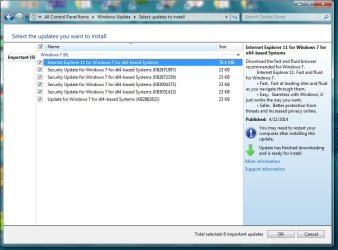
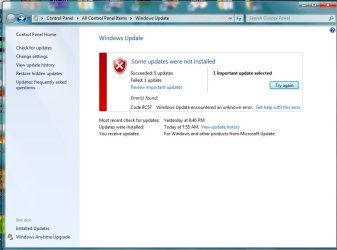
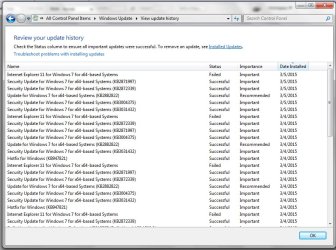
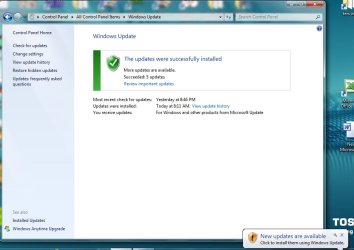
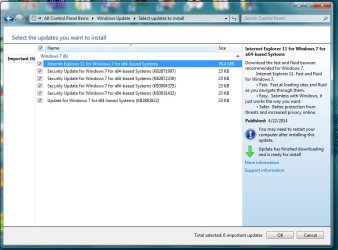
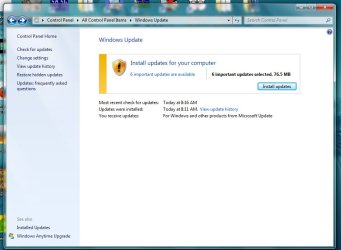
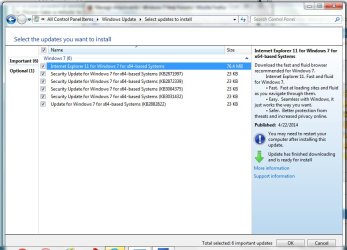
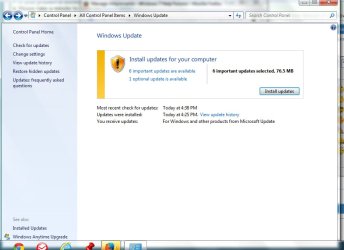
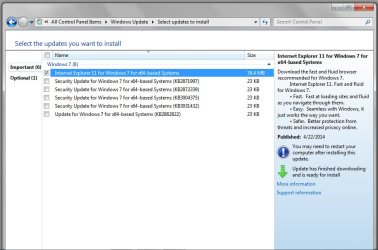
In December I noticed every time I booted my computer (Toshiba Sat A665) it had Windows updates to install. Eventually this got my attention and I found that windows update was downloading and installing the same 5 updates "successfully" over and over again. It was also downloading and unsuccessfully trying to install internet explorer 11 as well, giving error code 9C57 (I'm pretty sure that the IE 11 error is because some of the required updates needed for IE 11 are not installed, which I believe is due to my first problem, that the same updates are download over and over again). If I hide any of the updates, this causes new updates to appear, which also download and install successfully, over and over again.

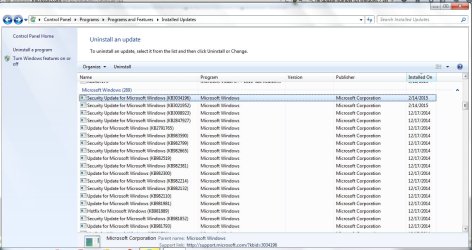
I have tried many of the solutions offered by Microsoft and a few that I saw on this forum without success, such as running "Reset_Windows_Update_Full.bat". Fortunately, while I did not see the "Never, under any circumstances, follow the instructions posted to another user who appears to be having the same problem as you" warning until after I had done exactly that, I had made a full backup of my system. So I am able to revert back to a few days ago where I had only tried Microsoft solutions if necessary. Here are some pics of what Windows update shows me in a typical session, in order.

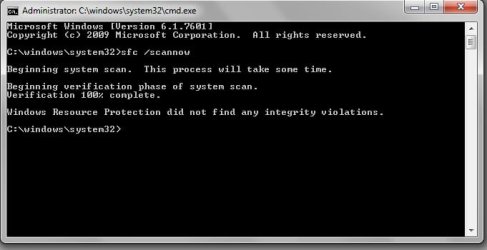
I have since followed the instructions on this forum and have run the System Update Readiness tool and the SFC scan. I will attach my logs in the next post.

If anyone can shed some light on this problem I would greatly appreciate it. Other than this one issue my laptop is running fine.

- Doug
 

Attachments

  • 1 updates are available.jpg
    1 updates are available.jpg
    58.2 KB · Views: 3
  • 2 updates to install.jpg
    2 updates to install.jpg
    95.2 KB · Views: 3
  • 3 updates installed.jpg
    3 updates installed.jpg
    71 KB · Views: 3
  • 4 update history.jpg
    4 update history.jpg
    130.8 KB · Views: 3
  • 5 updates installed successfully.jpg
    5 updates installed successfully.jpg
    76.4 KB · Views: 3
  • 8 select updates to install again and again and again.jpg
    8 select updates to install again and again and again.jpg
    96.1 KB · Views: 3
  • 7 important updates available again and again.jpg
    7 important updates available again and again.jpg
    67.7 KB · Views: 3
  • 6 update history again.jpg
    6 update history again.jpg
    144 KB · Views: 3

My Computer My Computer

At a glance

windows 7 64 bitintel core i3 M370 2.4gh4 gig
Computer type
Laptop
Computer Manufacturer/Model Number
Toshiba
OS
windows 7 64 bit
CPU
intel core i3 M370 2.4gh
Motherboard
satallite a665
Memory
4 gig
Antivirus
shophos
Browser
firefox
Here are my log files and a shot of the SFC scan results...
 

Attachments

  • sfc.jpg
    sfc.jpg
    44.8 KB · Views: 38

My Computer My Computer

At a glance

windows 7 64 bitintel core i3 M370 2.4gh4 gig
Computer type
Laptop
Computer Manufacturer/Model Number
Toshiba
OS
windows 7 64 bit
CPU
intel core i3 M370 2.4gh
Motherboard
satallite a665
Memory
4 gig
Antivirus
shophos
Browser
firefox
CheckSUR is clear - but SFC has onefailure...
Code:
 Line 15012: 2015-03-05 21:13:27, Info                  CSI    000002ec [SR] Repairing 1 components
 Line 15013: 2015-03-05 21:13:27, Info                  CSI    000002ed [SR] Beginning Verify and Repair transaction
 Line 15016: 2015-03-05 21:13:27, Info                  CSI    000002ef [SR] Cannot repair member file [l:22{11}]"autochk.exe" of Microsoft-Windows-Autochk, Version = 6.1.7601.17514, pA = PROCESSOR_ARCHITECTURE_AMD64 (9), Culture neutral, VersionScope = 1 nonSxS, PublicKeyToken = {l:8 b:31bf3856ad364e35}, Type neutral, TypeName neutral, PublicKey neutral in the store, hash mismatch

I'll post a fix later for that.
 

My Computer My Computer

At a glance

Win 7 x64 Home Premium (and x86 VirtualBox VM...i3 370M/i7 6500U8GB - finally :)/8GBit's an i3, dude!/dual Intel&nVidia
Computer type
Laptop
Computer Manufacturer/Model Number
Asus K52F or Lenovo B51-80
OS
Win 7 x64 Home Premium (and x86 VirtualBox VM)/Win10
CPU
i3 370M/i7 6500U
Motherboard
Asus/Lenovo
Memory
8GB - finally :)/8GB
Graphics Card(s)
it's an i3, dude!/dual Intel&nVidia
Sound Card
onboard
Monitor(s) Displays
15.6" built-in
Screen Resolution
1366x768/1920x1080
Hard Drives
750GB Seagate internal
Sundry external drives attached to other computers on the local network
1TB SSD on the Lenovo
PSU
n/a
Internet Speed
as much as I can get - usually on a dongle/phone, so <1MB/s
Antivirus
MSE/Defender
Browser
IE11/12/Edge/Chrome/FF(if I must)
Thank You.

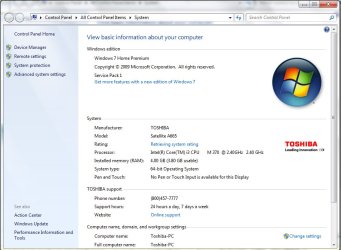
I noticed the file error implies a file version that is for an AMD processor (if I understand it correctly). My processor is intel (see attached screen shot). Could this be the result of having tried "other peoples fixes" on this forum? Specifically I tried post #7 from this thread:

http://www.sevenforums.com/windows-...-7-pro-sp1-some-updates-will-not-install.html

I can restore from a full backup to the day before I tried that fix if you want, and then re-run System readiness tool and the file check . Just let me know.

Thanks,
Doug
 

Attachments

  • toshiba laptop processor info.jpg
    toshiba laptop processor info.jpg
    84.3 KB · Views: 2

My Computer My Computer

At a glance

windows 7 64 bitintel core i3 M370 2.4gh4 gig
Computer type
Laptop
Computer Manufacturer/Model Number
Toshiba
OS
windows 7 64 bit
CPU
intel core i3 M370 2.4gh
Motherboard
satallite a665
Memory
4 gig
Antivirus
shophos
Browser
firefox
The AMD signifies the processor architecture, not the make :) -

I don't think that particular fix will have done any damage.


I've uploaded a file - dghaa.zip - to my OneDrive at Noel's OneDrive
Please download and save it.

Right-click on the saved file and select Extract all...
Change the target to C:\ and click on Extract
Close all windows (it would be a good idea to print these instructions!)

Now reboot to the Repair Environment - as soon as the machine restarts, start tapping F8 - this should bring up the Advanced Boot Menu, at the top of which should be the option 'Repair my Computer'
Pick that
You'll have to log in with your username and password.

Pick the option to use a Command Prompt
At the prompt type
DIR C:\dghaa
hit the enter key - if you get a 'Not Found' error try
DIR D:\dghaa
or
DIR E:\dghaa


The drive letter in use when you find the folder will need to be substituted (for<drive>) into the following command...


XCOPY <drive>:\dghaa <drive>:\windows\winsxs /y /i /s /v /h


(e.g. XCOPY P:\wfire P:\windows\winsxs /y /i /s /v /h )


run the command (it should take almost no time) and when the prompt returns, type
EXIT
and hit the Enter key to exit Command Prompt - reboot to Normal Mode Windows.

Now run SFC /SCANNOW in an Elevated Command Prompt
then reboot and upload the new CBS.log file to your reply
 

My Computer My Computer

At a glance

Win 7 x64 Home Premium (and x86 VirtualBox VM...i3 370M/i7 6500U8GB - finally :)/8GBit's an i3, dude!/dual Intel&nVidia
Computer type
Laptop
Computer Manufacturer/Model Number
Asus K52F or Lenovo B51-80
OS
Win 7 x64 Home Premium (and x86 VirtualBox VM)/Win10
CPU
i3 370M/i7 6500U
Motherboard
Asus/Lenovo
Memory
8GB - finally :)/8GB
Graphics Card(s)
it's an i3, dude!/dual Intel&nVidia
Sound Card
onboard
Monitor(s) Displays
15.6" built-in
Screen Resolution
1366x768/1920x1080
Hard Drives
750GB Seagate internal
Sundry external drives attached to other computers on the local network
1TB SSD on the Lenovo
PSU
n/a
Internet Speed
as much as I can get - usually on a dongle/phone, so <1MB/s
Antivirus
MSE/Defender
Browser
IE11/12/Edge/Chrome/FF(if I must)
Thanks again for the help. So everything went well with downloading and applying the patch. The instructions were good and easy to follow, and the sfc no longer reports a problem with the autochk.exe file, so that problem is resolved. I've uploaded the log files as you requested.

Regarding windows update: If I run windows update I still get the same behavior as before (updates download and install successfully, and then are presented again as if they were never installed). I've uploaded some screen shots again. I notice the uploads don't necessarily show up in the order I've uploaded them, but if you hover over them you can see the names, and the correct order is windows update.jpg and then "windows update screen2.jpg", and so on. While the screen shots might not show it, excluding the internet explorer update does not change the behavior of the update problem. FYI Internet explorer 9.0.35 (KB3021952) is what is currently installed (I never use Internet explorer by the way). Another worthwhile thing to note is that updates such as windows defender updates do download and install only once (in other words correctly).

Let me know if there is anything else I can do on my end.

Thanks,
Doug
 

Attachments

  • sfc 3-7-15 scan results.jpg
    sfc 3-7-15 scan results.jpg
    40.8 KB · Views: 31
  • windows update screen 5.jpg
    windows update screen 5.jpg
    65.6 KB · Views: 2
  • windows update screen 4.jpg
    windows update screen 4.jpg
    92.3 KB · Views: 2
  • windows update screen 3.jpg
    windows update screen 3.jpg
    66.1 KB · Views: 2
  • windows update screen 2.jpg
    windows update screen 2.jpg
    85 KB · Views: 2
  • windows update 3-7-15.jpg
    windows update 3-7-15.jpg
    38.7 KB · Views: 31

My Computer My Computer

At a glance

windows 7 64 bitintel core i3 M370 2.4gh4 gig
Computer type
Laptop
Computer Manufacturer/Model Number
Toshiba
OS
windows 7 64 bit
CPU
intel core i3 M370 2.4gh
Motherboard
satallite a665
Memory
4 gig
Antivirus
shophos
Browser
firefox
Next time those updates appear, right click on them and 'Hide' them. Then the circus should stop.
 

My Computer My Computer

At a glance

Vista, Windows7, Mint Mate, Zorin, Windows 8from 1.6GHz Duo to i7
Computer Manufacturer/Model Number
HP, Dell, Gateway, Toshiba - 4 laptops and 2 desktops
OS
Vista, Windows7, Mint Mate, Zorin, Windows 8
CPU
from 1.6GHz Duo to i7
Monitor(s) Displays
2x HP w2207
Hard Drives
5x HDD, 7x SSD, 12x Externals
Keyboard
with trackball - no mices
Mouse
Trackball mice
Internet Speed
DSL 6000
I like that! It is a circus of sorts!!!

Hiding the updates makes the next set of update appear, and then those do the same thing, repeat. I have not gone beyond two sets of hidden updates but I'm pretty sure it would go on for ever.

Interesting note: If you take a repeating update, like Update KB2882822 for example, and download it yourself from Microsoft, and attempt to install it manually, the system will say it is already installed (and not let you install it). But if you then go to the control panel , Control Panel\All Control Panel Items\Programs and Features\Installed Updates, and search for KB2882822, it is not in the list of installed updates. This has the added effect of not letting you uninstall it and trying again.

Other info that might be pertinent:
For the longest time (almost a year) my laptop would not download service pack 1. When I looked into it it seemed the problem was an incompatible videocard driver (though I'm having to reach here to remember). After several attempts to locate the correct driver I finally gave up, though I continued to get regular windows updates (correctly) and "toshiba service station updates" which sometimes did include drivers. Somewhere along the way service pack 1 finally downloaded and appeared. I will look to see if it's installation coincides with the start of my update problem (as I had not thought of that until now).

Thank You for your input. With regards to all other things my laptop behaves normally. This is it's only bug!
 

My Computer My Computer

At a glance

windows 7 64 bitintel core i3 M370 2.4gh4 gig
Computer type
Laptop
Computer Manufacturer/Model Number
Toshiba
OS
windows 7 64 bit
CPU
intel core i3 M370 2.4gh
Motherboard
satallite a665
Memory
4 gig
Antivirus
shophos
Browser
firefox
Regarding Win7 service pack 1, which you can see from post 4 is supposedly installed when I look at the properties of "my computer", when I look at the installed updates it is not listed (I did both a search for KB 976932 in the search box of the installed updates window and I manually scrolled through the list).

Also, you can see from the attached screen shot that other than the two updates installed in february of this year my updates pretty much stop on December 17th, even though my computer is used daily. The last 4 updates installed were:

KB3034196 Security Update for Internet Explorer 10 for Windows 8 (KB3034196)
KB3021952 Cumulative Security Update for Internet Explorer 10 for Windows 8 (KB3021952)

These (above) two are interesting as i don't have windows 8 or IE10 (I'm on win7 and IE 9)

KB3008923 MS14-080: Cumulative security update for Internet Explorer: December 9, 2014
KB2847927 MS13-058: Vulnerability in Windows Defender could allow elevation of privilege: July 9, 2013
 

Attachments

  • windows update.jpg
    windows update.jpg
    147.9 KB · Views: 3

My Computer My Computer

At a glance

windows 7 64 bitintel core i3 M370 2.4gh4 gig
Computer type
Laptop
Computer Manufacturer/Model Number
Toshiba
OS
windows 7 64 bit
CPU
intel core i3 M370 2.4gh
Motherboard
satallite a665
Memory
4 gig
Antivirus
shophos
Browser
firefox
Please post the C:\Windows\windowsupdate.log file

What happens if you attempt to install only the non-IE patches?
 

My Computer My Computer

At a glance

Win 7 x64 Home Premium (and x86 VirtualBox VM...i3 370M/i7 6500U8GB - finally :)/8GBit's an i3, dude!/dual Intel&nVidia
Computer type
Laptop
Computer Manufacturer/Model Number
Asus K52F or Lenovo B51-80
OS
Win 7 x64 Home Premium (and x86 VirtualBox VM)/Win10
CPU
i3 370M/i7 6500U
Motherboard
Asus/Lenovo
Memory
8GB - finally :)/8GB
Graphics Card(s)
it's an i3, dude!/dual Intel&nVidia
Sound Card
onboard
Monitor(s) Displays
15.6" built-in
Screen Resolution
1366x768/1920x1080
Hard Drives
750GB Seagate internal
Sundry external drives attached to other computers on the local network
1TB SSD on the Lenovo
PSU
n/a
Internet Speed
as much as I can get - usually on a dongle/phone, so <1MB/s
Antivirus
MSE/Defender
Browser
IE11/12/Edge/Chrome/FF(if I must)
The same thing still happens. I tried uninstalling the first three updates of my last post, which worked, and then running windows update again. I was presented with the same updates as always plus KB3021952 (which win update says is a patch for IE9). I then tried just installing the 5 repeating updates but the result was the same, they install successfully and then want to be downloaded and installed again.

I also tried uninstalling sp1 from the command line, but it error saying it is not installed. So I then downloaded SP1 iso from microsoft and tried to install sp1 but it just errors out with an error box that contains no error code and just says I need to restart the computer and try again. Very frustrating.
 

My Computer My Computer

At a glance

windows 7 64 bitintel core i3 M370 2.4gh4 gig
Computer type
Laptop
Computer Manufacturer/Model Number
Toshiba
OS
windows 7 64 bit
CPU
intel core i3 M370 2.4gh
Motherboard
satallite a665
Memory
4 gig
Antivirus
shophos
Browser
firefox
The errors in the update log all tend to support the idea of corruption somewhere in the update system itself - let's start with the least aggressive remedy, and work up...

Please run the following commands in an Elevated Command Prompt

NET STOP CRYPTSVC
REN C:\WINDOWS\SYSTEM32\CATROOT2 CATROOT2OLD
NET START CRYPTSVC


once complete, leave the system alone for at least an hour to rebuild the database, then reboot, and run another Check for Updates - Attempt to install only the oldest available update, then either post the new error message and KB number, or attempt the rest of the updates.


My Computer My Computer

At a glance

Win 7 x64 Home Premium (and x86 VirtualBox VM...i3 370M/i7 6500U8GB - finally :)/8GBit's an i3, dude!/dual Intel&nVidia
Computer type
Laptop
Computer Manufacturer/Model Number
Asus K52F or Lenovo B51-80
OS
Win 7 x64 Home Premium (and x86 VirtualBox VM)/Win10
CPU
i3 370M/i7 6500U
Motherboard
Asus/Lenovo
Memory
8GB - finally :)/8GB
Graphics Card(s)
it's an i3, dude!/dual Intel&nVidia
Sound Card
onboard
Monitor(s) Displays
15.6" built-in
Screen Resolution
1366x768/1920x1080
Hard Drives
750GB Seagate internal
Sundry external drives attached to other computers on the local network
1TB SSD on the Lenovo
PSU
n/a
Internet Speed
as much as I can get - usually on a dongle/phone, so <1MB/s
Antivirus
MSE/Defender
Browser
IE11/12/Edge/Chrome/FF(if I must)
Ok, will do! I'm going to let the computer sit for a while while we have breakfast and get the day going.

What would you suggest as the best method of determining which update of those offered is the oldest?
 

Attachments

  • catroot.jpg
    catroot.jpg
    50.2 KB · Views: 34

My Computer My Computer

At a glance

windows 7 64 bitintel core i3 M370 2.4gh4 gig
Computer type
Laptop
Computer Manufacturer/Model Number
Toshiba
OS
windows 7 64 bit
CPU
intel core i3 M370 2.4gh
Motherboard
satallite a665
Memory
4 gig
Antivirus
shophos
Browser
firefox
Simply cycle through the listing and check the release date in the description pane.
 

My Computer My Computer

At a glance

Win 7 x64 Home Premium (and x86 VirtualBox VM...i3 370M/i7 6500U8GB - finally :)/8GBit's an i3, dude!/dual Intel&nVidia
Computer type
Laptop
Computer Manufacturer/Model Number
Asus K52F or Lenovo B51-80
OS
Win 7 x64 Home Premium (and x86 VirtualBox VM)/Win10
CPU
i3 370M/i7 6500U
Motherboard
Asus/Lenovo
Memory
8GB - finally :)/8GB
Graphics Card(s)
it's an i3, dude!/dual Intel&nVidia
Sound Card
onboard
Monitor(s) Displays
15.6" built-in
Screen Resolution
1366x768/1920x1080
Hard Drives
750GB Seagate internal
Sundry external drives attached to other computers on the local network
1TB SSD on the Lenovo
PSU
n/a
Internet Speed
as much as I can get - usually on a dongle/phone, so <1MB/s
Antivirus
MSE/Defender
Browser
IE11/12/Edge/Chrome/FF(if I must)
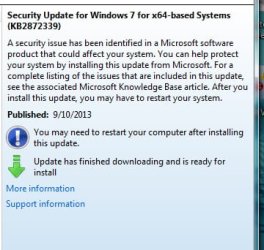
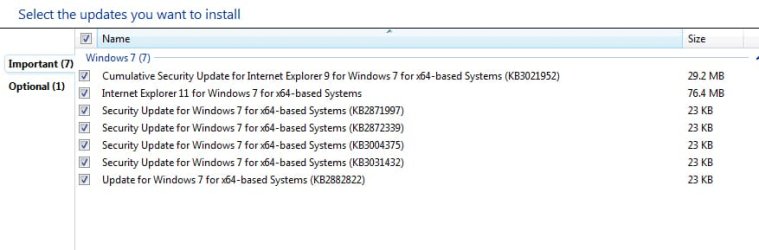
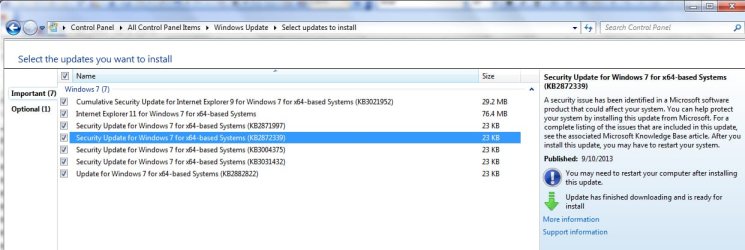
Ok, I gave it about two hours and then I ran Windows update. I've attached a screen shot of the updates presented. The oldest was KB2872339, released 9-10-2013.

I'm going to install only KB2872339 and then I'll post the results.
 

Attachments

  • oldest update.jpg
    oldest update.jpg
    53.8 KB · Views: 27
  • undates offered.jpg
    undates offered.jpg
    45.3 KB · Views: 2

My Computer My Computer

At a glance

windows 7 64 bitintel core i3 M370 2.4gh4 gig
Computer type
Laptop
Computer Manufacturer/Model Number
Toshiba
OS
windows 7 64 bit
CPU
intel core i3 M370 2.4gh
Motherboard
satallite a665
Memory
4 gig
Antivirus
shophos
Browser
firefox
The results were the same: The old update installed successfully without error. running windows update again causes the "successfully" installed update to be presented again, as if it had never been installed.

I have attached the windows update log

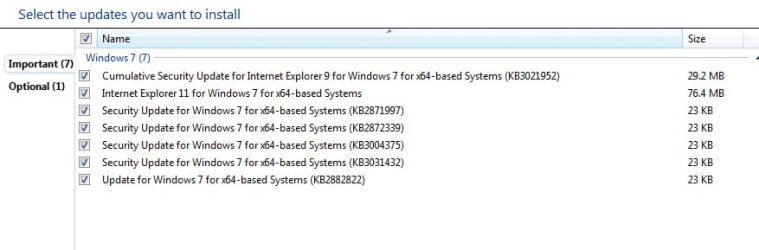
If anyone knows how I can determine the order the pics show up in the post please let me know so I can make my posts easier to follow. Other wise, the correct order to view the pics as they currently appear in the post is: first, third, fourth, second.

Thanks,
Doug
 

Attachments

  • pic 1 - undates offered.jpg
    pic 1 - undates offered.jpg
    45.3 KB · Views: 1
  • pic 2 - update sucessfully installed.jpg
    pic 2 - update sucessfully installed.jpg
    32.3 KB · Views: 26
  • pic 3 - updates offered again.jpg
    pic 3 - updates offered again.jpg
    33.4 KB · Views: 27
  • pic 4 - details of updates offered again.jpg
    pic 4 - details of updates offered again.jpg
    88.4 KB · Views: 2

My Computer My Computer

At a glance

windows 7 64 bitintel core i3 M370 2.4gh4 gig
Computer type
Laptop
Computer Manufacturer/Model Number
Toshiba
OS
windows 7 64 bit
CPU
intel core i3 M370 2.4gh
Motherboard
satallite a665
Memory
4 gig
Antivirus
shophos
Browser
firefox
I was finally able to repair my laptop by doing a non destructive reinstall of windows 7. The instructions on how to do this are here:
https://www.winhelp.us/non-destructive-reinstall-of-windows-7.html

I backed up my hard drive prior to the procedure, but ultimately it worked great. I now receive updates and they install only once and I did not have to reinstall any of my user programs.
 

My Computer My Computer

At a glance

windows 7 64 bitintel core i3 M370 2.4gh4 gig
Computer type
Laptop
Computer Manufacturer/Model Number
Toshiba
OS
windows 7 64 bit
CPU
intel core i3 M370 2.4gh
Motherboard
satallite a665
Memory
4 gig
Antivirus
shophos
Browser
firefox
Back
Top