Win 7 Looking for Directory Doesn't Exist

dw85745

New member
Member
VIP
Local time
5:42 AM
Messages
199
After Win 7 boots, the first thing I receive is:

Can't find c:\windows\install\AsusSetUp.ini

1) How to I track down where this call is being originated so I can delete it
OR
2) What is the best way to correct this issue.

BACKGROUND
In attempting to correct the "PCI Simple Communication Control" issue in Devices
I first executed a Hotfix and then the Management Information from ASUS.

I believe the Hotfix has caused this problem.
 

My Computer

Computer type
PC/Desktop
Computer Manufacturer/Model Number
build -
OS
Win 7 Pro x32
CPU
Intel I5-4690K
Motherboard
ASUS H-97Plus
Memory
8 GB
Graphics Card(s)
On Board
Sound Card
On Board
Other Info
ASUS MOBO Issues never resolved even by ASUS:
1) MOBO will NOT boot from other than the Default HDD drive.
2) MOBO will NOT boot Most DOS based CDs
Hi,
It sounds like a scheduled task that needs to be removed
Click Start and type in the search box
task scheduler
On the right column click on Display all running tasks
You might see a asus task click it and delete.
 

My Computer

Computer type
PC/Desktop
Computer Manufacturer/Model Number
Custom assembled by me :}
OS
Win-7-Pro64bit 7-H-Prem-64bit
CPU
i7-5930K 2nd i9-9940x both water blocked VRM's too
Motherboard
ASUS SABERTOOTH X99 2nd ASUS x299 Apex
Memory
Trident-z 3200C14 2nd Trident-z 3600C16
Graphics Card(s)
EVGA 1080ti ftw3 2nd Titan Xp both water blocked
Sound Card
Built-in Realtek
Monitor(s) Displays
1-AOC G2460PG 24"G-Sync 144Hz/ 2nd 1-ASUS VG248QE 24" 144Hz
Screen Resolution
1920 x 1080 144Hz
Hard Drives
2-Samsung M.2 Evo & Evo Plus
2-Samsung 850 EVO 500GB SSD's/ 3-2.5 W.D. Black 1tb-&3-1tb/3-3.5 WD Black 1tb hdd's
PSU
EVGA SuperNOVA 1000-P2 2nd 1200-P2
Case
2-Corsair Obsidian Series 450D Black ATX Mid Tower
Cooling
Custom water loops
Keyboard
Logitech G710+/ 2nd Logitech G910
Mouse
2-RedDragon M901 Perdition 16400 dpi Gaming mouse = wired
Internet Speed
Comcast Ping 19ms 89.31mbps download speed 6.12mbps upload
Antivirus
Malwarebytes Pro/ Superantispyware Pro
Browser
FireFox & Pale moon
Other Info
2nd ASUS X299 Apex/Intel i9-9940x with Custom water loop/7H-Prem-x64/Corsair 450D case/Ram Trident-z 3600C16 4x8gb / Samsung970Evo plus 500gb SSD/Dual ssd EZ swap evo/PSU EVGA SuperNova 1200w-P2 80+Platinum/GPU Titan Xp /8-ML-140 on push-pull on 2-280GTX rads
ThrashZone:

Thanks for responding.

====== ADDITIONAL QUESTIONS =========

Question 1:
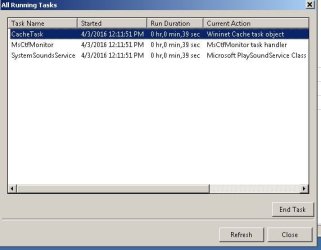
I found a reference to several Microsoft tasks (but NOT ASUS Hotfix) under display (see attachment), I closed them, but on reboot they reappeared. Not sure what they are OR if needed. I'm guessing I need to search Net for each one unless you have any ideas of their importance?

Question 2:
ASUS Hotfix was not listed under Display but did find a reference to it and its directory by searching elsehere in Task Scheduler.
Went to that physical directory using Explorer, changed the directory name, and rebooted, and issue did NOT reappear.

a) I can physically remove the directory "c:\windows\Hotfix_X86", but unsure if this is correct approach.
The directory (or file of interest) is NOT listed as a "NEW" program in Control Panel..
Should I be using 'regedit" to locate and remove the directory reference -- if it occurs in registry -- or
something else. That is where is the call to "c:\windows\Hotfix_X86" originating ?

b) Come to think of it I'm NOT really sure what a Hotfix really is and how it is executed. If you have a moment could you please explain.

Thanks
David
 

Attachments

  • TaskScheduler_20160403.JPG
    TaskScheduler_20160403.JPG
    32.1 KB · Views: 14

My Computer

Computer type
PC/Desktop
Computer Manufacturer/Model Number
build -
OS
Win 7 Pro x32
CPU
Intel I5-4690K
Motherboard
ASUS H-97Plus
Memory
8 GB
Graphics Card(s)
On Board
Sound Card
On Board
Other Info
ASUS MOBO Issues never resolved even by ASUS:
1) MOBO will NOT boot from other than the Default HDD drive.
2) MOBO will NOT boot Most DOS based CDs
Hi,
I didn't say anything about removing any task of windows :)
Only asus
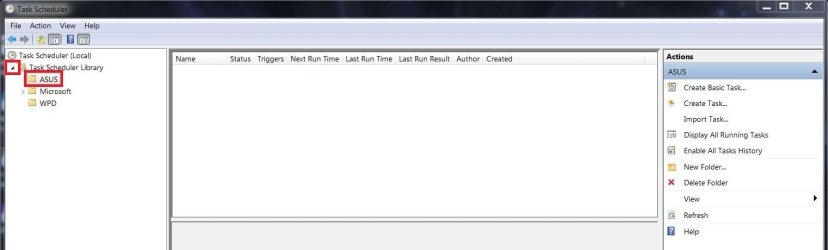
Expand the left column and click on the asus listing
You might see a setup task
asus tasks.JPG
 

My Computer

Computer type
PC/Desktop
Computer Manufacturer/Model Number
Custom assembled by me :}
OS
Win-7-Pro64bit 7-H-Prem-64bit
CPU
i7-5930K 2nd i9-9940x both water blocked VRM's too
Motherboard
ASUS SABERTOOTH X99 2nd ASUS x299 Apex
Memory
Trident-z 3200C14 2nd Trident-z 3600C16
Graphics Card(s)
EVGA 1080ti ftw3 2nd Titan Xp both water blocked
Sound Card
Built-in Realtek
Monitor(s) Displays
1-AOC G2460PG 24"G-Sync 144Hz/ 2nd 1-ASUS VG248QE 24" 144Hz
Screen Resolution
1920 x 1080 144Hz
Hard Drives
2-Samsung M.2 Evo & Evo Plus
2-Samsung 850 EVO 500GB SSD's/ 3-2.5 W.D. Black 1tb-&3-1tb/3-3.5 WD Black 1tb hdd's
PSU
EVGA SuperNOVA 1000-P2 2nd 1200-P2
Case
2-Corsair Obsidian Series 450D Black ATX Mid Tower
Cooling
Custom water loops
Keyboard
Logitech G710+/ 2nd Logitech G910
Mouse
2-RedDragon M901 Perdition 16400 dpi Gaming mouse = wired
Internet Speed
Comcast Ping 19ms 89.31mbps download speed 6.12mbps upload
Antivirus
Malwarebytes Pro/ Superantispyware Pro
Browser
FireFox & Pale moon
Other Info
2nd ASUS X299 Apex/Intel i9-9940x with Custom water loop/7H-Prem-x64/Corsair 450D case/Ram Trident-z 3600C16 4x8gb / Samsung970Evo plus 500gb SSD/Dual ssd EZ swap evo/PSU EVGA SuperNova 1200w-P2 80+Platinum/GPU Titan Xp /8-ML-140 on push-pull on 2-280GTX rads
Using the ASUS task scheduler listing is where I was able to locate the directories and files.
Why they did NOT show in "Display All Tasks" I don't understand.
I went and changed back the "Hotfix_X86" directory (put on by ASUS) to its original name.
I then found the Hotfix files (i-SetUp005053 and i-SetUp010644) and renamed them and rebooted.
I did NOT get an Error messagebox so assuming this is where the call to "Hotfix_X86" is originating.
FWIW I executed the Hotfix locally -- in error -- after I downloaded the file from ASUS in an attempt to get rid of the PCI Simple Controller in devices. It appears the Hotfixes had nothing to do with this.
Didn't realize a Hotfix could be executed from Task Scheduler.

QUESTIONS:
Other than using the Sniping Tool,. amy way to get a Print of some of the Task Scheduler listings?
 

My Computer

Computer type
PC/Desktop
Computer Manufacturer/Model Number
build -
OS
Win 7 Pro x32
CPU
Intel I5-4690K
Motherboard
ASUS H-97Plus
Memory
8 GB
Graphics Card(s)
On Board
Sound Card
On Board
Other Info
ASUS MOBO Issues never resolved even by ASUS:
1) MOBO will NOT boot from other than the Default HDD drive.
2) MOBO will NOT boot Most DOS based CDs
QUESTIONS:
Other than using the Sniping Tool,. amy way to get a Print of some of the Task Scheduler listings?

To get a Scheduled Task report open an elevated CMD window and run this command:
schtasks /Query /V > D:\ScheduledTasks.txt

You need to change D:\ScheduledTasks.txt to where you want the report created

If that has more info than you want, remove the /V (verbose) option and use this command:
schtasks /Query > D:\ScheduledTasks.txt
 

My Computer

Computer type
PC/Desktop
Computer Manufacturer/Model Number
home built
OS
Multi-Boot W7_Pro_x64 W8.1_Pro_x64 W10_Pro_x64 +Linux_VMs +Chromium_VM
CPU
AMD Athlon II x4 620
Motherboard
Gigabyte GA-MA785G-UD3H
Memory
6GB GSkill DDR2 800
Graphics Card(s)
AMD 4670 GPU + AMD 4200 IGP
Sound Card
on board Realtek ALC889A
Monitor(s) Displays
RCA 40" LCD TV, Insignia 32" LCD TV, HP 15" LCD monitor
Screen Resolution
1680 x 1050
Hard Drives
OCZ Vertex 3 120GB,
Samsung F3 1TB (3),
Several others - WD, Seagate, Hitachi, ...
PSU
Corsair 500 W
Case
Rosewill mid tower
Cooling
CM 90mm rifle
Keyboard
Gyration wireless, Logitech wireless, Dell USB wired
Mouse
Gyration wireless, Logitech wireless, V7 USB wired
Internet Speed
Spectrum - 100Mbps D / 10Mbps U
Antivirus
Avast, MBAM3, EMET, WinPatrol
Browser
Pale Moon, Firefox, IE
Other Info
2 multi-boot PC's
Mainly HTPC/Office/Gen purpose (no gaming).
Trendnet USB KVM.
LG DVD burner/Blue Ray Player.
Tray system for removable SATA backup drives.

Not currently OCd, under-volted.
I use Hybrid sleep, rarely re-boot or shutdown.

Hauppauge HD-PVR, Avermedia PCIe TV Tuner, Hauppauge PCI TV Tuner.
DavidE: Thanks.

Thank you to "ThrashZone" also for his efforts on my behalf.
 

My Computer

Computer type
PC/Desktop
Computer Manufacturer/Model Number
build -
OS
Win 7 Pro x32
CPU
Intel I5-4690K
Motherboard
ASUS H-97Plus
Memory
8 GB
Graphics Card(s)
On Board
Sound Card
On Board
Other Info
ASUS MOBO Issues never resolved even by ASUS:
1) MOBO will NOT boot from other than the Default HDD drive.
2) MOBO will NOT boot Most DOS based CDs

My Computer

Computer type
PC/Desktop
Computer Manufacturer/Model Number
Custom assembled by me :}
OS
Win-7-Pro64bit 7-H-Prem-64bit
CPU
i7-5930K 2nd i9-9940x both water blocked VRM's too
Motherboard
ASUS SABERTOOTH X99 2nd ASUS x299 Apex
Memory
Trident-z 3200C14 2nd Trident-z 3600C16
Graphics Card(s)
EVGA 1080ti ftw3 2nd Titan Xp both water blocked
Sound Card
Built-in Realtek
Monitor(s) Displays
1-AOC G2460PG 24"G-Sync 144Hz/ 2nd 1-ASUS VG248QE 24" 144Hz
Screen Resolution
1920 x 1080 144Hz
Hard Drives
2-Samsung M.2 Evo & Evo Plus
2-Samsung 850 EVO 500GB SSD's/ 3-2.5 W.D. Black 1tb-&3-1tb/3-3.5 WD Black 1tb hdd's
PSU
EVGA SuperNOVA 1000-P2 2nd 1200-P2
Case
2-Corsair Obsidian Series 450D Black ATX Mid Tower
Cooling
Custom water loops
Keyboard
Logitech G710+/ 2nd Logitech G910
Mouse
2-RedDragon M901 Perdition 16400 dpi Gaming mouse = wired
Internet Speed
Comcast Ping 19ms 89.31mbps download speed 6.12mbps upload
Antivirus
Malwarebytes Pro/ Superantispyware Pro
Browser
FireFox & Pale moon
Other Info
2nd ASUS X299 Apex/Intel i9-9940x with Custom water loop/7H-Prem-x64/Corsair 450D case/Ram Trident-z 3600C16 4x8gb / Samsung970Evo plus 500gb SSD/Dual ssd EZ swap evo/PSU EVGA SuperNova 1200w-P2 80+Platinum/GPU Titan Xp /8-ML-140 on push-pull on 2-280GTX rads
Back
Top