Solved Win 7 not using all memory

sarge74

New member
Local time
4:24 PM
Messages
14
Hi
I just upgraded to windows 7 64bit and went from two gig to 8 gig. Was looking forward to much better performance.
However I was topping out at 100% on the task manager at around 4 gig. I did the winconfig and found the the machine said I had 7.37 total physical memory but only 3.87 available physical mem. Another post here suggested to set memory to max in the config settings. I did now I'm at 6.75 total mem and 4.15 available. I'm so confused on what to do to be able to use what I installed. Help?
Here the second report I generated:

OS Name Microsoft Windows 7 Home Premium
Version 6.1.7600 Build 7600
Other OS Description Not Available
OS Manufacturer Microsoft Corporation
System Name RYAN-PC
System Manufacturer Gigabyte Technology Co., Ltd.
System Model M61SME-S2
System Type x64-based PC
Processor AMD Athlon(tm) 64 X2 Dual Core Processor 4200+, 2200 Mhz, 2 Core(s), 2 Logical Processor(s)
BIOS Version/Date Award Software International, Inc. F7, 11/23/2007
SMBIOS Version 2.4
Windows Directory C:\Windows
System Directory C:\Windows\system32
Boot Device \Device\HarddiskVolume1
Locale United States
Hardware Abstraction Layer Version = "6.1.7600.16385"
User Name Ryan-PC\Ryan
Time Zone Eastern Daylight Time
Installed Physical Memory (RAM) Not Available
Total Physical Memory 6.75 GB
Available Physical Memory 4.07 GB
Total Virtual Memory 13.5 GB
Available Virtual Memory 10.7 GB
Page File Space 6.75 GB
Page File C:\pagefile.sys

thanks
 

My Computer

Computer Manufacturer/Model Number
Gigabyte GA-M61SME-S2
OS
Windows 7 64bit
CPU
AMD Athlon 64 X2 Dual Core
Motherboard
Gigabyte GA-M61SME-S2
Memory
8 gig
Graphics Card(s)
Geforce GTX560
Sound Card
Gigabyte
Monitor(s) Displays
acer AL1916W
Hard Drives
?
PSU
?
Case
?
Cooling
5 fans
Wow, over a hundred views and no one has any ideas?
I'd sure appreciate if any of you could help me out. Thanks
 

My Computer

Computer Manufacturer/Model Number
Gigabyte GA-M61SME-S2
OS
Windows 7 64bit
CPU
AMD Athlon 64 X2 Dual Core
Motherboard
Gigabyte GA-M61SME-S2
Memory
8 gig
Graphics Card(s)
Geforce GTX560
Sound Card
Gigabyte
Monitor(s) Displays
acer AL1916W
Hard Drives
?
PSU
?
Case
?
Cooling
5 fans
Your Win 7 not using all memory

If your Windows7 version is a 32bit version then it will be limited to a max RAM of 4GB. Only the 64bit version of Windows7 can utilise quantities of RAM over 4GB.
To check and see which version u have right click on Computer and select Properties.
Read thru the pane that opens up and it will indicate which bit type you have...either 32bit or 64bit. If it says 64bit then something else is causing OS to not see the extra RAM added...

GAry
 

My Computer

Computer type
PC/Desktop
OS
Microsoft Windows 7 Professional 64-bit 7601 Multiprocessor Free Service Pack 1
CPU
Intel(R) Core(TM) i7-4770 CPU @ 3.40GHz
Motherboard
ASUSTeK COMPUTER INC. Z87-C
Memory
16.00 GB
Graphics Card(s)
NVIDIA GeForce GTX 1060
Sound Card
Asus Xonar Essence STX
Monitor(s) Displays
2X Dell U2713H
Screen Resolution
2560 x 1440 x 32 bits (4294967296 colors) @ 59 Hz
Hard Drives
(1) INTEL SSDSC2CW120A3 ATA Device (2) WDC WD1001FALS-00J7B0 ATA Device (3) WDC WD10EARS-00MVWB0 ATA Device (4) Generic- SD/MMC/MS/MSPRO USB Device (5) HP Photosmart C6180 USB Device (6) SanDisk Cruzer Switch USB Device (7) ST2000DM 001-1
Antivirus
Avast Pro Antivirus
Thanks for the input Gary. Very much appreciated. I am running windows 7 64 bit. I double checked using your directions and I am infact running "64 bit operating system".
Any ideas?
 

My Computer

Computer Manufacturer/Model Number
Gigabyte GA-M61SME-S2
OS
Windows 7 64bit
CPU
AMD Athlon 64 X2 Dual Core
Motherboard
Gigabyte GA-M61SME-S2
Memory
8 gig
Graphics Card(s)
Geforce GTX560
Sound Card
Gigabyte
Monitor(s) Displays
acer AL1916W
Hard Drives
?
PSU
?
Case
?
Cooling
5 fans
Welcome to Seven Forums sarge74.

My usual disclaimer: I'm not an expert at anything. :)
According to your specs your GPU is a GeForce GTX 560. Standard memory configuration is supposed to be 1GB.

GeForce GTX 560 | Specifications | GeForce

It's normal to have that amount of RAM set aside under what's called "memory mapping". Other hardware on your computer usually uses smaller amounts of memory and that is set aside as well. So your usable memory will very likely be less than the installed memory.

The usable memory may be less than the installed memory on Windows 7-based computers

For a better picture (a graphic display) of how your computer memory is actually being allocated, you could open Resource Monitor > Memory tab. If you have a question about what it's showing you can post a screenshot and one of the experts should be able to explain it.

http://www.sevenforums.com/tutorials/12523-resource-monitor.html

http://www.sevenforums.com/tutorials/9733-screenshots-files-upload-post-seven-forums.html
 

My Computer

Computer type
Laptop
Computer Manufacturer/Model Number
Sony Vaio VPCEB47GM Laptop
OS
Win 7 Pro 64-bit
CPU
Intel i5 2.4 Ghz
Memory
8GB DDR3
Graphics Card(s)
Intel HD 3000
Sound Card
IDT High Definition
Monitor(s) Displays
15.6 WGXA Anti-Glare LED
Screen Resolution
1280x800
Hard Drives
640Gb 7200rpm
Antivirus
MSE
Browser
Opera (primary) with IE9 backup
task man 7-19-12-2.jpg
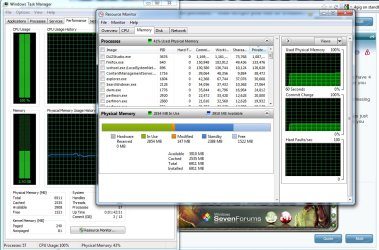
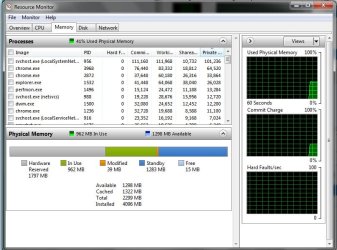
Here's the screen shot. Thanks Marsmimar.
 

My Computer

Computer Manufacturer/Model Number
Gigabyte GA-M61SME-S2
OS
Windows 7 64bit
CPU
AMD Athlon 64 X2 Dual Core
Motherboard
Gigabyte GA-M61SME-S2
Memory
8 gig
Graphics Card(s)
Geforce GTX560
Sound Card
Gigabyte
Monitor(s) Displays
acer AL1916W
Hard Drives
?
PSU
?
Case
?
Cooling
5 fans
Zero ( 0 ) mb for hardware is not correct. Any one I have ever seen is between 5 and 10 mb.
Go back into Resource Monitor/ memory and give it a couple of minutes and post another screen shot if it changes.
 

My Computer

Computer type
PC/Desktop
Computer Manufacturer/Model Number
Home made Desktop
OS
Windows 10 Pro. 64/ version 1709 Windows 7 Pro/64
CPU
Intel i7-6800K @ 4.3
Motherboard
ASUS X-99 Deluxe II
Memory
Corsair Platinum 16 gig @2400
Graphics Card(s)
EVGA GTX 1070 OC
Monitor(s) Displays
Asus 27" LED LCD/VE278Q
Screen Resolution
1920-1080 or 1280-720 HDMI
Hard Drives
INTEL SSD 730-240 Gb Sata 3.0/
PSU
EVGA Platium 1200W
Case
Phanteks Luxe Tempered Glass 8 fans/ one radiator
Cooling
XSPC/ Water Cooled CPU
Keyboard
Das 4 Professional
Mouse
Logitech M705/MX Anywhere 2-S
Internet Speed
100 mbits
Antivirus
Microsoft Security Essentials/ Malwarebytes Premium 3.0/ SAS
Browser
I.E. 11 default/Firefox/ ISP Time Warner Cable/Spectrum
Other Info
LG BluRay Burner/
Sound system-KLipsch-THX/
Icy Dock ssd Hot Swap bays.
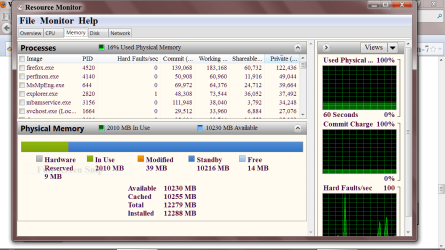
Capture.PN MEMORY SNIPPET.PNG


Take a look, something like this.
 

My Computer

Computer type
PC/Desktop
Computer Manufacturer/Model Number
Home made Desktop
OS
Windows 10 Pro. 64/ version 1709 Windows 7 Pro/64
CPU
Intel i7-6800K @ 4.3
Motherboard
ASUS X-99 Deluxe II
Memory
Corsair Platinum 16 gig @2400
Graphics Card(s)
EVGA GTX 1070 OC
Monitor(s) Displays
Asus 27" LED LCD/VE278Q
Screen Resolution
1920-1080 or 1280-720 HDMI
Hard Drives
INTEL SSD 730-240 Gb Sata 3.0/
PSU
EVGA Platium 1200W
Case
Phanteks Luxe Tempered Glass 8 fans/ one radiator
Cooling
XSPC/ Water Cooled CPU
Keyboard
Das 4 Professional
Mouse
Logitech M705/MX Anywhere 2-S
Internet Speed
100 mbits
Antivirus
Microsoft Security Essentials/ Malwarebytes Premium 3.0/ SAS
Browser
I.E. 11 default/Firefox/ ISP Time Warner Cable/Spectrum
Other Info
LG BluRay Burner/
Sound system-KLipsch-THX/
Icy Dock ssd Hot Swap bays.
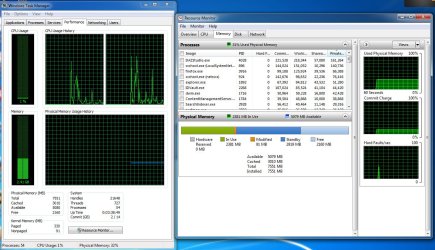
Thanks Bear. Here's another. Hardware Reserve still at 0. Is something wrong?
 

Attachments

  • task man 7-21-12.jpg
    task man 7-21-12.jpg
    195.3 KB · Views: 38

My Computer

Computer Manufacturer/Model Number
Gigabyte GA-M61SME-S2
OS
Windows 7 64bit
CPU
AMD Athlon 64 X2 Dual Core
Motherboard
Gigabyte GA-M61SME-S2
Memory
8 gig
Graphics Card(s)
Geforce GTX560
Sound Card
Gigabyte
Monitor(s) Displays
acer AL1916W
Hard Drives
?
PSU
?
Case
?
Cooling
5 fans
View attachment 222647
Here's the screen shot. Thanks Marsmimar.

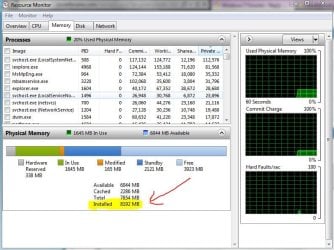
According to your screenshot your installed memory is 6911MB. But in your first post you indicated you went from 2GB to 8GB. So installed memory should be 8192MB (8 x 1024 and similar to my screenshot.)

resmon.JPG

You're missing about 1281MB. That's close enough to 1280 to say you're missing a gig and a quarter (1024MB + 256MB = 1280.) Suggest you double check your RAM and make sure each module is seated correctly. You could also check each module individually in slot # 1 to make sure it's being recognized. It's possible that even a new stick can be defective.

BTW, how is your 8GB installed? 4 sticks of 2GB? 2 sticks of 4GB? Something else? Are they all brand new or did you just add additional memory to the original 2GB? Sometimes non-matched sticks can throw out some RAM errors. Not saying this is what's happening, just suggesting things to look at.

EDIT: Typed over your last reply. Second screenshot is showing 7551 installed. Again, not what it should be and changed from first screenshot. Something about your installed memory isn't being detected correctly.
 

My Computer

Computer type
Laptop
Computer Manufacturer/Model Number
Sony Vaio VPCEB47GM Laptop
OS
Win 7 Pro 64-bit
CPU
Intel i5 2.4 Ghz
Memory
8GB DDR3
Graphics Card(s)
Intel HD 3000
Sound Card
IDT High Definition
Monitor(s) Displays
15.6 WGXA Anti-Glare LED
Screen Resolution
1280x800
Hard Drives
640Gb 7200rpm
Antivirus
MSE
Browser
Opera (primary) with IE9 backup
I had a good friend install the memory. We put in Two sticks of 4 gig. They were from G.Skill and supposedly pretested and warranties yadda yadda...
So something isn't reading right? And what about the 0 for hardware reserve?
Thanks so much for helping.
 

My Computer

Computer Manufacturer/Model Number
Gigabyte GA-M61SME-S2
OS
Windows 7 64bit
CPU
AMD Athlon 64 X2 Dual Core
Motherboard
Gigabyte GA-M61SME-S2
Memory
8 gig
Graphics Card(s)
Geforce GTX560
Sound Card
Gigabyte
Monitor(s) Displays
acer AL1916W
Hard Drives
?
PSU
?
Case
?
Cooling
5 fans
As I said earlier, I'm not an expert at anything. ;)

Since your installed memory value is changing, something isn't right. If I've got 2GB installed (2048MB) it should stay 2048. 8192 installed memory should stay at 8192. The cached, reserved, available, etc will change based on computer usage. So I believe something isn't right with the installed sticks. As mentioned before, try putting just one stick in slot # 1 and make sure it's recognized as 4096MB installed. Available will be something less than that (maybe around 3GB / 3000MB) and that's pretty normal. Then try the other stick.

How many slots total are you working with? If using a motherboard with 4 slots you might want to double check the owner's manual which slots to use with only two sticks. Some mobos say to use slots 1 & 3. Others might say 2 & 4. Still others might say 1 & 2. Not using the correct slots could also affect how memory is seen. (If you're using a laptop with only two slots well, it won;t make a difference which slots you use but you should still check each individual stick to make sure it's working.)

I'm thinking that if the installed memory reads correctly it might correct the hardware reserve reading.
 

My Computer

Computer type
Laptop
Computer Manufacturer/Model Number
Sony Vaio VPCEB47GM Laptop
OS
Win 7 Pro 64-bit
CPU
Intel i5 2.4 Ghz
Memory
8GB DDR3
Graphics Card(s)
Intel HD 3000
Sound Card
IDT High Definition
Monitor(s) Displays
15.6 WGXA Anti-Glare LED
Screen Resolution
1280x800
Hard Drives
640Gb 7200rpm
Antivirus
MSE
Browser
Opera (primary) with IE9 backup
I think marsmimar has got something there. You ram shows different every time and still with zero reserve for hardware. It could be as simple as dirty contacts or not pushed in correctly. You could try installing your old ram and check resource monitor a few times and see if it indicates properly for 3 or 4 times. We don't have the complete specs of your ram which leaves us flopping in the wind. It always helps us to have complete details in specs. Ram should be verified that it will work with your exact motherboard and cpu with the system bios set at default.

f
http://www.sevenforums.com/member.php?u=52246
 

My Computer

Computer type
PC/Desktop
Computer Manufacturer/Model Number
Home made Desktop
OS
Windows 10 Pro. 64/ version 1709 Windows 7 Pro/64
CPU
Intel i7-6800K @ 4.3
Motherboard
ASUS X-99 Deluxe II
Memory
Corsair Platinum 16 gig @2400
Graphics Card(s)
EVGA GTX 1070 OC
Monitor(s) Displays
Asus 27" LED LCD/VE278Q
Screen Resolution
1920-1080 or 1280-720 HDMI
Hard Drives
INTEL SSD 730-240 Gb Sata 3.0/
PSU
EVGA Platium 1200W
Case
Phanteks Luxe Tempered Glass 8 fans/ one radiator
Cooling
XSPC/ Water Cooled CPU
Keyboard
Das 4 Professional
Mouse
Logitech M705/MX Anywhere 2-S
Internet Speed
100 mbits
Antivirus
Microsoft Security Essentials/ Malwarebytes Premium 3.0/ SAS
Browser
I.E. 11 default/Firefox/ ISP Time Warner Cable/Spectrum
Other Info
LG BluRay Burner/
Sound system-KLipsch-THX/
Icy Dock ssd Hot Swap bays.

My Computer

Computer Manufacturer/Model Number
Gigabyte GA-M61SME-S2
OS
Windows 7 64bit
CPU
AMD Athlon 64 X2 Dual Core
Motherboard
Gigabyte GA-M61SME-S2
Memory
8 gig
Graphics Card(s)
Geforce GTX560
Sound Card
Gigabyte
Monitor(s) Displays
acer AL1916W
Hard Drives
?
PSU
?
Case
?
Cooling
5 fans
I can't check if that ram is approve by Gigabyte because that part of their site isn't working for me. By the specs of the ram it should spd 800 at max v. 1.8 matches the max. 800 speed of motherboard. Have you tried one stick at a time like marsmimar recommended. P.S. Be sure to download the motherboard manual and keep it as long as you have the computer.
 

My Computer

Computer type
PC/Desktop
Computer Manufacturer/Model Number
Home made Desktop
OS
Windows 10 Pro. 64/ version 1709 Windows 7 Pro/64
CPU
Intel i7-6800K @ 4.3
Motherboard
ASUS X-99 Deluxe II
Memory
Corsair Platinum 16 gig @2400
Graphics Card(s)
EVGA GTX 1070 OC
Monitor(s) Displays
Asus 27" LED LCD/VE278Q
Screen Resolution
1920-1080 or 1280-720 HDMI
Hard Drives
INTEL SSD 730-240 Gb Sata 3.0/
PSU
EVGA Platium 1200W
Case
Phanteks Luxe Tempered Glass 8 fans/ one radiator
Cooling
XSPC/ Water Cooled CPU
Keyboard
Das 4 Professional
Mouse
Logitech M705/MX Anywhere 2-S
Internet Speed
100 mbits
Antivirus
Microsoft Security Essentials/ Malwarebytes Premium 3.0/ SAS
Browser
I.E. 11 default/Firefox/ ISP Time Warner Cable/Spectrum
Other Info
LG BluRay Burner/
Sound system-KLipsch-THX/
Icy Dock ssd Hot Swap bays.
can you tell whats wrong with this? cuz my hardware reserved is more than 10mb? heheh
 

Attachments

  • Untitled.jpg
    Untitled.jpg
    76.7 KB · Views: 40

My Computer

OS
windows 7 home premium 64bit
What ram are you using now. I have never seen hardware that high. It would make things better and we might get more help if you filled out your ((My System Specs)) completely so we know what we are working with.
 

My Computer

Computer type
PC/Desktop
Computer Manufacturer/Model Number
Home made Desktop
OS
Windows 10 Pro. 64/ version 1709 Windows 7 Pro/64
CPU
Intel i7-6800K @ 4.3
Motherboard
ASUS X-99 Deluxe II
Memory
Corsair Platinum 16 gig @2400
Graphics Card(s)
EVGA GTX 1070 OC
Monitor(s) Displays
Asus 27" LED LCD/VE278Q
Screen Resolution
1920-1080 or 1280-720 HDMI
Hard Drives
INTEL SSD 730-240 Gb Sata 3.0/
PSU
EVGA Platium 1200W
Case
Phanteks Luxe Tempered Glass 8 fans/ one radiator
Cooling
XSPC/ Water Cooled CPU
Keyboard
Das 4 Professional
Mouse
Logitech M705/MX Anywhere 2-S
Internet Speed
100 mbits
Antivirus
Microsoft Security Essentials/ Malwarebytes Premium 3.0/ SAS
Browser
I.E. 11 default/Firefox/ ISP Time Warner Cable/Spectrum
Other Info
LG BluRay Burner/
Sound system-KLipsch-THX/
Icy Dock ssd Hot Swap bays.
can you tell whats wrong with this? cuz my hardware reserved is more than 10mb? heheh

to help us keep responses and problems straight and to address our answers to the thread starter, I request that you start a fresh thread in which you state your problem.

Thanks for your understanding and cooperation,
karl
 

My Computer

Computer Manufacturer/Model Number
Toshiba Satellite S875D-S7239 laptop
OS
MS Windows 7 Ultimate SP1 64-bit
CPU
AMD A10-4600M
Motherboard
AMD Pumori (Socket FT1)
Memory
6.00 GB Dual-Channel DDR3 @ 798MHz (11-11-12-28)
Graphics Card(s)
AMD Radeon HD 7660G
Sound Card
High Definition Audio Device
Monitor(s) Displays
Generic PnP Monitor (1600x900@60Hz)
Screen Resolution
1600x900@60Hz
Hard Drives
SSD 119GB Corsair CSSD-V128GB2 ATA Device
Keyboard
Standard PS/2 Keyboard
Mouse
HP Wireless Optical Mobile Mouse Model FHA-3410
Internet Speed
What the local pub, local coffee shop offers.
Other Info
Optical Drive:MATSHITA BD-CMB UJ160B ATA Device


Also have an Asus ha1002xp netbook with Win 7 Ultimate installed.
Resource Monitor is your friend.

WIN | type RESMON | ENTER key | Memory tab

Different people will how different values, but as long as you are not adding/removing devices then Hardware Reserved should stay constant. Mine is 259 MB.

Your Installed Memory should stay constant.

To get more insight into your physical memory, then I would like for you to run a PowerShell script which will put a file onto your Desktop. Please attach that file to your next post.

# **********************INSTRUCTIONS**************************
# STEP 1 ** RUN POWERSHELL AS ADMINISTRATOR ******************
# ************************************************************
#
# WIN key | type POWERSHELL | do NOT hit ENTER |
# in the PROGRAMS list, right-click on WINDOWS POWERSHELL |
# choose "Run as administrator" |
# Click on the YES button (if such appears)
#
# WIN key = key with Microsoft log on top
#
# for the guru:
# WIN | type POWERSHELL | CTRL+SHIFT+ENTER key combo | ALT+Y keycombo
# ************************************************************
# STEP 2 ** COPY AND PASTE ***********************************
# ************************************************************
#
# COPY the script using CTRL+C,
# COPY every line of script down thru both EXIT statements
#
# PASTE into Powershell
#----Right-Click at the PowerShell Prompt
#----(Ctrl+V does not work)
#
# Start copying with first script line without a # at start of the line
# Note: Actually, you can paste the entire file if you rather
#-------Lines starting with a # are ignored by PowerShell
# ************************************************************
# STEP 3 ** SCRIPT OUTPUT & SCRIPT PURPOSE *******************
# ************************************************************
# --The script output and purpose is given at the very front of the script
#
# --The script output and purpose is given at the very front of the script
#
# ************************************************************
# ***************** NOTE - POWERSHELL VERSION*****************
# if you receive this error msg:
#--The system can not find the path specified
# you may need to update your PowerShell
# you must be using Powershell 2.0 or later.
#
# To determine your Powershell version:
#---Run PowerShell
#---enter $host.version
#---you should see at least:
# Major Minor Build Revision
# ----- ----- ----- --------
# 2......0......-1.....-1
#
# If you do not see the above, update your Vista/Win 7.
# ************************************************************
# *************** NOTE - EXECUTION POLICY*********************
# If you haven't set the execution policy, you may need to:
#---Run PowerShell
#---enter SET-EXECUTIONPOLICY -EXECUTIONPOLICY REMOTESIGNED
# ************************************************************

PHP:
# ***********************************************
# OUTPUT: MemInfo.TXT file on your desktop
# contains info about your memory
# ***********************************************

function get-ID { 
  param ([string]$title, [int]$arraycnt, [int]$arrayndx) 
  $id = " " + $title + " "
  If ($arraycnt -ne 1) {$id = $id + [string]$arrayndx + " "}
  $id }
function get-title { param ([string]$id) 
  $hashes = ([int](51 - $id.length)/2)
  $hashstr = '#' * $hashes
  $title = $hashstr + $id + $hashstr
  If ($title.length -le 51) {$title += "#"}
  $title  }
$sterne = "*" * 79
$obj = New-Object PSObject
$os = gwmi win32_operatingsystem
$id = get-id "OS" 1 0

$PhyMemArray = @(gwmi win32_PhysicalMemoryArray)
$cnt = $phymemarray.count
for ($ndx=1; $ndx -le $cnt; $ndx++) {
  $d = $phymemarray[$ndx -1]
  $id = get-id "PHYSICAL MEMORY ARRAY" $cnt $ndx
  $obj | add-member -membertype noteproperty -name ( Get-title $Id ) -value $sterne
  $obj | add-member -membertype noteproperty -name (" Maximum Memory Capacity") -value([string][int]($d.maxcapacity/1048576) + " GB")
  $obj | add-member -membertype noteproperty -name (" Number of Memory Devices") -value($d.memorydevices)
}

$arr = @(gwmi win32_PhysicalMemory)
$cnt = $arr.count
for($i=1; $i -le $cnt; $i++){
  $d = $arr[$i-1]
  $id = get-id "PHYSICAL MEMORY" $cnt $i
  $obj | add-member -membertype noteproperty -name (get-title $id) -value $sterne
  $obj | add-member -membertype noteproperty -name ($id + "Bank Label") -value($d.banklabel)
#  $obj | add-member -membertype noteproperty -name ($id + "Tag") -value($d.tag)
  $obj | add-member -membertype noteproperty -name ($id + "Manufacturer") -value($d.manufacturer)
  $obj | add-member -membertype noteproperty -name ($id + "Part Number") -value($d.partnumber)
  $obj | add-member -membertype noteproperty -name ($id + "Serial Number") -value($d.serialnumber)
  $obj | add-member -membertype noteproperty -name ($id + "Capacity") -value([string][int]($d.capacity/1073741824) + " GB")
  $obj | add-member -membertype noteproperty -name ($id + "Device Locator") -value($d.devicelocator)
  $obj | add-member -membertype noteproperty -name ($id + "Data Width") -value($d.datawidth)
  $obj | add-member -membertype noteproperty -name ($id + "Speed") -value($d.speed)
}

$Arr = @(gwmi win32_memoryarray)
$cnt = $arr.count
for($i=1; $i -le $cnt; $i++){
  $d = $arr[$i-1];
  $id = get-id "MEMORY ARRAY" $CNT $I
  $obj | add-member -membertype noteproperty -name (get-title $id) -value $sterne
  $obj | add-member -membertype noteproperty -name ($id + "Device ID") -value($d.deviceid)
  $obj | add-member -membertype noteproperty -name ($id + "Starting Address") -value($d.startingaddress)
  $obj | add-member -membertype noteproperty -name ($id + "Ending Address") -value($d.endingaddress)
}

$Arr = @(gwmi win32_memorydevice)
$cnt = $arr.count
for($i=1; $i -le $cnt; $i++){
  $d = $arr[$i-1];
  $id = get-id "MEMORY DEVICE" $cnd $i
  $obj | add-member -membertype noteproperty -name (get-title $id) -value $sterne
#  $obj | add-member -membertype noteproperty -name ($id + "Device ID") -value($d.deviceid)
  $obj | add-member -membertype noteproperty -name ($id + "Starting Address") -value($d.startingaddress)
  $obj | add-member -membertype noteproperty -name ($id + "Ending Address") -value($d.endingaddress)
}
$obj > $env:userprofile\desktop\MemInfo.txt

EXIT
EXIT
 

My Computer

Computer Manufacturer/Model Number
Toshiba Satellite S875D-S7239 laptop
OS
MS Windows 7 Ultimate SP1 64-bit
CPU
AMD A10-4600M
Motherboard
AMD Pumori (Socket FT1)
Memory
6.00 GB Dual-Channel DDR3 @ 798MHz (11-11-12-28)
Graphics Card(s)
AMD Radeon HD 7660G
Sound Card
High Definition Audio Device
Monitor(s) Displays
Generic PnP Monitor (1600x900@60Hz)
Screen Resolution
1600x900@60Hz
Hard Drives
SSD 119GB Corsair CSSD-V128GB2 ATA Device
Keyboard
Standard PS/2 Keyboard
Mouse
HP Wireless Optical Mobile Mouse Model FHA-3410
Internet Speed
What the local pub, local coffee shop offers.
Other Info
Optical Drive:MATSHITA BD-CMB UJ160B ATA Device


Also have an Asus ha1002xp netbook with Win 7 Ultimate installed.
can you tell whats wrong with this? cuz my hardware reserved is more than 10mb? heheh

to help us keep responses and problems straight and to address our answers to the thread starter, I request that you start a fresh thread in which you state your problem.

Thanks for your understanding and cooperation,
karl

alright i will make a new thread.. heheh.. thanks karl
 

My Computer

OS
windows 7 home premium 64bit
Back
Top