
Win 7 RAM usage at 46% idle?

jonesnewton

New member
Member
VIP
Local time
5:32 PM
Messages
211
Location
Prague, Czech Rep
Hi
My Win 7 Acer RAM (3GB) is running at 46% idle? This seems to be alot?
Though it does not increase that much with windows open, even when I open WMP and play music it only goes up to 49-50%.
I use the gadget on screen and double check it with task manager, they are the same.
This is more than the previous Vista Basic machine, which I returned, it ran at 40%?
Is there a way to adjust or sort this?

Oh, this morning it went up 99% and I could not switch it off, I had to hold the button to switch off?

Any help.
Thanks.
Neil
 

My Computer

Computer type
Laptop
Computer Manufacturer/Model Number
Acer 7738G
OS
Acer Aspire 7738G Win 7 X64 bit Home Premium
Open Task Manager > Processes tab > click on "Memory". There you will see which processes eat your RAM - ordered by size. Maybe you have too many startup programs. Have a look in msconfig and disable those that you do not need (which are probably all). On the other hand, there is nothing wrong with the system using all the RAM. I assume it's all paid for - LOL.
But when you have excessive usage (like the 99%), you can also kill the culprit process in task manager. No need to shut off the whole system.
 

My Computer

Computer Manufacturer/Model Number
HP, Dell, Gateway, Toshiba - 4 laptops and 2 desktops
OS
Vista, Windows7, Mint Mate, Zorin, Windows 8
CPU
from 1.6GHz Duo to i7
Monitor(s) Displays
2x HP w2207
Hard Drives
5x HDD, 7x SSD, 12x Externals
Keyboard
with trackball - no mices
Mouse
Trackball mice
Internet Speed
DSL 6000
OK thanks, but not sure what should or should n ot be running?
As for the 99% I could not even open task manager!!
 

My Computer

Computer type
Laptop
Computer Manufacturer/Model Number
Acer 7738G
OS
Acer Aspire 7738G Win 7 X64 bit Home Premium
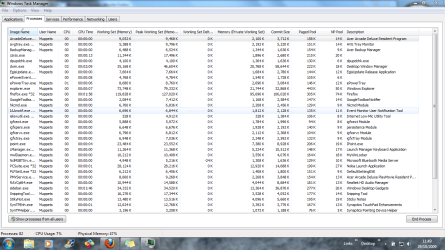
Hi here is a screen print??
 

Attachments

  • Capture.PNG
    Capture.PNG
    72.8 KB · Views: 562

My Computer

Computer type
Laptop
Computer Manufacturer/Model Number
Acer 7738G
OS
Acer Aspire 7738G Win 7 X64 bit Home Premium
1. when you have 99% usage, it will take a long time for the task manager to open. You'll have to be patient.
2. your screenshot looks generally ok (although there are some processes you can probably live without - check the startups) , but it does not show all the processes (you'll have to enlarge the window a little - pull it down). And click on (working set(memory)). Then it will show the big RAM eaters on top.
 
Last edited:

My Computer

Computer Manufacturer/Model Number
HP, Dell, Gateway, Toshiba - 4 laptops and 2 desktops
OS
Vista, Windows7, Mint Mate, Zorin, Windows 8
CPU
from 1.6GHz Duo to i7
Monitor(s) Displays
2x HP w2207
Hard Drives
5x HDD, 7x SSD, 12x Externals
Keyboard
with trackball - no mices
Mouse
Trackball mice
Internet Speed
DSL 6000
Hi
u
here is the second shot.

So is 50% average usage?

thanks again.
 

Attachments

  • Capture2.PNG
    Capture2.PNG
    73.3 KB · Views: 279
Last edited:

My Computer

Computer type
Laptop
Computer Manufacturer/Model Number
Acer 7738G
OS
Acer Aspire 7738G Win 7 X64 bit Home Premium
AVG...I bet it is AVG. Tho I could be wrong, however, a lt of people are having problems with AVG and this sort of thing.
 

My Computer

Computer type
PC/Desktop
Computer Manufacturer/Model Number
Alienware Aurora ALX R4
OS
Windows 10 Pro (x64)
CPU
Intel Core i7-3930K (3.2GHz - 4.5GHz)
Motherboard
Alienware Aurora-R4 x79
Memory
4x Samsung 4GB PC3-12800 DDR3 (16GB 1600MHz)
Graphics Card(s)
Nvidia Geforce GTX 690
Sound Card
SteelSeries Siberia Elite
Monitor(s) Displays
Dell UltraSharp U3011
Screen Resolution
2560x1600
Hard Drives
Samsung 850 Pro 256 GB, Seagate 1TB Desktop Hybrid HDD, 2x Western Digital 4TB Green HDD
PSU
875W Some Dell PSU <.<
Case
Alienware Aurora ALX
Cooling
Custom Liquid Cooling (EK CPU & GPU blocks) dual EK 480RAD
Keyboard
Logitech G710+ Mechanical
Mouse
Logitech G700s
Internet Speed
Verizon Fios (50 mbps average)
Other Info
Server: Intel NUC D54250WYK: i5-4250U, 16GB, 256 GB mSATA, Windows Server 2012 R2
Hi logicearth,

So you think its AVG?
But it does not show it is using much, but hey what do I know :confused:
Could you recommend something else? And is it free?

Thanks.
 

My Computer

Computer type
Laptop
Computer Manufacturer/Model Number
Acer 7738G
OS
Acer Aspire 7738G Win 7 X64 bit Home Premium
Mileage will vary, but I use Microsoft Security Essentials.
Amazingly Tiny, without the annoyingness, and free.
http://www.microsoft.com/security_essentials/

I don't normally run an antivirus solution, but MSE was like made for me...*shrugs*
 

My Computer

Computer type
PC/Desktop
Computer Manufacturer/Model Number
Alienware Aurora ALX R4
OS
Windows 10 Pro (x64)
CPU
Intel Core i7-3930K (3.2GHz - 4.5GHz)
Motherboard
Alienware Aurora-R4 x79
Memory
4x Samsung 4GB PC3-12800 DDR3 (16GB 1600MHz)
Graphics Card(s)
Nvidia Geforce GTX 690
Sound Card
SteelSeries Siberia Elite
Monitor(s) Displays
Dell UltraSharp U3011
Screen Resolution
2560x1600
Hard Drives
Samsung 850 Pro 256 GB, Seagate 1TB Desktop Hybrid HDD, 2x Western Digital 4TB Green HDD
PSU
875W Some Dell PSU <.<
Case
Alienware Aurora ALX
Cooling
Custom Liquid Cooling (EK CPU & GPU blocks) dual EK 480RAD
Keyboard
Logitech G710+ Mechanical
Mouse
Logitech G700s
Internet Speed
Verizon Fios (50 mbps average)
Other Info
Server: Intel NUC D54250WYK: i5-4250U, 16GB, 256 GB mSATA, Windows Server 2012 R2
So,, should I change AVG for MSE? Will this cover all virus protection?
I have Malwarebytes installed, can I keep this with MSE?

Also I have the Firefox browser, it seems to be using loads of resources, so is there something lighter out there?
I am looking for a mail client as Win 7 does not have Windows Mail (Vista), only Windows LIVE Mail, I am used to Outlook Express, simple for me to use and I could save mails for multiple sendings, ie CV-job applications. Outlook does not allow for saving a mail for multiple sendings, only once.

I only had the Vista machine for a short time, returned it as it did not work correctly, now I have Win 7 I need to learn what magic it has:D.

Thanks..:D
 

My Computer

Computer type
Laptop
Computer Manufacturer/Model Number
Acer 7738G
OS
Acer Aspire 7738G Win 7 X64 bit Home Premium
My RAM usage on Windows 7 runs at about 20% at idle. I have 4 gigs installed, of which only 3.3 is usable because I use 32-bit Windows.

I am using AVG Free 9.0 with Win 7 without any issues.

I seriously doubt Malwarebytes will interfere with MSE or AVG.

Opera is lighter than Firefox, but it is not intuitive. I took a look at it for a couple of hours recently and gave up.

Firefox has just released 3.5.4.

I briefly looked at Windows Live Mail and wasn't amused.

Thunderbird Mail is working well for me on Windows 7 and looks very much like Outlook Express.
 

My Computer

Computer type
PC/Desktop
Computer Manufacturer/Model Number
Ignatz Special; 4 speed manual gearbox; factory air conditioning; one of one
OS
Windows 7 Home Premium SP1, 64-bit
CPU
Intel Skylake i5-6600K, not overclocked
Motherboard
AsRock Z170M Extreme 4, micro ATX
Memory
8 GB HyperX DDR4-2666 (2 x 4 GB)
Graphics Card(s)
none; graphics are integrated on CPU
Sound Card
onboard: Realtek ALC1150; external: USB Behringer UF0-202
Monitor(s) Displays
Dell S2340M 23 inch IPS
Screen Resolution
1600 x 900
Hard Drives
System: Crucial MX100 series SSD, 128 GB;
Data: Samsung Spinpoint 103SJ, 1 TB;
Backup: WD Caviar Green WD30EZRX-00D8PB0, 3 TB
PSU
Rosewill SilentNight 500 watt fanless, semi-modular
Case
Antec Solo II
Cooling
Noctua NH-U12S; Noctua F12 intake, Noctua S12A exhaust
Keyboard
Microsoft 200 6JH-00001 USB
Mouse
Dell or Microsoft optical wired; USB
Antivirus
Microsoft Security Essentials and Malwarebytes Premium
Browser
Pale Moon
Other Info
All fans PWM; speeds at idle: CPU circa 500 rpm; intake circa 600 rpm; exhaust circa 600 rpm; CPU temps 27 idle and 47 C load in a warm room (27 C/81 F) when running Intel Extreme Tuning Utility stress test.
Hi
u
here is the second shot.

So is 50% average usage?

thanks again.


The short answer is: it is rather high. I just compared with my own numbers, and your's are a lot higher in all cases. Examples: explorer your 91MB vs. my 19MB, sidebar 35 vs 10, taskmanager 11.7 vs 2.5.
Question is what makes them inflate as much. My system has 4GB of RAM and one would think that my numbers would be higher.
 

My Computer

Computer Manufacturer/Model Number
HP, Dell, Gateway, Toshiba - 4 laptops and 2 desktops
OS
Vista, Windows7, Mint Mate, Zorin, Windows 8
CPU
from 1.6GHz Duo to i7
Monitor(s) Displays
2x HP w2207
Hard Drives
5x HDD, 7x SSD, 12x Externals
Keyboard
with trackball - no mices
Mouse
Trackball mice
Internet Speed
DSL 6000
Hi
u
here is the second shot.

So is 50% average usage?

thanks again.


The short answer is: it is rather high. I just compared with my own numbers, and your's are a lot higher in all cases. Examples: explorer your 91MB vs. my 19MB, sidebar 35 vs 10, taskmanager 11.7 vs 2.5.
Question is what makes them inflate as much. My system has 4GB of RAM and one would think that my numbers would be higher.

Umm!!!
So why would they be so different, anyone know?
Do I need to change things on here like I listed earlier?
:confused:
 

My Computer

Computer type
Laptop
Computer Manufacturer/Model Number
Acer 7738G
OS
Acer Aspire 7738G Win 7 X64 bit Home Premium
Back
Top