Solved Win 7 Repair Reinstall hangs at final re-boot

sparkyguy3809

New member
Local time
10:01 AM
Messages
6
Win 7 HP 64-Bit SP1
Attempting a Repair-Reinstall on 1TB Western Digital Hard-Drive.
Machine will boot as-is, but I don't want to do a full (clean) install due to the amount of data and stuff on it. The Repair-Install goes as it should (I've done them before) except at the very final re-boot (immediately after key-code entry when it says the system will now re-boot), the screen goes blank and stays blank. No blinking cursor, nothing. The system is not frozen. The Num-Lock and Scroll-Lock still toggle and hard-drive LED shows some activity. I've waited overnight and still nothing. When I finally force it to reboot, it says the installation failed and rolls back to the beginning restoring everything to the conditions when I began. Device Manager notes no flagged issues or drivers. Hard Drive is basically new and I scanned it for errors before beginning using Western Digital Data Lifeguard utility plus I ran chkdsk /r/f on the OS partition before beginning.

Any suggestions?
 

My Computer My Computer

At a glance

windows 7 Home Premium 64 bitI38GBInternal Intel
Computer type
PC/Desktop
Computer Manufacturer/Model Number
Dell
OS
windows 7 Home Premium 64 bit
CPU
I3
Motherboard
Dell
Memory
8GB
Graphics Card(s)
Internal Intel
Hard Drives
Western Digital 1TB
Antivirus
Uninstalled for trouble shooting purposes
Browser
Firefox
I'm no expert but I did find a tutorial I recommend reading through to check and see if you missed something. Read it slow and carefully, their is a lot of information.

Note:
Make sure the only drives you have hooked up are the DVD player and the hard drive Windows 7 is installed on.
By Brink:
http://www.sevenforums.com/tutorials/3413-repair-install.html

If you can complete this tutorial by Golden and post the picture exactly as the tutorial instructs.
Do this tutorial before you unhook anything.

http://www.sevenforums.com/tutorials/274797-disk-management-post-screen-capture-image.html
 

My Computer My Computer

At a glance

Windows 10 Pro. 64/ version 1709 Windows 7 Pr...Intel i7-6800K @ 4.3Corsair Platinum 16 gig @2400EVGA GTX 1070 OC
Computer type
PC/Desktop
Computer Manufacturer/Model Number
Home made Desktop
OS
Windows 10 Pro. 64/ version 1709 Windows 7 Pro/64
CPU
Intel i7-6800K @ 4.3
Motherboard
ASUS X-99 Deluxe II
Memory
Corsair Platinum 16 gig @2400
Graphics Card(s)
EVGA GTX 1070 OC
Monitor(s) Displays
Asus 27" LED LCD/VE278Q
Screen Resolution
1920-1080 or 1280-720 HDMI
Hard Drives
INTEL SSD 730-240 Gb Sata 3.0/
PSU
EVGA Platium 1200W
Case
Phanteks Luxe Tempered Glass 8 fans/ one radiator
Cooling
XSPC/ Water Cooled CPU
Keyboard
Das 4 Professional
Mouse
Logitech M705/MX Anywhere 2-S
Internet Speed
100 mbits
Antivirus
Microsoft Security Essentials/ Malwarebytes Premium 3.0/ SAS
Browser
I.E. 11 default/Firefox/ ISP Time Warner Cable/Spectrum
Other Info
LG BluRay Burner/
Sound system-KLipsch-THX/
Icy Dock ssd Hot Swap bays.
Layback Bear, thanks for the quick reply.

Ironically, that is the exact steps I found earlier and followed to the letter.
Everything proceeded as described up to Step 20.
Looking at the two screen captures in Step 20, mine gets to the first screen just fine, but does not continue to the second screen. My screen simply goes black with no cursor or display of any kind.
 

My Computer My Computer

At a glance

windows 7 Home Premium 64 bitI38GBInternal Intel
Computer type
PC/Desktop
Computer Manufacturer/Model Number
Dell
OS
windows 7 Home Premium 64 bit
CPU
I3
Motherboard
Dell
Memory
8GB
Graphics Card(s)
Internal Intel
Hard Drives
Western Digital 1TB
Antivirus
Uninstalled for trouble shooting purposes
Browser
Firefox
How long have you waited for the second screen in #20 to appear?

I have used this same tutorial a few times a while back and don't remember having to wait. But my memory is always in question. Please read step #21.

The screen shots using Goldens tutorial might show us something.

Time for me to test my eye lids for holes.
 

My Computer My Computer

At a glance

Windows 10 Pro. 64/ version 1709 Windows 7 Pr...Intel i7-6800K @ 4.3Corsair Platinum 16 gig @2400EVGA GTX 1070 OC
Computer type
PC/Desktop
Computer Manufacturer/Model Number
Home made Desktop
OS
Windows 10 Pro. 64/ version 1709 Windows 7 Pro/64
CPU
Intel i7-6800K @ 4.3
Motherboard
ASUS X-99 Deluxe II
Memory
Corsair Platinum 16 gig @2400
Graphics Card(s)
EVGA GTX 1070 OC
Monitor(s) Displays
Asus 27" LED LCD/VE278Q
Screen Resolution
1920-1080 or 1280-720 HDMI
Hard Drives
INTEL SSD 730-240 Gb Sata 3.0/
PSU
EVGA Platium 1200W
Case
Phanteks Luxe Tempered Glass 8 fans/ one radiator
Cooling
XSPC/ Water Cooled CPU
Keyboard
Das 4 Professional
Mouse
Logitech M705/MX Anywhere 2-S
Internet Speed
100 mbits
Antivirus
Microsoft Security Essentials/ Malwarebytes Premium 3.0/ SAS
Browser
I.E. 11 default/Firefox/ ISP Time Warner Cable/Spectrum
Other Info
LG BluRay Burner/
Sound system-KLipsch-THX/
Icy Dock ssd Hot Swap bays.
10 hours now and still counting (as I write this).
It is the weekend, so I can continue to leave it undisturbed for another 24 hours and report back.
However, I'm not too hopeful . . . . . . but then, I'm a pessimist by nature.
Either way, I will report back.

This forum is, by far, the best Windows 7 forum I've ran across.
I've been here dozens of times and I usually find the answers I'm looking for in old postings.
This is the first time I've ever needed to add one of my my own.

The computer proceeds "by the book" up to the point that it black screens, so my issue must be something rather basic that I'm simply overlooking. I didn't mention previously, but the 1TB HD is configured pretty "vanilla". By that, I mean it is basic 1-partition, 1-OS, Win 7 HP SP1, NTFS (No SSD hard-drive, No RAID, no high-performance stuff or special drivers of any sort). It's my niece's family "home computer" so it is a very,very basic box, even uses the Intel on-board video. Only USB devices plugged-in are the mouse and USB keyboard. I would think the Win-7 install disk should find all the basic drivers that it needs to do a repair-install.
 

My Computer My Computer

At a glance

windows 7 Home Premium 64 bitI38GBInternal Intel
Computer type
PC/Desktop
Computer Manufacturer/Model Number
Dell
OS
windows 7 Home Premium 64 bit
CPU
I3
Motherboard
Dell
Memory
8GB
Graphics Card(s)
Internal Intel
Hard Drives
Western Digital 1TB
Antivirus
Uninstalled for trouble shooting purposes
Browser
Firefox
What I was trying to get to is; you should only have the hard drive/ssd you want Windows 7 installed and the DVD player hooked up.

You should not have any extra hard drives or ssd's hooked up.

Did you try removing the Windows DVD and booting?
No way in hell should you have to wait for hours.

Now when you boot into Windows 7 your probable looking at couple of hundred updates that will take lots of time.

I'm thinking about your Black screen and trying to figure out how you got there. I never have.
 

My Computer My Computer

At a glance

Windows 10 Pro. 64/ version 1709 Windows 7 Pr...Intel i7-6800K @ 4.3Corsair Platinum 16 gig @2400EVGA GTX 1070 OC
Computer type
PC/Desktop
Computer Manufacturer/Model Number
Home made Desktop
OS
Windows 10 Pro. 64/ version 1709 Windows 7 Pro/64
CPU
Intel i7-6800K @ 4.3
Motherboard
ASUS X-99 Deluxe II
Memory
Corsair Platinum 16 gig @2400
Graphics Card(s)
EVGA GTX 1070 OC
Monitor(s) Displays
Asus 27" LED LCD/VE278Q
Screen Resolution
1920-1080 or 1280-720 HDMI
Hard Drives
INTEL SSD 730-240 Gb Sata 3.0/
PSU
EVGA Platium 1200W
Case
Phanteks Luxe Tempered Glass 8 fans/ one radiator
Cooling
XSPC/ Water Cooled CPU
Keyboard
Das 4 Professional
Mouse
Logitech M705/MX Anywhere 2-S
Internet Speed
100 mbits
Antivirus
Microsoft Security Essentials/ Malwarebytes Premium 3.0/ SAS
Browser
I.E. 11 default/Firefox/ ISP Time Warner Cable/Spectrum
Other Info
LG BluRay Burner/
Sound system-KLipsch-THX/
Icy Dock ssd Hot Swap bays.
Sorry, out if frustration, I probably gave too much info.
Clarifying........ your list is what is plugged in, nothing more.
I have a one SATA hard-drive, one SATA DVD drive, mouse and keyboard only.

At this point, if I shut down and force a reboot, it will generate an "installation failed" error and immediately roll back to where I started. It does not finish the repair install.

Also, to clarify, I've been through this a half-dozen trys and even tried using two different Win 7 HP install DVD's.
The results are always the same.
 

My Computer My Computer

At a glance

windows 7 Home Premium 64 bitI38GBInternal Intel
Computer type
PC/Desktop
Computer Manufacturer/Model Number
Dell
OS
windows 7 Home Premium 64 bit
CPU
I3
Motherboard
Dell
Memory
8GB
Graphics Card(s)
Internal Intel
Hard Drives
Western Digital 1TB
Antivirus
Uninstalled for trouble shooting purposes
Browser
Firefox
The only thing I can think of is a corrupt installation DVD or the wrong one. Is it for a 64 bit Windows 7 Home Premium.

Where exactly did you get the DVD with Windows 7 on it?
Is it exactly the same as the Windows 7 you are trying to do the Repair Install.
Are you trying to use a Dell DVD?
 

My Computer My Computer

At a glance

Windows 10 Pro. 64/ version 1709 Windows 7 Pr...Intel i7-6800K @ 4.3Corsair Platinum 16 gig @2400EVGA GTX 1070 OC
Computer type
PC/Desktop
Computer Manufacturer/Model Number
Home made Desktop
OS
Windows 10 Pro. 64/ version 1709 Windows 7 Pro/64
CPU
Intel i7-6800K @ 4.3
Motherboard
ASUS X-99 Deluxe II
Memory
Corsair Platinum 16 gig @2400
Graphics Card(s)
EVGA GTX 1070 OC
Monitor(s) Displays
Asus 27" LED LCD/VE278Q
Screen Resolution
1920-1080 or 1280-720 HDMI
Hard Drives
INTEL SSD 730-240 Gb Sata 3.0/
PSU
EVGA Platium 1200W
Case
Phanteks Luxe Tempered Glass 8 fans/ one radiator
Cooling
XSPC/ Water Cooled CPU
Keyboard
Das 4 Professional
Mouse
Logitech M705/MX Anywhere 2-S
Internet Speed
100 mbits
Antivirus
Microsoft Security Essentials/ Malwarebytes Premium 3.0/ SAS
Browser
I.E. 11 default/Firefox/ ISP Time Warner Cable/Spectrum
Other Info
LG BluRay Burner/
Sound system-KLipsch-THX/
Icy Dock ssd Hot Swap bays.
All are Win 7 Home Premium 64-Bit SP1.
Since it was originally a Dell, it was shipped without a Win DVD, only the restore partition (which I hate).
Therefore, I don't have a genuine Dell-labeled Microsoft Windows 7 DVD.

Even with my key-code, Microsoft will no longer let you directly download the iso from their site if you have an OEM install (such as this DELL does). Therefore, I have two copies of the proper version, both of which were obtained from different trusted sites.

One DVD was directly obtained from Digital River some time ago. Note that I obtained it before Microsoft pulled the iso's off-line @ Digital River.
My 2nd from another trusted site which I frankly can't remember. However, it crashes at the exact same spot at re-boot.
Both are capable of doing a complete fresh clean-install without any issues. However, this will wipe all existing data off the hard-drive which is what I'm trying to avoid in the first place.

Sorry to be lengthy, but here is a summary of things I've tried.
1. I've done a total drive image & restore into a new, empty (and thoroughly tested) drive so that I'm not messing with the original hard-drive drive. Before beginning with a repair-install, I verified it operates EXACTLY as the original installation did. All of the partitions can be accessed (Win OS, Dell Restore and Maintenance). However, when I do a Win 7 repair-install, it always fails at the same point at the very end.

2. I wiped the hard-drive and then restored the original drive-image back into the new drive. It occurred to me that the Dell Restore and Maintenance partitions "might" be confusing the generic Win 7 repair-install. Therefore, I tried deleting all Dell Restore & Maintenance partitions. I then ran Maintenance to restore the drive to bootable status. No problems with any of that. The computer will boot and load Windows without a hitch. Finally, I tried another repair-install over THAT installation. It again fails at the exact same point at the end.

I'm CERTAIN both of my Win-7 DVD's are good because I can easily do a full-installation from either of them. The problem is that I lose all of my installed configuration. Since I have a full image of the original
drive, I can easily wipe things, do another image restore and re-start from scratch. All I lose is the time it takes to perform every restore.

Sorry to be so lengthy, but I've tried enough stuff to write a book and been to 200 different forum sites looking for answers. PLEASE do not be offended (I sincerely appreciate ANY assistance anybody can offer) but this isn't my first rodeo . . . .I've done this a half dozen times before on different hardware and know the steps. This time, something just isn't cooperating as it usually does.
 

My Computer My Computer

At a glance

windows 7 Home Premium 64 bitI38GBInternal Intel
Computer type
PC/Desktop
Computer Manufacturer/Model Number
Dell
OS
windows 7 Home Premium 64 bit
CPU
I3
Motherboard
Dell
Memory
8GB
Graphics Card(s)
Internal Intel
Hard Drives
Western Digital 1TB
Antivirus
Uninstalled for trouble shooting purposes
Browser
Firefox
I'm not offended in any way.
Your recovery partition might be getting in the way, but because I have never owned a computer with a recovery partition I'm not sure.

**I'm going to the Ranch and ask for others to take a look at your problem.

Way back in my post #2 I asked for this to be done hoping it would show something. Can you do this tutorial.


Disk Management - Post a Screen Capture Image
 

My Computer My Computer

At a glance

Windows 10 Pro. 64/ version 1709 Windows 7 Pr...Intel i7-6800K @ 4.3Corsair Platinum 16 gig @2400EVGA GTX 1070 OC
Computer type
PC/Desktop
Computer Manufacturer/Model Number
Home made Desktop
OS
Windows 10 Pro. 64/ version 1709 Windows 7 Pro/64
CPU
Intel i7-6800K @ 4.3
Motherboard
ASUS X-99 Deluxe II
Memory
Corsair Platinum 16 gig @2400
Graphics Card(s)
EVGA GTX 1070 OC
Monitor(s) Displays
Asus 27" LED LCD/VE278Q
Screen Resolution
1920-1080 or 1280-720 HDMI
Hard Drives
INTEL SSD 730-240 Gb Sata 3.0/
PSU
EVGA Platium 1200W
Case
Phanteks Luxe Tempered Glass 8 fans/ one radiator
Cooling
XSPC/ Water Cooled CPU
Keyboard
Das 4 Professional
Mouse
Logitech M705/MX Anywhere 2-S
Internet Speed
100 mbits
Antivirus
Microsoft Security Essentials/ Malwarebytes Premium 3.0/ SAS
Browser
I.E. 11 default/Firefox/ ISP Time Warner Cable/Spectrum
Other Info
LG BluRay Burner/
Sound system-KLipsch-THX/
Icy Dock ssd Hot Swap bays.
Is your Windows 7 HP with SP1 installed? and is your installation disk a Windows 7 SP1? I am not sure if that would make a difference, but I know a pre SP1 repair disk will not work on a SP1 installation.

When it rolls back to your current OS open an elevated command prompt ( click start, type cmd in the search box, right click on the cmd entry and select run as administrator) in the black box that opens, copy/paste sfc /scannow. If you decide to type it, notice the space between the sfc and the /. It is a system file checker which will scan your system files and attempt to correct any missing or corrupt files. What we want are the results to say windows found no integrity violations. If it says files were found but could not be repaired, close the box, reboot and run it again, after opening the administrative command prompt. You may have to reboot and run it three times for it to repair all system files. If it can't repair them after 3 reboots, let us know.
 

My Computers My Computers

  • At a glance

    Windows 11 ProRyzen 9 5900X32GB G Skill DDR4-3600EVGA RTX 3080 FTW 3 Ultra
    Computer type
    PC/Desktop
    Computer Manufacturer/Model Number
    ALWAYS UNDER CONSTRUCTION
    OS
    Windows 11 Pro
    CPU
    Ryzen 9 5900X
    Motherboard
    Asus X570 Crosshair Viii Hero
    Memory
    32GB G Skill DDR4-3600
    Graphics Card(s)
    EVGA RTX 3080 FTW 3 Ultra
    Sound Card
    On Board/Sennheiser PC37X Headset
    Monitor(s) Displays
    3 X Asus 27"
    Screen Resolution
    2560x1440
    Hard Drives
    2 X 1 TB NVME drives
    PSU
    EVGA 850
    Case
    Phanteks Eclipse P400A
    Cooling
    EVGA 280 AIO
    Keyboard
    Logitech G510s/ Logitech G13
    Mouse
    Logitech G502
    Internet Speed
    24/1
    Antivirus
    ESET/MBAM Pro/SAS Pro
    Browser
    Chrome/ Firefox/ Edge
  • At a glance

    Windows 11 ProIntel Ultra 9 288V32 GB LPDDR5X 8533
    Computer type
    Laptop
    System Manufacturer/Model Number
    Dell 16 Plus
    OS
    Windows 11 Pro
    CPU
    Intel Ultra 9 288V
    Memory
    32 GB LPDDR5X 8533
    Monitor(s) Displays
    16" Mini-LED HDR600 Touch 90 Hz
    Screen Resolution
    2560X1600
    Hard Drives
    1 TB NVME
Thanks Steve for dropping by to help.
 

My Computer My Computer

At a glance

Windows 10 Pro. 64/ version 1709 Windows 7 Pr...Intel i7-6800K @ 4.3Corsair Platinum 16 gig @2400EVGA GTX 1070 OC
Computer type
PC/Desktop
Computer Manufacturer/Model Number
Home made Desktop
OS
Windows 10 Pro. 64/ version 1709 Windows 7 Pro/64
CPU
Intel i7-6800K @ 4.3
Motherboard
ASUS X-99 Deluxe II
Memory
Corsair Platinum 16 gig @2400
Graphics Card(s)
EVGA GTX 1070 OC
Monitor(s) Displays
Asus 27" LED LCD/VE278Q
Screen Resolution
1920-1080 or 1280-720 HDMI
Hard Drives
INTEL SSD 730-240 Gb Sata 3.0/
PSU
EVGA Platium 1200W
Case
Phanteks Luxe Tempered Glass 8 fans/ one radiator
Cooling
XSPC/ Water Cooled CPU
Keyboard
Das 4 Professional
Mouse
Logitech M705/MX Anywhere 2-S
Internet Speed
100 mbits
Antivirus
Microsoft Security Essentials/ Malwarebytes Premium 3.0/ SAS
Browser
I.E. 11 default/Firefox/ ISP Time Warner Cable/Spectrum
Other Info
LG BluRay Burner/
Sound system-KLipsch-THX/
Icy Dock ssd Hot Swap bays.

My Computers My Computers

  • At a glance

    Windows 11 ProRyzen 9 5900X32GB G Skill DDR4-3600EVGA RTX 3080 FTW 3 Ultra
    Computer type
    PC/Desktop
    Computer Manufacturer/Model Number
    ALWAYS UNDER CONSTRUCTION
    OS
    Windows 11 Pro
    CPU
    Ryzen 9 5900X
    Motherboard
    Asus X570 Crosshair Viii Hero
    Memory
    32GB G Skill DDR4-3600
    Graphics Card(s)
    EVGA RTX 3080 FTW 3 Ultra
    Sound Card
    On Board/Sennheiser PC37X Headset
    Monitor(s) Displays
    3 X Asus 27"
    Screen Resolution
    2560x1440
    Hard Drives
    2 X 1 TB NVME drives
    PSU
    EVGA 850
    Case
    Phanteks Eclipse P400A
    Cooling
    EVGA 280 AIO
    Keyboard
    Logitech G510s/ Logitech G13
    Mouse
    Logitech G502
    Internet Speed
    24/1
    Antivirus
    ESET/MBAM Pro/SAS Pro
    Browser
    Chrome/ Firefox/ Edge
  • At a glance

    Windows 11 ProIntel Ultra 9 288V32 GB LPDDR5X 8533
    Computer type
    Laptop
    System Manufacturer/Model Number
    Dell 16 Plus
    OS
    Windows 11 Pro
    CPU
    Intel Ultra 9 288V
    Memory
    32 GB LPDDR5X 8533
    Monitor(s) Displays
    16" Mini-LED HDR600 Touch 90 Hz
    Screen Resolution
    2560X1600
    Hard Drives
    1 TB NVME
Well maybe I didn't explain what I meant by exactly the same Windows 7 well enough.

The SP-1 and sfc /scannow are great ideas.

A Repair Install should take care of any problems sfc /scannow can't but who know. It cost nothing to try and it can't hurt anything.
 

My Computer My Computer

At a glance

Windows 10 Pro. 64/ version 1709 Windows 7 Pr...Intel i7-6800K @ 4.3Corsair Platinum 16 gig @2400EVGA GTX 1070 OC
Computer type
PC/Desktop
Computer Manufacturer/Model Number
Home made Desktop
OS
Windows 10 Pro. 64/ version 1709 Windows 7 Pro/64
CPU
Intel i7-6800K @ 4.3
Motherboard
ASUS X-99 Deluxe II
Memory
Corsair Platinum 16 gig @2400
Graphics Card(s)
EVGA GTX 1070 OC
Monitor(s) Displays
Asus 27" LED LCD/VE278Q
Screen Resolution
1920-1080 or 1280-720 HDMI
Hard Drives
INTEL SSD 730-240 Gb Sata 3.0/
PSU
EVGA Platium 1200W
Case
Phanteks Luxe Tempered Glass 8 fans/ one radiator
Cooling
XSPC/ Water Cooled CPU
Keyboard
Das 4 Professional
Mouse
Logitech M705/MX Anywhere 2-S
Internet Speed
100 mbits
Antivirus
Microsoft Security Essentials/ Malwarebytes Premium 3.0/ SAS
Browser
I.E. 11 default/Firefox/ ISP Time Warner Cable/Spectrum
Other Info
LG BluRay Burner/
Sound system-KLipsch-THX/
Icy Dock ssd Hot Swap bays.
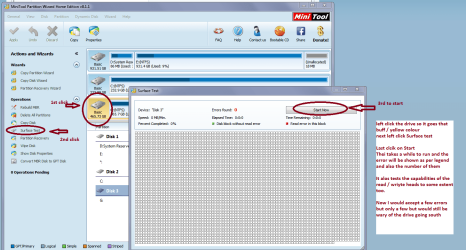
Two things I can think of are the drive is no good - just how old is it as I don't remember seeing any vintage attached to it. It could be tested using say Seagate and even the surface test (in another machine of course) with Partition Wizard Best Free Partition Manager for Windows | MiniTool Partition Free (see pic)

Now an option would be to get a new drive - I know more expense and the OP would have to borrow an installation media disk and use Gregs tutorial and the ei.cfg removal tool. It would get rid of the bloat as well. The data if any needs saving from the original drive can be got using a Ubuntu or Linux Mint boot.
http://www.sevenforums.com/tutorials/219487-clean-reinstall-factory-oem-windows-7-a.html
 

Attachments

  • MINI TOOL SURFACE 2.PNG
    MINI TOOL SURFACE 2.PNG
    62.3 KB · Views: 0

My Computer My Computer

At a glance

Desk1 7 Home Prem / Desk2 10 Pro / Main lap A...Desk1 i5 3750K / Laptop i7 GTX 860M / Desk2 i...Desk1 8GB (1866) / Desk2 16GB (1333) / Laptop...Desk 1& 2NVidia GTX 650 & Laptops on board Intel
Computer type
PC/Desktop
Computer Manufacturer/Model Number
Own build (new) Desk1 / Asus ROG Win 7 / Desk2 1st build
OS
Desk1 7 Home Prem / Desk2 10 Pro / Main lap Asus ROG 10 Pro 2 laptop Toshiba 7 Pro Asus P2520 7 & 10
CPU
Desk1 i5 3750K / Laptop i7 GTX 860M / Desk2 i5 2500
Motherboard
Desk1 Asus P877-V / Desk2 Gigabyte H67 UD3H / Laptop ?
Memory
Desk1 8GB (1866) / Desk2 16GB (1333) / Laptop 8Gb DDR3
Graphics Card(s)
Desk 1& 2NVidia GTX 650 & Laptops on board Intel
Sound Card
Desk 1 & 2 -XONAR DG Realtek High Def audio Laptop
Monitor(s) Displays
Desk 1 Benq HD 2450 / Desk2 Philips 24" / Laptop 17.5"
Screen Resolution
1920x1080 D1 & D2 & Laptop 1
Hard Drives
Desk1 Samsung 120GB 830 SSD
Asus ROG 256GB 850 Pro SSD
Desk2 Samsung 840 256 SSD
Toshiba 120GB EVO
PSU
Desk 1 Corsair HX 1050/ Laptop ? / Desk 2 Corsair HX 650
Case
Desk 1 Cooler HAF XM ? Toshiba laptop / Desk2 Coolermaster
Cooling
Fans on all Desk1 -2 Desk2 - all Coolermasters 5 Laptop ?
Keyboard
Desk 1 MS Sidewinder X6 Desk 2 MS Sidewinder X 4
Mouse
Desk 1&2 - Gigabyte MS 900 gamer - laptop - Logitec wireless
Internet Speed
ADSL2+
Other Info
One other Desktop (tester) and spare Toshba laptop both with SSD's
Running Kaspersky 2016 ISS on all machines config'd identically
Logitec audio stereo systems on each machine (x3)
Canon MG5250MFC
Router/modem TP-Link running WPA2SK
Thanks John for coming to help.
We need some response from sparkyguy3809.

From post #1

Hard Drive is basically new and I scanned it for errors before beginning using Western Digital Data Lifeguard utility plus I ran chkdsk /r/f on the OS partition before beginning.
 

My Computer My Computer

At a glance

Windows 10 Pro. 64/ version 1709 Windows 7 Pr...Intel i7-6800K @ 4.3Corsair Platinum 16 gig @2400EVGA GTX 1070 OC
Computer type
PC/Desktop
Computer Manufacturer/Model Number
Home made Desktop
OS
Windows 10 Pro. 64/ version 1709 Windows 7 Pro/64
CPU
Intel i7-6800K @ 4.3
Motherboard
ASUS X-99 Deluxe II
Memory
Corsair Platinum 16 gig @2400
Graphics Card(s)
EVGA GTX 1070 OC
Monitor(s) Displays
Asus 27" LED LCD/VE278Q
Screen Resolution
1920-1080 or 1280-720 HDMI
Hard Drives
INTEL SSD 730-240 Gb Sata 3.0/
PSU
EVGA Platium 1200W
Case
Phanteks Luxe Tempered Glass 8 fans/ one radiator
Cooling
XSPC/ Water Cooled CPU
Keyboard
Das 4 Professional
Mouse
Logitech M705/MX Anywhere 2-S
Internet Speed
100 mbits
Antivirus
Microsoft Security Essentials/ Malwarebytes Premium 3.0/ SAS
Browser
I.E. 11 default/Firefox/ ISP Time Warner Cable/Spectrum
Other Info
LG BluRay Burner/
Sound system-KLipsch-THX/
Icy Dock ssd Hot Swap bays.
Oops sorry Jack my bad all the same I reckon a scan over the drive wouldn't go amiss and yes some response as you say would be good.

Now I am thinking along the lines of having a look at the state of the PSU too as I do like starting from scratch and it doesn't come any more basic than the power supply eh?
 

My Computer My Computer

At a glance

Desk1 7 Home Prem / Desk2 10 Pro / Main lap A...Desk1 i5 3750K / Laptop i7 GTX 860M / Desk2 i...Desk1 8GB (1866) / Desk2 16GB (1333) / Laptop...Desk 1& 2NVidia GTX 650 & Laptops on board Intel
Computer type
PC/Desktop
Computer Manufacturer/Model Number
Own build (new) Desk1 / Asus ROG Win 7 / Desk2 1st build
OS
Desk1 7 Home Prem / Desk2 10 Pro / Main lap Asus ROG 10 Pro 2 laptop Toshiba 7 Pro Asus P2520 7 & 10
CPU
Desk1 i5 3750K / Laptop i7 GTX 860M / Desk2 i5 2500
Motherboard
Desk1 Asus P877-V / Desk2 Gigabyte H67 UD3H / Laptop ?
Memory
Desk1 8GB (1866) / Desk2 16GB (1333) / Laptop 8Gb DDR3
Graphics Card(s)
Desk 1& 2NVidia GTX 650 & Laptops on board Intel
Sound Card
Desk 1 & 2 -XONAR DG Realtek High Def audio Laptop
Monitor(s) Displays
Desk 1 Benq HD 2450 / Desk2 Philips 24" / Laptop 17.5"
Screen Resolution
1920x1080 D1 & D2 & Laptop 1
Hard Drives
Desk1 Samsung 120GB 830 SSD
Asus ROG 256GB 850 Pro SSD
Desk2 Samsung 840 256 SSD
Toshiba 120GB EVO
PSU
Desk 1 Corsair HX 1050/ Laptop ? / Desk 2 Corsair HX 650
Case
Desk 1 Cooler HAF XM ? Toshiba laptop / Desk2 Coolermaster
Cooling
Fans on all Desk1 -2 Desk2 - all Coolermasters 5 Laptop ?
Keyboard
Desk 1 MS Sidewinder X6 Desk 2 MS Sidewinder X 4
Mouse
Desk 1&2 - Gigabyte MS 900 gamer - laptop - Logitec wireless
Internet Speed
ADSL2+
Other Info
One other Desktop (tester) and spare Toshba laptop both with SSD's
Running Kaspersky 2016 ISS on all machines config'd identically
Logitec audio stereo systems on each machine (x3)
Canon MG5250MFC
Router/modem TP-Link running WPA2SK
I came up with my own "back door" solution.

My apologies for not replying back sooner. In regards to various suggestions above:
Yes, I've verified that all my Windows install versions are correct to the letter. Everything is Home-Premium, 64-bit, SP1.

Before Microsoft/Digital River pulled them, I downloaded install media iso's for 32 bit and 64 bit Home-Premium and Professional of both Vista and Win 7 to keep on file for my various repairs. Glad I did since they are now difficult to find.

I'm familiar with SFC and ran it before my initial post (it came up clean).
My new replacement drive is WD/Blue. Before putting any data on it, I initially scanned the drive with WD utility, then my copy of Seagate utility and finally my copy of Spinrite (yea, I'm kind of OCD about error-checking all my new drives). All came back as perfect. I've also ran Chkdsk with /r/f switches a half-dozen different times before initially posting (also comes back as clean).

My solution:
The old drive image was still basically bootable, although some internal Windows functions were flaky (which was my reason for doing the repair-install in the first place). My final solution was to throw in the towel. I restored my basically-bootable image into the new drive and then did the dreaded Windows 10 update on top of the whole mess. Surprisingly, this worked.
Sorry that I got busy doing other drive house-cleaning chores after that and I neglected to get back to this forum until now.

Thanks for all the suggestions. I've only posted this one time on this forum, but have referred to it for a long time as a resource and usually find my answers by simple searching. It is one of the most helpful places on the Net for Win 7 issues.

It still bugs the heck out me to not find out what was going on with the old Win 7 install, but as long as the computer is now functional without doing a full reformat/reinstall my niece will be as happy as a clam. In fact, she will probably think I did her a FAVOR by upgrading to Windows 10. Little does she know that I really FAILED to fix her old Windows 7 build.
 

My Computer My Computer

At a glance

windows 7 Home Premium 64 bitI38GBInternal Intel
Computer type
PC/Desktop
Computer Manufacturer/Model Number
Dell
OS
windows 7 Home Premium 64 bit
CPU
I3
Motherboard
Dell
Memory
8GB
Graphics Card(s)
Internal Intel
Hard Drives
Western Digital 1TB
Antivirus
Uninstalled for trouble shooting purposes
Browser
Firefox
Happy computing to you and your niece.
 

My Computer My Computer

At a glance

Windows 10 Pro. 64/ version 1709 Windows 7 Pr...Intel i7-6800K @ 4.3Corsair Platinum 16 gig @2400EVGA GTX 1070 OC
Computer type
PC/Desktop
Computer Manufacturer/Model Number
Home made Desktop
OS
Windows 10 Pro. 64/ version 1709 Windows 7 Pro/64
CPU
Intel i7-6800K @ 4.3
Motherboard
ASUS X-99 Deluxe II
Memory
Corsair Platinum 16 gig @2400
Graphics Card(s)
EVGA GTX 1070 OC
Monitor(s) Displays
Asus 27" LED LCD/VE278Q
Screen Resolution
1920-1080 or 1280-720 HDMI
Hard Drives
INTEL SSD 730-240 Gb Sata 3.0/
PSU
EVGA Platium 1200W
Case
Phanteks Luxe Tempered Glass 8 fans/ one radiator
Cooling
XSPC/ Water Cooled CPU
Keyboard
Das 4 Professional
Mouse
Logitech M705/MX Anywhere 2-S
Internet Speed
100 mbits
Antivirus
Microsoft Security Essentials/ Malwarebytes Premium 3.0/ SAS
Browser
I.E. 11 default/Firefox/ ISP Time Warner Cable/Spectrum
Other Info
LG BluRay Burner/
Sound system-KLipsch-THX/
Icy Dock ssd Hot Swap bays.
Back
Top