Solved Win 7 SP1 download

t-4-2

Banned
Local time
3:43 PM
Messages
997

My Computer

Computer Manufacturer/Model Number
Acer Aspire 7741Z
OS
Windows 7 Home Premium 64-bit, SP1
CPU
Intel Pentium P6200, Cores 2, 2.13 GHz
Memory
4 GB
Graphics Card(s)
Intel HD
Sound Card
unknown
Monitor(s) Displays
17.3 inches
Screen Resolution
1600 x 900
Hard Drives
640 GB, 5400 PRM
Hi t-4-2. :)
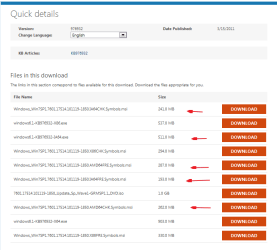
This is the only one you need > "windows6.1-KB976932-X64.exe
903.0 MB"
 

My Computer

Computer Manufacturer/Model Number
WALLONN7 / LIN BLACK SERIES II
OS
Windows 7 Ultimate x64 SP1
CPU
AMD PHENOM II X6 1090T 3.2GHz
Motherboard
GIGABYTE GA-890FXA-UD7
Memory
8GB G.SKILL RIPJAWS - F3-10666CL7D
Graphics Card(s)
SAPPHIRE ATI RADEON HD 5870 VAPOR X OC
Sound Card
REALTEK DOLBY HOME THEATER
Monitor(s) Displays
LED LG W2486L
Screen Resolution
1080p
Hard Drives
SEAGATE 1TB -ST31000528AS - AHCI MODE - AS SATA
PSU
ZALMAN ZM1000-HP 1000W
Case
THERMALTAKE XASER VI VG4000SWA
Cooling
140MM x3 / 120MM x1 AIR COOLING - THERMALTAKE
Keyboard
MICROSOFT DIGITAL MEDIA KEYBOARD 3000 - USB
Mouse
MICROSOFT BASIC OPTICAL MOUSE 2.0 - USB
Internet Speed
600KBPS
Other Info
MICROSOFT XBOX 360 CONTROLLER
Hi t-4-2. :)
This is the only one you need > "windows6.1-KB976932-X64.exe 903.0 MB"


Thank you.
Will come back with an update.
 

My Computer

Computer Manufacturer/Model Number
Acer Aspire 7741Z
OS
Windows 7 Home Premium 64-bit, SP1
CPU
Intel Pentium P6200, Cores 2, 2.13 GHz
Memory
4 GB
Graphics Card(s)
Intel HD
Sound Card
unknown
Monitor(s) Displays
17.3 inches
Screen Resolution
1600 x 900
Hard Drives
640 GB, 5400 PRM
I forgot to mention...

windows6.1-KB976932-X64.exe > This application installs Sp1 to a 64-bit machine running Windows 7 or Windows Server 2008 R2.

windows6.1-KB976932-IA64.exe > This application installs Sp1 to an Itanium 64-bit Windows Server 2008 R2.

That's the reason why is important to fill all system specs...
 

My Computer

Computer Manufacturer/Model Number
WALLONN7 / LIN BLACK SERIES II
OS
Windows 7 Ultimate x64 SP1
CPU
AMD PHENOM II X6 1090T 3.2GHz
Motherboard
GIGABYTE GA-890FXA-UD7
Memory
8GB G.SKILL RIPJAWS - F3-10666CL7D
Graphics Card(s)
SAPPHIRE ATI RADEON HD 5870 VAPOR X OC
Sound Card
REALTEK DOLBY HOME THEATER
Monitor(s) Displays
LED LG W2486L
Screen Resolution
1080p
Hard Drives
SEAGATE 1TB -ST31000528AS - AHCI MODE - AS SATA
PSU
ZALMAN ZM1000-HP 1000W
Case
THERMALTAKE XASER VI VG4000SWA
Cooling
140MM x3 / 120MM x1 AIR COOLING - THERMALTAKE
Keyboard
MICROSOFT DIGITAL MEDIA KEYBOARD 3000 - USB
Mouse
MICROSOFT BASIC OPTICAL MOUSE 2.0 - USB
Internet Speed
600KBPS
Other Info
MICROSOFT XBOX 360 CONTROLLER
I forgot to mention...

windows6.1-KB976932-X64.exe > This application installs Sp1 to a 64-bit machine running Windows 7 or Windows Server 2008 R2.

windows6.1-KB976932-IA64.exe > This application installs Sp1 to an Itanium 64-bit Windows Server 2008 R2.

That's the reason why is important to fill all system specs...

So, which one I am suppoded to use ?
Here is my specs.....
system specs.png
 

My Computer

Computer Manufacturer/Model Number
Acer Aspire 7741Z
OS
Windows 7 Home Premium 64-bit, SP1
CPU
Intel Pentium P6200, Cores 2, 2.13 GHz
Memory
4 GB
Graphics Card(s)
Intel HD
Sound Card
unknown
Monitor(s) Displays
17.3 inches
Screen Resolution
1600 x 900
Hard Drives
640 GB, 5400 PRM
I forgot to mention...

windows6.1-KB976932-X64.exe > This application installs Sp1 to a 64-bit machine running Windows 7 or Windows Server 2008 R2.

windows6.1-KB976932-IA64.exe > This application installs Sp1 to an Itanium 64-bit Windows Server 2008 R2.

That's the reason why is important to fill all system specs...

So, which one I am suppoded to use ?
Here is my specs.....
View attachment 161185


"windows6.1-KB976932-IA64.exe"

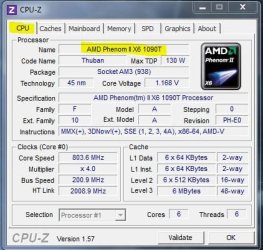
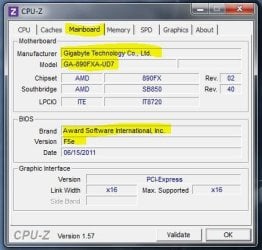
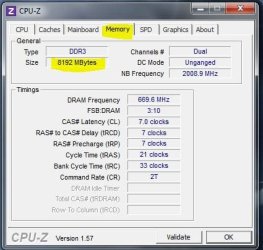
Use CPU-Z -
(.zip, no installation) - to fill mobo, memory, CPU, GPU, etc... As shown below.


Attachments

  • 1.JPG
    1.JPG
    47.6 KB · Views: 6
  • 2.JPG
    2.JPG
    38.5 KB · Views: 5
  • 3.JPG
    3.JPG
    37.6 KB · Views: 6
  • 4.JPG
    4.JPG
    42.7 KB · Views: 6
  • 5.JPG
    5.JPG
    32.9 KB · Views: 8

My Computer

Computer Manufacturer/Model Number
WALLONN7 / LIN BLACK SERIES II
OS
Windows 7 Ultimate x64 SP1
CPU
AMD PHENOM II X6 1090T 3.2GHz
Motherboard
GIGABYTE GA-890FXA-UD7
Memory
8GB G.SKILL RIPJAWS - F3-10666CL7D
Graphics Card(s)
SAPPHIRE ATI RADEON HD 5870 VAPOR X OC
Sound Card
REALTEK DOLBY HOME THEATER
Monitor(s) Displays
LED LG W2486L
Screen Resolution
1080p
Hard Drives
SEAGATE 1TB -ST31000528AS - AHCI MODE - AS SATA
PSU
ZALMAN ZM1000-HP 1000W
Case
THERMALTAKE XASER VI VG4000SWA
Cooling
140MM x3 / 120MM x1 AIR COOLING - THERMALTAKE
Keyboard
MICROSOFT DIGITAL MEDIA KEYBOARD 3000 - USB
Mouse
MICROSOFT BASIC OPTICAL MOUSE 2.0 - USB
Internet Speed
600KBPS
Other Info
MICROSOFT XBOX 360 CONTROLLER
OK.
Good thing I was just saving the exe file.
Deleted the wrong one, and now saving the windows6.1-KB976932-IA64.exe to my computer.

I am not so knowledgeable in computer. I am totally lost in your screenshots of CPU-Z .
 

My Computer

Computer Manufacturer/Model Number
Acer Aspire 7741Z
OS
Windows 7 Home Premium 64-bit, SP1
CPU
Intel Pentium P6200, Cores 2, 2.13 GHz
Memory
4 GB
Graphics Card(s)
Intel HD
Sound Card
unknown
Monitor(s) Displays
17.3 inches
Screen Resolution
1600 x 900
Hard Drives
640 GB, 5400 PRM
I forgot to mention...

windows6.1-KB976932-X64.exe > This application installs Sp1 to a 64-bit machine running Windows 7 or Windows Server 2008 R2.

windows6.1-KB976932-IA64.exe > This application installs Sp1 to an Itanium 64-bit Windows Server 2008 R2.

That's the reason why is important to fill all system specs...

So, which one I am suppoded to use ?
Here is my specs.....
View attachment 161185


"windows6.1-KB976932-IA64.exe"

Use CPU-Z - (.zip, no installation) - to fill mobo, memory, CPU, GPU, etc... As shown below.

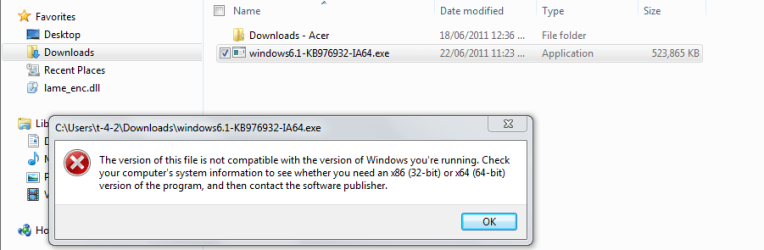
windows6.1-KB976932-IA64.exe does not work.
I double clicked at it after saving, clicked Run and I get this message .....


sp1 exe.png
 

My Computer

Computer Manufacturer/Model Number
Acer Aspire 7741Z
OS
Windows 7 Home Premium 64-bit, SP1
CPU
Intel Pentium P6200, Cores 2, 2.13 GHz
Memory
4 GB
Graphics Card(s)
Intel HD
Sound Card
unknown
Monitor(s) Displays
17.3 inches
Screen Resolution
1600 x 900
Hard Drives
640 GB, 5400 PRM
OK.
I am totally lost in your screenshots of CPU-Z .

Just extract the files. Double click "cpuz64.exe". When it opens, just browse the tabs. ;)
 

My Computer

Computer Manufacturer/Model Number
WALLONN7 / LIN BLACK SERIES II
OS
Windows 7 Ultimate x64 SP1
CPU
AMD PHENOM II X6 1090T 3.2GHz
Motherboard
GIGABYTE GA-890FXA-UD7
Memory
8GB G.SKILL RIPJAWS - F3-10666CL7D
Graphics Card(s)
SAPPHIRE ATI RADEON HD 5870 VAPOR X OC
Sound Card
REALTEK DOLBY HOME THEATER
Monitor(s) Displays
LED LG W2486L
Screen Resolution
1080p
Hard Drives
SEAGATE 1TB -ST31000528AS - AHCI MODE - AS SATA
PSU
ZALMAN ZM1000-HP 1000W
Case
THERMALTAKE XASER VI VG4000SWA
Cooling
140MM x3 / 120MM x1 AIR COOLING - THERMALTAKE
Keyboard
MICROSOFT DIGITAL MEDIA KEYBOARD 3000 - USB
Mouse
MICROSOFT BASIC OPTICAL MOUSE 2.0 - USB
Internet Speed
600KBPS
Other Info
MICROSOFT XBOX 360 CONTROLLER
windows6.1-KB976932-IA64.exe does not work.
I double clicked at it after saving, clicked Run and I get this message .....


View attachment 161196
I've just realized that your machine is a recent laptop model ... sorry for my mistake ... :o "windows6.1-KB976932-X64.exe" is the right one. Sorry one more time. :(
 

My Computer

Computer Manufacturer/Model Number
WALLONN7 / LIN BLACK SERIES II
OS
Windows 7 Ultimate x64 SP1
CPU
AMD PHENOM II X6 1090T 3.2GHz
Motherboard
GIGABYTE GA-890FXA-UD7
Memory
8GB G.SKILL RIPJAWS - F3-10666CL7D
Graphics Card(s)
SAPPHIRE ATI RADEON HD 5870 VAPOR X OC
Sound Card
REALTEK DOLBY HOME THEATER
Monitor(s) Displays
LED LG W2486L
Screen Resolution
1080p
Hard Drives
SEAGATE 1TB -ST31000528AS - AHCI MODE - AS SATA
PSU
ZALMAN ZM1000-HP 1000W
Case
THERMALTAKE XASER VI VG4000SWA
Cooling
140MM x3 / 120MM x1 AIR COOLING - THERMALTAKE
Keyboard
MICROSOFT DIGITAL MEDIA KEYBOARD 3000 - USB
Mouse
MICROSOFT BASIC OPTICAL MOUSE 2.0 - USB
Internet Speed
600KBPS
Other Info
MICROSOFT XBOX 360 CONTROLLER
windows6.1-KB976932-IA64.exe does not work.
I double clicked at it after saving, clicked Run and I get this message .....

View attachment 161196
I've just realized that your machine is a recent laptop model ... sorry for my mistake ... :o "windows6.1-KB976932-X64.exe" is the right one. Sorry one more time. :(

That's ok.
I did go back to windows6.1-KB976932-X64.exe, saved it and ran it.

SP1 installed successfully.

Still wonder why I did not get it from Windows Update ???

I am asking the mod to close this thread.
 

My Computer

Computer Manufacturer/Model Number
Acer Aspire 7741Z
OS
Windows 7 Home Premium 64-bit, SP1
CPU
Intel Pentium P6200, Cores 2, 2.13 GHz
Memory
4 GB
Graphics Card(s)
Intel HD
Sound Card
unknown
Monitor(s) Displays
17.3 inches
Screen Resolution
1600 x 900
Hard Drives
640 GB, 5400 PRM
Back
Top