Win 7 Won't Boot Drive Ltrs Changed

Frank W

New member
Local time
8:44 AM
Messages
7
Greetings Forumerions!

I'm aware that variations of this problem have been discussed before; however, I thought I would be safe and initiate a new thread specific to my exact problems.

First the computer in question is:

Lenovo Laptop Z565 with Win 7 Home Premium 64 bit.

The last couple months the 'puter has been getting glitchy; it began by going into (auto) repair periodically, stating Windows didn't start. When this happened--it was always able to repair itself ... Until it didn't.
After failed attempts to "repair" the computer using the repair option I finally ran chkdsk. That seemed to have fixed the problem; however, I soon learned it was only temporary.

Once again, Windows wouldn't load, so I repeated my previous steps all in vein. Not giving up during one of the repair attempts I noticed that the "c:" partition was swapped with "e:" . In opening notepad I could see that all my files were now in "e:" and "c:" was empty.

Any input, guidance, advice would be greatly appreciated. I will add that (like most) I have data I can't lose and is not backed up (I know).

Cheers,
Frank
 

My Computer

Computer type
Laptop
Computer Manufacturer/Model Number
Lenovo
OS
Windows 7 Home Premium 64 Bit
CPU
AMD
Memory
8 GB
Antivirus
Avast
Browser
Firefox

My Computer

Computer type
PC/Desktop
Computer Manufacturer/Model Number
Home made Desktop
OS
Windows 10 Pro. 64/ version 1709 Windows 7 Pro/64
CPU
Intel i7-6800K @ 4.3
Motherboard
ASUS X-99 Deluxe II
Memory
Corsair Platinum 16 gig @2400
Graphics Card(s)
EVGA GTX 1070 OC
Monitor(s) Displays
Asus 27" LED LCD/VE278Q
Screen Resolution
1920-1080 or 1280-720 HDMI
Hard Drives
INTEL SSD 730-240 Gb Sata 3.0/
PSU
EVGA Platium 1200W
Case
Phanteks Luxe Tempered Glass 8 fans/ one radiator
Cooling
XSPC/ Water Cooled CPU
Keyboard
Das 4 Professional
Mouse
Logitech M705/MX Anywhere 2-S
Internet Speed
100 mbits
Antivirus
Microsoft Security Essentials/ Malwarebytes Premium 3.0/ SAS
Browser
I.E. 11 default/Firefox/ ISP Time Warner Cable/Spectrum
Other Info
LG BluRay Burner/
Sound system-KLipsch-THX/
Icy Dock ssd Hot Swap bays.
The OP can't boot into Windows, Jack.
 

My Computers

System One System Two

  • Computer type
    PC/Desktop
    OS
    7 X64
    CPU
    i5 8400
    Motherboard
    gigabyte b365m ds3h
    Memory
    2x8gb 3200mhz
    Hard Drives
    various
    PSU
    pure power 11 400w cm
    Case
    Coolermaster
    Cooling
    cryorig m9i
  • Computer type
    PC/Desktop
    OS
    7x64
    CPU
    g5400
    Motherboard
    ga b365m ds3h
    Memory
    8gb ddr4 2400
    PSU
    xfx pro 450w
Thank you SIW2. My three brain cells aren't working so good today.

Jack
 

My Computer

Computer type
PC/Desktop
Computer Manufacturer/Model Number
Home made Desktop
OS
Windows 10 Pro. 64/ version 1709 Windows 7 Pro/64
CPU
Intel i7-6800K @ 4.3
Motherboard
ASUS X-99 Deluxe II
Memory
Corsair Platinum 16 gig @2400
Graphics Card(s)
EVGA GTX 1070 OC
Monitor(s) Displays
Asus 27" LED LCD/VE278Q
Screen Resolution
1920-1080 or 1280-720 HDMI
Hard Drives
INTEL SSD 730-240 Gb Sata 3.0/
PSU
EVGA Platium 1200W
Case
Phanteks Luxe Tempered Glass 8 fans/ one radiator
Cooling
XSPC/ Water Cooled CPU
Keyboard
Das 4 Professional
Mouse
Logitech M705/MX Anywhere 2-S
Internet Speed
100 mbits
Antivirus
Microsoft Security Essentials/ Malwarebytes Premium 3.0/ SAS
Browser
I.E. 11 default/Firefox/ ISP Time Warner Cable/Spectrum
Other Info
LG BluRay Burner/
Sound system-KLipsch-THX/
Icy Dock ssd Hot Swap bays.
Frank W, welcome to the Forum.

It seems that your Hard Drive may have failed. Do you have a Windows 7 DVD so you can install Windows to new a Hard Drive. Of course you will have to remove the old one, but treat it carefully. Then you could buy or borrow a HDD caddy so you can load your old drive into & then see if you can recover your files from it via a USB connection.
 

My Computer

Computer type
PC/Desktop
Computer Manufacturer/Model Number
Self built using existing case
OS
Windows 7 Home Premium 64 bit sp1
CPU
Intel i5 3570 3.4Ghz Ivy Bridge SKT 1155 quad core
Motherboard
Gigabyte Z77-HD3 SKT 1155 2xSata 3, 4x USB 3.0
Memory
G-Skill Rip Jaws 16Gb (8x2) DDR3 -1600 PC3 12800 CL 10 red
Graphics Card(s)
Gigabyte NVIDIA GT610 1Gb DDR3 810/1200 PCI-E 2.0 Silent
Sound Card
NVIDIA High Definition & Realtech High Definition Audio
Monitor(s) Displays
2 x Philips 226V4L 16:9 aspect ratio
Screen Resolution
1920 x 1080 HD
Hard Drives
Samsung 840 Pro 256gb SSD, SATA 3.
Hitachi Touro Portable 1tb, USB 3.0 HDD used for image b/ups.
PSU
Corsair VS450
Case
Codeng
Cooling
PSU fan & CPU fan
Keyboard
Logitech
Mouse
Logitech Wireless trackball M570
Internet Speed
Wireless 3G. 3mg down & 550kb up.
Antivirus
Bitdefender Internet Security 2020
Browser
Opera (Current Version) & Firefox
Other Info
MS Office 2013 Pro. Davis weather station software. MGE Nova 600 avr UPS.
Mornin' Ranger,

Frank W, welcome to the Forum.
It seems that your Hard Drive may have failed. Do you have a Windows 7 DVD so you can install Windows to new a Hard Drive. Of course you will have to remove the old one, but treat it carefully. Then you could buy or borrow a HDD caddy so you can load your old drive into & then see if you can recover your files from it via a USB connection.

In checking the volumes via diskpart, they all come back as "healthy." That said, installing a new dard drive is inevitable in the future. I'm hoping I can get this drive up and running and either copy the files to an external drive (I have a new one ready to go) and or make an image of the existing drive (after it is corrected).

I don't have a Win 7 DVD. If all else fails and I have to install a new hard drive (sooner then I'd like), wouldn't a USB/hard drive adaptor work (without a caddy)?

Appreciate the input.

Cheers,
Frank
 

My Computer

Computer type
Laptop
Computer Manufacturer/Model Number
Lenovo
OS
Windows 7 Home Premium 64 Bit
CPU
AMD
Memory
8 GB
Antivirus
Avast
Browser
Firefox
Frank, do you have another computer so you can download SIW2's web link?.

If you don't, can you borrow a Windows 7 Home Premium 64 bit DVD & run that & try a Start Up Repair, as it seems your problem may be due to a corrupted MBR. You information shows you are using Windows 7 Home Premium 64 bit, so if you can borrow a DVD it must match that.
 

My Computer

Computer type
PC/Desktop
Computer Manufacturer/Model Number
Self built using existing case
OS
Windows 7 Home Premium 64 bit sp1
CPU
Intel i5 3570 3.4Ghz Ivy Bridge SKT 1155 quad core
Motherboard
Gigabyte Z77-HD3 SKT 1155 2xSata 3, 4x USB 3.0
Memory
G-Skill Rip Jaws 16Gb (8x2) DDR3 -1600 PC3 12800 CL 10 red
Graphics Card(s)
Gigabyte NVIDIA GT610 1Gb DDR3 810/1200 PCI-E 2.0 Silent
Sound Card
NVIDIA High Definition & Realtech High Definition Audio
Monitor(s) Displays
2 x Philips 226V4L 16:9 aspect ratio
Screen Resolution
1920 x 1080 HD
Hard Drives
Samsung 840 Pro 256gb SSD, SATA 3.
Hitachi Touro Portable 1tb, USB 3.0 HDD used for image b/ups.
PSU
Corsair VS450
Case
Codeng
Cooling
PSU fan & CPU fan
Keyboard
Logitech
Mouse
Logitech Wireless trackball M570
Internet Speed
Wireless 3G. 3mg down & 550kb up.
Antivirus
Bitdefender Internet Security 2020
Browser
Opera (Current Version) & Firefox
Other Info
MS Office 2013 Pro. Davis weather station software. MGE Nova 600 avr UPS.
Ranger,

Frank, do you have another computer so you can download SIW2's web link?.

If you don't, can you borrow a Windows 7 Home Premium 64 bit DVD & run that & try a Start Up Repair, as it seems your problem may be due to a corrupted MBR. You information shows you are using Windows 7 Home Premium 64 bit, so if you can borrow a DVD it must match that.

I have 3 other computers in the office in various states of array; however, I can use a neighbor's computer if need be. That said, I have been able to get to the repair environment (RE) and also (to my credit) made a repair disk; none of the "auto prcesses" have worked (and I think it was during one of those attempts when the drive letters got swapped), so as of late I have gone to the command prompt. With all that in mind would a Win 7 disc (complete) make any difference?

I do have a 1 TB external drive and my thoughts were to copy over files via the command prompt before attempting to revive the HD. Doing this--on my own--is out of my wheel-house. Of course that's the reason I'm here.

Frank
 

My Computer

Computer type
Laptop
Computer Manufacturer/Model Number
Lenovo
OS
Windows 7 Home Premium 64 Bit
CPU
AMD
Memory
8 GB
Antivirus
Avast
Browser
Firefox
That's certainly worth trying & you might be able to save your data files, but you probably wont be able to save any actual application files, as these need to be installed directly into the operating system.

When you do get everything up & running again definitely think about using a back up program. I & a lot of other members here use Macrium Reflect, which seems very good for doing images of your system.
 

My Computer

Computer type
PC/Desktop
Computer Manufacturer/Model Number
Self built using existing case
OS
Windows 7 Home Premium 64 bit sp1
CPU
Intel i5 3570 3.4Ghz Ivy Bridge SKT 1155 quad core
Motherboard
Gigabyte Z77-HD3 SKT 1155 2xSata 3, 4x USB 3.0
Memory
G-Skill Rip Jaws 16Gb (8x2) DDR3 -1600 PC3 12800 CL 10 red
Graphics Card(s)
Gigabyte NVIDIA GT610 1Gb DDR3 810/1200 PCI-E 2.0 Silent
Sound Card
NVIDIA High Definition & Realtech High Definition Audio
Monitor(s) Displays
2 x Philips 226V4L 16:9 aspect ratio
Screen Resolution
1920 x 1080 HD
Hard Drives
Samsung 840 Pro 256gb SSD, SATA 3.
Hitachi Touro Portable 1tb, USB 3.0 HDD used for image b/ups.
PSU
Corsair VS450
Case
Codeng
Cooling
PSU fan & CPU fan
Keyboard
Logitech
Mouse
Logitech Wireless trackball M570
Internet Speed
Wireless 3G. 3mg down & 550kb up.
Antivirus
Bitdefender Internet Security 2020
Browser
Opera (Current Version) & Firefox
Other Info
MS Office 2013 Pro. Davis weather station software. MGE Nova 600 avr UPS.

My Computers

System One System Two

  • Computer type
    PC/Desktop
    OS
    7 X64
    CPU
    i5 8400
    Motherboard
    gigabyte b365m ds3h
    Memory
    2x8gb 3200mhz
    Hard Drives
    various
    PSU
    pure power 11 400w cm
    Case
    Coolermaster
    Cooling
    cryorig m9i
  • Computer type
    PC/Desktop
    OS
    7x64
    CPU
    g5400
    Motherboard
    ga b365m ds3h
    Memory
    8gb ddr4 2400
    PSU
    xfx pro 450w
Mornin' Ranger,

That's certainly worth trying & you might be able to save your data files, but you probably wont be able to save any actual application files, as these need to be installed directly into the operating system.

When you do get everything up & running again definitely think about using a back up program. I & a lot of other members here use Macrium Reflect, which seems very good for doing images of your system.

Since the first step is to copy files from the (currently) unbootable drive--do you know the steps to do the deed from the command prompt? My understanding is that the tools are either Xcopy or Robocopy, the former apprently is depracated. Also what confuses me is all the options or switches to use for properly copying everything over in its entirety.

Please advise.

Cheers,
Frank
 

My Computer

Computer type
Laptop
Computer Manufacturer/Model Number
Lenovo
OS
Windows 7 Home Premium 64 Bit
CPU
AMD
Memory
8 GB
Antivirus
Avast
Browser
Firefox
:confused:
 

My Computers

System One System Two

  • Computer type
    PC/Desktop
    OS
    7 X64
    CPU
    i5 8400
    Motherboard
    gigabyte b365m ds3h
    Memory
    2x8gb 3200mhz
    Hard Drives
    various
    PSU
    pure power 11 400w cm
    Case
    Coolermaster
    Cooling
    cryorig m9i
  • Computer type
    PC/Desktop
    OS
    7x64
    CPU
    g5400
    Motherboard
    ga b365m ds3h
    Memory
    8gb ddr4 2400
    PSU
    xfx pro 450w
Frank. Did you try the Boot Media that SIW2 provided a link for in his Post #11. That is certainly worth trying.

No, I do not know how to copy a HDD using the Command Prompt, so I can't help you there.

You could try removing the faulty HDD & install it in a working computer & see if it shows in disc management & then see if you can copy the files from it onto the working computers HDD.
 

My Computer

Computer type
PC/Desktop
Computer Manufacturer/Model Number
Self built using existing case
OS
Windows 7 Home Premium 64 bit sp1
CPU
Intel i5 3570 3.4Ghz Ivy Bridge SKT 1155 quad core
Motherboard
Gigabyte Z77-HD3 SKT 1155 2xSata 3, 4x USB 3.0
Memory
G-Skill Rip Jaws 16Gb (8x2) DDR3 -1600 PC3 12800 CL 10 red
Graphics Card(s)
Gigabyte NVIDIA GT610 1Gb DDR3 810/1200 PCI-E 2.0 Silent
Sound Card
NVIDIA High Definition & Realtech High Definition Audio
Monitor(s) Displays
2 x Philips 226V4L 16:9 aspect ratio
Screen Resolution
1920 x 1080 HD
Hard Drives
Samsung 840 Pro 256gb SSD, SATA 3.
Hitachi Touro Portable 1tb, USB 3.0 HDD used for image b/ups.
PSU
Corsair VS450
Case
Codeng
Cooling
PSU fan & CPU fan
Keyboard
Logitech
Mouse
Logitech Wireless trackball M570
Internet Speed
Wireless 3G. 3mg down & 550kb up.
Antivirus
Bitdefender Internet Security 2020
Browser
Opera (Current Version) & Firefox
Other Info
MS Office 2013 Pro. Davis weather station software. MGE Nova 600 avr UPS.
Ranger,

Frank. Did you try the Boot Media that SIW2 provided a link for in his Post #11. That is certainly worth trying.

No, I do not know how to copy a HDD using the Command Prompt, so I can't help you there.

You could try removing the faulty HDD & install it in a working computer & see if it shows in disc management & then see if you can copy the files from it onto the working computers HDD.

Didn't notice SIW2's link till now. Since my last post I fired up one of my old office computers (which only has a half a gig of memory) and although very slow and frustrating, I burned a copy of Hirens' Boot CD (to USB), but haven't used it yet (just finished).

FYI: I opened up Notepad from the command prompt and that's how I discovered that all my files were in an "e" drive.

Hirens, as you know has a zillion utilities in it, so I'm lost as which to use for my particular situation.

Frank
 

My Computer

Computer type
Laptop
Computer Manufacturer/Model Number
Lenovo
OS
Windows 7 Home Premium 64 Bit
CPU
AMD
Memory
8 GB
Antivirus
Avast
Browser
Firefox
I am not familiar with Hiren's Boot CD, but I have had a look at the list of available downloads & yes there certainly is a formidable list. Scrolling down through it, there does seem be something in the Recovery Tools section that might suit you. DataResue DD 1.0 or DiskDigger or DiskGenius might also be worth looking at. But as I have said I have not used any of these so you would do so at your own risk.

Have you looked into the possibility of putting this HDD into another computer & seeing if you can copy the files. Here again I not saying that will work, but it might be worth considering.
 

My Computer

Computer type
PC/Desktop
Computer Manufacturer/Model Number
Self built using existing case
OS
Windows 7 Home Premium 64 bit sp1
CPU
Intel i5 3570 3.4Ghz Ivy Bridge SKT 1155 quad core
Motherboard
Gigabyte Z77-HD3 SKT 1155 2xSata 3, 4x USB 3.0
Memory
G-Skill Rip Jaws 16Gb (8x2) DDR3 -1600 PC3 12800 CL 10 red
Graphics Card(s)
Gigabyte NVIDIA GT610 1Gb DDR3 810/1200 PCI-E 2.0 Silent
Sound Card
NVIDIA High Definition & Realtech High Definition Audio
Monitor(s) Displays
2 x Philips 226V4L 16:9 aspect ratio
Screen Resolution
1920 x 1080 HD
Hard Drives
Samsung 840 Pro 256gb SSD, SATA 3.
Hitachi Touro Portable 1tb, USB 3.0 HDD used for image b/ups.
PSU
Corsair VS450
Case
Codeng
Cooling
PSU fan & CPU fan
Keyboard
Logitech
Mouse
Logitech Wireless trackball M570
Internet Speed
Wireless 3G. 3mg down & 550kb up.
Antivirus
Bitdefender Internet Security 2020
Browser
Opera (Current Version) & Firefox
Other Info
MS Office 2013 Pro. Davis weather station software. MGE Nova 600 avr UPS.
Ranger,

I am not familiar with Hiren's Boot CD, but I have had a look at the list of available downloads & yes there certainly is a formidable list. Scrolling down through it, there does seem be something in the Recovery Tools section that might suit you. DataResue DD 1.0 or DiskDigger or DiskGenius might also be worth looking at. But as I have said I have not used any of these so you would do so at your own risk.

Have you looked into the possibility of putting this HDD into another computer & seeing if you can copy the files. Here again I not saying that will work, but it might be worth considering.

I am currently on the "problem" computer ... it booted up, and I'm not sure why. I burned a copy of Hirens, changed the boot order and turned the computer on ... it didn't boot to the USB; it went straight into auto repair, so I left it alone. I thought perhaps I didn't burn the copy properly so I pulled the USB out (no way to do it properly) and re-burned it.

It dawned on me that I didn't save the boot order properly; however, after the auto-repair it booted up on its own. A thought: when the problem began and I repeated the repair process multiple times, I had the printer plugged into a USB port. I'm wondering if that had something to do with the drive letter swap, and by the same token, I'm wondering if that's how it was returned to normal (since I had the USB in for the Hirens programs in when it went into AR).

In any event, I'm currently running virus software and am going to back everything up. I'm still apprehensive that this isn't over ...

Cheers,
Frank
 

My Computer

Computer type
Laptop
Computer Manufacturer/Model Number
Lenovo
OS
Windows 7 Home Premium 64 Bit
CPU
AMD
Memory
8 GB
Antivirus
Avast
Browser
Firefox
I have been watching this thread.
Your making headway.

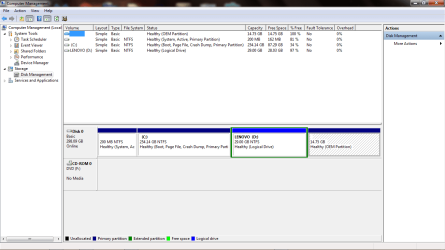
After your scans I think completing this tutorial by Golden would show us a lot of information. I'm presuming at this time you can boot into Windows 7.

Disk Management - Post a Screen Capture Image

Jack
 

My Computer

Computer type
PC/Desktop
Computer Manufacturer/Model Number
Home made Desktop
OS
Windows 10 Pro. 64/ version 1709 Windows 7 Pro/64
CPU
Intel i7-6800K @ 4.3
Motherboard
ASUS X-99 Deluxe II
Memory
Corsair Platinum 16 gig @2400
Graphics Card(s)
EVGA GTX 1070 OC
Monitor(s) Displays
Asus 27" LED LCD/VE278Q
Screen Resolution
1920-1080 or 1280-720 HDMI
Hard Drives
INTEL SSD 730-240 Gb Sata 3.0/
PSU
EVGA Platium 1200W
Case
Phanteks Luxe Tempered Glass 8 fans/ one radiator
Cooling
XSPC/ Water Cooled CPU
Keyboard
Das 4 Professional
Mouse
Logitech M705/MX Anywhere 2-S
Internet Speed
100 mbits
Antivirus
Microsoft Security Essentials/ Malwarebytes Premium 3.0/ SAS
Browser
I.E. 11 default/Firefox/ ISP Time Warner Cable/Spectrum
Other Info
LG BluRay Burner/
Sound system-KLipsch-THX/
Icy Dock ssd Hot Swap bays.
Good work Frank, at least you are making headway. Once the virus scans are done back up straight away in case everything fails again.

As Layback Bear has asked, posting a screen shot of Disc Management could help diagnose possible problems, but get all your files etc. copied first.
 

My Computer

Computer type
PC/Desktop
Computer Manufacturer/Model Number
Self built using existing case
OS
Windows 7 Home Premium 64 bit sp1
CPU
Intel i5 3570 3.4Ghz Ivy Bridge SKT 1155 quad core
Motherboard
Gigabyte Z77-HD3 SKT 1155 2xSata 3, 4x USB 3.0
Memory
G-Skill Rip Jaws 16Gb (8x2) DDR3 -1600 PC3 12800 CL 10 red
Graphics Card(s)
Gigabyte NVIDIA GT610 1Gb DDR3 810/1200 PCI-E 2.0 Silent
Sound Card
NVIDIA High Definition & Realtech High Definition Audio
Monitor(s) Displays
2 x Philips 226V4L 16:9 aspect ratio
Screen Resolution
1920 x 1080 HD
Hard Drives
Samsung 840 Pro 256gb SSD, SATA 3.
Hitachi Touro Portable 1tb, USB 3.0 HDD used for image b/ups.
PSU
Corsair VS450
Case
Codeng
Cooling
PSU fan & CPU fan
Keyboard
Logitech
Mouse
Logitech Wireless trackball M570
Internet Speed
Wireless 3G. 3mg down & 550kb up.
Antivirus
Bitdefender Internet Security 2020
Browser
Opera (Current Version) & Firefox
Other Info
MS Office 2013 Pro. Davis weather station software. MGE Nova 600 avr UPS.
LB, Ranger,

Good work Frank, at least you are making headway. Once the virus scans are done back up straight away in case everything fails again.

As Layback Bear has asked, posting a screen shot of Disc Management could help diagnose possible problems, but get all your files etc. copied first.

Here's screen cap ...

Frank
 

Attachments

  • Disk Mgmt (Partitions).png
    Disk Mgmt (Partitions).png
    30.4 KB · Views: 4

My Computer

Computer type
Laptop
Computer Manufacturer/Model Number
Lenovo
OS
Windows 7 Home Premium 64 Bit
CPU
AMD
Memory
8 GB
Antivirus
Avast
Browser
Firefox
Back
Top