Win 7 & XP: sharing Internet and files

iMaStEr

I like Linux
Member
Local time
5:11 PM
Messages
38
Location
LTU
I want to share Internet connection and files on two computers: one with Win7 (main) other with XP SP3. The connection is splitted with a switch: http://www.ipix.lt/images/36682673.jpg
Everything is connected, I also tried configuring, (files sharing enabled, conection sharing also enabled) but still can't get Internet working on the second PC (on first it's working as it should) and can't share files and see computers on both.
What can I do? What exactly needs to be done to share Internet and files?
 

My Computer

Computer Manufacturer/Model Number
PTG www.ptg.lt
OS
Win 7 Ultimate x64
CPU
AMD Phenom II X4 945 3000MHz
Motherboard
MSI 770-C45
Memory
Kingston 6GB DDR3
Graphics Card(s)
Sapphire Radeon HD4890 1GB GDDR5
Sound Card
Realtek
Monitor(s) Displays
Samsung 2243SN 21,5"
Screen Resolution
1920x1080
Hard Drives
WD Green 1TB 3GB/s
PSU
Gigabyte 550W Superb
Cooling
2x Nexus 80mm
Keyboard
Logitech Illuminated
Mouse
MS Wireless 2000
Internet Speed
100Mb/s DL & UL

My Computer

OS
Windows 7 Ultimate x64 Service Pack 1 (Build 6.1.7601)
CPU
Intel Core 2 Quad Q6600 (G0 Kentsfield) LGA775 (FC-LGA6)
Motherboard
GIGABYTE GA-EP35C-DS3R (Rev. 2.1)
Memory
Corsair TW3X4G1333C9A 4GB PC-10600 (2x XMS3 2GB)
Graphics Card(s)
ASUS nVIDIA GeForce 560
Sound Card
RealTek ALC885/889A/890
Monitor(s) Displays
ChiMei CMV CT-730D 17inch (LCD Monitor)
Screen Resolution
1280-1024 60Hertz (Ture Colour 32bit)
Hard Drives
2x Barracuda 7200.10 SATA 3.0Gb/s 160-GB Hard Drive ST3160815AS (AHCI)
PSU
ANTEC 750w Earthwatts
Case
Thermaltake Shark (VA7000SWA ATX) Full Tower
Cooling
Front 120mm fan (1400 RPM) /Rear 120mm (1400 RPM) blue LED
Keyboard
Labtec Media Desktop Y-SAD65
Mouse
Razer DeathAdder 3G Infrared Sensor (1800DPI)
Internet Speed
Telstra BigPond Elite Liberty ADSL2+ 24Mbps/256kbps
Other Info
ASUS PCE-N13 802.11n Wireless LAN card
You cannot use a simple Network Switch to connect two computers simultaneously to the internet - you need to use a Router.

This is because every computer connected to the internet must have a unique IP address, but the ISP only allocates one IP address. This means that only the first computer to connect will get an IP address and get online. When you use a Router, it [the router] gets the single IP address and, in turn, allocates addresses to the computers connected to it, using one of the address ranges reserved for Local Area Networks, most commonly 192.168.x.x addresses. The Router then "routes" the internet traffic to the appropriate computer in the Local Area Network.
 

My Computer

OS
Windows 7 & 8 64-bit, Mac OSX 10.8.2
OK, I see that I need a router.
But with switch, it's possible to connect to internet on the same time just from one (doesn't matter which) computer? Or just from the main computer?
 

My Computer

Computer Manufacturer/Model Number
PTG www.ptg.lt
OS
Win 7 Ultimate x64
CPU
AMD Phenom II X4 945 3000MHz
Motherboard
MSI 770-C45
Memory
Kingston 6GB DDR3
Graphics Card(s)
Sapphire Radeon HD4890 1GB GDDR5
Sound Card
Realtek
Monitor(s) Displays
Samsung 2243SN 21,5"
Screen Resolution
1920x1080
Hard Drives
WD Green 1TB 3GB/s
PSU
Gigabyte 550W Superb
Cooling
2x Nexus 80mm
Keyboard
Logitech Illuminated
Mouse
MS Wireless 2000
Internet Speed
100Mb/s DL & UL
If both computers are connected to the network switch (which is also connected to the modem), the first one that you boot should get an IP address and get online. The second one will probably get a 169.254.x.x APIPA address (Automatic Private IP Addressing) allocated by Windows.

Having said that, with Cable Modems in the UK, when swapping the connection between computers, the Modem has to be switched off for several minutes so that it loses the association between the existing connection (recognised by the network adapter's MAC address) and the IP address it has allocated to it. A new connection is then found and a different IP address allocated. I don't know whether this will be relevant to your situation.
 

My Computer

OS
Windows 7 & 8 64-bit, Mac OSX 10.8.2
You don't need a switch to share internet. The easiest and fastest way I know for two or more machines to get net access at home is to have a wireless network setup (if you are still working with wires, than stop and start using wireless). And have all your machines connected to this network wirelessly. If you have a desktop, and don't have wireless capabilty, wired her up with one of the ports on the router. Allow for auto detect IPs and you're laughing.
 

My Computer

Computer Manufacturer/Model Number
Lenovo ThinkPad T60
OS
Windows 7 Ultimate 64Bit
CPU
GenuineIntel Intel(R) Core(TM) DuoCore T2400 @ 1.83GHz
Motherboard
Intel(R) 82801G (ICH7 Family)
Memory
2.00 GB
Graphics Card(s)
Mobile Intel(R) 945 Express Chipset
Sound Card
SoundMAX Integrated Digital HD Audio
Monitor(s) Displays
ThinkPad Display
Screen Resolution
1400x1050
Hard Drives
100Gb SATA
Keyboard
Standard Keyboard
Mouse
HID-compliant Mouse
Internet Speed
Cable Broadband - 54Mbps
Other Info
Intel(R) PRO/1000 PL Network Connection
11a/b/g Wireless LAN Mini PCI Express Adapter
You don't need a switch to share internet. The easiest and fastest way I know for two or more machines to get net access at home is to have a wireless network setup (if you are still working with wires, than stop and start using wireless). And have all your machines connected to this network wirelessly. If you have a desktop, and don't have wireless capabilty, wired her up with one of the ports on the router. Allow for auto detect IPs and you're laughing.

Wireless is not the answer for everyone man what if he is a gamer you cant play games on wireless your ping just jumps too much.
 

My Computer

OS
Windows 7 Ultimate x64 Service Pack 1 (Build 6.1.7601)
CPU
Intel Core 2 Quad Q6600 (G0 Kentsfield) LGA775 (FC-LGA6)
Motherboard
GIGABYTE GA-EP35C-DS3R (Rev. 2.1)
Memory
Corsair TW3X4G1333C9A 4GB PC-10600 (2x XMS3 2GB)
Graphics Card(s)
ASUS nVIDIA GeForce 560
Sound Card
RealTek ALC885/889A/890
Monitor(s) Displays
ChiMei CMV CT-730D 17inch (LCD Monitor)
Screen Resolution
1280-1024 60Hertz (Ture Colour 32bit)
Hard Drives
2x Barracuda 7200.10 SATA 3.0Gb/s 160-GB Hard Drive ST3160815AS (AHCI)
PSU
ANTEC 750w Earthwatts
Case
Thermaltake Shark (VA7000SWA ATX) Full Tower
Cooling
Front 120mm fan (1400 RPM) /Rear 120mm (1400 RPM) blue LED
Keyboard
Labtec Media Desktop Y-SAD65
Mouse
Razer DeathAdder 3G Infrared Sensor (1800DPI)
Internet Speed
Telstra BigPond Elite Liberty ADSL2+ 24Mbps/256kbps
Other Info
ASUS PCE-N13 802.11n Wireless LAN card
According to the original post, nothing wrong with going wireless. As for playing games, i don't play games but if you were to play games "over" the internet, i can't see how a good wireless connection wouldnt do it. If you mean other types of games that you play over a physical network, that's different all together.
 

My Computer

Computer Manufacturer/Model Number
Lenovo ThinkPad T60
OS
Windows 7 Ultimate 64Bit
CPU
GenuineIntel Intel(R) Core(TM) DuoCore T2400 @ 1.83GHz
Motherboard
Intel(R) 82801G (ICH7 Family)
Memory
2.00 GB
Graphics Card(s)
Mobile Intel(R) 945 Express Chipset
Sound Card
SoundMAX Integrated Digital HD Audio
Monitor(s) Displays
ThinkPad Display
Screen Resolution
1400x1050
Hard Drives
100Gb SATA
Keyboard
Standard Keyboard
Mouse
HID-compliant Mouse
Internet Speed
Cable Broadband - 54Mbps
Other Info
Intel(R) PRO/1000 PL Network Connection
11a/b/g Wireless LAN Mini PCI Express Adapter
To go "wireless" does still require the use of a Router. That's the essential item that's preventing the original poster from connecting multiple computers to the internet simultaneously.

The alternative, of course, is to connect one (Host) PC to the internet and run "Internet Connection Sharing" to provide access to the second (Client) PC.
 

My Computer

OS
Windows 7 & 8 64-bit, Mac OSX 10.8.2
IP --- > Modem--> wireless router (e.g Linksys WRT54G) ----> laptops/desktop (with wireless card).

The wireless router functions as a means to broadcast your wireless network. If you don't want to get one, you might need to get a modem that has built-in wireless router (same concept just that the modem has the router feature which does the broadcasting).
 

My Computer

Computer Manufacturer/Model Number
Lenovo ThinkPad T60
OS
Windows 7 Ultimate 64Bit
CPU
GenuineIntel Intel(R) Core(TM) DuoCore T2400 @ 1.83GHz
Motherboard
Intel(R) 82801G (ICH7 Family)
Memory
2.00 GB
Graphics Card(s)
Mobile Intel(R) 945 Express Chipset
Sound Card
SoundMAX Integrated Digital HD Audio
Monitor(s) Displays
ThinkPad Display
Screen Resolution
1400x1050
Hard Drives
100Gb SATA
Keyboard
Standard Keyboard
Mouse
HID-compliant Mouse
Internet Speed
Cable Broadband - 54Mbps
Other Info
Intel(R) PRO/1000 PL Network Connection
11a/b/g Wireless LAN Mini PCI Express Adapter
#5 will try that turning off modem EDIT: didn't help
#9 ICS already enabled
#10 I don't have router, just a switch

Also, my friend said that it's possible to share connection and files using a 'pc-2-pc' cable, if using a USB cable (have this) from modem to main PC. Is that true?
 
Last edited:

My Computer

Computer Manufacturer/Model Number
PTG www.ptg.lt
OS
Win 7 Ultimate x64
CPU
AMD Phenom II X4 945 3000MHz
Motherboard
MSI 770-C45
Memory
Kingston 6GB DDR3
Graphics Card(s)
Sapphire Radeon HD4890 1GB GDDR5
Sound Card
Realtek
Monitor(s) Displays
Samsung 2243SN 21,5"
Screen Resolution
1920x1080
Hard Drives
WD Green 1TB 3GB/s
PSU
Gigabyte 550W Superb
Cooling
2x Nexus 80mm
Keyboard
Logitech Illuminated
Mouse
MS Wireless 2000
Internet Speed
100Mb/s DL & UL
If you were using "Internet Connection Sharing", you would connect the two computers directly via your switch, which shouldn't also be connected to the Modem. The PC you're using as the Host would then connect to the Modem (either by USB or by ethernet, but to use ethernet the PC would need to have two network adapters installed).

What your friend is suggesting is to connect the two computers "Network Adapter" to "Network Adapter" with a crossover ethernet cable, but the same effect is obtained by connecting them via your existing "switch".
 

My Computer

OS
Windows 7 & 8 64-bit, Mac OSX 10.8.2
OK, will try that!
EDIT: after disconnecting Ethernet cable and connecting modem to pc with a USB cable, I am not able to connect to Internet at all..
 
Last edited:

My Computer

Computer Manufacturer/Model Number
PTG www.ptg.lt
OS
Win 7 Ultimate x64
CPU
AMD Phenom II X4 945 3000MHz
Motherboard
MSI 770-C45
Memory
Kingston 6GB DDR3
Graphics Card(s)
Sapphire Radeon HD4890 1GB GDDR5
Sound Card
Realtek
Monitor(s) Displays
Samsung 2243SN 21,5"
Screen Resolution
1920x1080
Hard Drives
WD Green 1TB 3GB/s
PSU
Gigabyte 550W Superb
Cooling
2x Nexus 80mm
Keyboard
Logitech Illuminated
Mouse
MS Wireless 2000
Internet Speed
100Mb/s DL & UL
When you connect to the modem by USB, instead of by ethernet, it is normally necessary to install the software which is required to create the USB connection. Did you get a CD with the modem?
 

My Computer

OS
Windows 7 & 8 64-bit, Mac OSX 10.8.2
Yes I think I have some kind of CD with modem, will try it and post here.
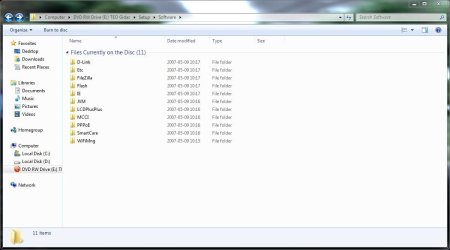
EDIT: There're quite a lot setups (see image), maybe you know which should I install?
 

Attachments

  • Capture.JPG
    Capture.JPG
    60.7 KB · Views: 36
Last edited:

My Computer

Computer Manufacturer/Model Number
PTG www.ptg.lt
OS
Win 7 Ultimate x64
CPU
AMD Phenom II X4 945 3000MHz
Motherboard
MSI 770-C45
Memory
Kingston 6GB DDR3
Graphics Card(s)
Sapphire Radeon HD4890 1GB GDDR5
Sound Card
Realtek
Monitor(s) Displays
Samsung 2243SN 21,5"
Screen Resolution
1920x1080
Hard Drives
WD Green 1TB 3GB/s
PSU
Gigabyte 550W Superb
Cooling
2x Nexus 80mm
Keyboard
Logitech Illuminated
Mouse
MS Wireless 2000
Internet Speed
100Mb/s DL & UL
Try the D-link folder and see if there is anything that looks as if it relates to setting up a USB connection.
 

My Computer

OS
Windows 7 & 8 64-bit, Mac OSX 10.8.2
Like i suggested back a few post...go wireless, get your youself a wireless router and u'll be connected in no time.
 

My Computer

Computer Manufacturer/Model Number
Lenovo ThinkPad T60
OS
Windows 7 Ultimate 64Bit
CPU
GenuineIntel Intel(R) Core(TM) DuoCore T2400 @ 1.83GHz
Motherboard
Intel(R) 82801G (ICH7 Family)
Memory
2.00 GB
Graphics Card(s)
Mobile Intel(R) 945 Express Chipset
Sound Card
SoundMAX Integrated Digital HD Audio
Monitor(s) Displays
ThinkPad Display
Screen Resolution
1400x1050
Hard Drives
100Gb SATA
Keyboard
Standard Keyboard
Mouse
HID-compliant Mouse
Internet Speed
Cable Broadband - 54Mbps
Other Info
Intel(R) PRO/1000 PL Network Connection
11a/b/g Wireless LAN Mini PCI Express Adapter
In the D link folder the was only setup.exe, installed it, but it's an utily for D-link airplus G network adapter :)
 

My Computer

Computer Manufacturer/Model Number
PTG www.ptg.lt
OS
Win 7 Ultimate x64
CPU
AMD Phenom II X4 945 3000MHz
Motherboard
MSI 770-C45
Memory
Kingston 6GB DDR3
Graphics Card(s)
Sapphire Radeon HD4890 1GB GDDR5
Sound Card
Realtek
Monitor(s) Displays
Samsung 2243SN 21,5"
Screen Resolution
1920x1080
Hard Drives
WD Green 1TB 3GB/s
PSU
Gigabyte 550W Superb
Cooling
2x Nexus 80mm
Keyboard
Logitech Illuminated
Mouse
MS Wireless 2000
Internet Speed
100Mb/s DL & UL
Back
Top