Win firewall

cowpoke

New member
Local time
11:53 AM
Messages
22
Hello, I'm running Win 7 64 bit.
On a Dell machine, came with Mcafee firewall.

It looks like the Win firewall is off due to the Mcafee being on ?
i.e., when I look at the firewall section under Control panel it tells me the FW is being managed by Mcafee....

Questions,
should I stick with the Mc FW (in the past I haven't heard good things about Mc)
If I decide to use the Win FW, how do I turn it on ?
(ive looked around and it appears that since the Mc FW is on it won't let me do that)
I'm guessing that I will have to uninstall the Mc and then turn on the Win FW
 

My Computer

Computer type
PC/Desktop
OS
WINDOWS 7
I'm guessing the MCFee came as a trial and also included the AV solution as well, it's normally bundled with new PCs.

You could keep it and at the end of the trial just subscribe. It's not as big a resource hog as it used to be.

If you want to unistall it; go to the MCafee website and download their uninstall tool; that's the cleanest way to remove it.

There are plenty of free AV/Firewall solutions out there MS Security essentials is pretty good, but the best tool is common sense!!
 

My Computer

Computer type
PC/Desktop
OS
openSUSE 13.1 64bit
CPU
i7
Motherboard
Gigabyte UD5
Memory
6gb Gskill matched DDR3
Graphics Card(s)
Radeon HD4600
Sound Card
All onboard
Monitor(s) Displays
HP 2159v
Hard Drives
120gb Samsung SSD for the OS
2 * 1tb WD Caviar Black for storage
PSU
Corsair 750w
Case
Antec 920
Cooling
Aksas Nero
Hi Welcome to Seven Forums ... Use the Uninstall tool for Mcafee .. Windows should then ask you turn the Firewall on ..
 

My Computer

Computer Manufacturer/Model Number
W530-3630QM1
OS
windows 7 home 64bit
CPU
INTEL-CORE I7
Memory
16GB
Hard Drives
750GB
Browser
Chrome
So should I use the Uninstall or the Mcfee uninstall via their website?

Do you distinguish between a FW and AV/Spyware tools ?

Thanks
 

My Computer

Computer type
PC/Desktop
OS
WINDOWS 7
A firewall and AV software perform very different functions. The purpose of a firewall is to prevent the entrance of data to your computer when it is initiated from some outside source. There is more but that is the general idea. But if offers no protection from malware when it is downloaded by you browser or other software. Firewalls and AV software have complimentary functions and you need both.

It is not good to have more than one firewall installed. They all work in slightly different ways and the interactions can have unpredictable results, including reduced protection. Much the same for multiple active AV products.
 

My Computer

Computer type
PC/Desktop
Computer Manufacturer/Model Number
HP
OS
Windows 7 Pro 64 bit
CPU
Xeon W3520
Memory
8 GB
Graphics Card(s)
Nvidia Geforce 210
Understood, on the FW AV differences, thanks.

I plan on removing the Mcfee (just haven't heard much good about them over the yrs ...)
Is my only option for FW, Windows or are there better FW's that I could use ?
 

My Computer

Computer type
PC/Desktop
OS
WINDOWS 7
Their are hundreds of free AV/Firewall solutions out there...asking in a forum will usually get you a million options and spark a war over people favourites.

MSE is a reasonably good solution; back it up with something like spyware blaster and a weekly scan with antimalware bytes add in a pinch of common sense and you'll be fine:
 

My Computer

Computer type
PC/Desktop
OS
openSUSE 13.1 64bit
CPU
i7
Motherboard
Gigabyte UD5
Memory
6gb Gskill matched DDR3
Graphics Card(s)
Radeon HD4600
Sound Card
All onboard
Monitor(s) Displays
HP 2159v
Hard Drives
120gb Samsung SSD for the OS
2 * 1tb WD Caviar Black for storage
PSU
Corsair 750w
Case
Antec 920
Cooling
Aksas Nero
So should I use the Uninstall or the Mcfee uninstall via their website?
~~~
Use the regular uninstall method via
Control Panel > Programs and Features.

Most of the custom uninstallers from vendors' websites (that I've seen) will say to try the normal method first. Some of the custom uninstallers will just run the normal uninstaller for you and then exit. If the normal uninstaller cannot be started, that is when the custom uninstaller kicks in. You can watch what they do via Process Explorer and Process Monitor.


~~~
Is my only option for FW, Windows or are there better FW's that I could use ?
The Windows firewall is fine*. The uninstall process for McAfee's firewall tool should automatically turn the the Windows firewall back on. Let us know if that does not happen.

*Some people will disagree. Some will claim that you need a firewall that halts outgoing traffic too. Some of the people making that claim have not noticed that their 3rd party firewall allows software (including infected files) to silently change the outgoing firewall rules. There are 3rd party firewall tools that do not allow such changes, but lots of users don't want to deal with the setup/popups from such firewalls. The Window firewall can halt outgoing traffic - if you care to set it up to do so.
 

My Computer

Computer type
Laptop
Computer Manufacturer/Model Number
Employer provided Dell Latitude
OS
W7 Pro SP1 64bit
CPU
i7
Memory
8GB
Graphics Card(s)
Intel HD Graphics
Hard Drives
crappy SSD
Antivirus
Employer mandated Symantec Endpoint Protection
Browser
Pale Moon 64bit, IE11 64bit & Chrome 64bit
Your thoughts on a couple of tools I've used in the past.

Spybot
CCleaner
 

My Computer

Computer type
PC/Desktop
OS
WINDOWS 7
CCleaner works fine. You don't need to use the registry part of it unless there is a specific problem you need to solve.


I don't use Spybot S&D so I've not studied it. I installed it into a virtual machine to have a look at the free feature set. Below are my first impressions/comments (they easily could be wrong :-)

Some features in Spybot S&D cater to the tin foil hat crowd (e.g. delete Explorer streams). I did not see a way to have Spybot S&D prevent Explorer streams from being recorded... instead, Spybot S&D just offers to clear some (but not all) of them after a scan.

Some features in Spybot S&D prevent some websites from working properly (e.g. prevent 3rd party cookies). The support websites for Mozy.com (and other websites) require 3rd party cookies because of the convoluted array of subcontracting Mozy has done with salesforce.com. [Yes, I'm aware of how 3rd party cookies can be abused.]

Spybot S&D's HOSTS file is large and some say that this can slow down your browser. Spybot S&D loads up the restricted sites with a very long list of websites (a lot of which do not exist anymore). This list seems redundant (given the HOSTS file), it causes IE to use a bit more RAM* and causes IE to load a bit slower**.

*but not so much that most systems cannot handle it
**you probably won't notice a second or two delay

Spybot S&D claims to remove your browsing history, but like so many products that make this claim, Spybot S&D has not changed how it does this to handle IE10 and above. Your surfing history is still there... you just might not know how to see it.
 

My Computer

Computer type
Laptop
Computer Manufacturer/Model Number
Employer provided Dell Latitude
OS
W7 Pro SP1 64bit
CPU
i7
Memory
8GB
Graphics Card(s)
Intel HD Graphics
Hard Drives
crappy SSD
Antivirus
Employer mandated Symantec Endpoint Protection
Browser
Pale Moon 64bit, IE11 64bit & Chrome 64bit
Thanks for the review, I use Firefox, so not sure if some of the concerns mentioned would apply.
Any thoughts on Malwarebytes ?
Or any recommendations ?
 

My Computer

Computer type
PC/Desktop
OS
WINDOWS 7

My Computer

Computer type
Laptop
Computer Manufacturer/Model Number
Employer provided Dell Latitude
OS
W7 Pro SP1 64bit
CPU
i7
Memory
8GB
Graphics Card(s)
Intel HD Graphics
Hard Drives
crappy SSD
Antivirus
Employer mandated Symantec Endpoint Protection
Browser
Pale Moon 64bit, IE11 64bit & Chrome 64bit
Long thread there, looks like for now some are staying with the 1.75...
Is that how you read it ?
 

My Computer

Computer type
PC/Desktop
OS
WINDOWS 7
You can stay with 1.75 for now...
...but some have no problems with version 2.
 

My Computer

Computer type
Laptop
Computer Manufacturer/Model Number
Employer provided Dell Latitude
OS
W7 Pro SP1 64bit
CPU
i7
Memory
8GB
Graphics Card(s)
Intel HD Graphics
Hard Drives
crappy SSD
Antivirus
Employer mandated Symantec Endpoint Protection
Browser
Pale Moon 64bit, IE11 64bit & Chrome 64bit
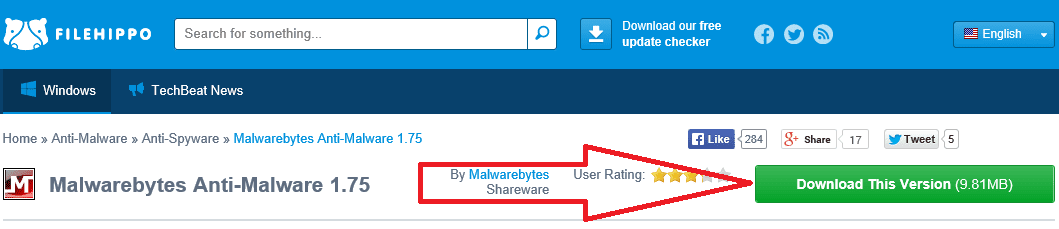
Didn't see the 1.75 at the Malware site...maybe I missed it, any idea where to get it.
 

My Computer

Computer type
PC/Desktop
OS
WINDOWS 7

My Computer

Computer type
Laptop
Computer Manufacturer/Model Number
Employer provided Dell Latitude
OS
W7 Pro SP1 64bit
CPU
i7
Memory
8GB
Graphics Card(s)
Intel HD Graphics
Hard Drives
crappy SSD
Antivirus
Employer mandated Symantec Endpoint Protection
Browser
Pale Moon 64bit, IE11 64bit & Chrome 64bit
Malwarebytes Anti-Malware Pro Lifetime 1 PC - Newegg.com

Above is a link to 1.75 "Pro", with a Lifetime license for 1 PC; $30. I saw a coupon for it today for only $15, but I think you have to be on Newegg's emailing list to get that price.

If you buy this, you can upgrade to the new "Premium" 2.0 at no charge and still retain the Lifetime license for 1 PC.

If, on the other hand, you instead buy the new "Premium" 2.0, you will be locked into a subscription model where you pay I think $25 a year for 3 PCs.

Up to you to decide which is the better value. If you don't want to get locked into a subscription model, you need to jump on 1.75 Pro right away; it will not be offered indefinitely and you would then be forced into Premium and its subscription model.
 

My Computer

Computer type
PC/Desktop
Computer Manufacturer/Model Number
Ignatz Special; 4 speed manual gearbox; factory air conditioning; one of one
OS
Windows 7 Home Premium SP1, 64-bit
CPU
Intel Skylake i5-6600K, not overclocked
Motherboard
AsRock Z170M Extreme 4, micro ATX
Memory
8 GB HyperX DDR4-2666 (2 x 4 GB)
Graphics Card(s)
none; graphics are integrated on CPU
Sound Card
onboard: Realtek ALC1150; external: USB Behringer UF0-202
Monitor(s) Displays
Dell S2340M 23 inch IPS
Screen Resolution
1600 x 900
Hard Drives
System: Crucial MX100 series SSD, 128 GB;
Data: Samsung Spinpoint 103SJ, 1 TB;
Backup: WD Caviar Green WD30EZRX-00D8PB0, 3 TB
PSU
Rosewill SilentNight 500 watt fanless, semi-modular
Case
Antec Solo II
Cooling
Noctua NH-U12S; Noctua F12 intake, Noctua S12A exhaust
Keyboard
Microsoft 200 6JH-00001 USB
Mouse
Dell or Microsoft optical wired; USB
Antivirus
Microsoft Security Essentials and Malwarebytes Premium
Browser
Pale Moon
Other Info
All fans PWM; speeds at idle: CPU circa 500 rpm; intake circa 600 rpm; exhaust circa 600 rpm; CPU temps 27 idle and 47 C load in a warm room (27 C/81 F) when running Intel Extreme Tuning Utility stress test.
Back
Top