Win7 64bit unusable - help

eckostate

New member
Local time
11:01 AM
Messages
7
Clean install win7 home prem. CPU usage is at a constant 100% - 32bit runs smooth but I needed 64bit for all 8g of my ram. Everything I do is so slow, windows is unusable in this condition. All processes/services are normal - I've not did anything to it other than clean install. USB drive won't even reconize in 64bit when it does in 32. This happens from boot, it's slow as soon as windows starts to load. Im just idle on the desktop with task manager open with 100% CPU - all non Microsoft services turned off or on makes no difference.

Here is what I am running:

1*x*Thermaltake VF1000SWA Silver Aluminum MicroATX Desktop Computer Case
1*x*GIGABYTE GA-G33M-DS2R LGA 775 Intel G33 Micro ATX Intel Motherboard
1*x*EVGA 01G-P3-1556-KR GeForce GTX 550 Ti (Fermi) FPB 1GB 192-bit GDDR5 PCI Express 2.0 x16 HDCP Ready SLI Support Video Card
1*x*CORSAIR HX Series CMPSU-520HX 520W ATX12V v2.2 and EPS12V 2.91 SLI Certified CrossFire Ready 80 PLUS Certified Modular Active PFC Compatible with Core i7 Power Supply
1*x*Intel Core 2 Duo E6600 Conroe 2.4GHz LGA 775 65W Dual-Core Processor BX80557E6600
2*x*G.SKILL 4GB (2 x 2GB) 240-Pin DDR2 SDRAM DDR2 800 (PC2 6400) Dual Channel Kit Desktop Memory Model F2-6400CL5D-4GBPQ
1*x*SAMSUNG SpinPoint T Series HD501LJ 500GB 7200 RPM SATA 3.0Gb/s 3.5" Hard Drive -Bare Drive
1*x*LITE-ON 20X DVD±R DVD Burner with LightScribe Black SATA Model LH-20A1L-05 LightScribe Support - OEM
1*x*Thermaltake CL-P0257 Blue orb II CPU Cooler for LGA775 & K8
 
Last edited:

My Computer

OS
Windows 7 Home Premium 64 bit
Hello, eckostate first of all can you make a picture of Proces Explorer: Process Explorer To see wich proces is using 100% cpu
 

My Computer

Computer Manufacturer/Model Number
Homebuilt
OS
Windows 7 Home Premium x64
CPU
Core i7 2600K
Motherboard
Asus P8Z77-V LX
Memory
4GB DDR3 Kingston HyperX
Graphics Card(s)
Gigabyte GTX 670
Sound Card
Realtek HD Audio
Monitor(s) Displays
Delium Monitor
Screen Resolution
1360 x 768
Hard Drives
C: (500GB)
PSU
Corsair 620W
Case
Antec
Cooling
Cooling Master
Keyboard
Logitech
Mouse
Logitech wireless mouse M 505
Internet Speed
60MBPS
It's going to take some time IF I can even do it. Stuff to load and stop "(not responding)" takes me a while to get around. Also when I say this starts when windows starts loading, I mean right after the POST it's 100% noticeable. Before I get to the password screen for windows I'm greeted with random black screens / windows background views alternating back and forth. I would also like to state that all windows 7 installs take me 9+ hours to do. But this is a first 64bit install for me. Like I said 32bit is problem free.
 

My Computer

OS
Windows 7 Home Premium 64 bit
You may need 64bit drivers for Windows 7 64bit. They may be different than W7 32bit.

Go here.> http://www.gigabyte.com/products/product-page.aspx?pid=2600#dl

Click the download tab and select Windows 7 64bit for 64bit drivers.
Some drivers may have two versions a 32 and 64bit. and you need the right one.
W 7 64bit drivers for W 7 64bit.
 

My Computer

Computer Manufacturer/Model Number
Hopalong/ Godzilla
OS
Windows7 Pro 64bit SP-1; Windows XP Pro 32bit
CPU
Intel Core i7-870 Lynnfield 2.93GHz LGA 1156 95W Quad-Core
Motherboard
ASUS P7P55D-E PRO
Memory
8GB@1400MHz Crucial Ballistix DDR3-1600 4x2GB
Graphics Card(s)
ASUS ENGTX460 DirectCU/2DI/1GD5 1GB 256-bit GDDR5
Sound Card
VIA Onboard
Monitor(s) Displays
Asus VS248H-P 24"; Samsung SyncMaster 941BW 19"ws
Screen Resolution
1920x1080; 1440x900
Hard Drives
Samsung 830 120GB SSD
Intel 320 120GB SSD
Western Digital Caviar Black WD7501AALS 750GB 7200 RPM SATA 3.0Gb/s
Western Digital Caviar Black WD6401AALS 640GB 7200 RPM SATA 3.0Gb/s
PSU
COOLER MASTER Silent Pro RS850-AMBAJ3-US 850W Modular
Case
COOLER MASTER HAF 932 RC-932-KKN5-GP Black
Cooling
Scythe "Mugen-2 Rev.B" (2 ScytheKaze-Jyuni PWM fans)
Keyboard
Logitech K-320
Mouse
Kensington
Antivirus
Avast Inernet Suite
Browser
IE 9 ; Chrome
I'll try to update those as well even bios. Could that be causing a slow boot as well?
 

My Computer

OS
Windows 7 Home Premium 64 bit
Yes it can but try ProcesExplorer first maybe you have a 100% using Hardware Interrupts so take a look
 

My Computer

Computer Manufacturer/Model Number
Homebuilt
OS
Windows 7 Home Premium x64
CPU
Core i7 2600K
Motherboard
Asus P8Z77-V LX
Memory
4GB DDR3 Kingston HyperX
Graphics Card(s)
Gigabyte GTX 670
Sound Card
Realtek HD Audio
Monitor(s) Displays
Delium Monitor
Screen Resolution
1360 x 768
Hard Drives
C: (500GB)
PSU
Corsair 620W
Case
Antec
Cooling
Cooling Master
Keyboard
Logitech
Mouse
Logitech wireless mouse M 505
Internet Speed
60MBPS
F4i0.67 MB2009/07/31
  1. Update latest onboard VGA BIOS
F30.66 MB2007/11/27
  1. Update CPU ID (Support Intel Yorkfield CPU)
  2. Fix: Some of 1000 GB (1TB) HDDs will be detected size error.
F20.65 MB2007/09/07
  1. Fix PS2 keyboard compatibility issues
F10.64 MB2007/06/27
  1. First Release
...
From the above listed Bios versions list there is no specific fix for Win 7 64bit.
So a Bios update probably won't help but who knows for sure.

I'd check the drivers first.
The drivers may be all 32 and 64bit.

My Asus drivers were all 32/64bit so there were no different ones.
So this may not be the problem but a good place to start.

Of course get the newest driver they have by date if newer than what you have installed or on CD.
 

My Computer

Computer Manufacturer/Model Number
Hopalong/ Godzilla
OS
Windows7 Pro 64bit SP-1; Windows XP Pro 32bit
CPU
Intel Core i7-870 Lynnfield 2.93GHz LGA 1156 95W Quad-Core
Motherboard
ASUS P7P55D-E PRO
Memory
8GB@1400MHz Crucial Ballistix DDR3-1600 4x2GB
Graphics Card(s)
ASUS ENGTX460 DirectCU/2DI/1GD5 1GB 256-bit GDDR5
Sound Card
VIA Onboard
Monitor(s) Displays
Asus VS248H-P 24"; Samsung SyncMaster 941BW 19"ws
Screen Resolution
1920x1080; 1440x900
Hard Drives
Samsung 830 120GB SSD
Intel 320 120GB SSD
Western Digital Caviar Black WD7501AALS 750GB 7200 RPM SATA 3.0Gb/s
Western Digital Caviar Black WD6401AALS 640GB 7200 RPM SATA 3.0Gb/s
PSU
COOLER MASTER Silent Pro RS850-AMBAJ3-US 850W Modular
Case
COOLER MASTER HAF 932 RC-932-KKN5-GP Black
Cooling
Scythe "Mugen-2 Rev.B" (2 ScytheKaze-Jyuni PWM fans)
Keyboard
Logitech K-320
Mouse
Kensington
Antivirus
Avast Inernet Suite
Browser
IE 9 ; Chrome
Yeah it looks like all drivers are both 32/64 - I might still do bios but tell me all updates are in the newest version cause it will take a while to dl all those with this lag. Still working on PM, writing this all on phone atm.
 

My Computer

OS
Windows 7 Home Premium 64 bit
Yeah it looks like all drivers are both 32/64 - I might still do bios but tell me all updates are in the newest version cause it will take a while to dl all those with this lag. Still working on PM, writing this all on phone atm.
Okay on already 64 bit. It was worth checking.

I'll make a post for more help also.
See if we can get you working properly with W7 64bit.

Mike
 

My Computer

Computer Manufacturer/Model Number
Hopalong/ Godzilla
OS
Windows7 Pro 64bit SP-1; Windows XP Pro 32bit
CPU
Intel Core i7-870 Lynnfield 2.93GHz LGA 1156 95W Quad-Core
Motherboard
ASUS P7P55D-E PRO
Memory
8GB@1400MHz Crucial Ballistix DDR3-1600 4x2GB
Graphics Card(s)
ASUS ENGTX460 DirectCU/2DI/1GD5 1GB 256-bit GDDR5
Sound Card
VIA Onboard
Monitor(s) Displays
Asus VS248H-P 24"; Samsung SyncMaster 941BW 19"ws
Screen Resolution
1920x1080; 1440x900
Hard Drives
Samsung 830 120GB SSD
Intel 320 120GB SSD
Western Digital Caviar Black WD7501AALS 750GB 7200 RPM SATA 3.0Gb/s
Western Digital Caviar Black WD6401AALS 640GB 7200 RPM SATA 3.0Gb/s
PSU
COOLER MASTER Silent Pro RS850-AMBAJ3-US 850W Modular
Case
COOLER MASTER HAF 932 RC-932-KKN5-GP Black
Cooling
Scythe "Mugen-2 Rev.B" (2 ScytheKaze-Jyuni PWM fans)
Keyboard
Logitech K-320
Mouse
Kensington
Antivirus
Avast Inernet Suite
Browser
IE 9 ; Chrome
alright, here is the screenshot of process explorer - i dont see anything crazy but then again i dont 100% know what i am looking at/for.
 

Attachments

  • proexp01.jpg
    proexp01.jpg
    127.8 KB · Views: 37

My Computer

OS
Windows 7 Home Premium 64 bit
It almost appears as if Windows Update is causing it. If you disable the Windows Update service (temporarily), does the CPU usage subside, or move to another process?
 

My Computer

Computer type
PC/Desktop
Computer Manufacturer/Model Number
Custom
OS
Windows 10 Pro x64
CPU
Intel Core i7 4790K @ 4.5GHz
Motherboard
Asus Maximus Hero VII
Memory
32GB DDR3
Graphics Card(s)
Nvidia GeForce GTX970
Sound Card
Realtek HD Audio
Screen Resolution
1920x1200
Hard Drives
1x Samsung 250GB SSD
4x WD RE 2TB (RAIDZ)
PSU
Corsair AX760i
Case
Fractal Design Define R4
Cooling
Noctua NH-D15
alright, here is the screenshot of process explorer - i dont see anything crazy but then again i dont 100% know what i am looking at/for.
TrustedInstaller and svchost are using a lot of cpu are you installing updates ??

Also i recommend you to do a clean windows 7 installation and update your drivers with Windows Update and see if that works :p

But first of all disable windows update service
 

My Computer

Computer Manufacturer/Model Number
Homebuilt
OS
Windows 7 Home Premium x64
CPU
Core i7 2600K
Motherboard
Asus P8Z77-V LX
Memory
4GB DDR3 Kingston HyperX
Graphics Card(s)
Gigabyte GTX 670
Sound Card
Realtek HD Audio
Monitor(s) Displays
Delium Monitor
Screen Resolution
1360 x 768
Hard Drives
C: (500GB)
PSU
Corsair 620W
Case
Antec
Cooling
Cooling Master
Keyboard
Logitech
Mouse
Logitech wireless mouse M 505
Internet Speed
60MBPS
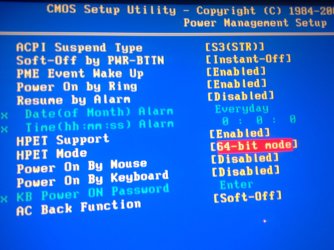
Check for this in your bios,

Bios\Power Management Setup\HPET Mode,set it to 64-bit mode.
 

Attachments

  • 07122011851.jpg
    07122011851.jpg
    368.1 KB · Views: 1

My Computer

Computer Manufacturer/Model Number
Custom Built by me.
OS
Windows 7 Ultimate 64bit SP1
CPU
Intel Core 2 Quad Q6600
Motherboard
Gigabyte GA-X38-DS4
Memory
2X2GB DDR2 PC6400 800MHZ DUAL CHANNEL
Graphics Card(s)
XFX RADEON HD 6850 1GB GDDR5
Sound Card
2/4/5.1/7.1-channel Realtek High Definition
Monitor(s) Displays
Samsung LE40A656F1 1080p 100Hz LCD HD TV 50,000:1
Screen Resolution
1366x768 in Desktop,1920x1080p in gaming and video
Hard Drives
C:\WD VelociRaptor 150 GB,10,000 RPM
E:\WESTERN DIGITAL WD15EADS 1.5TB CAVIAR GREEN SATA2 F:\WESTERN DIGITAL WD15EADS 1.5TB CAVIAR GREEN SATA2
PSU
THERMALTAKE W0229 TOUGHPOWER XT 750W
Case
A-Case Twin Engine BB
Cooling
3 x thermaltake smart case fan II + 1 arctic cooling fan
Keyboard
Wireless Logitech LX710
Mouse
Logitech Wireless Gaming Mouse G700
Internet Speed
ADSL 12000 plus
Other Info
Mouse Logitech G700,with 13 buttons who needs keyboard in RPG?

D:\Sony high speed sata Dvd Rewriter
Logitech Cordless Rumblepad 2
Its windows update browsing what to download for your computer, let it run for some minutes and see if the high cpu usage stops?
 

My Computer

Computer type
PC/Desktop
OS
Microsoft Windows 10 Professional / Windows 7 Professional
CPU
Intel i5-3570
Motherboard
Lenovo Mahobay
Memory
16GB DDR3
Graphics Card(s)
AMD Radeon HD 7850 2GB
Sound Card
(1) Realtek HD Audio (2) AMD HD Audio
Monitor(s) Displays
LG LS192WS
Screen Resolution
1440 x 900 @ 32bit color
Hard Drives
(1) SUV300S37A/120G (2) ST3500413AS SATA Disk Device AHCI mode enabled.
PSU
Corsair HX620
Case
Thermaltake V4 Black Edition
Cooling
Cooler Master Hyper 212 + Artic Silver 5 on CPU/GPU
Keyboard
Dell SK-8115
Mouse
Razer Copperhead with MAPED mat (awesome!)
Internet Speed
100 Mbps up/down
Browser
Chrome
Ok so I took out two sticks of ram and problem solved. Now I'm back down to 4g (the whole reason for 64bit was for more ram) >.< any ideas now?
 

My Computer

OS
Windows 7 Home Premium 64 bit

My Computer

Computer Manufacturer/Model Number
Custom Built by me.
OS
Windows 7 Ultimate 64bit SP1
CPU
Intel Core 2 Quad Q6600
Motherboard
Gigabyte GA-X38-DS4
Memory
2X2GB DDR2 PC6400 800MHZ DUAL CHANNEL
Graphics Card(s)
XFX RADEON HD 6850 1GB GDDR5
Sound Card
2/4/5.1/7.1-channel Realtek High Definition
Monitor(s) Displays
Samsung LE40A656F1 1080p 100Hz LCD HD TV 50,000:1
Screen Resolution
1366x768 in Desktop,1920x1080p in gaming and video
Hard Drives
C:\WD VelociRaptor 150 GB,10,000 RPM
E:\WESTERN DIGITAL WD15EADS 1.5TB CAVIAR GREEN SATA2 F:\WESTERN DIGITAL WD15EADS 1.5TB CAVIAR GREEN SATA2
PSU
THERMALTAKE W0229 TOUGHPOWER XT 750W
Case
A-Case Twin Engine BB
Cooling
3 x thermaltake smart case fan II + 1 arctic cooling fan
Keyboard
Wireless Logitech LX710
Mouse
Logitech Wireless Gaming Mouse G700
Internet Speed
ADSL 12000 plus
Other Info
Mouse Logitech G700,with 13 buttons who needs keyboard in RPG?

D:\Sony high speed sata Dvd Rewriter
Logitech Cordless Rumblepad 2
I changed that to 64bit mode before I even removed the ram cause I figured that was the problem. Currently using that setting now, just 100% cpu with 8g ram still even with that setting (my board is capable of 8g) idk :(
 
Last edited:

My Computer

OS
Windows 7 Home Premium 64 bit
Run a full scan with Malwarebytes. Install a free lightweight AV like Avast or Microsoft Security Essentials and run a full scan.

Test your RAM and slots thoroughly following these steps: RAM - Test with Memtest86+

Recheck that your RAM is spec'd correctly without doubt.

Once RAM is confirmed or bad stick/slot removed, I would reinstall following these steps to get a perfect reinstall, particularly if they vary greatly from the way you first installed: Reinstalling Windows 7
 
Last edited:
alright, here is the screenshot of process explorer - i dont see anything crazy but then again i dont 100% know what i am looking at/for.

I had a feeling it was svchost.exe.

This is caused by a virus, same thing happened to me, however it is easy to remove if you have a restore disk or a Restore Point.

Use a System Restore point or a clean install, I used a System Restore, but others may be able to troubleshoot even more with a more advanced method.

To enter System Restore, repeatedly press F8 during Boot, and go down to System Restore, select a date that was before the problem happened.

Hope this helps, and good luck.

Joe.
 

My Computer

Computer Manufacturer/Model Number
iRush Pro
OS
Windows 7 Ultimate x64
CPU
Intel Core i5 2500K Processor
Motherboard
Intel H67 Chipset Motherboard (Micro ATX)
Memory
2x4GB DDR3 1333Mhz Memory
Graphics Card(s)
Novatech Radeon 6770 1GB Graphics Card
Hard Drives
1TB
PSU
Novatech 500W
Case
Novatech ATX Gaming Case
Cooling
-
Keyboard
Novatech Wired Keyboard
Mouse
Novatech Wired Mouse
Internet Speed
VirginMedia 10MB/s
Back
Top