Solved Win7 MBR Issues After New Deleted Dual Boot

Yes I did indeed :)
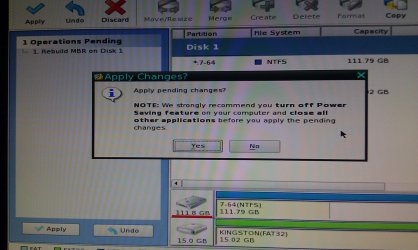
OK booted up via the disc, set to active, and rebuilt MBR...moment of truth here! :D
Nope...Says "Reboot and select proper boot device etc"

So now time to try the 3x repair?
 

My Computer My Computer

At a glance

Win7 Proi5 760 @ 3.7 on an H7012GB Corsair 12800Nvidia 480GTX
OS
Win7 Pro
CPU
i5 760 @ 3.7 on an H70
Motherboard
Asus Maximus Gene III
Memory
12GB Corsair 12800
Graphics Card(s)
Nvidia 480GTX
Sound Card
Auzen Prelude 7.1
Monitor(s) Displays
Samsung 27" LED
Hard Drives
OCZ Vertex2 120GB SSD
Samsung Spinpoint 740GB
WD 1.5T WEARS
WD 2T WEARS
PSU
XFX 850w
Case
Lian Li
Cooling
Corsair H70
Yes, confirm Win7 is Active and Primary.

It would help to see a camera snip of PW drive map to see if other partitions might interfere. What are their markings?
 
No partitions present, the drive showed up as one sole drive only.
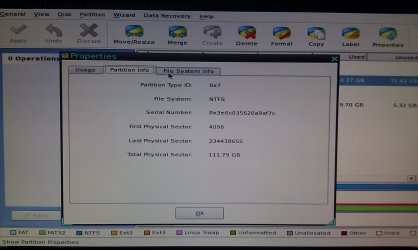
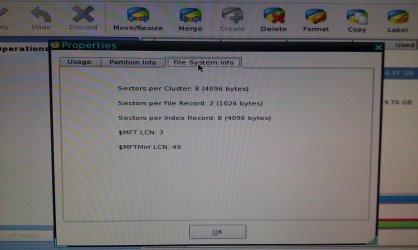
I took some with my camera if you did wish to see them anyway?
About to do my 3rd repair here

My PC seems to love to sit & hang upon rebooting sometimes,
No BIOS post etc, just have to ctrl alt del a few times
 

My Computer My Computer

At a glance

Win7 Proi5 760 @ 3.7 on an H7012GB Corsair 12800Nvidia 480GTX
OS
Win7 Pro
CPU
i5 760 @ 3.7 on an H70
Motherboard
Asus Maximus Gene III
Memory
12GB Corsair 12800
Graphics Card(s)
Nvidia 480GTX
Sound Card
Auzen Prelude 7.1
Monitor(s) Displays
Samsung 27" LED
Hard Drives
OCZ Vertex2 120GB SSD
Samsung Spinpoint 740GB
WD 1.5T WEARS
WD 2T WEARS
PSU
XFX 850w
Case
Lian Li
Cooling
Corsair H70
Do you have the latest BIOS version update? Check your mobo or computer maker's Support Downloads webpage for your model.

If so, reset the CMOS: Clear CMOS - 3 Ways to Clear the CMOS - Reset BIOS

Yes, please post the PW drive map camera snaps using paper clip in Reply Box.

Does the Repair utility find an installation to Repair?
 
Yeah I have the latest BIOS
CMOS cleared
Repair seems to find an installation to repair but prior to all of this it still found and repaired the installation.

Crap...same thing..."Reboot and Select proper boot device.....etc" message man.
 

Attachments

  • IMAG0027.jpg
    IMAG0027.jpg
    360.8 KB · Views: 9
  • IMAG0028.jpg
    IMAG0028.jpg
    383.8 KB · Views: 8
  • IMAG0029.jpg
    IMAG0029.jpg
    377.4 KB · Views: 10

My Computer My Computer

At a glance

Win7 Proi5 760 @ 3.7 on an H7012GB Corsair 12800Nvidia 480GTX
OS
Win7 Pro
CPU
i5 760 @ 3.7 on an H70
Motherboard
Asus Maximus Gene III
Memory
12GB Corsair 12800
Graphics Card(s)
Nvidia 480GTX
Sound Card
Auzen Prelude 7.1
Monitor(s) Displays
Samsung 27" LED
Hard Drives
OCZ Vertex2 120GB SSD
Samsung Spinpoint 740GB
WD 1.5T WEARS
WD 2T WEARS
PSU
XFX 850w
Case
Lian Li
Cooling
Corsair H70
DISK 1 is neither Primary nor Active according to it's markings.

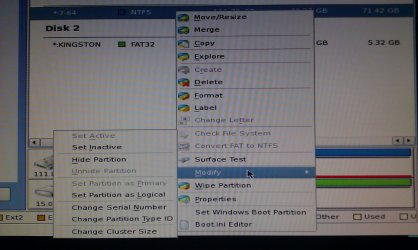
Did you convert it to Primary and Modify>Mark Active?
 
Yes I did 100% and applied the changes too
I am back in Partition Manager and it was back to Inactive again!?
I have set it to Active and applied it once again
Not sure WTH is going on there.
That program is very similar to Acronis so the operations are the same.

EDIT...ah ha, BOOT MANAGER Missing error this time
Making progress lol
I will boot back into PM and repair MBR again and make sure it is Active but it seems like it has remained as such
 

My Computer My Computer

At a glance

Win7 Proi5 760 @ 3.7 on an H7012GB Corsair 12800Nvidia 480GTX
OS
Win7 Pro
CPU
i5 760 @ 3.7 on an H70
Motherboard
Asus Maximus Gene III
Memory
12GB Corsair 12800
Graphics Card(s)
Nvidia 480GTX
Sound Card
Auzen Prelude 7.1
Monitor(s) Displays
Samsung 27" LED
Hard Drives
OCZ Vertex2 120GB SSD
Samsung Spinpoint 740GB
WD 1.5T WEARS
WD 2T WEARS
PSU
XFX 850w
Case
Lian Li
Cooling
Corsair H70
If Repair finds an installation to repair, then it should be able to start it if it's marked Active.

Was there GRUB on the HD, as this can make Win7 irreparable?

Besides checking again that PW CD has it marked Active, try Rebuild MBR, Check File System and HD Surface Scan with repair ticked.
 
Redid it with some image proof lol
No GRUB...it is nice but don't use it unless I am installing Ubuntu etc


Attachments

  • IMAG0030.jpg
    IMAG0030.jpg
    401.2 KB · Views: 4
  • IMAG0031.jpg
    IMAG0031.jpg
    342.3 KB · Views: 4

My Computer My Computer

At a glance

Win7 Proi5 760 @ 3.7 on an H7012GB Corsair 12800Nvidia 480GTX
OS
Win7 Pro
CPU
i5 760 @ 3.7 on an H70
Motherboard
Asus Maximus Gene III
Memory
12GB Corsair 12800
Graphics Card(s)
Nvidia 480GTX
Sound Card
Auzen Prelude 7.1
Monitor(s) Displays
Samsung 27" LED
Hard Drives
OCZ Vertex2 120GB SSD
Samsung Spinpoint 740GB
WD 1.5T WEARS
WD 2T WEARS
PSU
XFX 850w
Case
Lian Li
Cooling
Corsair H70
I don't see Active cued to Apply.

Have you seen DISK1 partition labeled Active at any time?

Nothing is going to work if the partition isn't marked Active. Why can't we see that?
 
It is Active... otherwise the Inactive would not be in bold.
Notice that the Active is greyed out as it is already active ;)
Oh boy...having some success...Bootmgr error again BUT when I started up on the 7 disc it detected a Win7 drive and told me the boot needs repairing :D

EDIT...and back to BOOTMGR error
Will try the 3 times repair again now as I am further along than I ever was previously
 

My Computer My Computer

At a glance

Win7 Proi5 760 @ 3.7 on an H7012GB Corsair 12800Nvidia 480GTX
OS
Win7 Pro
CPU
i5 760 @ 3.7 on an H70
Motherboard
Asus Maximus Gene III
Memory
12GB Corsair 12800
Graphics Card(s)
Nvidia 480GTX
Sound Card
Auzen Prelude 7.1
Monitor(s) Displays
Samsung 27" LED
Hard Drives
OCZ Vertex2 120GB SSD
Samsung Spinpoint 740GB
WD 1.5T WEARS
WD 2T WEARS
PSU
XFX 850w
Case
Lian Li
Cooling
Corsair H70
It is just unusual for the labels not to be on the Drive Map and in the listings. Could be corruption also blocking repair.

Can you see files when you choose Explore on partition?

I'd check the file System and do HD Surface Scan to give yourself every edge.
 
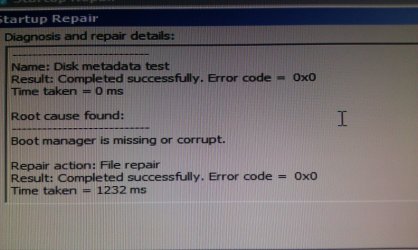
Here is a repair result:
Just did it again and I am IN!!!!
:D :D :D
Thanks to everyone for their help and thanks to you most of all Greg for sticking along mate

OK...just curious as to WHY my only drive attached (the SSD) is showing as the H: drive and not C:? LMAO
My DVD drive is D:
I won't be able to connect my other drives now as one will tag itself as C: and cause issues, or would it since there is no OS present?
 

Attachments

  • IMAG0032.jpg
    IMAG0032.jpg
    694.3 KB · Views: 6

My Computer My Computer

At a glance

Win7 Proi5 760 @ 3.7 on an H7012GB Corsair 12800Nvidia 480GTX
OS
Win7 Pro
CPU
i5 760 @ 3.7 on an H70
Motherboard
Asus Maximus Gene III
Memory
12GB Corsair 12800
Graphics Card(s)
Nvidia 480GTX
Sound Card
Auzen Prelude 7.1
Monitor(s) Displays
Samsung 27" LED
Hard Drives
OCZ Vertex2 120GB SSD
Samsung Spinpoint 740GB
WD 1.5T WEARS
WD 2T WEARS
PSU
XFX 850w
Case
Lian Li
Cooling
Corsair H70
I booted up off the 7 disc again and it found the OS and showed the Drive as C: with no errors but when I just booted up again, it is still H: ??
It is fitting as this fiasco is causing me to go grab some Preparation H here lol

Can I not change the drive letter in Disk Manager or will that cause programs not to run?
It shouldn't considering everything is running now and this drive used to be X:

What do you think Greg?

OK just plugged in my thumb stick and it is C: now? Haha wow....
 

My Computer My Computer

At a glance

Win7 Proi5 760 @ 3.7 on an H7012GB Corsair 12800Nvidia 480GTX
OS
Win7 Pro
CPU
i5 760 @ 3.7 on an H70
Motherboard
Asus Maximus Gene III
Memory
12GB Corsair 12800
Graphics Card(s)
Nvidia 480GTX
Sound Card
Auzen Prelude 7.1
Monitor(s) Displays
Samsung 27" LED
Hard Drives
OCZ Vertex2 120GB SSD
Samsung Spinpoint 740GB
WD 1.5T WEARS
WD 2T WEARS
PSU
XFX 850w
Case
Lian Li
Cooling
Corsair H70
Don't worry about the drive letters you see when you are booted into windows re - they will usually be different from the way your windows installation sees them.
 

My Computers My Computers

  • At a glance

    7 X64i5 84002x8gb 3200mhz
    Computer type
    PC/Desktop
    OS
    7 X64
    CPU
    i5 8400
    Motherboard
    gigabyte b365m ds3h
    Memory
    2x8gb 3200mhz
    Hard Drives
    various
    PSU
    pure power 11 400w cm
    Case
    Coolermaster
    Cooling
    cryorig m9i
  • At a glance

    7x64g54008gb ddr4 2400
    Computer type
    PC/Desktop
    OS
    7x64
    CPU
    g5400
    Motherboard
    ga b365m ds3h
    Memory
    8gb ddr4 2400
    PSU
    xfx pro 450w
What's important now is performance, to see whether it was affected by the conversions and repairs at all.

If so, you can try a http://www.sevenforums.com/tutorials/3413-repair-install.html?ltr=R which keeps everything in place while reinstalling the OS and resorting the boot. Unplug all other HD's so it might recover the C if it hasn't already - Win7 has a mind of its own on these things.

Si, can he use Paragon Rescue CD to restore Drive letter if it has slipped in a Repair operation like this?
 
I just changed it with Acronis but I got a C:\Windows\system\system32\nvvsvc.exe runtime error at the title screen and now it is stuck on Preparing Desktop
That looks like it might be an Nvidia service, no?
Now it is on a pale blank blue screen with a Windows 7 Build 7600 Not Genuine notification in the botton right corner
It is a legit version 100% paid for right from MS
Oh joy....obviously it thinks it is past due and not legit so it is in lock down?
 

My Computer My Computer

At a glance

Win7 Proi5 760 @ 3.7 on an H7012GB Corsair 12800Nvidia 480GTX
OS
Win7 Pro
CPU
i5 760 @ 3.7 on an H70
Motherboard
Asus Maximus Gene III
Memory
12GB Corsair 12800
Graphics Card(s)
Nvidia 480GTX
Sound Card
Auzen Prelude 7.1
Monitor(s) Displays
Samsung 27" LED
Hard Drives
OCZ Vertex2 120GB SSD
Samsung Spinpoint 740GB
WD 1.5T WEARS
WD 2T WEARS
PSU
XFX 850w
Case
Lian Li
Cooling
Corsair H70
The blue screen non-genuine lockout is due to the drive letter slipping. It is remedied by Paragon Rescue CD to change back the drive letter: http://www.sevenforums.com/installa...in7-partition-another-drive-2.html#post484430

But if it occurred only after you changed the drive letter with Acronis then it might not work since you cannot change a drive letter using any other method without bricking the OS, unless it is done during imaging.

But since the symptoms are the same as for standard blue-screen lockout due to slipped drive letter, use the known fix which is linked above.
 
Which the rParagon link above?
I cannot even boot from the disc right now....it just keeps going to the desktop and blue screen :(
I will give it a shot :)
 

My Computer My Computer

At a glance

Win7 Proi5 760 @ 3.7 on an H7012GB Corsair 12800Nvidia 480GTX
OS
Win7 Pro
CPU
i5 760 @ 3.7 on an H70
Motherboard
Asus Maximus Gene III
Memory
12GB Corsair 12800
Graphics Card(s)
Nvidia 480GTX
Sound Card
Auzen Prelude 7.1
Monitor(s) Displays
Samsung 27" LED
Hard Drives
OCZ Vertex2 120GB SSD
Samsung Spinpoint 740GB
WD 1.5T WEARS
WD 2T WEARS
PSU
XFX 850w
Case
Lian Li
Cooling
Corsair H70
OK did as the link described but no change in symptoms
 
Last edited:

My Computer My Computer

At a glance

Win7 Proi5 760 @ 3.7 on an H7012GB Corsair 12800Nvidia 480GTX
OS
Win7 Pro
CPU
i5 760 @ 3.7 on an H70
Motherboard
Asus Maximus Gene III
Memory
12GB Corsair 12800
Graphics Card(s)
Nvidia 480GTX
Sound Card
Auzen Prelude 7.1
Monitor(s) Displays
Samsung 27" LED
Hard Drives
OCZ Vertex2 120GB SSD
Samsung Spinpoint 740GB
WD 1.5T WEARS
WD 2T WEARS
PSU
XFX 850w
Case
Lian Li
Cooling
Corsair H70
Back
Top