Win7 mounting network share (NAS) impossible

il pepe

New member
Local time
6:48 AM
Messages
6
Hi,
I have a bit of a complicated problem.
I installed a NAS (Lacie) which is working great.
At least on both my Linux (ubuntu) computers.

On my Win7 laptop on the other hand it is a complete mess.
I can see the drive as media server kind of thing under network, but I'm not able to mount the drive at all...

I already stopped the function called windows media player network sharing service wmpnetwk, i entered a new key in the registry (Windows 7 – Cannot connect to network drive | Eureka!) but still nothing.http://eureka.ykyuen.info/2009/09/04/windows-7-cannot-connect-to-newtork-drive/

Any help? I'm not used to working in a windows environment, but is suppose mounting a network drive should be a basic tool anyway.

The mounts in Linux are done with sshfs...

please help
http://eureka.ykyuen.info/2009/09/04/windows-7-cannot-connect-to-newtork-drive/
 

My Computer

OS
windows7 home 64bit
This usually requires that you change the lanman server parimeters in order to get Windows 7 to connect to certain types of NAS boxes and older servers.

The NAS box probably doesn't do NTLMv2. Try setting the Windows 7 machines to allow both NTLMv1 and NTLMv2.

This assumes that you have Windows 7 Ultimate, Enterprise or Pro.

Control Panel - Administrative Tools - Local Security Policy

Local Policies - Security Options

Network security: LAN Manager authentication level
Set to Send LM & NTLM responses only

Set the Minimum session security for NTLM SSP
Disable Require 128-bit encryption


The screen shots below should be helpful. Notice how both "Require NTLMv2 session security" is unchecked as is "Require 128 bit encryption".

Reboot all machines after making the adjustment.


My Computer

Computer type
PC/Desktop
Computer Manufacturer/Model Number
Home built
OS
Windows 7 Ult, Windows 8.1 Pro,
CPU
Q9650-4.275GHz, E8600 4.5GHz, E6750-3.8GHz
Motherboard
Evga 780i FTW
Memory
G.Skill PC2 9600 1200Mhz 5 5 5 15 2T
Graphics Card(s)
GTX480
Sound Card
Asus Xonar D2
Monitor(s) Displays
HannsG
Screen Resolution
1680X1050
Hard Drives
GSkill Phoenix Pro 120GB SSD
PSU
ThermalTake Toughpower 1000Watt modular
Case
ThermalTake XaserV
Cooling
Xigmatek S1283
Keyboard
Logitech G15
Mouse
Logitech G9
Internet Speed
T1
Thanks for the fast reply.
The only problem is i'm running windows7 home premium.

Any solution for the home edition?
 

My Computer

OS
windows7 home 64bit
Thanks for the fast reply.
The only problem is i'm running windows7 home premium.

Any solution for the home edition?

Yep that's a problem.

I believe you will need to edit the registry if you want this to work with HP.

Otherwise for connection to NAS boxes you need to use the higher editions of Windows 7.

To open the registry type regedit into the start/run box.

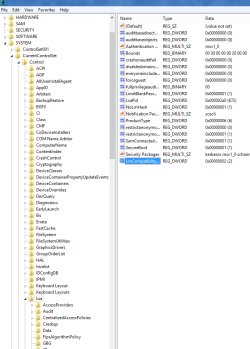
You will need to create the LmCompatibilityLevel key when you get to HKLM\SYSTEM\CurrentControlSet\Control\Lsa

Then set the value to 2.

What the values do with each different number in the link below.
http://technet.microsoft.com/en-us/library/cc960646.aspx

It's also important that you reboot after making the adjustments in the registry.

If that doesn't work bypass the root and go straight to the share.
 
Last edited:

My Computer

Computer type
PC/Desktop
Computer Manufacturer/Model Number
Home built
OS
Windows 7 Ult, Windows 8.1 Pro,
CPU
Q9650-4.275GHz, E8600 4.5GHz, E6750-3.8GHz
Motherboard
Evga 780i FTW
Memory
G.Skill PC2 9600 1200Mhz 5 5 5 15 2T
Graphics Card(s)
GTX480
Sound Card
Asus Xonar D2
Monitor(s) Displays
HannsG
Screen Resolution
1680X1050
Hard Drives
GSkill Phoenix Pro 120GB SSD
PSU
ThermalTake Toughpower 1000Watt modular
Case
ThermalTake XaserV
Cooling
Xigmatek S1283
Keyboard
Logitech G15
Mouse
Logitech G9
Internet Speed
T1
Any help on changing the registry?
I don't know where to start?
I entered LMCompatibilityLevel with value 1 and 2, no succes...

It is actually quiet annoying this is almost impossible in windows7 home... I can't understand why this has to be so hard...
 

My Computer

OS
windows7 home 64bit
Any help on changing the registry?
I don't know where to start?
I entered LMCompatibilityLevel with value 1 and 2, no succes...

It is actually quiet annoying this is almost impossible in windows7 home... I can't understand why this has to be so hard...

It's only difficult because you don't have the proper versions of Windows 7 for connecting to NAS boxes or servers. :)
 

My Computer

Computer type
PC/Desktop
Computer Manufacturer/Model Number
Home built
OS
Windows 7 Ult, Windows 8.1 Pro,
CPU
Q9650-4.275GHz, E8600 4.5GHz, E6750-3.8GHz
Motherboard
Evga 780i FTW
Memory
G.Skill PC2 9600 1200Mhz 5 5 5 15 2T
Graphics Card(s)
GTX480
Sound Card
Asus Xonar D2
Monitor(s) Displays
HannsG
Screen Resolution
1680X1050
Hard Drives
GSkill Phoenix Pro 120GB SSD
PSU
ThermalTake Toughpower 1000Watt modular
Case
ThermalTake XaserV
Cooling
Xigmatek S1283
Keyboard
Logitech G15
Mouse
Logitech G9
Internet Speed
T1
Mayby so. But i would expect that for a modern OS, with growing intrest in networking/cloud support/... mapping a network drive would be a basic function.
Anyway, I still need some help for the registry changes....
 

My Computer

OS
windows7 home 64bit
Mayby so. But i would expect that for a modern OS, with growing intrest in networking/cloud support/... mapping a network drive would be a basic function.
Anyway, I still need some help for the registry changes....

I put down everything I found for the registry adjustments and they are working for most who tried them.
 

My Computer

Computer type
PC/Desktop
Computer Manufacturer/Model Number
Home built
OS
Windows 7 Ult, Windows 8.1 Pro,
CPU
Q9650-4.275GHz, E8600 4.5GHz, E6750-3.8GHz
Motherboard
Evga 780i FTW
Memory
G.Skill PC2 9600 1200Mhz 5 5 5 15 2T
Graphics Card(s)
GTX480
Sound Card
Asus Xonar D2
Monitor(s) Displays
HannsG
Screen Resolution
1680X1050
Hard Drives
GSkill Phoenix Pro 120GB SSD
PSU
ThermalTake Toughpower 1000Watt modular
Case
ThermalTake XaserV
Cooling
Xigmatek S1283
Keyboard
Logitech G15
Mouse
Logitech G9
Internet Speed
T1
Mayby so. But i would expect that for a modern OS, with growing intrest in networking/cloud support/... mapping a network drive would be a basic function.
Anyway, I still need some help for the registry changes....

I put down everything I found for the registry adjustments and they are working for most who tried them.
Sorry, I missed that part somehow. I will try it again, and hope it works now...
 

My Computer

OS
windows7 home 64bit
possibly a stupid question, but the LMCompabilityLevel, that should be a hexadecimal number, right?

No succes yet :-(
 

My Computer

OS
windows7 home 64bit
Like this I believe, at this location, HKLM\SYSTEM\CurrentControlSet\Control\Lsa

You would right click on Lsa then choose "new" then Dword 32 bit value, then create the LmCompatiblityLevel key and hit enter, then right click the new key and choose modify, then set to value 2.
 

Attachments

  • Lmcompat.PNG
    Lmcompat.PNG
    25.9 KB · Views: 16

My Computer

Computer type
PC/Desktop
Computer Manufacturer/Model Number
Home built
OS
Windows 7 Ult, Windows 8.1 Pro,
CPU
Q9650-4.275GHz, E8600 4.5GHz, E6750-3.8GHz
Motherboard
Evga 780i FTW
Memory
G.Skill PC2 9600 1200Mhz 5 5 5 15 2T
Graphics Card(s)
GTX480
Sound Card
Asus Xonar D2
Monitor(s) Displays
HannsG
Screen Resolution
1680X1050
Hard Drives
GSkill Phoenix Pro 120GB SSD
PSU
ThermalTake Toughpower 1000Watt modular
Case
ThermalTake XaserV
Cooling
Xigmatek S1283
Keyboard
Logitech G15
Mouse
Logitech G9
Internet Speed
T1
Back
Top