
Win7 OEM vs Retail

bawldiggle

GrayGhost2 ret.
Pro User
VIP
Local time
2:50 AM
Messages
895
Location
Australia
I have read this 2009 thread by "DataMan47" ... but I am none the wiser 6 years later

My understanding is that ...

  1. OEM can only be used on one machine while the motherboard is unchanged
    The OS can be reinstalled but only on the same machine.
    OEM cannot be installed onto a new/different machine (or the old machine with a new motherboard)
  2. Retail (ie, perpetual) and can be installed on any one machine at a time
    - ie if the original machine dies and the OS is no longer accessible/usable the retail OS can be installed onto a new machine
    - multiple machine installs is not allowed

From "DataMan47" explanation it looks like their are two versions of OEM

  • the Dell/HP/Toshiba pre-installed OEM
  • OEM installed on a non TRM machine ?

As a Win7 fan-boy I have located both Retail and OEM versions of Win7 PRO
- the prices are $200 and <$100
The suppliers of the (I assumed OEM) replied to my email asking if their product was OEM
- their advertisement didn't say OEM or retail and their "description" was full of contradictions
- "one-size-fits-all"

This is reply I received from the distributor
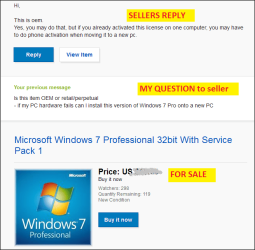
sellers reply.png

... and extracted from the sellers web-page ...
(they have made 7,600 sales since Sept 2010 -- reputation = 99.8%)

What you're looking at is an authentic windows license package. product key is never used, and will 100% activate without a problem.
This is not just an upgrade, this is full installation.

Each purchase includes

original CoA license
product key
installation dvd for 32bit professional

You will get everything on this picture, including the product key on the back of the DVD sleeve. Key would only activate on Professional with service pack 1 installed. If your current system is not professional with service pack 1, simply reinstall your system with the DVD we provide.
Makesure you backup all your important files before you do the installation as it will wipe out your system.

For older computer, please download and run the Windows 7 Upgrade Advisor to makesure your computer is ready for Windows 7.
Just type in Windows 7 Upgrade Advisor on google and you will find it on the first none-advertiser link.
You will be eligible for free upgrade to windows 10 with this license.

To be in compliance with Microsoft licensing, recovery media, OEM media and MAR media containing Microsoft software must be redistributed as part of a complete package that contains the media, the original computer hardware with which to software was distributed and the corresponding COA label. We sell this item bundled with the original system Motherboard-Untested.
I already have a 3xpack of Win7 Home Premium OEM including "OEM Preinstalltion Kit" (disc) AND COA stickers
- and I presume that limits me to each original PC forever
- but I would prefer to have Win7 PRO that I can use on replacement PCs over the coming years.
- at 2 months off 70 I want to stay with Win7 to minimize MS using my PCs as servers for their own purposes and I don't want to start an OS learning process all over again.
- there is more life behind me than in front

I would appreciate some expert clarification of OEM types ... if that makes sense.

Thank you :)
 
Last edited:

My Computer

Computer type
PC/Desktop
Computer Manufacturer/Model Number
Toshiba, Lenovo (laptops) + 4 rigs
OS
XP Pro (x86) | 7 HP (x86) & (x64) | 7 Pro (x64)
An oem version of home premium on new egg sells for $99, Pro $139

If you were lucky enough to find new Retail copies of those, they would be twice that much or even way more, depending on the seller. (Good Luck with that)

A retail copy can be used on any PC and activated as long as it`s only on 1 PC at a time.

Operating Systems, Microsoft Windows - Newegg.com

An oem version that you buy is yours, if you have to install a new board, you can always make a robo call and enter the numbers on the activation screen, if that fails call MS to explain the situation and if you`re nice, they usually are too. :)
 

My Computer

Computer type
PC/Desktop
Computer Manufacturer/Model Number
Skylake Special #666
OS
Windows 10 Pro x64
CPU
Intel Core i7 6700K
Motherboard
Asus Sabertooth Z170 Mark 1
Memory
GSkill TridentZ RGB 16GB 3600 16-16-16-36
Graphics Card(s)
EVGA GTX 980 Ti SC x2
Sound Card
Realtek High Definition
Monitor(s) Displays
AOC G2460PG
Screen Resolution
1920 x 1080 144Hz
Hard Drives
Samsung 860 Pro 256GB, Seagate Barracuda 4TB x2
PSU
EVGA 1000 P2, EVGA White Custom Braided Cables
Case
Corsair Vengeance C70 Gunmetal Black
Cooling
Corsair H100i v2, Corsair ML120 x2, Thermal Grizzly Kryonaut
Keyboard
Logitech G910 Orion Spectrum
Mouse
Logitech G700s
Internet Speed
Verizon Fios Quantum Gateway 75/75
Antivirus
Windows Defender, Malwarebytes Free 3.8.3
Browser
Chrome
Other Info
Corsair SP120 x4, LG Blu-ray Drive, Durabrand HT-395 100 Watt Dolby Digital Amp, Corsair H2100 Wireless 7.1 Headset
From post #1

My understanding is that ...

  1. OEM can only be used on one machine while the motherboard is unchanged
    The OS can be reinstalled but only on the same machine.
    OEM cannot be installed onto a new/different machine (or the old machine with a new motherboard)
  2. Retail (ie, perpetual) and can be installed on any one machine at a time
    - ie if the original machine dies and the OS is no longer accessible/usable the retail OS can be installed onto a new machine
    - multiple machine installs is not allowed
That is my understanding. With one exception in my opinion.
If one calls Microsoft and they allow a change from the rules.

I will explain.
A few years ago I had a motherboard RMA but the I.D. had changed therefore would not activate on my OEM/COA key.

One phone call to Microsoft and in about 3 minutes talking to a real person the activation problem was solved and it's been working properly for years.

Other than that we are thinking the same on this matter.

You would be very lucky if you can find a legal Retail Windows 7 Pro.
They are like hens teeth to find. Because of that you are even less likely to find a sale on a legal one.

Of course this is just my opinion.

*Hi Brian. I was typing while you were posting.
 

My Computer

Computer type
PC/Desktop
Computer Manufacturer/Model Number
Home made Desktop
OS
Windows 10 Pro. 64/ version 1709 Windows 7 Pro/64
CPU
Intel i7-6800K @ 4.3
Motherboard
ASUS X-99 Deluxe II
Memory
Corsair Platinum 16 gig @2400
Graphics Card(s)
EVGA GTX 1070 OC
Monitor(s) Displays
Asus 27" LED LCD/VE278Q
Screen Resolution
1920-1080 or 1280-720 HDMI
Hard Drives
INTEL SSD 730-240 Gb Sata 3.0/
PSU
EVGA Platium 1200W
Case
Phanteks Luxe Tempered Glass 8 fans/ one radiator
Cooling
XSPC/ Water Cooled CPU
Keyboard
Das 4 Professional
Mouse
Logitech M705/MX Anywhere 2-S
Internet Speed
100 mbits
Antivirus
Microsoft Security Essentials/ Malwarebytes Premium 3.0/ SAS
Browser
I.E. 11 default/Firefox/ ISP Time Warner Cable/Spectrum
Other Info
LG BluRay Burner/
Sound system-KLipsch-THX/
Icy Dock ssd Hot Swap bays.
@ AddRAM :)
Thank you for your input.
The more I read the OEM "sellers" blurbs I suspect they will say anything for a sale. The supplier is in USA, by the time I add p&h us$30 delivery to OZ I am better than half way to a local genuine new PRO.

I will stick with the genuine Pro retail I have found, a few extra dollars ... at least it will be slightly easier to stop MS messing with my brain and trying to install Win29 in 2045, on my sacred Win7. ;)

In the wings is Linux Mint on an old Acer laptop, not an easy transition from Windows ... yet!
- and there are some things MS do very well ... Excel especially the macro programming ... VBA (and XML?)
- Libre does not even get near it
I am still writing VBA addins for Excel

Thanks again :)
 

My Computer

Computer type
PC/Desktop
Computer Manufacturer/Model Number
Toshiba, Lenovo (laptops) + 4 rigs
OS
XP Pro (x86) | 7 HP (x86) & (x64) | 7 Pro (x64)
@ Layback Bear :)

Other than that we are thinking the same on this matter.

You would be very lucky if you can find a legal Retail Windows 7 Pro.
They are like hens teeth to find. Because of that you are even less likely to find a sale on a legal one.

Of course this is just my opinion.
We are on the same page :cool:
- there are a few second hand retails floating around the net.
- One last bid was $130 for second hand -- I am not that trusting

I am buying two new retail PROs... second is for she-who-must-be obeyed.
- genuine retail right here in OZ from a very reputable enterprise supplier

I will let you know how I get on ;)
 

My Computer

Computer type
PC/Desktop
Computer Manufacturer/Model Number
Toshiba, Lenovo (laptops) + 4 rigs
OS
XP Pro (x86) | 7 HP (x86) & (x64) | 7 Pro (x64)
In the wings is Linux Mint on an old Acer laptop, not an easy transition from Windows ... yet!
- and there are some things MS do very well ... Excel especially the macro programming ... VBA (and XML?)
- Libre does not even get near it
I am still writing VBA addins for Excel

Bawldiggle:

Do you have any insight into Libre Office (as found on Linux Mint)?

Specifically:

I have an important Excel file containing personal financial data. About 100 tabs, about 5 MB in size.

Not overly complicated, but it does have some colored cells via conditional formatting, a few simple charts, formulas that reference various of the 100 tabs, and a couple of 15 line VBA macros that grab stock market data.

Is this file likely to open and operate properly in Mint using Libre or should I just plan on running a Windows virtual machine inside Mint and open it with Office?
 

My Computer

Computer type
PC/Desktop
Computer Manufacturer/Model Number
Ignatz Special; 4 speed manual gearbox; factory air conditioning; one of one
OS
Windows 7 Home Premium SP1, 64-bit
CPU
Intel Skylake i5-6600K, not overclocked
Motherboard
AsRock Z170M Extreme 4, micro ATX
Memory
8 GB HyperX DDR4-2666 (2 x 4 GB)
Graphics Card(s)
none; graphics are integrated on CPU
Sound Card
onboard: Realtek ALC1150; external: USB Behringer UF0-202
Monitor(s) Displays
Dell S2340M 23 inch IPS
Screen Resolution
1600 x 900
Hard Drives
System: Crucial MX100 series SSD, 128 GB;
Data: Samsung Spinpoint 103SJ, 1 TB;
Backup: WD Caviar Green WD30EZRX-00D8PB0, 3 TB
PSU
Rosewill SilentNight 500 watt fanless, semi-modular
Case
Antec Solo II
Cooling
Noctua NH-U12S; Noctua F12 intake, Noctua S12A exhaust
Keyboard
Microsoft 200 6JH-00001 USB
Mouse
Dell or Microsoft optical wired; USB
Antivirus
Microsoft Security Essentials and Malwarebytes Premium
Browser
Pale Moon
Other Info
All fans PWM; speeds at idle: CPU circa 500 rpm; intake circa 600 rpm; exhaust circa 600 rpm; CPU temps 27 idle and 47 C load in a warm room (27 C/81 F) when running Intel Extreme Tuning Utility stress test.
Is this file likely to open and operate properly in Mint using Libre or should I just plan on running a Windows virtual machine inside Mint and open it with Office?

If you are on windows, you can install Libre office on windows and check how the file shows up. From my previous experience, spreadsheets open pretty seamlessly on most office suites like Libre, MS Office, and even mobile office suites. The word documents seem to have some sort of formatting issues. Sorry, I do not have Mint as of now to try out your ask.
 

My Computer

Computer type
PC/Desktop
Computer Manufacturer/Model Number
Custom Built
OS
Windows 7 Ultimate x64
CPU
AMD A8-3850
Motherboard
ASUS FM1A55 LX PLUS
Memory
Corsair 8GB Vegence
Graphics Card(s)
AMD Radeon HD 6550D (APU builtin)
Hard Drives
60GB OCZ Agility3 - For OS
30GB Kingston V100 - For Programs
500 GB Seagate - For music, movies, storage
PSU
Corsair CX500
Case
Modified
Cooling
Coole rMaster Hyper 212 EVO
Internet Speed
50 Mbps
Antivirus
Avira
Good Luck with that (cough hack) genuine Pro Retail, let us know how that turns out.

Make sure you get full refunds in writing up front, should the key not work, we`ve heard many stories of buyers getting ripped off here.
 

My Computer

Computer type
PC/Desktop
Computer Manufacturer/Model Number
Skylake Special #666
OS
Windows 10 Pro x64
CPU
Intel Core i7 6700K
Motherboard
Asus Sabertooth Z170 Mark 1
Memory
GSkill TridentZ RGB 16GB 3600 16-16-16-36
Graphics Card(s)
EVGA GTX 980 Ti SC x2
Sound Card
Realtek High Definition
Monitor(s) Displays
AOC G2460PG
Screen Resolution
1920 x 1080 144Hz
Hard Drives
Samsung 860 Pro 256GB, Seagate Barracuda 4TB x2
PSU
EVGA 1000 P2, EVGA White Custom Braided Cables
Case
Corsair Vengeance C70 Gunmetal Black
Cooling
Corsair H100i v2, Corsair ML120 x2, Thermal Grizzly Kryonaut
Keyboard
Logitech G910 Orion Spectrum
Mouse
Logitech G700s
Internet Speed
Verizon Fios Quantum Gateway 75/75
Antivirus
Windows Defender, Malwarebytes Free 3.8.3
Browser
Chrome
Other Info
Corsair SP120 x4, LG Blu-ray Drive, Durabrand HT-395 100 Watt Dolby Digital Amp, Corsair H2100 Wireless 7.1 Headset
In the wings is Linux Mint on an old Acer laptop, not an easy transition from Windows ... yet!
- and there are some things MS do very well ... Excel especially the macro programming ... VBA (and XML?)
- Libre does not even get near it
I am still writing VBA addins for Excel

Bawldiggle:

Do you have any insight into Libre Office (as found on Linux Mint)?

Specifically:

I have an important Excel file containing personal financial data. About 100 tabs, about 5 MB in size.

Not overly complicated, but it does have some colored cells via conditional formatting, a few simple charts, formulas that reference various of the 100 tabs, and a couple of 15 line VBA macros that grab stock market data.

Is this file likely to open and operate properly in Mint using Libre or should I just plan on running a Windows virtual machine inside Mint and open it with Office?

I haven't used Libre much at all,
But the only thing you might need to do is download M$ fonts which are not installed in Libre
If I remember correctly you just open the software manager and type in the search Microsoft and the fonts listing will appear and download them.
 

My Computer

Computer type
PC/Desktop
Computer Manufacturer/Model Number
Custom assembled by me :}
OS
Win-7-Pro64bit 7-H-Prem-64bit
CPU
i7-5930K 2nd i9-9940x both water blocked VRM's too
Motherboard
ASUS SABERTOOTH X99 2nd ASUS x299 Apex
Memory
Trident-z 3200C14 2nd Trident-z 3600C16
Graphics Card(s)
EVGA 1080ti ftw3 2nd Titan Xp both water blocked
Sound Card
Built-in Realtek
Monitor(s) Displays
1-AOC G2460PG 24"G-Sync 144Hz/ 2nd 1-ASUS VG248QE 24" 144Hz
Screen Resolution
1920 x 1080 144Hz
Hard Drives
2-Samsung M.2 Evo & Evo Plus
2-Samsung 850 EVO 500GB SSD's/ 3-2.5 W.D. Black 1tb-&3-1tb/3-3.5 WD Black 1tb hdd's
PSU
EVGA SuperNOVA 1000-P2 2nd 1200-P2
Case
2-Corsair Obsidian Series 450D Black ATX Mid Tower
Cooling
Custom water loops
Keyboard
Logitech G710+/ 2nd Logitech G910
Mouse
2-RedDragon M901 Perdition 16400 dpi Gaming mouse = wired
Internet Speed
Comcast Ping 19ms 89.31mbps download speed 6.12mbps upload
Antivirus
Malwarebytes Pro/ Superantispyware Pro
Browser
FireFox & Pale moon
Other Info
2nd ASUS X299 Apex/Intel i9-9940x with Custom water loop/7H-Prem-x64/Corsair 450D case/Ram Trident-z 3600C16 4x8gb / Samsung970Evo plus 500gb SSD/Dual ssd EZ swap evo/PSU EVGA SuperNova 1200w-P2 80+Platinum/GPU Titan Xp /8-ML-140 on push-pull on 2-280GTX rads
I recently switched to LinuxLite, a ubuntu derivative which I really like. Very glad I made the switch!

Rather than Office via Wine, i also opted to switch to Libre. There is a transition, but I'm pretty satisfied with Libre. I have a lot of Word macros, and my reading tells me that they should be adaptable, but it is going to take some work. They do not run out of the box.
 

My Computer

Computer type
PC/Desktop
Computer Manufacturer/Model Number
dell precision t3400 tower
OS
Linux Lite 3.2 x64; Windows 7, 8.1
CPU
Core2Duo 2.4
Memory
6GB ddr2
Graphics Card(s)
nVidia
Hard Drives
120gb SSD, 1TB HD, 2TB HD; sata II
Internet Speed
12/2
Browser
Vivaldi, Slimjet (Chromium) x64
Back
Top