
Win7 PC boot failure - bad driver to blame?

LaurieD227

New member
Power User
VIP
Local time
9:04 AM
Messages
133
Location
Central Colorado
I rebooted my ProStar Win7 Pro PC 4 nights ago,and it would not boot all the way up. It got as far as the black screen with the "Starting Windows" phrase and would not go further.

I rebooted, at which point Startup Repair tried to fix the problem but couldn't. I wrote down the results (the details are in the attached txt file). The results said something about a "bad driver." I was able to get it to boot all the way, and at that point I applied my most recent Restore point. As far as I can tell, it was successful, and I have not had a boot problem since.

The reason I'm posting this is because I figure I still need to solve the driver problem, and I'm not sure what I should do next. I've done the following:
-I ran chkdsk which found no problems (results attached)
-I ran sfc /scannow multiple times, both before and after running the SUR tool. The results were the same each time - the only errors found were some files related to Windows Update KB3068708 that I later discovered were not actually corrupt (that's a whole different thread). The most recent results are attached.
-I ran the SUR tool, which found no errors. (Logs attached)

So - any ideas?
 

Attachments

My Computer My Computer

At a glance

Windows 7 Professional 64 bit SP 1Intel Core i7-4710 MQ16 GBNVIDIA GeForce GTX 870M
Computer type
Laptop
Computer Manufacturer/Model Number
ProStar Model P157SM-A
OS
Windows 7 Professional 64 bit SP 1
CPU
Intel Core i7-4710 MQ
Motherboard
No info
Memory
16 GB
Graphics Card(s)
NVIDIA GeForce GTX 870M
Hard Drives
256 GB Samsung SSD
1TB 7200 RPM Hard Drive
Antivirus
Norton Internet Security
Browser
Internet Explorer and Mozilla Firefox
I also ran Norton Internet Security and Malwarebytes Anti-Malware. Neither found any evidence of any infections or issues, with the exception that Norton found and removed some tracking cookies.
 

My Computer My Computer

At a glance

Windows 7 Professional 64 bit SP 1Intel Core i7-4710 MQ16 GBNVIDIA GeForce GTX 870M
Computer type
Laptop
Computer Manufacturer/Model Number
ProStar Model P157SM-A
OS
Windows 7 Professional 64 bit SP 1
CPU
Intel Core i7-4710 MQ
Motherboard
No info
Memory
16 GB
Graphics Card(s)
NVIDIA GeForce GTX 870M
Hard Drives
256 GB Samsung SSD
1TB 7200 RPM Hard Drive
Antivirus
Norton Internet Security
Browser
Internet Explorer and Mozilla Firefox
Any dumps (.dmp files) in C:\Windows\minidump? If yes, zip them up then post in the Crashes and Debugging forum.
 

My Computer My Computer

At a glance

Windows 10 Pro X64Intel Quad Core i7-4770 @ 3.4Ghz16.0GB PC3-12800 DDR3 SDRAM 1600 MHzIntel Integrated HD Graphics
Computer type
PC/Desktop
Computer Manufacturer/Model Number
Lenovo IdeaCenter 450
OS
Windows 10 Pro X64
CPU
Intel Quad Core i7-4770 @ 3.4Ghz
Memory
16.0GB PC3-12800 DDR3 SDRAM 1600 MHz
Graphics Card(s)
Intel Integrated HD Graphics
Sound Card
Realtek HD Audio
Monitor(s) Displays
HP 22" LCD
Screen Resolution
1680 x 1050
Hard Drives
250GB Samsung EVO SATA-3 SSD
2TB Seagate ST2000DM001 SATA-2
1.5TB Seagate ST3150041AS SATA
Keyboard
Dell USB
Mouse
Lenovo USB
Internet Speed
Cable via Road Runner 3MB Upload, 30MB Download
Antivirus
Windows Defender, MBAM Pro, MBAE
Browser
Seamonkey
Other Info
UEFI/GPT
PLDS DVD-RW DH16AERSH
Nope, there isn't even a "minidump" subfolder in my Windows folder. I also searched my Windows folder for any file with the file extension ".dmp" and found nothing. Would it have been wiped out when I applied the System Restore point that predated the boot failure?

Also, I will ask to have this thread moved to the Crashes and Debugging forum. I didn't think to go there initially since my machine never actually "crashed."

EDIT: So the Crashes and Debugging forum is the BSOD forum? This didn't seem serious enough to me to belong with the BSOD issues. Or am I just confused?
 

My Computer My Computer

At a glance

Windows 7 Professional 64 bit SP 1Intel Core i7-4710 MQ16 GBNVIDIA GeForce GTX 870M
Computer type
Laptop
Computer Manufacturer/Model Number
ProStar Model P157SM-A
OS
Windows 7 Professional 64 bit SP 1
CPU
Intel Core i7-4710 MQ
Motherboard
No info
Memory
16 GB
Graphics Card(s)
NVIDIA GeForce GTX 870M
Hard Drives
256 GB Samsung SSD
1TB 7200 RPM Hard Drive
Antivirus
Norton Internet Security
Browser
Internet Explorer and Mozilla Firefox
This appears repeatedly in the sfc results (as you've stated):
Code:
2015-06-24 20:03:37, Info                  CSI    0000033f [SR] Cannot repair member file [l:24{12}]"utc.app.json" of Microsoft-Windows-Unified-Telemetry-Client, Version = 6.1.7601.18869, pA = PROCESSOR_ARCHITECTURE_AMD64 (9), Culture neutral, VersionScope = 1 nonSxS, PublicKeyToken = {l:8 b:31bf3856ad364e35}, Type neutral, TypeName neutral, PublicKey neutral in the store, hash mismatch
2015-06-24 20:03:37, Info                  CSI    00000341 [SR] Cannot repair member file [l:66{33}]"telemetry.ASM-WindowsDefault.json" of Microsoft-Windows-Unified-Telemetry-Client, Version = 6.1.7601.18869, pA = PROCESSOR_ARCHITECTURE_AMD64 (9), Culture neutral, VersionScope = 1 nonSxS, PublicKeyToken = {l:8 b:31bf3856ad364e35}, Type neutral, TypeName neutral, PublicKey neutral in the store, hash mismatch
2015-06-24 20:03:37, Info                  CSI    00000343 [SR] Cannot repair member file [l:24{12}]"utc.app.json" of Microsoft-Windows-Unified-Telemetry-Client, Version = 6.1.7601.18869, pA = PROCESSOR_ARCHITECTURE_AMD64 (9), Culture neutral, VersionScope = 1 nonSxS, PublicKeyToken = {l:8 b:31bf3856ad364e35}, Type neutral, TypeName neutral, PublicKey neutral in the store, hash mismatch
2015-06-24 20:03:37, Info                  CSI    00000344 [SR] This component was referenced by [l:162{81}]"Package_250_for_[B][COLOR=Red]KB3068708[/COLOR][/B]~31bf3856ad364e35~amd64~~6.1.1.0.3068708-814_neutral_GDR"
2015-06-24 20:03:37, Info                  CSI    00000346 [SR] Cannot repair member file [l:66{33}]"telemetry.ASM-WindowsDefault.json" of Microsoft-Windows-Unified-Telemetry-Client, Version = 6.1.7601.18869, pA = PROCESSOR_ARCHITECTURE_AMD64 (9), Culture neutral, VersionScope = 1 nonSxS, PublicKeyToken = {l:8 b:31bf3856ad364e35}, Type neutral, TypeName neutral, PublicKey neutral in the store, hash mismatch
2015-06-24 20:03:37, Info                  CSI    00000347 [SR] This component was referenced by [l:162{81}]"Package_250_for_[B][COLOR=Red]KB3068708[/COLOR][/B]~31bf3856ad364e35~amd64~~6.1.1.0.3068708-814_neutral_GDR"
Go to Control Panel > Programs > Programs & Features > View Installed Updates then uninstall KB3068708. If it returns through Windows Updates hide it so as to stop it installing in future. (you'll find more info on that here among many other threads http://www.sevenforums.com/performa...exe-how-seriously-should-i-take-report-2.html ). Best to remove it from the equation and see how things go, if the problem persists we'll dig deeper.
 

My Computer My Computer

At a glance

W7 Pro x64 SP1 | W10 Pro IP x64 | W8.1 Pro x6...i7-4790k @ 4GHz (4.4GHz Boost)16GB DDR3 Kingston HyperX Fury @ 1600MHz CL 9...EVGA GTX 980 Classified
Computer type
PC/Desktop
Computer Manufacturer/Model Number
Custom Build
OS
W7 Pro x64 SP1 | W10 Pro IP x64 | W8.1 Pro x64 VM | Linux Mint VM
CPU
i7-4790k @ 4GHz (4.4GHz Boost)
Motherboard
ASUS Sabertooth Z87 (BIOS Rev 2004)
Memory
16GB DDR3 Kingston HyperX Fury @ 1600MHz CL 9-9-9-27
Graphics Card(s)
EVGA GTX 980 Classified
Sound Card
Realtek Onboard
Monitor(s) Displays
Samsung S27D390
Screen Resolution
1920 x 1080
Hard Drives
240GB Intel 520 Series SSD |
Samsung 850 EVO 120GB SSD |
2TB WD Caviar Black |
2TB WD Caviar Green
PSU
Corsair HX850-80 Gold Modular
Case
Cooler Master Silencio 650
Cooling
Corsair H80i w/2 x Corsair SP120 | 2 x 120mm Noctua NF-S12B
Keyboard
Microsoft Sidewinder X4
Mouse
Gigabyte M6900 optical
Internet Speed
152mb
Antivirus
F-Secure
Browser
Firefox 38.0
Other Info
Backup Rig: Win 7 Pro 64-bit | AMD A10-5800k | ASUS F2A85-V Pro | 8GB Samsung DDR3 @1600MHz | 120GB Toshiba SDD | 2TB Seagate HDD | Cooler Master Silencio 550
As indicated, I found the Microsoft information regarding the "false positives" - the fact that the files associated with KB3022345 and KB3068708 show corrupt in sfc when they really aren't corrupt.

I also found that both of these updates are installed on my older Dell D630 Win7 Pro SP1 machine (32-bit), and the SFC /SCANNOW results come back clean - no report of corrupt items whatsoever, and this is without any "fixing" or intervention. Maybe it's due to differences in configuration (hardware and/or software and/or both) between the two machines, or maybe to the order or timing of the installs - or maybe phases of the moon (who knows?)

Regardless, I went ahead and uninstalled both updates from the ProStar machine (Win 7 Pro SP164-bit), and the SFC /SCANNOW results are now clean.

However, I don't think this has anything to do with my "failure to boot - bad driver" problem.
 
Last edited:

My Computer My Computer

At a glance

Windows 7 Professional 64 bit SP 1Intel Core i7-4710 MQ16 GBNVIDIA GeForce GTX 870M
Computer type
Laptop
Computer Manufacturer/Model Number
ProStar Model P157SM-A
OS
Windows 7 Professional 64 bit SP 1
CPU
Intel Core i7-4710 MQ
Motherboard
No info
Memory
16 GB
Graphics Card(s)
NVIDIA GeForce GTX 870M
Hard Drives
256 GB Samsung SSD
1TB 7200 RPM Hard Drive
Antivirus
Norton Internet Security
Browser
Internet Explorer and Mozilla Firefox
After tracing back, I finally realized that the last thing I did before the "failure to boot" issue was that I copied a set of files to an older USB stick - a 4GB "Attache" stick manufactured by PNY Technologies. I have used this stick before with my older machines, but I can't remember if this was the first usage on the ProStar. It has never caused a problem, never been infected - it just worked.

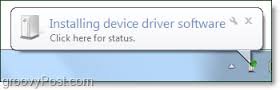
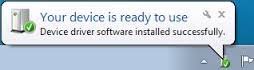
When I inserted the USB, the usual process occurred - recognizing a new device, installing the driver, and pronouncing it ready for use. (see attached generic jpgs that show what I mean)

I copied my files to the USB, removed it, and shut down my laptop. the next time I tried to boot up, the failure occurred and the Startup Repair couldn't fix it. That's when the problem signature results contained a reference to a "bad driver." (Text attached)

My "Restore" seems to have worked, as the problem has not occurred again. However, I have not tried to use this device again, and I don't know how to figure out what driver would drive it, let alone what caused the problem, how to fix that driver if it is still broken, or how to prevent problems with it in the future. It is possible that my Restore may have fixed it, since it restored back to a time before I used the USB, but I don't know how to tell for sure

This all assumes that I'm correct, and that this event is the cause of the failure to boot - but I don't know for sure if I'm right.
 

Attachments

  • Installing device driver.jpg
    Installing device driver.jpg
    4.1 KB · Views: 9
  • ready for use.jpg
    ready for use.jpg
    4 KB · Views: 9
  • Startup Repair Failure.txt
    Startup Repair Failure.txt
    383 bytes · Views: 0

My Computer My Computer

At a glance

Windows 7 Professional 64 bit SP 1Intel Core i7-4710 MQ16 GBNVIDIA GeForce GTX 870M
Computer type
Laptop
Computer Manufacturer/Model Number
ProStar Model P157SM-A
OS
Windows 7 Professional 64 bit SP 1
CPU
Intel Core i7-4710 MQ
Motherboard
No info
Memory
16 GB
Graphics Card(s)
NVIDIA GeForce GTX 870M
Hard Drives
256 GB Samsung SSD
1TB 7200 RPM Hard Drive
Antivirus
Norton Internet Security
Browser
Internet Explorer and Mozilla Firefox
If it does it again

You can use DriveCleanup (Drive Tools for Windows) to get rid of those drivers:
- Remove the USB stick (if attached)
- restart
- run DriveCleanup as admin
- restart
- plug in the USB stick (it should auto install)

This will remove all drivers for devices not attached at that time, so your other USB sticks/HDD will go through the regular device driver installation phase.
 

My Computer My Computer

At a glance

Windows 7 Ultimate x64 SP1AMD Phenom 2 1090T2x8GB Kingston HyperX Fury Black 1600Mhz Unga...MSI GTX 970 Gaming 4G
Computer type
PC/Desktop
Computer Manufacturer/Model Number
Custom Build
OS
Windows 7 Ultimate x64 SP1
CPU
AMD Phenom 2 1090T
Motherboard
Gigabyte GA-890FXA-UD5
Memory
2x8GB Kingston HyperX Fury Black 1600Mhz Unganged
Graphics Card(s)
MSI GTX 970 Gaming 4G
Sound Card
Realtek On-Board HD 7.1 Audio / Logitech G35
Monitor(s) Displays
3xAcer GD245HQ
Screen Resolution
1920x1080
Hard Drives
Samsung 850 Pro 512GB SSD - OS /
WD Caviar Black SATA 3 - 1 TBx2 - Dynamic RAID 0 /
WD Caviar Green SATA 2 - 640GBx2 - Dynamic RAID 0 /
WD Caviar Green SATA 2 - 640GB - Internal Backup /
Seagate Barracude SATA 3 - 3TB - External Backup/ Sync
PSU
HighPower 1000W
Case
Cooler Master HAF 932
Cooling
Noctua NH-D14
Keyboard
Logitech G19
Mouse
Logitech G500
Internet Speed
100/4 Mbit Cable (100GB quota)
Antivirus
ZoneAlarm Extreme Security / MBAM Pro / MBAE Free / SAS Free
Browser
IE 11 - Firefox - Chrome
Other Info
Logitech F710/ G27/ G940/ Z5500 // TrackIR 5 // Nvidia 3D Surround Vision
Sorry for the delayed reply - I've been on the road

When I get home, I will try the USB stick again to test it and its driver to see if it was just a faulty install the previous time. If it fails again, I will try your solution and will post the results

Thanks!!!
 

My Computer My Computer

At a glance

Windows 7 Professional 64 bit SP 1Intel Core i7-4710 MQ16 GBNVIDIA GeForce GTX 870M
Computer type
Laptop
Computer Manufacturer/Model Number
ProStar Model P157SM-A
OS
Windows 7 Professional 64 bit SP 1
CPU
Intel Core i7-4710 MQ
Motherboard
No info
Memory
16 GB
Graphics Card(s)
NVIDIA GeForce GTX 870M
Hard Drives
256 GB Samsung SSD
1TB 7200 RPM Hard Drive
Antivirus
Norton Internet Security
Browser
Internet Explorer and Mozilla Firefox
Back
Top