Win7 setup

andibosi

New member
Local time
10:37 AM
Messages
4
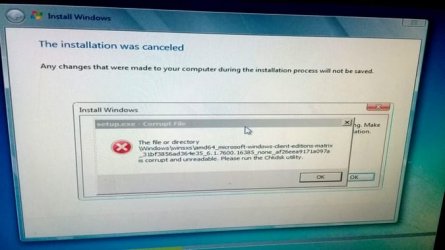
Hello everyone,I was trying to install Win7 ultimate x64 but during installation this error popped up:
Screenshot by Lightshot
Is there a way to fix this?(not using chkdsk.)
Thanks in advance.
 

My Computer

Computer type
PC/Desktop
OS
Win 7 ult x64
Is your hard drive old? It sounds like there may be a hard drive failure.
 

My Computer

Computer type
PC/Desktop
OS
Windows 7 Ultimate x64
Hi

looks like your install media is corrupt

Roy
 

My Computer

Computer type
PC/Desktop
Computer Manufacturer/Model Number
medionl/Aspire 6930G/acer x55a
OS
W7 home premium 32bit/W7HP 64bit/w10 tp insider ring
CPU
E5300 dual core
Motherboard
medion MS7366
Memory
3gb
Graphics Card(s)
Nvidia Geforce 7100 Nforce 630i
Monitor(s) Displays
avixc
Internet Speed
n (isp resticted to 72)
Antivirus
mse/pands
Browser
palemoon
Other Info
Belkin Fd7050 n USB using Railink RT2870 drivers, more upto date
That screenshot reads much better if it's NOT laying on its side.


That message actually told you what to do, so why didn't you do it. That's confusing!


So, you said you tried different media.... WHAT MEDIA? DVD's, FD's, what?


I've seen the same problem when I tried only DVD's. It was the DVD reader itself. That's one reason that I keep a brand new DVD drive on the shelf.


When a DVD didn't work, I've also tried a Flash Drive. On most computers, that's a viable option.


Good luck,
TM :cool:
 

Attachments

  • screenshot.jpg
    screenshot.jpg
    178.8 KB · Views: 14

My Computer

Computer type
PC/Desktop
Computer Manufacturer/Model Number
Various
OS
Win 7 Pro, SP1, x86, Win-11/Pro/64
CPU
AMD
Motherboard
Various
Memory
8GB Crucial
Graphics Card(s)
Various
Sound Card
OnBoard
Monitor(s) Displays
Acer 21.5"
Hard Drives
Crucial SSD, 500 GB
PSU
OEM
Case
SFF Slim Line Case
Cooling
OEM
Keyboard
eMachines
Mouse
Logitech Wireless
Internet Speed
varies
Antivirus
Windows Defender/Super Anti-Spyware
Browser
Firefox
That screenshot reads much better if it's NOT laying on its side.


That message actually told you what to do, so why didn't you do it. That's confusing!


So, you said you tried different media.... WHAT MEDIA? DVD's, FD's, what?


I've seen the same problem when I tried only DVD's. It was the DVD reader itself. That's one reason that I keep a brand new DVD drive on the shelf.


When a DVD didn't work, I've also tried a Flash Drive. On most computers, that's a viable option.


Good luck,
TM :cool:
Im running chkdsk right now but its taking tooo long it says 11 percent complete.(416468 of 49976746 free clusters processed)and its been 3 hours since I started it. (Thats why i didnt want to do it in the first place)
I meant I tried win 10, diff versions of win 7, even win xp
I will try flash drive thanks.
 

My Computer

Computer type
PC/Desktop
OS
Win 7 ult x64
Im running chkdsk right now but its taking tooo long it says 11 percent complete.(416468 of 49976746 free clusters processed)and its been 3 hours since I started it. (Thats why i didnt want to do it in the first place)
I meant I tried win 10, diff versions of win 7, even win xp
I will try flash drive thanks.

Everything points to a drive issue.
On a healthy drive, check disk only take less than a minute.
If it finds bad blocks, bad clusters, bad sectors etc you must replace the drive.
 

My Computers

System One System Two

  • Computer type
    PC/Desktop
    Computer Manufacturer/Model Number
    custom build
    OS
    Windows 7 HP 64
    CPU
    i5 6600K - 800MHz to 4200MHz
    Motherboard
    GA-Z170-HD3P
    Memory
    4+4G GSkill DDR4 3000
    Graphics Card(s)
    IG - Intel 530
    Monitor(s) Displays
    Samsung 226BW
    Screen Resolution
    1680x1050
    Hard Drives
    (1) -1 SM951 – 128GB M.2 AHCI PCIe SSD drive for Windows 7 and Lubuntu
    (2) -1 WD SATA 3 - 1T for Data
    (3) -1 WD SATA 3 - 1T for backup
    PSU
    Thermaltake 450W TR2 gold
    Keyboard
    Old and good Chicony mechanical keyboard
    Mouse
    Logitech mX performance - 9 buttons (had to disable some)
    Internet Speed
    500Mb/s
    Browser
    Firefox 64
    Other Info
    TinyWall firewall
  • Computer type
    Laptop
    System Manufacturer/Model Number
    Asus Q550LF
    OS
    Windows 7 Pro
    CPU
    i7-4500U 800MHz to 3.0GHz
    Motherboard
    Asus Q550LF
    Memory
    (4+4)G DDR3 1600
    Graphics Card(s)
    IG intel 4400 + NVIDIA GeForce GT 745M
    Sound Card
    Realtek
    Monitor(s) Displays
    LG Display LP156WF4-SPH1
    Screen Resolution
    1920 x 1080
    Hard Drives
    BX500 120G SSD for Windows and programs +
    1T HDD for data
    Internet Speed
    500 Mb/s
    Browser
    Firefox
    Other Info
    TinyWall firewall
The time that CHKDSK takes to check an entire HD is somewhat dependent on the size of the HD being checked. Quantity of RAM and cpu speed also enters into the game.


For years, I've not used CHKDSK, but a number of After Market programs, like Spinrite.


Before using a HD that I was unsure of, I'd boot up the PC with my DOS Utilities CD, and run the DOS Format command on the disk. The DOS Format command will examine every sector on the disk and if it finds an unreliable sector, it will mark it as BAD in the "Bad Sector Map" which is recorded on the HD.
Then NO program will ever use that Sector.


Years ago, I also used a program called, "Low Level Formatter". It took quite a while to run, but it would leave the HD just like it had just left the factory. All bad sectors were blocked out.


Proper HD diagnostics and repair is not for the faint of heart, or the beginner.

If time is money, just replace the old HD with a new SSD and be done with it.


Cheers Mate!
TM :cool:
 

My Computer

Computer type
PC/Desktop
Computer Manufacturer/Model Number
Various
OS
Win 7 Pro, SP1, x86, Win-11/Pro/64
CPU
AMD
Motherboard
Various
Memory
8GB Crucial
Graphics Card(s)
Various
Sound Card
OnBoard
Monitor(s) Displays
Acer 21.5"
Hard Drives
Crucial SSD, 500 GB
PSU
OEM
Case
SFF Slim Line Case
Cooling
OEM
Keyboard
eMachines
Mouse
Logitech Wireless
Internet Speed
varies
Antivirus
Windows Defender/Super Anti-Spyware
Browser
Firefox
Back
Top