Solved Win7 Style Builder: Importing Taskbar from another theme

Spores

Banned
I like this theme called Planisphere 2. It looks like this:

shot2.png


The only problem I have with it is the taskbar. I want to keep the taskbar from my current theme (7.5):

shot1.png


So I would like to make Planisphere 2.0 look like the following (the image below is photoshopped):

asdads.png


I tried importing TaskBar & Tray Notify but the results were disastrous:

shot1.png


Which elements do I have to import? Please help!
 
Last edited:

My Computer

Computer type
Laptop
Computer Manufacturer/Model Number
Dell Inspiron 3521
OS
Windows 7 Ultimate x64
CPU
Intel(R) Core(TM) i3-2365M CPU @ 1.40GHz
Motherboard
Dell Inc. 0NT0M2
Memory
4.00 GB
Graphics Card(s)
Intel(R) HD Graphics 3000
Sound Card
(1) Realtek High Definition Audio (2) Intel(R) Display Aud
Screen Resolution
1366 x 768
Hard Drives
ST500LM012 HN-M500MBB ATA Device
Internet Speed
30 Mbps
Antivirus
None
Browser
Google Chrome
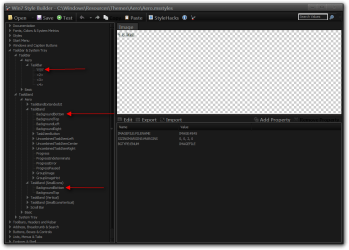
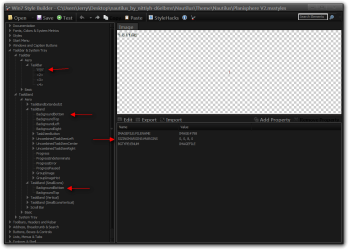
You can export the images at the locations in the screenshot below and then it import them back in the other theme.

Jerry
Win7 Style Builder - CWindowsResourcesThemesAeroAero.msstyles.png
 

My Computer

Computer type
Laptop
Computer Manufacturer/Model Number
Sager NP9170
OS
Win 7 Pro x64 / Win 10 Pro
CPU
Intel(R) Core(TM) i7-3630QM CPU @ 2.40GHz
Motherboard
CLEVO P170EM
Memory
12 GB
Graphics Card(s)
(1) Intel(R) HD Graphics 4000 (2) NVIDIA GeForce GTX 675M
Sound Card
(1) Realtek High Definition Audio (2) Intel(R) Display Aud
Monitor(s) Displays
17.3
Screen Resolution
1920x1080
Hard Drives
(1) Samsung 860 EVO 500GB(OS) (1) Samsung 860 EVO 500GB(Data)
Keyboard
Backlite
Antivirus
MSE, Malwarebytes Pro
Browser
Firefox
Other Info
DESKTOP: Custom-built.
OS: Win 10 Pro x64.
CASE: Rosewill R5.
CPU: Intel I5 4670K CPU @ 3.40GHz.
CPU COOLER: Cool Master Hyper 212 EVO.
MOTHERBOARD: Asus Z87-A.
MEMORY: Kingston HyperX 2x4 GB.
GPU: Nvidia Geforce 650 TI.
PSU: Corsair TX750.
DRIVES: (1) Samsung 840 120 GB SSD (2) Western Digital blue 500 GB 7200 RPM.

Thanks for the reply Jerry. I followed your instructions exactly and this is what I've got now:

shot1.png


As you can see a bit of the old taskbar remains (those are taskbar buttons without icons, yuck!). I'm sure importing those images would have worked on most themes but this one is stubborn. Any ideas?

(My current theme now has a fully transparent taskbar so that's why most of it is invisible.)
 

My Computer

Computer type
Laptop
Computer Manufacturer/Model Number
Dell Inspiron 3521
OS
Windows 7 Ultimate x64
CPU
Intel(R) Core(TM) i3-2365M CPU @ 1.40GHz
Motherboard
Dell Inc. 0NT0M2
Memory
4.00 GB
Graphics Card(s)
Intel(R) HD Graphics 3000
Sound Card
(1) Realtek High Definition Audio (2) Intel(R) Display Aud
Screen Resolution
1366 x 768
Hard Drives
ST500LM012 HN-M500MBB ATA Device
Internet Speed
30 Mbps
Antivirus
None
Browser
Google Chrome

My Computer

Computer type
Laptop
Computer Manufacturer/Model Number
Sager NP9170
OS
Win 7 Pro x64 / Win 10 Pro
CPU
Intel(R) Core(TM) i7-3630QM CPU @ 2.40GHz
Motherboard
CLEVO P170EM
Memory
12 GB
Graphics Card(s)
(1) Intel(R) HD Graphics 4000 (2) NVIDIA GeForce GTX 675M
Sound Card
(1) Realtek High Definition Audio (2) Intel(R) Display Aud
Monitor(s) Displays
17.3
Screen Resolution
1920x1080
Hard Drives
(1) Samsung 860 EVO 500GB(OS) (1) Samsung 860 EVO 500GB(Data)
Keyboard
Backlite
Antivirus
MSE, Malwarebytes Pro
Browser
Firefox
Other Info
DESKTOP: Custom-built.
OS: Win 10 Pro x64.
CASE: Rosewill R5.
CPU: Intel I5 4670K CPU @ 3.40GHz.
CPU COOLER: Cool Master Hyper 212 EVO.
MOTHERBOARD: Asus Z87-A.
MEMORY: Kingston HyperX 2x4 GB.
GPU: Nvidia Geforce 650 TI.
PSU: Corsair TX750.
DRIVES: (1) Samsung 840 120 GB SSD (2) Western Digital blue 500 GB 7200 RPM.
Thanks Jerry now the taskbar is invisible again! However, taskbar icons are still missing as shown below.

shot1.png


I've also noticed that the taskbar has retained its Planisphere 2 size, which is a bit greater than 7.5's. Do you know how to change that as well?
 

My Computer

Computer type
Laptop
Computer Manufacturer/Model Number
Dell Inspiron 3521
OS
Windows 7 Ultimate x64
CPU
Intel(R) Core(TM) i3-2365M CPU @ 1.40GHz
Motherboard
Dell Inc. 0NT0M2
Memory
4.00 GB
Graphics Card(s)
Intel(R) HD Graphics 3000
Sound Card
(1) Realtek High Definition Audio (2) Intel(R) Display Aud
Screen Resolution
1366 x 768
Hard Drives
ST500LM012 HN-M500MBB ATA Device
Internet Speed
30 Mbps
Antivirus
None
Browser
Google Chrome
Thanks Jerry now the taskbar is invisible again! However, taskbar icons are still missing as shown below.
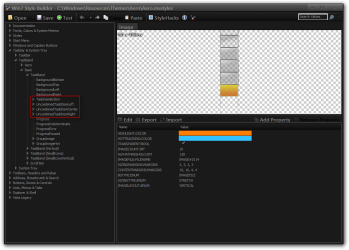
You will need to change the CONTENTMARGINS:MARGINS at the location shown in the screenshot below.
The original ones are 10, 10, 4, 4 Notice there is a space after the ,
The sequence for numbers are left right top bottom the bigger the number the more it hides things.
1.png


I've also noticed that the taskbar has retained its Planisphere 2 size, which is a bit greater than 7.5's. Do you know how to change that as well?

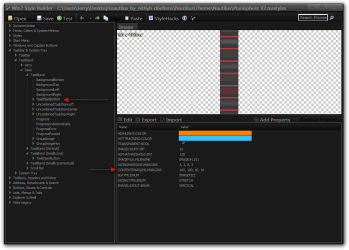
Checked the difference between the 2 themes at the locations in the screenshot, topmost location originally SIZINGMARGIN:MARGIN was 0, 0, 2, 0 and the other 2 locations did not have them they were added. If that's not it I'm not sure where else to check.

Jerry
3.png
 

My Computer

Computer type
Laptop
Computer Manufacturer/Model Number
Sager NP9170
OS
Win 7 Pro x64 / Win 10 Pro
CPU
Intel(R) Core(TM) i7-3630QM CPU @ 2.40GHz
Motherboard
CLEVO P170EM
Memory
12 GB
Graphics Card(s)
(1) Intel(R) HD Graphics 4000 (2) NVIDIA GeForce GTX 675M
Sound Card
(1) Realtek High Definition Audio (2) Intel(R) Display Aud
Monitor(s) Displays
17.3
Screen Resolution
1920x1080
Hard Drives
(1) Samsung 860 EVO 500GB(OS) (1) Samsung 860 EVO 500GB(Data)
Keyboard
Backlite
Antivirus
MSE, Malwarebytes Pro
Browser
Firefox
Other Info
DESKTOP: Custom-built.
OS: Win 10 Pro x64.
CASE: Rosewill R5.
CPU: Intel I5 4670K CPU @ 3.40GHz.
CPU COOLER: Cool Master Hyper 212 EVO.
MOTHERBOARD: Asus Z87-A.
MEMORY: Kingston HyperX 2x4 GB.
GPU: Nvidia Geforce 650 TI.
PSU: Corsair TX750.
DRIVES: (1) Samsung 840 120 GB SSD (2) Western Digital blue 500 GB 7200 RPM.
Thanks Jerry, it worked!
 
Last edited:

My Computer

Computer type
Laptop
Computer Manufacturer/Model Number
Dell Inspiron 3521
OS
Windows 7 Ultimate x64
CPU
Intel(R) Core(TM) i3-2365M CPU @ 1.40GHz
Motherboard
Dell Inc. 0NT0M2
Memory
4.00 GB
Graphics Card(s)
Intel(R) HD Graphics 3000
Sound Card
(1) Realtek High Definition Audio (2) Intel(R) Display Aud
Screen Resolution
1366 x 768
Hard Drives
ST500LM012 HN-M500MBB ATA Device
Internet Speed
30 Mbps
Antivirus
None
Browser
Google Chrome
You're welcome
 

My Computer

Computer type
Laptop
Computer Manufacturer/Model Number
Sager NP9170
OS
Win 7 Pro x64 / Win 10 Pro
CPU
Intel(R) Core(TM) i7-3630QM CPU @ 2.40GHz
Motherboard
CLEVO P170EM
Memory
12 GB
Graphics Card(s)
(1) Intel(R) HD Graphics 4000 (2) NVIDIA GeForce GTX 675M
Sound Card
(1) Realtek High Definition Audio (2) Intel(R) Display Aud
Monitor(s) Displays
17.3
Screen Resolution
1920x1080
Hard Drives
(1) Samsung 860 EVO 500GB(OS) (1) Samsung 860 EVO 500GB(Data)
Keyboard
Backlite
Antivirus
MSE, Malwarebytes Pro
Browser
Firefox
Other Info
DESKTOP: Custom-built.
OS: Win 10 Pro x64.
CASE: Rosewill R5.
CPU: Intel I5 4670K CPU @ 3.40GHz.
CPU COOLER: Cool Master Hyper 212 EVO.
MOTHERBOARD: Asus Z87-A.
MEMORY: Kingston HyperX 2x4 GB.
GPU: Nvidia Geforce 650 TI.
PSU: Corsair TX750.
DRIVES: (1) Samsung 840 120 GB SSD (2) Western Digital blue 500 GB 7200 RPM.
Back
Top