
Win7 taskbar hover and JetAudio toolbar mode problem

Pepino

New member
Local time
6:28 PM
Messages
3
Hi, at start I am sorry for my english..

I have problem with compatible win7 taskbar hover and use jetaudio as toolbar.. On the attached image you can see my problem..

at seetings of jetAudio i have disable option ,,always on top"

How you any idea i can solved this?
 

Attachments
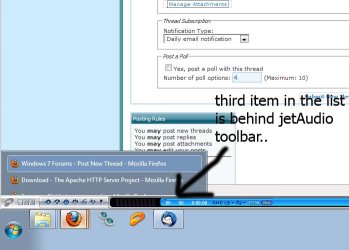
  • step.jpg
    step.jpg
    38.2 KB · Views: 186

My Computer My Computer

OS
Windows 7
Drag the top of your taskbar down a notch, it looks like it was dragged up and that might be causing your problem.
 

My Computer My Computer

Computer type
PC/Desktop
Computer Manufacturer/Model Number
Custom Build/Mod
OS
Windows 7 Home Premium x64
CPU
Intel QX9650 Extreme 4.0 GHz
Motherboard
ASUS Rampage Extreme Rev2
Memory
8GB (4x2) Corsair Dominator DDR3
Graphics Card(s)
2x Radeon R390X [8GB]
Sound Card
SupremeFX X-Fi
Monitor(s) Displays
Dell 2408WFP 26" Panel
Screen Resolution
1920x1200
Hard Drives
4x WD 2TB (8TB+ Total)
2x Crucial SSD 128GB (RAID-0)
1x LG Blu-ray read/write
1x Phillips LightScribe DVD read/write
PSU
Corsair HX1000
Case
CoolerMaster - Cosmos S
Cooling
Custom Liquid - 320mm rad w/ 3x 80mm fans, CPU/NB/SB Blocks
Keyboard
Logitech Illuminater Pro
Mouse
Logitech
Internet Speed
Fractional T1 - 125Mbps
Antivirus
ESET Security Suite / Microsoft Security Essentials
Browser
Cyberfox Intel x64
Other Info
OC'd to 5.0GHz @ 44c under full load
Drag the top of your taskbar down a notch, it looks like it was dragged up and that might be causing your problem.
This is not solutions my problem.. this ,,bug" is only at hover group item list.. start menu is over jet audio.. tooltip when i hover on time is also over jet audio..
 

My Computer My Computer

OS
Windows 7
I have seen this before not only with Windows 7 and not only with JetAudio. Windows 7 does not understand that the JetAudio bar is there. For Windows 7 to understand what JetAudio is doing the programmer needs to tell the shell that it is taking up space so the shell will adjust for it. I would post in the JetAudio forums what you have found so they can fix the problem. Until they fix it you can put the JetAudio bar on top of the screen.
 

My Computer My Computer

Computer type
PC/Desktop
Computer Manufacturer/Model Number
Dell OP7010
OS
Windows 7 Enterprise (x64); Windows Server 2008 R2 (x64)
Memory
16GB
Monitor(s) Displays
4 Dell 24" LCD
Screen Resolution
1280x1024
Keyboard
Dell
Mouse
Dell Optical
Internet Speed
40meg
I have seen this before not only with Windows 7 and not only with JetAudio. Windows 7 does not understand that the JetAudio bar is there. For Windows 7 to understand what JetAudio is doing the programmer needs to tell the shell that it is taking up space so the shell will adjust for it. I would post in the JetAudio forums what you have found so they can fix the problem. Until they fix it you can put the JetAudio bar on top of the screen.
Thank you. I'll try to ask for a answer on the JetAudio forum.
 

My Computer My Computer

OS
Windows 7
Back
Top