Win7 Virtual Machine on Win7

rap33042

Senior Moment
Guru
Local time
1:13 PM
Messages
570
Location
Osceola, WI
Hello All:

I run Win 7; I would like to install win 7 on Virtual Box.

Am I going to run into a snag when I try to activate the virtual Windows 7?

Will MS think I'm running it on two machines?

What are the licensing issues?

TIA
 

My Computer

Computer Manufacturer/Model Number
OEM - Me
OS
Windows 7 Home Premium x64
CPU
AMD Phenom II X6 1600T
Motherboard
GigaByte GZ-990FXA-UD3
Memory
16GB PC3-10700 (1342MHz)
Graphics Card(s)
ATI Radeon 5770 HD (x2) CrossFire
Sound Card
On-board RealTek chipset
Monitor(s) Displays
3x Hanns-G 1920x1080 Monitors
Screen Resolution
3x Hanns-G 1920x1080 Monitors
Hard Drives
Intel 25-V SSD 40GB: 218 MB/s AT: 0.1ms
Intel X-25M SSD 80GB: 230MB/s AT: 0.1ms
Seagate 750GB: 133 MB/s AT: 13ms (perpendicular storage)
Buffalo HD-PCTU3 1TB External drive
PSU
OCZ Stealth X Stream 750W
Case
Cheap (unknown)
Cooling
Stock
Keyboard
HP USB
Mouse
LogiTech USB
Internet Speed
1.5 Mbps - Slow - At the tail-end of a rural network
Other Info
Printer: Epson Stylus C-84
Scanner: HP 3500C Flatbed
DVD-RW: Plextor
DVD-ROM: Unknown
WEI: 7.4
OEM won't install but a normal VL or "family" key will.
 

My Computer

OS
7 Pro
I don't have a Volume License or Family Pack license- I guess I'm out of luck, then?
 

My Computer

Computer Manufacturer/Model Number
OEM - Me
OS
Windows 7 Home Premium x64
CPU
AMD Phenom II X6 1600T
Motherboard
GigaByte GZ-990FXA-UD3
Memory
16GB PC3-10700 (1342MHz)
Graphics Card(s)
ATI Radeon 5770 HD (x2) CrossFire
Sound Card
On-board RealTek chipset
Monitor(s) Displays
3x Hanns-G 1920x1080 Monitors
Screen Resolution
3x Hanns-G 1920x1080 Monitors
Hard Drives
Intel 25-V SSD 40GB: 218 MB/s AT: 0.1ms
Intel X-25M SSD 80GB: 230MB/s AT: 0.1ms
Seagate 750GB: 133 MB/s AT: 13ms (perpendicular storage)
Buffalo HD-PCTU3 1TB External drive
PSU
OCZ Stealth X Stream 750W
Case
Cheap (unknown)
Cooling
Stock
Keyboard
HP USB
Mouse
LogiTech USB
Internet Speed
1.5 Mbps - Slow - At the tail-end of a rural network
Other Info
Printer: Epson Stylus C-84
Scanner: HP 3500C Flatbed
DVD-RW: Plextor
DVD-ROM: Unknown
WEI: 7.4
You can not activate an already activated Windows 7 on another computer. It's no difference if the other computer is a real, physical one or a virtual machine. Before installing an activated retail copy of Windows 7 to another computer, you should "deactivate" it first.

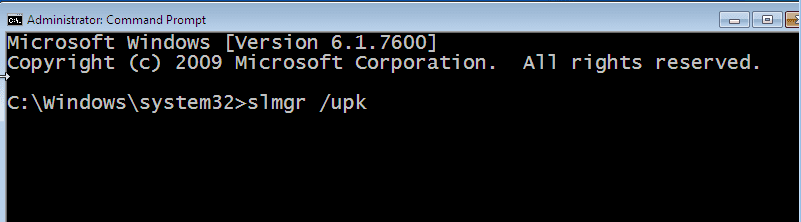
To deactivate Windows Seven, open an elevated command promt by right clicking Command Prompt in Start Menu > Accesories and choose Run as administrator. Tell system licence manager tool to uninstall current, activated product key by typing slmgr /upk to command prompt, like this:

Deactivate_Windows_1.PNG

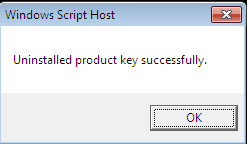
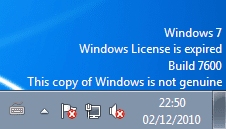
When software licence manager has finished, you get the confirmation dialog. You also see a watermark on the lower right corner of your desktop telling that your Windows is no longer activated:

Deactivate_Windows_2.PNG Deactivate_Windows_3.PNG

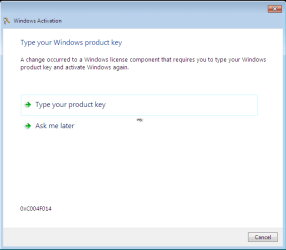
If you reboot your computer, you'll see this:

Deactivate_Windows_4.PNG

Windows is now completely deactivated, product key uninstalled and you should have no problems to re-activate it on another computer. Reminder: this works for retail version. OEM version can be deactivated using this same method but can only be re-activated on that same computer.

Kari
 
Last edited:

My Computer

Computer type
Laptop
Computer Manufacturer/Model Number
HP ENVY 17-1150eg
OS
Windows 10 Pro x64 EN-GB
CPU
1.6 GHz Intel Core i7-720QM Processor
Memory
6 GB
Graphics Card(s)
ATI Mobility Radeon HD 5850 Graphics
Sound Card
Beats sound system with integrated subwoofer
Monitor(s) Displays
17" laptop display, 22" LED and 32" Full HD TV through HDMI
Screen Resolution
1600*900 (1), 1920*1080 (2&3)
Hard Drives
Internal: 2 x 500 GB SATA Hard Disk Drive 7200 rpm
External: 2TB for backups, 3TB USB3 network drive for media
Cooling
As Envy runs a bit warm, I have it on a Cooler Master pad
Keyboard
Logitech diNovo Media Desktop Laser (bluetooth)
Mouse
Logitech Performance Mouse MX
Internet Speed
50/10 Mbps VDSL
Antivirus
Windows Defender 4.3.9431.0
Browser
Maxthon 3.5.2., IE11
OEM won't install but a normal VL or "family" key will.


Hi there
OEM WILL install but it won't pass activation - so you would have to re-create your VM every 30 (or 3) days depending on the activation message.

You *might* be able to get an OEM version to work by doing a P2V (Physical to Virtual) conversion from the physical machine. It's possible in this case the activation will either not be requested or it will pass.

Cheers
jimbo
 

My Computer

Computer type
PC/Desktop
Computer Manufacturer/Model Number
Custom built, several laptops HP/ASUS
OS
Linux CENTOS 7 / various Windows OS'es and servers
CPU
Intel i7 Intel i5
Memory
8GB, 16GB
Graphics Card(s)
On Motherboard
Sound Card
Realtek HD audio
Monitor(s) Displays
Apple Cinema display, Samsung LCD
Screen Resolution
1920 X 1080
Hard Drives
4 X 1TB SATA
Mouse
Toshiba wireless laser
Internet Speed
> 20MB up
OK - there are a few myths in this thread that need to be exploded once and for all.... (since I got pointed here from another thread)

1) Family Pack Windows are ALL Upgrades, and cannot be used in isolation, particularly for installing into Virtual Machines of any kind - which require Full Licenses for each instance.

2) 'Uninstalling' the Key does NOT remove the activation from MS's database - all it does is prepare the current system for the entry of a new Key. MS will still 'see' the old install for comparison when the new install is activated. MS's database will still record the activation attempt, and the hardware hash (as it does ALL attempts at activation that get as far as its servers)

3) Activating a previously-used Key on another computer (or motherboard) will almost always require telephone activation.

4) OEM Licenses CANNOT be moved to another computer for any reason whatsoever - and can only be moved to a new motherboard when the board is repalced *under warranty conditions*.


I hope this clears some things up - PM me if you need specifics.
 

My Computer

Computer type
Laptop
Computer Manufacturer/Model Number
Asus K52F or Lenovo B51-80
OS
Win 7 x64 Home Premium (and x86 VirtualBox VM)/Win10
CPU
i3 370M/i7 6500U
Motherboard
Asus/Lenovo
Memory
8GB - finally :)/8GB
Graphics Card(s)
it's an i3, dude!/dual Intel&nVidia
Sound Card
onboard
Monitor(s) Displays
15.6" built-in
Screen Resolution
1366x768/1920x1080
Hard Drives
750GB Seagate internal
Sundry external drives attached to other computers on the local network
1TB SSD on the Lenovo
PSU
n/a
Internet Speed
as much as I can get - usually on a dongle/phone, so <1MB/s
Antivirus
MSE/Defender
Browser
IE11/12/Edge/Chrome/FF(if I must)
@Noel:

1) See tutorials section of Seven Forums or any other Windows forums to see how to make a clean install with upgrade version of Windows 7. For instance this method method can be used to install an upgrade version of Seven to a virtual machine: http://www.sevenforums.com/tutorials/31402-clean-install-upgrade-windows-7-version.html. And it's legal. Done that, been there, although didn't get the T-shirt ;)

2) Own experience: an activated retail Seven Ultimate on an old Toshiba laptop. When Toshiba started dying, used the same key to activate Ultimate on a new HP laptop using Anytime Upgrade (HP came with Home Premium). It was a no go, even the automated phone activation was telling the key was used, waited almost 15 minutes to be connected to a real person. Did not want to wait anymore, put the phone down and used slmgr /upk (Software Licence Manager with Uninstall Product Key switch) on old Toshiba. Tried to activate HP with the same key, did not succeed. Waited for half an hour, tried again, succeeded.

3) See 2)

4) Nothing to add, although both Seven Forums and other forums have numerous stories from people who have had a good explanation and phone activation people have given them a code to use OEM key on another machine.

Kari
 

My Computer

Computer type
Laptop
Computer Manufacturer/Model Number
HP ENVY 17-1150eg
OS
Windows 10 Pro x64 EN-GB
CPU
1.6 GHz Intel Core i7-720QM Processor
Memory
6 GB
Graphics Card(s)
ATI Mobility Radeon HD 5850 Graphics
Sound Card
Beats sound system with integrated subwoofer
Monitor(s) Displays
17" laptop display, 22" LED and 32" Full HD TV through HDMI
Screen Resolution
1600*900 (1), 1920*1080 (2&3)
Hard Drives
Internal: 2 x 500 GB SATA Hard Disk Drive 7200 rpm
External: 2TB for backups, 3TB USB3 network drive for media
Cooling
As Envy runs a bit warm, I have it on a Cooler Master pad
Keyboard
Logitech diNovo Media Desktop Laser (bluetooth)
Mouse
Logitech Performance Mouse MX
Internet Speed
50/10 Mbps VDSL
Antivirus
Windows Defender 4.3.9431.0
Browser
Maxthon 3.5.2., IE11
If you want to run win7 on top of 7, you can do so without using any iso. VMLite allows you to create vm using the files from host os.

We released a beta version of vmlite v4, you can download from: (free registration is required)

www.vmlite.com

click Download, Beta, VMLiteWorkstationSetup-v42-beta-1.exe

After install, reboot the pc, then start VMLite Workstation,

go to menu Machine > New VMLite...,

it will create a vm that allows the current OS to be virtualized. It takes only 1 min, then you can start the vm, taking a few mins, and you will have a sandbox.
 

My Computer

OS
windows 7
@Noel:

1) See tutorials section of Seven Forums or any other Windows forums to see how to make a clean install with upgrade version of Windows 7. For instance this method method can be used to install an upgrade version of Seven to a virtual machine: http://www.sevenforums.com/tutorials/31402-clean-install-upgrade-windows-7-version.html. And it's legal. Done that, been there, although didn't get the T-shirt ;)

Just because it's possible (and I've used that method myself) doesn't mean that it's legal - it is ONLY legal when a qualifying license is held for that system.

Activation and validation are only able to test the techical aspects of the system, not the legal ones.
 

My Computer

Computer type
Laptop
Computer Manufacturer/Model Number
Asus K52F or Lenovo B51-80
OS
Win 7 x64 Home Premium (and x86 VirtualBox VM)/Win10
CPU
i3 370M/i7 6500U
Motherboard
Asus/Lenovo
Memory
8GB - finally :)/8GB
Graphics Card(s)
it's an i3, dude!/dual Intel&nVidia
Sound Card
onboard
Monitor(s) Displays
15.6" built-in
Screen Resolution
1366x768/1920x1080
Hard Drives
750GB Seagate internal
Sundry external drives attached to other computers on the local network
1TB SSD on the Lenovo
PSU
n/a
Internet Speed
as much as I can get - usually on a dongle/phone, so <1MB/s
Antivirus
MSE/Defender
Browser
IE11/12/Edge/Chrome/FF(if I must)
Back
Top