
Solved Win7 wants to scan & fix BitLocker drive

voyager

New member
Local time
9:21 PM
Messages
39
Location
Hawaii
Every time I unlock the BitLocker encrypted drive I get the following:


If I click on "Scan and fix", I am told that the drive must be unmounted before it can be scanned.
I have scanned all the drives by "[FONT=&quot]Chkdsk /f /r" on a reboot. I am still getting the prompt to "scan and fix".[/FONT]

How can I fix whatever is causing the prompt, or stop the prompts from being generated?
 
Last edited:

My Computer My Computer

At a glance

Windows 7 Ultimate x64i7-3770k OC to 4.5GHz4x4GB Kingston HyperX 1600XFX Radeon R7 260X
Computer type
PC/Desktop
Computer Manufacturer/Model Number
Voyager's PC Foundry - VPCF07
OS
Windows 7 Ultimate x64
CPU
i7-3770k OC to 4.5GHz
Motherboard
ASUS P8Z77-V
Memory
4x4GB Kingston HyperX 1600
Graphics Card(s)
XFX Radeon R7 260X
Sound Card
Onboard HD sound
Monitor(s) Displays
2X Dell U2412M
Screen Resolution
1920 x 1200 [3840 X 1200]
Hard Drives
1X Crucial MX300 750 GB SATA-III SSD;
1x Seagate 2TB ST2000DM001 SATA-III;
2x Hitachi 2TB Ultrastar HUA723020ALA641 SATA III
PSU
Corsair RM Series 850W
Case
Corsair Graphite T600
Cooling
Noctua NH-U12P SE2
Keyboard
Azio KB505U Large Print Backlit - wired
Mouse
Cheapest I can find - wired
Internet Speed
50mbps
Antivirus
Bit Defender Free
Browser
Palemoon
Other Info
Epson SureColor 400;
Brother MFC L2740DW;
Nikon Super CoolScan 4000ED;
TCC 750LC PreAmp;
MCS [Technics] 6603 Turntable;
Hauppauge WinTV-HVR 1850 TV tuner card;
Syba SD-SA2PEX-2IR SATA RAID card

My Computer My Computer

At a glance

Windows 7 Ultimate 32bit SP1Intel(R) Core(TM)2 Quad CPU @ 2.40GHz, 2400 MHz4 GBATI Radeon HD 2600 Pro
Computer type
PC/Desktop
Computer Manufacturer/Model Number
Bruce ... somewhere in his 40's
OS
Windows 7 Ultimate 32bit SP1
CPU
Intel(R) Core(TM)2 Quad CPU @ 2.40GHz, 2400 MHz
Motherboard
INTEL/D975XBX2
Memory
4 GB
Graphics Card(s)
ATI Radeon HD 2600 Pro
Monitor(s) Displays
Samsung SyncMaster 914v
Screen Resolution
1280 x 1024
Hard Drives
2/500GB each ... ST3500630AS ATA Device.
One is not connected
PSU
Rocketfish 700 W
Case
G.Skill Gigabyte Chassis
Keyboard
Standard PS/2 Keyboard
Mouse
Microsoft PS/2 Mouse
Internet Speed
DSL
Antivirus
Avira Internet Security
Browser
IE 11
Other Info
ATI HDMI Audio
Thanks for your response Jacee,
Just to be sure We're on the same page:

1. After I enter the PW to unlock the encrypted drive, I get the scan prompt.
2. If I click on "Scan and fix", it runs for a few seconds then says that the drive has to be unmounted to do the scan.

I apologize for not including the following information:
3. If I click on "continue without scanning" the drive decrypts and I seem to have access to everything on it. It does not seem to be inaccessible in any way. I only have to click through the prompt to scan the disc every time it is opened up.

As I scan the links you've provided, They seem to be aimed at a situation where the drive is not accessible at all.
I will go back and look at them more thoroughly in the morning to make sure that I am not missing something, which I do quite often.
 

My Computer My Computer

At a glance

Windows 7 Ultimate x64i7-3770k OC to 4.5GHz4x4GB Kingston HyperX 1600XFX Radeon R7 260X
Computer type
PC/Desktop
Computer Manufacturer/Model Number
Voyager's PC Foundry - VPCF07
OS
Windows 7 Ultimate x64
CPU
i7-3770k OC to 4.5GHz
Motherboard
ASUS P8Z77-V
Memory
4x4GB Kingston HyperX 1600
Graphics Card(s)
XFX Radeon R7 260X
Sound Card
Onboard HD sound
Monitor(s) Displays
2X Dell U2412M
Screen Resolution
1920 x 1200 [3840 X 1200]
Hard Drives
1X Crucial MX300 750 GB SATA-III SSD;
1x Seagate 2TB ST2000DM001 SATA-III;
2x Hitachi 2TB Ultrastar HUA723020ALA641 SATA III
PSU
Corsair RM Series 850W
Case
Corsair Graphite T600
Cooling
Noctua NH-U12P SE2
Keyboard
Azio KB505U Large Print Backlit - wired
Mouse
Cheapest I can find - wired
Internet Speed
50mbps
Antivirus
Bit Defender Free
Browser
Palemoon
Other Info
Epson SureColor 400;
Brother MFC L2740DW;
Nikon Super CoolScan 4000ED;
TCC 750LC PreAmp;
MCS [Technics] 6603 Turntable;
Hauppauge WinTV-HVR 1850 TV tuner card;
Syba SD-SA2PEX-2IR SATA RAID card
OK, I think I have it fixed.
I decided to try a more hands-on approach to tracking the problem down.

1. I copied all the files on the encrypted drive to another drive with a file transfer and checker utility, TeraCopy. I use it whenever I move large quantities of files from drive to drive.

2. I found a couple of files with path/file names that were too long. They had to have their names trimmed, then manually moved to the other drive. The prompt to scan was still offered when unlocking after a reboot.

3. I deleted all the transferred files from the encrypted drive. The prompt to scan was still offered when unlocking after a reboot.

4. I decrypted the drive.

5. After a reboot, several files that had been deleted were back on the decrypted drive. I could not delete them. I tried the scan option and for the first time it actually offered to dismount the drive. I dismounted and scanned it, rebooted, and on restart the drive was scanned again. I could then delete those files.

6. I have re-encrypted the drive but have not reloaded the files yet. After a reboot and unlocking the drive, it no longer prompts for a scan.

After doing a bit more online reading, I'm thinking that the problem might have been based on my moving the TPM card and drive from my old PC to my newly build PC.

So, this brings another question:
Does it make any difference if I reload the 700GB of files while the drive is encrypted. Or, would it be better to decrypt the drive before reloading the files and then re-encrypt the drive after they're back on?
 
Last edited:

My Computer My Computer

At a glance

Windows 7 Ultimate x64i7-3770k OC to 4.5GHz4x4GB Kingston HyperX 1600XFX Radeon R7 260X
Computer type
PC/Desktop
Computer Manufacturer/Model Number
Voyager's PC Foundry - VPCF07
OS
Windows 7 Ultimate x64
CPU
i7-3770k OC to 4.5GHz
Motherboard
ASUS P8Z77-V
Memory
4x4GB Kingston HyperX 1600
Graphics Card(s)
XFX Radeon R7 260X
Sound Card
Onboard HD sound
Monitor(s) Displays
2X Dell U2412M
Screen Resolution
1920 x 1200 [3840 X 1200]
Hard Drives
1X Crucial MX300 750 GB SATA-III SSD;
1x Seagate 2TB ST2000DM001 SATA-III;
2x Hitachi 2TB Ultrastar HUA723020ALA641 SATA III
PSU
Corsair RM Series 850W
Case
Corsair Graphite T600
Cooling
Noctua NH-U12P SE2
Keyboard
Azio KB505U Large Print Backlit - wired
Mouse
Cheapest I can find - wired
Internet Speed
50mbps
Antivirus
Bit Defender Free
Browser
Palemoon
Other Info
Epson SureColor 400;
Brother MFC L2740DW;
Nikon Super CoolScan 4000ED;
TCC 750LC PreAmp;
MCS [Technics] 6603 Turntable;
Hauppauge WinTV-HVR 1850 TV tuner card;
Syba SD-SA2PEX-2IR SATA RAID card
I'm not sure on your question, so I'll ask for more help :)
 

My Computer My Computer

At a glance

Windows 7 Ultimate 32bit SP1Intel(R) Core(TM)2 Quad CPU @ 2.40GHz, 2400 MHz4 GBATI Radeon HD 2600 Pro
Computer type
PC/Desktop
Computer Manufacturer/Model Number
Bruce ... somewhere in his 40's
OS
Windows 7 Ultimate 32bit SP1
CPU
Intel(R) Core(TM)2 Quad CPU @ 2.40GHz, 2400 MHz
Motherboard
INTEL/D975XBX2
Memory
4 GB
Graphics Card(s)
ATI Radeon HD 2600 Pro
Monitor(s) Displays
Samsung SyncMaster 914v
Screen Resolution
1280 x 1024
Hard Drives
2/500GB each ... ST3500630AS ATA Device.
One is not connected
PSU
Rocketfish 700 W
Case
G.Skill Gigabyte Chassis
Keyboard
Standard PS/2 Keyboard
Mouse
Microsoft PS/2 Mouse
Internet Speed
DSL
Antivirus
Avira Internet Security
Browser
IE 11
Other Info
ATI HDMI Audio
You should be able to unlock the drive and add files to it which should be automatically encrypted then. Check it though if the data is sensitive.
 

My Computer My Computer

At a glance

Windows 7 Ultimate X64 SP1Intel i5-2550K, Differing ~4.4-4.8GHz No buil...16GB G.Skill Sniper 1866MHz @ 2133MHz 2x8GBASUS GTX650TIB-DC2OC-2GD5, (650TI Boost)
Computer type
PC/Desktop
Computer Manufacturer/Model Number
Home Built Desktop By DataTech
OS
Windows 7 Ultimate X64 SP1
CPU
Intel i5-2550K, Differing ~4.4-4.8GHz No built in GPU
Motherboard
ASUS P8Z68-V PRO/GEN3
Memory
16GB G.Skill Sniper 1866MHz @ 2133MHz 2x8GB
Graphics Card(s)
ASUS GTX650TIB-DC2OC-2GD5, (650TI Boost)
Sound Card
Onboard Realtek 5-1
Monitor(s) Displays
Samsung P2570HD
Screen Resolution
1920x1080
Hard Drives
Samsung 840 Pro 256GB SSD for OS, 500GB Seagate Constellation (Enterprise drive) for Data
PSU
Corsair HX650W
Case
Inwin Dragon Rider
Cooling
Hyper 212 EVO w/two Noctua fans, push-pull, @1300 RPM
Keyboard
E-Z Eyes, bright yellow keys with large characters
Mouse
steelseries SENSEI Laser Pro Gaming
Internet Speed
48-51Mbs Mbs down, 11 Mbs up Xfinity Cable
Antivirus
Norton Internet Security 2013
Browser
IE 10, Opera, Pale Moon if needed
Other Info
4 case fans, LG BluRay-RE, ASUS DVD-RW, Mr. Fusion power supply, 1.21 gigawatts.
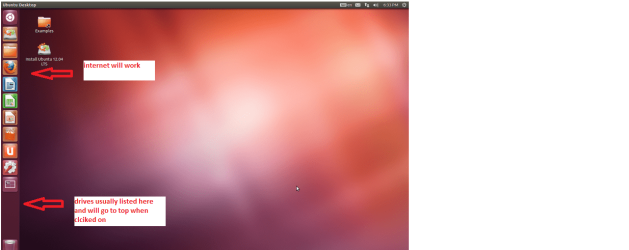
Look I might be WAY out of line here but if you just want to check or ecover stuff from the drive why not try this

BOOTABLE UBUNTU

Make a bootable Ubuntu disk http://www.ubuntu.com/download

Set the BIOS to boot from theoptical when the machine boots it will show you a screen with TRY or INSTALL> select TRY

When it is finished - it takes verylittle time you will get a screen like in the pic .

Open the drive you want > Userand dig down until you get to the WLM settings you may be able to copy / pastethe material you want doing this.

I am not sure if it will but I haverecovered tons of data etc using this method both on "dead" or justplain drives that you cannot get data from using Windows.
 

Attachments

  • Ubuntu screen.PNG
    Ubuntu screen.PNG
    123.3 KB · Views: 1

My Computer My Computer

At a glance

Desk1 7 Home Prem / Desk2 10 Pro / Main lap A...Desk1 i5 3750K / Laptop i7 GTX 860M / Desk2 i...Desk1 8GB (1866) / Desk2 16GB (1333) / Laptop...Desk 1& 2NVidia GTX 650 & Laptops on board Intel
Computer type
PC/Desktop
Computer Manufacturer/Model Number
Own build (new) Desk1 / Asus ROG Win 7 / Desk2 1st build
OS
Desk1 7 Home Prem / Desk2 10 Pro / Main lap Asus ROG 10 Pro 2 laptop Toshiba 7 Pro Asus P2520 7 & 10
CPU
Desk1 i5 3750K / Laptop i7 GTX 860M / Desk2 i5 2500
Motherboard
Desk1 Asus P877-V / Desk2 Gigabyte H67 UD3H / Laptop ?
Memory
Desk1 8GB (1866) / Desk2 16GB (1333) / Laptop 8Gb DDR3
Graphics Card(s)
Desk 1& 2NVidia GTX 650 & Laptops on board Intel
Sound Card
Desk 1 & 2 -XONAR DG Realtek High Def audio Laptop
Monitor(s) Displays
Desk 1 Benq HD 2450 / Desk2 Philips 24" / Laptop 17.5"
Screen Resolution
1920x1080 D1 & D2 & Laptop 1
Hard Drives
Desk1 Samsung 120GB 830 SSD
Asus ROG 256GB 850 Pro SSD
Desk2 Samsung 840 256 SSD
Toshiba 120GB EVO
PSU
Desk 1 Corsair HX 1050/ Laptop ? / Desk 2 Corsair HX 650
Case
Desk 1 Cooler HAF XM ? Toshiba laptop / Desk2 Coolermaster
Cooling
Fans on all Desk1 -2 Desk2 - all Coolermasters 5 Laptop ?
Keyboard
Desk 1 MS Sidewinder X6 Desk 2 MS Sidewinder X 4
Mouse
Desk 1&2 - Gigabyte MS 900 gamer - laptop - Logitec wireless
Internet Speed
ADSL2+
Other Info
One other Desktop (tester) and spare Toshba laptop both with SSD's
Running Kaspersky 2016 ISS on all machines config'd identically
Logitec audio stereo systems on each machine (x3)
Canon MG5250MFC
Router/modem TP-Link running WPA2SK
Thanks Jacee & Britton30,
Everything is loaded back onto the encrypted drive and it is working as it should.
Life is good again.
 

My Computer My Computer

At a glance

Windows 7 Ultimate x64i7-3770k OC to 4.5GHz4x4GB Kingston HyperX 1600XFX Radeon R7 260X
Computer type
PC/Desktop
Computer Manufacturer/Model Number
Voyager's PC Foundry - VPCF07
OS
Windows 7 Ultimate x64
CPU
i7-3770k OC to 4.5GHz
Motherboard
ASUS P8Z77-V
Memory
4x4GB Kingston HyperX 1600
Graphics Card(s)
XFX Radeon R7 260X
Sound Card
Onboard HD sound
Monitor(s) Displays
2X Dell U2412M
Screen Resolution
1920 x 1200 [3840 X 1200]
Hard Drives
1X Crucial MX300 750 GB SATA-III SSD;
1x Seagate 2TB ST2000DM001 SATA-III;
2x Hitachi 2TB Ultrastar HUA723020ALA641 SATA III
PSU
Corsair RM Series 850W
Case
Corsair Graphite T600
Cooling
Noctua NH-U12P SE2
Keyboard
Azio KB505U Large Print Backlit - wired
Mouse
Cheapest I can find - wired
Internet Speed
50mbps
Antivirus
Bit Defender Free
Browser
Palemoon
Other Info
Epson SureColor 400;
Brother MFC L2740DW;
Nikon Super CoolScan 4000ED;
TCC 750LC PreAmp;
MCS [Technics] 6603 Turntable;
Hauppauge WinTV-HVR 1850 TV tuner card;
Syba SD-SA2PEX-2IR SATA RAID card
Cool, thanks for letting us know. :)
 

My Computer My Computer

At a glance

Windows 7 Ultimate X64 SP1Intel i5-2550K, Differing ~4.4-4.8GHz No buil...16GB G.Skill Sniper 1866MHz @ 2133MHz 2x8GBASUS GTX650TIB-DC2OC-2GD5, (650TI Boost)
Computer type
PC/Desktop
Computer Manufacturer/Model Number
Home Built Desktop By DataTech
OS
Windows 7 Ultimate X64 SP1
CPU
Intel i5-2550K, Differing ~4.4-4.8GHz No built in GPU
Motherboard
ASUS P8Z68-V PRO/GEN3
Memory
16GB G.Skill Sniper 1866MHz @ 2133MHz 2x8GB
Graphics Card(s)
ASUS GTX650TIB-DC2OC-2GD5, (650TI Boost)
Sound Card
Onboard Realtek 5-1
Monitor(s) Displays
Samsung P2570HD
Screen Resolution
1920x1080
Hard Drives
Samsung 840 Pro 256GB SSD for OS, 500GB Seagate Constellation (Enterprise drive) for Data
PSU
Corsair HX650W
Case
Inwin Dragon Rider
Cooling
Hyper 212 EVO w/two Noctua fans, push-pull, @1300 RPM
Keyboard
E-Z Eyes, bright yellow keys with large characters
Mouse
steelseries SENSEI Laser Pro Gaming
Internet Speed
48-51Mbs Mbs down, 11 Mbs up Xfinity Cable
Antivirus
Norton Internet Security 2013
Browser
IE 10, Opera, Pale Moon if needed
Other Info
4 case fans, LG BluRay-RE, ASUS DVD-RW, Mr. Fusion power supply, 1.21 gigawatts.
Back
Top