
Solved Win7 will not boot?

MissSherlock

New member
Member
VIP
Local time
9:53 AM
Messages
131
Hi Folks,

Running Windows 7 Home 64-bit. Computer working fine last night. However, today Win7 is stuck on logo and worn boot. Tried re-booting in safe mode and nothing happens.

I only have an ASUS ISO copy of Win7.

What should I do next.

Thanks, :cry:

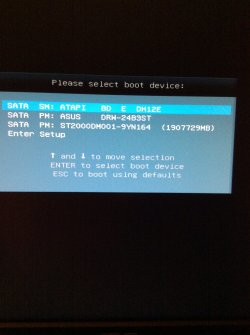
Changed keyboard and have the following options:
 

Attachments
  • image.jpg
    image.jpg
    242.6 KB · Views: 1
Last edited:

My Computer

Computer type
PC/Desktop
Computer Manufacturer/Model Number
Asus CM-6870
OS
Windows 7 Home Premium 64bit
CPU
Intel Core i7-3770, CPU @ 3.4 GHz
Motherboard
Asus
Memory
16 GB RM (4 cores)
Graphics Card(s)
NVIDIA GeForce GT 630,
Sound Card
Realtek HD Audio standard
Monitor(s) Displays
Asus VE248Q
Screen Resolution
1920 x 1080
Hard Drives
2 TB
PSU
300W
Case
Asus
Cooling
Smart Cooling System and Q-Fan
Keyboard
Microsoft Wireless
Mouse
Microsoft Laser 3500 Wireless
Internet Speed
25 mbps or greater
Antivirus
Bitdefender Total Security 2018
Browser
Firefox/Chrome/IE
Other Info
Firewall - Bitdefender 2018
Printer: HP Officejet Pro 8600 Plus (wireless)

My Computer

Computer type
PC/Desktop
Computer Manufacturer/Model Number
Custom assembled by me :}
OS
Win-7-Pro64bit 7-H-Prem-64bit
CPU
i7-5930K 2nd i9-9940x both water blocked VRM's too
Motherboard
ASUS SABERTOOTH X99 2nd ASUS x299 Apex
Memory
Trident-z 3200C14 2nd Trident-z 3600C16
Graphics Card(s)
EVGA 1080ti ftw3 2nd Titan Xp both water blocked
Sound Card
Built-in Realtek
Monitor(s) Displays
1-AOC G2460PG 24"G-Sync 144Hz/ 2nd 1-ASUS VG248QE 24" 144Hz
Screen Resolution
1920 x 1080 144Hz
Hard Drives
2-Samsung M.2 Evo & Evo Plus
2-Samsung 850 EVO 500GB SSD's/ 3-2.5 W.D. Black 1tb-&3-1tb/3-3.5 WD Black 1tb hdd's
PSU
EVGA SuperNOVA 1000-P2 2nd 1200-P2
Case
2-Corsair Obsidian Series 450D Black ATX Mid Tower
Cooling
Custom water loops
Keyboard
Logitech G710+/ 2nd Logitech G910
Mouse
2-RedDragon M901 Perdition 16400 dpi Gaming mouse = wired
Internet Speed
Comcast Ping 19ms 89.31mbps download speed 6.12mbps upload
Antivirus
Malwarebytes Pro/ Superantispyware Pro
Browser
FireFox & Pale moon
Other Info
2nd ASUS X299 Apex/Intel i9-9940x with Custom water loop/7H-Prem-x64/Corsair 450D case/Ram Trident-z 3600C16 4x8gb / Samsung970Evo plus 500gb SSD/Dual ssd EZ swap evo/PSU EVGA SuperNova 1200w-P2 80+Platinum/GPU Titan Xp /8-ML-140 on push-pull on 2-280GTX rads
Hi Thrash,

Did as advised and I received the same boot device options as above with F8.

Any further suggestions.

Thanks, :):confused:
 

My Computer

Computer type
PC/Desktop
Computer Manufacturer/Model Number
Asus CM-6870
OS
Windows 7 Home Premium 64bit
CPU
Intel Core i7-3770, CPU @ 3.4 GHz
Motherboard
Asus
Memory
16 GB RM (4 cores)
Graphics Card(s)
NVIDIA GeForce GT 630,
Sound Card
Realtek HD Audio standard
Monitor(s) Displays
Asus VE248Q
Screen Resolution
1920 x 1080
Hard Drives
2 TB
PSU
300W
Case
Asus
Cooling
Smart Cooling System and Q-Fan
Keyboard
Microsoft Wireless
Mouse
Microsoft Laser 3500 Wireless
Internet Speed
25 mbps or greater
Antivirus
Bitdefender Total Security 2018
Browser
Firefox/Chrome/IE
Other Info
Firewall - Bitdefender 2018
Printer: HP Officejet Pro 8600 Plus (wireless)
Hi,
What happens if you toggle down to enter setup ?
 

My Computer

Computer type
PC/Desktop
Computer Manufacturer/Model Number
Custom assembled by me :}
OS
Win-7-Pro64bit 7-H-Prem-64bit
CPU
i7-5930K 2nd i9-9940x both water blocked VRM's too
Motherboard
ASUS SABERTOOTH X99 2nd ASUS x299 Apex
Memory
Trident-z 3200C14 2nd Trident-z 3600C16
Graphics Card(s)
EVGA 1080ti ftw3 2nd Titan Xp both water blocked
Sound Card
Built-in Realtek
Monitor(s) Displays
1-AOC G2460PG 24"G-Sync 144Hz/ 2nd 1-ASUS VG248QE 24" 144Hz
Screen Resolution
1920 x 1080 144Hz
Hard Drives
2-Samsung M.2 Evo & Evo Plus
2-Samsung 850 EVO 500GB SSD's/ 3-2.5 W.D. Black 1tb-&3-1tb/3-3.5 WD Black 1tb hdd's
PSU
EVGA SuperNOVA 1000-P2 2nd 1200-P2
Case
2-Corsair Obsidian Series 450D Black ATX Mid Tower
Cooling
Custom water loops
Keyboard
Logitech G710+/ 2nd Logitech G910
Mouse
2-RedDragon M901 Perdition 16400 dpi Gaming mouse = wired
Internet Speed
Comcast Ping 19ms 89.31mbps download speed 6.12mbps upload
Antivirus
Malwarebytes Pro/ Superantispyware Pro
Browser
FireFox & Pale moon
Other Info
2nd ASUS X299 Apex/Intel i9-9940x with Custom water loop/7H-Prem-x64/Corsair 450D case/Ram Trident-z 3600C16 4x8gb / Samsung970Evo plus 500gb SSD/Dual ssd EZ swap evo/PSU EVGA SuperNova 1200w-P2 80+Platinum/GPU Titan Xp /8-ML-140 on push-pull on 2-280GTX rads
Hi Thrash,

See below
 

Attachments

  • image.jpg
    image.jpg
    325.5 KB · Views: 2

My Computer

Computer type
PC/Desktop
Computer Manufacturer/Model Number
Asus CM-6870
OS
Windows 7 Home Premium 64bit
CPU
Intel Core i7-3770, CPU @ 3.4 GHz
Motherboard
Asus
Memory
16 GB RM (4 cores)
Graphics Card(s)
NVIDIA GeForce GT 630,
Sound Card
Realtek HD Audio standard
Monitor(s) Displays
Asus VE248Q
Screen Resolution
1920 x 1080
Hard Drives
2 TB
PSU
300W
Case
Asus
Cooling
Smart Cooling System and Q-Fan
Keyboard
Microsoft Wireless
Mouse
Microsoft Laser 3500 Wireless
Internet Speed
25 mbps or greater
Antivirus
Bitdefender Total Security 2018
Browser
Firefox/Chrome/IE
Other Info
Firewall - Bitdefender 2018
Printer: HP Officejet Pro 8600 Plus (wireless)
Hi,
I would probably go to normal mode and then boot and see what is there
You have windows installed on a 2tb drive ?
How many partitions on it if so ?
 

My Computer

Computer type
PC/Desktop
Computer Manufacturer/Model Number
Custom assembled by me :}
OS
Win-7-Pro64bit 7-H-Prem-64bit
CPU
i7-5930K 2nd i9-9940x both water blocked VRM's too
Motherboard
ASUS SABERTOOTH X99 2nd ASUS x299 Apex
Memory
Trident-z 3200C14 2nd Trident-z 3600C16
Graphics Card(s)
EVGA 1080ti ftw3 2nd Titan Xp both water blocked
Sound Card
Built-in Realtek
Monitor(s) Displays
1-AOC G2460PG 24"G-Sync 144Hz/ 2nd 1-ASUS VG248QE 24" 144Hz
Screen Resolution
1920 x 1080 144Hz
Hard Drives
2-Samsung M.2 Evo & Evo Plus
2-Samsung 850 EVO 500GB SSD's/ 3-2.5 W.D. Black 1tb-&3-1tb/3-3.5 WD Black 1tb hdd's
PSU
EVGA SuperNOVA 1000-P2 2nd 1200-P2
Case
2-Corsair Obsidian Series 450D Black ATX Mid Tower
Cooling
Custom water loops
Keyboard
Logitech G710+/ 2nd Logitech G910
Mouse
2-RedDragon M901 Perdition 16400 dpi Gaming mouse = wired
Internet Speed
Comcast Ping 19ms 89.31mbps download speed 6.12mbps upload
Antivirus
Malwarebytes Pro/ Superantispyware Pro
Browser
FireFox & Pale moon
Other Info
2nd ASUS X299 Apex/Intel i9-9940x with Custom water loop/7H-Prem-x64/Corsair 450D case/Ram Trident-z 3600C16 4x8gb / Samsung970Evo plus 500gb SSD/Dual ssd EZ swap evo/PSU EVGA SuperNova 1200w-P2 80+Platinum/GPU Titan Xp /8-ML-140 on push-pull on 2-280GTX rads
Hi Thrash,

How do I do that from this screen? There two partitions on factory install, I.e. Win7op and recovery.

Thanks
 

My Computer

Computer type
PC/Desktop
Computer Manufacturer/Model Number
Asus CM-6870
OS
Windows 7 Home Premium 64bit
CPU
Intel Core i7-3770, CPU @ 3.4 GHz
Motherboard
Asus
Memory
16 GB RM (4 cores)
Graphics Card(s)
NVIDIA GeForce GT 630,
Sound Card
Realtek HD Audio standard
Monitor(s) Displays
Asus VE248Q
Screen Resolution
1920 x 1080
Hard Drives
2 TB
PSU
300W
Case
Asus
Cooling
Smart Cooling System and Q-Fan
Keyboard
Microsoft Wireless
Mouse
Microsoft Laser 3500 Wireless
Internet Speed
25 mbps or greater
Antivirus
Bitdefender Total Security 2018
Browser
Firefox/Chrome/IE
Other Info
Firewall - Bitdefender 2018
Printer: HP Officejet Pro 8600 Plus (wireless)
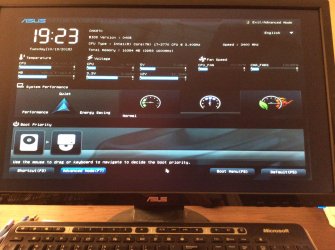
Hi,
F5 would set everything to default which might be good enough to start with and save and exit the setup or Advanced mode on the top right.
 

My Computer

Computer type
PC/Desktop
Computer Manufacturer/Model Number
Custom assembled by me :}
OS
Win-7-Pro64bit 7-H-Prem-64bit
CPU
i7-5930K 2nd i9-9940x both water blocked VRM's too
Motherboard
ASUS SABERTOOTH X99 2nd ASUS x299 Apex
Memory
Trident-z 3200C14 2nd Trident-z 3600C16
Graphics Card(s)
EVGA 1080ti ftw3 2nd Titan Xp both water blocked
Sound Card
Built-in Realtek
Monitor(s) Displays
1-AOC G2460PG 24"G-Sync 144Hz/ 2nd 1-ASUS VG248QE 24" 144Hz
Screen Resolution
1920 x 1080 144Hz
Hard Drives
2-Samsung M.2 Evo & Evo Plus
2-Samsung 850 EVO 500GB SSD's/ 3-2.5 W.D. Black 1tb-&3-1tb/3-3.5 WD Black 1tb hdd's
PSU
EVGA SuperNOVA 1000-P2 2nd 1200-P2
Case
2-Corsair Obsidian Series 450D Black ATX Mid Tower
Cooling
Custom water loops
Keyboard
Logitech G710+/ 2nd Logitech G910
Mouse
2-RedDragon M901 Perdition 16400 dpi Gaming mouse = wired
Internet Speed
Comcast Ping 19ms 89.31mbps download speed 6.12mbps upload
Antivirus
Malwarebytes Pro/ Superantispyware Pro
Browser
FireFox & Pale moon
Other Info
2nd ASUS X299 Apex/Intel i9-9940x with Custom water loop/7H-Prem-x64/Corsair 450D case/Ram Trident-z 3600C16 4x8gb / Samsung970Evo plus 500gb SSD/Dual ssd EZ swap evo/PSU EVGA SuperNova 1200w-P2 80+Platinum/GPU Titan Xp /8-ML-140 on push-pull on 2-280GTX rads
Hi Again Thrash,

Did as directed above. Computer tried to re-start but won't reboot into Win7. Stuck on "starting windows" and no error messages.

Any other options to access repair?

Thanks
 

My Computer

Computer type
PC/Desktop
Computer Manufacturer/Model Number
Asus CM-6870
OS
Windows 7 Home Premium 64bit
CPU
Intel Core i7-3770, CPU @ 3.4 GHz
Motherboard
Asus
Memory
16 GB RM (4 cores)
Graphics Card(s)
NVIDIA GeForce GT 630,
Sound Card
Realtek HD Audio standard
Monitor(s) Displays
Asus VE248Q
Screen Resolution
1920 x 1080
Hard Drives
2 TB
PSU
300W
Case
Asus
Cooling
Smart Cooling System and Q-Fan
Keyboard
Microsoft Wireless
Mouse
Microsoft Laser 3500 Wireless
Internet Speed
25 mbps or greater
Antivirus
Bitdefender Total Security 2018
Browser
Firefox/Chrome/IE
Other Info
Firewall - Bitdefender 2018
Printer: HP Officejet Pro 8600 Plus (wireless)
Hi,
Startup repair would be difficult without the install media
If you can get back to setup then use F8 and show what's there ?

The other screen shot only show your disk drive of hdd :/
 

My Computer

Computer type
PC/Desktop
Computer Manufacturer/Model Number
Custom assembled by me :}
OS
Win-7-Pro64bit 7-H-Prem-64bit
CPU
i7-5930K 2nd i9-9940x both water blocked VRM's too
Motherboard
ASUS SABERTOOTH X99 2nd ASUS x299 Apex
Memory
Trident-z 3200C14 2nd Trident-z 3600C16
Graphics Card(s)
EVGA 1080ti ftw3 2nd Titan Xp both water blocked
Sound Card
Built-in Realtek
Monitor(s) Displays
1-AOC G2460PG 24"G-Sync 144Hz/ 2nd 1-ASUS VG248QE 24" 144Hz
Screen Resolution
1920 x 1080 144Hz
Hard Drives
2-Samsung M.2 Evo & Evo Plus
2-Samsung 850 EVO 500GB SSD's/ 3-2.5 W.D. Black 1tb-&3-1tb/3-3.5 WD Black 1tb hdd's
PSU
EVGA SuperNOVA 1000-P2 2nd 1200-P2
Case
2-Corsair Obsidian Series 450D Black ATX Mid Tower
Cooling
Custom water loops
Keyboard
Logitech G710+/ 2nd Logitech G910
Mouse
2-RedDragon M901 Perdition 16400 dpi Gaming mouse = wired
Internet Speed
Comcast Ping 19ms 89.31mbps download speed 6.12mbps upload
Antivirus
Malwarebytes Pro/ Superantispyware Pro
Browser
FireFox & Pale moon
Other Info
2nd ASUS X299 Apex/Intel i9-9940x with Custom water loop/7H-Prem-x64/Corsair 450D case/Ram Trident-z 3600C16 4x8gb / Samsung970Evo plus 500gb SSD/Dual ssd EZ swap evo/PSU EVGA SuperNova 1200w-P2 80+Platinum/GPU Titan Xp /8-ML-140 on push-pull on 2-280GTX rads
Miss Sherlock,

To access Safe Mode with an ASUS board, you have to press the F8 key when the BIOS splash screen disappears. It's a bit tricky to catch it right, but that should avoid the boot select menu.

Why they made F8 the boot select key when most of their users run Windows and need to get into Safe Mode is beyond me...
 

My Computer

Computer type
PC/Desktop
Computer Manufacturer/Model Number
Mellon Labs (custom build)
OS
Win 7 Pro x64/Win 10 Pro x64 dual boot
CPU
AMD FX 8350 Vishera @ 4200
Motherboard
ASUS M5A97 R2.0
Memory
16 GB Mushkin Blackline DDR3-2400 @ 1866 (9-10-10-10-31)
Graphics Card(s)
XFX Radeon R9 280 Double D Black Edition
Sound Card
Realtek HD Audio on MB. Sounds great.
Monitor(s) Displays
Acer 24", Acer 22"
Screen Resolution
3840 x 1080
Hard Drives
1 x Mushkin Chronos 120 GB SSD (Win 10)
1 x Samsung 850 EVO 250 GB SSD (Win 7)
1 x WD 1TB SATA Blue
1 x WD 1TB SATA Green
PSU
Corsair TX-750
Case
CoolerMaster HAF 912+
Cooling
Coolermaster Seidon 240M Liquid AIO. 6 case fans
Keyboard
Logitech G710+
Mouse
Logitech G500s
Internet Speed
Much better since I got fiber, but still way overpriced.
Antivirus
MSE, Malware Bytes for scanning
Browser
Firefox
Other Info
Corsair VOID USB headphones.

A Mellon Labs X-1 - LCD Smartie driven system status display.

Brought to you by the letter E
Hi Thrash and Mellon,

Thanks so much. Mellon your right. It's just a very small window between the ASUS Bios screen fading to press F8.

I'm finally on the Advanced Boot Options. What option should I use, I.e. Repair or safe mode?

Thanks

P.s. I havent backed up my stuff in a couple of months. :o
 

Attachments

  • image.jpg
    image.jpg
    267.2 KB · Views: 0

My Computer

Computer type
PC/Desktop
Computer Manufacturer/Model Number
Asus CM-6870
OS
Windows 7 Home Premium 64bit
CPU
Intel Core i7-3770, CPU @ 3.4 GHz
Motherboard
Asus
Memory
16 GB RM (4 cores)
Graphics Card(s)
NVIDIA GeForce GT 630,
Sound Card
Realtek HD Audio standard
Monitor(s) Displays
Asus VE248Q
Screen Resolution
1920 x 1080
Hard Drives
2 TB
PSU
300W
Case
Asus
Cooling
Smart Cooling System and Q-Fan
Keyboard
Microsoft Wireless
Mouse
Microsoft Laser 3500 Wireless
Internet Speed
25 mbps or greater
Antivirus
Bitdefender Total Security 2018
Browser
Firefox/Chrome/IE
Other Info
Firewall - Bitdefender 2018
Printer: HP Officejet Pro 8600 Plus (wireless)
Hi,
I would select safe mode with networking to see what happens.

If you go back to the bios go to boot and Disable fast boot.
 

My Computer

Computer type
PC/Desktop
Computer Manufacturer/Model Number
Custom assembled by me :}
OS
Win-7-Pro64bit 7-H-Prem-64bit
CPU
i7-5930K 2nd i9-9940x both water blocked VRM's too
Motherboard
ASUS SABERTOOTH X99 2nd ASUS x299 Apex
Memory
Trident-z 3200C14 2nd Trident-z 3600C16
Graphics Card(s)
EVGA 1080ti ftw3 2nd Titan Xp both water blocked
Sound Card
Built-in Realtek
Monitor(s) Displays
1-AOC G2460PG 24"G-Sync 144Hz/ 2nd 1-ASUS VG248QE 24" 144Hz
Screen Resolution
1920 x 1080 144Hz
Hard Drives
2-Samsung M.2 Evo & Evo Plus
2-Samsung 850 EVO 500GB SSD's/ 3-2.5 W.D. Black 1tb-&3-1tb/3-3.5 WD Black 1tb hdd's
PSU
EVGA SuperNOVA 1000-P2 2nd 1200-P2
Case
2-Corsair Obsidian Series 450D Black ATX Mid Tower
Cooling
Custom water loops
Keyboard
Logitech G710+/ 2nd Logitech G910
Mouse
2-RedDragon M901 Perdition 16400 dpi Gaming mouse = wired
Internet Speed
Comcast Ping 19ms 89.31mbps download speed 6.12mbps upload
Antivirus
Malwarebytes Pro/ Superantispyware Pro
Browser
FireFox & Pale moon
Other Info
2nd ASUS X299 Apex/Intel i9-9940x with Custom water loop/7H-Prem-x64/Corsair 450D case/Ram Trident-z 3600C16 4x8gb / Samsung970Evo plus 500gb SSD/Dual ssd EZ swap evo/PSU EVGA SuperNova 1200w-P2 80+Platinum/GPU Titan Xp /8-ML-140 on push-pull on 2-280GTX rads
Hi Thrash,

It froze on Safe Mode with Networking. See blue screen.

What next, :cry:
 

Attachments

  • image.jpg
    image.jpg
    328.1 KB · Views: 2

My Computer

Computer type
PC/Desktop
Computer Manufacturer/Model Number
Asus CM-6870
OS
Windows 7 Home Premium 64bit
CPU
Intel Core i7-3770, CPU @ 3.4 GHz
Motherboard
Asus
Memory
16 GB RM (4 cores)
Graphics Card(s)
NVIDIA GeForce GT 630,
Sound Card
Realtek HD Audio standard
Monitor(s) Displays
Asus VE248Q
Screen Resolution
1920 x 1080
Hard Drives
2 TB
PSU
300W
Case
Asus
Cooling
Smart Cooling System and Q-Fan
Keyboard
Microsoft Wireless
Mouse
Microsoft Laser 3500 Wireless
Internet Speed
25 mbps or greater
Antivirus
Bitdefender Total Security 2018
Browser
Firefox/Chrome/IE
Other Info
Firewall - Bitdefender 2018
Printer: HP Officejet Pro 8600 Plus (wireless)
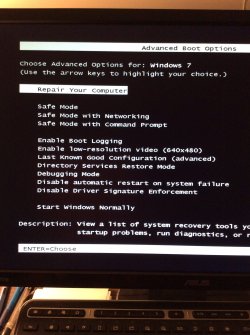
I asked for help but I guess the next step should be get back to the prior window using F8 again and now use Last known good configuration :(
 

My Computer

Computer type
PC/Desktop
Computer Manufacturer/Model Number
Custom assembled by me :}
OS
Win-7-Pro64bit 7-H-Prem-64bit
CPU
i7-5930K 2nd i9-9940x both water blocked VRM's too
Motherboard
ASUS SABERTOOTH X99 2nd ASUS x299 Apex
Memory
Trident-z 3200C14 2nd Trident-z 3600C16
Graphics Card(s)
EVGA 1080ti ftw3 2nd Titan Xp both water blocked
Sound Card
Built-in Realtek
Monitor(s) Displays
1-AOC G2460PG 24"G-Sync 144Hz/ 2nd 1-ASUS VG248QE 24" 144Hz
Screen Resolution
1920 x 1080 144Hz
Hard Drives
2-Samsung M.2 Evo & Evo Plus
2-Samsung 850 EVO 500GB SSD's/ 3-2.5 W.D. Black 1tb-&3-1tb/3-3.5 WD Black 1tb hdd's
PSU
EVGA SuperNOVA 1000-P2 2nd 1200-P2
Case
2-Corsair Obsidian Series 450D Black ATX Mid Tower
Cooling
Custom water loops
Keyboard
Logitech G710+/ 2nd Logitech G910
Mouse
2-RedDragon M901 Perdition 16400 dpi Gaming mouse = wired
Internet Speed
Comcast Ping 19ms 89.31mbps download speed 6.12mbps upload
Antivirus
Malwarebytes Pro/ Superantispyware Pro
Browser
FireFox & Pale moon
Other Info
2nd ASUS X299 Apex/Intel i9-9940x with Custom water loop/7H-Prem-x64/Corsair 450D case/Ram Trident-z 3600C16 4x8gb / Samsung970Evo plus 500gb SSD/Dual ssd EZ swap evo/PSU EVGA SuperNova 1200w-P2 80+Platinum/GPU Titan Xp /8-ML-140 on push-pull on 2-280GTX rads
Hi Thrash,

Oh dear, it didn't work! Still stuck on Windows Logo with starting windows.

Any other suggestions.

Thanks
 

My Computer

Computer type
PC/Desktop
Computer Manufacturer/Model Number
Asus CM-6870
OS
Windows 7 Home Premium 64bit
CPU
Intel Core i7-3770, CPU @ 3.4 GHz
Motherboard
Asus
Memory
16 GB RM (4 cores)
Graphics Card(s)
NVIDIA GeForce GT 630,
Sound Card
Realtek HD Audio standard
Monitor(s) Displays
Asus VE248Q
Screen Resolution
1920 x 1080
Hard Drives
2 TB
PSU
300W
Case
Asus
Cooling
Smart Cooling System and Q-Fan
Keyboard
Microsoft Wireless
Mouse
Microsoft Laser 3500 Wireless
Internet Speed
25 mbps or greater
Antivirus
Bitdefender Total Security 2018
Browser
Firefox/Chrome/IE
Other Info
Firewall - Bitdefender 2018
Printer: HP Officejet Pro 8600 Plus (wireless)
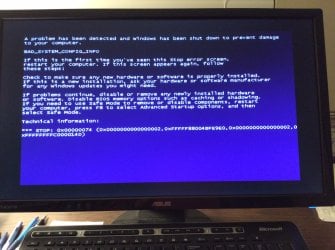
Here's some info on that bugcheck, not very good news for you I'm afraid,

https://msdn.microsoft.com/en-us/library/ff559188(v=VS.85).aspx?f=255&MSPPError=-2147217396

Cause:

The BAD_SYSTEM_CONFIG_INFO bug check occurs if the SYSTEM hive is corrupt. However, this corruption is unlikely, because the boot loader, known as NT Loader (NTLDR) in versions of Windows prior to Vista, checks a hive for corruption when it loads the hive.
This bug check can also occur if some critical registry keys and values are missing. Thee keys and values might be missing if a user manually edited the registry.


Resolution:

Try restarting the computer by selecting "last known good configuration" in the boot options.
If the restart does not fix the problem, the registry damage is too extensive. You must reinstall the OS or use the Emergency Repair Disk (ERD) that you previously created by using the Windows Backup tool.

If Thrash's suggestion of last known good configuration didn't work, it sounds like a more drastic approach is needed.
 

My Computer

Computer type
PC/Desktop
Computer Manufacturer/Model Number
Self Built
OS
Win 10 Pro x64
CPU
Intel I5-2500K @3.3GHz
Motherboard
Asrock P67 Extreme4
Memory
16GB G.Skill Ripjaws X (4x4GB)
Graphics Card(s)
EVGA GeForce 750 Ti SC 2GB
Sound Card
ASUS Xonar DG 5.1 Channels 24-bit 96KHz PCI Interface Sound
Monitor(s) Displays
auria eq2367
Screen Resolution
1920 x 1080
Hard Drives
250GB Samsung 850 EVO SSD
1TB WD Blue
1TB Hitachi
PSU
SeaSonic X 650W 80 Plus Gold
Case
Corsair Obsidian 750D
Cooling
Corsair H60, Three 140mm case fans
Keyboard
Logitech Wireless Keyboard K520
Mouse
Logitech Wireless Mouse M310
Internet Speed
Wave Broadband ~ 100 dn 5 up
Antivirus
Windows Defender, Malwarebytes Premium
Browser
Edge, IE11, Chrome
Other Info
Laptop specs: HP g7-1365dx /
CPU: AMD A6-3420M APU with Radeon(tm) HD Graphics /
RAM: Crucial 8Gb (2x4Gb) /
SSD: Crucial M4-CT128M4SSD2 ATA Device/ FW 000F /
GFX: AMD Radeon HD 6520G /
OS: Windows 10 Pro x64
Hi Derekimo,

Just my luck! The only disks I have are the Windows 7 OP disks from ASUS. I'll need to save my data first before doing a clean install of Windows 7.

Silly question, but what would cause so much damage?

Thanks for all your help. ;)
 

My Computer

Computer type
PC/Desktop
Computer Manufacturer/Model Number
Asus CM-6870
OS
Windows 7 Home Premium 64bit
CPU
Intel Core i7-3770, CPU @ 3.4 GHz
Motherboard
Asus
Memory
16 GB RM (4 cores)
Graphics Card(s)
NVIDIA GeForce GT 630,
Sound Card
Realtek HD Audio standard
Monitor(s) Displays
Asus VE248Q
Screen Resolution
1920 x 1080
Hard Drives
2 TB
PSU
300W
Case
Asus
Cooling
Smart Cooling System and Q-Fan
Keyboard
Microsoft Wireless
Mouse
Microsoft Laser 3500 Wireless
Internet Speed
25 mbps or greater
Antivirus
Bitdefender Total Security 2018
Browser
Firefox/Chrome/IE
Other Info
Firewall - Bitdefender 2018
Printer: HP Officejet Pro 8600 Plus (wireless)

My Computer

Computer type
PC/Desktop
Computer Manufacturer/Model Number
Custom assembled by me :}
OS
Win-7-Pro64bit 7-H-Prem-64bit
CPU
i7-5930K 2nd i9-9940x both water blocked VRM's too
Motherboard
ASUS SABERTOOTH X99 2nd ASUS x299 Apex
Memory
Trident-z 3200C14 2nd Trident-z 3600C16
Graphics Card(s)
EVGA 1080ti ftw3 2nd Titan Xp both water blocked
Sound Card
Built-in Realtek
Monitor(s) Displays
1-AOC G2460PG 24"G-Sync 144Hz/ 2nd 1-ASUS VG248QE 24" 144Hz
Screen Resolution
1920 x 1080 144Hz
Hard Drives
2-Samsung M.2 Evo & Evo Plus
2-Samsung 850 EVO 500GB SSD's/ 3-2.5 W.D. Black 1tb-&3-1tb/3-3.5 WD Black 1tb hdd's
PSU
EVGA SuperNOVA 1000-P2 2nd 1200-P2
Case
2-Corsair Obsidian Series 450D Black ATX Mid Tower
Cooling
Custom water loops
Keyboard
Logitech G710+/ 2nd Logitech G910
Mouse
2-RedDragon M901 Perdition 16400 dpi Gaming mouse = wired
Internet Speed
Comcast Ping 19ms 89.31mbps download speed 6.12mbps upload
Antivirus
Malwarebytes Pro/ Superantispyware Pro
Browser
FireFox & Pale moon
Other Info
2nd ASUS X299 Apex/Intel i9-9940x with Custom water loop/7H-Prem-x64/Corsair 450D case/Ram Trident-z 3600C16 4x8gb / Samsung970Evo plus 500gb SSD/Dual ssd EZ swap evo/PSU EVGA SuperNova 1200w-P2 80+Platinum/GPU Titan Xp /8-ML-140 on push-pull on 2-280GTX rads
Hi Thrash,

Is it possible to use my recovery partition for repair?

Do the Linux tools work with Microsoft?

Thanks
 

My Computer

Computer type
PC/Desktop
Computer Manufacturer/Model Number
Asus CM-6870
OS
Windows 7 Home Premium 64bit
CPU
Intel Core i7-3770, CPU @ 3.4 GHz
Motherboard
Asus
Memory
16 GB RM (4 cores)
Graphics Card(s)
NVIDIA GeForce GT 630,
Sound Card
Realtek HD Audio standard
Monitor(s) Displays
Asus VE248Q
Screen Resolution
1920 x 1080
Hard Drives
2 TB
PSU
300W
Case
Asus
Cooling
Smart Cooling System and Q-Fan
Keyboard
Microsoft Wireless
Mouse
Microsoft Laser 3500 Wireless
Internet Speed
25 mbps or greater
Antivirus
Bitdefender Total Security 2018
Browser
Firefox/Chrome/IE
Other Info
Firewall - Bitdefender 2018
Printer: HP Officejet Pro 8600 Plus (wireless)
Back
Top