Win7codecs

i have a strange issue with the newest codecs (2.2.4)

I've been using the Shark007 codecs for a long without any issues at all.

However, with this new release, under my normal settings, my x264 gives an error and stops at the start of an encode,

AND MP4's crash WMP with a App crash and a ref. to <fault RAAC.dll>
(but ONLY if it has a AAC 5.1)
I double checked the FFDshow AAC codec, and its set to libfaad

MP4 files with Stereo AAC = Working w/out issues
Mp4 files with 5.1 AAC = Working IF selecting MONOGRAM decoder from the Swap Tab

Everything works without issue in WMC 64bit, set as described below.

What I normally do is set in Swap tab:
Use FFD Show for everything EXCEPT Mp3

Under H264 :
set all to use FFDshow

I do the same for the 64bit side

This has always worked flawless for me, until this latest release.
now the issues as described above.

To get the libfaad AAC decoder to work:

I must disable Ms Audio/video/ and the WMF it works again without issue.
Simply disabling WMF .. Crash
disabling MS Audio = crash
they all 3 need be checked.
(Ive never had to disable any of these, so im curious why now its needed, but only on the 32bit side. it doesnt phase the 64bit side)

The 64 bit side works flawlessly with my normal settings as desribed above with no need to disable anything.

So i'm guessing Im completely overlooking something, or something changed and theres a setting that diff by default Im unaware of.

Any advice appreciated. TY
 

My Computer

Computer Manufacturer/Model Number
Custom (Self Build)
OS
Windows 7 Home Premium 64bit
CPU
Intel Core i7 2700k
Motherboard
eVGA P67 SLI
Memory
8GB Mushkin Redline Ridgebacks @1866
Graphics Card(s)
EVGA GTX570 SC
Sound Card
XiFi Titanium HD
Monitor(s) Displays
LG W2453V
Screen Resolution
1920x1080
Hard Drives
Intel 320 80GB -- Intel X25-V 40GB --WD Black 1TB x2 -- WD Blue 640GB
PSU
Seasonic x750
Case
Corsair 600T SE White
Cooling
eVGA Superclocked CPU Cooler
Keyboard
Saitek Cyborg
Antivirus
Kaspersky
Browser
IE
Other Info
LG BD/DVD
Any advice appreciated. TY

I think it's just a bad build of ffdshow.
There has been alot of active development within ffdshow concerning audio.
hopefully its back to normal before my next release.
 

My Computer

Computer Manufacturer/Model Number
Selfbuilt
OS
Windows 7 Ultimate 64bit
CPU
i7 2600k
Motherboard
asus P8Z68-V LE
Memory
16GB (4x4) corsair vengeance
Graphics Card(s)
Intel HD3000 iGPU / AMD HD6870 1024MB
Sound Card
bitstreamed to an Onkyo 609
Monitor(s) Displays
Asus VE278 27" LED / Bravia EX7 60" LED
Screen Resolution
native 1080p x2
Hard Drives
4x 2TB int. + 2x 2TB external and a SSD for the boot drive.
PSU
650w Antec
Case
NZXT tempest evo
Cooling
air/stock
Keyboard
Dell
Mouse
logitech m505
Internet Speed
dual: cable/blackberry tether for travel use
Other Info
BD re-writer //
asus notebook G73Jw
Any advice appreciated. TY

I think it's just a bad build of ffdshow.
There has been alot of active development within ffdshow concerning audio.
hopefully its back to normal before my next release.


Thank you Shark.

It can easily be configured to work,so it truly isn't a huge issue.
I was simply curious what changed.

Thanks again
 

My Computer

Computer Manufacturer/Model Number
Custom (Self Build)
OS
Windows 7 Home Premium 64bit
CPU
Intel Core i7 2700k
Motherboard
eVGA P67 SLI
Memory
8GB Mushkin Redline Ridgebacks @1866
Graphics Card(s)
EVGA GTX570 SC
Sound Card
XiFi Titanium HD
Monitor(s) Displays
LG W2453V
Screen Resolution
1920x1080
Hard Drives
Intel 320 80GB -- Intel X25-V 40GB --WD Black 1TB x2 -- WD Blue 640GB
PSU
Seasonic x750
Case
Corsair 600T SE White
Cooling
eVGA Superclocked CPU Cooler
Keyboard
Saitek Cyborg
Antivirus
Kaspersky
Browser
IE
Other Info
LG BD/DVD
it's good
Thankx
 

My Computer

Computer Manufacturer/Model Number
HP
OS
win7
Motherboard
Inte p
Memory
1 GB
Graphics Card(s)
Intel
Monitor(s) Displays
HP vp17
Hard Drives
160 GB
Use a good player and you don't need additional codecs. If you search a little you will find that adding these things causes more problems than they solve.

no they don't. use k-lite mega pack. avoid wmp. use the media player classic that comes with k-lite.
 

My Computer

OS
Windows 7 Ultimate
May I ask what is included in your codecs pack? I currently use k-lite mega codec pack. I have had no problems with it but I am willing to try something new.
 

My Computer

OS
win7 ultimate x64
CPU
Intel Core2 Duo E8400 @ 3.0
Motherboard
NVIDIA nForce 680i SLI
Memory
4gb corsair 6400 ddr2
Graphics Card(s)
Palit GTX260 Sonic 216 SP
Sound Card
sb audigy 24bit
Monitor(s) Displays
i-inc 19" lcd
Screen Resolution
1440x900
Hard Drives
seagate barracuda 7200 250 gb
PSU
ULTRA LSP Pro 750
Case
ultra midtower
Cooling
air
For what its worth,
I do ALOT of HD encoding as well as playback of many different types of media.
Mostly MKV with AC3 Audio, but a few MP4s as well.

I use WMP and WMC with Media browser Plug-in and Stark Covers.


Sharks Codecs are the only ones I rely on. not only for stability reasons, but all the reasons he has listed above.
 

My Computer

Computer Manufacturer/Model Number
Custom (Self Build)
OS
Windows 7 Home Premium 64bit
CPU
Intel Core i7 2700k
Motherboard
eVGA P67 SLI
Memory
8GB Mushkin Redline Ridgebacks @1866
Graphics Card(s)
EVGA GTX570 SC
Sound Card
XiFi Titanium HD
Monitor(s) Displays
LG W2453V
Screen Resolution
1920x1080
Hard Drives
Intel 320 80GB -- Intel X25-V 40GB --WD Black 1TB x2 -- WD Blue 640GB
PSU
Seasonic x750
Case
Corsair 600T SE White
Cooling
eVGA Superclocked CPU Cooler
Keyboard
Saitek Cyborg
Antivirus
Kaspersky
Browser
IE
Other Info
LG BD/DVD
Hello Shark007!

Just to inform you Nod32 found 2 viruses in your latest codec packs:

C:\Program Files (x86)\Win7codecs\Tools\Settings32.exe » AUTOIT » script.au3 - Win32/Packed.Autoit.Gen potentially unwanted application
C:\Program Files\Shark007\Tools\settings64.exe » AUTOIT » script.au3 - Win32/Packed.Autoit.Gen potentially unwanted application
 

My Computer

Computer type
PC/Desktop
Computer Manufacturer/Model Number
Custom
OS
Windows 7 SP1 x64
CPU
Intel E8400 3.0 GHz
Motherboard
Gigabyte EP45-DS3R
Memory
4x1 Trascend DDR2 800 Mhz
Graphics Card(s)
Gainward 8800GT 512 Mb
Sound Card
Realtek HD Audio 889A
Monitor(s) Displays
LG L204WS
Screen Resolution
1680x1050
Hard Drives
Intel 520 Series 120Gb SSD (System)
Western Digital 6400AAKS 640Gb (Data)
PSU
Cooler Master 650W
Case
Cooler Master Centurion 532
Cooling
2x 12 cm fans
Keyboard
Logitech Wave
Mouse
Logitech G5
Internet Speed
10 Mbit Cable Flat
Antivirus
NOD32 Smart Security
Browser
Google Chrome
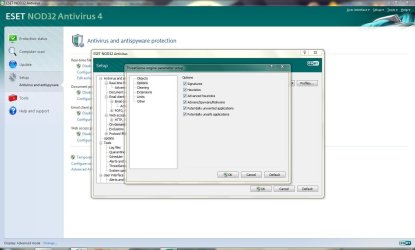
ratePV, are they being listed as possible false positives? You apparently have your NOD32 ThreatSense set for unwanted apps. As well I do to.
Capture.JPG
 

My Computer

OS
win7 ultimate x64
CPU
Intel Core2 Duo E8400 @ 3.0
Motherboard
NVIDIA nForce 680i SLI
Memory
4gb corsair 6400 ddr2
Graphics Card(s)
Palit GTX260 Sonic 216 SP
Sound Card
sb audigy 24bit
Monitor(s) Displays
i-inc 19" lcd
Screen Resolution
1440x900
Hard Drives
seagate barracuda 7200 250 gb
PSU
ULTRA LSP Pro 750
Case
ultra midtower
Cooling
air
Yes i believe that these are false positives,and i did have that option enabled.

EDIT: I did a rescan with the option disabled and it didn't show anything.
 
Last edited:

My Computer

Computer type
PC/Desktop
Computer Manufacturer/Model Number
Custom
OS
Windows 7 SP1 x64
CPU
Intel E8400 3.0 GHz
Motherboard
Gigabyte EP45-DS3R
Memory
4x1 Trascend DDR2 800 Mhz
Graphics Card(s)
Gainward 8800GT 512 Mb
Sound Card
Realtek HD Audio 889A
Monitor(s) Displays
LG L204WS
Screen Resolution
1680x1050
Hard Drives
Intel 520 Series 120Gb SSD (System)
Western Digital 6400AAKS 640Gb (Data)
PSU
Cooler Master 650W
Case
Cooler Master Centurion 532
Cooling
2x 12 cm fans
Keyboard
Logitech Wave
Mouse
Logitech G5
Internet Speed
10 Mbit Cable Flat
Antivirus
NOD32 Smart Security
Browser
Google Chrome
Hello Shark007!

Just to inform you Nod32 found 2 viruses in your latest codec packs:

C:\Program Files (x86)\Win7codecs\Tools\Settings32.exe » AUTOIT » script.au3 - Win32/Packed.Autoit.Gen potentially unwanted application
C:\Program Files\Shark007\Tools\settings64.exe » AUTOIT » script.au3 - Win32/Packed.Autoit.Gen potentially unwanted application

This is old news, publicly ducumented HERE
There are suggestions to deal with the FALSE POSITVES here.

Bottom line, AUTOIT = the scripting language I use to write my settings interface.
 

My Computer

Computer Manufacturer/Model Number
Selfbuilt
OS
Windows 7 Ultimate 64bit
CPU
i7 2600k
Motherboard
asus P8Z68-V LE
Memory
16GB (4x4) corsair vengeance
Graphics Card(s)
Intel HD3000 iGPU / AMD HD6870 1024MB
Sound Card
bitstreamed to an Onkyo 609
Monitor(s) Displays
Asus VE278 27" LED / Bravia EX7 60" LED
Screen Resolution
native 1080p x2
Hard Drives
4x 2TB int. + 2x 2TB external and a SSD for the boot drive.
PSU
650w Antec
Case
NZXT tempest evo
Cooling
air/stock
Keyboard
Dell
Mouse
logitech m505
Internet Speed
dual: cable/blackberry tether for travel use
Other Info
BD re-writer //
asus notebook G73Jw
I can suggest to you, open the x64 Settings Application, select FFDshow on the righthand side of the H264 TAB and also go to the SWAP TAB and select FFDshow for everything there except WVC1 and MPEG2. These suggestions will probably correct any poor playback you are currently experiencing.

A couple of handy suggestions:
M2TS files that play without audio, on the SWAP TAB, choose to disable Windows Media Foundation.
And one more for x64 users. Playback of Standalone FLAC audio files in x64 MC. On the Config TAB of the x64 Application, choose to toggle the WMP to x64 and back to 32bit will permanenly enable x64 MC to play standalone FLAC audio.

So, should I be using the x64 WMP as default? You suggest to change the x64 settings but I'm using the default x32 WMP.

No. Leave the 32bit WMP set as default, but do toggle to x64 player as enabled and then set it back to 32bit because this action will setup standalone flac audio in Media Center. 32bit codecs are your best option right now but Media Center is x64 only on your system so I made those suggestions to get you started in the right direction.

I'm still a bit confused on how your suggestion for adjusting my settings in the x64 configuration would help me in using the 32bit codecs that you suggest I use since 32bit is default on my x64 system. If you could walk me through your suggestion for my particular settings again that would be very helpful.
 

My Computer

OS
XP / Win7 x64 Pro
CPU
Intel Quad-Core Q9450 @ 3.2GHz
Motherboard
Asus P5-E
Memory
2x2GB GSkill DDR2
Graphics Card(s)
NVIDIA GeForce 8600 GTS (EVGA)
Monitor(s) Displays
Dell 2408WFP
Screen Resolution
1920x1200
Been using your codecs ever since I switched to Win7x64 and been loving it, great job.

Quick question, I noticed recently that my .MOV (apple/quicktime) videos are starting up with WMP, and they play correctly to my surprise but without any audio. Can WMP actually get the audio as well, or should I restore the default settings and get quicktime to handle these?

Thanks
 

My Computer

OS
Win 7 Ultimate x64
CPU
Intel i7 950 OC'd @ 4.0Ghz (SpeedStep ON)
Motherboard
ASUS P6X58D-E BIOS 0303
Memory
3x2GB Patriot Extreme Viper II Sector 7 DDR3 @ 1600mhz
Graphics Card(s)
ATI MSI 5870 900mhz/1300mhz
Sound Card
Onboard Realtek ALC889
Monitor(s) Displays
2 X 24" BenQ G2412HD
Screen Resolution
1920x1080p
Hard Drives
Intel X25-M 80 GB (SSD)
W.D. Caviar Black 1TB (SATA)
Seagate Barricuda 1TB (SATA)
Seagate Barricuda 80GB (SATA)
PSU
Corsair AX850
Case
Antec 1200
Cooling
Lots and Lots of Air!
Keyboard
Razer Lycosa
Mouse
Microsoft Sidewinder
Internet Speed
25Mbps/1Mbps
Been using your codecs ever since I switched to Win7x64 and been loving it, great job.

Quick question, I noticed recently that my .MOV (apple/quicktime) videos are starting up with WMP, and they play correctly to my surprise but without any audio. Can WMP actually get the audio as well, or should I restore the default settings and get quicktime to handle these?

Thanks

If the mov files are 'modern' such as current movie trailers, they should play without issue with audio and video. If this is the case, lets discuss it on my forum. If the files are originating from a camera you can try the camera setting on the MOV TAB. Also on the mov tab, you can try using Haali as the splitter. Some mov files (older ones) will require you to install QT Lite. I personally avoid the official quicktime software.
 

My Computer

Computer Manufacturer/Model Number
Selfbuilt
OS
Windows 7 Ultimate 64bit
CPU
i7 2600k
Motherboard
asus P8Z68-V LE
Memory
16GB (4x4) corsair vengeance
Graphics Card(s)
Intel HD3000 iGPU / AMD HD6870 1024MB
Sound Card
bitstreamed to an Onkyo 609
Monitor(s) Displays
Asus VE278 27" LED / Bravia EX7 60" LED
Screen Resolution
native 1080p x2
Hard Drives
4x 2TB int. + 2x 2TB external and a SSD for the boot drive.
PSU
650w Antec
Case
NZXT tempest evo
Cooling
air/stock
Keyboard
Dell
Mouse
logitech m505
Internet Speed
dual: cable/blackberry tether for travel use
Other Info
BD re-writer //
asus notebook G73Jw
They are videos I have created using 'Camtasia'.
 

My Computer

OS
Win 7 Ultimate x64
CPU
Intel i7 950 OC'd @ 4.0Ghz (SpeedStep ON)
Motherboard
ASUS P6X58D-E BIOS 0303
Memory
3x2GB Patriot Extreme Viper II Sector 7 DDR3 @ 1600mhz
Graphics Card(s)
ATI MSI 5870 900mhz/1300mhz
Sound Card
Onboard Realtek ALC889
Monitor(s) Displays
2 X 24" BenQ G2412HD
Screen Resolution
1920x1080p
Hard Drives
Intel X25-M 80 GB (SSD)
W.D. Caviar Black 1TB (SATA)
Seagate Barricuda 1TB (SATA)
Seagate Barricuda 80GB (SATA)
PSU
Corsair AX850
Case
Antec 1200
Cooling
Lots and Lots of Air!
Keyboard
Razer Lycosa
Mouse
Microsoft Sidewinder
Internet Speed
25Mbps/1Mbps
FliGi7, are you having a problem playing a particular file?
If so, i will promptly deal with it.

No particular file, just wondering how to properly apply your advice - whether I should be adjusting settings in the 32bit app or the x64.
 
Last edited by a moderator:

My Computer

OS
XP / Win7 x64 Pro
CPU
Intel Quad-Core Q9450 @ 3.2GHz
Motherboard
Asus P5-E
Memory
2x2GB GSkill DDR2
Graphics Card(s)
NVIDIA GeForce 8600 GTS (EVGA)
Monitor(s) Displays
Dell 2408WFP
Screen Resolution
1920x1200
They are videos I have created using 'Camtasia'.
Please make a post and supply a small sample for testing.

No particular file, just wondering how to properly apply your advice - whether I should be adjusting settings in the 32bit app or the x64.

x86 players use x86 codecs (you use the x86 settings application for adjustment)
x64 players use x64 codecs (you use the x64 settings application for adjustment)

On an x64 Operating System, Media Center is x64 only.

There are 2 aspects of the 32bit settings application that are global in thier usage.
Global meaning they affect x64 also. Thumbnailing settings and the associations button on the Help TAB.

My personal recomendation is to use the x86 version of WMP because the codec support is far better for 32bit players. With Media Center, you do not have a choice. There is only 1 version, and it is x64. Without having the x64 codecs install virtually nothing would work in Media Center.
 
Last edited by a moderator:

My Computer

Computer Manufacturer/Model Number
Selfbuilt
OS
Windows 7 Ultimate 64bit
CPU
i7 2600k
Motherboard
asus P8Z68-V LE
Memory
16GB (4x4) corsair vengeance
Graphics Card(s)
Intel HD3000 iGPU / AMD HD6870 1024MB
Sound Card
bitstreamed to an Onkyo 609
Monitor(s) Displays
Asus VE278 27" LED / Bravia EX7 60" LED
Screen Resolution
native 1080p x2
Hard Drives
4x 2TB int. + 2x 2TB external and a SSD for the boot drive.
PSU
650w Antec
Case
NZXT tempest evo
Cooling
air/stock
Keyboard
Dell
Mouse
logitech m505
Internet Speed
dual: cable/blackberry tether for travel use
Other Info
BD re-writer //
asus notebook G73Jw
x86 players use x86 codecs (you use the x86 settings application for adjustment)
x64 players use x64 codecs (you use the x64 settings application for adjustment)

On an x64 Operating System, Media Center is x64 only.

There are 2 aspects of the 32bit settings application that are global in thier usage.
Global meaning they affect x64 also. Thumbnailing settings and the associations button on the Help TAB.

My personal recomendation is to use the x86 version of WMP because the codec support is far better for 32bit players. With Media Center, you do not have a choice. There is only 1 version, and it is x64. Without having the x64 codecs install virtually nothing would work in Media Center.


So the suggestions below were not for my x86 codec settings, just for WMC since you suggested to adjust the x64 settings, correct?

Shark007 said:
I can suggest to you, open the x64 Settings Application, select FFDshow on the righthand side of the H264 TAB and also go to the SWAP TAB and select FFDshow for everything there except WVC1 and MPEG2. These suggestions will probably correct any poor playback you are currently experiencing.

A couple of handy suggestions:
M2TS files that play without audio, on the SWAP TAB, choose to disable Windows Media Foundation.
And one more for x64 users. Playback of Standalone FLAC audio files in x64 MC. On the Config TAB of the x64 Application, choose to toggle the WMP to x64 and back to 32bit will permanenly enable x64 MC to play standalone FLAC audio.

If so, I'm curious about any general x86 settings I might want to adjust based on our talks back and forth.
 

My Computer

OS
XP / Win7 x64 Pro
CPU
Intel Quad-Core Q9450 @ 3.2GHz
Motherboard
Asus P5-E
Memory
2x2GB GSkill DDR2
Graphics Card(s)
NVIDIA GeForce 8600 GTS (EVGA)
Monitor(s) Displays
Dell 2408WFP
Screen Resolution
1920x1200
If so, I'm curious about any general x86 settings I might want to adjust based on our talks back and forth.

suggested deviations from a default installation for x86...

Help TAB, associate filetypes
SWAP TAB, Disable the DMO video codecs
SWAP TAB, choose ffdshow for xvid etc.
SWAP TAB, disable the Microsoft Audio decoder (unless you use LiveTV, then leave it alone)
H264 TAB, select the divx codec
Audio TAB, match your hardware
Config TAB, lower boxes, match your hardware

None of this is set as defaults because most new users coming to the shark codecs like the idea that i do not deviate from the Microsoft settings by default. These are the same users that do not fully investigate the possibilities my interface offers and then can't understand why things still arent workin well.

Once you do have a working setup with 99% of your media playback as you wish it, PLEASE use the provided 'save settings' feature of the Misc TAB. Since I force uninstalls and do not allow upgrades, using the restore feature after a re-install will have you set back up in the wink of an eye.

http://shark007.net/forum/index.php
 
Last edited by a moderator:

My Computer

Computer Manufacturer/Model Number
Selfbuilt
OS
Windows 7 Ultimate 64bit
CPU
i7 2600k
Motherboard
asus P8Z68-V LE
Memory
16GB (4x4) corsair vengeance
Graphics Card(s)
Intel HD3000 iGPU / AMD HD6870 1024MB
Sound Card
bitstreamed to an Onkyo 609
Monitor(s) Displays
Asus VE278 27" LED / Bravia EX7 60" LED
Screen Resolution
native 1080p x2
Hard Drives
4x 2TB int. + 2x 2TB external and a SSD for the boot drive.
PSU
650w Antec
Case
NZXT tempest evo
Cooling
air/stock
Keyboard
Dell
Mouse
logitech m505
Internet Speed
dual: cable/blackberry tether for travel use
Other Info
BD re-writer //
asus notebook G73Jw
Much appreciated!
 

My Computer

OS
XP / Win7 x64 Pro
CPU
Intel Quad-Core Q9450 @ 3.2GHz
Motherboard
Asus P5-E
Memory
2x2GB GSkill DDR2
Graphics Card(s)
NVIDIA GeForce 8600 GTS (EVGA)
Monitor(s) Displays
Dell 2408WFP
Screen Resolution
1920x1200
Back
Top