
Solved Win8 upgrade experience

System Restore is turned on again in my VM install.
I installed WLM 2012 and the Restore Point description is "Windows Live Essentials".

I'm running the Windows 8.1 Enterprise Evaluation version in a VMware Virtual Machine.

I tested this on my Test box with Win 8.1 Pro, normal install (not a VM).
Same results - installing WLM turned on System Restore and created a Restore Point.

Personally I'll stay with FULL System Backups, as Windows System Restore is too unreliable imho ...
 

My Computer

Computer type
PC/Desktop
Computer Manufacturer/Model Number
home built
OS
Multi-Boot W7_Pro_x64 W8.1_Pro_x64 W10_Pro_x64 +Linux_VMs +Chromium_VM
CPU
AMD Athlon II x4 620
Motherboard
Gigabyte GA-MA785G-UD3H
Memory
6GB GSkill DDR2 800
Graphics Card(s)
AMD 4670 GPU + AMD 4200 IGP
Sound Card
on board Realtek ALC889A
Monitor(s) Displays
RCA 40" LCD TV, Insignia 32" LCD TV, HP 15" LCD monitor
Screen Resolution
1680 x 1050
Hard Drives
OCZ Vertex 3 120GB,
Samsung F3 1TB (3),
Several others - WD, Seagate, Hitachi, ...
PSU
Corsair 500 W
Case
Rosewill mid tower
Cooling
CM 90mm rifle
Keyboard
Gyration wireless, Logitech wireless, Dell USB wired
Mouse
Gyration wireless, Logitech wireless, V7 USB wired
Internet Speed
Spectrum - 100Mbps D / 10Mbps U
Antivirus
Avast, MBAM3, EMET, WinPatrol
Browser
Pale Moon, Firefox, IE
Other Info
2 multi-boot PC's
Mainly HTPC/Office/Gen purpose (no gaming).
Trendnet USB KVM.
LG DVD burner/Blue Ray Player.
Tray system for removable SATA backup drives.

Not currently OCd, under-volted.
I use Hybrid sleep, rarely re-boot or shutdown.

Hauppauge HD-PVR, Avermedia PCIe TV Tuner, Hauppauge PCI TV Tuner.
System Restore is turned on again in my VM install.
I installed WLM 2012 and the Restore Point description is "Windows Live Essentials".

I'm running the Windows 8.1 Enterprise Evaluation version in a VMware Virtual Machine.

I tested this on my Test box with Win 8.1 Pro, normal install (not a VM).
Same results - installing WLM turned on System Restore and created a Restore Point.

Personally I'll stay with FULL System Backups, as Windows System Restore is too unreliable imho ...

Keep an eye on it David, other MS products (Office, Skype, etc) or even a repair of WLM might force System Protection back on - why? Who knows.
 

My Computer

Computer type
Laptop
Computer Manufacturer/Model Number
HP Pavilion dv6-6c10us
OS
x64 (6.3.9600) Win8.1 Pro & soon dual boot x64 (6.1.7601) Win7_SP1 HomePrem
CPU
AMD A6-3420M APU with Radeon(tm) HD Graphics
Motherboard
Hewlett-Packard 1805
Memory
6.00 GB
Graphics Card(s)
AMD Radeon(TM) HD 6520G
Sound Card
(1) AMD High Definition Audio Device (2) IDT High Definiti
Monitor(s) Displays
HP W2072a 20" LCD (1600 x 900) @ 60 Hz
Screen Resolution
1366 x 768 x 32 bits (4294967296 colors) @ 60 Hz
Hard Drives
ST640LM0 00 HM641JI SATA Disk Device
Keyboard
Logitech k520 wireless KB
Mouse
Logitech m320 wireless mouse (bundled with KB)
Internet Speed
15/5 | 54 MB Wireless 'n'
Antivirus
Realtime: Defender or Avast | On-demand: Malwarebytes, ESET
Browser
IE 11 on Win8, IE 10 on win 7
Other Info
Media: [Gimp, Audacity, VLC] || Comm: [WEmail 2012, Skype] || Productivity: [OpenOffice,| Textpad] || Utils: [Sysinternals, cCleaner, Speccy, Defraggler]
Eureka! Seagate GoFlex Desk external drive - resolved.

OEMs - sheesh!
In a round about way, I found Seagate Dashboard 3.0 - it was not on the support page for my device and GoFlex Desk was not on the list of supported devices. Since the Dashboard offered for my device would not install on Win8, I decided to try 3.0 - it installed and recognized the drive.

There isn't much you can configure in Dashboard, but you can specify sleep time in the firmware. I had it set to never under Win7, but it now showed sleep after 30 minutes. I doubt that was controlling the device though because it would sleep after 4 minutes and then it might wake up a minute later. Once it really went to sleep it took 30-60 seconds to wake up.

I set it to never sleep.

It's interesting to note that while I was troubleshooting this, I set Hard disk sleep in the power plan to 240 minutes (4 hours) - it might be coincidence, but 240 seconds is 4 minutes. The whole disk sleep time in power is odd anyway - 1440 minutes is one day, but you can set the value greater than that. I suppose you might want to sleep the HD after two or three days, but......

I also found that needle in the haystack: a simple setting in Windows.
On the USB 3.0 root hub (xHCI), there is a power management tab. That's what I couldn't recall before.
I decided that I had spent enough time on this and rather than wait-and-see if Dashboard sleep fixed the issue, I also UN_ticked Allow the computer to turn off the device to save power and rebooted.

This machine has two 3.0 ports, so I made the same change to both hubs. I suppose I could have only made the change to the one hub with the drive listed as a child, but if I ever connect it to the other port I might have the "issue" again.

I did not bother to change the 2.0 hubs since the drive is USB 3.0 capable.

Things are just swell now.
 

My Computer

Computer type
Laptop
Computer Manufacturer/Model Number
HP Pavilion dv6-6c10us
OS
x64 (6.3.9600) Win8.1 Pro & soon dual boot x64 (6.1.7601) Win7_SP1 HomePrem
CPU
AMD A6-3420M APU with Radeon(tm) HD Graphics
Motherboard
Hewlett-Packard 1805
Memory
6.00 GB
Graphics Card(s)
AMD Radeon(TM) HD 6520G
Sound Card
(1) AMD High Definition Audio Device (2) IDT High Definiti
Monitor(s) Displays
HP W2072a 20" LCD (1600 x 900) @ 60 Hz
Screen Resolution
1366 x 768 x 32 bits (4294967296 colors) @ 60 Hz
Hard Drives
ST640LM0 00 HM641JI SATA Disk Device
Keyboard
Logitech k520 wireless KB
Mouse
Logitech m320 wireless mouse (bundled with KB)
Internet Speed
15/5 | 54 MB Wireless 'n'
Antivirus
Realtime: Defender or Avast | On-demand: Malwarebytes, ESET
Browser
IE 11 on Win8, IE 10 on win 7
Other Info
Media: [Gimp, Audacity, VLC] || Comm: [WEmail 2012, Skype] || Productivity: [OpenOffice,| Textpad] || Utils: [Sysinternals, cCleaner, Speccy, Defraggler]
Event viewer

I've only scratched the surface for this category.

There are two immediate issues, one that I found a reasonable resolution and the other still looking

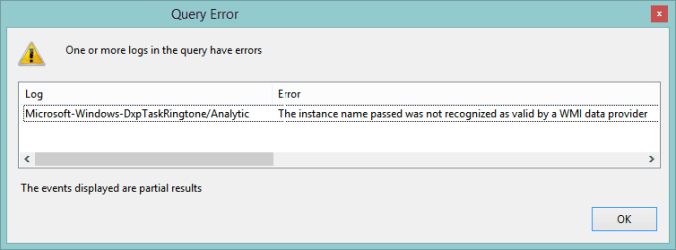
1) Error opening Administrative Events: Microsoft-Windows-DxpTaskRingtone/Analytic
Apparently only on 8.1 upgrade (full install reportedly does not have the registry entry)
Capture.PNG
Resolution: delete the registry key
HKEY_LOCAL_MACHINE\SOFTWARE\Microsoft\Windows\CurrentVersion\WINEVT\Channels\Microsoft-Windows-DxpTaskRingtone/Analytic
Code:
Windows Registry Editor Version 5.00

[HKEY_LOCAL_MACHINE\SOFTWARE\Microsoft\Windows\CurrentVersion\WINEVT\Channels\Microsoft-Windows-DxpTaskRingtone/Analytic]
"ChannelAccess"="O:BAG:SYD:(A;;0xf0007;;;SY)(A;;0x7;;;BA)(A;;0x3;;;BO)(A;;0x5;;;SO)(A;;0x1;;;IU)(A;;0x3;;;SU)(A;;0x1;;;S-1-5-3)(A;;0x2;;;S-1-5-33)(A;;0x1;;;S-1-5-32-573)"
"Enabled"=dword:00000000
"Isolation"=dword:00000001
"OwningPublisher"="{3df0c2c1-5a04-4966-9790-df6ef0ccde9c}"
"Type"=dword:00000002

2) Watchdog throwing error to System at every restart The system has rebooted without cleanly shutting down first
No resolution yet.

Code:
Log Name:      System
Source:        Microsoft-Windows-Kernel-Power
Date:          06/28/14 05:49:36
Event ID:      142
Task Category: (173)
Level:         Critical
Keywords:      (2)
User:          SYSTEM
Computer:      EIdv6
Description:
The system has rebooted without cleanly shutting down first. This error is caused because the system stopped responding and the hardware watchdog triggered a system reset.
Event Xml:
<Event xmlns="http://schemas.microsoft.com/win/2004/08/events/event">
  <System>
    <Provider Name="Microsoft-Windows-Kernel-Power" Guid="{331C3B3A-2005-44C2-AC5E-77220C37D6B4}" />
    <EventID>142</EventID>
    <Version>0</Version>
    <Level>1</Level>
    <Task>173</Task>
    <Opcode>0</Opcode>
    <Keywords>0x8000000000000002</Keywords>
    <TimeCreated SystemTime="2014-06-28T09:49:36.323221000Z" />
    <EventRecordID>4740</EventRecordID>
    <Correlation />
    <Execution ProcessID="4" ThreadID="8" />
    <Channel>System</Channel>
    <Computer>EIdv6</Computer>
    <Security UserID="S-1-5-18" />
  </System>
  <EventData>
    <Data Name="ResetReasonMask">0</Data>
  </EventData>
</Event>
 

My Computer

Computer type
Laptop
Computer Manufacturer/Model Number
HP Pavilion dv6-6c10us
OS
x64 (6.3.9600) Win8.1 Pro & soon dual boot x64 (6.1.7601) Win7_SP1 HomePrem
CPU
AMD A6-3420M APU with Radeon(tm) HD Graphics
Motherboard
Hewlett-Packard 1805
Memory
6.00 GB
Graphics Card(s)
AMD Radeon(TM) HD 6520G
Sound Card
(1) AMD High Definition Audio Device (2) IDT High Definiti
Monitor(s) Displays
HP W2072a 20" LCD (1600 x 900) @ 60 Hz
Screen Resolution
1366 x 768 x 32 bits (4294967296 colors) @ 60 Hz
Hard Drives
ST640LM0 00 HM641JI SATA Disk Device
Keyboard
Logitech k520 wireless KB
Mouse
Logitech m320 wireless mouse (bundled with KB)
Internet Speed
15/5 | 54 MB Wireless 'n'
Antivirus
Realtime: Defender or Avast | On-demand: Malwarebytes, ESET
Browser
IE 11 on Win8, IE 10 on win 7
Other Info
Media: [Gimp, Audacity, VLC] || Comm: [WEmail 2012, Skype] || Productivity: [OpenOffice,| Textpad] || Utils: [Sysinternals, cCleaner, Speccy, Defraggler]
A little over a month on Win8 with no major complaints.

One thing troubled me - Microsoft store stopped working After 8.1 or perhaps update 1. I wasn't using the Modern GUI all that much so I didn't notice when it occurred. The app started and 'quit' it did nothing.

I found a few suggestions by searching, but the answer was buried in a post on a forum.
The post pointing to the TechNet (TN) blog basically said don't run the App trouble shooter, instead follow the instructions in a TN blog.

I had already run the App trouble shooter and it did not solve the issue.
Windows App Store doesn't load after 8.1 Upgrade - OUC1TOO - Site Home - TechNet Blogs

The solution that worked for me (from the TN blog)
David Williams Dixon 19 Oct 2013 10:58 AM said:
You may have seen other sites recommend running the WSreset.exe tool, or manually trying to clear the cache from the Windows\SoftwareDistribution\Download folder.

Don't. This can happen when the Store needs to be re-registered after an upgrade.

Open a Command Prompt as an Administrator.
In the Administrator Command Prompt
type or paste the following command:

powershell -ExecutionPolicy Unrestricted Add-AppxPackage -DisableDevelopmentMode -Register $Env:SystemRoot\WinStore\AppxManifest.xml
hit Enter.

Now in that same Administrator Command Prompt type or paste:
start "" "ms-windows-store:"

I suppose you could just run an elevated PowerShell, but I followed the above instructions.

This was the only thing that I tried that solved the issue.
I'll post it to the EightForum tutorials if it's not already there.

edit: As I expected, EightForums tutorial section already has the information
DISM - Fixing Component Store Corruption in Windows 8

There is no CheckSUR, Windows 8 built it into Windows / Windows Update.
Deployment Image Servicing and Management (DISM) is now used to replace the tools retired in Win7: pkgmgr, PEImg, and IntlConfg.
...more information: Deployment Image Servicing and Management (DISM) (Windows)
 
Last edited:

My Computer

Computer type
Laptop
Computer Manufacturer/Model Number
HP Pavilion dv6-6c10us
OS
x64 (6.3.9600) Win8.1 Pro & soon dual boot x64 (6.1.7601) Win7_SP1 HomePrem
CPU
AMD A6-3420M APU with Radeon(tm) HD Graphics
Motherboard
Hewlett-Packard 1805
Memory
6.00 GB
Graphics Card(s)
AMD Radeon(TM) HD 6520G
Sound Card
(1) AMD High Definition Audio Device (2) IDT High Definiti
Monitor(s) Displays
HP W2072a 20" LCD (1600 x 900) @ 60 Hz
Screen Resolution
1366 x 768 x 32 bits (4294967296 colors) @ 60 Hz
Hard Drives
ST640LM0 00 HM641JI SATA Disk Device
Keyboard
Logitech k520 wireless KB
Mouse
Logitech m320 wireless mouse (bundled with KB)
Internet Speed
15/5 | 54 MB Wireless 'n'
Antivirus
Realtime: Defender or Avast | On-demand: Malwarebytes, ESET
Browser
IE 11 on Win8, IE 10 on win 7
Other Info
Media: [Gimp, Audacity, VLC] || Comm: [WEmail 2012, Skype] || Productivity: [OpenOffice,| Textpad] || Utils: [Sysinternals, cCleaner, Speccy, Defraggler]
I have always had a major kvetch with Windows copy / move.

Why couldn't the code do a simple size. time, and date comparison and then tell you "these files are the same size, date and time... do you want to copy/move them?"

Win8 fixes that ... finally.

A dialog box opens and allows you to hide files that are the same size, date & time - if all are gone, then you can replace the files in the destination folder - no more (2) (3)...(12) copies of the same file.

Now all I have to do is sort out the existing numerical copies of the same files I copied in previous versions of Windows. I make a lot of manual backups and there are lots of (#) files. It would be great if copy / move included those in it's comparison, but I'm very happy about this improvement.
 

My Computer

Computer type
Laptop
Computer Manufacturer/Model Number
HP Pavilion dv6-6c10us
OS
x64 (6.3.9600) Win8.1 Pro & soon dual boot x64 (6.1.7601) Win7_SP1 HomePrem
CPU
AMD A6-3420M APU with Radeon(tm) HD Graphics
Motherboard
Hewlett-Packard 1805
Memory
6.00 GB
Graphics Card(s)
AMD Radeon(TM) HD 6520G
Sound Card
(1) AMD High Definition Audio Device (2) IDT High Definiti
Monitor(s) Displays
HP W2072a 20" LCD (1600 x 900) @ 60 Hz
Screen Resolution
1366 x 768 x 32 bits (4294967296 colors) @ 60 Hz
Hard Drives
ST640LM0 00 HM641JI SATA Disk Device
Keyboard
Logitech k520 wireless KB
Mouse
Logitech m320 wireless mouse (bundled with KB)
Internet Speed
15/5 | 54 MB Wireless 'n'
Antivirus
Realtime: Defender or Avast | On-demand: Malwarebytes, ESET
Browser
IE 11 on Win8, IE 10 on win 7
Other Info
Media: [Gimp, Audacity, VLC] || Comm: [WEmail 2012, Skype] || Productivity: [OpenOffice,| Textpad] || Utils: [Sysinternals, cCleaner, Speccy, Defraggler]
Seems as though a few hardware issues that existed in previous versions of Windows (Vista & Win7) are popping up.

I already fixed the ext HD issue I had before in Win7 (I forgot what I did two years ago, but dug around until it hit me)by turning off power mgmnt for the USB controllers.

This HP laptop has a biometric fingerprint reader. Pretty cool when it works. The issue with Win7 was really an issue for HP. They used a driver from a company bought by Apple - for some reason the driver updates weren't posted on HP and the driver from the company was sporadic.

I haven't checked the details yet, but the driver for the hardware is supplied through Windows Update. For whatever reason, the reader only works after a boot. If the machine sleeps, no reader. Pretty much what happened under Win7.

This is a minor concern - I disabled the reader in Win7 and might do the same under Win8.
 

My Computer

Computer type
Laptop
Computer Manufacturer/Model Number
HP Pavilion dv6-6c10us
OS
x64 (6.3.9600) Win8.1 Pro & soon dual boot x64 (6.1.7601) Win7_SP1 HomePrem
CPU
AMD A6-3420M APU with Radeon(tm) HD Graphics
Motherboard
Hewlett-Packard 1805
Memory
6.00 GB
Graphics Card(s)
AMD Radeon(TM) HD 6520G
Sound Card
(1) AMD High Definition Audio Device (2) IDT High Definiti
Monitor(s) Displays
HP W2072a 20" LCD (1600 x 900) @ 60 Hz
Screen Resolution
1366 x 768 x 32 bits (4294967296 colors) @ 60 Hz
Hard Drives
ST640LM0 00 HM641JI SATA Disk Device
Keyboard
Logitech k520 wireless KB
Mouse
Logitech m320 wireless mouse (bundled with KB)
Internet Speed
15/5 | 54 MB Wireless 'n'
Antivirus
Realtime: Defender or Avast | On-demand: Malwarebytes, ESET
Browser
IE 11 on Win8, IE 10 on win 7
Other Info
Media: [Gimp, Audacity, VLC] || Comm: [WEmail 2012, Skype] || Productivity: [OpenOffice,| Textpad] || Utils: [Sysinternals, cCleaner, Speccy, Defraggler]
I wouldn't classify this as an issue, probably more of misunderstanding One... er SkyDrive.

I don't like things on my system to 'help' me so I turn off auto updates (except for virus defs).

Skydrive seemed determined to sync with the cloud. I didn't try very hard, but right click select pause did nothing.

I installed the stand alone Desktop version, but that didn't give me any more control over SkyDrive... now I have two versions! Modern and Desktop.

I'll have to read more on this to determine if I even want SkyDrive on my system. I can uninstall the Desktop version, but there doesn't seem to be an easy way to uninstall the Modern version (no uninstall on the alt menu).

I can always just go to my MS account, log in and use Skydrive - I'm not sure I want the 'convenience' of it on my machine.

more later if I am that motivated to 'solve' it.
 

My Computer

Computer type
Laptop
Computer Manufacturer/Model Number
HP Pavilion dv6-6c10us
OS
x64 (6.3.9600) Win8.1 Pro & soon dual boot x64 (6.1.7601) Win7_SP1 HomePrem
CPU
AMD A6-3420M APU with Radeon(tm) HD Graphics
Motherboard
Hewlett-Packard 1805
Memory
6.00 GB
Graphics Card(s)
AMD Radeon(TM) HD 6520G
Sound Card
(1) AMD High Definition Audio Device (2) IDT High Definiti
Monitor(s) Displays
HP W2072a 20" LCD (1600 x 900) @ 60 Hz
Screen Resolution
1366 x 768 x 32 bits (4294967296 colors) @ 60 Hz
Hard Drives
ST640LM0 00 HM641JI SATA Disk Device
Keyboard
Logitech k520 wireless KB
Mouse
Logitech m320 wireless mouse (bundled with KB)
Internet Speed
15/5 | 54 MB Wireless 'n'
Antivirus
Realtime: Defender or Avast | On-demand: Malwarebytes, ESET
Browser
IE 11 on Win8, IE 10 on win 7
Other Info
Media: [Gimp, Audacity, VLC] || Comm: [WEmail 2012, Skype] || Productivity: [OpenOffice,| Textpad] || Utils: [Sysinternals, cCleaner, Speccy, Defraggler]
Hi Bill,

If you haven't seen it, here is a thread about this that might help answer ...
http://www.sevenforums.com/general-discussion/338347-get-rid-one-drive.html

I don't like the idea of "my data" in the cloud, without me choosing ... and I understand it ... and trust it ...

Most of the time I'm using 8.1 in desktop mode (like Win 7).
I found if I want to use "Metro", for some things I need to use an "MS account" ...
I changed account type a few times and got tired of that.
Right now I have 2 accounts, (a Local account and my "Outlook.com" account).
Normally I login with my Local account.
If I want to play in the app store, I log out and login with my Outlook account.
 

My Computer

Computer type
PC/Desktop
Computer Manufacturer/Model Number
home built
OS
Multi-Boot W7_Pro_x64 W8.1_Pro_x64 W10_Pro_x64 +Linux_VMs +Chromium_VM
CPU
AMD Athlon II x4 620
Motherboard
Gigabyte GA-MA785G-UD3H
Memory
6GB GSkill DDR2 800
Graphics Card(s)
AMD 4670 GPU + AMD 4200 IGP
Sound Card
on board Realtek ALC889A
Monitor(s) Displays
RCA 40" LCD TV, Insignia 32" LCD TV, HP 15" LCD monitor
Screen Resolution
1680 x 1050
Hard Drives
OCZ Vertex 3 120GB,
Samsung F3 1TB (3),
Several others - WD, Seagate, Hitachi, ...
PSU
Corsair 500 W
Case
Rosewill mid tower
Cooling
CM 90mm rifle
Keyboard
Gyration wireless, Logitech wireless, Dell USB wired
Mouse
Gyration wireless, Logitech wireless, V7 USB wired
Internet Speed
Spectrum - 100Mbps D / 10Mbps U
Antivirus
Avast, MBAM3, EMET, WinPatrol
Browser
Pale Moon, Firefox, IE
Other Info
2 multi-boot PC's
Mainly HTPC/Office/Gen purpose (no gaming).
Trendnet USB KVM.
LG DVD burner/Blue Ray Player.
Tray system for removable SATA backup drives.

Not currently OCd, under-volted.
I use Hybrid sleep, rarely re-boot or shutdown.

Hauppauge HD-PVR, Avermedia PCIe TV Tuner, Hauppauge PCI TV Tuner.
Hi Bill,

If you haven't seen it, here is a thread about this that might help answer ...
http://www.sevenforums.com/general-discussion/338347-get-rid-one-drive.html

I don't like the idea of "my data" in the cloud, without me choosing ... and I understand it ... and trust it ...

Most of the time I'm using 8.1 in desktop mode (like Win 7).
I found if I want to use "Metro", for some things I need to use an "MS account" ...
I changed account type a few times and got tired of that.
Right now I have 2 accounts, (a Local account and my "Outlook.com" account).
Normally I login with my Local account.
If I want to play in the app store, I log out and login with my Outlook account.

Thanks David, I'll look at the link.

Same here - boot to desktop and use Modern GUI for some Start menu type pgms. Most system pgms I need are available by right clicking the start icon, the rest of commonly used pgms are on Start.

Changing the account type is frustrating, I was going to post that as a pet peeve. The only apps I use regularly that prompt for an MS Account are Mahjong and Solitaire - I've found that all I need to do is hit the cancel button to get around the prompt - the games play fine offline. This is how I discovered the MS Store issue - I uninstalled the 'pretty' games but decided later to reinstall them (MS Store didn't work, so I couldn't until I fixed the 8.1 upgrade MS Store fault).

When you say you have two accounts, do you mean two user profiles for Windows?

If not, I'd like to know how to set up the same thing on my machine. I thought of that solution (two accounts one local, one MS flip between depending on the app), but didn't invest any time in it.

Thanks,

Bill
.
 

My Computer

Computer type
Laptop
Computer Manufacturer/Model Number
HP Pavilion dv6-6c10us
OS
x64 (6.3.9600) Win8.1 Pro & soon dual boot x64 (6.1.7601) Win7_SP1 HomePrem
CPU
AMD A6-3420M APU with Radeon(tm) HD Graphics
Motherboard
Hewlett-Packard 1805
Memory
6.00 GB
Graphics Card(s)
AMD Radeon(TM) HD 6520G
Sound Card
(1) AMD High Definition Audio Device (2) IDT High Definiti
Monitor(s) Displays
HP W2072a 20" LCD (1600 x 900) @ 60 Hz
Screen Resolution
1366 x 768 x 32 bits (4294967296 colors) @ 60 Hz
Hard Drives
ST640LM0 00 HM641JI SATA Disk Device
Keyboard
Logitech k520 wireless KB
Mouse
Logitech m320 wireless mouse (bundled with KB)
Internet Speed
15/5 | 54 MB Wireless 'n'
Antivirus
Realtime: Defender or Avast | On-demand: Malwarebytes, ESET
Browser
IE 11 on Win8, IE 10 on win 7
Other Info
Media: [Gimp, Audacity, VLC] || Comm: [WEmail 2012, Skype] || Productivity: [OpenOffice,| Textpad] || Utils: [Sysinternals, cCleaner, Speccy, Defraggler]

My Computer

Computer type
PC/Desktop
Computer Manufacturer/Model Number
home built
OS
Multi-Boot W7_Pro_x64 W8.1_Pro_x64 W10_Pro_x64 +Linux_VMs +Chromium_VM
CPU
AMD Athlon II x4 620
Motherboard
Gigabyte GA-MA785G-UD3H
Memory
6GB GSkill DDR2 800
Graphics Card(s)
AMD 4670 GPU + AMD 4200 IGP
Sound Card
on board Realtek ALC889A
Monitor(s) Displays
RCA 40" LCD TV, Insignia 32" LCD TV, HP 15" LCD monitor
Screen Resolution
1680 x 1050
Hard Drives
OCZ Vertex 3 120GB,
Samsung F3 1TB (3),
Several others - WD, Seagate, Hitachi, ...
PSU
Corsair 500 W
Case
Rosewill mid tower
Cooling
CM 90mm rifle
Keyboard
Gyration wireless, Logitech wireless, Dell USB wired
Mouse
Gyration wireless, Logitech wireless, V7 USB wired
Internet Speed
Spectrum - 100Mbps D / 10Mbps U
Antivirus
Avast, MBAM3, EMET, WinPatrol
Browser
Pale Moon, Firefox, IE
Other Info
2 multi-boot PC's
Mainly HTPC/Office/Gen purpose (no gaming).
Trendnet USB KVM.
LG DVD burner/Blue Ray Player.
Tray system for removable SATA backup drives.

Not currently OCd, under-volted.
I use Hybrid sleep, rarely re-boot or shutdown.

Hauppauge HD-PVR, Avermedia PCIe TV Tuner, Hauppauge PCI TV Tuner.
Thanks a lot David.

I'm not sure I want to add another account right now just for avoiding the MS account login prompt (I don't use it much at all), but the information is very useful.

Maybe I'll get past my reluctance to use the Modern / Immersive GUI.... it took a while for me to go from the ease of use in command line OSes Unix, DOS, and OS2 to Windows 3. I was much younger then :p
:what: we don't need no stinkin' badges GUI! :roflmao:

I'm more interested at this point in learning Powershell than dropping my resistance to yet-another-GUI.

Bill
.
 

My Computer

Computer type
Laptop
Computer Manufacturer/Model Number
HP Pavilion dv6-6c10us
OS
x64 (6.3.9600) Win8.1 Pro & soon dual boot x64 (6.1.7601) Win7_SP1 HomePrem
CPU
AMD A6-3420M APU with Radeon(tm) HD Graphics
Motherboard
Hewlett-Packard 1805
Memory
6.00 GB
Graphics Card(s)
AMD Radeon(TM) HD 6520G
Sound Card
(1) AMD High Definition Audio Device (2) IDT High Definiti
Monitor(s) Displays
HP W2072a 20" LCD (1600 x 900) @ 60 Hz
Screen Resolution
1366 x 768 x 32 bits (4294967296 colors) @ 60 Hz
Hard Drives
ST640LM0 00 HM641JI SATA Disk Device
Keyboard
Logitech k520 wireless KB
Mouse
Logitech m320 wireless mouse (bundled with KB)
Internet Speed
15/5 | 54 MB Wireless 'n'
Antivirus
Realtime: Defender or Avast | On-demand: Malwarebytes, ESET
Browser
IE 11 on Win8, IE 10 on win 7
Other Info
Media: [Gimp, Audacity, VLC] || Comm: [WEmail 2012, Skype] || Productivity: [OpenOffice,| Textpad] || Utils: [Sysinternals, cCleaner, Speccy, Defraggler]
Back
Top