window 7 firewall error code 0x80070424

cambodany

New member
Local time
8:06 AM
Messages
2
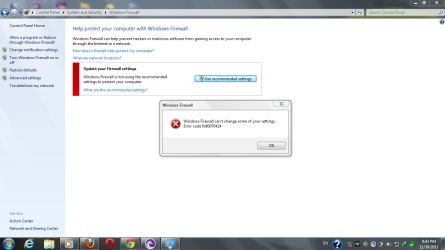
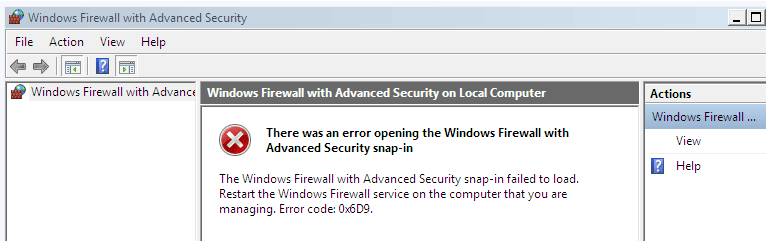
my computer is window7 ultimate 32 bit. Recently, I just got error code of firewall. I could not change firewall at all. the code error is like this.

error code 0x80070424 when I try to change it in Window Normal Start.
error code 0x6D9 when I try to change it in Safe Mode.

here are the pictures.
 

Attachments
  • Capture.PNG
    Capture.PNG
    9.5 KB · Views: 902
  • Capturew.PNG
    Capturew.PNG
    67.9 KB · Views: 2,053

My Computer

OS
window7 ultimate 32 bit.
The error from the MMC means that there's no RPC endpoint available for it to talk to, and the error from the security center is "ERROR_SERVICE_DOES_NOT_EXIST". So, do you know when this first started happening? Is anything else happening on the system or in the event logs that might indicate a larger problem?
 

My Computer

Computer type
PC/Desktop
Computer Manufacturer/Model Number
Custom
OS
Windows 10 Pro x64
CPU
Intel Core i7 4790K @ 4.5GHz
Motherboard
Asus Maximus Hero VII
Memory
32GB DDR3
Graphics Card(s)
Nvidia GeForce GTX970
Sound Card
Realtek HD Audio
Screen Resolution
1920x1200
Hard Drives
1x Samsung 250GB SSD
4x WD RE 2TB (RAIDZ)
PSU
Corsair AX760i
Case
Fractal Design Define R4
Cooling
Noctua NH-D15
thanks for your response. This happened when I try to install one software which I downloaded from internet without scan. that time there are viruses effected to computer but I have Essential to clean them. since that time I never uninstall antivirus until now. this is my first problem of using window7 ultimate 32 bit and there is only one too. my computer starting window well but I need FireWall working back to making safe.

Please help me to solve it step by step because my knowledge of computer science is little.

Best to you.

Thanks
 

My Computer

OS
window7 ultimate 32 bit.

My Computer

Computer type
PC/Desktop
Computer Manufacturer/Model Number
Custom
OS
Windows 10 Pro x64
CPU
Intel Core i7 4790K @ 4.5GHz
Motherboard
Asus Maximus Hero VII
Memory
32GB DDR3
Graphics Card(s)
Nvidia GeForce GTX970
Sound Card
Realtek HD Audio
Screen Resolution
1920x1200
Hard Drives
1x Samsung 250GB SSD
4x WD RE 2TB (RAIDZ)
PSU
Corsair AX760i
Case
Fractal Design Define R4
Cooling
Noctua NH-D15
Hi, cambodany. Welcome to Seven Forums.http://www.sevenforums.com/member.php?u=188297

I suspect that the source of the problem is that your computer is still infected. Please go here to run an on-line scan from ESET.

  • Note: It is easiest if you use Internet explorer for this scan. (If you use an alternate browser, it will be necessary to download the ESET Smart Installer)
  • Turn off the real time scanner of any existing antivirus program while performing the online scan
  • Tick the box next to YES, I accept the Terms of Use.
  • Click Start
  • When asked, allow the ActiveX control to install
  • Click Start
  • Make sure that the option Remove found threats and the Scan Archives options are ticked.
  • Click on Advanced Settings, ensure the options Scan for potentially unwanted applications, Scan for potentially unsafe applications, and Enable Anti-Stealth Technology are ticked.
  • Click Scan
  • Wait for the scan to finish
  • Use notepad to open the logfile located at C:\Program Files\Eset\Eset Online Scanner\log.txt


You may also want to try this Microsoft Fixit: Diagnose and fix Windows Firewall service problems automatically.
 

My Computer

OS
Windows 7 & Windows Vista Ultimate
i have this problem to my antivirus is good but my firewall is off.....please help me
~windows 7 ultimate 64 bit~
 

My Computer

OS
Windows 7 Ultimate 64bit
CPU
Intel(R) Core(TM) i5-2500K CPU @ 3.30GHz
Memory
4.1GB RAM
Graphics Card(s)
Intel(R) Core(TM) i5-2500K CPU @ 3.30GHz
Screen Resolution
1280 x 1024
Case
black LG gaming case
Internet Speed
12MB
Back
Top