
window search, annoying, please help!

unityole

Banned
Local time
10:28 AM
Messages
25
please help me out here and I am at the border of my limits. just when i thought i had everything i need figured out, more stuff comes in and pisses me off. I have looked everywhere, google, this forum, other forums, no help. Please don't give me an answer with bunch of links and tell me to see them for solution. All these problems are very similar in a way I doubt theres more than 2 solution to them. unless its individual solution then yes I will visit them and thank you.

heres the picture, very clearly states what I need, please help me and thank you!
edit: im using window 7 64-bit.
 

Attachments
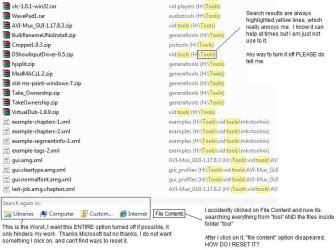
  • my7problem.jpg
    my7problem.jpg
    67.5 KB · Views: 87

My Computer

Computer Manufacturer/Model Number
ASUS G74SX-BBK7
OS
64bit
CPU
i7 2630QM 2.0 GHz Quad-Core 8 threads
Memory
DDR3 1333 MHZ, 9-9-9-24
Graphics Card(s)
nvidia GTX 560M 2GB DDR5, 128-bit
Screen Resolution
1600x900, 900p
Hard Drives
2x 750 sata drive.
Cooling
DUAL FAN 120 MM
  1. Open a Windows Explorer window.
  2. Under the Navigation buttons, Click he work Organize
  3. Select Folder and Search options
  4. Click on the Search tab
  5. Click the restore Defaults button
This should help fix your problem of always searching in file contents.

As for removing the highlight, that kinda defeats the purpose of searching. If it can be done, it will probably e in one of our tutorials here on the site.

And, for future reference, please don't try to dictate how the help is provided. If a post with a bunch of links is the best solution, then that is what we'll provide - b/c we have a vast library of tutorials that walk you through, step by step, in how to accomplish a lot of configuration and such in Windows 7, including how to customize, and un-customize it, as well as how to fix irritating little things like what you encountered. Complete with pictures, step-by-step tutorials, and links to other, related tutorials.

IOW, there is a method to our madness.
 

My Computers

System One System Two

  • Computer type
    PC/Desktop
    Computer Manufacturer/Model Number
    The Beast Model A (homebrew)
    OS
    Windows 11 21H2 Current build
    CPU
    AMD Ryzen 9 3950X
    Motherboard
    MSI MEG X570 GODLIKE
    Memory
    4 * 32 GB - Corsair Vengeance 3600 MHz
    Graphics Card(s)
    EVGA GeForce RTX 3080 Ti XC3 ULTRA GAMING (12G-P5-3955-KR)
    Sound Card
    Realtek® ALC1220 Codec
    Monitor(s) Displays
    2x Eve Spectrum ES07D03 4K Gaming Monitor (Matte) | Eve Spec
    Screen Resolution
    3x 3840 x 2160
    Hard Drives
    3x Samsung 980 Pro NVMe PCIe 4 M.2 2 TB SSD (MZ-V8P2T0B/AM) } 3x Sabrent Rocket NVMe 4.0 1 TB SSD
    PSU
    PC Power & Cooling’s Silencer Series 1050 Watt, 80 Plus Plat
    Case
    Fractal Design Define 7 XL Dark ATX Full Tower Case
    Cooling
    SteelSeries Apex Pro Wired Gaming Keyboard
    Keyboard
    SteelSeries Apex Pro
    Mouse
    Logitech MX Master 3S | MX Master 3 for business
    Internet Speed
    AT&T LightSpeed Gigabit Duplex Ftth
    Antivirus
    Windows Defender + MB 3
    Browser
    Nightly (default) + Firefox (stable),Chrome, Edge
  • Computer type
    PC/Desktop
    System Manufacturer/Model Number
    Dell Latitude E5470
    OS
    ChromeOS Flex Dev Channel (current)
    CPU
    Intel(R) Core(TM) i5-6300U CPU @ 2.40GHz, 2501 Mhz, 2 Core(s), 4 Logical Processor(s)
    Motherboard
    Dell
    Memory
    16 GB
    Graphics Card(s)
    Intel(R) HD Graphics 520
    Sound Card
    Intel(R) HD Graphics 520 + RealTek Audio
    Monitor(s) Displays
    Dell laptop display 15"
    Screen Resolution
    1920 * 1080
    Hard Drives
    Toshiba 128GB M.2 22300 drive
    INTEL Cherryville 520 Series SSDSC2CW180A 180 GB SATA III SSD
    PSU
    Dell
    Case
    Dell
    Cooling
    Dell
    Keyboard
    Dell
    Mouse
    Logitech MX Master 3S (shared w. Sys 1) | Dell TouchPad
    Internet Speed
    AT&T LightSpeed Gigabit Duplex Ftth
yea i understand i only say that cause many times i see a solution, the person suggest "maybe this will help" and then before i know it, i can see 4 to 7 links of "maybe these can help".

also, i did the reset thing you mentioned, it did not work, its still searching file contents. as always the file content option after i clicked on it, its gone and now its set there for good. anyway to delete that whole "search again in" or "file content" together?
 

My Computer

Computer Manufacturer/Model Number
ASUS G74SX-BBK7
OS
64bit
CPU
i7 2630QM 2.0 GHz Quad-Core 8 threads
Memory
DDR3 1333 MHZ, 9-9-9-24
Graphics Card(s)
nvidia GTX 560M 2GB DDR5, 128-bit
Screen Resolution
1600x900, 900p
Hard Drives
2x 750 sata drive.
Cooling
DUAL FAN 120 MM
When you looked on the Search tab, at the top, which item is selected?
 

My Computers

System One System Two

  • Computer type
    PC/Desktop
    Computer Manufacturer/Model Number
    The Beast Model A (homebrew)
    OS
    Windows 11 21H2 Current build
    CPU
    AMD Ryzen 9 3950X
    Motherboard
    MSI MEG X570 GODLIKE
    Memory
    4 * 32 GB - Corsair Vengeance 3600 MHz
    Graphics Card(s)
    EVGA GeForce RTX 3080 Ti XC3 ULTRA GAMING (12G-P5-3955-KR)
    Sound Card
    Realtek® ALC1220 Codec
    Monitor(s) Displays
    2x Eve Spectrum ES07D03 4K Gaming Monitor (Matte) | Eve Spec
    Screen Resolution
    3x 3840 x 2160
    Hard Drives
    3x Samsung 980 Pro NVMe PCIe 4 M.2 2 TB SSD (MZ-V8P2T0B/AM) } 3x Sabrent Rocket NVMe 4.0 1 TB SSD
    PSU
    PC Power & Cooling’s Silencer Series 1050 Watt, 80 Plus Plat
    Case
    Fractal Design Define 7 XL Dark ATX Full Tower Case
    Cooling
    SteelSeries Apex Pro Wired Gaming Keyboard
    Keyboard
    SteelSeries Apex Pro
    Mouse
    Logitech MX Master 3S | MX Master 3 for business
    Internet Speed
    AT&T LightSpeed Gigabit Duplex Ftth
    Antivirus
    Windows Defender + MB 3
    Browser
    Nightly (default) + Firefox (stable),Chrome, Edge
  • Computer type
    PC/Desktop
    System Manufacturer/Model Number
    Dell Latitude E5470
    OS
    ChromeOS Flex Dev Channel (current)
    CPU
    Intel(R) Core(TM) i5-6300U CPU @ 2.40GHz, 2501 Mhz, 2 Core(s), 4 Logical Processor(s)
    Motherboard
    Dell
    Memory
    16 GB
    Graphics Card(s)
    Intel(R) HD Graphics 520
    Sound Card
    Intel(R) HD Graphics 520 + RealTek Audio
    Monitor(s) Displays
    Dell laptop display 15"
    Screen Resolution
    1920 * 1080
    Hard Drives
    Toshiba 128GB M.2 22300 drive
    INTEL Cherryville 520 Series SSDSC2CW180A 180 GB SATA III SSD
    PSU
    Dell
    Case
    Dell
    Cooling
    Dell
    Keyboard
    Dell
    Mouse
    Logitech MX Master 3S (shared w. Sys 1) | Dell TouchPad
    Internet Speed
    AT&T LightSpeed Gigabit Duplex Ftth
the first one is selected, but ive tried both, didnt work but somehow i solved this problem by finding an option i can choose between index only and index+file content within "indexing option"

but this still doesnt remove the "search again in" pane at the very bottom and might accident click on something else again. i also found out that when window 7 in explorer askes if I want to set certain location (example c:\ or d:\tools etc..) as index location, once is set, and if file content at the bottom is clicked for those indexed location, then it cant be reset unless through "indexing option".

for the none indexed folder (all the other folders) even if file content is clicked on, next time start up search, its reset again.
 

My Computer

Computer Manufacturer/Model Number
ASUS G74SX-BBK7
OS
64bit
CPU
i7 2630QM 2.0 GHz Quad-Core 8 threads
Memory
DDR3 1333 MHZ, 9-9-9-24
Graphics Card(s)
nvidia GTX 560M 2GB DDR5, 128-bit
Screen Resolution
1600x900, 900p
Hard Drives
2x 750 sata drive.
Cooling
DUAL FAN 120 MM
Back
Top