Solved Windows 10 upgrade reverts back to Windows 7 Home Premium (previous OS

keokat15

New member
Local time
4:04 AM
Messages
11
Hello everyone, I've been stuck on trying to upgrade to Windows 10. I am currently using a OEM Windows 7 Home Premium 64 bit, HP Pavilion dv6 laptop.

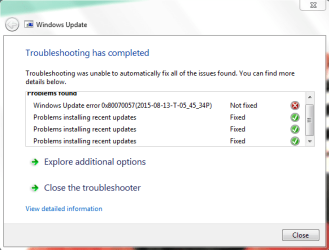
Problem started when I notified Microsoft that I wanted to upgrade to Windows 10. I upgraded with my wife's laptop first. She also has the same laptop, but its a newer version. Windows 10 installed fine, so I decided to do mine. So I repeated the steps I did when I upgraded my wife's laptop. I clicked on the Windows icon in my task bar. It told me Windows upgrade was ready, so I clicked on continue. I let the update take its course. After 8 hours of seeing the words "working on it" I decided to exit out of the program, thinking something is wrong. I restarted my laptop and clicked on the Windows icon again. This time I did this before I went to bed. When I woke up it still had the words "working on it." So I did some research and I came across a thread that stated to use Windows update. I ran the Windows update and to my surprise Windows 10 was there (it was the only update). I clicked on update and it started to download, so I figured life was good. Windows 10 downloaded and installed. It went through the three phases (Baking up files, installing software and drivers, and then validation)<--if those are not the exact three phases I forgot, but there are three phases-->as soon as the third phase finished it states that something goes wrong and reverts back to Windows 7 Home Premium. So I commence my research, I download every fix it tool known to man and every SUR that all the forums point to. I will post my SFC /scannow file in this thread. So I contact Microsoft and the first technician was helpful, he thought my problem was that my profile was corrupt, so we created a new administrator profile and tried installing the update that way, but still my laptop does the same thing, goes through the update and install then reverts back to original OS. So I research some more because I don't want to wait 2 hrs on the phone to talk to another Microsoft technician. So I do more research. I came across a thread to do a clean boot and turn off WIFI when during the install phase of Windows 10. I did this, but instead of turning of WIFI I cut my router off so there was no Internet period! Laptop still reverted back to original OS. So I did more digging and came across another thread that states to run the update troubleshooter. So I open help in windows and download the update troubleshooter and attached is my result. I have also uploaded my CBS log. Since I got frustrated I decided to give Microsoft another chance, so I waited two hours to talk to a technician. Technician decided to download Windows 10 using the media creation tool. I thought it was going to work. I waited patiently as I saw my Windows 10 software being downloaded. Once it downloaded it started to install, so I was pretty excited. But after the last part of the installation it went to check for updates and about 15 minutes later it stated that windows had a problem and it couldn't upgrade. Please any help would be appreciated. I don't know what else to do at this point.

Thanks for your time to read this post :D
 

Attachments

  • Update Troubleshooter.PNG
    Update Troubleshooter.PNG
    14.5 KB · Views: 24

My Computer My Computer

At a glance

Windows 7 Home Premium 64 bitAMD A6-4400M APU with Radeon(tm) HD Graphics ...6.00 GB RAM
Computer type
Laptop
Computer Manufacturer/Model Number
HP Pavilion dv6 Notebook
OS
Windows 7 Home Premium 64 bit
CPU
AMD A6-4400M APU with Radeon(tm) HD Graphics 2.70 GHz
Memory
6.00 GB RAM
Antivirus
360 Total Security
Browser
Mozilla
Did you begin this extravaganza with Windows 7 Home Premium?

Or Windows 7 Home Premium SP 1?

What's an "SUR"?
 

My Computer My Computer

At a glance

Windows 7 Home Premium SP1, 64-bitIntel Skylake i5-6600K, not overclocked8 GB HyperX DDR4-2666 (2 x 4 GB)none; graphics are integrated on CPU
Computer type
PC/Desktop
Computer Manufacturer/Model Number
Ignatz Special; 4 speed manual gearbox; factory air conditioning; one of one
OS
Windows 7 Home Premium SP1, 64-bit
CPU
Intel Skylake i5-6600K, not overclocked
Motherboard
AsRock Z170M Extreme 4, micro ATX
Memory
8 GB HyperX DDR4-2666 (2 x 4 GB)
Graphics Card(s)
none; graphics are integrated on CPU
Sound Card
onboard: Realtek ALC1150; external: USB Behringer UF0-202
Monitor(s) Displays
Dell S2340M 23 inch IPS
Screen Resolution
1600 x 900
Hard Drives
System: Crucial MX100 series SSD, 128 GB;
Data: Samsung Spinpoint 103SJ, 1 TB;
Backup: WD Caviar Green WD30EZRX-00D8PB0, 3 TB
PSU
Rosewill SilentNight 500 watt fanless, semi-modular
Case
Antec Solo II
Cooling
Noctua NH-U12S; Noctua F12 intake, Noctua S12A exhaust
Keyboard
Microsoft 200 6JH-00001 USB
Mouse
Dell or Microsoft optical wired; USB
Antivirus
Microsoft Security Essentials and Malwarebytes Premium
Browser
Pale Moon
Other Info
All fans PWM; speeds at idle: CPU circa 500 rpm; intake circa 600 rpm; exhaust circa 600 rpm; CPU temps 27 idle and 47 C load in a warm room (27 C/81 F) when running Intel Extreme Tuning Utility stress test.
Please post the CheckSUR.log file
(SUR aka SURT aka CheckSUR - the System Update Readiness Tool)
There is no SFC data in your CBS.log - and no errors in the background CBS data. Please post a couple of the latest CBSPersist files.
 

My Computer My Computer

At a glance

Win 7 x64 Home Premium (and x86 VirtualBox VM...i3 370M/i7 6500U8GB - finally :)/8GBit's an i3, dude!/dual Intel&nVidia
Computer type
Laptop
Computer Manufacturer/Model Number
Asus K52F or Lenovo B51-80
OS
Win 7 x64 Home Premium (and x86 VirtualBox VM)/Win10
CPU
i3 370M/i7 6500U
Motherboard
Asus/Lenovo
Memory
8GB - finally :)/8GB
Graphics Card(s)
it's an i3, dude!/dual Intel&nVidia
Sound Card
onboard
Monitor(s) Displays
15.6" built-in
Screen Resolution
1366x768/1920x1080
Hard Drives
750GB Seagate internal
Sundry external drives attached to other computers on the local network
1TB SSD on the Lenovo
PSU
n/a
Internet Speed
as much as I can get - usually on a dongle/phone, so <1MB/s
Antivirus
MSE/Defender
Browser
IE11/12/Edge/Chrome/FF(if I must)
@ignatzatsonic-good question and sorry for not posting that earlier. SP1 was preinstalled. Also my laptop was bought with Windows 7 Home Premium SP1 already installed.

@NoelDP-Thanks for answering ignatzatsonic and also here is another file that "I think" you are asking for. I don't know if you care but I add the CheckSUR.persist.log file. I don't what that is but it looks important.

Thanks for your help as always
 

Attachments

My Computer My Computer

At a glance

Windows 7 Home Premium 64 bitAMD A6-4400M APU with Radeon(tm) HD Graphics ...6.00 GB RAM
Computer type
Laptop
Computer Manufacturer/Model Number
HP Pavilion dv6 Notebook
OS
Windows 7 Home Premium 64 bit
CPU
AMD A6-4400M APU with Radeon(tm) HD Graphics 2.70 GHz
Memory
6.00 GB RAM
Antivirus
360 Total Security
Browser
Mozilla
Here's the summary from the CheckSUR log -
Code:
Summary:
Seconds executed: 425
 Found 6 errors
 Fixed 6 errors
  CBS MUM Missing Total count: 6
  Fixed: CBS MUM Missing.  Total count: 6
  Fixed: CBS Paired File.  Total count: 6
The CheckSUR.Persist.log is interesting - it apparently shows that you've just installed IE11 despite having some errors in the IE10 install.

It's the first time I've seen some of these particular errors fixed - and in quite a clever way, at that! (deleting the problem files and allowing CheckSUR to re-insert them - because CheckSUR accepts the files as being genuine for replacement purposes so refuses to do the proper work it needs to do)
Where did you get that idea from?

SO we now have a clear CheckSUR log -

Please run another SFC /SCANNOW and post the new CBS.log file
 

My Computer My Computer

At a glance

Win 7 x64 Home Premium (and x86 VirtualBox VM...i3 370M/i7 6500U8GB - finally :)/8GBit's an i3, dude!/dual Intel&nVidia
Computer type
Laptop
Computer Manufacturer/Model Number
Asus K52F or Lenovo B51-80
OS
Win 7 x64 Home Premium (and x86 VirtualBox VM)/Win10
CPU
i3 370M/i7 6500U
Motherboard
Asus/Lenovo
Memory
8GB - finally :)/8GB
Graphics Card(s)
it's an i3, dude!/dual Intel&nVidia
Sound Card
onboard
Monitor(s) Displays
15.6" built-in
Screen Resolution
1366x768/1920x1080
Hard Drives
750GB Seagate internal
Sundry external drives attached to other computers on the local network
1TB SSD on the Lenovo
PSU
n/a
Internet Speed
as much as I can get - usually on a dongle/phone, so <1MB/s
Antivirus
MSE/Defender
Browser
IE11/12/Edge/Chrome/FF(if I must)
@NoelDP- The funny thing was it was a fluke and I can't take credit for that. When I saw those errors I went to the folder where they were located and just deleted them. After researching 80070057 fail it told me to the CheckSUR as stated above. So honestly that was a fluke. I'm running an SFC /scannow and I will post when its finish.
 

My Computer My Computer

At a glance

Windows 7 Home Premium 64 bitAMD A6-4400M APU with Radeon(tm) HD Graphics ...6.00 GB RAM
Computer type
Laptop
Computer Manufacturer/Model Number
HP Pavilion dv6 Notebook
OS
Windows 7 Home Premium 64 bit
CPU
AMD A6-4400M APU with Radeon(tm) HD Graphics 2.70 GHz
Memory
6.00 GB RAM
Antivirus
360 Total Security
Browser
Mozilla
@NoelDP- My CBS file is too large for the forum.
 

My Computer My Computer

At a glance

Windows 7 Home Premium 64 bitAMD A6-4400M APU with Radeon(tm) HD Graphics ...6.00 GB RAM
Computer type
Laptop
Computer Manufacturer/Model Number
HP Pavilion dv6 Notebook
OS
Windows 7 Home Premium 64 bit
CPU
AMD A6-4400M APU with Radeon(tm) HD Graphics 2.70 GHz
Memory
6.00 GB RAM
Antivirus
360 Total Security
Browser
Mozilla
@NoelDP- I was able to make the file a zip file so here is the CBS log.
 

My Computer My Computer

At a glance

Windows 7 Home Premium 64 bitAMD A6-4400M APU with Radeon(tm) HD Graphics ...6.00 GB RAM
Computer type
Laptop
Computer Manufacturer/Model Number
HP Pavilion dv6 Notebook
OS
Windows 7 Home Premium 64 bit
CPU
AMD A6-4400M APU with Radeon(tm) HD Graphics 2.70 GHz
Memory
6.00 GB RAM
Antivirus
360 Total Security
Browser
Mozilla
The only errors in the SFC data are these...
Code:
	Line 16539: 2015-08-13 22:46:12, Info                  CSI    0000035c [SR] Repairing 1 components
	Line 16540: 2015-08-13 22:46:12, Info                  CSI    0000035d [SR] Beginning Verify and Repair transaction
	Line 16543: 2015-08-13 22:46:12, Info                  CSI    0000035f [SR] Cannot repair member file [l:24{12}]"utc.app.json" of Microsoft-Windows-Unified-Telemetry-Client, Version = 6.1.7601.18869, pA = PROCESSOR_ARCHITECTURE_AMD64 (9), Culture neutral, VersionScope = 1 nonSxS, PublicKeyToken = {l:8 b:31bf3856ad364e35}, Type neutral, TypeName neutral, PublicKey neutral in the store, hash mismatch
	Line 16546: 2015-08-13 22:46:12, Info                  CSI    00000361 [SR] Cannot repair member file [l:66{33}]"telemetry.ASM-WindowsDefault.json" of Microsoft-Windows-Unified-Telemetry-Client, Version = 6.1.7601.18869, pA = PROCESSOR_ARCHITECTURE_AMD64 (9), Culture neutral, VersionScope = 1 nonSxS, PublicKeyToken = {l:8 b:31bf3856ad364e35}, Type neutral, TypeName neutral, PublicKey neutral in the store, hash mismatch
They are 'normal' and don't cause problems - MS will get around to fixing them some day (so they say)

So that means that there's not a lot wrong with the system as such.

Did you check that there were no software compatibility problems before starting the update, by clicking on the notification icon? if there were/are any you must address these first.
 

My Computer My Computer

At a glance

Win 7 x64 Home Premium (and x86 VirtualBox VM...i3 370M/i7 6500U8GB - finally :)/8GBit's an i3, dude!/dual Intel&nVidia
Computer type
Laptop
Computer Manufacturer/Model Number
Asus K52F or Lenovo B51-80
OS
Win 7 x64 Home Premium (and x86 VirtualBox VM)/Win10
CPU
i3 370M/i7 6500U
Motherboard
Asus/Lenovo
Memory
8GB - finally :)/8GB
Graphics Card(s)
it's an i3, dude!/dual Intel&nVidia
Sound Card
onboard
Monitor(s) Displays
15.6" built-in
Screen Resolution
1366x768/1920x1080
Hard Drives
750GB Seagate internal
Sundry external drives attached to other computers on the local network
1TB SSD on the Lenovo
PSU
n/a
Internet Speed
as much as I can get - usually on a dongle/phone, so <1MB/s
Antivirus
MSE/Defender
Browser
IE11/12/Edge/Chrome/FF(if I must)
@NoelDP-I tried everything. I wanted to reinstall Windows 7 but my key was not valid so I called Microsoft and it because this is an OEM Laptop, but besides that point the only update I have is the Windows 10 and it will not install period. I get these two errors that I just can't figure (C1900101-4000D and 80070057) out even searching online doesn't help. I get the C1900101-4000D when Windows tries to install Windows 10 and it reverts back then the update screen produces this error. When I run the update troubleshooter it fixes everything but can't repair 80070057. Also the weird thing is that my update just updated 32 Microsoft Office components that I don't have on this laptop (weird). Don't know what else to do. Microsoft Techs can't help either! So I'm basically stuck. Any advice would help.
 

My Computer My Computer

At a glance

Windows 7 Home Premium 64 bitAMD A6-4400M APU with Radeon(tm) HD Graphics ...6.00 GB RAM
Computer type
Laptop
Computer Manufacturer/Model Number
HP Pavilion dv6 Notebook
OS
Windows 7 Home Premium 64 bit
CPU
AMD A6-4400M APU with Radeon(tm) HD Graphics 2.70 GHz
Memory
6.00 GB RAM
Antivirus
360 Total Security
Browser
Mozilla
Hmmm - You're having Activation/Validation problems?
To properly analyse and solve problems with Activation and Validation, we need to see a full copy of the report produced by the MGADiag tool
(download and save to desktop - http://go.microsoft.com/fwlink/?linkid=52012 )
Once saved, run the tool.
Click on the Continue button, which will produce the report.
To copy the report to your response, click on the Copy button in the tool (ignore any error messages at this point), and then paste (using either r-click/Paste, or Ctrl+V ) into your response.x
- in your own thread, please

Please also state the Version and Edition of Windows quoted on your COA sticker (if you have one) on the case of your machine (or inside the battery compartment), but do NOT quote the Key on the sticker!
How to tell - Hardware
 

My Computer My Computer

At a glance

Win 7 x64 Home Premium (and x86 VirtualBox VM...i3 370M/i7 6500U8GB - finally :)/8GBit's an i3, dude!/dual Intel&nVidia
Computer type
Laptop
Computer Manufacturer/Model Number
Asus K52F or Lenovo B51-80
OS
Win 7 x64 Home Premium (and x86 VirtualBox VM)/Win10
CPU
i3 370M/i7 6500U
Motherboard
Asus/Lenovo
Memory
8GB - finally :)/8GB
Graphics Card(s)
it's an i3, dude!/dual Intel&nVidia
Sound Card
onboard
Monitor(s) Displays
15.6" built-in
Screen Resolution
1366x768/1920x1080
Hard Drives
750GB Seagate internal
Sundry external drives attached to other computers on the local network
1TB SSD on the Lenovo
PSU
n/a
Internet Speed
as much as I can get - usually on a dongle/phone, so <1MB/s
Antivirus
MSE/Defender
Browser
IE11/12/Edge/Chrome/FF(if I must)
Diagnostic Report (1.9.0027.0):
-----------------------------------------
Windows Validation Data-->

Validation Code: 0
Cached Online Validation Code: 0x0
Windows Product Key: *****-*****-73CQT-WMF7J-3Q6C9
Windows Product Key Hash: KaFG+RmurcM3ZxzWyfEP9WtPUJw=
Windows Product ID: 00359-OEM-8992687-00010
Windows Product ID Type: 2
Windows License Type: OEM SLP
Windows OS version: 6.1.7601.2.00010300.1.0.003
ID: {72DE6224-13A0-4345-9739-6FF673535522}(1)
Is Admin: Yes
TestCab: 0x0
LegitcheckControl ActiveX: N/A, hr = 0x80070002
Signed By: N/A, hr = 0x80070002
Product Name: Windows 7 Home Premium
Architecture: 0x00000009
Build lab: 7601.win7sp1_gdr.150715-0600
TTS Error:
Validation Diagnostic:
Resolution Status: N/A

Vista WgaER Data-->
ThreatID(s): N/A, hr = 0x80070002
Version: N/A, hr = 0x80070002

Windows XP Notifications Data-->
Cached Result: N/A, hr = 0x80070002
File Exists: No
Version: N/A, hr = 0x80070002
WgaTray.exe Signed By: N/A, hr = 0x80070002
WgaLogon.dll Signed By: N/A, hr = 0x80070002

OGA Notifications Data-->
Cached Result: N/A, hr = 0x80070002
Version: N/A, hr = 0x80070002
OGAExec.exe Signed By: N/A, hr = 0x80070002
OGAAddin.dll Signed By: N/A, hr = 0x80070002

OGA Data-->
Office Status: 109 N/A
OGA Version: N/A, 0x80070002
Signed By: N/A, hr = 0x80070002
Office Diagnostics: 025D1FF3-364-80041010_025D1FF3-229-80041010_025D1FF3-230-1_025D1FF3-517-80040154_025D1FF3-237-80040154_025D1FF3-238-2_025D1FF3-244-80070002_025D1FF3-258-3

Browser Data-->
Proxy settings: N/A
User Agent: Mozilla/4.0 (compatible; MSIE; Win32)
Default Browser: C:\Program Files (x86)\Mozilla Firefox\firefox.exe
Download signed ActiveX controls: Prompt
Download unsigned ActiveX controls: Disabled
Run ActiveX controls and plug-ins: Allowed
Initialize and script ActiveX controls not marked as safe: Disabled
Allow scripting of Internet Explorer Webbrowser control: Disabled
Active scripting: Allowed
Script ActiveX controls marked as safe for scripting: Allowed

File Scan Data-->

Other data-->
Office Details: <GenuineResults><MachineData><UGUID>{72DE6224-13A0-4345-9739-6FF673535522}</UGUID><Version>1.9.0027.0</Version><OS>6.1.7601.2.00010300.1.0.003</OS><Architecture>x64</Architecture><PKey>*****-*****-*****-*****-3Q6C9</PKey><PID>00359-OEM-8992687-00010</PID><PIDType>2</PIDType><SID>S-1-5-21-3186618482-2040748835-983897112</SID><SYSTEM><Manufacturer>Hewlett-Packard</Manufacturer><Model>HP Pavilion dv6 Notebook PC</Model></SYSTEM><BIOS><Manufacturer>Insyde</Manufacturer><Version>F.25</Version><SMBIOSVersion major="2" minor="7"/><Date>20140804000000.000000+000</Date></BIOS><HWID>04F93807018400F2</HWID><UserLCID>0409</UserLCID><SystemLCID>0409</SystemLCID><TimeZone>Tokyo Standard Time(GMT+09:00)</TimeZone><iJoin>0</iJoin><SBID><stat>3</stat><msppid></msppid><name></name><model></model></SBID><OEM><OEMID>HPQOEM</OEMID><OEMTableID>SLIC-MPC</OEMTableID></OEM><GANotification/></MachineData><Software><Office><Result>109</Result><Products/><Applications/></Office></Software></GenuineResults>

Spsys.log Content: 0x80070002

Licensing Data-->
Software licensing service version: 6.1.7601.17514

Name: Windows(R) 7, HomePremium edition
Description: Windows Operating System - Windows(R) 7, OEM_SLP channel
Activation ID: d2c04e90-c3dd-4260-b0f3-f845f5d27d64
Application ID: 55c92734-d682-4d71-983e-d6ec3f16059f
Extended PID: 00359-00178-926-800010-02-1033-7601.0000-1262012
Installation ID: 017002927812915050694690412526013571138413743785506143
Processor Certificate URL: SpcService Web Service
Machine Certificate URL: RacService Web Service
Use License URL: UseLicenseService Web Service
Product Key Certificate URL: PkcService Web Service
Partial Product Key: 3Q6C9
License Status: Licensed
Remaining Windows rearm count: 0
Trusted time: 8/13/2015 11:31:51 PM

Windows Activation Technologies-->
HrOffline: 0x00000000
HrOnline: 0x00000000
HealthStatus: 0x0000000000000000
Event Time Stamp: 7:26:2015 21:51
ActiveX: Registered, Version: 7.1.7600.16395
Admin Service: Registered, Version: 7.1.7600.16395
HealthStatus Bitmask Output:


HWID Data-->
HWID Hash Current: MgAAAAEAAQABAAEAAAADAAAAAwABAAEAonYgz/Lytpd23Jh5LeKKm9xE5XDSQ+Lmhls=

OEM Activation 1.0 Data-->
N/A

OEM Activation 2.0 Data-->
BIOS valid for OA 2.0: yes
Windows marker version: 0x20001
OEMID and OEMTableID Consistent: yes
BIOS Information:
ACPI Table Name OEMID Value OEMTableID Value
APIC HPQOEM 182D
FACP HPQOEM SLIC-MPC
HPET HPQOEM 182D
BOOT HPQOEM 182D
MCFG HPQOEM 182D
WDAT HPQOEM 182D
UEFI HPQOEM 182D
ASF! HPQOEM 182D
SLIC HPQOEM SLIC-MPC
WDRT HPQOEM 182D
FPDT HPQOEM 182D
SSDT HPQOEM 182D
SSDT HPQOEM 182D


Also I have Windows 7 Home Premium and that what it says on the sticker on the bottom of my laptop
 

My Computer My Computer

At a glance

Windows 7 Home Premium 64 bitAMD A6-4400M APU with Radeon(tm) HD Graphics ...6.00 GB RAM
Computer type
Laptop
Computer Manufacturer/Model Number
HP Pavilion dv6 Notebook
OS
Windows 7 Home Premium 64 bit
CPU
AMD A6-4400M APU with Radeon(tm) HD Graphics 2.70 GHz
Memory
6.00 GB RAM
Antivirus
360 Total Security
Browser
Mozilla
The report indicates no problems at all with activation or validation - so it's not that blocking anything (although I would have expected the install to have backed out at a very early stage if there had been any problems with it).

I see you have Norton installed - this is often the cause of major problems with upgrades.
I would suggest uninstalling it at least temporarily, and installing MSE until the upgrade is done - you can then install it fresh on the new OS. (so do the backups suggested in the link below!)
You'll ned to also run the Norton Removal Tool.
Download the Norton Removal Tool from here https://www-secure.symantec.com/nor...10133834EN&product=home&version=1&pvid=f-home

Close all other programs, then run the tool. When it's complete, reboot the machine whether it asks for it or not.

After the reboot, open an Elevated Command Prompt, and run the following command

NETSH WINSOCK RESET

You'll be advised to reboot - do so.
then install MSE
 

My Computer My Computer

At a glance

Win 7 x64 Home Premium (and x86 VirtualBox VM...i3 370M/i7 6500U8GB - finally :)/8GBit's an i3, dude!/dual Intel&nVidia
Computer type
Laptop
Computer Manufacturer/Model Number
Asus K52F or Lenovo B51-80
OS
Win 7 x64 Home Premium (and x86 VirtualBox VM)/Win10
CPU
i3 370M/i7 6500U
Motherboard
Asus/Lenovo
Memory
8GB - finally :)/8GB
Graphics Card(s)
it's an i3, dude!/dual Intel&nVidia
Sound Card
onboard
Monitor(s) Displays
15.6" built-in
Screen Resolution
1366x768/1920x1080
Hard Drives
750GB Seagate internal
Sundry external drives attached to other computers on the local network
1TB SSD on the Lenovo
PSU
n/a
Internet Speed
as much as I can get - usually on a dongle/phone, so <1MB/s
Antivirus
MSE/Defender
Browser
IE11/12/Edge/Chrome/FF(if I must)
@NoelDP-I thought I uninstalled Norton years ago with the same tool. Well it stated that it was removed. I also did the elevated command prompt with the winsock reset. I will try to install Windows 10 again.

Thanks for your help as usual!
 

My Computer My Computer

At a glance

Windows 7 Home Premium 64 bitAMD A6-4400M APU with Radeon(tm) HD Graphics ...6.00 GB RAM
Computer type
Laptop
Computer Manufacturer/Model Number
HP Pavilion dv6 Notebook
OS
Windows 7 Home Premium 64 bit
CPU
AMD A6-4400M APU with Radeon(tm) HD Graphics 2.70 GHz
Memory
6.00 GB RAM
Antivirus
360 Total Security
Browser
Mozilla
Ah - I misread '360 Total Security' in your specs as being Norton rather than the freebie AV. :o

I would still uninstall it and install MSE, as AV's are the most common external cause of problems with upgrades. also use any cleanup tool they may have for download, as well.
 

My Computer My Computer

At a glance

Win 7 x64 Home Premium (and x86 VirtualBox VM...i3 370M/i7 6500U8GB - finally :)/8GBit's an i3, dude!/dual Intel&nVidia
Computer type
Laptop
Computer Manufacturer/Model Number
Asus K52F or Lenovo B51-80
OS
Win 7 x64 Home Premium (and x86 VirtualBox VM)/Win10
CPU
i3 370M/i7 6500U
Motherboard
Asus/Lenovo
Memory
8GB - finally :)/8GB
Graphics Card(s)
it's an i3, dude!/dual Intel&nVidia
Sound Card
onboard
Monitor(s) Displays
15.6" built-in
Screen Resolution
1366x768/1920x1080
Hard Drives
750GB Seagate internal
Sundry external drives attached to other computers on the local network
1TB SSD on the Lenovo
PSU
n/a
Internet Speed
as much as I can get - usually on a dongle/phone, so <1MB/s
Antivirus
MSE/Defender
Browser
IE11/12/Edge/Chrome/FF(if I must)
@NoelDP-Thanks for the info but now my BITS is not working, it gave me a 2147024894 error stating BITS can't be started.
 

My Computer My Computer

At a glance

Windows 7 Home Premium 64 bitAMD A6-4400M APU with Radeon(tm) HD Graphics ...6.00 GB RAM
Computer type
Laptop
Computer Manufacturer/Model Number
HP Pavilion dv6 Notebook
OS
Windows 7 Home Premium 64 bit
CPU
AMD A6-4400M APU with Radeon(tm) HD Graphics 2.70 GHz
Memory
6.00 GB RAM
Antivirus
360 Total Security
Browser
Mozilla
Please open an Elevated Command Prompt, and run the following commands:

SC queryex BFE
SC START BITS
SC QC BITS
SC Queryex BITS
SC sdshow BITS
sc qprivs BITS
sc qsidtype BITS
 

My Computer My Computer

At a glance

Win 7 x64 Home Premium (and x86 VirtualBox VM...i3 370M/i7 6500U8GB - finally :)/8GBit's an i3, dude!/dual Intel&nVidia
Computer type
Laptop
Computer Manufacturer/Model Number
Asus K52F or Lenovo B51-80
OS
Win 7 x64 Home Premium (and x86 VirtualBox VM)/Win10
CPU
i3 370M/i7 6500U
Motherboard
Asus/Lenovo
Memory
8GB - finally :)/8GB
Graphics Card(s)
it's an i3, dude!/dual Intel&nVidia
Sound Card
onboard
Monitor(s) Displays
15.6" built-in
Screen Resolution
1366x768/1920x1080
Hard Drives
750GB Seagate internal
Sundry external drives attached to other computers on the local network
1TB SSD on the Lenovo
PSU
n/a
Internet Speed
as much as I can get - usually on a dongle/phone, so <1MB/s
Antivirus
MSE/Defender
Browser
IE11/12/Edge/Chrome/FF(if I must)
...and post the results!
Here are some instructions to make life easier :)
1) To open an Elevated Command Prompt Window (the ECP window), click on Start, All Programs, Accessories – then right-click on Command Prompt, and select Run as Administrator. Accept the UAC prompt.
2) To run the commands easier, highlight the block of commands, and right-click on the highlight – select Copy. In the CP Window, click on the black/white icon at top left – select Paste. The commands will run but may not complete the last command, so hit the Enter Key once.
3) To copy the results... click on the Black/White icon in the top left, and select Edit... 'Select All', and hit the Enter key - then use Ctrl+V or r-click+Paste to paste it into your response.
 

My Computer My Computer

At a glance

Win 7 x64 Home Premium (and x86 VirtualBox VM...i3 370M/i7 6500U8GB - finally :)/8GBit's an i3, dude!/dual Intel&nVidia
Computer type
Laptop
Computer Manufacturer/Model Number
Asus K52F or Lenovo B51-80
OS
Win 7 x64 Home Premium (and x86 VirtualBox VM)/Win10
CPU
i3 370M/i7 6500U
Motherboard
Asus/Lenovo
Memory
8GB - finally :)/8GB
Graphics Card(s)
it's an i3, dude!/dual Intel&nVidia
Sound Card
onboard
Monitor(s) Displays
15.6" built-in
Screen Resolution
1366x768/1920x1080
Hard Drives
750GB Seagate internal
Sundry external drives attached to other computers on the local network
1TB SSD on the Lenovo
PSU
n/a
Internet Speed
as much as I can get - usually on a dongle/phone, so <1MB/s
Antivirus
MSE/Defender
Browser
IE11/12/Edge/Chrome/FF(if I must)
Microsoft Windows [Version 6.1.7601]
Copyright (c) 2009 Microsoft Corporation. All rights reserved.

C:\Windows\system32>SC queryex BFE

SERVICE_NAME: BFE
TYPE : 20 WIN32_SHARE_PROCESS
STATE : 4 RUNNING
(STOPPABLE, NOT_PAUSABLE, IGNORES_SHUTDOWN)
WIN32_EXIT_CODE : 0 (0x0)
SERVICE_EXIT_CODE : 0 (0x0)
CHECKPOINT : 0x0
WAIT_HINT : 0x0
PID : 1684
FLAGS :

C:\Windows\system32>SC START BITS

SERVICE_NAME: BITS
TYPE : 20 WIN32_SHARE_PROCESS
STATE : 2 START_PENDING
(NOT_STOPPABLE, NOT_PAUSABLE, IGNORES_SHUTDOWN)
WIN32_EXIT_CODE : 0 (0x0)
SERVICE_EXIT_CODE : 0 (0x0)
CHECKPOINT : 0x0
WAIT_HINT : 0x7d0
PID : 372
FLAGS :

C:\Windows\system32>SC QC BITS
[SC] QueryServiceConfig SUCCESS

SERVICE_NAME: BITS
TYPE : 20 WIN32_SHARE_PROCESS
START_TYPE : 2 AUTO_START (DELAYED)
ERROR_CONTROL : 1 NORMAL
BINARY_PATH_NAME : C:\Windows\System32\svchost.exe -k netsvcs
LOAD_ORDER_GROUP :
TAG : 0
DISPLAY_NAME : Background Intelligent Transfer Service
DEPENDENCIES : RpcSs
: EventSystem
SERVICE_START_NAME : LocalSystem

C:\Windows\system32>SC Queryex BITS

SERVICE_NAME: BITS
TYPE : 20 WIN32_SHARE_PROCESS
STATE : 1 STOPPED
WIN32_EXIT_CODE : 1066 (0x42a)
SERVICE_EXIT_CODE : -2147024894 (0x80070002)
CHECKPOINT : 0x0
WAIT_HINT : 0x0
PID : 0
FLAGS :

C:\Windows\system32>SC sdshow BITS

D:(A;CI;CCDCLCSWRPWPDTLOCRSDRCWDWO;;;SY)(A;;CCDCLCSWRPWPDTLOCRSDRCWDWO;;;BA)(A;;
CCLCSWLOCRRC;;;IU)(A;;CCLCSWLOCRRC;;;SU)S:(AU;SAFA;WDWO;;;BA)

C:\Windows\system32>sc qprivs BITS
[SC] QueryServiceConfig2 SUCCESS

SERVICE_NAME: BITS
PRIVILEGES : SeCreateGlobalPrivilege
: SeImpersonatePrivilege
: SeTcbPrivilege
: SeAssignPrimaryTokenPrivilege
: SeIncreaseQuotaPrivilege

C:\Windows\system32>sc qsidtype BITS
[SC] QueryServiceConfig2 SUCCESS

SERVICE_NAME: BITS
SERVICE_SID_TYPE: UNRESTRICTED

C:\Windows\system32>

@NoelDP here are the results of what you asked earlier. Sorry I couldn't respond sooner because I had to work.

Thanks again
 

My Computer My Computer

At a glance

Windows 7 Home Premium 64 bitAMD A6-4400M APU with Radeon(tm) HD Graphics ...6.00 GB RAM
Computer type
Laptop
Computer Manufacturer/Model Number
HP Pavilion dv6 Notebook
OS
Windows 7 Home Premium 64 bit
CPU
AMD A6-4400M APU with Radeon(tm) HD Graphics 2.70 GHz
Memory
6.00 GB RAM
Antivirus
360 Total Security
Browser
Mozilla
That looks normal to me - I'll do some research and get back to you later.
 

My Computer My Computer

At a glance

Win 7 x64 Home Premium (and x86 VirtualBox VM...i3 370M/i7 6500U8GB - finally :)/8GBit's an i3, dude!/dual Intel&nVidia
Computer type
Laptop
Computer Manufacturer/Model Number
Asus K52F or Lenovo B51-80
OS
Win 7 x64 Home Premium (and x86 VirtualBox VM)/Win10
CPU
i3 370M/i7 6500U
Motherboard
Asus/Lenovo
Memory
8GB - finally :)/8GB
Graphics Card(s)
it's an i3, dude!/dual Intel&nVidia
Sound Card
onboard
Monitor(s) Displays
15.6" built-in
Screen Resolution
1366x768/1920x1080
Hard Drives
750GB Seagate internal
Sundry external drives attached to other computers on the local network
1TB SSD on the Lenovo
PSU
n/a
Internet Speed
as much as I can get - usually on a dongle/phone, so <1MB/s
Antivirus
MSE/Defender
Browser
IE11/12/Edge/Chrome/FF(if I must)
Back
Top