
Windows 2000 in VM Under Win 7??

To configure a Windows client properly, you need to login locally, if need be, Remove the domain membership, configure, rejoin the Domain. That'll sort a lot of intermittent issues that can arise when Domain connection is unavailable.

zzz2496
 

My Computer

Computer Manufacturer/Model Number
Self Built
OS
Windows7 Ultimate 64bit
CPU
Intel Core 2 Quad Q6600
Motherboard
Abit IN9-32X-MMAX
Memory
DDR2 Adata 4GB
Graphics Card(s)
Nvidia GeForce GTX 285 1024 and Nvidia GeForce 8800GT 512
Sound Card
Asus Xonar HDAV 1.3
Monitor(s) Displays
Dell 2407WFP and BenQ 2400v and Philips 150v3
Screen Resolution
3840x1200 and 1024x768
Hard Drives
2 WDC 1TB
1 WDC 1.5TB
1 WDC 640GB
1 WDC 320GB
1 Seagate 200GB
PSU
Corsair TX 850W
Case
Cooler Master HAF932
Cooling
Arctic Cooling Freezer Extreme and plenty of fans...
Keyboard
MicrosoftNaturalKeyboard 4000/Apple Alu keyboard/Dinovo mini
Mouse
Logitech G5/MarbleMouseTrackball/PerformanceMX/SpacePilotPRO
Internet Speed
1.5Mbps down/384Kbps up
Other Info
APC SURT 1000XL
Logitech Z-560
Wiimote
Mikrotik Router
Linksys (now Cisco) SD2008 8 port Gigabit switch
Linksys WRT54G (acting as AP)
Apple wireless Aluminium keyboard
Apple Magic Mouse
Xbox360 wired controller
I really don't need to connect to the domain. I would just like to have network connectivity though so that I can run the terminal program to access the VAX. But, if I can't I can't.

The system admin may need to rejoin me to the domain (and remove me), and he's getting a little tired of me doing all this... That's to be avoided if possible.

Still need to know how to capture a screen image.
 

My Computer

Computer Manufacturer/Model Number
DYI
OS
Win 7 x64 Professional
CPU
Intel Core i5-750 2.67Ghz
Motherboard
Gigabyte P55M-UD4
Memory
4gb
Graphics Card(s)
Nvidia GeForce 9500GT 512mb
Sound Card
On MB
Monitor(s) Displays
Lg Flatron
Screen Resolution
1280 x 1024
Hard Drives
C: 200mb Maxtor SATA 3
D: 500gb WD SATA 3
How does one capture a screen image of the VM window? PRINT-SCREEN doesn't work. It's as if that window isn't there.

I presume you can use Snipping tool... it is showing in Windows 7's desktop, right?

Or, use a digital camera...

zzz2496

Edit: I tried, Snipping tool works for me, I captured my VirtualBox view succesfully
 

My Computer

Computer Manufacturer/Model Number
Self Built
OS
Windows7 Ultimate 64bit
CPU
Intel Core 2 Quad Q6600
Motherboard
Abit IN9-32X-MMAX
Memory
DDR2 Adata 4GB
Graphics Card(s)
Nvidia GeForce GTX 285 1024 and Nvidia GeForce 8800GT 512
Sound Card
Asus Xonar HDAV 1.3
Monitor(s) Displays
Dell 2407WFP and BenQ 2400v and Philips 150v3
Screen Resolution
3840x1200 and 1024x768
Hard Drives
2 WDC 1TB
1 WDC 1.5TB
1 WDC 640GB
1 WDC 320GB
1 Seagate 200GB
PSU
Corsair TX 850W
Case
Cooler Master HAF932
Cooling
Arctic Cooling Freezer Extreme and plenty of fans...
Keyboard
MicrosoftNaturalKeyboard 4000/Apple Alu keyboard/Dinovo mini
Mouse
Logitech G5/MarbleMouseTrackball/PerformanceMX/SpacePilotPRO
Internet Speed
1.5Mbps down/384Kbps up
Other Info
APC SURT 1000XL
Logitech Z-560
Wiimote
Mikrotik Router
Linksys (now Cisco) SD2008 8 port Gigabit switch
Linksys WRT54G (acting as AP)
Apple wireless Aluminium keyboard
Apple Magic Mouse
Xbox360 wired controller
The snipping tool! I always wondered what that was. Yea, it worked.

What was the other item you wanted an image of?
 

Attachments

  • vm1.jpg
    vm1.jpg
    115.2 KB · Views: 10

My Computer

Computer Manufacturer/Model Number
DYI
OS
Win 7 x64 Professional
CPU
Intel Core i5-750 2.67Ghz
Motherboard
Gigabyte P55M-UD4
Memory
4gb
Graphics Card(s)
Nvidia GeForce 9500GT 512mb
Sound Card
On MB
Monitor(s) Displays
Lg Flatron
Screen Resolution
1280 x 1024
Hard Drives
C: 200mb Maxtor SATA 3
D: 500gb WD SATA 3
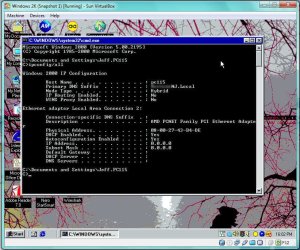
(yes, I see the IP and Subnet fields are all zeros)
 

My Computer

Computer Manufacturer/Model Number
DYI
OS
Win 7 x64 Professional
CPU
Intel Core i5-750 2.67Ghz
Motherboard
Gigabyte P55M-UD4
Memory
4gb
Graphics Card(s)
Nvidia GeForce 9500GT 512mb
Sound Card
On MB
Monitor(s) Displays
Lg Flatron
Screen Resolution
1280 x 1024
Hard Drives
C: 200mb Maxtor SATA 3
D: 500gb WD SATA 3
NICE !!!
Now assign it 192.168.0.100, then ping your Windows 7 .0.x IP.

Edit: I see that it's DHCP enabled, turn it into manual, assign manually for now.
Edit2: you don't need to censor anything, it's not worth it... It's LAN, right?
 

My Computer

Computer Manufacturer/Model Number
Self Built
OS
Windows7 Ultimate 64bit
CPU
Intel Core 2 Quad Q6600
Motherboard
Abit IN9-32X-MMAX
Memory
DDR2 Adata 4GB
Graphics Card(s)
Nvidia GeForce GTX 285 1024 and Nvidia GeForce 8800GT 512
Sound Card
Asus Xonar HDAV 1.3
Monitor(s) Displays
Dell 2407WFP and BenQ 2400v and Philips 150v3
Screen Resolution
3840x1200 and 1024x768
Hard Drives
2 WDC 1TB
1 WDC 1.5TB
1 WDC 640GB
1 WDC 320GB
1 Seagate 200GB
PSU
Corsair TX 850W
Case
Cooler Master HAF932
Cooling
Arctic Cooling Freezer Extreme and plenty of fans...
Keyboard
MicrosoftNaturalKeyboard 4000/Apple Alu keyboard/Dinovo mini
Mouse
Logitech G5/MarbleMouseTrackball/PerformanceMX/SpacePilotPRO
Internet Speed
1.5Mbps down/384Kbps up
Other Info
APC SURT 1000XL
Logitech Z-560
Wiimote
Mikrotik Router
Linksys (now Cisco) SD2008 8 port Gigabit switch
Linksys WRT54G (acting as AP)
Apple wireless Aluminium keyboard
Apple Magic Mouse
Xbox360 wired controller
try to open tcp/ip properties dialog, make sure tcp/ip is bounded to an adapter. Sometimes, it's not bounded after p2v conversion.
 

My Computer

OS
windows 7
In the "local pc mode" I don't have "sufficient rights" to change it... duh. I though I was a local admin too.

I'm going back to the domain login where I do have admin rights. Stand by.
 

My Computer

Computer Manufacturer/Model Number
DYI
OS
Win 7 x64 Professional
CPU
Intel Core i5-750 2.67Ghz
Motherboard
Gigabyte P55M-UD4
Memory
4gb
Graphics Card(s)
Nvidia GeForce 9500GT 512mb
Sound Card
On MB
Monitor(s) Displays
Lg Flatron
Screen Resolution
1280 x 1024
Hard Drives
C: 200mb Maxtor SATA 3
D: 500gb WD SATA 3
Go go go !!!!
 

My Computer

Computer Manufacturer/Model Number
Self Built
OS
Windows7 Ultimate 64bit
CPU
Intel Core 2 Quad Q6600
Motherboard
Abit IN9-32X-MMAX
Memory
DDR2 Adata 4GB
Graphics Card(s)
Nvidia GeForce GTX 285 1024 and Nvidia GeForce 8800GT 512
Sound Card
Asus Xonar HDAV 1.3
Monitor(s) Displays
Dell 2407WFP and BenQ 2400v and Philips 150v3
Screen Resolution
3840x1200 and 1024x768
Hard Drives
2 WDC 1TB
1 WDC 1.5TB
1 WDC 640GB
1 WDC 320GB
1 Seagate 200GB
PSU
Corsair TX 850W
Case
Cooler Master HAF932
Cooling
Arctic Cooling Freezer Extreme and plenty of fans...
Keyboard
MicrosoftNaturalKeyboard 4000/Apple Alu keyboard/Dinovo mini
Mouse
Logitech G5/MarbleMouseTrackball/PerformanceMX/SpacePilotPRO
Internet Speed
1.5Mbps down/384Kbps up
Other Info
APC SURT 1000XL
Logitech Z-560
Wiimote
Mikrotik Router
Linksys (now Cisco) SD2008 8 port Gigabit switch
Linksys WRT54G (acting as AP)
Apple wireless Aluminium keyboard
Apple Magic Mouse
Xbox360 wired controller
*Anxiously waiting...*
 

My Computer

Computer Manufacturer/Model Number
Self Built
OS
Windows7 Ultimate 64bit
CPU
Intel Core 2 Quad Q6600
Motherboard
Abit IN9-32X-MMAX
Memory
DDR2 Adata 4GB
Graphics Card(s)
Nvidia GeForce GTX 285 1024 and Nvidia GeForce 8800GT 512
Sound Card
Asus Xonar HDAV 1.3
Monitor(s) Displays
Dell 2407WFP and BenQ 2400v and Philips 150v3
Screen Resolution
3840x1200 and 1024x768
Hard Drives
2 WDC 1TB
1 WDC 1.5TB
1 WDC 640GB
1 WDC 320GB
1 Seagate 200GB
PSU
Corsair TX 850W
Case
Cooler Master HAF932
Cooling
Arctic Cooling Freezer Extreme and plenty of fans...
Keyboard
MicrosoftNaturalKeyboard 4000/Apple Alu keyboard/Dinovo mini
Mouse
Logitech G5/MarbleMouseTrackball/PerformanceMX/SpacePilotPRO
Internet Speed
1.5Mbps down/384Kbps up
Other Info
APC SURT 1000XL
Logitech Z-560
Wiimote
Mikrotik Router
Linksys (now Cisco) SD2008 8 port Gigabit switch
Linksys WRT54G (acting as AP)
Apple wireless Aluminium keyboard
Apple Magic Mouse
Xbox360 wired controller
OK. Some progress here. BIG progress.

I changed to static IP, and when I rebooted I was able to log into the network, and the resources were available. Yay!

Now, I can't continue to use a static IP on this VM. The IP I used was that of the retired machine. However, that IP is being recycled since we're short of network address (remember... other thread?)

So, it would seem that NAT is what I want, right? I want the VM to use the IP address of the host machine.

By the way, Firefox does not crash now, but it has no internet access (times out). Ping sees the gateway (192.168.10.41), but if you ping 208.67.222.222 (Open DNS servers) you get a timeout.
 

My Computer

Computer Manufacturer/Model Number
DYI
OS
Win 7 x64 Professional
CPU
Intel Core i5-750 2.67Ghz
Motherboard
Gigabyte P55M-UD4
Memory
4gb
Graphics Card(s)
Nvidia GeForce 9500GT 512mb
Sound Card
On MB
Monitor(s) Displays
Lg Flatron
Screen Resolution
1280 x 1024
Hard Drives
C: 200mb Maxtor SATA 3
D: 500gb WD SATA 3
Crud...

Scratch what I said about no Inet access. I just noticed the gateway address was WRONG (10.4 instead of 10.41). Ping to 208.67.222.222 is OK now. I'm sure Firefox will work now too.
 

My Computer

Computer Manufacturer/Model Number
DYI
OS
Win 7 x64 Professional
CPU
Intel Core i5-750 2.67Ghz
Motherboard
Gigabyte P55M-UD4
Memory
4gb
Graphics Card(s)
Nvidia GeForce 9500GT 512mb
Sound Card
On MB
Monitor(s) Displays
Lg Flatron
Screen Resolution
1280 x 1024
Hard Drives
C: 200mb Maxtor SATA 3
D: 500gb WD SATA 3
No, NAT is not what you want... to be able to login to a DC, you need to actually "face" the DC on the network, you can't have a "veil" (the NAT/PAT) over you because if you do that, the DC will think that it's the Windows 7 Box that's logging in... Here's the issue, your Windows 2K IS an independent computer now, it is directly connected to the network on it's own... So you'd need an IP address to assign to. IF you need the Win2K machine to be connected to the Domain, then do so, and remove Windows 7 from the network.

By the way, if you want to access internet, make sure you have the "Default Gateway" box filled out...
Make a screenshot of ipconfig again, I'll look into it.

zzz2496

Edit: crap... I type way too slow... :cry:
Edit 2: You can't use NAT/PAT, but you can use route...
Edit 3: waiting anxiously... again...
 

My Computer

Computer Manufacturer/Model Number
Self Built
OS
Windows7 Ultimate 64bit
CPU
Intel Core 2 Quad Q6600
Motherboard
Abit IN9-32X-MMAX
Memory
DDR2 Adata 4GB
Graphics Card(s)
Nvidia GeForce GTX 285 1024 and Nvidia GeForce 8800GT 512
Sound Card
Asus Xonar HDAV 1.3
Monitor(s) Displays
Dell 2407WFP and BenQ 2400v and Philips 150v3
Screen Resolution
3840x1200 and 1024x768
Hard Drives
2 WDC 1TB
1 WDC 1.5TB
1 WDC 640GB
1 WDC 320GB
1 Seagate 200GB
PSU
Corsair TX 850W
Case
Cooler Master HAF932
Cooling
Arctic Cooling Freezer Extreme and plenty of fans...
Keyboard
MicrosoftNaturalKeyboard 4000/Apple Alu keyboard/Dinovo mini
Mouse
Logitech G5/MarbleMouseTrackball/PerformanceMX/SpacePilotPRO
Internet Speed
1.5Mbps down/384Kbps up
Other Info
APC SURT 1000XL
Logitech Z-560
Wiimote
Mikrotik Router
Linksys (now Cisco) SD2008 8 port Gigabit switch
Linksys WRT54G (acting as AP)
Apple wireless Aluminium keyboard
Apple Magic Mouse
Xbox360 wired controller
Time to go home!

- Internet is working on the VM. It was the incorrectly typed gateway address just mentioned.

- Understand the issue of being able to log in to the domain. Will discuss with IT guy in morning.

- I have a "spare" IP address in the 10.x spectrum that I can assign to the VM for the times it may get used. This spare IP may be used by other things, so it isn't always available. It's a temporary address. Nobody can use it for long.

- Going back to the "I don't really need to log into the domain", if I can get network access (able to go through the gateway) without the domain access, that will still work for me. If I can get the shared folder to work so I can move data from the VM to the host C: drive. I have to find out if I can access the VAX without being on the domain.

- Why don't we declare this a successful end to the day, and pick this up tomorrow morning? This morning it was blue screens, and tonight it's working. almost working.

I'll check the forum when I get home. Shutting down now.

Thanks for all the help and suggestions today. Both of you.
 

My Computer

Computer Manufacturer/Model Number
DYI
OS
Win 7 x64 Professional
CPU
Intel Core i5-750 2.67Ghz
Motherboard
Gigabyte P55M-UD4
Memory
4gb
Graphics Card(s)
Nvidia GeForce 9500GT 512mb
Sound Card
On MB
Monitor(s) Displays
Lg Flatron
Screen Resolution
1280 x 1024
Hard Drives
C: 200mb Maxtor SATA 3
D: 500gb WD SATA 3
Hmm... you can access internet from VM, obviously you now can access Win7 SMB share, right? This is solved right?

zzz2496
 

My Computer

Computer Manufacturer/Model Number
Self Built
OS
Windows7 Ultimate 64bit
CPU
Intel Core 2 Quad Q6600
Motherboard
Abit IN9-32X-MMAX
Memory
DDR2 Adata 4GB
Graphics Card(s)
Nvidia GeForce GTX 285 1024 and Nvidia GeForce 8800GT 512
Sound Card
Asus Xonar HDAV 1.3
Monitor(s) Displays
Dell 2407WFP and BenQ 2400v and Philips 150v3
Screen Resolution
3840x1200 and 1024x768
Hard Drives
2 WDC 1TB
1 WDC 1.5TB
1 WDC 640GB
1 WDC 320GB
1 Seagate 200GB
PSU
Corsair TX 850W
Case
Cooler Master HAF932
Cooling
Arctic Cooling Freezer Extreme and plenty of fans...
Keyboard
MicrosoftNaturalKeyboard 4000/Apple Alu keyboard/Dinovo mini
Mouse
Logitech G5/MarbleMouseTrackball/PerformanceMX/SpacePilotPRO
Internet Speed
1.5Mbps down/384Kbps up
Other Info
APC SURT 1000XL
Logitech Z-560
Wiimote
Mikrotik Router
Linksys (now Cisco) SD2008 8 port Gigabit switch
Linksys WRT54G (acting as AP)
Apple wireless Aluminium keyboard
Apple Magic Mouse
Xbox360 wired controller
No, not 100% solved. Maybe 90%. Much better than this morning, which way 0%!

Still a few things to follow up on tomorrow. No need to look for messages every 2 minutes though! Just catch them as you see them. I'll be back tomorrow morning. I want to try the NAT to see what happens, and I still have the video driver issue in the VM to solve. I can't get above 800x600 16 color because no driver is installed. Where did the driver that was installed on the physical machine go? isn't that still used in the VM? If not, where do I get the driver?
 

My Computer

Computer Manufacturer/Model Number
DYI
OS
Win 7 x64 Professional
CPU
Intel Core i5-750 2.67Ghz
Motherboard
Gigabyte P55M-UD4
Memory
4gb
Graphics Card(s)
Nvidia GeForce 9500GT 512mb
Sound Card
On MB
Monitor(s) Displays
Lg Flatron
Screen Resolution
1280 x 1024
Hard Drives
C: 200mb Maxtor SATA 3
D: 500gb WD SATA 3
On the Virtual Machine window (the one you see your virtual monitor), click "Devices"=>"Install Guest Additions". That's where all the drivers are.
As for NAT... I'm 95% sure that masquerading won't work when you try to connect to the DC, routing the request is another matter...

zzz2496
 

My Computer

Computer Manufacturer/Model Number
Self Built
OS
Windows7 Ultimate 64bit
CPU
Intel Core 2 Quad Q6600
Motherboard
Abit IN9-32X-MMAX
Memory
DDR2 Adata 4GB
Graphics Card(s)
Nvidia GeForce GTX 285 1024 and Nvidia GeForce 8800GT 512
Sound Card
Asus Xonar HDAV 1.3
Monitor(s) Displays
Dell 2407WFP and BenQ 2400v and Philips 150v3
Screen Resolution
3840x1200 and 1024x768
Hard Drives
2 WDC 1TB
1 WDC 1.5TB
1 WDC 640GB
1 WDC 320GB
1 Seagate 200GB
PSU
Corsair TX 850W
Case
Cooler Master HAF932
Cooling
Arctic Cooling Freezer Extreme and plenty of fans...
Keyboard
MicrosoftNaturalKeyboard 4000/Apple Alu keyboard/Dinovo mini
Mouse
Logitech G5/MarbleMouseTrackball/PerformanceMX/SpacePilotPRO
Internet Speed
1.5Mbps down/384Kbps up
Other Info
APC SURT 1000XL
Logitech Z-560
Wiimote
Mikrotik Router
Linksys (now Cisco) SD2008 8 port Gigabit switch
Linksys WRT54G (acting as AP)
Apple wireless Aluminium keyboard
Apple Magic Mouse
Xbox360 wired controller
Good evening, Jeffs (or Good morning in your timezone) :)
 

My Computer

Computer Manufacturer/Model Number
Self Built
OS
Windows7 Ultimate 64bit
CPU
Intel Core 2 Quad Q6600
Motherboard
Abit IN9-32X-MMAX
Memory
DDR2 Adata 4GB
Graphics Card(s)
Nvidia GeForce GTX 285 1024 and Nvidia GeForce 8800GT 512
Sound Card
Asus Xonar HDAV 1.3
Monitor(s) Displays
Dell 2407WFP and BenQ 2400v and Philips 150v3
Screen Resolution
3840x1200 and 1024x768
Hard Drives
2 WDC 1TB
1 WDC 1.5TB
1 WDC 640GB
1 WDC 320GB
1 Seagate 200GB
PSU
Corsair TX 850W
Case
Cooler Master HAF932
Cooling
Arctic Cooling Freezer Extreme and plenty of fans...
Keyboard
MicrosoftNaturalKeyboard 4000/Apple Alu keyboard/Dinovo mini
Mouse
Logitech G5/MarbleMouseTrackball/PerformanceMX/SpacePilotPRO
Internet Speed
1.5Mbps down/384Kbps up
Other Info
APC SURT 1000XL
Logitech Z-560
Wiimote
Mikrotik Router
Linksys (now Cisco) SD2008 8 port Gigabit switch
Linksys WRT54G (acting as AP)
Apple wireless Aluminium keyboard
Apple Magic Mouse
Xbox360 wired controller
Good morning. Here where I stand.

I tried switching back to NAT, but I can no longer get network connectivity (can't ping anything). I set the network adapter back to PCnet FAST III (NAT). I set the TCP setting of the network adapter in the VM back to "automatic". The VM is clearly having trouble too as it doesn't always start up, it locks during the desktop startup when the various icons appear in the notification area. Hovering the mouse cursor over the taskbar gives the "busy" icon, in the desktop area, just an arrow. Nothing can be selected. START doesn't work. Did I need to change anything under the "Advanced" setting when going back to NAT?

After talking to my IT coworker, I do not need to access the domain, so logging into that is not an issue. I do not need to be logged in to access the VAX. All I need is network connectivity. So if we can just get the network going to the point where I can ping things, I should be OK.

I can not keep the static IP address that we had working in bridged mode. That address is being recycled, and soon.

For the video, I tried "Devices=>Install Guest Additions..." but no subsequent window appears. Nothing else happens.
 

My Computer

Computer Manufacturer/Model Number
DYI
OS
Win 7 x64 Professional
CPU
Intel Core i5-750 2.67Ghz
Motherboard
Gigabyte P55M-UD4
Memory
4gb
Graphics Card(s)
Nvidia GeForce 9500GT 512mb
Sound Card
On MB
Monitor(s) Displays
Lg Flatron
Screen Resolution
1280 x 1024
Hard Drives
C: 200mb Maxtor SATA 3
D: 500gb WD SATA 3
To keep things simple, do you have a backup of your virtual harddisk? If so, revert to backup, change back Networking to the way before you switch to NAT. I need to test things up a bit, I'll post back ASAP.

zzz2496
 

My Computer

Computer Manufacturer/Model Number
Self Built
OS
Windows7 Ultimate 64bit
CPU
Intel Core 2 Quad Q6600
Motherboard
Abit IN9-32X-MMAX
Memory
DDR2 Adata 4GB
Graphics Card(s)
Nvidia GeForce GTX 285 1024 and Nvidia GeForce 8800GT 512
Sound Card
Asus Xonar HDAV 1.3
Monitor(s) Displays
Dell 2407WFP and BenQ 2400v and Philips 150v3
Screen Resolution
3840x1200 and 1024x768
Hard Drives
2 WDC 1TB
1 WDC 1.5TB
1 WDC 640GB
1 WDC 320GB
1 Seagate 200GB
PSU
Corsair TX 850W
Case
Cooler Master HAF932
Cooling
Arctic Cooling Freezer Extreme and plenty of fans...
Keyboard
MicrosoftNaturalKeyboard 4000/Apple Alu keyboard/Dinovo mini
Mouse
Logitech G5/MarbleMouseTrackball/PerformanceMX/SpacePilotPRO
Internet Speed
1.5Mbps down/384Kbps up
Other Info
APC SURT 1000XL
Logitech Z-560
Wiimote
Mikrotik Router
Linksys (now Cisco) SD2008 8 port Gigabit switch
Linksys WRT54G (acting as AP)
Apple wireless Aluminium keyboard
Apple Magic Mouse
Xbox360 wired controller
Back
Top