
Windows 2000 in VM Under Win 7??

I do have a backup on the external drive (nightly backups), but let me see if I can just shut down and go back to the other settings again to get network connectivity.

I'm no longer logging into the domain, I've switched it to "Workgroup" at the IT guy's suggestion. I've unmapped my network drives (the ones on the domain) as I won't need them.

Note: I notice I have a "virtual" CD drive with the disk "VBOXADDITIONS_3" inserted, and a number of files and folders showing. But, we'll get to that after I get the network back.
 

My Computer

Computer Manufacturer/Model Number
DYI
OS
Win 7 x64 Professional
CPU
Intel Core i5-750 2.67Ghz
Motherboard
Gigabyte P55M-UD4
Memory
4gb
Graphics Card(s)
Nvidia GeForce 9500GT 512mb
Sound Card
On MB
Monitor(s) Displays
Lg Flatron
Screen Resolution
1280 x 1024
Hard Drives
C: 200mb Maxtor SATA 3
D: 500gb WD SATA 3
Alright, here's what I've tested for you:

The easy way
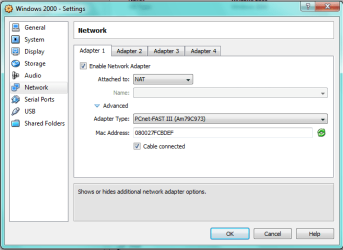
This would be setting the Network to NAT, and let your Windows 2000 network back to DHCP enabled. Once it's done, check "ipconfig /all", make sure all info are filled out.

The hard way
Turn your Windows 7 into a "router", you can use this link as reference.

OR


Enable Internet Connection Sharing under Windows 7, effectively making it a NAT gateway.

zzz2496
 

My Computer

Computer Manufacturer/Model Number
Self Built
OS
Windows7 Ultimate 64bit
CPU
Intel Core 2 Quad Q6600
Motherboard
Abit IN9-32X-MMAX
Memory
DDR2 Adata 4GB
Graphics Card(s)
Nvidia GeForce GTX 285 1024 and Nvidia GeForce 8800GT 512
Sound Card
Asus Xonar HDAV 1.3
Monitor(s) Displays
Dell 2407WFP and BenQ 2400v and Philips 150v3
Screen Resolution
3840x1200 and 1024x768
Hard Drives
2 WDC 1TB
1 WDC 1.5TB
1 WDC 640GB
1 WDC 320GB
1 Seagate 200GB
PSU
Corsair TX 850W
Case
Cooler Master HAF932
Cooling
Arctic Cooling Freezer Extreme and plenty of fans...
Keyboard
MicrosoftNaturalKeyboard 4000/Apple Alu keyboard/Dinovo mini
Mouse
Logitech G5/MarbleMouseTrackball/PerformanceMX/SpacePilotPRO
Internet Speed
1.5Mbps down/384Kbps up
Other Info
APC SURT 1000XL
Logitech Z-560
Wiimote
Mikrotik Router
Linksys (now Cisco) SD2008 8 port Gigabit switch
Linksys WRT54G (acting as AP)
Apple wireless Aluminium keyboard
Apple Magic Mouse
Xbox360 wired controller
I'm able to get it working again by going back to the original settings. It sometimes takes several boots to get it working after a change, but it is working again.

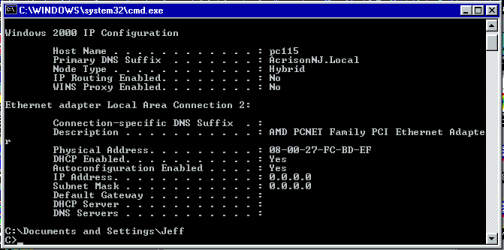
Under "The Easy Way", I've been doing this while waiting for your message. All I get in ipconfig is 0.0.0.0/0.0.0.0

It there some particular "order" to make these changes? I have to change the VM network settings to NAT, then I have to boot the VM and set it's IP settings to "automatic", then reboot. Then I get 0.0.0.0. Should I reverse the order?

I should expect to see the IP address of the host machine, right?

Since it works for you, and not for me (again), I'm obviously not doing something right.
 

My Computer

Computer Manufacturer/Model Number
DYI
OS
Win 7 x64 Professional
CPU
Intel Core i5-750 2.67Ghz
Motherboard
Gigabyte P55M-UD4
Memory
4gb
Graphics Card(s)
Nvidia GeForce 9500GT 512mb
Sound Card
On MB
Monitor(s) Displays
Lg Flatron
Screen Resolution
1280 x 1024
Hard Drives
C: 200mb Maxtor SATA 3
D: 500gb WD SATA 3
Why not try this:

Shut down the VM, change settings, boot up VM, disable VM networking, enable VM networking, look into "ipconfig /all"

zzz2496

Edit: You won't see the host's IP address, in my VM it got 10.x.y.z IP address, and it works, I don't see any network interface has that network on my Network Interface list.
Edit2: All that above assuming that the VM networking is ==> DHCP enabled.
 

My Computer

Computer Manufacturer/Model Number
Self Built
OS
Windows7 Ultimate 64bit
CPU
Intel Core 2 Quad Q6600
Motherboard
Abit IN9-32X-MMAX
Memory
DDR2 Adata 4GB
Graphics Card(s)
Nvidia GeForce GTX 285 1024 and Nvidia GeForce 8800GT 512
Sound Card
Asus Xonar HDAV 1.3
Monitor(s) Displays
Dell 2407WFP and BenQ 2400v and Philips 150v3
Screen Resolution
3840x1200 and 1024x768
Hard Drives
2 WDC 1TB
1 WDC 1.5TB
1 WDC 640GB
1 WDC 320GB
1 Seagate 200GB
PSU
Corsair TX 850W
Case
Cooler Master HAF932
Cooling
Arctic Cooling Freezer Extreme and plenty of fans...
Keyboard
MicrosoftNaturalKeyboard 4000/Apple Alu keyboard/Dinovo mini
Mouse
Logitech G5/MarbleMouseTrackball/PerformanceMX/SpacePilotPRO
Internet Speed
1.5Mbps down/384Kbps up
Other Info
APC SURT 1000XL
Logitech Z-560
Wiimote
Mikrotik Router
Linksys (now Cisco) SD2008 8 port Gigabit switch
Linksys WRT54G (acting as AP)
Apple wireless Aluminium keyboard
Apple Magic Mouse
Xbox360 wired controller
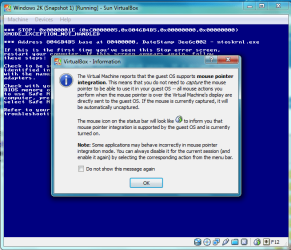
While waiting for your reply, I decided to install the VBOXADDITIONS. They appeared to install successfully, and rebooted the machine. Now I get a blue screen every single time I reboot the VM. This is how the VM window appears at the BSOD point. Not that I can click OK on that window about the MP Integration and it does close. I will probably have to go to the backup now...
 

Attachments

  • Capture1.PNG
    Capture1.PNG
    31 KB · Views: 3

My Computer

Computer Manufacturer/Model Number
DYI
OS
Win 7 x64 Professional
CPU
Intel Core i5-750 2.67Ghz
Motherboard
Gigabyte P55M-UD4
Memory
4gb
Graphics Card(s)
Nvidia GeForce 9500GT 512mb
Sound Card
On MB
Monitor(s) Displays
Lg Flatron
Screen Resolution
1280 x 1024
Hard Drives
C: 200mb Maxtor SATA 3
D: 500gb WD SATA 3
Hmm, just curious, did you enable "Hardware Virtualization" support?
Windows 2K doesn't like to be virtualized iirc, unless you have hardware virtualization support...
Oh yeah, do not enable nested paging unless your processor is Core i7 (and up) or Phenom II (and up)

zzz2496
 

My Computer

Computer Manufacturer/Model Number
Self Built
OS
Windows7 Ultimate 64bit
CPU
Intel Core 2 Quad Q6600
Motherboard
Abit IN9-32X-MMAX
Memory
DDR2 Adata 4GB
Graphics Card(s)
Nvidia GeForce GTX 285 1024 and Nvidia GeForce 8800GT 512
Sound Card
Asus Xonar HDAV 1.3
Monitor(s) Displays
Dell 2407WFP and BenQ 2400v and Philips 150v3
Screen Resolution
3840x1200 and 1024x768
Hard Drives
2 WDC 1TB
1 WDC 1.5TB
1 WDC 640GB
1 WDC 320GB
1 Seagate 200GB
PSU
Corsair TX 850W
Case
Cooler Master HAF932
Cooling
Arctic Cooling Freezer Extreme and plenty of fans...
Keyboard
MicrosoftNaturalKeyboard 4000/Apple Alu keyboard/Dinovo mini
Mouse
Logitech G5/MarbleMouseTrackball/PerformanceMX/SpacePilotPRO
Internet Speed
1.5Mbps down/384Kbps up
Other Info
APC SURT 1000XL
Logitech Z-560
Wiimote
Mikrotik Router
Linksys (now Cisco) SD2008 8 port Gigabit switch
Linksys WRT54G (acting as AP)
Apple wireless Aluminium keyboard
Apple Magic Mouse
Xbox360 wired controller
Hardware Virtualization is enabled in the BIOS, yes. It is also checked ON on the system/accel tab. Enable Nested Paging is checked OFF.

These the settings you're asking about?
 

My Computer

Computer Manufacturer/Model Number
DYI
OS
Win 7 x64 Professional
CPU
Intel Core i5-750 2.67Ghz
Motherboard
Gigabyte P55M-UD4
Memory
4gb
Graphics Card(s)
Nvidia GeForce 9500GT 512mb
Sound Card
On MB
Monitor(s) Displays
Lg Flatron
Screen Resolution
1280 x 1024
Hard Drives
C: 200mb Maxtor SATA 3
D: 500gb WD SATA 3
Yes.

Hmm... Let me search a bit... The network problem, after restoring your backup, is it operational now? Or still no connection?

zzz2496

Edit: Additions is compatible with Win2K... If you can extract that dump file, it'd be great... OR you can just ignore the display problem, and use the virtual machine as is...
 

My Computer

Computer Manufacturer/Model Number
Self Built
OS
Windows7 Ultimate 64bit
CPU
Intel Core 2 Quad Q6600
Motherboard
Abit IN9-32X-MMAX
Memory
DDR2 Adata 4GB
Graphics Card(s)
Nvidia GeForce GTX 285 1024 and Nvidia GeForce 8800GT 512
Sound Card
Asus Xonar HDAV 1.3
Monitor(s) Displays
Dell 2407WFP and BenQ 2400v and Philips 150v3
Screen Resolution
3840x1200 and 1024x768
Hard Drives
2 WDC 1TB
1 WDC 1.5TB
1 WDC 640GB
1 WDC 320GB
1 Seagate 200GB
PSU
Corsair TX 850W
Case
Cooler Master HAF932
Cooling
Arctic Cooling Freezer Extreme and plenty of fans...
Keyboard
MicrosoftNaturalKeyboard 4000/Apple Alu keyboard/Dinovo mini
Mouse
Logitech G5/MarbleMouseTrackball/PerformanceMX/SpacePilotPRO
Internet Speed
1.5Mbps down/384Kbps up
Other Info
APC SURT 1000XL
Logitech Z-560
Wiimote
Mikrotik Router
Linksys (now Cisco) SD2008 8 port Gigabit switch
Linksys WRT54G (acting as AP)
Apple wireless Aluminium keyboard
Apple Magic Mouse
Xbox360 wired controller
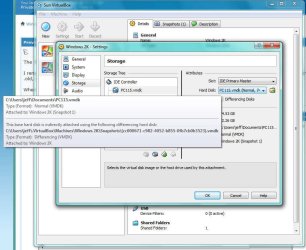
The file I restored crashes the same way, as if I didn't restore anything and some other data is still being used.

I renamed PC115.vmdk to PC115.vmdk.old, and restored PC115.vmdk from the drive. I now have two HUGE files stilling there. (one .old, one not)

When I start the VM still BSOD and still shows the mouse integration message from the additions I applied.

I think it's using old data. See this:
 

Attachments

  • vm2.jpg
    vm2.jpg
    79.4 KB · Views: 6

My Computer

Computer Manufacturer/Model Number
DYI
OS
Win 7 x64 Professional
CPU
Intel Core i5-750 2.67Ghz
Motherboard
Gigabyte P55M-UD4
Memory
4gb
Graphics Card(s)
Nvidia GeForce 9500GT 512mb
Sound Card
On MB
Monitor(s) Displays
Lg Flatron
Screen Resolution
1280 x 1024
Hard Drives
C: 200mb Maxtor SATA 3
D: 500gb WD SATA 3

To be safe, release the .vmdk off your VM, remove the virtual disk to another folder, attach the backup virtual disk.

zzz2496
 

My Computer

Computer Manufacturer/Model Number
Self Built
OS
Windows7 Ultimate 64bit
CPU
Intel Core 2 Quad Q6600
Motherboard
Abit IN9-32X-MMAX
Memory
DDR2 Adata 4GB
Graphics Card(s)
Nvidia GeForce GTX 285 1024 and Nvidia GeForce 8800GT 512
Sound Card
Asus Xonar HDAV 1.3
Monitor(s) Displays
Dell 2407WFP and BenQ 2400v and Philips 150v3
Screen Resolution
3840x1200 and 1024x768
Hard Drives
2 WDC 1TB
1 WDC 1.5TB
1 WDC 640GB
1 WDC 320GB
1 Seagate 200GB
PSU
Corsair TX 850W
Case
Cooler Master HAF932
Cooling
Arctic Cooling Freezer Extreme and plenty of fans...
Keyboard
MicrosoftNaturalKeyboard 4000/Apple Alu keyboard/Dinovo mini
Mouse
Logitech G5/MarbleMouseTrackball/PerformanceMX/SpacePilotPRO
Internet Speed
1.5Mbps down/384Kbps up
Other Info
APC SURT 1000XL
Logitech Z-560
Wiimote
Mikrotik Router
Linksys (now Cisco) SD2008 8 port Gigabit switch
Linksys WRT54G (acting as AP)
Apple wireless Aluminium keyboard
Apple Magic Mouse
Xbox360 wired controller
I am really getting disgusted. I can't get it to work again. Just blue screens all the time.

I've deleted the VM, and will start over from scratch. I'll be back.
 

My Computer

Computer Manufacturer/Model Number
DYI
OS
Win 7 x64 Professional
CPU
Intel Core i5-750 2.67Ghz
Motherboard
Gigabyte P55M-UD4
Memory
4gb
Graphics Card(s)
Nvidia GeForce 9500GT 512mb
Sound Card
On MB
Monitor(s) Displays
Lg Flatron
Screen Resolution
1280 x 1024
Hard Drives
C: 200mb Maxtor SATA 3
D: 500gb WD SATA 3
Note: Don't use the fancy stuffs just yet (Snapshots, etc).
Use it "barebone mode" only.

zzz2496
 

My Computer

Computer Manufacturer/Model Number
Self Built
OS
Windows7 Ultimate 64bit
CPU
Intel Core 2 Quad Q6600
Motherboard
Abit IN9-32X-MMAX
Memory
DDR2 Adata 4GB
Graphics Card(s)
Nvidia GeForce GTX 285 1024 and Nvidia GeForce 8800GT 512
Sound Card
Asus Xonar HDAV 1.3
Monitor(s) Displays
Dell 2407WFP and BenQ 2400v and Philips 150v3
Screen Resolution
3840x1200 and 1024x768
Hard Drives
2 WDC 1TB
1 WDC 1.5TB
1 WDC 640GB
1 WDC 320GB
1 Seagate 200GB
PSU
Corsair TX 850W
Case
Cooler Master HAF932
Cooling
Arctic Cooling Freezer Extreme and plenty of fans...
Keyboard
MicrosoftNaturalKeyboard 4000/Apple Alu keyboard/Dinovo mini
Mouse
Logitech G5/MarbleMouseTrackball/PerformanceMX/SpacePilotPRO
Internet Speed
1.5Mbps down/384Kbps up
Other Info
APC SURT 1000XL
Logitech Z-560
Wiimote
Mikrotik Router
Linksys (now Cisco) SD2008 8 port Gigabit switch
Linksys WRT54G (acting as AP)
Apple wireless Aluminium keyboard
Apple Magic Mouse
Xbox360 wired controller
OK, back to operational. Bridged networking, static IP assigned. Network access working to the internet.

I even uninstalled a few obnoxious application from the W2K VM that aren't needed in that operating environment.

Now, before I go any further exactly what do I copy to make sure I can get to "this point in time - where we are right now" again? Is it just the PC115.vmdk file? Why doesn't the time stamp on that file change? Obviously the data inside it is changing. Any option to make it do that, otherwise it won't be backed up by the "files" backup, only the image backup will catch it.

Once I copy whatever file you tell me to, then lets revisit the network issue (which is where I was 2 hours ago -wasted...)
 

My Computer

Computer Manufacturer/Model Number
DYI
OS
Win 7 x64 Professional
CPU
Intel Core i5-750 2.67Ghz
Motherboard
Gigabyte P55M-UD4
Memory
4gb
Graphics Card(s)
Nvidia GeForce 9500GT 512mb
Sound Card
On MB
Monitor(s) Displays
Lg Flatron
Screen Resolution
1280 x 1024
Hard Drives
C: 200mb Maxtor SATA 3
D: 500gb WD SATA 3
Sorry...

If the current "Snapshot" is OK for you, copy the .vmdk file over somewhere safe. I have to go for an hour or two, I'll check the thread when I get back.

zzz2496
 

My Computer

Computer Manufacturer/Model Number
Self Built
OS
Windows7 Ultimate 64bit
CPU
Intel Core 2 Quad Q6600
Motherboard
Abit IN9-32X-MMAX
Memory
DDR2 Adata 4GB
Graphics Card(s)
Nvidia GeForce GTX 285 1024 and Nvidia GeForce 8800GT 512
Sound Card
Asus Xonar HDAV 1.3
Monitor(s) Displays
Dell 2407WFP and BenQ 2400v and Philips 150v3
Screen Resolution
3840x1200 and 1024x768
Hard Drives
2 WDC 1TB
1 WDC 1.5TB
1 WDC 640GB
1 WDC 320GB
1 Seagate 200GB
PSU
Corsair TX 850W
Case
Cooler Master HAF932
Cooling
Arctic Cooling Freezer Extreme and plenty of fans...
Keyboard
MicrosoftNaturalKeyboard 4000/Apple Alu keyboard/Dinovo mini
Mouse
Logitech G5/MarbleMouseTrackball/PerformanceMX/SpacePilotPRO
Internet Speed
1.5Mbps down/384Kbps up
Other Info
APC SURT 1000XL
Logitech Z-560
Wiimote
Mikrotik Router
Linksys (now Cisco) SD2008 8 port Gigabit switch
Linksys WRT54G (acting as AP)
Apple wireless Aluminium keyboard
Apple Magic Mouse
Xbox360 wired controller
Thanks. The file's been copied. I'm going to tinker with the NAT networking again. See you when you return.
 

My Computer

Computer Manufacturer/Model Number
DYI
OS
Win 7 x64 Professional
CPU
Intel Core i5-750 2.67Ghz
Motherboard
Gigabyte P55M-UD4
Memory
4gb
Graphics Card(s)
Nvidia GeForce 9500GT 512mb
Sound Card
On MB
Monitor(s) Displays
Lg Flatron
Screen Resolution
1280 x 1024
Hard Drives
C: 200mb Maxtor SATA 3
D: 500gb WD SATA 3
Go back to NAT, networking gone.
 

Attachments

  • Capture3.PNG
    Capture3.PNG
    23.4 KB · Views: 3
  • headbangsoncomputer_t_01.gif
    headbangsoncomputer_t_01.gif
    4.2 KB · Views: 33
  • Capture2.PNG
    Capture2.PNG
    5.4 KB · Views: 3
  • Capture4.PNG
    Capture4.PNG
    17.2 KB · Views: 2

My Computer

Computer Manufacturer/Model Number
DYI
OS
Win 7 x64 Professional
CPU
Intel Core i5-750 2.67Ghz
Motherboard
Gigabyte P55M-UD4
Memory
4gb
Graphics Card(s)
Nvidia GeForce 9500GT 512mb
Sound Card
On MB
Monitor(s) Displays
Lg Flatron
Screen Resolution
1280 x 1024
Hard Drives
C: 200mb Maxtor SATA 3
D: 500gb WD SATA 3
I thought I would try an experiment and assign the VM an address of 192.168.2.1/255.255.0.0

Well, it works, kind of. I can talk to all my "foriegn" equipment on 25.x, 26.x, 0.x, but nothing on 10.x responds. Probably because those machines have 255.255.255.0 as their subnet masks.

Oh well, nice try. We now return to head banging.
 

My Computer

Computer Manufacturer/Model Number
DYI
OS
Win 7 x64 Professional
CPU
Intel Core i5-750 2.67Ghz
Motherboard
Gigabyte P55M-UD4
Memory
4gb
Graphics Card(s)
Nvidia GeForce 9500GT 512mb
Sound Card
On MB
Monitor(s) Displays
Lg Flatron
Screen Resolution
1280 x 1024
Hard Drives
C: 200mb Maxtor SATA 3
D: 500gb WD SATA 3
if what you want is to access the files from the vmdk, you don't even need to boot the vm. Install MyOldPCs on your Windows 7 host, then run this command to mount the disk:

vmlitectl.exe mount your-windows-2000.vmdk

it will mount to a drive, for example, Z:, then you can access all files.

After done, dismount it, "vmlitectl umount z:"
 

My Computer

OS
windows 7
Jeffs, I'm back :)

Let's continue, set it back to bridged, and set your 7 as a router, follow my link earlier (The hard way), edit registry or something
By enabling that, you are allowing Windows 7 to act as a router, a real Router. Then after that, well... the rest should be easy...

zzz2496
 

My Computer

Computer Manufacturer/Model Number
Self Built
OS
Windows7 Ultimate 64bit
CPU
Intel Core 2 Quad Q6600
Motherboard
Abit IN9-32X-MMAX
Memory
DDR2 Adata 4GB
Graphics Card(s)
Nvidia GeForce GTX 285 1024 and Nvidia GeForce 8800GT 512
Sound Card
Asus Xonar HDAV 1.3
Monitor(s) Displays
Dell 2407WFP and BenQ 2400v and Philips 150v3
Screen Resolution
3840x1200 and 1024x768
Hard Drives
2 WDC 1TB
1 WDC 1.5TB
1 WDC 640GB
1 WDC 320GB
1 Seagate 200GB
PSU
Corsair TX 850W
Case
Cooler Master HAF932
Cooling
Arctic Cooling Freezer Extreme and plenty of fans...
Keyboard
MicrosoftNaturalKeyboard 4000/Apple Alu keyboard/Dinovo mini
Mouse
Logitech G5/MarbleMouseTrackball/PerformanceMX/SpacePilotPRO
Internet Speed
1.5Mbps down/384Kbps up
Other Info
APC SURT 1000XL
Logitech Z-560
Wiimote
Mikrotik Router
Linksys (now Cisco) SD2008 8 port Gigabit switch
Linksys WRT54G (acting as AP)
Apple wireless Aluminium keyboard
Apple Magic Mouse
Xbox360 wired controller
That's a good suggestion. Sure, access to files is the goal, but I'd like the old machine to "run" too.

Plus, I'm going to try to use the terminal program on the W2K VM machine to access the VAX since I removed those drivers from the W7 machine in order to make the VM software even install. It's probably what caused your VMLite workstation install to fail as well.
 

My Computer

Computer Manufacturer/Model Number
DYI
OS
Win 7 x64 Professional
CPU
Intel Core i5-750 2.67Ghz
Motherboard
Gigabyte P55M-UD4
Memory
4gb
Graphics Card(s)
Nvidia GeForce 9500GT 512mb
Sound Card
On MB
Monitor(s) Displays
Lg Flatron
Screen Resolution
1280 x 1024
Hard Drives
C: 200mb Maxtor SATA 3
D: 500gb WD SATA 3
Back
Top