
Solved Windows 7 32bit

HEKTakun

New member
Local time
2:38 PM
Messages
5
Windows 7 32bit 2.25 GB usable RAM

Installed Windows 7 Professional 32 bit onto a Dell Studio XPS 13 (PP17S).

There are two RAM sticks in there. Each one has 2GB making a total of 4GB installed.

Under system properties it says "Installed memory (RAM): 4.00 GB (2.25 GB usable)"
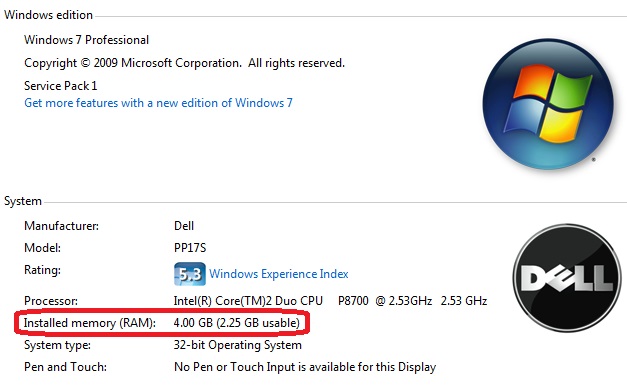
i6fvOjt.jpg


Things I've tried.

Installed 3 different RAM sticks to test the DIMM slots. The slots are fine. The sticks I got are fine.

Took out the CPU to check for bent pins. Did a through look. Nothing bent.

Advanced Boot options. Checked, unchecked, either option did nothing.

Updated to the lasted BIOS to try and change some sort of advanced Mem Mapping stuff. BIOS is really basic and provides no such option.


Anyone have any other suggestions?


I'll upload some screen shots or pics of BIOS later if someone needs it.
 
Last edited:

My Computer

Computer type
Laptop
Computer Manufacturer/Model Number
Dell Studio XPS 13 (PP17S)
OS
Windows 7 Professional 32bit
CPU
Intel Core 2 Duo P8700 2.53GHz
Memory
4 GB installed
Graphics Card(s)
nVIDIA GeForce 9400M G
Hard Drives
Seagate Momentus Thin ST500LT012 500GB
Browser
Google Chrome Version 34.0.1847.131 m

My Computer

Computer type
PC/Desktop
Computer Manufacturer/Model Number
Dell XPS 420
OS
Windows 10, Home Clean Install
CPU
Intel Core2 processsor Q8200(2.33Ghz 1333FSB) Quad Core Tech
Motherboard
Dell
Memory
6 gb
Graphics Card(s)
ATI Radeon 256MB HD3650
Sound Card
Intergrated 7.1 Channel Audio
Monitor(s) Displays
Dell SP2009W 20"
Hard Drives
640 GB Serial ATA Hard drive
Cooling
Fan
Keyboard
Dell USB Keyboard
Mouse
Dell Premium Optical USB
Internet Speed
DSL 2.85
Usable is what you have remaining after the current usage is removed ie. graphics card etc
The usable memory may be less than the installed memory on Windows 7-based computers


Thanks, but nope.

On board GPU doesn't shear system mem. It has it's own dedicated RAM. Which has memory size of 256 MB.


After windows is done address what it needs to into RAM there should be plenty of available memory left. I understand a few hundred MB's sure. But >1GB is too much, something ain't right.
 

My Computer

Computer type
Laptop
Computer Manufacturer/Model Number
Dell Studio XPS 13 (PP17S)
OS
Windows 7 Professional 32bit
CPU
Intel Core 2 Duo P8700 2.53GHz
Memory
4 GB installed
Graphics Card(s)
nVIDIA GeForce 9400M G
Hard Drives
Seagate Momentus Thin ST500LT012 500GB
Browser
Google Chrome Version 34.0.1847.131 m

My Computer

Computer type
PC/Desktop
Computer Manufacturer/Model Number
Dell XPS 420
OS
Windows 10, Home Clean Install
CPU
Intel Core2 processsor Q8200(2.33Ghz 1333FSB) Quad Core Tech
Motherboard
Dell
Memory
6 gb
Graphics Card(s)
ATI Radeon 256MB HD3650
Sound Card
Intergrated 7.1 Channel Audio
Monitor(s) Displays
Dell SP2009W 20"
Hard Drives
640 GB Serial ATA Hard drive
Cooling
Fan
Keyboard
Dell USB Keyboard
Mouse
Dell Premium Optical USB
Internet Speed
DSL 2.85
What does your resource monitor look like?
 

Attachments

  • resource.JPG
    resource.JPG
    83.5 KB · Views: 0

My Computer

Computer type
PC/Desktop
Computer Manufacturer/Model Number
Self Built
OS
Win 10 Pro x64
CPU
Intel I5-2500K @3.3GHz
Motherboard
Asrock P67 Extreme4
Memory
16GB G.Skill Ripjaws X (4x4GB)
Graphics Card(s)
EVGA GeForce 750 Ti SC 2GB
Sound Card
ASUS Xonar DG 5.1 Channels 24-bit 96KHz PCI Interface Sound
Monitor(s) Displays
auria eq2367
Screen Resolution
1920 x 1080
Hard Drives
250GB Samsung 850 EVO SSD
1TB WD Blue
1TB Hitachi
PSU
SeaSonic X 650W 80 Plus Gold
Case
Corsair Obsidian 750D
Cooling
Corsair H60, Three 140mm case fans
Keyboard
Logitech Wireless Keyboard K520
Mouse
Logitech Wireless Mouse M310
Internet Speed
Wave Broadband ~ 100 dn 5 up
Antivirus
Windows Defender, Malwarebytes Premium
Browser
Edge, IE11, Chrome
Other Info
Laptop specs: HP g7-1365dx /
CPU: AMD A6-3420M APU with Radeon(tm) HD Graphics /
RAM: Crucial 8Gb (2x4Gb) /
SSD: Crucial M4-CT128M4SSD2 ATA Device/ FW 000F /
GFX: AMD Radeon HD 6520G /
OS: Windows 10 Pro x64
What does your resource monitor look like?


Good question, thanks. Didn't think to look there. Says 1.7 GB hardware reserved. Which I'm fairly sure that's a bit on the high side.

cSXxEL9.jpg
 

My Computer

Computer type
Laptop
Computer Manufacturer/Model Number
Dell Studio XPS 13 (PP17S)
OS
Windows 7 Professional 32bit
CPU
Intel Core 2 Duo P8700 2.53GHz
Memory
4 GB installed
Graphics Card(s)
nVIDIA GeForce 9400M G
Hard Drives
Seagate Momentus Thin ST500LT012 500GB
Browser
Google Chrome Version 34.0.1847.131 m
You really do not seem out of line with your memory. I have 6GB and have 4.5 Available.
 

My Computer

Computer type
PC/Desktop
Computer Manufacturer/Model Number
Dell XPS 420
OS
Windows 10, Home Clean Install
CPU
Intel Core2 processsor Q8200(2.33Ghz 1333FSB) Quad Core Tech
Motherboard
Dell
Memory
6 gb
Graphics Card(s)
ATI Radeon 256MB HD3650
Sound Card
Intergrated 7.1 Channel Audio
Monitor(s) Displays
Dell SP2009W 20"
Hard Drives
640 GB Serial ATA Hard drive
Cooling
Fan
Keyboard
Dell USB Keyboard
Mouse
Dell Premium Optical USB
Internet Speed
DSL 2.85
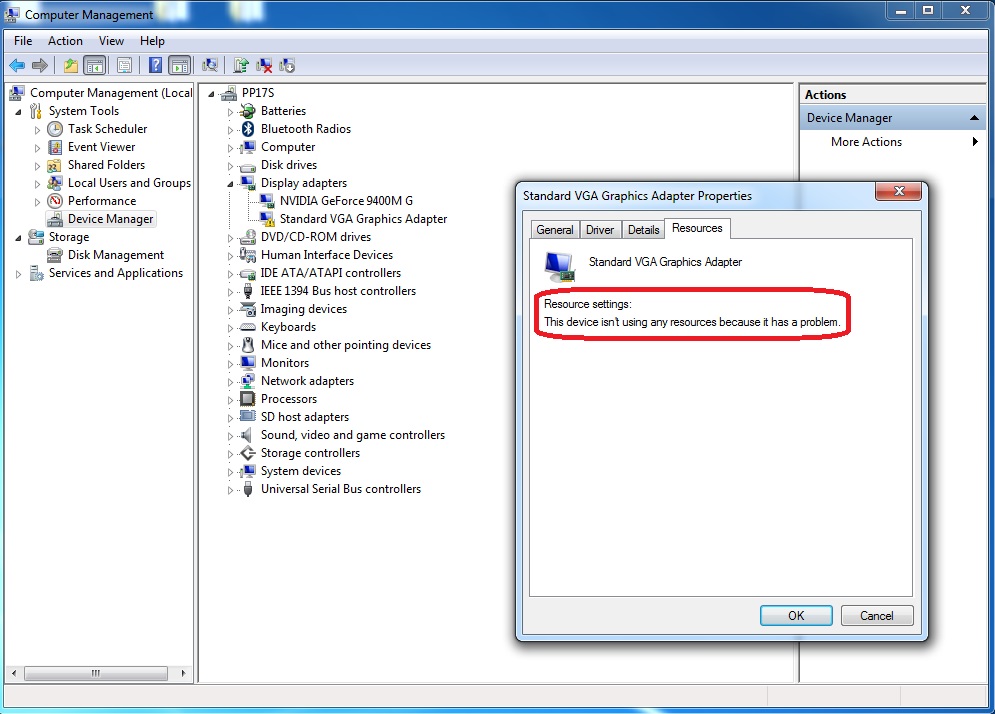
On a slightly off topic issue I've been having. There seems to be an issue with a device connecting to the laptop in the Device Manager. I don't think there could be a significant connection to this problem, because it say not using an resoruse. But I figured to post this info just in case anyone might know if there's a connection to the two issues. I'll probably make another post on this issue all together though.


58UsVq6.jpg
 

My Computer

Computer type
Laptop
Computer Manufacturer/Model Number
Dell Studio XPS 13 (PP17S)
OS
Windows 7 Professional 32bit
CPU
Intel Core 2 Duo P8700 2.53GHz
Memory
4 GB installed
Graphics Card(s)
nVIDIA GeForce 9400M G
Hard Drives
Seagate Momentus Thin ST500LT012 500GB
Browser
Google Chrome Version 34.0.1847.131 m
You really do not seem out of line with your memory. I have 6GB and have 4.5 Available.


You really think so? That seems like so much to me. At least for a 32 bit system. I can understand 64 bit taking a heavier load. But if you really think so, then I guess I'll just leave it at that.
 

My Computer

Computer type
Laptop
Computer Manufacturer/Model Number
Dell Studio XPS 13 (PP17S)
OS
Windows 7 Professional 32bit
CPU
Intel Core 2 Duo P8700 2.53GHz
Memory
4 GB installed
Graphics Card(s)
nVIDIA GeForce 9400M G
Hard Drives
Seagate Momentus Thin ST500LT012 500GB
Browser
Google Chrome Version 34.0.1847.131 m
Back
Top