Windows 7 5.1 problem

baru013

New member
Local time
3:18 PM
Messages
12
Hello everyone, I have a problem with my sound system, and I was hoping that you could give me a give me a hand with it, the specifics:

I have got installed windows 7 64 bits.
My mother board is ASUS P8P67 M B3.
My audio codec is ALC887, directX 11.0 and driver version 6.0.1.6482.
My sound system is Logitech surround speakers Z506.
I did have 5.1 working properly in my system but after some windows updates it stopped working properly, the subwoofer doesn't work although the center does.

When I do the testing in either realtek hd audio manager or windows application, the subwoofer does not sound (center speaker, which shares same cable works) and no the subwoofer speaker works perfectly (it isn’t broken) it is brand new as well as the rest of the computer.

When doing the windows test the green bar goes up and down suggesting that the system thinks that it is actually making noise, when it isn't.

The realtek should let me reasing the jacks just by double clicking on them, not doing so.

I have tried the reassingment fix and all drivers I could find, I have also tried enableling efects and filling speakers and so on.

Any ideas?

Many thaks.
 
Last edited:

My Computer

OS
Windows 7 Home Premium 32bit
Are you using a hdmi enabled graphics card?
If you are try disabling the hdmi audio on the graphics card.
That solved a similar issue for me recently.
 

My Computer

Computer Manufacturer/Model Number
Insane hobo technologies. ;-)
OS
Windows 7 x64
CPU
Intel i7 2600k
Motherboard
Asrock z68 extreme 4 gen 3
Memory
G.skill Ripjaw 16gigs @ 1866
Graphics Card(s)
Nvidia gtx580 (evga)
Sound Card
Integrated HD audio + hdmi
Monitor(s) Displays
24" ASUS widescreen + 42" insignia
Screen Resolution
1080p (1920x1080)
Hard Drives
128 Samsung 830
256 Samsung 840
3 x 1tb storage drive (various)
1 western digital 1tb (eSATA)
1 Seagate 1tb (eSATA)
PSU
1 kilowatt SLI/Crossfire rated Silverstone modular
Case
NZXT Phantom + additional 220 fan
Cooling
Zalmann
Keyboard
Microsoft wireless 3000 (v2)
Mouse
MS - wireless 5000 (bluetrack)
Internet Speed
depends on if you ask me or my provider.
Other Info
The above information is provided as is, and the author assumes no responsibility for issues it may cause with your sanity or fanboyism.
thanks for replying, how can I do what you suggested?

my graphics is nvidia gtx 560 ti
 

My Computer

OS
Windows 7 Home Premium 32bit
right click the speaker in your tray
pick playback devices
find it in the list (i prefer to only leave the actual playback device I am currently using active myself)
right click it and disable.
 

My Computer

Computer Manufacturer/Model Number
Insane hobo technologies. ;-)
OS
Windows 7 x64
CPU
Intel i7 2600k
Motherboard
Asrock z68 extreme 4 gen 3
Memory
G.skill Ripjaw 16gigs @ 1866
Graphics Card(s)
Nvidia gtx580 (evga)
Sound Card
Integrated HD audio + hdmi
Monitor(s) Displays
24" ASUS widescreen + 42" insignia
Screen Resolution
1080p (1920x1080)
Hard Drives
128 Samsung 830
256 Samsung 840
3 x 1tb storage drive (various)
1 western digital 1tb (eSATA)
1 Seagate 1tb (eSATA)
PSU
1 kilowatt SLI/Crossfire rated Silverstone modular
Case
NZXT Phantom + additional 220 fan
Cooling
Zalmann
Keyboard
Microsoft wireless 3000 (v2)
Mouse
MS - wireless 5000 (bluetrack)
Internet Speed
depends on if you ask me or my provider.
Other Info
The above information is provided as is, and the author assumes no responsibility for issues it may cause with your sanity or fanboyism.
In the list I only had:
1. speakers
2. Realtek digital output
3. realtek digital output (optical)

Disabled 2 & 3, did not work, I also disabled nvidia high definition audio drivers from device manager...no luck
 

My Computer

OS
Windows 7 Home Premium 32bit

My Computer

Computer Manufacturer/Model Number
Insane hobo technologies. ;-)
OS
Windows 7 x64
CPU
Intel i7 2600k
Motherboard
Asrock z68 extreme 4 gen 3
Memory
G.skill Ripjaw 16gigs @ 1866
Graphics Card(s)
Nvidia gtx580 (evga)
Sound Card
Integrated HD audio + hdmi
Monitor(s) Displays
24" ASUS widescreen + 42" insignia
Screen Resolution
1080p (1920x1080)
Hard Drives
128 Samsung 830
256 Samsung 840
3 x 1tb storage drive (various)
1 western digital 1tb (eSATA)
1 Seagate 1tb (eSATA)
PSU
1 kilowatt SLI/Crossfire rated Silverstone modular
Case
NZXT Phantom + additional 220 fan
Cooling
Zalmann
Keyboard
Microsoft wireless 3000 (v2)
Mouse
MS - wireless 5000 (bluetrack)
Internet Speed
depends on if you ask me or my provider.
Other Info
The above information is provided as is, and the author assumes no responsibility for issues it may cause with your sanity or fanboyism.
thanks mate, i am looking into it, but it´s not looking good...
 

My Computer

OS
Windows 7 Home Premium 32bit
yeah I would have other ideas as to what to try if there was a complete failure but just the loss of the one channel is very odd.

One last thing that occurs to me though it seems unlikely is that there is actually an option to swap the mic in for the center/sub out in the windows options under speakers -> properties (located in the same place as the above suggestion)

It is possible this option needs to be checked on your system. I can not say for certain not knowing how this specific system is set up though.
 

My Computer

Computer Manufacturer/Model Number
Insane hobo technologies. ;-)
OS
Windows 7 x64
CPU
Intel i7 2600k
Motherboard
Asrock z68 extreme 4 gen 3
Memory
G.skill Ripjaw 16gigs @ 1866
Graphics Card(s)
Nvidia gtx580 (evga)
Sound Card
Integrated HD audio + hdmi
Monitor(s) Displays
24" ASUS widescreen + 42" insignia
Screen Resolution
1080p (1920x1080)
Hard Drives
128 Samsung 830
256 Samsung 840
3 x 1tb storage drive (various)
1 western digital 1tb (eSATA)
1 Seagate 1tb (eSATA)
PSU
1 kilowatt SLI/Crossfire rated Silverstone modular
Case
NZXT Phantom + additional 220 fan
Cooling
Zalmann
Keyboard
Microsoft wireless 3000 (v2)
Mouse
MS - wireless 5000 (bluetrack)
Internet Speed
depends on if you ask me or my provider.
Other Info
The above information is provided as is, and the author assumes no responsibility for issues it may cause with your sanity or fanboyism.
did find it...it is wierd that center works and sub doesn´t coming the signal from the same cable...realtek´s program is not working properly it won´t let me reasing jack ^^ (jack input/jack sh*t) but when you place the cursor over it seem to get the proper conections...anyways thanks for your help, i´ll check the forum once in a while :D
 

My Computer

OS
Windows 7 Home Premium 32bit
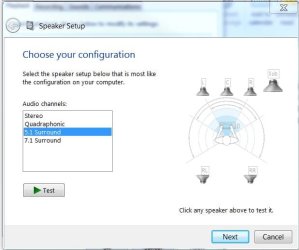
It could be that an update reset the configuration. In the Sound window, Playback tab, right click speakers and select Configuration. Verify your setup and test each speaker. Also, you might want to unplug all the speakers then reconnect. This has cleared "lost" speaker problems too.

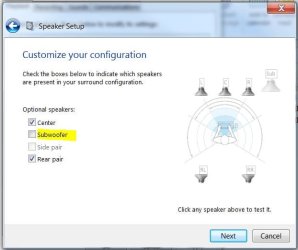
EDIT: There is a setting you need to use when a sub-woofer is combined with other speakers on the same connection. Otherwise, the sub-woofer is assumed to be stand-alone and the driver will chop the low frequencies from the output for other speakers. I just can't think of it at the moment but it is part of the Configuration.
 

My Computer

Computer type
PC/Desktop
Computer Manufacturer/Model Number
Built 2/11/2011
OS
Windows 7 Pro-x64
CPU
i7-2600 3.4GHz - 3.8GHz Turbo
Motherboard
Intel DH67BL-B3
Memory
8Gb - 2x4GB, Muskin 991770 PC3-1333
Graphics Card(s)
Integrated Intel HD 2000
Sound Card
Integrated Intel 10.1 HD, RealTek ALC892
Monitor(s) Displays
Asus LCD VH222H, Haier HL24XSL2a
Screen Resolution
1920x1080, 1920x1080
Hard Drives
Crucial SSD C300-128Gb,
Western Digital WD5002AALX - 500Gb,
Western Digital WD7501AALS - 750Gb
PSU
Seasonic 650W 80+ Gold Modular
Case
Rosewill Defender
Cooling
Stock CPU, Four 120mm case fans, PCH fan added
Keyboard
Logitech EX100 Y-RBH94 Wireless
Mouse
Logitech EX100 M-RCE95 Wireless
Internet Speed
3.0/1.5 Mbs
Antivirus
Microsoft Security Essentials
Browser
Microsoft Internet Explorer 11
Other Info
Antec Veris Premier-Multimedia IR Station,
Cyber Accoustics-3602 Speakers,
AFT XM-5U Card Reader,
Hauppauge TV-HVR-2250,
Sony LX300 USB Turntable
thanks carwiz, replugging did not fix it nor reconfigurating, i'll google lost speakers...
 

My Computer

OS
Windows 7 Home Premium 32bit
This happened in between working 5.1 and not working 5.1

"There are several well documented bugs in the Windows 7 RC build. The bug appears when a hardware/software component fails to re-initialize when the system resumes from Sleep or Hibernation or will not enter the suspend state. This is a small list of other issues that have been seen. These bugs have only been seen on specific systems that have combinations of certain hardware/software installed."

Don't know if related or hwo to fix it...(not gone into hibernation/sleep in a couple of weeks)
 

My Computer

OS
Windows 7 Home Premium 32bit
did find it...it is wierd that center works and sub doesn´t coming the signal from the same cable.
I edited my post after seeing this. Did you read the "EDIT"?
 

My Computer

Computer type
PC/Desktop
Computer Manufacturer/Model Number
Built 2/11/2011
OS
Windows 7 Pro-x64
CPU
i7-2600 3.4GHz - 3.8GHz Turbo
Motherboard
Intel DH67BL-B3
Memory
8Gb - 2x4GB, Muskin 991770 PC3-1333
Graphics Card(s)
Integrated Intel HD 2000
Sound Card
Integrated Intel 10.1 HD, RealTek ALC892
Monitor(s) Displays
Asus LCD VH222H, Haier HL24XSL2a
Screen Resolution
1920x1080, 1920x1080
Hard Drives
Crucial SSD C300-128Gb,
Western Digital WD5002AALX - 500Gb,
Western Digital WD7501AALS - 750Gb
PSU
Seasonic 650W 80+ Gold Modular
Case
Rosewill Defender
Cooling
Stock CPU, Four 120mm case fans, PCH fan added
Keyboard
Logitech EX100 Y-RBH94 Wireless
Mouse
Logitech EX100 M-RCE95 Wireless
Internet Speed
3.0/1.5 Mbs
Antivirus
Microsoft Security Essentials
Browser
Microsoft Internet Explorer 11
Other Info
Antec Veris Premier-Multimedia IR Station,
Cyber Accoustics-3602 Speakers,
AFT XM-5U Card Reader,
Hauppauge TV-HVR-2250,
Sony LX300 USB Turntable
EDIT: There is a setting you need to use when a sub-woofer is combined with other speakers on the same connection. Otherwise, the sub-woofer is assumed to be stand-alone and the driver will chop the low frequencies from the output for other speakers. I just can't think of it at the moment but it is part of the Configuration.


I understand waht you are saying but I don't know what to do next, I think I have tried every possible config...any ideas.

Thank again
 

My Computer

OS
Windows 7 Home Premium 32bit
One more thing, there is an option to flip center for sub and vice versa, when I do change it, the center sounds when it is the subw is highlighted and when the center is highlighted the center mutes, which reinforces your theory of the lower frequencies being shut down...don't know if I made myself clear :D
 

My Computer

OS
Windows 7 Home Premium 32bit
Here you go.
Set your Configuration to 5.1, click Next.

Un-check the Sub-Woofer box. (Turn it off.) Click Next.

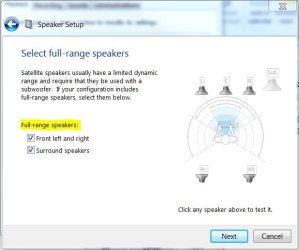
Check both boxes for Full Range Speakers. Click Next then Finish.
 

Attachments

  • Configure Speakers1.JPG
    Configure Speakers1.JPG
    35.2 KB · Views: 22
  • Configure Speakers2.JPG
    Configure Speakers2.JPG
    34.6 KB · Views: 18
  • Configure Speakers3.JPG
    Configure Speakers3.JPG
    37.8 KB · Views: 15

My Computer

Computer type
PC/Desktop
Computer Manufacturer/Model Number
Built 2/11/2011
OS
Windows 7 Pro-x64
CPU
i7-2600 3.4GHz - 3.8GHz Turbo
Motherboard
Intel DH67BL-B3
Memory
8Gb - 2x4GB, Muskin 991770 PC3-1333
Graphics Card(s)
Integrated Intel HD 2000
Sound Card
Integrated Intel 10.1 HD, RealTek ALC892
Monitor(s) Displays
Asus LCD VH222H, Haier HL24XSL2a
Screen Resolution
1920x1080, 1920x1080
Hard Drives
Crucial SSD C300-128Gb,
Western Digital WD5002AALX - 500Gb,
Western Digital WD7501AALS - 750Gb
PSU
Seasonic 650W 80+ Gold Modular
Case
Rosewill Defender
Cooling
Stock CPU, Four 120mm case fans, PCH fan added
Keyboard
Logitech EX100 Y-RBH94 Wireless
Mouse
Logitech EX100 M-RCE95 Wireless
Internet Speed
3.0/1.5 Mbs
Antivirus
Microsoft Security Essentials
Browser
Microsoft Internet Explorer 11
Other Info
Antec Veris Premier-Multimedia IR Station,
Cyber Accoustics-3602 Speakers,
AFT XM-5U Card Reader,
Hauppauge TV-HVR-2250,
Sony LX300 USB Turntable
It doesn't work, it stay mute, but if in addition in realtek I check the box switch center/subwoofer, the subwoofer stays silent but the center plays the bass THIS IS MADNESS!!

Many thanks for your efforts.

PD: I am going to bed, it's 4:15 am in Madrid...TEXAS FOREVER!!!
 

My Computer

OS
Windows 7 Home Premium 32bit
I just read that my speakers are not real 5.1, but virtual/3D 5.1...
 

My Computer

OS
Windows 7 Home Premium 32bit
I just read that my speakers are not real 5.1, but virtual/3D 5.1...

I don't want to get you concerned or anything, but I think that may be a large contributor to your problems here.
 

My Computer

Computer Manufacturer/Model Number
Insane hobo technologies. ;-)
OS
Windows 7 x64
CPU
Intel i7 2600k
Motherboard
Asrock z68 extreme 4 gen 3
Memory
G.skill Ripjaw 16gigs @ 1866
Graphics Card(s)
Nvidia gtx580 (evga)
Sound Card
Integrated HD audio + hdmi
Monitor(s) Displays
24" ASUS widescreen + 42" insignia
Screen Resolution
1080p (1920x1080)
Hard Drives
128 Samsung 830
256 Samsung 840
3 x 1tb storage drive (various)
1 western digital 1tb (eSATA)
1 Seagate 1tb (eSATA)
PSU
1 kilowatt SLI/Crossfire rated Silverstone modular
Case
NZXT Phantom + additional 220 fan
Cooling
Zalmann
Keyboard
Microsoft wireless 3000 (v2)
Mouse
MS - wireless 5000 (bluetrack)
Internet Speed
depends on if you ask me or my provider.
Other Info
The above information is provided as is, and the author assumes no responsibility for issues it may cause with your sanity or fanboyism.
Ok, but it did work at some point just before some major win update...
 

My Computer

OS
Windows 7 Home Premium 32bit
Back
Top