Windows 7 5.1 surround problems (realtek)

hdmi, why should I use optional "upmix-crap" in the Realtek drivers, like "Speaker Fill", when in Windows XP SP3, I have a pure, untouched, unupmixed, proper 5.1 sound in every windows or non-windows application?

The question is rhetorical.

And one more thing... In RARE cases my 5.1 is working, while playing games... Again, only under Windows 7...

I think too, that this isn't a Realtek failure... It is a Microsoft failure. They should fix it, now. My motherboard is produced in mid 2009... The audio chipset should be completely and "without-failure-ly" supported... Just like the Ubuntu or any other kind of Linux... This sucks!

This is my last negative post in this topic. I'll write to you guys, when my Realtek ALC1200 starts to work in Windows 7. Good luck to all!
 
Last edited:

My Computer My Computer

OS
Windows 7 x64
I will give microsoft this much. there are so many versions of drivers for each device that it makes it very difficult to test that they all will work before the final release. But on the other hand how many billions of dollars did microsoft net? I can tell you it should be enough to make the software or OS right. And to give the other side to that it is the responsibility of the hardware manufacturer to get the right versions of the drivers so that your stuff will work. So it goes both ways. I can almost bet that realtek knows the problem exsits because its all over their forums so I would expect to see some newer drivers that should fix the problem in the near future.

As for the realtek not working on this machine I still havent fixed it. Odly I have another PC with realtek drivers and yes it does seem to work fine except for some features. Another thing, there are like17 different versions of the realtek drivers that actually make the audio work and will install in windows but on this one machine it seems that none of them will make the 5.1 7.1 speakers all work correctly like the rest of the people.
 

My Computer My Computer

OS
windows 7
hdmi, why should I use optional "upmix-crap" in the Realtek drivers, like "Speaker Fill"
You should use optional "upmix-crap" in the Realtek drivers, like "Speaker Fill" EACH TIME YOU LISTEN STEREO MUSIC and NOT WHEN YOU LISTEN TO 5.1 TRACKS. :doh:
 

My Computer My Computer

Computer type
Laptop
Computer Manufacturer/Model Number
Asus R510L
OS
8.1 x64
CPU
i7 4510U
Memory
8GB DDR3
Graphics Card(s)
GeForce 820M
Sound Card
Eastern Electric Supreme; Emotiva UMC-200; Astell&Kern AK240
Monitor(s) Displays
LG 42LH5000
Screen Resolution
1920x1080
Hard Drives
1TB internal; 45TB external
PSU
Li-ion
Keyboard
Logitech K800
Mouse
Logitech G400
Internet Speed
20Mbit/s up, 200Mbit/s down
Browser
IE 11
hdmi, why should I use optional "upmix-crap" in the Realtek drivers, like "Speaker Fill"
You should use optional "upmix-crap" in the Realtek drivers, like "Speaker Fill" EACH TIME YOU LISTEN STEREO MUSIC and NOT WHEN YOU LISTEN TO 5.1 TRACKS. :doh:

SO how are we supposed to utilise 5.1 for surround sound then? Or are you not understanding the point of this thread???
 

My Computer My Computer

OS
Windows 7
CPU
Core 2 Duo E6600
Motherboard
Asus P5ND
Memory
4 GB DDR2
Graphics Card(s)
Geforce 9800GT
Sound Card
Realtek
Monitor(s) Displays
22" LG
By doubleclicking on these:
 

Attachments

  • Surround.png
    Surround.png
    7.5 KB · Views: 1,474

My Computer My Computer

Computer type
Laptop
Computer Manufacturer/Model Number
Asus R510L
OS
8.1 x64
CPU
i7 4510U
Memory
8GB DDR3
Graphics Card(s)
GeForce 820M
Sound Card
Eastern Electric Supreme; Emotiva UMC-200; Astell&Kern AK240
Monitor(s) Displays
LG 42LH5000
Screen Resolution
1920x1080
Hard Drives
1TB internal; 45TB external
PSU
Li-ion
Keyboard
Logitech K800
Mouse
Logitech G400
Internet Speed
20Mbit/s up, 200Mbit/s down
Browser
IE 11
hdmi, excuse me, I don't think, you are helping.

My point was, that in Winamp, WMP or a DVD with LPCM/stereo stream... Under Windows XP SP3... I DON'T HAVE to TURN ON the SPEAKER FILL option, to have a 5.1 surround! (excuse me for the caps lock)

Besides, the Speaker Fill options doesn't sound NICE while upmixing stereo source. Have you tried it? And if you have tried it, what do you think? That it is better? Don't think so on my almost brand new Logitech G51 5.1 system...

Besides, the volume levels, while Speaker Fill is turned on are very random/scrambled... This drives me mad too. Speaker Fill isn't a diamond. Just a shaped rock.
 

My Computer My Computer

OS
Windows 7 x64
Are any / all / some of you using hte W7 drivers or the Realtek 2.14 HD drivers?

Hi there

This is STILL one thing I use an XP virtual machine for - even the Virtual Audio driver has a decent CUSTOM settable equalisation. The W7 drivers just have "Fixed Presets" -- absolute rubbish.

I'm actually moving most of my Multimedia off W7 anyway and running it on a dedicated server. I'm using a W2K3 server (XP drivers work fine) and may change to a "Vortex" type multimedia or W2008 Server or even Linux.

The only multimedia I use on a computer now is watching a DVD (also soon to be replaced by my Multimedia streaming system) or watching TV.

Cheers
jimbo
 

My Computer My Computer

Computer type
PC/Desktop
Computer Manufacturer/Model Number
Custom built, several laptops HP/ASUS
OS
Linux CENTOS 7 / various Windows OS'es and servers
CPU
Intel i7 Intel i5
Memory
8GB, 16GB
Graphics Card(s)
On Motherboard
Sound Card
Realtek HD audio
Monitor(s) Displays
Apple Cinema display, Samsung LCD
Screen Resolution
1920 X 1080
Hard Drives
4 X 1TB SATA
Mouse
Toshiba wireless laser
Internet Speed
> 20MB up
Jimbo here you go. Click on the button next to where it says reset and a graphic eq pops up so you can adjust to your own taste..
 

Attachments

  • Capture.PNG
    Capture.PNG
    71.5 KB · Views: 265

My Computer My Computer

Computer Manufacturer/Model Number
Custom Build.
OS
Windows 7 Ultimate x64.
CPU
i5 760 @ 4.2Ghz. 1.18v
Motherboard
Gigabyte - H55M-USB3
Memory
4g Corsair xms3 ddr3, 1600Mhz.
Graphics Card(s)
Gigabyte GTX-560Ti soc edition
Sound Card
Asus Xonar Dx - Logitech Z5500.
Monitor(s) Displays
Acer 22" LCD Wide screen 1680-1050 -Samsung 42" Plasma....
Screen Resolution
1680/1050 -----1920/1080p.
Hard Drives
2x 2TB Seagate Go Flex,
1x 1TB Seagate,
1x 640WD Black,
x16 Gig sandisc flash drive,
1x8Gig sandisc flash drive.
PSU
XigmaTek 80plus NRP-PC702 - 700w dual 30a.
Case
Venus Gamers Midi Tower Case with LED Display
Cooling
Arctic Freezer 7 Pro Rev 2... x2 Arctic F8 case fans........
Keyboard
Logitech G15-v2 Gaming.
Mouse
Microsoft Sidewinder X8.
Internet Speed
Virgin Media - 50mb down- 8mb up.
Other Info
x2 Xbox 360 wireless controllers...

Dual layer optical disc drive...

Chrome 79million

A.V = MSE
By doubleclicking on these:

:rolleyes:

Mine's sorted itself anyway! I installed GOM player and now have 5.1 - it's not as good as it was in XP, rear speakers are alot quieter, but it's there. However, if I update to the latest or even the same realtek drivers I lose 5.1 and go back to stereo. I've no idea what I did to make it work.

I'm also convinced this is a Windows 7 problem and not a driver problem.
 

My Computer My Computer

OS
Windows 7
CPU
Core 2 Duo E6600
Motherboard
Asus P5ND
Memory
4 GB DDR2
Graphics Card(s)
Geforce 9800GT
Sound Card
Realtek
Monitor(s) Displays
22" LG
Windows 7 Low volume in speaker.

Hi...
I have a sound problem with windows 7 (it's works fine with xp) I check the speakers with one of my friends system he also installed win 7 the same think happens low sounds.
Headphones are working fine. But the speakers sound is too low.
Is there any way to fix the problem.


Help plz..
Thanks in advance.
Kingz
 

My Computer My Computer

OS
Windows 7
Jimbo here you go. Click on the button next to where it says reset and a graphic eq pops up so you can adjust to your own taste..

Hi there - it doesn't on my system and I'm sure I've downloaded the latest driver.

I'm running W7 Enterprise X-64.

I just get the "Canned Presets".

Thanks anyway for the info -- but I really like the idea of building a separate Multimedia server now -- also means I don't need to have a desktop server on 24 hours a day just for Multi-media apps.

The "Vortex" system uses as little as 30 Watts when its not "busy".

Cheers
jimbo
 

My Computer My Computer

Computer type
PC/Desktop
Computer Manufacturer/Model Number
Custom built, several laptops HP/ASUS
OS
Linux CENTOS 7 / various Windows OS'es and servers
CPU
Intel i7 Intel i5
Memory
8GB, 16GB
Graphics Card(s)
On Motherboard
Sound Card
Realtek HD audio
Monitor(s) Displays
Apple Cinema display, Samsung LCD
Screen Resolution
1920 X 1080
Hard Drives
4 X 1TB SATA
Mouse
Toshiba wireless laser
Internet Speed
> 20MB up
hdmi, excuse me, I don't think, you are helping.

My point was, that in Winamp, WMP or a DVD with LPCM/stereo stream... Under Windows XP SP3... I DON'T HAVE to TURN ON the SPEAKER FILL option, to have a 5.1 surround! (excuse me for the caps lock)

Besides, the Speaker Fill options doesn't sound NICE while upmixing stereo source. Have you tried it? And if you have tried it, what do you think? That it is better? Don't think so on my almost brand new Logitech G51 5.1 system...

Besides, the volume levels, while Speaker Fill is turned on are very random/scrambled... This drives me mad too. Speaker Fill isn't a diamond. Just a shaped rock.
Oh, sorry I misunderstood. :confused: Anyway, here's what you might be looking for:
 

Attachments

  • Renderer.png
    Renderer.png
    13.5 KB · Views: 235
  • Mixer.png
    Mixer.png
    19.4 KB · Views: 429

My Computer My Computer

Computer type
Laptop
Computer Manufacturer/Model Number
Asus R510L
OS
8.1 x64
CPU
i7 4510U
Memory
8GB DDR3
Graphics Card(s)
GeForce 820M
Sound Card
Eastern Electric Supreme; Emotiva UMC-200; Astell&Kern AK240
Monitor(s) Displays
LG 42LH5000
Screen Resolution
1920x1080
Hard Drives
1TB internal; 45TB external
PSU
Li-ion
Keyboard
Logitech K800
Mouse
Logitech G400
Internet Speed
20Mbit/s up, 200Mbit/s down
Browser
IE 11
hello to all of you,that same fhit happened to me last night and didn't bother to argue with people which don't want to help and read the full post and help me solve it..so I found a soultion for winamp on my own,its "VL sound for vista" winamp output plug-in,hope it will work for all of you,and I hope that I helped
sorry for bad english
 

My Computer My Computer

OS
windows 7 (for now)
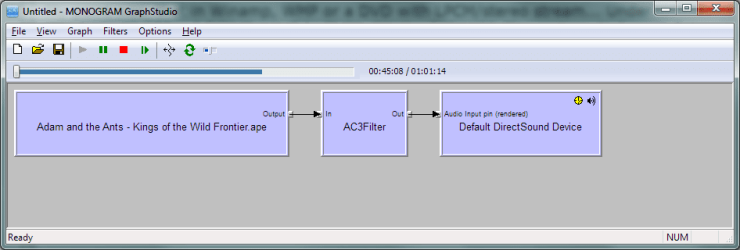
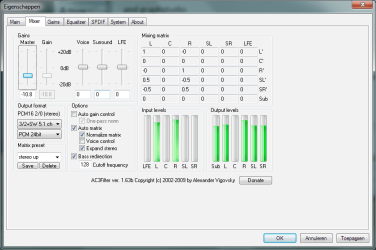
The 'Default Format' is limited to 2 channels only, but not in Windows XP. Yes, that is correct... To get more channels, you need to use software that's capable of running the audio device in 'Exclusive Mode' instead of using the 'Default Format'. Examples of such software are videogames, foobar2000 using ChannelMixer, and Media Player Classic Home Cinema (or GrapStudio) using AC3Filter. In my screenshot you can clearly see how I'm using AC3Filter to expand stereo music. If this is still not helping you, then good luck. :eek:
 

My Computer My Computer

Computer type
Laptop
Computer Manufacturer/Model Number
Asus R510L
OS
8.1 x64
CPU
i7 4510U
Memory
8GB DDR3
Graphics Card(s)
GeForce 820M
Sound Card
Eastern Electric Supreme; Emotiva UMC-200; Astell&Kern AK240
Monitor(s) Displays
LG 42LH5000
Screen Resolution
1920x1080
Hard Drives
1TB internal; 45TB external
PSU
Li-ion
Keyboard
Logitech K800
Mouse
Logitech G400
Internet Speed
20Mbit/s up, 200Mbit/s down
Browser
IE 11
Yes, hdmi, I know about the AC3 Filter... And how to use it and so...

Now I use:

1. Media Player Classic Home Cinema x64 (DXVA enabled) + AC3 Filter (great sound, no worries)

2. foobar2000 + ChannelMixer (superb audio)

3. PC Games... the problem is, that the most of them have stereo output... can't upmix them to 5.1... I guess I'll have to buy a Creative audio card sooner or later... :confused:
 

My Computer My Computer

OS
Windows 7 x64
Any progress with this issue yet? I'm getting so sick of speaker-fill...

I have an external Presonus Firebox that I use for audio-editing.
presonus_firebox.jpg


If I bought 3 of these -
13802_p.jpg


Would I be able to hook my surround speakers up to it? I really don't want to do that, though... I'm thinking it won't work.

Realtek needs to get their act together and make functioning drivers that worked as nice as the XP ones.

Even on my old compaq from '04 with AC'97 sounded amazing with 5.1. But this junky speakerfill make my music sound like a washed out cassette tape... lol
 

My Computer My Computer

OS
Windows 7
CPU
Intel Core i7 920 Nehalem 2.66GHz
Motherboard
GIGABYTE GA-EX58-UD3R LGA 1366 Intel X58 ATX
Memory
OCZ Gold 6GB (3 x 2GB) 240-Pin DDR3 SDRAM DDR3 1600
Graphics Card(s)
SAPPHIRE 100259L Radeon HD 4870
Monitor(s) Displays
Acer X233Hbid Black 23" 5ms HDMI Full 1080P
Screen Resolution
1920 x 1080
Hard Drives
Seagate Barracuda 7200.12 ST3500418AS 500GB
PSU
PC&Power Cooling 750
Case
Antec Nine Hundred Black Steel ATX
Got 5.1 sound and it is great

Been fighting this for weeks. Here is how I got it.

1. downloaded the driver motherboard_driver_audio_realtek_azalia.exe from Gigabyte's site.

2. Executed motherboard_driver_audio_realtek_azalia.exe which extracted to Realtek folder.

3. Executed Setup.exe which uninstalled old driver and requested a reboot.

4. Rebooted.

5. Executed Setup.exe again with Run as administrator option which installed driver and again requested reboot.

6. Rebooted.

7. Went to Control Panel and clicked on Realtek HD Audio Manager.

8. Set up connections, set to 5.1 sound, tested sound.

9. Put in "Transformers Revenge of the fallen" and the sound is DTS 5.1 in all it's glory. My neighbor is going to hate me.

Hope this helps...
 

My Computer My Computer

Computer Manufacturer/Model Number
Home built
OS
Windows 7 Professional
CPU
Intel Core 2 Quad Q6600 2.4ghz Processor
Motherboard
Gigabyte GA-P35-DS4 r2.0
Memory
2x2gb G-Skill DDR2 800 PC6400
Graphics Card(s)
Sapphire Radeon HD3870 512mb GDDR4 PCI-E HDCP Graphics
Sound Card
Realtek ALC889A
Monitor(s) Displays
ASUS VW246H HDMI & Samsung 240T DVI
Hard Drives
150gb Western Digital WD1500ADFD Raptor 10,000rpm SATA/150

150gb Western Digital WD1500HLFS Raptor 10,000rpm SATA/150

1tb Samsung Spinpoint F1 7200rpm 32M SATA2 HD103UJ
PSU
Cooler Master Real Power Pro 750watt Power Supply
Case
NZXT Zero Black/Silver Aluminum ATX Full Tower Case w/8 fans
Cooling
Rosewill RCX-Z775-EX Heatpipe Cooler
Installed it twice? lol, I'm desperate enough to give that a try.
 

My Computer My Computer

OS
Windows 7
CPU
Intel Core i7 920 Nehalem 2.66GHz
Motherboard
GIGABYTE GA-EX58-UD3R LGA 1366 Intel X58 ATX
Memory
OCZ Gold 6GB (3 x 2GB) 240-Pin DDR3 SDRAM DDR3 1600
Graphics Card(s)
SAPPHIRE 100259L Radeon HD 4870
Monitor(s) Displays
Acer X233Hbid Black 23" 5ms HDMI Full 1080P
Screen Resolution
1920 x 1080
Hard Drives
Seagate Barracuda 7200.12 ST3500418AS 500GB
PSU
PC&Power Cooling 750
Case
Antec Nine Hundred Black Steel ATX
Installed it twice? lol, I'm desperate enough to give that a try.


Not installed twice.

1st time it uninstalled old driver.

2nd time it installed new driver.
 

My Computer My Computer

Computer Manufacturer/Model Number
Home built
OS
Windows 7 Professional
CPU
Intel Core 2 Quad Q6600 2.4ghz Processor
Motherboard
Gigabyte GA-P35-DS4 r2.0
Memory
2x2gb G-Skill DDR2 800 PC6400
Graphics Card(s)
Sapphire Radeon HD3870 512mb GDDR4 PCI-E HDCP Graphics
Sound Card
Realtek ALC889A
Monitor(s) Displays
ASUS VW246H HDMI & Samsung 240T DVI
Hard Drives
150gb Western Digital WD1500ADFD Raptor 10,000rpm SATA/150

150gb Western Digital WD1500HLFS Raptor 10,000rpm SATA/150

1tb Samsung Spinpoint F1 7200rpm 32M SATA2 HD103UJ
PSU
Cooler Master Real Power Pro 750watt Power Supply
Case
NZXT Zero Black/Silver Aluminum ATX Full Tower Case w/8 fans
Cooling
Rosewill RCX-Z775-EX Heatpipe Cooler
Oh, sorry about that. I misread.


In that case, I've already done that. I have the latest azalia from Gigabyte installed, still no 5.1 in anything.
 

My Computer My Computer

OS
Windows 7
CPU
Intel Core i7 920 Nehalem 2.66GHz
Motherboard
GIGABYTE GA-EX58-UD3R LGA 1366 Intel X58 ATX
Memory
OCZ Gold 6GB (3 x 2GB) 240-Pin DDR3 SDRAM DDR3 1600
Graphics Card(s)
SAPPHIRE 100259L Radeon HD 4870
Monitor(s) Displays
Acer X233Hbid Black 23" 5ms HDMI Full 1080P
Screen Resolution
1920 x 1080
Hard Drives
Seagate Barracuda 7200.12 ST3500418AS 500GB
PSU
PC&Power Cooling 750
Case
Antec Nine Hundred Black Steel ATX
Back
Top