Windows 7, another step backwards

Frustration, I would imagine, though now that he has requested some actual help, we are glad to provide it... Really, thunderbird is a full featured email client that does what outlook express did and more... it deserves a look....

Also keep in mind that with any new OS, you need to keep an open mind long enough to give it an honest evaluation... Its a different mind set from what you were used to, and once you get familiar with it, the battle is won... ;)
 

My Computer

Computer type
PC/Desktop
Computer Manufacturer/Model Number
LENOVO K450 @3.0GHZ
OS
64-bit Windows 8.1 Pro
CPU
Core(TM) i5 CPU 4330 Haswell @ 3.20GHz
Motherboard
LENOVO
Memory
12.00 GB
Graphics Card(s)
Intel(R) HD Graphics
Sound Card
Intel HD integtrated
Monitor(s) Displays
HP 25' ISP Monitor
Screen Resolution
1900/1020
Hard Drives
(1) ST1000DM003-1CH162 (2) Generic STORAGE DEVICE USB Device (3) Generic STORAGE DEVICE USB Device
Internet Speed
100mb down/10mb up
Besides....microsoft is SHOVING Windows 7 at us. Their ultimate goal is to stop supporting XP as soon as they can. Up till now they have been pretty much forced to provide ongoing XP support, but with a successful Windows 7 launch they are probably, even now, planning a quick demise for XP. Just something to keep in mind.
Once you take the time to learn Windows 7, you will never go back. (I basically went from XP to Win7, and it was not too hard to get used to. I am a convert now.)
 

My Computer

Computer Manufacturer/Model Number
Custom Built and Maintained...by Me
OS
Windows 7 Ultimate x64
CPU
AMD Phenome x4 965 Black Ed (Lovingly OverClocked.a tad)
Motherboard
Gigabyte GA 890GPA-UD3H
Memory
6 Gb (3 x 2 Gb GSKILL 16000CL9 )
Graphics Card(s)
ASUS EAH5850/2DIS/1GD5 Radeon HD 5850 1GB
Sound Card
Creative SB X-Fi
Monitor(s) Displays
Dual 24" Samsung Wide-Sceens
Screen Resolution
Good Enough.
Hard Drives
5x SATA Seagates (in assorted sizes, shapes, and colors--Variety is the spice of Life)
PSU
790 Watt Enermax Modular
Case
Lian-Li Black Mesh (Love that Mesh !!)
Cooling
Pure Air Baby..Flowin Freely
Keyboard
Microsoft 4000 Natural Ergonomic
Mouse
Multiple Logitech Laser mice....each has its specific use
Internet Speed
Not Fast Enough, it's probably never going to be fast enough
Other Info
This Computer building crap started out years ago as a simple hobby..that has now gotten completely out of hand !!
(It does come in handy though, when everyone in the family wants their own computer)
You can send me your windows 7 cd and serial key if you want to
 

My Computer

OS
windows 7
Really, thunderbird is a full featured email client that does what outlook express did and more... it deserves a look...

Not really .. But Thunderbird or Outlook is about as close to OE as you can get...
That I've found so far.

If you don't organize your contacts in folders ..
And expect to be able to operate from .. or restore from a wab file.. conveniently ..
You'll be OK
 

My Computer

Computer Manufacturer/Model Number
HP d4996t (upgraded)
OS
XP MCE .... XP Pro 64 .... W7 U x64
CPU
E6750, 2.67GHz C2D
Memory
4GB, PC2 6400
Graphics Card(s)
GeForce 9400GT
Monitor(s) Displays
Twin Samsung 2443BWT
Screen Resolution
1920x1200
Hard Drives
Many .. 3 Installed
PSU
460W
Internet Speed
Cable
Can't understand why people find Live mail difficult, I suppose getting used to a new idea is hard at first, but not difficult to use.

I use Windows Mail in my Vista, and Live mail in Seven.
 

My Computer

Computer Manufacturer/Model Number
Home build.
OS
Vista Ultimate 32 bit, Win 7 Pro 32 bit, Win 7 Pro 64 bit
CPU
Intel i5 CPU 750 @ 2.67 GHZ, OC 3.7 GHZ
Motherboard
Asus P7P55D
Memory
4 Gig
Graphics Card(s)
Nvidia GeForce GTS450
Monitor(s) Displays
Acer 24"
Screen Resolution
1440 x 900
Hard Drives
1000 GIG
1000 GIG
PSU
650
Case
Antec Nine Hundred Two
Internet Speed
14 MB (APPROX)
Thanks for th tips guys, I'll search for thunderbird when I get home.

Anyone hep me stop the explorer window appearing at start up???
 

My Computer

OS
Windows 7
You can lead a lot of users to Window 7 , but you can't make them use it.

But the ones that really make the effort, will enjoy it & be happy with it ! :D


" Doc "
 

My Computer

Computer type
PC/Desktop
Computer Manufacturer/Model Number
Built them myself, Science Experiments !
OS
Win7 Enterprise, Win7 x86 (Ult 7600), Win7 x64 Ult 7600, TechNet RTM on AMD x64 (2.8Ghz)
CPU
AMD fx8350 4ghz, AMD-32 2400mhz, AMD-64 3200mhz, AMDx64 2.8G
Motherboard
SIS 755, ECS-K8M890M-M (Ult 7600), GigaByte & others
Memory
2gb, 4gb on the Ult 7600, 4gb on Technet RTM, 32gb on FX8350
Graphics Card(s)
Draw my own Graphics, several nVidia cards
Sound Card
on motherboard
Monitor(s) Displays
19" flat scr, 28" I-Inc widescr,22" Emprex Widescr, 23" Acer
Screen Resolution
1280 x 1024, 1440 x 900, 1920 x 1080
Hard Drives
6 pata Ide HD's & 2 Sata HD's
added 80gb external on Ult 7600 computer,
numerous extra 1tb, 2TB, 3Tb SATA HD's
A collection of ext HD Docks w/ HDs
PSU
430w, 550w, 600w, 700, 800, etc
Case
All Generic Full Towers
Cooling
Open Air & a few fans, some w/ colored LEDs
Keyboard
Compaq & Dell recycled from GoodWill
Mouse
Made in China Optical Wired Mouse
Internet Speed
Fast Cable InterNet
Antivirus
AVG Free on 24 different Desktops, NO Problems!
Browser
IE 8 is preferred, but use FireFox sometimes
Other Info
Linksys Routers, switches, & Hubs
Too Many USB Flash Drives to count, Biggest is 64GB !
Eight computers in my home network.
Sixteen computers at my business network.
Linked via TeamViewer !
Lots of old used spare computer parts everywhere!
Besides....microsoft is SHOVING Windows 7 at us. Their ultimate goal is to stop supporting XP as soon as they can. Up till now they have been pretty much forced to provide ongoing XP support, but with a successful Windows 7 launch they are probably, even now, planning a quick demise for XP. Just something to keep in mind.
Once you take the time to learn Windows 7, you will never go back. (I basically went from XP to Win7, and it was not too hard to get used to. I am a convert now.)


Rot..! Microsoft tried something entirely new with Vista and unfortunately got caught with their pants down, because few software/hardware manufacturers kept up their side of the bargain so at launch time there was a barrage of criticism, much of it unfairly directed at Microsoft.

IMHO they didn't need to rush headlong into an even newer system (Windows 7) so fast as Vista is now working quite well for the most part.

The life cycle of Microsoft Operating Systems is published for all to see on the web and XP's extended support has always had an expiry date of 2014. Nothing has changed. Just Google it.
 

My Computer

Computer type
PC/Desktop
Computer Manufacturer/Model Number
Alienware® ALX X58
OS
Win 7 Ult SP1/Win 10 Pro (all x64)
CPU
Intel® Core™ i7-975 Extreme O/C to 4.02 GHz, 8MB Cache
Motherboard
Asus® P6T Deluxe V2 X58 LGA1366
Memory
24GB Corsair Vengeance DDR3 SDRAM at 1600MHz - 6 x 4096MB
Graphics Card(s)
1792 MB NVIDIA® GeForce® GTX 295 Dual Core
Sound Card
Onboard Soundmax® High-Definition 7.1 Performance Audio
Monitor(s) Displays
Samsung XL2370 LED backlit 23" W/S 2ms response time
Screen Resolution
1920 X 1080
Hard Drives
2 x 500gb SATA II
1 x 1TB SATA II
1 external eSATA LaCie 3TB
(Non-RAID)
PSU
Alienware® 1200 Watt Multi-GPU
Case
Alienware® P2 ALX Chassis with AlienIce™ 3.0 Video Cooling
Cooling
Alienware® High-Perf. Liquid Cooling + Acoustic Dampening
Keyboard
Microsoft® Wireless Entertainment 8000 + Logitech® G15 Wired
Mouse
Microsoft® Wireless Laser 8000 + Logitech® G9 Wired
Internet Speed
1Gb/s
Antivirus
McAfee LiveSafe
Browser
Firefox - latest
Other Info
Using non-RAID on purpose as I find RAID to be too temperamental.
Now set to AHCI

My Computer

Computer type
PC/Desktop
Computer Manufacturer/Model Number
Bruce ... somewhere in his 40's
OS
Windows 7 Ultimate 32bit SP1
CPU
Intel(R) Core(TM)2 Quad CPU @ 2.40GHz, 2400 MHz
Motherboard
INTEL/D975XBX2
Memory
4 GB
Graphics Card(s)
ATI Radeon HD 2600 Pro
Monitor(s) Displays
Samsung SyncMaster 914v
Screen Resolution
1280 x 1024
Hard Drives
2/500GB each ... ST3500630AS ATA Device.
One is not connected
PSU
Rocketfish 700 W
Case
G.Skill Gigabyte Chassis
Keyboard
Standard PS/2 Keyboard
Mouse
Microsoft PS/2 Mouse
Internet Speed
DSL
Antivirus
Avira Internet Security
Browser
IE 11
Other Info
ATI HDMI Audio
There was very little wrong with Vista that wasnt fixed by the first Service Pack.

XP is awfully long in the tooth. It was a great OS but its 8 years old and its time to put her down.

By saying that you are a novice user, you arent really qualified to decide which is better.

I could ramble off a couple hundred reasons why Vista and 7 are better than XP but you probably wouldnt understand them anyway.
 

My Computer

OS
Windows Vista Business / Windows 7 Ultimate
I’ve been here about 6 months now .. And as near as I can figure ..
You might like, and be able to use Windows 7, over XP …
As long as you do NOT ….


Know the difference in the Display of ... And the purpose for ... Icons and Thumbnails …

Want to Customize your right click context menus …

Operate multiple monitors thru a KVM switch …

Want to make a new task bar and park it on any edge of your Screen(s) …

What to manually organize the contents of a folder …

Expect an office 2003 file Icon to stay on your desktop where you put it …

Expect the new Windows Movie Maker to have all the features the old one …

Mind the loss of OE’s Features …

Expect Windows 7 to remember the size and position of Windows.
 

My Computer

Computer Manufacturer/Model Number
HP d4996t (upgraded)
OS
XP MCE .... XP Pro 64 .... W7 U x64
CPU
E6750, 2.67GHz C2D
Memory
4GB, PC2 6400
Graphics Card(s)
GeForce 9400GT
Monitor(s) Displays
Twin Samsung 2443BWT
Screen Resolution
1920x1200
Hard Drives
Many .. 3 Installed
PSU
460W
Internet Speed
Cable
Jacee, thanks for that but it's double dutch to me.

E.G. How do I go to Vista folder when Vista is no longer on my computer?.
 
Last edited:

My Computer

OS
Windows 7
...
By saying that you are a novice user, you arent really qualified to decide which is better.

I could ramble off a couple hundred reasons why Vista and 7 are better than XP but you probably wouldnt understand them anyway.

The humility is only surpassed by the bedside manner ;)
 

My Computer

Computer Manufacturer/Model Number
Multiple machines in various stages of decomposition.
OS
Win7x64
...
By saying that you are a novice user, you arent really qualified to decide which is better.

I could ramble off a couple hundred reasons why Vista and 7 are better than XP but you probably wouldnt understand them anyway.

The humility is only surpassed by the bedside manner ;)


I disagree, the fact that novice's like myself could work and operate XP without any major problem, but struggle with Vista/7 is exactly where it's gone wrong. Microsoft should be making things easier for the home user not more complicated.
 

My Computer

OS
Windows 7

My Computer

Computer type
PC/Desktop
Computer Manufacturer/Model Number
Bruce ... somewhere in his 40's
OS
Windows 7 Ultimate 32bit SP1
CPU
Intel(R) Core(TM)2 Quad CPU @ 2.40GHz, 2400 MHz
Motherboard
INTEL/D975XBX2
Memory
4 GB
Graphics Card(s)
ATI Radeon HD 2600 Pro
Monitor(s) Displays
Samsung SyncMaster 914v
Screen Resolution
1280 x 1024
Hard Drives
2/500GB each ... ST3500630AS ATA Device.
One is not connected
PSU
Rocketfish 700 W
Case
G.Skill Gigabyte Chassis
Keyboard
Standard PS/2 Keyboard
Mouse
Microsoft PS/2 Mouse
Internet Speed
DSL
Antivirus
Avira Internet Security
Browser
IE 11
Other Info
ATI HDMI Audio
Anyone hep me stop the explorer window appearing at start up???


In the past (as in under XP) I have seen this behavior when there is a program in the startup folder or otherwise configured to start at Windows start-up that is no longer valid.

In this case, the Windows Explorer window would pop up, as if to say, "Okay, what did you want me to start again?"

There are two ways to check for this case:
1) Click on the ORB (lower left corner) and go to All Programs > Startup and see if there are any program shortcuts there that may be corrupted or not valid. Delete any bad ones.

2) Click on the Orb again and at the "Search" box right there above the orb, type in "MSCONFIG" (without the quotes) and then hit ENTER.

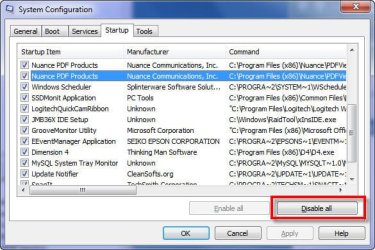
When the window appears, click on the START UP tab, as seen in the attached screenshot, then scroll through the list and see if there are any odd entries.

As sort of a big bang test, you could simply click the DISABLE ALL button at the bottom right (annotated in the screenshot with the red box), then reboot your computer to see if the Windows Explorer window still appears.

If it does not, then something in your startup is amiss. Bring up MSCONFIG again (startup tab) and then add back one or two at a time manually, rebooting after each (click on the checkbox in this window). A bit tedious, yes, but you would find your answer.
Post your results to this iif it works or not.
 

Attachments

  • SNAG-0040.jpg
    SNAG-0040.jpg
    55.8 KB · Views: 10

My Computer

Computer Manufacturer/Model Number
Dell Vostro 420
OS
Windows 7 Pro x64
CPU
3.00 GHz Intel Core2 Quad Q9650
Memory
4 GB
Graphics Card(s)
ATI Radeon HD 3400 Series
Monitor(s) Displays
DELL 2405FPW
Screen Resolution
1920x1200
Hard Drives
System: 80GB WDC WD800JD-22MSA1
Data: 500GB Hitachi HDP725050GLA360
Internet Speed
Verizon FiOS 20/5 mbps
Other Info
Computing is primarily business use with off-time troubleshooting practice: Remote desktop, scanning and producing invoices, some minor graphics work.
Thanks Jaycee, but I don't want a new email address, just a client like Outlook Express or Windows Mail that is 'user friendly'.
 

My Computer

OS
Windows 7
My own view is that MS stumbled out of the gate with Vista by offering "free Vista upgrades" on hardware that couldn't run Vista properly, so it got a bad reputation pretty quickly and people avoided it like the plague. Put Vista on a powerful machine however and there were virtually no problems with it.

Now that Windows 7 is out and appears to be a hit, I think it's crazy to remain with XP which was released to retail Oct 25th, 2001 - over 8 years ago. You know MS is just itching to stop supporting XP, so it's time to take the plunge and move to Windows 7.

The biggest problem with moving from XP to Win7 (as it was from XP to Vista) is that it's NEW and DIFFERENT and people don't like change. Well guess what, everything changes. All you need to do is open your mind a bit and not be so negative about the new stuff. New doesn't automatically mean bad. And in todays world with Seven Forum and Google, you can find an instant answer to almost any problem you're having with Windows 7.

Finally, my 66 year old father has used XP since it came out. He had to use it for work and now uses it for email, etc in his retired life. He went on a vacation recently and I gave him a Windows 7 laptop to use. I figured he wouldn't be able to do much on it, but when he got back, I was surprised to hear him talk about how much he liked it, how easy it was to use and how it was pretty much like XP, only prettier. Now I have to upgrade his desktop to Windows 7. :D
 

My Computer

OS
Windows 7 Ultimate x64
CPU
Intel i7-3770K
Motherboard
Intel DZ77RE-75K
Memory
16 GB (4x4GB) Corsair Vengeance DDR3 PC-1600
Graphics Card(s)
BFG Tech - GeForce GTX 295
Sound Card
Auzentech X-Fi Prelude
Monitor(s) Displays
Dell 2407WFP LCD
Screen Resolution
1920x1200
Hard Drives
Boot Drive: Intel 520 Series SSD - 180GB
1TB Seagate Barracuda 7200 SATA
3 x 2TB Western Digital Caviar Black SATA
NAS: WD Sentinel DX4000 8TB
PSU
Seasonic Platinum 1000 (1000w)
Case
SilverStone TJ09
Cooling
Intel RTS2011LC Liquid Cooling Solution
Keyboard
Logitech K750 Solar
Mouse
Wacom Intuos4 Medium Tablet
Internet Speed
AT&T U-Verse 18Mbps
Why dont you quit being so lazy and check it out and you will realize that it is alot better organized than XP and way more user freindly
 
With regards to the comments made by the original poster....after working briefly with my inlaws this weekend who purchased a new laptop computer that comes with Windows 7....I can understand where he is coming from.

My inlaws have a computer that came with Windows XP. Prior to that, I think their home computer had either 98 or ME. They are in their 60's, aren't very technical and often get themselves into trouble with the computer. They aren't the types that are going to buy a book or read websites to learn how to use their computer. They are going to just sit there and click around and hopefully figure it out.

After 2 days with the computer
--They couldn't even remotely come close to getting their wireless network connected
--The UAC prompts confuse them
--They don't understand the superbar or where their open programs have gone.

Adding insult to injury, their new computer came with 4GB of RAM (which they didn't know), and it also came with Windows 7 64-bit (which they don't have any idea whatsoever that 32-bit or 64-bit even mean anything). I cannot even wait to see what issues they start running into when they try to install drivers for the printer, camera, etc. Or when they download applications from the web and don't run the 64-bit equivalents. For example, with 7zip you don't get Windows explorer context menus if you load the 32-bit version on a 64-bit Windows 7 host.

They aren't really complaining yet...but I know that it frustrates them that the things they actually know how to do, they cannot do as locations and such of these things have changed. And I'm not trying to say that we need to keep everything exactly how it was in Windows XP.......but for those who don't really enjoy their computers and aren't hobbyists...these changes are not always more intuitive for them.

Windows XP will be supported with updates and such from Microsoft until 2014.
 

My Computer

Computer Manufacturer/Model Number
Self-Built in July 2009
OS
Windows 7 Ultimate x64
CPU
Intel Q9550 2.83Ghz OC'd to 3.40Ghz
Motherboard
Gigabyte GA-EP45-UD3R rev. 1.1, F12 BIOS
Memory
8GB G.Skill PI DDR2-800, 4-4-4-12 timings
Graphics Card(s)
EVGA 1280MB Nvidia GeForce GTX570
Sound Card
Realtek ALC899A 8 channel onboard audio
Monitor(s) Displays
23" Acer x233H
Screen Resolution
1920x1080
Hard Drives
Intel X25-M 80GB Gen 2 SSD
Western Digital 1TB Caviar Black, 32MB cache. WD1001FALS
PSU
Corsair 620HX modular
Case
Antec P182
Cooling
stock
Keyboard
ABS M1 Mechanical
Mouse
Logitech G9 Laser Mouse
Internet Speed
15/2 cable modem
Other Info
Windows and Linux enthusiast. Logitech G35 Headset.
Back
Top