Windows 7 automatically changing display color

Well there doesn't seem to be a display driver, common for a lap top.
As for the driver, use Revo Unistaller and reinstall your driver. The nVIDIA driver clean install isn't clean always, I know I have nVIDIA GFX. :D

EDIT: Correction here, you should use Driver Sweeper instead. Phyxion.net - Driver Sweeper

There is a display driver on that page. It's under "VGA". And it's from November of 2009 as I talked about earlier.

That is correct, the display adapter driver, not a monitor driver, I've confused the two before myself.

I just now saw the previous post to yours where the user was asking about a monitor driver. So, sorry about that as well. I didn't extrapolate what was being talked about at the moment, rather took your statement at face value.
 

My Computer My Computer

OS
XP / Win7 x64 Pro
CPU
Intel Quad-Core Q9450 @ 3.2GHz
Motherboard
Asus P5-E
Memory
2x2GB GSkill DDR2
Graphics Card(s)
NVIDIA GeForce 8600 GTS (EVGA)
Monitor(s) Displays
Dell 2408WFP
Screen Resolution
1920x1200
Hi Italia366, the "Gamma Correction" menu you saw may very well be the settings menu of your MONITOR (you may have touched a button of your monitor without knowing it, I sometimes do). If it's the case, you should correct your MONITOR settings, not your display card.
 

My Computer My Computer

OS
Windows 7 Ultimate x64
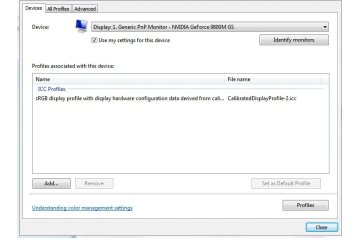
I uploaded a pic of my color management settings and my nvidia settings. i added them as attachments. Also, i still am failing to understand why this orange discoloration isnt on the login screen when i log into windows, and it only appears once i log in after i bring the laptop out of hibernation. makes no dam sense.
 

Attachments

  • Colormanagement.jpg
    Colormanagement.jpg
    33 KB · Views: 26
  • nvidiasettings.jpg
    nvidiasettings.jpg
    79.5 KB · Views: 48

My Computer My Computer

Computer type
Laptop
Computer Manufacturer/Model Number
HP dv6
OS
Windows 7 Professional 64 bit
CPU
Intel Core i7-3610QM CPU @ 2.3GHz
Memory
8 GB RAM
Graphics Card(s)
Nvidia GeFroce GT 650M
Sound Card
Beats Audio
Screen Resolution
1920x1080
Cooling
Cooler Master Cooling Pad, Internal Fans
Keyboard
Razer Blackwidow
Mouse
Razer Naga
Antivirus
Norton 360
Browser
Google Chrome
anyone? need more info or something? its annoying having to click on display calibration and close it after every time i unhibernate my laptop. its such a weird problem lol. i have display calibration pinned to my taskbar now
 

My Computer My Computer

Computer type
Laptop
Computer Manufacturer/Model Number
HP dv6
OS
Windows 7 Professional 64 bit
CPU
Intel Core i7-3610QM CPU @ 2.3GHz
Memory
8 GB RAM
Graphics Card(s)
Nvidia GeFroce GT 650M
Sound Card
Beats Audio
Screen Resolution
1920x1080
Cooling
Cooler Master Cooling Pad, Internal Fans
Keyboard
Razer Blackwidow
Mouse
Razer Naga
Antivirus
Norton 360
Browser
Google Chrome
Hi, have you tried the graphics driver update?
I have requested more help with this too.
 

My Computer My Computer

Computer type
PC/Desktop
Computer Manufacturer/Model Number
Home Built Desktop By DataTech
OS
Windows 7 Ultimate X64 SP1
CPU
Intel i5-2550K, Differing ~4.4-4.8GHz No built in GPU
Motherboard
ASUS P8Z68-V PRO/GEN3
Memory
16GB G.Skill Sniper 1866MHz @ 2133MHz 2x8GB
Graphics Card(s)
ASUS GTX650TIB-DC2OC-2GD5, (650TI Boost)
Sound Card
Onboard Realtek 5-1
Monitor(s) Displays
Samsung P2570HD
Screen Resolution
1920x1080
Hard Drives
Samsung 840 Pro 256GB SSD for OS, 500GB Seagate Constellation (Enterprise drive) for Data
PSU
Corsair HX650W
Case
Inwin Dragon Rider
Cooling
Hyper 212 EVO w/two Noctua fans, push-pull, @1300 RPM
Keyboard
E-Z Eyes, bright yellow keys with large characters
Mouse
steelseries SENSEI Laser Pro Gaming
Internet Speed
48-51Mbs Mbs down, 11 Mbs up Xfinity Cable
Antivirus
Norton Internet Security 2013
Browser
IE 10, Opera, Pale Moon if needed
Other Info
4 case fans, LG BluRay-RE, ASUS DVD-RW, Mr. Fusion power supply, 1.21 gigawatts.
Thanks, and yeah i did update my card:

i did update my graphics card from Nvidia's website, and no luck. still got it.

So it isnt a graphics problem then...? do i need to update a monitor driver? is this something stupid windows is doing?

for some reason i think its something stupid with windows...idk why. i mean there have even been times where this orangeish tint is on a delay, like itll come on after 5 seconds. but most of the time it comes on right after i wake up the laptop. one click on display calibration and POOF it fixes itself. it looks like its like a "hot / cold" color change if u get what im saying.
 
Last edited:

My Computer My Computer

Computer type
Laptop
Computer Manufacturer/Model Number
HP dv6
OS
Windows 7 Professional 64 bit
CPU
Intel Core i7-3610QM CPU @ 2.3GHz
Memory
8 GB RAM
Graphics Card(s)
Nvidia GeFroce GT 650M
Sound Card
Beats Audio
Screen Resolution
1920x1080
Cooling
Cooler Master Cooling Pad, Internal Fans
Keyboard
Razer Blackwidow
Mouse
Razer Naga
Antivirus
Norton 360
Browser
Google Chrome
It is very odd to be sure. I have given you all my ideas, but maybe something will *pop* into my head or someone else will give you a hand.
Gary

EDIT: What theme are you using? Try switching to a Basic theme and see if the issue persists, if not go back to your current one.

I know you told me your color setting were the same except for a couple. Your snip didn't have the Advanced tab open though. Have a look to see it is set like mine.
 
Last edited:

My Computer My Computer

Computer type
PC/Desktop
Computer Manufacturer/Model Number
Home Built Desktop By DataTech
OS
Windows 7 Ultimate X64 SP1
CPU
Intel i5-2550K, Differing ~4.4-4.8GHz No built in GPU
Motherboard
ASUS P8Z68-V PRO/GEN3
Memory
16GB G.Skill Sniper 1866MHz @ 2133MHz 2x8GB
Graphics Card(s)
ASUS GTX650TIB-DC2OC-2GD5, (650TI Boost)
Sound Card
Onboard Realtek 5-1
Monitor(s) Displays
Samsung P2570HD
Screen Resolution
1920x1080
Hard Drives
Samsung 840 Pro 256GB SSD for OS, 500GB Seagate Constellation (Enterprise drive) for Data
PSU
Corsair HX650W
Case
Inwin Dragon Rider
Cooling
Hyper 212 EVO w/two Noctua fans, push-pull, @1300 RPM
Keyboard
E-Z Eyes, bright yellow keys with large characters
Mouse
steelseries SENSEI Laser Pro Gaming
Internet Speed
48-51Mbs Mbs down, 11 Mbs up Xfinity Cable
Antivirus
Norton Internet Security 2013
Browser
IE 10, Opera, Pale Moon if needed
Other Info
4 case fans, LG BluRay-RE, ASUS DVD-RW, Mr. Fusion power supply, 1.21 gigawatts.
Might be a long shot but check your Start up Items, you may have a odd or 3rd party program starting after log-in conflicting with your Display Properties!

My old laptop had Nivida, Windows, and Gateway display settings.
 

My Computer My Computer

Computer type
PC/Desktop
Computer Manufacturer/Model Number
Jeepmann/Custom Built
OS
Windows 7 Ultimate 64bit
CPU
Intel Core i7-2600K Sandy Bridge 3.4GHz (@[email protected])
Motherboard
Asus Maximus IV Extreme LGA 1155 Intel P67
Memory
G.SKILL Ripjaws X Series 16GB 1600Mhz (4 x 4GB) (Stock)
Graphics Card(s)
x2 EVGA GeForce GTX 760's w/ACXCoolers in SLI Surround
Sound Card
On-Board
Monitor(s) Displays
3x Acer 24" HDMI Widescreen LCD Monitor
Screen Resolution
3@ 1920x1080 (5760x1080 In Surround)
Hard Drives
Samsung 830 128gb ssd
Western Digital Caviar Black 640GB 7200 RPM
Western Digital Caviar Black 500GB 7200 RPM
Seagate 2tb 7200 RPM
PSU
COOLER MASTER Silent Pro 1000W
Case
COOLER MASTER HAF X Black
Cooling
CORSAIR Hydro H70
Keyboard
Logitech G510
Mouse
Zalman M300
Internet Speed
100mbps-ish Down & 5mbps-ish Up
Other Info
I installed the stock 140mm case fan outside of case then installed the H70+ 1 of its 120mm fans inside case. Used the 2nd 120mm from the H70 to go in the Gpu tunnel.
230mm Front,200mm side,200mm top,120mm Gpu tunnel,120mm&140mm on H70.
Might be a long shot but check your Start up Items, you may have a odd or 3rd party program starting after log-in conflicting with your Display Properties!

That's actually a great idea.

Also try ticking the Use Nvidia settings button and see what happens.


My Computer My Computer

Computer type
PC/Desktop
Computer Manufacturer/Model Number
Custom built by me.
OS
Windows 10 Pro
CPU
Intel Core i7-4770K (3.5Ghz)
Motherboard
Gigabyte G1 Sniper 5 (F10 Bios)
Memory
32 gig Corsair Dominator Platinum (4x8Gig)
Graphics Card(s)
Sapphire Tri-X R9 Fury
Sound Card
Soundblaster ZXR
Monitor(s) Displays
NEC PA242W 24" LCD Monitor
Screen Resolution
1920 x 1200
Hard Drives
Primary - Samsung 850 Pro (512gig), Samsung 840 Pro (256gig), 2TB WD Caviar Black.
PSU
EVGA Supernova 1000 G2
Case
Cooler Master HAF X
Cooling
Corsair H100i with Corsair Air Series SP120 Quiet Fans
Keyboard
Logitech Wireless Wave
Mouse
Logitech Performance MX
Internet Speed
High Speed Cable
Antivirus
Norton Security
Browser
IE11
Other Info
Memory Timings - 1866MHz @ 9-9-9-27-1T @ 1.5 volts
It is very odd to be sure. I have given you all my ideas, but maybe something will *pop* into my head or someone else will give you a hand.
Gary

EDIT: What theme are you using? Try switching to a Basic theme and see if the issue persists, if not go back to your current one.

I know you told me your color setting were the same except for a couple. Your snip didn't have the Advanced tab open though. Have a look to see it is set like mine.

Tried the theme, and that one specific option is set like yours. still no luck

That's actually a great idea.

Also try ticking the Use Nvidia settings button and see what happens.


Tried using nvidia settings. no luck.

Might be a long shot but check your Start up Items, you may have a odd or 3rd party program starting after log-in conflicting with your Display Properties!

My old laptop had Nivida, Windows, and Gateway display settings.

Here are my startup programs. My comp is also set to "normal startup" as well.
 

Attachments

  • startupconfig.jpg
    startupconfig.jpg
    39 KB · Views: 26

My Computer My Computer

Computer type
Laptop
Computer Manufacturer/Model Number
HP dv6
OS
Windows 7 Professional 64 bit
CPU
Intel Core i7-3610QM CPU @ 2.3GHz
Memory
8 GB RAM
Graphics Card(s)
Nvidia GeFroce GT 650M
Sound Card
Beats Audio
Screen Resolution
1920x1080
Cooling
Cooler Master Cooling Pad, Internal Fans
Keyboard
Razer Blackwidow
Mouse
Razer Naga
Antivirus
Norton 360
Browser
Google Chrome
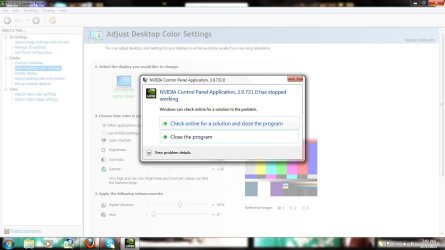
Also for some reason if i have the Nvidia control panel up for more than a few seconds i get this. Dont know if it has any significance
 

Attachments

  • nvidiaproblem.jpg
    nvidiaproblem.jpg
    76.2 KB · Views: 34

My Computer My Computer

Computer type
Laptop
Computer Manufacturer/Model Number
HP dv6
OS
Windows 7 Professional 64 bit
CPU
Intel Core i7-3610QM CPU @ 2.3GHz
Memory
8 GB RAM
Graphics Card(s)
Nvidia GeFroce GT 650M
Sound Card
Beats Audio
Screen Resolution
1920x1080
Cooling
Cooler Master Cooling Pad, Internal Fans
Keyboard
Razer Blackwidow
Mouse
Razer Naga
Antivirus
Norton 360
Browser
Google Chrome
Yes, nVIDIA driver are buggy, which one do you have installed?
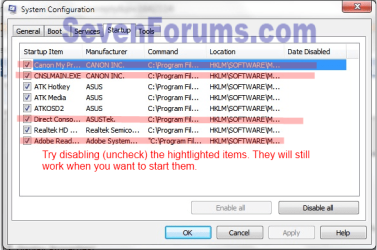
In startup try the below:
startups.png
 

My Computer My Computer

Computer type
PC/Desktop
Computer Manufacturer/Model Number
Home Built Desktop By DataTech
OS
Windows 7 Ultimate X64 SP1
CPU
Intel i5-2550K, Differing ~4.4-4.8GHz No built in GPU
Motherboard
ASUS P8Z68-V PRO/GEN3
Memory
16GB G.Skill Sniper 1866MHz @ 2133MHz 2x8GB
Graphics Card(s)
ASUS GTX650TIB-DC2OC-2GD5, (650TI Boost)
Sound Card
Onboard Realtek 5-1
Monitor(s) Displays
Samsung P2570HD
Screen Resolution
1920x1080
Hard Drives
Samsung 840 Pro 256GB SSD for OS, 500GB Seagate Constellation (Enterprise drive) for Data
PSU
Corsair HX650W
Case
Inwin Dragon Rider
Cooling
Hyper 212 EVO w/two Noctua fans, push-pull, @1300 RPM
Keyboard
E-Z Eyes, bright yellow keys with large characters
Mouse
steelseries SENSEI Laser Pro Gaming
Internet Speed
48-51Mbs Mbs down, 11 Mbs up Xfinity Cable
Antivirus
Norton Internet Security 2013
Browser
IE 10, Opera, Pale Moon if needed
Other Info
4 case fans, LG BluRay-RE, ASUS DVD-RW, Mr. Fusion power supply, 1.21 gigawatts.
Yes, nVIDIA driver are buggy, which one do you have installed?
In startup try the below:
View attachment 182438

nah still no luck...ive seen people with similar problems to mine, but ive only found two cases and the threads really went no where (the second one is for a desktop not a laptop, but maybe itll have some useful info.)

http://www.sevenforums.com/graphic-...coming-back-sleep-screen-has-orange-tint.html

http://www.sevenforums.com/graphic-cards/182738-monitor-tint.html
 

My Computer My Computer

Computer type
Laptop
Computer Manufacturer/Model Number
HP dv6
OS
Windows 7 Professional 64 bit
CPU
Intel Core i7-3610QM CPU @ 2.3GHz
Memory
8 GB RAM
Graphics Card(s)
Nvidia GeFroce GT 650M
Sound Card
Beats Audio
Screen Resolution
1920x1080
Cooling
Cooler Master Cooling Pad, Internal Fans
Keyboard
Razer Blackwidow
Mouse
Razer Naga
Antivirus
Norton 360
Browser
Google Chrome
Try Disable All, reboot and give that a try. Re-enable one at a time to see if it returns.
There is a glaring omission in your startups too, no security software.
There are links to 3 below my sig, MalwareBytes|Microsoft Security Essentials|SuperAntiSpyware
MSE is a full time program, MalwareBytes and Super AnitSpyware are on demand, free scanners.
 

My Computer My Computer

Computer type
PC/Desktop
Computer Manufacturer/Model Number
Home Built Desktop By DataTech
OS
Windows 7 Ultimate X64 SP1
CPU
Intel i5-2550K, Differing ~4.4-4.8GHz No built in GPU
Motherboard
ASUS P8Z68-V PRO/GEN3
Memory
16GB G.Skill Sniper 1866MHz @ 2133MHz 2x8GB
Graphics Card(s)
ASUS GTX650TIB-DC2OC-2GD5, (650TI Boost)
Sound Card
Onboard Realtek 5-1
Monitor(s) Displays
Samsung P2570HD
Screen Resolution
1920x1080
Hard Drives
Samsung 840 Pro 256GB SSD for OS, 500GB Seagate Constellation (Enterprise drive) for Data
PSU
Corsair HX650W
Case
Inwin Dragon Rider
Cooling
Hyper 212 EVO w/two Noctua fans, push-pull, @1300 RPM
Keyboard
E-Z Eyes, bright yellow keys with large characters
Mouse
steelseries SENSEI Laser Pro Gaming
Internet Speed
48-51Mbs Mbs down, 11 Mbs up Xfinity Cable
Antivirus
Norton Internet Security 2013
Browser
IE 10, Opera, Pale Moon if needed
Other Info
4 case fans, LG BluRay-RE, ASUS DVD-RW, Mr. Fusion power supply, 1.21 gigawatts.
Try Disable All, reboot and give that a try. Re-enable one at a time to see if it returns.
There is a glaring omission in your startups too, no security software.
There are links to 3 below my sig, MalwareBytes|Microsoft Security Essentials|SuperAntiSpyware
MSE is a full time program, MalwareBytes and Super AnitSpyware are on demand, free scanners.

That is weird, because i have Norton 360 installed on my computer. But im not sure if it could be a startup program problem because when i restart my computer it doesnt happen. only out of hibernation.
 

My Computer My Computer

Computer type
Laptop
Computer Manufacturer/Model Number
HP dv6
OS
Windows 7 Professional 64 bit
CPU
Intel Core i7-3610QM CPU @ 2.3GHz
Memory
8 GB RAM
Graphics Card(s)
Nvidia GeFroce GT 650M
Sound Card
Beats Audio
Screen Resolution
1920x1080
Cooling
Cooler Master Cooling Pad, Internal Fans
Keyboard
Razer Blackwidow
Mouse
Razer Naga
Antivirus
Norton 360
Browser
Google Chrome
I have Norton Internet Security but use those also because they work and detect differently.
Instead of hibernate, try using only sleep instead to see how that works. Sleep writes your PC state to memory instead of a file on your drive and may perform better. Hibernate can corrupt files too.
 

My Computer My Computer

Computer type
PC/Desktop
Computer Manufacturer/Model Number
Home Built Desktop By DataTech
OS
Windows 7 Ultimate X64 SP1
CPU
Intel i5-2550K, Differing ~4.4-4.8GHz No built in GPU
Motherboard
ASUS P8Z68-V PRO/GEN3
Memory
16GB G.Skill Sniper 1866MHz @ 2133MHz 2x8GB
Graphics Card(s)
ASUS GTX650TIB-DC2OC-2GD5, (650TI Boost)
Sound Card
Onboard Realtek 5-1
Monitor(s) Displays
Samsung P2570HD
Screen Resolution
1920x1080
Hard Drives
Samsung 840 Pro 256GB SSD for OS, 500GB Seagate Constellation (Enterprise drive) for Data
PSU
Corsair HX650W
Case
Inwin Dragon Rider
Cooling
Hyper 212 EVO w/two Noctua fans, push-pull, @1300 RPM
Keyboard
E-Z Eyes, bright yellow keys with large characters
Mouse
steelseries SENSEI Laser Pro Gaming
Internet Speed
48-51Mbs Mbs down, 11 Mbs up Xfinity Cable
Antivirus
Norton Internet Security 2013
Browser
IE 10, Opera, Pale Moon if needed
Other Info
4 case fans, LG BluRay-RE, ASUS DVD-RW, Mr. Fusion power supply, 1.21 gigawatts.
I have Norton Internet Security but use those also because they work and detect differently.
Instead of hibernate, try using only sleep instead to see how that works. Sleep writes your PC state to memory instead of a file on your drive and may perform better. Hibernate can corrupt files too.

still happens out of sleep too :(
 

My Computer My Computer

Computer type
Laptop
Computer Manufacturer/Model Number
HP dv6
OS
Windows 7 Professional 64 bit
CPU
Intel Core i7-3610QM CPU @ 2.3GHz
Memory
8 GB RAM
Graphics Card(s)
Nvidia GeFroce GT 650M
Sound Card
Beats Audio
Screen Resolution
1920x1080
Cooling
Cooler Master Cooling Pad, Internal Fans
Keyboard
Razer Blackwidow
Mouse
Razer Naga
Antivirus
Norton 360
Browser
Google Chrome
Lol anyone else got any ideas? its a weird issue i know lol. Look through this thread so u can see what has worked/what hasnt. I need help with this. its beginning to get really annoying:confused:
 

My Computer My Computer

Computer type
Laptop
Computer Manufacturer/Model Number
HP dv6
OS
Windows 7 Professional 64 bit
CPU
Intel Core i7-3610QM CPU @ 2.3GHz
Memory
8 GB RAM
Graphics Card(s)
Nvidia GeFroce GT 650M
Sound Card
Beats Audio
Screen Resolution
1920x1080
Cooling
Cooler Master Cooling Pad, Internal Fans
Keyboard
Razer Blackwidow
Mouse
Razer Naga
Antivirus
Norton 360
Browser
Google Chrome
Did you try the scans from post #34? After another look at your start-ups, you could disable all of them. See what happens, then re-enable one by one till the issues returns. There is no security running in the start up.
 

My Computer My Computer

Computer type
PC/Desktop
Computer Manufacturer/Model Number
Home Built Desktop By DataTech
OS
Windows 7 Ultimate X64 SP1
CPU
Intel i5-2550K, Differing ~4.4-4.8GHz No built in GPU
Motherboard
ASUS P8Z68-V PRO/GEN3
Memory
16GB G.Skill Sniper 1866MHz @ 2133MHz 2x8GB
Graphics Card(s)
ASUS GTX650TIB-DC2OC-2GD5, (650TI Boost)
Sound Card
Onboard Realtek 5-1
Monitor(s) Displays
Samsung P2570HD
Screen Resolution
1920x1080
Hard Drives
Samsung 840 Pro 256GB SSD for OS, 500GB Seagate Constellation (Enterprise drive) for Data
PSU
Corsair HX650W
Case
Inwin Dragon Rider
Cooling
Hyper 212 EVO w/two Noctua fans, push-pull, @1300 RPM
Keyboard
E-Z Eyes, bright yellow keys with large characters
Mouse
steelseries SENSEI Laser Pro Gaming
Internet Speed
48-51Mbs Mbs down, 11 Mbs up Xfinity Cable
Antivirus
Norton Internet Security 2013
Browser
IE 10, Opera, Pale Moon if needed
Other Info
4 case fans, LG BluRay-RE, ASUS DVD-RW, Mr. Fusion power supply, 1.21 gigawatts.
Did you try the scans from post #34? After another look at your start-ups, you could disable all of them. See what happens, then re-enable one by one till the issues returns. There is no security running in the start up.

Even when all were disabled i still had the problem.
 

My Computer My Computer

Computer type
Laptop
Computer Manufacturer/Model Number
HP dv6
OS
Windows 7 Professional 64 bit
CPU
Intel Core i7-3610QM CPU @ 2.3GHz
Memory
8 GB RAM
Graphics Card(s)
Nvidia GeFroce GT 650M
Sound Card
Beats Audio
Screen Resolution
1920x1080
Cooling
Cooler Master Cooling Pad, Internal Fans
Keyboard
Razer Blackwidow
Mouse
Razer Naga
Antivirus
Norton 360
Browser
Google Chrome
Back
Top