Windows 7 Basic Theme Freezing

Jason761

New member
Local time
8:21 AM
Messages
17
I've been having freezing issues since I got my computer. When I switch from Aero to any Basic and High Contrast theme, my computer will freeze for 1-2 second if I minimize or maximize a window. My sound will also freeze for a short moment too. I've tried replacing my mobo and cpu, reformatting Windows 7, updating drivers to latest version and RAM test overnight and none of which fixed the issue. None of my other computers had these issues.
 

My Computer

Computer type
PC/Desktop
Computer Manufacturer/Model Number
Custom Build
OS
Windows 7 Ultimate SP1 64 bit
CPU
Intel i5-3570k
Motherboard
Asus P8Z77-V Pro (2104)
Memory
G.Skill Ripjaws X 16GB (4x4 GB) DDR3 1600MHz
Graphics Card(s)
MSI HD 7870 2GB
Sound Card
Creative SB X-Fi HD USB
Monitor(s) Displays
Asus VE247H
Screen Resolution
1080p
Hard Drives
ADATA XPG SX900 256GB SSD
WD Black 2TB
PSU
XFX Pro 850W XXX Edition Semi-Modular
Case
Zalman Z11 Plus
Cooling
CM Hyper 212 Evo (2 mounted fans) + 6 fans
Keyboard
Das Keyboard Model S Professional MX Brown PS/2
Mouse
Logitech G700s
Welcome back to Seven Forums Jason761. Let me see if I have your issue correctly.

Normally you use an Aero theme?

IF you switch to a Classic or High contrast theme every time you minimize or maximize a window your PC freezes for a couple of seconds? Over and over using a Classic or High contrast theme, it freezes every time?

OR

It freezes for a couple of seconds the first time only when you min/max after changing from an Aero theme?

A Guy
 

My Computer

Computer type
PC/Desktop
OS
Windows 10 Home x64
CPU
INTEL Core i5-750 Quad-Core 3.37GHz
Motherboard
ASUS P7P55D
Memory
HyperX Fury Black Series 8GB (2 x 4GB) 1866Mhz
Graphics Card(s)
EVGA GeForce GTX 750 Superclocked 1GB 128-Bit GDDR5
Monitor(s) Displays
LG 32MA68HY 32" IPS
Screen Resolution
1920 x 1080
Hard Drives
Samsung 840 Evo 120GB, SEAGATE 500GB Barracuda® 7200.12, SATA 3 Gb/s, 7200 RPM, 16MB cache
PSU
ANTEC TruePower New TP-550, 80 PLUS, 550W
Case
ANTEC Three Hundred Illusion
Cooling
COOLER MASTER Hyper 212 Plus, 4 x 120mm 1 x 140mm Noctua's
Internet Speed
85 + Mbps
Antivirus
Avast
Browser
Vivaldi
Yes I usually use the aero theme and never ran into any issues. My computer will always freeze for a few seconds when I minimize or maximize a window in a Classic or High Contrast theme.
 

My Computer

Computer type
PC/Desktop
Computer Manufacturer/Model Number
Custom Build
OS
Windows 7 Ultimate SP1 64 bit
CPU
Intel i5-3570k
Motherboard
Asus P8Z77-V Pro (2104)
Memory
G.Skill Ripjaws X 16GB (4x4 GB) DDR3 1600MHz
Graphics Card(s)
MSI HD 7870 2GB
Sound Card
Creative SB X-Fi HD USB
Monitor(s) Displays
Asus VE247H
Screen Resolution
1080p
Hard Drives
ADATA XPG SX900 256GB SSD
WD Black 2TB
PSU
XFX Pro 850W XXX Edition Semi-Modular
Case
Zalman Z11 Plus
Cooling
CM Hyper 212 Evo (2 mounted fans) + 6 fans
Keyboard
Das Keyboard Model S Professional MX Brown PS/2
Mouse
Logitech G700s

My Computer

Computer type
PC/Desktop
OS
Windows 10 Home x64
CPU
INTEL Core i5-750 Quad-Core 3.37GHz
Motherboard
ASUS P7P55D
Memory
HyperX Fury Black Series 8GB (2 x 4GB) 1866Mhz
Graphics Card(s)
EVGA GeForce GTX 750 Superclocked 1GB 128-Bit GDDR5
Monitor(s) Displays
LG 32MA68HY 32" IPS
Screen Resolution
1920 x 1080
Hard Drives
Samsung 840 Evo 120GB, SEAGATE 500GB Barracuda® 7200.12, SATA 3 Gb/s, 7200 RPM, 16MB cache
PSU
ANTEC TruePower New TP-550, 80 PLUS, 550W
Case
ANTEC Three Hundred Illusion
Cooling
COOLER MASTER Hyper 212 Plus, 4 x 120mm 1 x 140mm Noctua's
Internet Speed
85 + Mbps
Antivirus
Avast
Browser
Vivaldi
I tried a clean boot but it still happens.
 

My Computer

Computer type
PC/Desktop
Computer Manufacturer/Model Number
Custom Build
OS
Windows 7 Ultimate SP1 64 bit
CPU
Intel i5-3570k
Motherboard
Asus P8Z77-V Pro (2104)
Memory
G.Skill Ripjaws X 16GB (4x4 GB) DDR3 1600MHz
Graphics Card(s)
MSI HD 7870 2GB
Sound Card
Creative SB X-Fi HD USB
Monitor(s) Displays
Asus VE247H
Screen Resolution
1080p
Hard Drives
ADATA XPG SX900 256GB SSD
WD Black 2TB
PSU
XFX Pro 850W XXX Edition Semi-Modular
Case
Zalman Z11 Plus
Cooling
CM Hyper 212 Evo (2 mounted fans) + 6 fans
Keyboard
Das Keyboard Model S Professional MX Brown PS/2
Mouse
Logitech G700s

My Computer

Computer type
PC/Desktop
OS
Windows 10 Home x64
CPU
INTEL Core i5-750 Quad-Core 3.37GHz
Motherboard
ASUS P7P55D
Memory
HyperX Fury Black Series 8GB (2 x 4GB) 1866Mhz
Graphics Card(s)
EVGA GeForce GTX 750 Superclocked 1GB 128-Bit GDDR5
Monitor(s) Displays
LG 32MA68HY 32" IPS
Screen Resolution
1920 x 1080
Hard Drives
Samsung 840 Evo 120GB, SEAGATE 500GB Barracuda® 7200.12, SATA 3 Gb/s, 7200 RPM, 16MB cache
PSU
ANTEC TruePower New TP-550, 80 PLUS, 550W
Case
ANTEC Three Hundred Illusion
Cooling
COOLER MASTER Hyper 212 Plus, 4 x 120mm 1 x 140mm Noctua's
Internet Speed
85 + Mbps
Antivirus
Avast
Browser
Vivaldi
Event Viewer doesn't display any errors when minimizing or maximizing but I do get something when changing themes.

This is the error I get when change from Aero -> Windows Basic.
Code:
Log Name:      Application
Source:        Desktop Window Manager
Date:          01/06/2014 11:04:56 PM
Event ID:      9019
Task Category: None
Level:         Information
Keywords:      Classic
User:          N/A
Computer:      Jason-PC
Description:
The Desktop Window Manager was unable to start because the desktop composition setting is disabled
Event Xml:
<Event xmlns="http://schemas.microsoft.com/win/2004/08/events/event">
  <System>
    <Provider Name="Desktop Window Manager" />
    <EventID Qualifiers="16384">9019</EventID>
    <Level>4</Level>
    <Task>0</Task>
    <Keywords>0x80000000000000</Keywords>
    <TimeCreated SystemTime="2014-06-02T06:04:56.000000000Z" />
    <EventRecordID>25347</EventRecordID>
    <Channel>Application</Channel>
    <Computer>Jason-PC</Computer>
    <Security />
  </System>
  <EventData>
  </EventData>
</Event>

This is from Windows Basic -> Classic
Code:
Log Name:      Application
Source:        Desktop Window Manager
Date:          01/06/2014 11:07:35 PM
Event ID:      9003
Task Category: None
Level:         Information
Keywords:      Classic
User:          N/A
Computer:      Jason-PC
Description:
The Desktop Window Manager was unable to start because a composited theme is not in use
Event Xml:
<Event xmlns="http://schemas.microsoft.com/win/2004/08/events/event">
  <System>
    <Provider Name="Desktop Window Manager" />
    <EventID Qualifiers="16384">9003</EventID>
    <Level>4</Level>
    <Task>0</Task>
    <Keywords>0x80000000000000</Keywords>
    <TimeCreated SystemTime="2014-06-02T06:07:35.000000000Z" />
    <EventRecordID>25350</EventRecordID>
    <Channel>Application</Channel>
    <Computer>Jason-PC</Computer>
    <Security />
  </System>
  <EventData>
  </EventData>
</Event>
 

My Computer

Computer type
PC/Desktop
Computer Manufacturer/Model Number
Custom Build
OS
Windows 7 Ultimate SP1 64 bit
CPU
Intel i5-3570k
Motherboard
Asus P8Z77-V Pro (2104)
Memory
G.Skill Ripjaws X 16GB (4x4 GB) DDR3 1600MHz
Graphics Card(s)
MSI HD 7870 2GB
Sound Card
Creative SB X-Fi HD USB
Monitor(s) Displays
Asus VE247H
Screen Resolution
1080p
Hard Drives
ADATA XPG SX900 256GB SSD
WD Black 2TB
PSU
XFX Pro 850W XXX Edition Semi-Modular
Case
Zalman Z11 Plus
Cooling
CM Hyper 212 Evo (2 mounted fans) + 6 fans
Keyboard
Das Keyboard Model S Professional MX Brown PS/2
Mouse
Logitech G700s

My Computer

Computer type
PC/Desktop
OS
Windows 10 Home x64
CPU
INTEL Core i5-750 Quad-Core 3.37GHz
Motherboard
ASUS P7P55D
Memory
HyperX Fury Black Series 8GB (2 x 4GB) 1866Mhz
Graphics Card(s)
EVGA GeForce GTX 750 Superclocked 1GB 128-Bit GDDR5
Monitor(s) Displays
LG 32MA68HY 32" IPS
Screen Resolution
1920 x 1080
Hard Drives
Samsung 840 Evo 120GB, SEAGATE 500GB Barracuda® 7200.12, SATA 3 Gb/s, 7200 RPM, 16MB cache
PSU
ANTEC TruePower New TP-550, 80 PLUS, 550W
Case
ANTEC Three Hundred Illusion
Cooling
COOLER MASTER Hyper 212 Plus, 4 x 120mm 1 x 140mm Noctua's
Internet Speed
85 + Mbps
Antivirus
Avast
Browser
Vivaldi
Desktop composition is already enabled. There is no option for it in Basic and High Contrast themes.
 

My Computer

Computer type
PC/Desktop
Computer Manufacturer/Model Number
Custom Build
OS
Windows 7 Ultimate SP1 64 bit
CPU
Intel i5-3570k
Motherboard
Asus P8Z77-V Pro (2104)
Memory
G.Skill Ripjaws X 16GB (4x4 GB) DDR3 1600MHz
Graphics Card(s)
MSI HD 7870 2GB
Sound Card
Creative SB X-Fi HD USB
Monitor(s) Displays
Asus VE247H
Screen Resolution
1080p
Hard Drives
ADATA XPG SX900 256GB SSD
WD Black 2TB
PSU
XFX Pro 850W XXX Edition Semi-Modular
Case
Zalman Z11 Plus
Cooling
CM Hyper 212 Evo (2 mounted fans) + 6 fans
Keyboard
Das Keyboard Model S Professional MX Brown PS/2
Mouse
Logitech G700s
Open a command prompt and enter the following

reg query HKLM\SYSTEM\CurrentControlSet\Services\UxSms /s > qUxSms.txt

Attach the file qUxSms.txt on a post (use the paperclip icon on the SF post menu to attach a file)
 

My Computer

Computer type
Laptop
Computer Manufacturer/Model Number
HP Pavilion dv6-6c10us
OS
x64 (6.3.9600) Win8.1 Pro & soon dual boot x64 (6.1.7601) Win7_SP1 HomePrem
CPU
AMD A6-3420M APU with Radeon(tm) HD Graphics
Motherboard
Hewlett-Packard 1805
Memory
6.00 GB
Graphics Card(s)
AMD Radeon(TM) HD 6520G
Sound Card
(1) AMD High Definition Audio Device (2) IDT High Definiti
Monitor(s) Displays
HP W2072a 20" LCD (1600 x 900) @ 60 Hz
Screen Resolution
1366 x 768 x 32 bits (4294967296 colors) @ 60 Hz
Hard Drives
ST640LM0 00 HM641JI SATA Disk Device
Keyboard
Logitech k520 wireless KB
Mouse
Logitech m320 wireless mouse (bundled with KB)
Internet Speed
15/5 | 54 MB Wireless 'n'
Antivirus
Realtime: Defender or Avast | On-demand: Malwarebytes, ESET
Browser
IE 11 on Win8, IE 10 on win 7
Other Info
Media: [Gimp, Audacity, VLC] || Comm: [WEmail 2012, Skype] || Productivity: [OpenOffice,| Textpad] || Utils: [Sysinternals, cCleaner, Speccy, Defraggler]
Are you restarting after the change to a basic theme? It shouldn't be necessary, but I thought I'd ask.
As the issue affects sound and graphics, there must be a timing issue when you change from Aero to basic themes.


A Guy asked about another user profile on the machine. If you don't have a 2nd user, try creating a temporary user to test if the issue is user profile related. After creating the new user, log off your normal profile and log on to the new profile. Try the same test with the new profile (change theme from aero to basic, then minimize a window). Same issue?

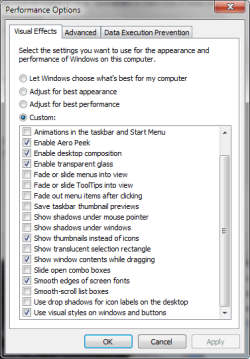
You might see if adjusting System Properties > Perfomance Options > Visual Effects helps.

If you have a custom scheme, record your existing settings (screenshots will do)

Try the upper three option picks (Let Windows, Best appear, best perf)
Minimize a window after each change is applied and see if any make a difference.
 

My Computer

Computer type
Laptop
Computer Manufacturer/Model Number
HP Pavilion dv6-6c10us
OS
x64 (6.3.9600) Win8.1 Pro & soon dual boot x64 (6.1.7601) Win7_SP1 HomePrem
CPU
AMD A6-3420M APU with Radeon(tm) HD Graphics
Motherboard
Hewlett-Packard 1805
Memory
6.00 GB
Graphics Card(s)
AMD Radeon(TM) HD 6520G
Sound Card
(1) AMD High Definition Audio Device (2) IDT High Definiti
Monitor(s) Displays
HP W2072a 20" LCD (1600 x 900) @ 60 Hz
Screen Resolution
1366 x 768 x 32 bits (4294967296 colors) @ 60 Hz
Hard Drives
ST640LM0 00 HM641JI SATA Disk Device
Keyboard
Logitech k520 wireless KB
Mouse
Logitech m320 wireless mouse (bundled with KB)
Internet Speed
15/5 | 54 MB Wireless 'n'
Antivirus
Realtime: Defender or Avast | On-demand: Malwarebytes, ESET
Browser
IE 11 on Win8, IE 10 on win 7
Other Info
Media: [Gimp, Audacity, VLC] || Comm: [WEmail 2012, Skype] || Productivity: [OpenOffice,| Textpad] || Utils: [Sysinternals, cCleaner, Speccy, Defraggler]
Open a command prompt and enter the following

reg query HKLM\SYSTEM\CurrentControlSet\Services\UxSms /s > qUxSms.txt

Attach the file qUxSms.txt on a post (use the paperclip icon on the SF post menu to attach a file)

View attachment qUxSms.txt

Are you restarting after the change to a basic theme? It shouldn't be necessary, but I thought I'd ask.
As the issue affects sound and graphics, there must be a timing issue when you change from Aero to basic themes.


A Guy asked about another user profile on the machine. If you don't have a 2nd user, try creating a temporary user to test if the issue is user profile related. After creating the new user, log off your normal profile and log on to the new profile. Try the same test with the new profile (change theme from aero to basic, then minimize a window). Same issue?

You might see if adjusting System Properties > Perfomance Options > Visual Effects helps.

If you have a custom scheme, record your existing settings (screenshots will do)

Try the upper three option picks (Let Windows, Best appear, best perf)
Minimize a window after each change is applied and see if any make a difference.

I do not restart after a theme change. Same issue appears on the Guest Account after switching to Windows Basic or High Contrast themes.

I don't use a custom scheme; I use the default Windows 7 Aero Theme.

Let Windows choose and best appearance does not fix the problem. However, Best Performance fixes the issue. I thinking its because "animate windows when minimizing and maximizing" is unchecked.
 

My Computer

Computer type
PC/Desktop
Computer Manufacturer/Model Number
Custom Build
OS
Windows 7 Ultimate SP1 64 bit
CPU
Intel i5-3570k
Motherboard
Asus P8Z77-V Pro (2104)
Memory
G.Skill Ripjaws X 16GB (4x4 GB) DDR3 1600MHz
Graphics Card(s)
MSI HD 7870 2GB
Sound Card
Creative SB X-Fi HD USB
Monitor(s) Displays
Asus VE247H
Screen Resolution
1080p
Hard Drives
ADATA XPG SX900 256GB SSD
WD Black 2TB
PSU
XFX Pro 850W XXX Edition Semi-Modular
Case
Zalman Z11 Plus
Cooling
CM Hyper 212 Evo (2 mounted fans) + 6 fans
Keyboard
Das Keyboard Model S Professional MX Brown PS/2
Mouse
Logitech G700s
Thanks Jason,

the regQuery on your machine and mine are identical.

Sorry... I wasn't clear when I asked about a custom scheme. I meant "Do you select a custom set of options for Visual Effects in System Properties > Performance Options". It's moot now.

Excellent sleuthing on the Best Performance pick - your analysis makes perfect sense.

I run a custom set, opting to turn off most of the animations, slides, fades, shadows....

myPerf.png


Does this qualify as a solved issue?
 

My Computer

Computer type
Laptop
Computer Manufacturer/Model Number
HP Pavilion dv6-6c10us
OS
x64 (6.3.9600) Win8.1 Pro & soon dual boot x64 (6.1.7601) Win7_SP1 HomePrem
CPU
AMD A6-3420M APU with Radeon(tm) HD Graphics
Motherboard
Hewlett-Packard 1805
Memory
6.00 GB
Graphics Card(s)
AMD Radeon(TM) HD 6520G
Sound Card
(1) AMD High Definition Audio Device (2) IDT High Definiti
Monitor(s) Displays
HP W2072a 20" LCD (1600 x 900) @ 60 Hz
Screen Resolution
1366 x 768 x 32 bits (4294967296 colors) @ 60 Hz
Hard Drives
ST640LM0 00 HM641JI SATA Disk Device
Keyboard
Logitech k520 wireless KB
Mouse
Logitech m320 wireless mouse (bundled with KB)
Internet Speed
15/5 | 54 MB Wireless 'n'
Antivirus
Realtime: Defender or Avast | On-demand: Malwarebytes, ESET
Browser
IE 11 on Win8, IE 10 on win 7
Other Info
Media: [Gimp, Audacity, VLC] || Comm: [WEmail 2012, Skype] || Productivity: [OpenOffice,| Textpad] || Utils: [Sysinternals, cCleaner, Speccy, Defraggler]
I leave the visual effects to default (let windows choose). I don't think the issue is solved. I am fairly certain my rig can handle all visual effects without struggling. Its weird how this is happening on non-Aero themes.
 

My Computer

Computer type
PC/Desktop
Computer Manufacturer/Model Number
Custom Build
OS
Windows 7 Ultimate SP1 64 bit
CPU
Intel i5-3570k
Motherboard
Asus P8Z77-V Pro (2104)
Memory
G.Skill Ripjaws X 16GB (4x4 GB) DDR3 1600MHz
Graphics Card(s)
MSI HD 7870 2GB
Sound Card
Creative SB X-Fi HD USB
Monitor(s) Displays
Asus VE247H
Screen Resolution
1080p
Hard Drives
ADATA XPG SX900 256GB SSD
WD Black 2TB
PSU
XFX Pro 850W XXX Edition Semi-Modular
Case
Zalman Z11 Plus
Cooling
CM Hyper 212 Evo (2 mounted fans) + 6 fans
Keyboard
Das Keyboard Model S Professional MX Brown PS/2
Mouse
Logitech G700s
Fair enough.

I'm curious about the sound issue too. If you set it to best performance, is the still a lag in audio?

Yeah, it's not a matter of hardware handling the effects, I think it's a software timing issue. Windows is told to animate the minimize and the basic theme doesn't employ aero to animate the process, so it "shrugs". I don't think it's all that weird - you're telling Windows to do something (animate minimize/maximize) in one configuration and telling windows not to use the feature (aero) that allows the first configuration. Should Windows behave differently... probably.

You could try choosing Best Appearance and unticking the two min-max windows animations.

While perhaps not solved, it seems to be a viable workaround. Especially since you say you normally run in Aero.

That's all I can add, good luck.

Bill
.
 

My Computer

Computer type
Laptop
Computer Manufacturer/Model Number
HP Pavilion dv6-6c10us
OS
x64 (6.3.9600) Win8.1 Pro & soon dual boot x64 (6.1.7601) Win7_SP1 HomePrem
CPU
AMD A6-3420M APU with Radeon(tm) HD Graphics
Motherboard
Hewlett-Packard 1805
Memory
6.00 GB
Graphics Card(s)
AMD Radeon(TM) HD 6520G
Sound Card
(1) AMD High Definition Audio Device (2) IDT High Definiti
Monitor(s) Displays
HP W2072a 20" LCD (1600 x 900) @ 60 Hz
Screen Resolution
1366 x 768 x 32 bits (4294967296 colors) @ 60 Hz
Hard Drives
ST640LM0 00 HM641JI SATA Disk Device
Keyboard
Logitech k520 wireless KB
Mouse
Logitech m320 wireless mouse (bundled with KB)
Internet Speed
15/5 | 54 MB Wireless 'n'
Antivirus
Realtime: Defender or Avast | On-demand: Malwarebytes, ESET
Browser
IE 11 on Win8, IE 10 on win 7
Other Info
Media: [Gimp, Audacity, VLC] || Comm: [WEmail 2012, Skype] || Productivity: [OpenOffice,| Textpad] || Utils: [Sysinternals, cCleaner, Speccy, Defraggler]
No the audio doesn't lag when set in best performance.

Anyone else have any suggestions?
 

My Computer

Computer type
PC/Desktop
Computer Manufacturer/Model Number
Custom Build
OS
Windows 7 Ultimate SP1 64 bit
CPU
Intel i5-3570k
Motherboard
Asus P8Z77-V Pro (2104)
Memory
G.Skill Ripjaws X 16GB (4x4 GB) DDR3 1600MHz
Graphics Card(s)
MSI HD 7870 2GB
Sound Card
Creative SB X-Fi HD USB
Monitor(s) Displays
Asus VE247H
Screen Resolution
1080p
Hard Drives
ADATA XPG SX900 256GB SSD
WD Black 2TB
PSU
XFX Pro 850W XXX Edition Semi-Modular
Case
Zalman Z11 Plus
Cooling
CM Hyper 212 Evo (2 mounted fans) + 6 fans
Keyboard
Das Keyboard Model S Professional MX Brown PS/2
Mouse
Logitech G700s
1.) This is a longshot, but have you tried the built in windows 7 aero troubleshooter?

:orb:, control panel. System and Security-Click Troubleshoot common computer problems under action center. Click display aero desktop effects.

Let me know what the troubleshooter says.


2.)

Please Run sfc /scan now using option 2 in this tutorial: SFC /SCANNOW Command - System File Checker

Please post back the results.
Please indicate what message was displayed at the end:

Windows found no integrity violations

OR

Corrupt files were found, and windows was unable to fix them.

OR

Corrupt files were found, and windows successfully repaired them

3.) Go to here:

http://www.sevenforums.com/tutorials/236709-services-restore-default-services-windows-7-a.html

Download the Desktop Window Manager Session Manager and merge the file. Restart.
 

My Computer

Computer type
PC/Desktop
Computer Manufacturer/Model Number
Custom Built
OS
Windows 10 Pro
CPU
AMD Ryzen 5 2400G Processor with Radeon RX Vega 11 Graphics
Motherboard
ASRock X470 Master SLI/AC AM4 AMD Promontory X470 SATA 6Gb/s
Memory
G.SKILL Ripjaws V Series 16GB (2 x 8GB) 288-Pin DDR4 SDRAM D
Graphics Card(s)
2047MB NVIDIA GeForce GTX 1060 6GB (EVGA)
Sound Card
Motherboard Built in
Monitor(s) Displays
Acer R240HY bidx 23.8-Inch IPS HDMI DVI VGA (1920 x 1080) Wi
Screen Resolution
1920 x 1080
Hard Drives
1TB Sandisk SSD PLUS (Main drive)
500 GB Seagate 7200 RPM (Games)
500 GB Western Digital 7200 RPM (Virtual Machines)
PSU
CORSAIR TX Series TX650M 650W 80+ Gold Modular Power Supply
Case
CORSAIR CARBIDE SPEC-02 Mid-Tower Gaming Case, Red LED Fan
Cooling
220mm, two 120mm, and four 60mm fans
Keyboard
Wired Dell keyboard
Mouse
Wireless Logitech mouse
Internet Speed
250mb down, 30mb up
Antivirus
Panda Cloud Antivirus
Browser
Chrome-ish x64
Other Info
Your awesome for reading this.
1. Says "Troubleshooting couldn't identify the problem. "

2. "Windows Resource Protection did not find any integrity violations. "

3. I merged the file and restarted.
 

My Computer

Computer type
PC/Desktop
Computer Manufacturer/Model Number
Custom Build
OS
Windows 7 Ultimate SP1 64 bit
CPU
Intel i5-3570k
Motherboard
Asus P8Z77-V Pro (2104)
Memory
G.Skill Ripjaws X 16GB (4x4 GB) DDR3 1600MHz
Graphics Card(s)
MSI HD 7870 2GB
Sound Card
Creative SB X-Fi HD USB
Monitor(s) Displays
Asus VE247H
Screen Resolution
1080p
Hard Drives
ADATA XPG SX900 256GB SSD
WD Black 2TB
PSU
XFX Pro 850W XXX Edition Semi-Modular
Case
Zalman Z11 Plus
Cooling
CM Hyper 212 Evo (2 mounted fans) + 6 fans
Keyboard
Das Keyboard Model S Professional MX Brown PS/2
Mouse
Logitech G700s
This happens with the discreet HD7870? Can you test with the IGPU HD 4000? See if it's the same. A Guy
 

My Computer

Computer type
PC/Desktop
OS
Windows 10 Home x64
CPU
INTEL Core i5-750 Quad-Core 3.37GHz
Motherboard
ASUS P7P55D
Memory
HyperX Fury Black Series 8GB (2 x 4GB) 1866Mhz
Graphics Card(s)
EVGA GeForce GTX 750 Superclocked 1GB 128-Bit GDDR5
Monitor(s) Displays
LG 32MA68HY 32" IPS
Screen Resolution
1920 x 1080
Hard Drives
Samsung 840 Evo 120GB, SEAGATE 500GB Barracuda® 7200.12, SATA 3 Gb/s, 7200 RPM, 16MB cache
PSU
ANTEC TruePower New TP-550, 80 PLUS, 550W
Case
ANTEC Three Hundred Illusion
Cooling
COOLER MASTER Hyper 212 Plus, 4 x 120mm 1 x 140mm Noctua's
Internet Speed
85 + Mbps
Antivirus
Avast
Browser
Vivaldi
Same thing. It always freezes for a few seconds.

I notice that if I unplug or plug in my mouse (receiver or cable), that it also freezes for 1-2 seconds including sound.

Edit: I forgot to mention that I also get window trailing on Basic and High Contrast themes.
 
Last edited:

My Computer

Computer type
PC/Desktop
Computer Manufacturer/Model Number
Custom Build
OS
Windows 7 Ultimate SP1 64 bit
CPU
Intel i5-3570k
Motherboard
Asus P8Z77-V Pro (2104)
Memory
G.Skill Ripjaws X 16GB (4x4 GB) DDR3 1600MHz
Graphics Card(s)
MSI HD 7870 2GB
Sound Card
Creative SB X-Fi HD USB
Monitor(s) Displays
Asus VE247H
Screen Resolution
1080p
Hard Drives
ADATA XPG SX900 256GB SSD
WD Black 2TB
PSU
XFX Pro 850W XXX Edition Semi-Modular
Case
Zalman Z11 Plus
Cooling
CM Hyper 212 Evo (2 mounted fans) + 6 fans
Keyboard
Das Keyboard Model S Professional MX Brown PS/2
Mouse
Logitech G700s
Back
Top