Windows 7 black screen with cursor

devenj01

New member
Local time
4:52 PM
Messages
7
hi for some reason my dell inspiron 1525 screen went black with a moving cursor when i turned it on..i dont want to reinstall because i have alot of important data on it.the same thing happens in safe mode, ive tried system repair,system restore,system image recovery
and diagnostic..i tried to to run sfc /scannow
but it says "there is a system repair pending which requires reboot to complete. Restart Windows and run sfc again.

I've restarted multiple times still the same result occurs
can any one help!!!?:cry:

also here is my log file results if it helps
 
Last edited:

My Computer

OS
windows 7
hi there :)
if you have run the sfc scan several times and it does not find any violations have you run a virus/mailware scan? check for updates for your drivers graphics card etc. also a bios update check. also could you fill your specs out please so the forum readers can assist you better :)
 

My Computer

Computer Manufacturer/Model Number
packard bell IXTREME M5722
OS
Operating System : Windows 7 Home Premium Edition 6.01.7600 SP1 (x64)
CPU
Processor : Intel Core 2 Quad Q8300 @ 2500 MHz
Motherboard
Mainboard : Packard Bell (Acer EG43M )
Memory
Physical Memory :8GB Corsair4x 2GB 800MHz C5 DDR2
Graphics Card(s)
Video Card : XFX 6700 AMD
Monitor(s) Displays
Maestro 234DL - BenQ V2220 - BenQ VW2420H
Screen Resolution
Current Display :1920x1080p pixels at 60 Hz in HD LED
Hard Drives
Hard Disks : WDC (1000 GB)
Drive C: (Hard Disk) : 428 GB available on 491 GB
Drive D: (Hard Disk) : 426 GB available on 492 GB
SAMSUNG spinpoint HD103SJ 1000.2 GB
(X 2) KINGSTON SSD NOW V 30GB
PSU
XFX ProSeries 550W PSU
Case
PACKARD BELL IXTREME
Cooling
System Blower Current: 150mA Air Flow16CFM ;Akasa 90mm rear
Keyboard
Gigabyte Aivia K8100
Mouse
TRUST-Wireless Laser Mouse - Carbon edition MI-7770C
Internet Speed
TP-LINK > TL-WN951N / AV500 Gigabit Powerline Adapters
Browser
chrome dev
Other Info
EXTRA COOLING>(FAN CONTROLLER) PC Bay Cooler 3 x 40mm fans; Akasa AK-HD-BL Blue hard drive cooler 2 x 40 mm fan 4500 rpm 29.7 dBA
Bios> American Megatrends Inc.
Version : P01-A1
Date : 08/31/2009
hi there :)
if you have run the sfc scan several times and it does not find any violations have you run a virus/mailware scan? check for updates for your drivers graphics card etc. also a bios update check. also could you fill your specs out please so the forum readers can assist you better :)


thanks! and i cant seem to run sfc /scannow now because it says "there is a system repair pending"
ok i will fill it out soon
 

My Computer

OS
windows 7
Check your hard disk for errors

You can help solve some computer problems and improve the performance of your computer by making sure that your hard disk has no errors.

Open Computer by clicking the Start button , and then clicking Computer.

Right-click the hard disk drive that you want to check, and then click Properties.

Click the Tools tab, and then, under Error-checking, click Check Now. If you are prompted for an administrator password or confirmation, type the password or provide confirmation.

To automatically repair problems with files and folders that the scan detects, select Automatically fix file system errors. Otherwise, the disk check will simply report problems but not fix them.

To perform a thorough disk check, select Scan for and attempt recovery of bad sectors. This scan attempts to find and repair physical errors on the hard disk itself, and it can take much longer to complete.

To check for both file errors and physical errors, select both Automatically fix file system errors and Scan for and attempt recovery of bad sectors.

Click Start.

Depending upon the size of your hard disk, this may take several minutes. For best results, don't use your computer for any other tasks while it's checking for errors.

more info >>> http://windows.microsoft.com/en-US/windows-vista/Check-your-hard-disk-for-errors
 

My Computer

Computer Manufacturer/Model Number
packard bell IXTREME M5722
OS
Operating System : Windows 7 Home Premium Edition 6.01.7600 SP1 (x64)
CPU
Processor : Intel Core 2 Quad Q8300 @ 2500 MHz
Motherboard
Mainboard : Packard Bell (Acer EG43M )
Memory
Physical Memory :8GB Corsair4x 2GB 800MHz C5 DDR2
Graphics Card(s)
Video Card : XFX 6700 AMD
Monitor(s) Displays
Maestro 234DL - BenQ V2220 - BenQ VW2420H
Screen Resolution
Current Display :1920x1080p pixels at 60 Hz in HD LED
Hard Drives
Hard Disks : WDC (1000 GB)
Drive C: (Hard Disk) : 428 GB available on 491 GB
Drive D: (Hard Disk) : 426 GB available on 492 GB
SAMSUNG spinpoint HD103SJ 1000.2 GB
(X 2) KINGSTON SSD NOW V 30GB
PSU
XFX ProSeries 550W PSU
Case
PACKARD BELL IXTREME
Cooling
System Blower Current: 150mA Air Flow16CFM ;Akasa 90mm rear
Keyboard
Gigabyte Aivia K8100
Mouse
TRUST-Wireless Laser Mouse - Carbon edition MI-7770C
Internet Speed
TP-LINK > TL-WN951N / AV500 Gigabit Powerline Adapters
Browser
chrome dev
Other Info
EXTRA COOLING>(FAN CONTROLLER) PC Bay Cooler 3 x 40mm fans; Akasa AK-HD-BL Blue hard drive cooler 2 x 40 mm fan 4500 rpm 29.7 dBA
Bios> American Megatrends Inc.
Version : P01-A1
Date : 08/31/2009
Check your hard disk for errors

You can help solve some computer problems and improve the performance of your computer by making sure that your hard disk has no errors.

Open Computer by clicking the Start button , and then clicking Computer.

Right-click the hard disk drive that you want to check, and then click Properties.

Click the Tools tab, and then, under Error-checking, click Check Now. If you are prompted for an administrator password or confirmation, type the password or provide confirmation.

To automatically repair problems with files and folders that the scan detects, select Automatically fix file system errors. Otherwise, the disk check will simply report problems but not fix them.

To perform a thorough disk check, select Scan for and attempt recovery of bad sectors. This scan attempts to find and repair physical errors on the hard disk itself, and it can take much longer to complete.

To check for both file errors and physical errors, select both Automatically fix file system errors and Scan for and attempt recovery of bad sectors.

Click Start.

Depending upon the size of your hard disk, this may take several minutes. For best results, don't use your computer for any other tasks while it's checking for errors.

more info >>> Check your hard disk for errors


my screen goes black before it gets to the login i cant login to my computer.
im trying to fix it using command prompt
 

My Computer

OS
windows 7
ok turn the pc off unplug the mains socket then press the pc power button for 5 secs or more to discharge any power in the machine.
now take your graphics card out and then re-sit it.
take the ram out (memory) and re-sit it
before working inside pc remember to earth yourself by touching a metal part of the pc to help discharge the static electricity so not to damage sensitive parts
then plug mains in and re-boot
this will reset the motherboard.
 

My Computer

Computer Manufacturer/Model Number
packard bell IXTREME M5722
OS
Operating System : Windows 7 Home Premium Edition 6.01.7600 SP1 (x64)
CPU
Processor : Intel Core 2 Quad Q8300 @ 2500 MHz
Motherboard
Mainboard : Packard Bell (Acer EG43M )
Memory
Physical Memory :8GB Corsair4x 2GB 800MHz C5 DDR2
Graphics Card(s)
Video Card : XFX 6700 AMD
Monitor(s) Displays
Maestro 234DL - BenQ V2220 - BenQ VW2420H
Screen Resolution
Current Display :1920x1080p pixels at 60 Hz in HD LED
Hard Drives
Hard Disks : WDC (1000 GB)
Drive C: (Hard Disk) : 428 GB available on 491 GB
Drive D: (Hard Disk) : 426 GB available on 492 GB
SAMSUNG spinpoint HD103SJ 1000.2 GB
(X 2) KINGSTON SSD NOW V 30GB
PSU
XFX ProSeries 550W PSU
Case
PACKARD BELL IXTREME
Cooling
System Blower Current: 150mA Air Flow16CFM ;Akasa 90mm rear
Keyboard
Gigabyte Aivia K8100
Mouse
TRUST-Wireless Laser Mouse - Carbon edition MI-7770C
Internet Speed
TP-LINK > TL-WN951N / AV500 Gigabit Powerline Adapters
Browser
chrome dev
Other Info
EXTRA COOLING>(FAN CONTROLLER) PC Bay Cooler 3 x 40mm fans; Akasa AK-HD-BL Blue hard drive cooler 2 x 40 mm fan 4500 rpm 29.7 dBA
Bios> American Megatrends Inc.
Version : P01-A1
Date : 08/31/2009
ok turn the pc off unplug the mains socket then press the pc power button for 5 secs or more to discharge any power in the machine.
now take your graphics card out and then re-sit it.
take the ram out (memory) and re-sit it
before working inside pc remember to earth yourself by touching a metal part of the pc to help discharge the static electricity so not to damage sensitive parts
then plug mains in and re-boot
this will reset the motherboard.

ok just tried it and screen is still black and still cannot use sfc /scannow
 

My Computer

OS
windows 7
have you a windows 7 repair disc that you have tried? and have you tried booting into safe mode? it sounds like it may be hardware errors as well.
 

My Computer

Computer Manufacturer/Model Number
packard bell IXTREME M5722
OS
Operating System : Windows 7 Home Premium Edition 6.01.7600 SP1 (x64)
CPU
Processor : Intel Core 2 Quad Q8300 @ 2500 MHz
Motherboard
Mainboard : Packard Bell (Acer EG43M )
Memory
Physical Memory :8GB Corsair4x 2GB 800MHz C5 DDR2
Graphics Card(s)
Video Card : XFX 6700 AMD
Monitor(s) Displays
Maestro 234DL - BenQ V2220 - BenQ VW2420H
Screen Resolution
Current Display :1920x1080p pixels at 60 Hz in HD LED
Hard Drives
Hard Disks : WDC (1000 GB)
Drive C: (Hard Disk) : 428 GB available on 491 GB
Drive D: (Hard Disk) : 426 GB available on 492 GB
SAMSUNG spinpoint HD103SJ 1000.2 GB
(X 2) KINGSTON SSD NOW V 30GB
PSU
XFX ProSeries 550W PSU
Case
PACKARD BELL IXTREME
Cooling
System Blower Current: 150mA Air Flow16CFM ;Akasa 90mm rear
Keyboard
Gigabyte Aivia K8100
Mouse
TRUST-Wireless Laser Mouse - Carbon edition MI-7770C
Internet Speed
TP-LINK > TL-WN951N / AV500 Gigabit Powerline Adapters
Browser
chrome dev
Other Info
EXTRA COOLING>(FAN CONTROLLER) PC Bay Cooler 3 x 40mm fans; Akasa AK-HD-BL Blue hard drive cooler 2 x 40 mm fan 4500 rpm 29.7 dBA
Bios> American Megatrends Inc.
Version : P01-A1
Date : 08/31/2009
Using the F8 Method:

Restart your computer.
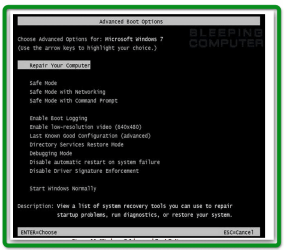
When the computer starts you will see your computer's hardware being listed. When you see this information start to gently tap the F8 key on your keyboard repeatedly until you are presented with the Windows 7 Advanced Boot Options screen as shown in the image below.
 

Attachments

  • brys_2011.04.22_19h56m13s_001.png
    brys_2011.04.22_19h56m13s_001.png
    47.2 KB · Views: 273

My Computer

Computer Manufacturer/Model Number
packard bell IXTREME M5722
OS
Operating System : Windows 7 Home Premium Edition 6.01.7600 SP1 (x64)
CPU
Processor : Intel Core 2 Quad Q8300 @ 2500 MHz
Motherboard
Mainboard : Packard Bell (Acer EG43M )
Memory
Physical Memory :8GB Corsair4x 2GB 800MHz C5 DDR2
Graphics Card(s)
Video Card : XFX 6700 AMD
Monitor(s) Displays
Maestro 234DL - BenQ V2220 - BenQ VW2420H
Screen Resolution
Current Display :1920x1080p pixels at 60 Hz in HD LED
Hard Drives
Hard Disks : WDC (1000 GB)
Drive C: (Hard Disk) : 428 GB available on 491 GB
Drive D: (Hard Disk) : 426 GB available on 492 GB
SAMSUNG spinpoint HD103SJ 1000.2 GB
(X 2) KINGSTON SSD NOW V 30GB
PSU
XFX ProSeries 550W PSU
Case
PACKARD BELL IXTREME
Cooling
System Blower Current: 150mA Air Flow16CFM ;Akasa 90mm rear
Keyboard
Gigabyte Aivia K8100
Mouse
TRUST-Wireless Laser Mouse - Carbon edition MI-7770C
Internet Speed
TP-LINK > TL-WN951N / AV500 Gigabit Powerline Adapters
Browser
chrome dev
Other Info
EXTRA COOLING>(FAN CONTROLLER) PC Bay Cooler 3 x 40mm fans; Akasa AK-HD-BL Blue hard drive cooler 2 x 40 mm fan 4500 rpm 29.7 dBA
Bios> American Megatrends Inc.
Version : P01-A1
Date : 08/31/2009
i have the upgrade disk but i don t want to reinstall
and yes i have tried safe mode..no go

Ok now when i turn it on it goes to the login screen (but no login bar appears ) and a moving cursor(the screen flashes every 11 sec)
 

My Computer

OS
windows 7
Using the F8 Method:

Restart your computer.
When the computer starts you will see your computer's hardware being listed. When you see this information start to gently tap the F8 key on your keyboard repeatedly until you are presented with the Windows 7 Advanced Boot Options screen as shown in the image below.

ok im there
 

My Computer

OS
windows 7
sounds like the graphics card is failing can you plug monitor into the motherboard vga and use the built in graphics?
 

My Computer

Computer Manufacturer/Model Number
packard bell IXTREME M5722
OS
Operating System : Windows 7 Home Premium Edition 6.01.7600 SP1 (x64)
CPU
Processor : Intel Core 2 Quad Q8300 @ 2500 MHz
Motherboard
Mainboard : Packard Bell (Acer EG43M )
Memory
Physical Memory :8GB Corsair4x 2GB 800MHz C5 DDR2
Graphics Card(s)
Video Card : XFX 6700 AMD
Monitor(s) Displays
Maestro 234DL - BenQ V2220 - BenQ VW2420H
Screen Resolution
Current Display :1920x1080p pixels at 60 Hz in HD LED
Hard Drives
Hard Disks : WDC (1000 GB)
Drive C: (Hard Disk) : 428 GB available on 491 GB
Drive D: (Hard Disk) : 426 GB available on 492 GB
SAMSUNG spinpoint HD103SJ 1000.2 GB
(X 2) KINGSTON SSD NOW V 30GB
PSU
XFX ProSeries 550W PSU
Case
PACKARD BELL IXTREME
Cooling
System Blower Current: 150mA Air Flow16CFM ;Akasa 90mm rear
Keyboard
Gigabyte Aivia K8100
Mouse
TRUST-Wireless Laser Mouse - Carbon edition MI-7770C
Internet Speed
TP-LINK > TL-WN951N / AV500 Gigabit Powerline Adapters
Browser
chrome dev
Other Info
EXTRA COOLING>(FAN CONTROLLER) PC Bay Cooler 3 x 40mm fans; Akasa AK-HD-BL Blue hard drive cooler 2 x 40 mm fan 4500 rpm 29.7 dBA
Bios> American Megatrends Inc.
Version : P01-A1
Date : 08/31/2009
hi there any update on this thread?:sleepy:
 

My Computer

Computer Manufacturer/Model Number
packard bell IXTREME M5722
OS
Operating System : Windows 7 Home Premium Edition 6.01.7600 SP1 (x64)
CPU
Processor : Intel Core 2 Quad Q8300 @ 2500 MHz
Motherboard
Mainboard : Packard Bell (Acer EG43M )
Memory
Physical Memory :8GB Corsair4x 2GB 800MHz C5 DDR2
Graphics Card(s)
Video Card : XFX 6700 AMD
Monitor(s) Displays
Maestro 234DL - BenQ V2220 - BenQ VW2420H
Screen Resolution
Current Display :1920x1080p pixels at 60 Hz in HD LED
Hard Drives
Hard Disks : WDC (1000 GB)
Drive C: (Hard Disk) : 428 GB available on 491 GB
Drive D: (Hard Disk) : 426 GB available on 492 GB
SAMSUNG spinpoint HD103SJ 1000.2 GB
(X 2) KINGSTON SSD NOW V 30GB
PSU
XFX ProSeries 550W PSU
Case
PACKARD BELL IXTREME
Cooling
System Blower Current: 150mA Air Flow16CFM ;Akasa 90mm rear
Keyboard
Gigabyte Aivia K8100
Mouse
TRUST-Wireless Laser Mouse - Carbon edition MI-7770C
Internet Speed
TP-LINK > TL-WN951N / AV500 Gigabit Powerline Adapters
Browser
chrome dev
Other Info
EXTRA COOLING>(FAN CONTROLLER) PC Bay Cooler 3 x 40mm fans; Akasa AK-HD-BL Blue hard drive cooler 2 x 40 mm fan 4500 rpm 29.7 dBA
Bios> American Megatrends Inc.
Version : P01-A1
Date : 08/31/2009
The solution to the dreaded blackwindow Cursor

hi there any update on this thread?:sleepy:

The answer is a 2 part answer - read part 2 along with part one if part 2 works this could be a 1 part answer.

Part 1: The Display drivers are probably not installed properly or become corrupt; you first must accomplish making sure your display driver is working properly... If you can't access your login try safe mode - create a new admin USER so you can at least login and not be in safe mode. After this you must succesfully get your display driver working or make sure that its not corrupt:

part 2; Sometimes you might be able to just do this if you not having any display issues in your Display Driver;login under the newly created account goto computer management >local Users and Groups>users - double click on the the account your having trouble with click on the " member of " Tab you'll notice your a member of the Administrators BUT NOT USERS So - Click on add>advanced>findnow highlight USERS and click ok

Once this is added your be able to login to you troubled account and dunction like nothing happened.

After 5 hour of doing 60 other thing except format and reinstall windows I figure this out and thought I would share to hopefully help others
 

My Computer

Computer Manufacturer/Model Number
Built
OS
win 7
CPU
930
Motherboard
asus a6x58d Premium
Memory
12gb
Graphics Card(s)
570
Sound Card
xfi
Monitor(s) Displays
Vizio 26inch
Hard Drives
4tb
PSU
750wtt
Cooling
water
Follow up

hi there any update on this thread?:sleepy:

The answer is a 2 part answer - read part 2 along with part one if part 2 works this could be a 1 part answer.

Part 1: The Display drivers are probably not installed properly or become corrupt; you first must accomplish making sure your display driver is working properly... If you can't access your login try safe mode - create a new admin USER so you can at least login and not be in safe mode. After this you must succesfully get your display driver working or make sure that its not corrupt:

part 2; Sometimes you might be able to just do this if you not having any display issues in your Display Driver;login under the newly created account goto computer management >local Users and Groups>users - double click on the the account your having trouble with click on the " member of " Tab you'll notice your a member of the Administrators BUT NOT USERS So - Click on add>advanced>findnow highlight USERS and click ok

Once this is added your be able to login to you troubled account and dunction like nothing happened.

After 5 hour of doing 60 other thing except format and reinstall windows I figure this out and thought I would share to hopefully help others


I'm doing a follow up to let you know what I did -its Very Frustrating. I first thought OMG the Power supply must be getting weak or my NEWvideo card has burned up or my memory module suc or Virus or worse.... swapped out cards disable all processes except microsoft on and on and on and on and on for five hours of guessing reading all the google crap there was.... turns out to be a simple solution....
However the Driver for my Nvidia display was telling me FAILED CANNOT INSTALL FAILED FAILED FAILED....well under a newly created user I managed to get Nvidia driver to a clean install - you;ll know when it works your display will blank out for a few seconds... to accomplish this I downloaded the driver daved them to disc and installed....FAILED then went to the Nvidia driver directory and manually installed each driver Physics control panel etc... now without rebooting I started the Nvidia package and advanced to the cleaninstall now yay my display drivers worked but still BLACK WINDOW WITH CURSOR then I did step 2 and baddabing its like It never happened.
 

My Computer

Computer Manufacturer/Model Number
Built
OS
win 7
CPU
930
Motherboard
asus a6x58d Premium
Memory
12gb
Graphics Card(s)
570
Sound Card
xfi
Monitor(s) Displays
Vizio 26inch
Hard Drives
4tb
PSU
750wtt
Cooling
water
Having the same issue with a fairly new Dell XPS 8300 with ATI video card.

Safe mode, fine. Safe mode w/ Networking, fine. Normal mode, log in screen (Win7 Pro on Domain), then black screen and cursor only.

Logged on to another PC and found this site, and began reading this thread. I had just logged into the affected PC and had the cursor/black screen while reading. I read each post, and was about to follow the instructions on Part 2 of the last post when the desktop appeared on the affected PC. Seems to be working fine.

My thoughts are that there is some sort of issue with the card, and it was in the process of correcting itself, however that took some time. After about 7-10 minutes the problem fixed itself, at least for now. Just posting this n case anyone else has similar issue.

I'll follow up if it manifests itself again.
 

My Computer

OS
Windows 7 Professional x64
Thank you FurryDog!

I had this problem tonight with a friend's Win7 PC and your post helped me solve it

- The machine would start-up windows and instead of any login screen would show a black screen with a pointer moving freely around (no Alt-Ctrl-Del, no nothing!).
- Plus the F8 key to safe mode would not work (how nice!).

Repair attempts through an installation disk only worked to boot once then next reboot plus more repair attempts only resulted to the same black screen.
Interesting note: after replacing the graphics card with one that the system did not already have drivers installed would lead to a normal boot. After proper driver installation or reinstalling previous graphics card, the same black screen.

Solution:
1. Boot to the Windows 7 installation disk.
2. Wait while it tries to repair...
3. Choose advanced options and then open the Repair Console
4. type the following: bcdedit /set {default} safeboot minimal
(according to this http://www.sevenforums.com/tutorials/69585-safe-mode.html)
5. Boot in safe mode at last!
6. a) Create new user and b) make main user member of Users group (not sure which of the two, a or b works the miracle)
7. Modify boot settings via msconfic (see link above) to boot normally
8. Done!!!

The black screen with cursor still comes up after start up but after a moment the login screen is loaded and everything seems to go normally after than.
 

My Computer

Computer Manufacturer/Model Number
custom
OS
Windows 7
CPU
Core2 Q9550
Motherboard
ASUS P5Q Turbo
Memory
8GB
Graphics Card(s)
GTX285
Hard Drives
OCZ Vector2 180GB (C:)
Back
Top