Windows 7 Black Screer With Cursor

jcs2448

New member
Local time
2:45 AM
Messages
9
Location
Toronto, Ontario
I am running windows 7 and on start up all i see is a black screen with cursor in the middle when it should show login.
Thanks
 

My Computer My Computer

Computer Manufacturer/Model Number
Sony Vaio/ VGN-NW235D
OS
Windows 7Home Premium 64bit
CPU
Pentium Dual- Core T4300 210GHz
Memory
4GB
Sound Card
Realtek
I can use same mode with no issue.
Thanks
 

My Computer My Computer

Computer Manufacturer/Model Number
Sony Vaio/ VGN-NW235D
OS
Windows 7Home Premium 64bit
CPU
Pentium Dual- Core T4300 210GHz
Memory
4GB
Sound Card
Realtek
Hi jcs2448 and welcome to the Forum. One thing you might try is as follows.

While at the black screen with cursor, Press CTL, Alt, Del and choose to bring up
Task Manager. Look for the process "explorer.exe" and highlite and then end this task. Then while in Task Manager, click on File - at the top and choose "New Task". In the Open box type "explorer" without the quotes.

Let us know if this makes any difference.
Regards
JohnnyA
 

My Computer My Computer

Computer Manufacturer/Model Number
Toshiba C650
OS
Windows Home Premium 64bit
CPU
T61-- 2.0ghz
Motherboard
Toshiba
Memory
4 GB
Graphics Card(s)
On board
Sound Card
On board
Monitor(s) Displays
15.6"
Hard Drives
500 GB
Hi the screen just stayed black with cursor while pressing ctl alt del
Thanks
 

My Computer My Computer

Computer Manufacturer/Model Number
Sony Vaio/ VGN-NW235D
OS
Windows 7Home Premium 64bit
CPU
Pentium Dual- Core T4300 210GHz
Memory
4GB
Sound Card
Realtek
I'm sure you did it right, but just in case, did you hold down the CTL and ALT keys and then hit DEL.

JohnnyA
 

My Computer My Computer

Computer Manufacturer/Model Number
Toshiba C650
OS
Windows Home Premium 64bit
CPU
T61-- 2.0ghz
Motherboard
Toshiba
Memory
4 GB
Graphics Card(s)
On board
Sound Card
On board
Monitor(s) Displays
15.6"
Hard Drives
500 GB
yes
Thanks
 

My Computer My Computer

Computer Manufacturer/Model Number
Sony Vaio/ VGN-NW235D
OS
Windows 7Home Premium 64bit
CPU
Pentium Dual- Core T4300 210GHz
Memory
4GB
Sound Card
Realtek
Umm. Hopefully one of our more knowlegable Guru's will jump in here any give you further guidance.

Regards
JohnnyA
 

My Computer My Computer

Computer Manufacturer/Model Number
Toshiba C650
OS
Windows Home Premium 64bit
CPU
T61-- 2.0ghz
Motherboard
Toshiba
Memory
4 GB
Graphics Card(s)
On board
Sound Card
On board
Monitor(s) Displays
15.6"
Hard Drives
500 GB
I am running windows 7 and on start up all i see is a black screen with cursor in the middle when it should show login.
Thanks

I can use same mode (safe mode?) with no issue.
Thanks

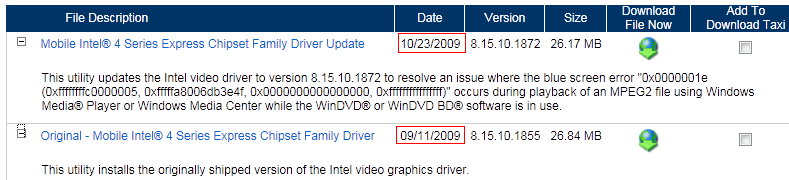
We can find drivers from the Sony Vaio VGN-NW235D official site is pretty ancient,
for example:
01.png

Please refer to Intel Graphics Media Accelerator Driver for Windows 7 x64 , perhaps the newer driviers will meet your requirement.

In the safe mode, uninstall the old one and reboot . If it can run the normal window, try the newer driver, if not, install the newer one in safe mode.

Waiting to see what happens~~~
 

My Computer My Computer

OS
Server 2008 R2 SP1, Win7 x64 Pro SP1
CPU
Intel Core 2 Duo E6700 @3.3GHz
Motherboard
ASUS P5W DH DELUXE
Memory
Transcend DDRII 800 4GB (2 x 2GB )
Graphics Card(s)
GeForce 7950GX2
Sound Card
Realtek ALC882M Integrated on board
Monitor(s) Displays
ACER AL2723 27" LCD
Screen Resolution
1920x1200
Hard Drives
WD 6401 AALS 640G x 1
Seagate 160 GB (Barracuda 7200.7) x 2
PSU
Zippy PSL-6720P(G1)720W
Case
Thermaltake Kandalf VA9000SWA
Cooling
Zalman CNPS9500
Keyboard
Standard
Mouse
Standard
Internet Speed
10M, Cable
Other Info
Above is one of my desktops.
Trying it now.
Thanks
 

My Computer My Computer

Computer Manufacturer/Model Number
Sony Vaio/ VGN-NW235D
OS
Windows 7Home Premium 64bit
CPU
Pentium Dual- Core T4300 210GHz
Memory
4GB
Sound Card
Realtek
Still have a black screen with cursor no changes.
Thanks
 

My Computer My Computer

Computer Manufacturer/Model Number
Sony Vaio/ VGN-NW235D
OS
Windows 7Home Premium 64bit
CPU
Pentium Dual- Core T4300 210GHz
Memory
4GB
Sound Card
Realtek
Sorry to learn that. :o
 

My Computer My Computer

OS
Server 2008 R2 SP1, Win7 x64 Pro SP1
CPU
Intel Core 2 Duo E6700 @3.3GHz
Motherboard
ASUS P5W DH DELUXE
Memory
Transcend DDRII 800 4GB (2 x 2GB )
Graphics Card(s)
GeForce 7950GX2
Sound Card
Realtek ALC882M Integrated on board
Monitor(s) Displays
ACER AL2723 27" LCD
Screen Resolution
1920x1200
Hard Drives
WD 6401 AALS 640G x 1
Seagate 160 GB (Barracuda 7200.7) x 2
PSU
Zippy PSL-6720P(G1)720W
Case
Thermaltake Kandalf VA9000SWA
Cooling
Zalman CNPS9500
Keyboard
Standard
Mouse
Standard
Internet Speed
10M, Cable
Other Info
Above is one of my desktops.
When did you first experience this problem? Had you made any changes to your computer around that time (add/remove hardware or software)?
 

My Computer My Computer

Computer Manufacturer/Model Number
Dell Studio 15
OS
Windows 7 Ultimate 64 bit
It started when my computer froze and i held down the power button to turn off then when i turned it back on this happened.
Thanks
 

My Computer My Computer

Computer Manufacturer/Model Number
Sony Vaio/ VGN-NW235D
OS
Windows 7Home Premium 64bit
CPU
Pentium Dual- Core T4300 210GHz
Memory
4GB
Sound Card
Realtek
Have you tried booting by using "Last Known Good Configuration"?
 

My Computer My Computer

Computer Manufacturer/Model Number
Dell Studio 15
OS
Windows 7 Ultimate 64 bit
just tried that same result
Thanks
 

My Computer My Computer

Computer Manufacturer/Model Number
Sony Vaio/ VGN-NW235D
OS
Windows 7Home Premium 64bit
CPU
Pentium Dual- Core T4300 210GHz
Memory
4GB
Sound Card
Realtek
Try System Restore.

1. Start your computer using "Safe Mode with Command Prompt".
2. At the Command Prompt, type rstrui.exe, then hit enter.
 

My Computer My Computer

Computer Manufacturer/Model Number
Dell Studio 15
OS
Windows 7 Ultimate 64 bit
It worked thanks so much!!
 

My Computer My Computer

Computer Manufacturer/Model Number
Sony Vaio/ VGN-NW235D
OS
Windows 7Home Premium 64bit
CPU
Pentium Dual- Core T4300 210GHz
Memory
4GB
Sound Card
Realtek
You're very welcome :D
 

My Computer My Computer

Computer Manufacturer/Model Number
Dell Studio 15
OS
Windows 7 Ultimate 64 bit
Back
Top