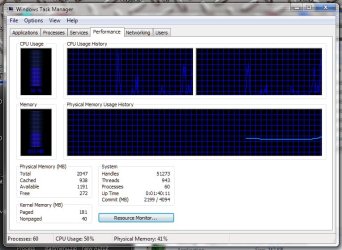
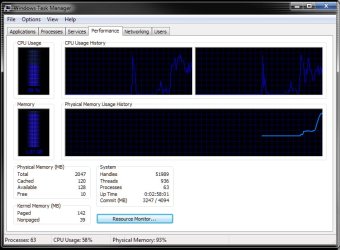
Windows 7 Blue Task Manager

Blue Task Manager

Thanks Sammy but the problem is there is not taskmgr.exe in my system32 folder only in my syswow64 folder. When I try to paste a taskmgr.exe into the sytem32 folder it tells me it already has one there but it is referring to the one in the syswow64 folder as though it is treating them as one in the same. So Now I have now task manager when I hit ctrl/alt/del .. and click on task manager nothing happens. When i tried to go back to a restore point it always comes back with system restore failed.. I have tried 3 different restore points. This is driving me insane and I really did not want to re-install.
 

My Computer

Computer Manufacturer/Model Number
Own Build
OS
Windows 7 7600 SP1 64 Bit dual boot Windows 8 CP
CPU
i7-2600k currently running @ 4.8 ghz
Motherboard
GA-Z68X-UD5-B3
Memory
8 gig Corsair Dominator 1600 DDR3
Graphics Card(s)
Gigabyte GTX 680
Sound Card
Onboard
Monitor(s) Displays
Dell Ultrasharp U3011
Screen Resolution
2560 x 1600
Hard Drives
1 x 256gb Crucial M4 SSD
2 x 1tb Western Digital Caviar Black
1 x 2tb Western Digital Caviar Green
1 x 2Tb Samsung Story USB 3
1 Ready NAS NV+ with 4x2Tb Drives
PSU
Enermax MAXREVO 1350 Watts
Case
Antec Lanboy Air Case with NZXT Sentry LXE Controller
Cooling
Antec Kuhler 920 with 120 mm Noctua NF-P12 PWM fans
Keyboard
Roccat Isku
Mouse
Roccat Kova Plus
Internet Speed
12000 kbs
Other Info
Brother 6490CW Multifunction Printer
Brother 2170W Laser Printer
Fritz Box 7390 Modem / Router
Logitech Webcam 500
Logitech G25 Racing Wheel
XBox 360 Controller
Logitech Z4 Speakers
WD TV Live
Any help would be most appreciated.. I have tried everything I can think of :confused:
 

My Computer

Computer Manufacturer/Model Number
Own Build
OS
Windows 7 7600 SP1 64 Bit dual boot Windows 8 CP
CPU
i7-2600k currently running @ 4.8 ghz
Motherboard
GA-Z68X-UD5-B3
Memory
8 gig Corsair Dominator 1600 DDR3
Graphics Card(s)
Gigabyte GTX 680
Sound Card
Onboard
Monitor(s) Displays
Dell Ultrasharp U3011
Screen Resolution
2560 x 1600
Hard Drives
1 x 256gb Crucial M4 SSD
2 x 1tb Western Digital Caviar Black
1 x 2tb Western Digital Caviar Green
1 x 2Tb Samsung Story USB 3
1 Ready NAS NV+ with 4x2Tb Drives
PSU
Enermax MAXREVO 1350 Watts
Case
Antec Lanboy Air Case with NZXT Sentry LXE Controller
Cooling
Antec Kuhler 920 with 120 mm Noctua NF-P12 PWM fans
Keyboard
Roccat Isku
Mouse
Roccat Kova Plus
Internet Speed
12000 kbs
Other Info
Brother 6490CW Multifunction Printer
Brother 2170W Laser Printer
Fritz Box 7390 Modem / Router
Logitech Webcam 500
Logitech G25 Racing Wheel
XBox 360 Controller
Logitech Z4 Speakers
WD TV Live
Thanks Sammy but the problem is there is not taskmgr.exe in my system32 folder only in my syswow64 folder. When I try to paste a taskmgr.exe into the sytem32 folder it tells me it already has one there but it is referring to the one in the syswow64 folder as though it is treating them as one in the same. So Now I have now task manager when I hit ctrl/alt/del .. and click on task manager nothing happens. When i tried to go back to a restore point it always comes back with system restore failed.. I have tried 3 different restore points. This is driving me insane and I really did not want to re-install.

I'm sorry that you are having such a hard time with this.

You can try this http://www.sevenforums.com/tutorials/1538-sfc-scannow-command-system-file-checker.html and if that doesn't you can try a repair install instead of doing a full reinstall. http://www.sevenforums.com/tutorials/3413-repair-install.html?ltr=R
 

My Computer

OS
vista x64
CPU
E8600 Core Duo
Motherboard
EVGA 780i Sli
Memory
8 GB
Graphics Card(s)
BFG 8800 GTX
I found this Windows 7 Blue Task Manager by ~xandir112 on deviantART if you like blue like I do you will like this & I'm just passing this along. Make a restore point first to be safe and follow the directions in the winrar file.

This will work on the 7600 build

Edited added System Requirements
- Windows 7 Builds
- Build 7000
- Build 7022
- Build 7068
- Build 7100 RC
- Build 7127, 7137, 7201, 7229, 7231, 7232, 7260, 7264 pre-RTM
- Build 7600.16384 RTM
- Build 7600.16385 RTM Sign Off
- x86/32 bit
- x64/64 bit

...


have some more +rep ;) last time i found a blue taskmanager (probably by same guy) it didn't work, but this one did!! for the benefit of 7600 users the taskmgr.exe from the 7068 folder is the one that worked for me
 

My Computer

OS
Windows 7 Ultimate 64Bit
CPU
AMD Athlon x4 650 3Ghz
Motherboard
ASUS
Memory
4gb
Graphics Card(s)
ATI Radeon 3000 series Onboard
I've figured out how it's done, but it ain't for the faint hearted! :D
(Involves a Hex-Editor to search for colour codes, a Resource Editor & something to alter the icons.)

GBlueTaskman.jpg
GBlueTaskman2.jpg


Here's my version, it's the 7068 one from the original post but edited & use the original instructions etc to install it:
View attachment taskmgr.zip
 

My Computer

Computer Manufacturer/Model Number
Self Built
OS
XP Pro SP3 x86/Vista SP2 x64/Win7 x64 Triple-boot
CPU
AMD64 X2 AM2 5000+
Motherboard
Asus MSN-X Plus
Memory
Corsair TWX 2Gb (2x1Gb) DDR2 800Mhz
Graphics Card(s)
PCI-X 2.0 Inno3D (NVidia) 9500GT 1Gb DDR2
Sound Card
Onboard Realtec ALC662-GR
Monitor(s) Displays
Relisys 17' CRT (model unknown)
Screen Resolution
1024x768
Hard Drives
750Gb Samsung 7200-3Gb/s 32Mb Cache SATA
PSU
500W
Cooling
Standard AMD CPU Fan, One side, front and rear case fan.
Keyboard
Microsoft Multimedia Keyboard
Mouse
Samsung Optical
Internet Speed
10M
I've figured out how it's done, but it ain't for the faint hearted! :D
(Involves a Hex-Editor to search for colour codes, a Resource Editor & something to alter the icons.)


Here's my version, it's the 7068 one from the original post but edited & use the original instructions etc to install it:

Thank you for your version + rep for you.
 

My Computer

OS
vista x64
CPU
E8600 Core Duo
Motherboard
EVGA 780i Sli
Memory
8 GB
Graphics Card(s)
BFG 8800 GTX
Generator's version is nice too, but I have one thing to say about it.

The blue is too dark. It's a little hard to see against the black background. You might want to make it a little bit lighter.
 

My Computer

Computer Manufacturer/Model Number
Dell Inspiron 14R N4110
OS
Windows 7 Home Premium x64
CPU
Intel Core i5-2410M Quad Core CPU @ 2.30 GHz
Memory
8 GB Shared Channel DDR3 Memory
Graphics Card(s)
Intel HD Graphics 3000, AMD Radeon HD 6470M
Sound Card
Intel Display Audio, Realtek High Definition Audio
Monitor(s) Displays
14" HD 720p LED Display
Screen Resolution
1366x768
Hard Drives
500 GB 5400 RPM SATA Hard Drive
Mouse
Microsoft USB IntelliMouse Explorer 3.0
Generator's version is nice too, but I have one thing to say about it.

The blue is too dark. It's a little hard to see against the black background. You might want to make it a little bit lighter.


I think it's the blue squared background... Hows this?


GTaskmanDB1.jpg


View attachment taskmgr.zip
 

My Computer

Computer Manufacturer/Model Number
Self Built
OS
XP Pro SP3 x86/Vista SP2 x64/Win7 x64 Triple-boot
CPU
AMD64 X2 AM2 5000+
Motherboard
Asus MSN-X Plus
Memory
Corsair TWX 2Gb (2x1Gb) DDR2 800Mhz
Graphics Card(s)
PCI-X 2.0 Inno3D (NVidia) 9500GT 1Gb DDR2
Sound Card
Onboard Realtec ALC662-GR
Monitor(s) Displays
Relisys 17' CRT (model unknown)
Screen Resolution
1024x768
Hard Drives
750Gb Samsung 7200-3Gb/s 32Mb Cache SATA
PSU
500W
Cooling
Standard AMD CPU Fan, One side, front and rear case fan.
Keyboard
Microsoft Multimedia Keyboard
Mouse
Samsung Optical
Internet Speed
10M
I'd love it if I could get a set of icons like Mr. Grim's, the progress bar, and this app made using the following RGB:

158/180/255 - it is a very soothing (on the eyes) baby blue that I like a lot better than a brilliant blue or dark blue.

In fact, if you use the black - RC theme here, all the text goes to a color very similar in nature.
 

My Computers

System One System Two

  • Computer type
    PC/Desktop
    Computer Manufacturer/Model Number
    The Beast Model A (homebrew)
    OS
    Windows 11 21H2 Current build
    CPU
    AMD Ryzen 9 3950X
    Motherboard
    MSI MEG X570 GODLIKE
    Memory
    4 * 32 GB - Corsair Vengeance 3600 MHz
    Graphics Card(s)
    EVGA GeForce RTX 3080 Ti XC3 ULTRA GAMING (12G-P5-3955-KR)
    Sound Card
    Realtek® ALC1220 Codec
    Monitor(s) Displays
    2x Eve Spectrum ES07D03 4K Gaming Monitor (Matte) | Eve Spec
    Screen Resolution
    3x 3840 x 2160
    Hard Drives
    3x Samsung 980 Pro NVMe PCIe 4 M.2 2 TB SSD (MZ-V8P2T0B/AM) } 3x Sabrent Rocket NVMe 4.0 1 TB SSD
    PSU
    PC Power & Cooling’s Silencer Series 1050 Watt, 80 Plus Plat
    Case
    Fractal Design Define 7 XL Dark ATX Full Tower Case
    Cooling
    SteelSeries Apex Pro Wired Gaming Keyboard
    Keyboard
    SteelSeries Apex Pro
    Mouse
    Logitech MX Master 3S | MX Master 3 for business
    Internet Speed
    AT&T LightSpeed Gigabit Duplex Ftth
    Antivirus
    Windows Defender + MB 3
    Browser
    Nightly (default) + Firefox (stable),Chrome, Edge
  • Computer type
    PC/Desktop
    System Manufacturer/Model Number
    Dell Latitude E5470
    OS
    ChromeOS Flex Dev Channel (current)
    CPU
    Intel(R) Core(TM) i5-6300U CPU @ 2.40GHz, 2501 Mhz, 2 Core(s), 4 Logical Processor(s)
    Motherboard
    Dell
    Memory
    16 GB
    Graphics Card(s)
    Intel(R) HD Graphics 520
    Sound Card
    Intel(R) HD Graphics 520 + RealTek Audio
    Monitor(s) Displays
    Dell laptop display 15"
    Screen Resolution
    1920 * 1080
    Hard Drives
    Toshiba 128GB M.2 22300 drive
    INTEL Cherryville 520 Series SSDSC2CW180A 180 GB SATA III SSD
    PSU
    Dell
    Case
    Dell
    Cooling
    Dell
    Keyboard
    Dell
    Mouse
    Logitech MX Master 3S (shared w. Sys 1) | Dell TouchPad
    Internet Speed
    AT&T LightSpeed Gigabit Duplex Ftth
I think it's the blue squared background... Hows this?


View attachment 21630


View attachment 21631
Well, now you can see the lines better, but the numbers under the two bars are still really hard to see. I had to look real closely at the screen to see the two numbers. The CPU Usage was like 53% or 58% while the Memory was 1.87 GB or 1.97 GB.

Don't get me wrong, I like that shade of blue, but it just doesn't work with the black background.
 

My Computer

Computer Manufacturer/Model Number
Dell Inspiron 14R N4110
OS
Windows 7 Home Premium x64
CPU
Intel Core i5-2410M Quad Core CPU @ 2.30 GHz
Memory
8 GB Shared Channel DDR3 Memory
Graphics Card(s)
Intel HD Graphics 3000, AMD Radeon HD 6470M
Sound Card
Intel Display Audio, Realtek High Definition Audio
Monitor(s) Displays
14" HD 720p LED Display
Screen Resolution
1366x768
Hard Drives
500 GB 5400 RPM SATA Hard Drive
Mouse
Microsoft USB IntelliMouse Explorer 3.0
Meh! sod it then lol!

I was only trying it as an experiment to start with just to see how it was done. :p
 

My Computer

Computer Manufacturer/Model Number
Self Built
OS
XP Pro SP3 x86/Vista SP2 x64/Win7 x64 Triple-boot
CPU
AMD64 X2 AM2 5000+
Motherboard
Asus MSN-X Plus
Memory
Corsair TWX 2Gb (2x1Gb) DDR2 800Mhz
Graphics Card(s)
PCI-X 2.0 Inno3D (NVidia) 9500GT 1Gb DDR2
Sound Card
Onboard Realtec ALC662-GR
Monitor(s) Displays
Relisys 17' CRT (model unknown)
Screen Resolution
1024x768
Hard Drives
750Gb Samsung 7200-3Gb/s 32Mb Cache SATA
PSU
500W
Cooling
Standard AMD CPU Fan, One side, front and rear case fan.
Keyboard
Microsoft Multimedia Keyboard
Mouse
Samsung Optical
Internet Speed
10M
Meh! sod it then lol!

I was only trying it as an experiment to start with just to see how it was done. :p

lol, looks like you trapped yourself into something more than bargained for.!!!;)
 

My Computer

OS
vista x64
CPU
E8600 Core Duo
Motherboard
EVGA 780i Sli
Memory
8 GB
Graphics Card(s)
BFG 8800 GTX
Hi Sammy

Thanks fr the scannow option, it worked and I now have the GREEN task manager back. I went through all the instrructions again and renamed the old file tasmgr.exe.green then pasted the blue one in but it still goes to the syswow64 folder and NOT the system32 folder is the problem that I am running 64bit windows .... I have renamed the old file back again and it works as green but I really would have loved the blue.

Thanx
 

My Computer

Computer Manufacturer/Model Number
Own Build
OS
Windows 7 7600 SP1 64 Bit dual boot Windows 8 CP
CPU
i7-2600k currently running @ 4.8 ghz
Motherboard
GA-Z68X-UD5-B3
Memory
8 gig Corsair Dominator 1600 DDR3
Graphics Card(s)
Gigabyte GTX 680
Sound Card
Onboard
Monitor(s) Displays
Dell Ultrasharp U3011
Screen Resolution
2560 x 1600
Hard Drives
1 x 256gb Crucial M4 SSD
2 x 1tb Western Digital Caviar Black
1 x 2tb Western Digital Caviar Green
1 x 2Tb Samsung Story USB 3
1 Ready NAS NV+ with 4x2Tb Drives
PSU
Enermax MAXREVO 1350 Watts
Case
Antec Lanboy Air Case with NZXT Sentry LXE Controller
Cooling
Antec Kuhler 920 with 120 mm Noctua NF-P12 PWM fans
Keyboard
Roccat Isku
Mouse
Roccat Kova Plus
Internet Speed
12000 kbs
Other Info
Brother 6490CW Multifunction Printer
Brother 2170W Laser Printer
Fritz Box 7390 Modem / Router
Logitech Webcam 500
Logitech G25 Racing Wheel
XBox 360 Controller
Logitech Z4 Speakers
WD TV Live
I noticed that the first post says 64bit and 32bit, but the file being downloaded only says 32bit.

I wonder if this is really 64bit compatible...and if so, if there are extra steps to get it working on 64bit....
 

My Computers

System One System Two

  • Computer type
    PC/Desktop
    Computer Manufacturer/Model Number
    The Beast Model A (homebrew)
    OS
    Windows 11 21H2 Current build
    CPU
    AMD Ryzen 9 3950X
    Motherboard
    MSI MEG X570 GODLIKE
    Memory
    4 * 32 GB - Corsair Vengeance 3600 MHz
    Graphics Card(s)
    EVGA GeForce RTX 3080 Ti XC3 ULTRA GAMING (12G-P5-3955-KR)
    Sound Card
    Realtek® ALC1220 Codec
    Monitor(s) Displays
    2x Eve Spectrum ES07D03 4K Gaming Monitor (Matte) | Eve Spec
    Screen Resolution
    3x 3840 x 2160
    Hard Drives
    3x Samsung 980 Pro NVMe PCIe 4 M.2 2 TB SSD (MZ-V8P2T0B/AM) } 3x Sabrent Rocket NVMe 4.0 1 TB SSD
    PSU
    PC Power & Cooling’s Silencer Series 1050 Watt, 80 Plus Plat
    Case
    Fractal Design Define 7 XL Dark ATX Full Tower Case
    Cooling
    SteelSeries Apex Pro Wired Gaming Keyboard
    Keyboard
    SteelSeries Apex Pro
    Mouse
    Logitech MX Master 3S | MX Master 3 for business
    Internet Speed
    AT&T LightSpeed Gigabit Duplex Ftth
    Antivirus
    Windows Defender + MB 3
    Browser
    Nightly (default) + Firefox (stable),Chrome, Edge
  • Computer type
    PC/Desktop
    System Manufacturer/Model Number
    Dell Latitude E5470
    OS
    ChromeOS Flex Dev Channel (current)
    CPU
    Intel(R) Core(TM) i5-6300U CPU @ 2.40GHz, 2501 Mhz, 2 Core(s), 4 Logical Processor(s)
    Motherboard
    Dell
    Memory
    16 GB
    Graphics Card(s)
    Intel(R) HD Graphics 520
    Sound Card
    Intel(R) HD Graphics 520 + RealTek Audio
    Monitor(s) Displays
    Dell laptop display 15"
    Screen Resolution
    1920 * 1080
    Hard Drives
    Toshiba 128GB M.2 22300 drive
    INTEL Cherryville 520 Series SSDSC2CW180A 180 GB SATA III SSD
    PSU
    Dell
    Case
    Dell
    Cooling
    Dell
    Keyboard
    Dell
    Mouse
    Logitech MX Master 3S (shared w. Sys 1) | Dell TouchPad
    Internet Speed
    AT&T LightSpeed Gigabit Duplex Ftth
This is indeed 64-Bit compatible. Look at the my screenshot:
 

My Computer

Computer Manufacturer/Model Number
Dell Inspiron 14R N4110
OS
Windows 7 Home Premium x64
CPU
Intel Core i5-2410M Quad Core CPU @ 2.30 GHz
Memory
8 GB Shared Channel DDR3 Memory
Graphics Card(s)
Intel HD Graphics 3000, AMD Radeon HD 6470M
Sound Card
Intel Display Audio, Realtek High Definition Audio
Monitor(s) Displays
14" HD 720p LED Display
Screen Resolution
1366x768
Hard Drives
500 GB 5400 RPM SATA Hard Drive
Mouse
Microsoft USB IntelliMouse Explorer 3.0
Hi Sammy

Thanks fr the scannow option, it worked and I now have the GREEN task manager back. I went through all the instrructions again and renamed the old file tasmgr.exe.green then pasted the blue one in but it still goes to the syswow64 folder and NOT the system32 folder is the problem that I am running 64bit windows .... I have renamed the old file back again and it works as green but I really would have loved the blue.

Thanx

Ok I think that one problem is that the person who made these files failed to insert this into his readme file, lucky it was added on the web site, also I added it to the OP.

Note: For build 7068 and up (7264, 7600 etc...) use the 7068 version

I don't know why it wants to go to syswow64 folder, they way I did it was use the Take Control Tool with Admin Privilege and not the reg keys and following each step carefully. Make sure you use the taskmng from the 7068, I don't know which one you are using since the readme file doesn't say.

Again I'm sorry you are having trouble with this.

@johngalt this works for me on 64 bit Win 7 also
 
Last edited:

My Computer

OS
vista x64
CPU
E8600 Core Duo
Motherboard
EVGA 780i Sli
Memory
8 GB
Graphics Card(s)
BFG 8800 GTX
I see by your screen shot that it is indeed 64bit compatable Klaw .. why then will my blue taskmgr.exe not paste into the system32 folder instead it pastes into the syswow64 folder. Anyone with any suggestions I'd love to hear from you. I am using the 7066 version Sammy. I did not use the reistry option either I merely took control of the file.
 

My Computer

Computer Manufacturer/Model Number
Own Build
OS
Windows 7 7600 SP1 64 Bit dual boot Windows 8 CP
CPU
i7-2600k currently running @ 4.8 ghz
Motherboard
GA-Z68X-UD5-B3
Memory
8 gig Corsair Dominator 1600 DDR3
Graphics Card(s)
Gigabyte GTX 680
Sound Card
Onboard
Monitor(s) Displays
Dell Ultrasharp U3011
Screen Resolution
2560 x 1600
Hard Drives
1 x 256gb Crucial M4 SSD
2 x 1tb Western Digital Caviar Black
1 x 2tb Western Digital Caviar Green
1 x 2Tb Samsung Story USB 3
1 Ready NAS NV+ with 4x2Tb Drives
PSU
Enermax MAXREVO 1350 Watts
Case
Antec Lanboy Air Case with NZXT Sentry LXE Controller
Cooling
Antec Kuhler 920 with 120 mm Noctua NF-P12 PWM fans
Keyboard
Roccat Isku
Mouse
Roccat Kova Plus
Internet Speed
12000 kbs
Other Info
Brother 6490CW Multifunction Printer
Brother 2170W Laser Printer
Fritz Box 7390 Modem / Router
Logitech Webcam 500
Logitech G25 Racing Wheel
XBox 360 Controller
Logitech Z4 Speakers
WD TV Live
Thanks everyone for your input, I have discovered why it was behaving strangely. By default i am using teracopy to copy files and as soon as I changed that to use the inbuilt filecopy it worked and I now have a blue task manager
 

My Computer

Computer Manufacturer/Model Number
Own Build
OS
Windows 7 7600 SP1 64 Bit dual boot Windows 8 CP
CPU
i7-2600k currently running @ 4.8 ghz
Motherboard
GA-Z68X-UD5-B3
Memory
8 gig Corsair Dominator 1600 DDR3
Graphics Card(s)
Gigabyte GTX 680
Sound Card
Onboard
Monitor(s) Displays
Dell Ultrasharp U3011
Screen Resolution
2560 x 1600
Hard Drives
1 x 256gb Crucial M4 SSD
2 x 1tb Western Digital Caviar Black
1 x 2tb Western Digital Caviar Green
1 x 2Tb Samsung Story USB 3
1 Ready NAS NV+ with 4x2Tb Drives
PSU
Enermax MAXREVO 1350 Watts
Case
Antec Lanboy Air Case with NZXT Sentry LXE Controller
Cooling
Antec Kuhler 920 with 120 mm Noctua NF-P12 PWM fans
Keyboard
Roccat Isku
Mouse
Roccat Kova Plus
Internet Speed
12000 kbs
Other Info
Brother 6490CW Multifunction Printer
Brother 2170W Laser Printer
Fritz Box 7390 Modem / Router
Logitech Webcam 500
Logitech G25 Racing Wheel
XBox 360 Controller
Logitech Z4 Speakers
WD TV Live
Edit well I'm glad that you now have blue taskmgr, I was running out of things to try.

Well enjoy the Blue, I know I do.
 

My Computer

OS
vista x64
CPU
E8600 Core Duo
Motherboard
EVGA 780i Sli
Memory
8 GB
Graphics Card(s)
BFG 8800 GTX
No I am using version 7264 .. still downloading the RTM from TECHNET it is coming down very slowly :(
 

My Computer

Computer Manufacturer/Model Number
Own Build
OS
Windows 7 7600 SP1 64 Bit dual boot Windows 8 CP
CPU
i7-2600k currently running @ 4.8 ghz
Motherboard
GA-Z68X-UD5-B3
Memory
8 gig Corsair Dominator 1600 DDR3
Graphics Card(s)
Gigabyte GTX 680
Sound Card
Onboard
Monitor(s) Displays
Dell Ultrasharp U3011
Screen Resolution
2560 x 1600
Hard Drives
1 x 256gb Crucial M4 SSD
2 x 1tb Western Digital Caviar Black
1 x 2tb Western Digital Caviar Green
1 x 2Tb Samsung Story USB 3
1 Ready NAS NV+ with 4x2Tb Drives
PSU
Enermax MAXREVO 1350 Watts
Case
Antec Lanboy Air Case with NZXT Sentry LXE Controller
Cooling
Antec Kuhler 920 with 120 mm Noctua NF-P12 PWM fans
Keyboard
Roccat Isku
Mouse
Roccat Kova Plus
Internet Speed
12000 kbs
Other Info
Brother 6490CW Multifunction Printer
Brother 2170W Laser Printer
Fritz Box 7390 Modem / Router
Logitech Webcam 500
Logitech G25 Racing Wheel
XBox 360 Controller
Logitech Z4 Speakers
WD TV Live
Back
Top