Solved Windows 7 boots normally then freezes after 2 minutes

Tizzletom

New member
Member
Local time
11:16 PM
Messages
28
When i boot my computer i get into windows 7 but about 2 minutes afterwards all of the programs and windows explorer will stop responding. I can get into safe mode fine and i have tried things like checking the integrity of windows and everything seems fine and i have run chkdsk and that came back fine. I have uninstalled the programs that i have recently downloaded but still nothing. I just got it to work once because i run a virus scan and it removed some but i restart after it works for 30 mins and then it freezes. Can anyone enlighten me on what i should do?
 

Attachments

My Computer My Computer

At a glance

Windows 7 Ultimate x64Intel i5 3570kCorsair DDR3 8 GBAMD 7850
Computer type
PC/Desktop
Computer Manufacturer/Model Number
Custom Build
OS
Windows 7 Ultimate x64
CPU
Intel i5 3570k
Motherboard
Asus z77
Memory
Corsair DDR3 8 GB
Graphics Card(s)
AMD 7850
Antivirus
AVG 2014
Browser
Chrome
1. If you are overclocking any hardware, please stop. Reset any changed values back to default and reset/clear CMOS: Clear CMOS - 3 Ways to Clear the CMOS - Reset BIOS. Uninstall any overclocking tool as these can also be a reason of blue screens.
Code:
Start Menu\Programs\ASUS\AI Suite II	Public:Start Menu\Programs\ASUS\AI Suite II	Public
Use Revo Uninstaller Free to uninstall stubborn software. Opt for Advanced Mode and uninstall the software, delete the leftover registry entries.
2. Uninstall your current antivirus software. It can cause problems. Please remove it with its removal tool and use Microsoft Security Essentials in its place. Malwarebytes is a great combination with it. Go through this thread for more info.
Code:
Start Menu\Programs\AVG	Public:Start Menu\Programs\AVG	Public
3. Run Disk Check with both boxes checked for all HDDs and with Automatically fix file system errors. Post back your logs for the checks after finding them using http://www.sevenforums.com/tutorials/96938-check-disk-chkdsk-read-event-viewer-log.html

4. Run http://www.sevenforums.com/tutorials/1538-sfc-scannow-command-system-file-checker.html to check windows for integrity violations. Run it up to three times to fix all errors. Post back if it continues to show errors after a fourth run or if the first run comes back with no integrity violations.

5. Make scans with Kaspersky TDSskiller and ESET Online scanner.

6. Perform a Clean Start up, this will help avoid any problematic applications from bugging the system.

Let us know the results.
 

My Computer My Computer

At a glance

Windows 10 Home 64BitIntel Core i5 10400 @ 2.90GHz8.00GB Single-Channel Unknown @ 1329MHz (16-2...
Computer type
PC/Desktop
Computer Manufacturer/Model Number
Self assembled
OS
Windows 10 Home 64Bit
CPU
Intel Core i5 10400 @ 2.90GHz
Motherboard
Intel Corporation DG41WV (PROCESSOR)
Memory
8.00GB Single-Channel Unknown @ 1329MHz (16-20-20-38)
Sound Card
Realtek High Definition Audio
Monitor(s) Displays
DELL E170S
Screen Resolution
1280x1024 pixels
Hard Drives
931GB TOSHIBA DT01ACA100 (SATA)
238GB TEAM TM8PS7256G (SATA SSD)
Case
Nothing Fancy
Cooling
Fans
Keyboard
A4 Tech Co LTD
Mouse
A4 Tech Co Ltd/Logitech
Internet Speed
25 Mbps
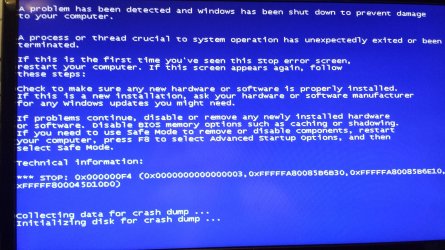
I already found the issue that was ai suite and i removed it and it seemed to boot fine, it worked for about 20 minutes and then froze again. I have also already fun a dskchk and nothing came up and also the same with /scannow. And also AVG is uninstalled and i now use malwarebytes. I have never overclocked either. After the 20 minutes that it worked it came up with the BSOD and i got no dump file but i have a picture
 

Attachments

  • 20130923_233733.jpg
    20130923_233733.jpg
    637.5 KB · Views: 2

My Computer My Computer

At a glance

Windows 7 Ultimate x64Intel i5 3570kCorsair DDR3 8 GBAMD 7850
Computer type
PC/Desktop
Computer Manufacturer/Model Number
Custom Build
OS
Windows 7 Ultimate x64
CPU
Intel i5 3570k
Motherboard
Asus z77
Memory
Corsair DDR3 8 GB
Graphics Card(s)
AMD 7850
Antivirus
AVG 2014
Browser
Chrome

My Computer My Computer

At a glance

Windows 10 Home 64BitIntel Core i5 10400 @ 2.90GHz8.00GB Single-Channel Unknown @ 1329MHz (16-2...
Computer type
PC/Desktop
Computer Manufacturer/Model Number
Self assembled
OS
Windows 10 Home 64Bit
CPU
Intel Core i5 10400 @ 2.90GHz
Motherboard
Intel Corporation DG41WV (PROCESSOR)
Memory
8.00GB Single-Channel Unknown @ 1329MHz (16-20-20-38)
Sound Card
Realtek High Definition Audio
Monitor(s) Displays
DELL E170S
Screen Resolution
1280x1024 pixels
Hard Drives
931GB TOSHIBA DT01ACA100 (SATA)
238GB TEAM TM8PS7256G (SATA SSD)
Case
Nothing Fancy
Cooling
Fans
Keyboard
A4 Tech Co LTD
Mouse
A4 Tech Co Ltd/Logitech
Internet Speed
25 Mbps
Would a 2nd hard drive that isnt being used cause this issue because there isnt anything wrong with the main hard drive?
 

My Computer My Computer

At a glance

Windows 7 Ultimate x64Intel i5 3570kCorsair DDR3 8 GBAMD 7850
Computer type
PC/Desktop
Computer Manufacturer/Model Number
Custom Build
OS
Windows 7 Ultimate x64
CPU
Intel i5 3570k
Motherboard
Asus z77
Memory
Corsair DDR3 8 GB
Graphics Card(s)
AMD 7850
Antivirus
AVG 2014
Browser
Chrome
Provide the snips first please.
 

My Computer My Computer

At a glance

Windows 10 Home 64BitIntel Core i5 10400 @ 2.90GHz8.00GB Single-Channel Unknown @ 1329MHz (16-2...
Computer type
PC/Desktop
Computer Manufacturer/Model Number
Self assembled
OS
Windows 10 Home 64Bit
CPU
Intel Core i5 10400 @ 2.90GHz
Motherboard
Intel Corporation DG41WV (PROCESSOR)
Memory
8.00GB Single-Channel Unknown @ 1329MHz (16-20-20-38)
Sound Card
Realtek High Definition Audio
Monitor(s) Displays
DELL E170S
Screen Resolution
1280x1024 pixels
Hard Drives
931GB TOSHIBA DT01ACA100 (SATA)
238GB TEAM TM8PS7256G (SATA SSD)
Case
Nothing Fancy
Cooling
Fans
Keyboard
A4 Tech Co LTD
Mouse
A4 Tech Co Ltd/Logitech
Internet Speed
25 Mbps
Was there any other programs in the log that was causing errors? Im not at home at the moment im on my laptop so ill try it when i get home
 

My Computer My Computer

At a glance

Windows 7 Ultimate x64Intel i5 3570kCorsair DDR3 8 GBAMD 7850
Computer type
PC/Desktop
Computer Manufacturer/Model Number
Custom Build
OS
Windows 7 Ultimate x64
CPU
Intel i5 3570k
Motherboard
Asus z77
Memory
Corsair DDR3 8 GB
Graphics Card(s)
AMD 7850
Antivirus
AVG 2014
Browser
Chrome
I couldn't get the HDD diagnostic to work, it just comes up with no hard drives detected
 

Attachments

  • ERROR 1.png
    ERROR 1.png
    54.6 KB · Views: 9
  • ERROR 2.png
    ERROR 2.png
    53.7 KB · Views: 3

My Computer My Computer

At a glance

Windows 7 Ultimate x64Intel i5 3570kCorsair DDR3 8 GBAMD 7850
Computer type
PC/Desktop
Computer Manufacturer/Model Number
Custom Build
OS
Windows 7 Ultimate x64
CPU
Intel i5 3570k
Motherboard
Asus z77
Memory
Corsair DDR3 8 GB
Graphics Card(s)
AMD 7850
Antivirus
AVG 2014
Browser
Chrome
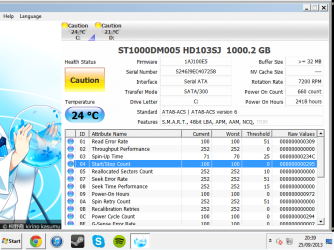
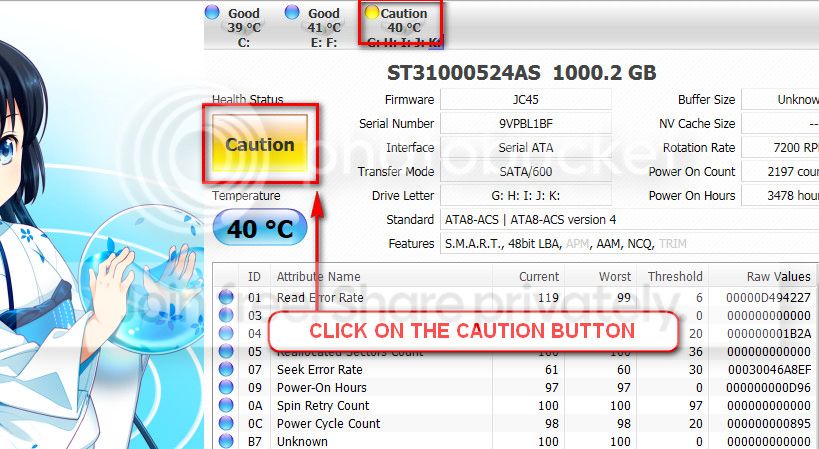
The caution indication can be converted to good using CrystalDiscInfo. Click on the caution Button, you will get another window ....
1_zps1eeadfca.jpg


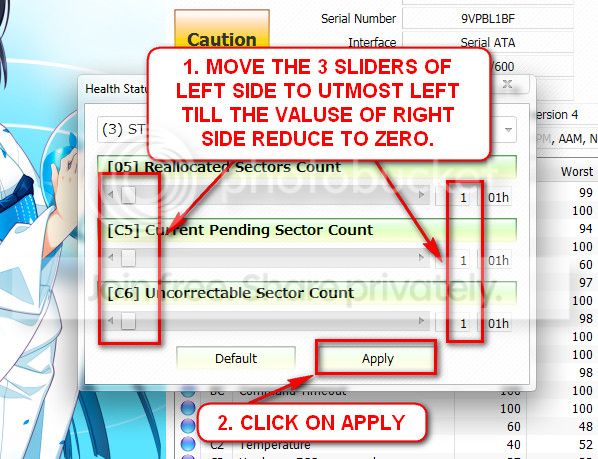
In the resulting window, there are three sliders in the left. Drag them to the ultimate left, and notice the values at the right side are converting to zeros.
2_zps50ae6eec.jpg


Now click the apply button, and notice that the caution is gone.
 

My Computer My Computer

At a glance

Microsoft Windows 10 Pro Insider Preview 64-bitIntel(R) Core(TM) i3-4130 CPU @ 3.40GHzCorsair Vengence 4GB x2 (8.00GB Dual-Channel ...2047MB GeForce GTS 450 (ZOTAC International)
Computer type
PC/Desktop
Computer Manufacturer/Model Number
Self Assembled
OS
Microsoft Windows 10 Pro Insider Preview 64-bit
CPU
Intel(R) Core(TM) i3-4130 CPU @ 3.40GHz
Motherboard
Gigabyte Technology Co., Ltd. B85M-D3H
Memory
Corsair Vengence 4GB x2 (8.00GB Dual-Channel DDR3 @ 798MHz)
Graphics Card(s)
2047MB GeForce GTS 450 (ZOTAC International)
Sound Card
Onboard (Realtek High Definition Audio)
Monitor(s) Displays
LG Flatron E2040T
Screen Resolution
1600x900
Hard Drives
Western Digital 1 TB
Seagate 500 GB
PSU
Corsair VS550
Case
Cooler Master K380
Cooling
Cooler Master Seidon 120V Plus
Keyboard
Logitech MK260r
Mouse
Logitech MK260r
Internet Speed
PMPL Broadband
Antivirus
Windows Defender + MBAM
Browser
Firefox
Other Info
Dell Studio 15" Laptop
I cant get to my computer as i am out at the moment. This is what i could find by looking at the events. ERROR text.txt is the errors that i found
 

Attachments

My Computer My Computer

At a glance

Windows 7 Ultimate x64Intel i5 3570kCorsair DDR3 8 GBAMD 7850
Computer type
PC/Desktop
Computer Manufacturer/Model Number
Custom Build
OS
Windows 7 Ultimate x64
CPU
Intel i5 3570k
Motherboard
Asus z77
Memory
Corsair DDR3 8 GB
Graphics Card(s)
AMD 7850
Antivirus
AVG 2014
Browser
Chrome
Seatool for dos: SeaTools | Seagate download

  • Burn it in a blank cd. boot from the CD, click on "Accept", wait for it to finish detecting the drives, then in the upper left corner select "Basic Tests", then select "Long Test" and let it run.
  • If it returns to be free from errors, Good. But if not, opt for the repair Options ... go with the Repair this one and all remaining.
Let us know the results.
 

My Computer My Computer

At a glance

Microsoft Windows 10 Pro Insider Preview 64-bitIntel(R) Core(TM) i3-4130 CPU @ 3.40GHzCorsair Vengence 4GB x2 (8.00GB Dual-Channel ...2047MB GeForce GTS 450 (ZOTAC International)
Computer type
PC/Desktop
Computer Manufacturer/Model Number
Self Assembled
OS
Microsoft Windows 10 Pro Insider Preview 64-bit
CPU
Intel(R) Core(TM) i3-4130 CPU @ 3.40GHz
Motherboard
Gigabyte Technology Co., Ltd. B85M-D3H
Memory
Corsair Vengence 4GB x2 (8.00GB Dual-Channel DDR3 @ 798MHz)
Graphics Card(s)
2047MB GeForce GTS 450 (ZOTAC International)
Sound Card
Onboard (Realtek High Definition Audio)
Monitor(s) Displays
LG Flatron E2040T
Screen Resolution
1600x900
Hard Drives
Western Digital 1 TB
Seagate 500 GB
PSU
Corsair VS550
Case
Cooler Master K380
Cooling
Cooler Master Seidon 120V Plus
Keyboard
Logitech MK260r
Mouse
Logitech MK260r
Internet Speed
PMPL Broadband
Antivirus
Windows Defender + MBAM
Browser
Firefox
Other Info
Dell Studio 15" Laptop
I did do this but it did not detect any drives
 

My Computer My Computer

At a glance

Windows 7 Ultimate x64Intel i5 3570kCorsair DDR3 8 GBAMD 7850
Computer type
PC/Desktop
Computer Manufacturer/Model Number
Custom Build
OS
Windows 7 Ultimate x64
CPU
Intel i5 3570k
Motherboard
Asus z77
Memory
Corsair DDR3 8 GB
Graphics Card(s)
AMD 7850
Antivirus
AVG 2014
Browser
Chrome
If you try Seatools For DOS by booting from it, still it does not detect a non-SCSI Seagate HDD?

Make this statement confirmed and let us know.
 

My Computer My Computer

At a glance

Microsoft Windows 10 Pro Insider Preview 64-bitIntel(R) Core(TM) i3-4130 CPU @ 3.40GHzCorsair Vengence 4GB x2 (8.00GB Dual-Channel ...2047MB GeForce GTS 450 (ZOTAC International)
Computer type
PC/Desktop
Computer Manufacturer/Model Number
Self Assembled
OS
Microsoft Windows 10 Pro Insider Preview 64-bit
CPU
Intel(R) Core(TM) i3-4130 CPU @ 3.40GHz
Motherboard
Gigabyte Technology Co., Ltd. B85M-D3H
Memory
Corsair Vengence 4GB x2 (8.00GB Dual-Channel DDR3 @ 798MHz)
Graphics Card(s)
2047MB GeForce GTS 450 (ZOTAC International)
Sound Card
Onboard (Realtek High Definition Audio)
Monitor(s) Displays
LG Flatron E2040T
Screen Resolution
1600x900
Hard Drives
Western Digital 1 TB
Seagate 500 GB
PSU
Corsair VS550
Case
Cooler Master K380
Cooling
Cooler Master Seidon 120V Plus
Keyboard
Logitech MK260r
Mouse
Logitech MK260r
Internet Speed
PMPL Broadband
Antivirus
Windows Defender + MBAM
Browser
Firefox
Other Info
Dell Studio 15" Laptop
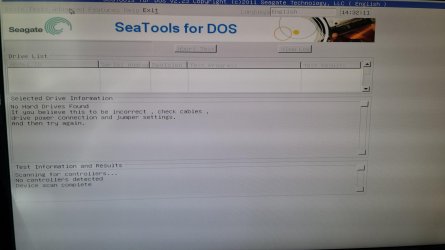
When i boot for DOS it does not detect any Hard Drives but i can still boot into windows if i exit the DOS program
 

My Computer My Computer

At a glance

Windows 7 Ultimate x64Intel i5 3570kCorsair DDR3 8 GBAMD 7850
Computer type
PC/Desktop
Computer Manufacturer/Model Number
Custom Build
OS
Windows 7 Ultimate x64
CPU
Intel i5 3570k
Motherboard
Asus z77
Memory
Corsair DDR3 8 GB
Graphics Card(s)
AMD 7850
Antivirus
AVG 2014
Browser
Chrome
When i boot for DOS it does not detect any Hard Drives but i can still boot into windows if i exit the DOS program
OK ... that means if you boot into Seatools For DOS disc, it does not detect none of your HDDs. Neither the Samsung 320 GB not the Seagate 1 TB. Am I right?

Try Seatools for windows in that case. It will not be able to attempt for repairs, but it will be able to determine if there is any corruptions in the disc or not.
 

My Computer My Computer

At a glance

Microsoft Windows 10 Pro Insider Preview 64-bitIntel(R) Core(TM) i3-4130 CPU @ 3.40GHzCorsair Vengence 4GB x2 (8.00GB Dual-Channel ...2047MB GeForce GTS 450 (ZOTAC International)
Computer type
PC/Desktop
Computer Manufacturer/Model Number
Self Assembled
OS
Microsoft Windows 10 Pro Insider Preview 64-bit
CPU
Intel(R) Core(TM) i3-4130 CPU @ 3.40GHz
Motherboard
Gigabyte Technology Co., Ltd. B85M-D3H
Memory
Corsair Vengence 4GB x2 (8.00GB Dual-Channel DDR3 @ 798MHz)
Graphics Card(s)
2047MB GeForce GTS 450 (ZOTAC International)
Sound Card
Onboard (Realtek High Definition Audio)
Monitor(s) Displays
LG Flatron E2040T
Screen Resolution
1600x900
Hard Drives
Western Digital 1 TB
Seagate 500 GB
PSU
Corsair VS550
Case
Cooler Master K380
Cooling
Cooler Master Seidon 120V Plus
Keyboard
Logitech MK260r
Mouse
Logitech MK260r
Internet Speed
PMPL Broadband
Antivirus
Windows Defender + MBAM
Browser
Firefox
Other Info
Dell Studio 15" Laptop
I can only get the computer to work properly in safe mode. Seatools for windows doesnt work in safe mode. With the dos version, none of my hard drives show up
 

Attachments

  • 20130926_143210.jpg
    20130926_143210.jpg
    278.2 KB · Views: 2

My Computer My Computer

At a glance

Windows 7 Ultimate x64Intel i5 3570kCorsair DDR3 8 GBAMD 7850
Computer type
PC/Desktop
Computer Manufacturer/Model Number
Custom Build
OS
Windows 7 Ultimate x64
CPU
Intel i5 3570k
Motherboard
Asus z77
Memory
Corsair DDR3 8 GB
Graphics Card(s)
AMD 7850
Antivirus
AVG 2014
Browser
Chrome
If your bios is in AHCI mode, use the Seatools for DOS. First go into bios and change to IDE mode and change 1st boot device to CD/DVD and put the CD in, save and exit. It should boot straight into the CD and see the drives then. When finished, go straight into bios and change back to AHCI mode, or you probably will not boot into Windows. I had the same issue and that's what I did and it worked perfectly.
 

My Computers My Computers

  • At a glance

    Windows 11 ProRyzen 9 5900X32GB G Skill DDR4-3600EVGA RTX 3080 FTW 3 Ultra
    Computer type
    PC/Desktop
    Computer Manufacturer/Model Number
    ALWAYS UNDER CONSTRUCTION
    OS
    Windows 11 Pro
    CPU
    Ryzen 9 5900X
    Motherboard
    Asus X570 Crosshair Viii Hero
    Memory
    32GB G Skill DDR4-3600
    Graphics Card(s)
    EVGA RTX 3080 FTW 3 Ultra
    Sound Card
    On Board/Sennheiser PC37X Headset
    Monitor(s) Displays
    3 X Asus 27"
    Screen Resolution
    2560x1440
    Hard Drives
    2 X 1 TB NVME drives
    PSU
    EVGA 850
    Case
    Phanteks Eclipse P400A
    Cooling
    EVGA 280 AIO
    Keyboard
    Logitech G510s/ Logitech G13
    Mouse
    Logitech G502
    Internet Speed
    24/1
    Antivirus
    ESET/MBAM Pro/SAS Pro
    Browser
    Chrome/ Firefox/ Edge
  • At a glance

    Windows 11 ProIntel Ultra 9 288V32 GB LPDDR5X 8533
    Computer type
    Laptop
    System Manufacturer/Model Number
    Dell 16 Plus
    OS
    Windows 11 Pro
    CPU
    Intel Ultra 9 288V
    Memory
    32 GB LPDDR5X 8533
    Monitor(s) Displays
    16" Mini-LED HDR600 Touch 90 Hz
    Screen Resolution
    2560X1600
    Hard Drives
    1 TB NVME
Thank you Steve :) Learned a new thing again :D

Tizzletom, it is set to AHCI mode.
Code:
Name    Intel(R) 7 Series/C216 Chipset Family SATA AHCI Controller - 1E02
Driver    c:\windows\system32\drivers\msahci.sys (6.1.7601.17514, 30.38 KB (31,104 bytes), 05/09/2012 09:06)
So Do what Essenbe suggested. Boot into BIOS, change the storage controller settings to IDE/SATA mode and boot into Seatools disc.

After finishing the test, change the storage controller mode to AHCI again, otherwise it will not boot to Windows, as Essenbe suggested.
 

My Computer My Computer

At a glance

Microsoft Windows 10 Pro Insider Preview 64-bitIntel(R) Core(TM) i3-4130 CPU @ 3.40GHzCorsair Vengence 4GB x2 (8.00GB Dual-Channel ...2047MB GeForce GTS 450 (ZOTAC International)
Computer type
PC/Desktop
Computer Manufacturer/Model Number
Self Assembled
OS
Microsoft Windows 10 Pro Insider Preview 64-bit
CPU
Intel(R) Core(TM) i3-4130 CPU @ 3.40GHz
Motherboard
Gigabyte Technology Co., Ltd. B85M-D3H
Memory
Corsair Vengence 4GB x2 (8.00GB Dual-Channel DDR3 @ 798MHz)
Graphics Card(s)
2047MB GeForce GTS 450 (ZOTAC International)
Sound Card
Onboard (Realtek High Definition Audio)
Monitor(s) Displays
LG Flatron E2040T
Screen Resolution
1600x900
Hard Drives
Western Digital 1 TB
Seagate 500 GB
PSU
Corsair VS550
Case
Cooler Master K380
Cooling
Cooler Master Seidon 120V Plus
Keyboard
Logitech MK260r
Mouse
Logitech MK260r
Internet Speed
PMPL Broadband
Antivirus
Windows Defender + MBAM
Browser
Firefox
Other Info
Dell Studio 15" Laptop
It came up with pretest failure warning saying that the drive is or has been over 70c. Which it hasn't. Its just running now, Will let you know the results ASAP. Thank you for your help :)
 

My Computer My Computer

At a glance

Windows 7 Ultimate x64Intel i5 3570kCorsair DDR3 8 GBAMD 7850
Computer type
PC/Desktop
Computer Manufacturer/Model Number
Custom Build
OS
Windows 7 Ultimate x64
CPU
Intel i5 3570k
Motherboard
Asus z77
Memory
Corsair DDR3 8 GB
Graphics Card(s)
AMD 7850
Antivirus
AVG 2014
Browser
Chrome
The test got to 52% and then said thank you for using Seatools check the log and such ( the text was too small to read ) it only found 2 errors. Is this really bad?
 

My Computer My Computer

At a glance

Windows 7 Ultimate x64Intel i5 3570kCorsair DDR3 8 GBAMD 7850
Computer type
PC/Desktop
Computer Manufacturer/Model Number
Custom Build
OS
Windows 7 Ultimate x64
CPU
Intel i5 3570k
Motherboard
Asus z77
Memory
Corsair DDR3 8 GB
Graphics Card(s)
AMD 7850
Antivirus
AVG 2014
Browser
Chrome
Back
Top