Windows 7 can't Install

lars0x00

New member
Local time
4:51 AM
Messages
7
Hello there! I am new to the forum. :)

I am having a problem installing Windows 7 on my laptop at home. I have a, Acer Aspire E5-473G-304W.

I did try to fresh install a Windows 7 on the Laptop via FlashDrive, but all the time I am about to install it, the screen just freezes up on the Windows 7 Loading Screen (example photo below)

maxresdefault.jpg


I tried variuos Windows 7 Installaion ISO's, but still the same problem occurs. I am posting on the forum looking for someone that could help me.

EDIT: Installing Windows 8, 8.1 and 10 is fine, its just the 7 I can't. And wondering why?

Laptop Specs:
Processor : Intel Core i3-5005U Processor (3M Cache, 2.00GHz)
Graphics : 2GB NVIDIA GeForce 920M DDR3 VRAM
Operating System : Windows 10
Display : 14-inch HD 1366 x 768 resolution Acer CineCrystal LED-backlit TFT LCD Display
Memory : 4GB DDR3L (I added another 1x4GB making it 8GB on my end)
Storage : 1TB SATA HDD
Optical Drive : 8X DVD-Super Multi double-layer drive
Battery : 4-Cell Battery
 

My Computer

Computer type
PC/Desktop
Computer Manufacturer/Model Number
Acer Aspire
OS
Windows 7 Ultimate x64
CPU
Intel Core i3 5005U @ 2.00GHz
Motherboard
Acer Robin_BH | Insyde Corp v1.11
Memory
8GB
Graphics Card(s)
NVIDIA GeForce 920m | Intel HD Graphics 5500
Browser
Google Chrome
Did you set BIOS properly?
Secure boot and fast boot must be off.
How did you transfer win 7 installation to the flash drive?
Did you booted the win 7 installation flash drive as UEFI?
 

My Computers

System One System Two

  • Computer type
    PC/Desktop
    Computer Manufacturer/Model Number
    custom build
    OS
    Windows 7 HP 64
    CPU
    i5 6600K - 800MHz to 4200MHz
    Motherboard
    GA-Z170-HD3P
    Memory
    4+4G GSkill DDR4 3000
    Graphics Card(s)
    IG - Intel 530
    Monitor(s) Displays
    Samsung 226BW
    Screen Resolution
    1680x1050
    Hard Drives
    (1) -1 SM951 – 128GB M.2 AHCI PCIe SSD drive for Windows 7 and Lubuntu
    (2) -1 WD SATA 3 - 1T for Data
    (3) -1 WD SATA 3 - 1T for backup
    PSU
    Thermaltake 450W TR2 gold
    Keyboard
    Old and good Chicony mechanical keyboard
    Mouse
    Logitech mX performance - 9 buttons (had to disable some)
    Internet Speed
    500Mb/s
    Browser
    Firefox 64
    Other Info
    TinyWall firewall
  • Computer type
    Laptop
    System Manufacturer/Model Number
    Asus Q550LF
    OS
    Windows 7 Pro
    CPU
    i7-4500U 800MHz to 3.0GHz
    Motherboard
    Asus Q550LF
    Memory
    (4+4)G DDR3 1600
    Graphics Card(s)
    IG intel 4400 + NVIDIA GeForce GT 745M
    Sound Card
    Realtek
    Monitor(s) Displays
    LG Display LP156WF4-SPH1
    Screen Resolution
    1920 x 1080
    Hard Drives
    BX500 120G SSD for Windows and programs +
    1T HDD for data
    Internet Speed
    500 Mb/s
    Browser
    Firefox
    Other Info
    TinyWall firewall

My Computer

Computer type
PC/Desktop
Computer Manufacturer/Model Number
Acer Aspire
OS
Windows 7 Ultimate x64
CPU
Intel Core i3 5005U @ 2.00GHz
Motherboard
Acer Robin_BH | Insyde Corp v1.11
Memory
8GB
Graphics Card(s)
NVIDIA GeForce 920m | Intel HD Graphics 5500
Browser
Google Chrome
Did you set BIOS properly?
Secure boot and fast boot must be off.
How did you transfer win 7 installation to the flash drive?
Did you booted the win 7 installation flash drive as UEFI?

1. Yes
2. Yep
3. Rufus, Win32Disk Imager, UNetBootIn, and others.
4. EUFI/MBR, Yes.
 

My Computer

Computer type
PC/Desktop
Computer Manufacturer/Model Number
Acer Aspire
OS
Windows 7 Ultimate x64
CPU
Intel Core i3 5005U @ 2.00GHz
Motherboard
Acer Robin_BH | Insyde Corp v1.11
Memory
8GB
Graphics Card(s)
NVIDIA GeForce 920m | Intel HD Graphics 5500
Browser
Google Chrome
Does it ask for a driver on CD \ DVD?
Boot the win 7 installation flash drive as UEFI. Launch the boot menu and you'll see two options to boot flash drive:
- Legacy
- UEFI
Choose UEFI, go to install - advanced and delete ALL partitions - create new.
It will create 3 partitions:
- UEFI FAT32 100M
- MS reserved RAW 120M
- Large NTFS.
Choose to install on the large NTFS.
 

My Computers

System One System Two

  • Computer type
    PC/Desktop
    Computer Manufacturer/Model Number
    custom build
    OS
    Windows 7 HP 64
    CPU
    i5 6600K - 800MHz to 4200MHz
    Motherboard
    GA-Z170-HD3P
    Memory
    4+4G GSkill DDR4 3000
    Graphics Card(s)
    IG - Intel 530
    Monitor(s) Displays
    Samsung 226BW
    Screen Resolution
    1680x1050
    Hard Drives
    (1) -1 SM951 – 128GB M.2 AHCI PCIe SSD drive for Windows 7 and Lubuntu
    (2) -1 WD SATA 3 - 1T for Data
    (3) -1 WD SATA 3 - 1T for backup
    PSU
    Thermaltake 450W TR2 gold
    Keyboard
    Old and good Chicony mechanical keyboard
    Mouse
    Logitech mX performance - 9 buttons (had to disable some)
    Internet Speed
    500Mb/s
    Browser
    Firefox 64
    Other Info
    TinyWall firewall
  • Computer type
    Laptop
    System Manufacturer/Model Number
    Asus Q550LF
    OS
    Windows 7 Pro
    CPU
    i7-4500U 800MHz to 3.0GHz
    Motherboard
    Asus Q550LF
    Memory
    (4+4)G DDR3 1600
    Graphics Card(s)
    IG intel 4400 + NVIDIA GeForce GT 745M
    Sound Card
    Realtek
    Monitor(s) Displays
    LG Display LP156WF4-SPH1
    Screen Resolution
    1920 x 1080
    Hard Drives
    BX500 120G SSD for Windows and programs +
    1T HDD for data
    Internet Speed
    500 Mb/s
    Browser
    Firefox
    Other Info
    TinyWall firewall
Does it ask for a driver on CD \ DVD?
Boot the win 7 installation flash drive as UEFI. Launch the boot menu and you'll see two options to boot flash drive:
- Legacy
- UEFI
Choose UEFI, go to install - advanced and delete ALL partitions - create new.
It will create 3 partitions:
- UEFI FAT32 100M
- MS reserved RAW 120M
- Large NTFS.
Choose to install on the large NTFS.

It does not ask for CD/DVD, because the process is not started at all since what I said. It just hangs on the like "Please wait" of the installing and freezes up.
 

My Computer

Computer type
PC/Desktop
Computer Manufacturer/Model Number
Acer Aspire
OS
Windows 7 Ultimate x64
CPU
Intel Core i3 5005U @ 2.00GHz
Motherboard
Acer Robin_BH | Insyde Corp v1.11
Memory
8GB
Graphics Card(s)
NVIDIA GeForce 920m | Intel HD Graphics 5500
Browser
Google Chrome
You need acces to machine running windows 7 or newer.
Then you use dism to install the drivers into the installation media.

How am I able to install this drivers If I can't install the OS?
 

My Computers

System One System Two

  • Computer type
    PC/Desktop
    OS
    7 X64
    CPU
    i5 8400
    Motherboard
    gigabyte b365m ds3h
    Memory
    2x8gb 3200mhz
    Hard Drives
    various
    PSU
    pure power 11 400w cm
    Case
    Coolermaster
    Cooling
    cryorig m9i
  • Computer type
    PC/Desktop
    OS
    7x64
    CPU
    g5400
    Motherboard
    ga b365m ds3h
    Memory
    8gb ddr4 2400
    PSU
    xfx pro 450w

My Computers

System One System Two

  • Computer type
    PC/Desktop
    Computer Manufacturer/Model Number
    custom build
    OS
    Windows 7 HP 64
    CPU
    i5 6600K - 800MHz to 4200MHz
    Motherboard
    GA-Z170-HD3P
    Memory
    4+4G GSkill DDR4 3000
    Graphics Card(s)
    IG - Intel 530
    Monitor(s) Displays
    Samsung 226BW
    Screen Resolution
    1680x1050
    Hard Drives
    (1) -1 SM951 – 128GB M.2 AHCI PCIe SSD drive for Windows 7 and Lubuntu
    (2) -1 WD SATA 3 - 1T for Data
    (3) -1 WD SATA 3 - 1T for backup
    PSU
    Thermaltake 450W TR2 gold
    Keyboard
    Old and good Chicony mechanical keyboard
    Mouse
    Logitech mX performance - 9 buttons (had to disable some)
    Internet Speed
    500Mb/s
    Browser
    Firefox 64
    Other Info
    TinyWall firewall
  • Computer type
    Laptop
    System Manufacturer/Model Number
    Asus Q550LF
    OS
    Windows 7 Pro
    CPU
    i7-4500U 800MHz to 3.0GHz
    Motherboard
    Asus Q550LF
    Memory
    (4+4)G DDR3 1600
    Graphics Card(s)
    IG intel 4400 + NVIDIA GeForce GT 745M
    Sound Card
    Realtek
    Monitor(s) Displays
    LG Display LP156WF4-SPH1
    Screen Resolution
    1920 x 1080
    Hard Drives
    BX500 120G SSD for Windows and programs +
    1T HDD for data
    Internet Speed
    500 Mb/s
    Browser
    Firefox
    Other Info
    TinyWall firewall

My Computer

Computer type
PC/Desktop
Computer Manufacturer/Model Number
Dell
OS
Linux Mint 18.2 xfce 64-bit (VMWare host) / Windows 8.1 Pro 32-bit (VMWare guest)
CPU
Haswell
Memory
4 GB
Monitor(s) Displays
Acer 23"
Screen Resolution
1920 x 1080
Hard Drives
Two hard drives, 1TB each: One for Linux, one for my data.
Keyboard
IBM Model M
Antivirus
Sophos (Linux), Trend Micro (Windows)
Browser
Firefox, Opera
Other Info
I use Samba to share my data drive with the other computers at my house and with my guest session in VMWare Workstation Player.
You can do a factory reset on your laptop, bringing your computer back to however it was when it was brand new. If it came with Windows 8.1, then this will be an easy and very effective way to install Windows 8.1 on your laptop. Your hard drive will be wiped clean in the process, so be sure to back up any data before doing it.

If you install Classic Shell in Windows 8.1, you can configure it to make Windows 8.1 look and feel exactly like Windows 7. That would be an easy way for you to get a Windows 7 like system on your computer.

Here's how to do a factory reset:
https://us.answers.acer.com/app/answers/detail/a_id/34866
 

My Computer

Computer type
PC/Desktop
Computer Manufacturer/Model Number
Dell
OS
Linux Mint 18.2 xfce 64-bit (VMWare host) / Windows 8.1 Pro 32-bit (VMWare guest)
CPU
Haswell
Memory
4 GB
Monitor(s) Displays
Acer 23"
Screen Resolution
1920 x 1080
Hard Drives
Two hard drives, 1TB each: One for Linux, one for my data.
Keyboard
IBM Model M
Antivirus
Sophos (Linux), Trend Micro (Windows)
Browser
Firefox, Opera
Other Info
I use Samba to share my data drive with the other computers at my house and with my guest session in VMWare Workstation Player.

My Computers

System One System Two

  • Computer type
    PC/Desktop
    OS
    7 X64
    CPU
    i5 8400
    Motherboard
    gigabyte b365m ds3h
    Memory
    2x8gb 3200mhz
    Hard Drives
    various
    PSU
    pure power 11 400w cm
    Case
    Coolermaster
    Cooling
    cryorig m9i
  • Computer type
    PC/Desktop
    OS
    7x64
    CPU
    g5400
    Motherboard
    ga b365m ds3h
    Memory
    8gb ddr4 2400
    PSU
    xfx pro 450w
I think you have a problem with the Win 7 installation flash disk.
- Format the flash disk as Fat32
- Copy all files and folders from the Win 7 installation DVD or iso to the flash disk.
- Add the Boot folder under \Efi - https://www.sevenforums.com/attachments/installation-setup/391488d1473288065-windows-7-installer-stuck-setup-starting-boot.zip
391487d1473287656-windows-7-installer-stuck-setup-starting-efi.jpg


This will make the flash disk boot able as UEFI only.

Have a look at this thread Windows 7 installer stuck at - Page 2 - Windows 7 Help Forums

As far as I remember I did this already and same result. Thanks tho.
 

My Computer

Computer type
PC/Desktop
Computer Manufacturer/Model Number
Acer Aspire
OS
Windows 7 Ultimate x64
CPU
Intel Core i3 5005U @ 2.00GHz
Motherboard
Acer Robin_BH | Insyde Corp v1.11
Memory
8GB
Graphics Card(s)
NVIDIA GeForce 920m | Intel HD Graphics 5500
Browser
Google Chrome
You can do a factory reset on your laptop, bringing your computer back to however it was when it was brand new. If it came with Windows 8.1, then this will be an easy and very effective way to install Windows 8.1 on your laptop. Your hard drive will be wiped clean in the process, so be sure to back up any data before doing it.

If you install Classic Shell in Windows 8.1, you can configure it to make Windows 8.1 look and feel exactly like Windows 7. That would be an easy way for you to get a Windows 7 like system on your computer.

Here's how to do a factory reset:
https://us.answers.acer.com/app/answers/detail/a_id/34866

It came with W10 Home.
 

My Computer

Computer type
PC/Desktop
Computer Manufacturer/Model Number
Acer Aspire
OS
Windows 7 Ultimate x64
CPU
Intel Core i3 5005U @ 2.00GHz
Motherboard
Acer Robin_BH | Insyde Corp v1.11
Memory
8GB
Graphics Card(s)
NVIDIA GeForce 920m | Intel HD Graphics 5500
Browser
Google Chrome

My Computer

Computer type
PC/Desktop
Computer Manufacturer/Model Number
Acer Aspire
OS
Windows 7 Ultimate x64
CPU
Intel Core i3 5005U @ 2.00GHz
Motherboard
Acer Robin_BH | Insyde Corp v1.11
Memory
8GB
Graphics Card(s)
NVIDIA GeForce 920m | Intel HD Graphics 5500
Browser
Google Chrome
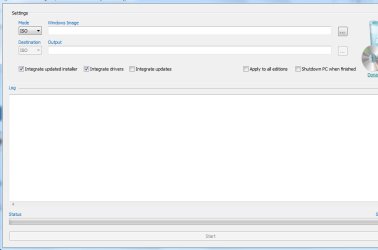
If you don't know how to extract drivers and use Dism, it will be easier for you to use this:

Windows_7_Image_Updater.7z

Untick "Apply to all editions" and to save time, untick "Integrate Updates".

image_updater.jpg
 

My Computers

System One System Two

  • Computer type
    PC/Desktop
    OS
    7 X64
    CPU
    i5 8400
    Motherboard
    gigabyte b365m ds3h
    Memory
    2x8gb 3200mhz
    Hard Drives
    various
    PSU
    pure power 11 400w cm
    Case
    Coolermaster
    Cooling
    cryorig m9i
  • Computer type
    PC/Desktop
    OS
    7x64
    CPU
    g5400
    Motherboard
    ga b365m ds3h
    Memory
    8gb ddr4 2400
    PSU
    xfx pro 450w
Back
Top