Windows 7 clean install - BIOS questions & system startup time

Ah I see what you mean now. Sorry for not understanding it! Talk soon anyway, cheers :)
 

My Computer My Computer

At a glance

Microsoft Windows 7 Professional 64-bitDual Xeon(R) CPU E5-2687W v3 @ 3.10GHz32.00 GBNVIDIA Quadro K4200
Computer type
PC/Desktop
Computer Manufacturer/Model Number
Dell Precision Tower 7910 Workstation
OS
Microsoft Windows 7 Professional 64-bit
CPU
Dual Xeon(R) CPU E5-2687W v3 @ 3.10GHz
Motherboard
Dell Inc. 0215PR
Memory
32.00 GB
Graphics Card(s)
NVIDIA Quadro K4200
Sound Card
(1) NVIDIA High Definition Audio (2) High Definition Audio
Hard Drives
(1) SK hynix SC210 2.5 7MM 256GB ATA Device
(2) ATA WDC WD4003FZEX-0 SCSI Disk Device
Antivirus
Avast Free and Malwarebytes Free
Browser
Chrome
Other Info
BIOS: BIOS Date: 04/14/15 18:58:26 Ver: A07.00
Hi RedLad,

Ah, I see what you mean now. Sorry for not understanding it!

No problems. Please let me know how the WU's go :thumbsup:.
 

My Computer My Computer

At a glance

Win 7 HP SP1 64-bit Vista HB SP2 32-bit Linux...Intel(R) Pentium(R) CPU P6200 @ 2.13GHz4.00 GBIntel(R) Graphics Media Accelerator HD
Computer type
Laptop
Computer Manufacturer/Model Number
Fujitsu LIFEBOOK
OS
Win 7 HP SP1 64-bit Vista HB SP2 32-bit Linux Mint 18.3
CPU
Intel(R) Pentium(R) CPU P6200 @ 2.13GHz
Motherboard
FUJITSU FJNBB06
Memory
4.00 GB
Graphics Card(s)
Intel(R) Graphics Media Accelerator HD
Sound Card
[1] Realtek High Definition Audio [2] Intel(R) Display Audio
Screen Resolution
1366 x 768 x 32 bits (4294967296 colors) @ 59 Hz
Hard Drives
TOSHIBA MK5076GSX
Antivirus
AVG FREE
Hi RedLad,

Just to follow up on your previous question of what is the correct order that drivers should be installed in, I found this for you => How to Install Dell Drivers in the Correct Order.

I personally would stick to the main ones I listed!

I hope this helps!
 
Last edited:

My Computer My Computer

At a glance

Win 7 HP SP1 64-bit Vista HB SP2 32-bit Linux...Intel(R) Pentium(R) CPU P6200 @ 2.13GHz4.00 GBIntel(R) Graphics Media Accelerator HD
Computer type
Laptop
Computer Manufacturer/Model Number
Fujitsu LIFEBOOK
OS
Win 7 HP SP1 64-bit Vista HB SP2 32-bit Linux Mint 18.3
CPU
Intel(R) Pentium(R) CPU P6200 @ 2.13GHz
Motherboard
FUJITSU FJNBB06
Memory
4.00 GB
Graphics Card(s)
Intel(R) Graphics Media Accelerator HD
Sound Card
[1] Realtek High Definition Audio [2] Intel(R) Display Audio
Screen Resolution
1366 x 768 x 32 bits (4294967296 colors) @ 59 Hz
Hard Drives
TOSHIBA MK5076GSX
Antivirus
AVG FREE
Hi RedLad,

I usually [if needed] install the drivers in the following order:

[1] BIOS and/or Firmware Updates [Advanced Users].
[2] Motherboard or the Chipset.
[3] Video Adapter.
[4] Network Interface Card (NIC).
[5] Audio Adapter.
[6] Wireless Network Card or LAN Adapter.
[7] Any other hardware device drivers not listed above.

I don't think it really matters as long as you do the Chipset first!

Obviously sometimes you will need to install the LAN driver first in order to be able to get online to find and download the other drivers. Often, when you run M$ WU [Windows Update], it will download the drivers for you!

I hope this helps!
 
Last edited:

My Computer My Computer

At a glance

Win 7 HP SP1 64-bit Vista HB SP2 32-bit Linux...Intel(R) Pentium(R) CPU P6200 @ 2.13GHz4.00 GBIntel(R) Graphics Media Accelerator HD
Computer type
Laptop
Computer Manufacturer/Model Number
Fujitsu LIFEBOOK
OS
Win 7 HP SP1 64-bit Vista HB SP2 32-bit Linux Mint 18.3
CPU
Intel(R) Pentium(R) CPU P6200 @ 2.13GHz
Motherboard
FUJITSU FJNBB06
Memory
4.00 GB
Graphics Card(s)
Intel(R) Graphics Media Accelerator HD
Sound Card
[1] Realtek High Definition Audio [2] Intel(R) Display Audio
Screen Resolution
1366 x 768 x 32 bits (4294967296 colors) @ 59 Hz
Hard Drives
TOSHIBA MK5076GSX
Antivirus
AVG FREE
Hi RedLad,

I have just reviewed todays posts. I have made some amendments so it makes it a bit clearer for anyone following this thread [or comes across this thread in the future]. May I suggest that you just go back over the posts from post #55.
 

My Computer My Computer

At a glance

Win 7 HP SP1 64-bit Vista HB SP2 32-bit Linux...Intel(R) Pentium(R) CPU P6200 @ 2.13GHz4.00 GBIntel(R) Graphics Media Accelerator HD
Computer type
Laptop
Computer Manufacturer/Model Number
Fujitsu LIFEBOOK
OS
Win 7 HP SP1 64-bit Vista HB SP2 32-bit Linux Mint 18.3
CPU
Intel(R) Pentium(R) CPU P6200 @ 2.13GHz
Motherboard
FUJITSU FJNBB06
Memory
4.00 GB
Graphics Card(s)
Intel(R) Graphics Media Accelerator HD
Sound Card
[1] Realtek High Definition Audio [2] Intel(R) Display Audio
Screen Resolution
1366 x 768 x 32 bits (4294967296 colors) @ 59 Hz
Hard Drives
TOSHIBA MK5076GSX
Antivirus
AVG FREE
Hi Paul,

I will read back over them, sure.

I managed to install all updates. But I did notice a few failed ones, but still went ahead with the many restarts and it installed what it could anyway. the one it is saying failed on just now is called 'Definition Update for Windows Defender Antivirus.'

Am I right in thinking this is a Windows 10 program?
 

My Computer My Computer

At a glance

Microsoft Windows 7 Professional 64-bitDual Xeon(R) CPU E5-2687W v3 @ 3.10GHz32.00 GBNVIDIA Quadro K4200
Computer type
PC/Desktop
Computer Manufacturer/Model Number
Dell Precision Tower 7910 Workstation
OS
Microsoft Windows 7 Professional 64-bit
CPU
Dual Xeon(R) CPU E5-2687W v3 @ 3.10GHz
Motherboard
Dell Inc. 0215PR
Memory
32.00 GB
Graphics Card(s)
NVIDIA Quadro K4200
Sound Card
(1) NVIDIA High Definition Audio (2) High Definition Audio
Hard Drives
(1) SK hynix SC210 2.5 7MM 256GB ATA Device
(2) ATA WDC WD4003FZEX-0 SCSI Disk Device
Antivirus
Avast Free and Malwarebytes Free
Browser
Chrome
Other Info
BIOS: BIOS Date: 04/14/15 18:58:26 Ver: A07.00
One thing I am glad to see is that those random freezes and black screens seem to have stopped since the 2nd re-install.

I have some questions Paul.

1. For post #55 you talk about the Bios and say that you "update the BIOS first, before updating any other drivers." What do I do in my case? As I have already updated the chipset and graphics card/display already.

2. In the Device Manager I am still seeing a lot of the yellow exclamation marks in the 'Other devices' section - so I am just wondering if I go ahead and try to update some other drivers, will this fix these issues (in Device Manager)
 

My Computer My Computer

At a glance

Microsoft Windows 7 Professional 64-bitDual Xeon(R) CPU E5-2687W v3 @ 3.10GHz32.00 GBNVIDIA Quadro K4200
Computer type
PC/Desktop
Computer Manufacturer/Model Number
Dell Precision Tower 7910 Workstation
OS
Microsoft Windows 7 Professional 64-bit
CPU
Dual Xeon(R) CPU E5-2687W v3 @ 3.10GHz
Motherboard
Dell Inc. 0215PR
Memory
32.00 GB
Graphics Card(s)
NVIDIA Quadro K4200
Sound Card
(1) NVIDIA High Definition Audio (2) High Definition Audio
Hard Drives
(1) SK hynix SC210 2.5 7MM 256GB ATA Device
(2) ATA WDC WD4003FZEX-0 SCSI Disk Device
Antivirus
Avast Free and Malwarebytes Free
Browser
Chrome
Other Info
BIOS: BIOS Date: 04/14/15 18:58:26 Ver: A07.00
Hi RedLad,

I will read back over them, sure.

I think it will be worth it, just to get it clear in your mind what has been done, in what order, and why!

I managed to install all updates. But I did notice a few failed ones, but still went ahead with the many restarts and it installed what it could anyway. the one it is saying failed on just now is called 'Definition Update for Windows Defender Antivirus.'

Am I right in thinking this is a Windows 10 program?

No it isn't. Windows Defender is an anti-malware component of M$ Windows. If you have your own AV [Anti-Virus] I wouldn't worry about it. Most people don't use it. The choice is yours!

I hope this helps!
 

My Computer My Computer

At a glance

Win 7 HP SP1 64-bit Vista HB SP2 32-bit Linux...Intel(R) Pentium(R) CPU P6200 @ 2.13GHz4.00 GBIntel(R) Graphics Media Accelerator HD
Computer type
Laptop
Computer Manufacturer/Model Number
Fujitsu LIFEBOOK
OS
Win 7 HP SP1 64-bit Vista HB SP2 32-bit Linux Mint 18.3
CPU
Intel(R) Pentium(R) CPU P6200 @ 2.13GHz
Motherboard
FUJITSU FJNBB06
Memory
4.00 GB
Graphics Card(s)
Intel(R) Graphics Media Accelerator HD
Sound Card
[1] Realtek High Definition Audio [2] Intel(R) Display Audio
Screen Resolution
1366 x 768 x 32 bits (4294967296 colors) @ 59 Hz
Hard Drives
TOSHIBA MK5076GSX
Antivirus
AVG FREE
Hi RedLad,

One thing I am glad to see is that those random freezes and black screens seem to have stopped since the 2nd re-install.
:thumbsup:

I have some questions Paul.

1. For post #55 you talk about the Bios and say that you "update the BIOS first, before updating any other drivers." What do I do in my case? As I have already updated the chipset and graphics card/display already.

2. In the Device Manager I am still seeing a lot of the yellow exclamation marks in the 'Other devices' section - so I am just wondering if I go ahead and try to update some other drivers, will this fix these issues (in Device Manager)

[1] The BIOS can be updated at any time, not necessarily first. As everything seems to be running OK now, you can update the BIOS if you so wish! If you do go ahead and do this, I would check for updates again.

IMPORTANT: Only update the BIOS with the update that is on the Dell website. Pay very close attention to the information they give for the installation and follow it to the letter!

[2] How many yellow triangles are we talking about?

Have you got a Dell Drivers DVD?
 

My Computer My Computer

At a glance

Win 7 HP SP1 64-bit Vista HB SP2 32-bit Linux...Intel(R) Pentium(R) CPU P6200 @ 2.13GHz4.00 GBIntel(R) Graphics Media Accelerator HD
Computer type
Laptop
Computer Manufacturer/Model Number
Fujitsu LIFEBOOK
OS
Win 7 HP SP1 64-bit Vista HB SP2 32-bit Linux Mint 18.3
CPU
Intel(R) Pentium(R) CPU P6200 @ 2.13GHz
Motherboard
FUJITSU FJNBB06
Memory
4.00 GB
Graphics Card(s)
Intel(R) Graphics Media Accelerator HD
Sound Card
[1] Realtek High Definition Audio [2] Intel(R) Display Audio
Screen Resolution
1366 x 768 x 32 bits (4294967296 colors) @ 59 Hz
Hard Drives
TOSHIBA MK5076GSX
Antivirus
AVG FREE
I actually installed Kaspersky Free along with Malwarebytes Free. I will keep these for now anyway. I always used Avast Free but wanted to try something different and the reviews were better for Kaspersky Free.

1. For the Bios - I went through a lot of stuff with that before from what I remember, with the other users who are no longer on the forum. So I am weary of messing about with it again now. There was all sorts on nonsense I had to alter, like raid controllers and UEFI. It was stressful at the time haha.

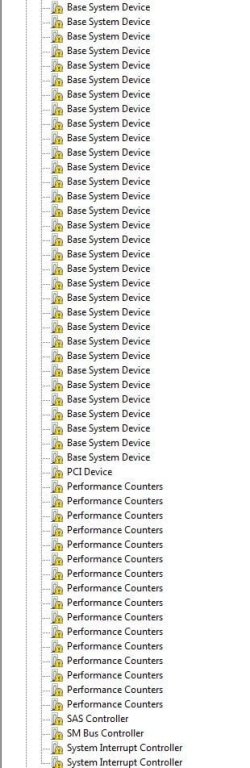
2. LOTS. Approx. 130 Base System Device ones. Along with these at the bottom:

This is only a portion of the Base System Device ones, in the image. The rest are listed above.
 

Attachments

  • Device_Manager3.JPG
    Device_Manager3.JPG
    65 KB · Views: 0

My Computer My Computer

At a glance

Microsoft Windows 7 Professional 64-bitDual Xeon(R) CPU E5-2687W v3 @ 3.10GHz32.00 GBNVIDIA Quadro K4200
Computer type
PC/Desktop
Computer Manufacturer/Model Number
Dell Precision Tower 7910 Workstation
OS
Microsoft Windows 7 Professional 64-bit
CPU
Dual Xeon(R) CPU E5-2687W v3 @ 3.10GHz
Motherboard
Dell Inc. 0215PR
Memory
32.00 GB
Graphics Card(s)
NVIDIA Quadro K4200
Sound Card
(1) NVIDIA High Definition Audio (2) High Definition Audio
Hard Drives
(1) SK hynix SC210 2.5 7MM 256GB ATA Device
(2) ATA WDC WD4003FZEX-0 SCSI Disk Device
Antivirus
Avast Free and Malwarebytes Free
Browser
Chrome
Other Info
BIOS: BIOS Date: 04/14/15 18:58:26 Ver: A07.00
Hi RedLad,

I actually installed Kaspersky Free along with Malwarebytes Free. I will keep these for now anyway. I always used Avast Free but wanted to try something different and the reviews were better for Kaspersky Free.

They are good considering they are FREE. Quite a few people have had various problems that tend to be over complicated to resolve because of having Avast [Norton also sometimes] installed. You can search this forum for further information.

1. For the Bios - I went through a lot of stuff with that before from what I remember, with the other users who are no longer on the forum. So I am weary of messing about with it again now. There was all sorts on nonsense I had to alter, like raid controllers and UEFI. It was stressful at the time haha.

What date is the BIOS update on the Dell website? It might be that the whole BIOS update process is a lot more secure and easier to install now than previously!

2. LOTS. Approx. 130 Base System Device ones. Along with these at the bottom:

This is only a portion of the Base System Device ones, in the image. The rest are listed above.

OK. From the ones that I can actually see in your screenshot, I would definately use the Dell drivers DVD to update the PCI Device [I thought you had already done this!] driver and the SAS Controller driver!

You will probably find that this will sort out a lot of the yellow triangles!

Go into Device Manager and right-click them, select Update driver software..., and then click Browse my computer for driver software.

If that doesn't work, then find them on the Dell Drivers DVD and install them from there!

I hope this helps!
 
Last edited:

My Computer My Computer

At a glance

Win 7 HP SP1 64-bit Vista HB SP2 32-bit Linux...Intel(R) Pentium(R) CPU P6200 @ 2.13GHz4.00 GBIntel(R) Graphics Media Accelerator HD
Computer type
Laptop
Computer Manufacturer/Model Number
Fujitsu LIFEBOOK
OS
Win 7 HP SP1 64-bit Vista HB SP2 32-bit Linux Mint 18.3
CPU
Intel(R) Pentium(R) CPU P6200 @ 2.13GHz
Motherboard
FUJITSU FJNBB06
Memory
4.00 GB
Graphics Card(s)
Intel(R) Graphics Media Accelerator HD
Sound Card
[1] Realtek High Definition Audio [2] Intel(R) Display Audio
Screen Resolution
1366 x 768 x 32 bits (4294967296 colors) @ 59 Hz
Hard Drives
TOSHIBA MK5076GSX
Antivirus
AVG FREE
Hi Paul,

The Bios update was last updated on 29 Oct 2018.

For the drivers - I do not have a driver disc at all for this unfortunately. I am not even sure I got one with the PC! What is the PDI Device? Or did you mean PCI? Or what category of drivers would I try and find it in?

When I went to install the SAS driver, I got the following message:
 

Attachments

  • SAS_Driver.JPG
    SAS_Driver.JPG
    91.5 KB · Views: 1

My Computer My Computer

At a glance

Microsoft Windows 7 Professional 64-bitDual Xeon(R) CPU E5-2687W v3 @ 3.10GHz32.00 GBNVIDIA Quadro K4200
Computer type
PC/Desktop
Computer Manufacturer/Model Number
Dell Precision Tower 7910 Workstation
OS
Microsoft Windows 7 Professional 64-bit
CPU
Dual Xeon(R) CPU E5-2687W v3 @ 3.10GHz
Motherboard
Dell Inc. 0215PR
Memory
32.00 GB
Graphics Card(s)
NVIDIA Quadro K4200
Sound Card
(1) NVIDIA High Definition Audio (2) High Definition Audio
Hard Drives
(1) SK hynix SC210 2.5 7MM 256GB ATA Device
(2) ATA WDC WD4003FZEX-0 SCSI Disk Device
Antivirus
Avast Free and Malwarebytes Free
Browser
Chrome
Other Info
BIOS: BIOS Date: 04/14/15 18:58:26 Ver: A07.00
When you say "Go into Device Manager and right-click them, select Update driver software..., and then click Browse my computer for driver software."

But what do I then point it to when I browse?

This is turning into a bit of a nightmare, would you agree? So stressful it is. I had expected to have to PC up and in working state by now, it is disappointing for me. Not aimed at anyone here, just my general feeling overall Paul. How far do you think I am away from having a fully working PC again where I can begin to install all of my software?
 

My Computer My Computer

At a glance

Microsoft Windows 7 Professional 64-bitDual Xeon(R) CPU E5-2687W v3 @ 3.10GHz32.00 GBNVIDIA Quadro K4200
Computer type
PC/Desktop
Computer Manufacturer/Model Number
Dell Precision Tower 7910 Workstation
OS
Microsoft Windows 7 Professional 64-bit
CPU
Dual Xeon(R) CPU E5-2687W v3 @ 3.10GHz
Motherboard
Dell Inc. 0215PR
Memory
32.00 GB
Graphics Card(s)
NVIDIA Quadro K4200
Sound Card
(1) NVIDIA High Definition Audio (2) High Definition Audio
Hard Drives
(1) SK hynix SC210 2.5 7MM 256GB ATA Device
(2) ATA WDC WD4003FZEX-0 SCSI Disk Device
Antivirus
Avast Free and Malwarebytes Free
Browser
Chrome
Other Info
BIOS: BIOS Date: 04/14/15 18:58:26 Ver: A07.00
Actually I wanted to get your opinion, if I tried this option on the page for my PC on their site. Would this 'recommended' option to "Let us analyze your system to find the latest updates" just install a load of unnecessary junk? This is the window on the site:
 

Attachments

  • Dell_Drivers.JPG
    Dell_Drivers.JPG
    15.2 KB · Views: 0

My Computer My Computer

At a glance

Microsoft Windows 7 Professional 64-bitDual Xeon(R) CPU E5-2687W v3 @ 3.10GHz32.00 GBNVIDIA Quadro K4200
Computer type
PC/Desktop
Computer Manufacturer/Model Number
Dell Precision Tower 7910 Workstation
OS
Microsoft Windows 7 Professional 64-bit
CPU
Dual Xeon(R) CPU E5-2687W v3 @ 3.10GHz
Motherboard
Dell Inc. 0215PR
Memory
32.00 GB
Graphics Card(s)
NVIDIA Quadro K4200
Sound Card
(1) NVIDIA High Definition Audio (2) High Definition Audio
Hard Drives
(1) SK hynix SC210 2.5 7MM 256GB ATA Device
(2) ATA WDC WD4003FZEX-0 SCSI Disk Device
Antivirus
Avast Free and Malwarebytes Free
Browser
Chrome
Other Info
BIOS: BIOS Date: 04/14/15 18:58:26 Ver: A07.00
Hi RedLad,

The Bios update was last updated on 29 Oct 2018.

As I said previously, only update the BIOS with the update that is on the Dell website. Pay very close attention to the information they give for the installation and follow it to the letter. It might be that the whole BIOS update process is a lot more secure and easier to install now than previously!

For the drivers - I do not have a driver disc at all for this unfortunately. I am not even sure I got one with the PC! What is the PDI Device? Or did you mean PCI? Or what category of drivers would I try and find it in?

That's a shame because that would have been the easiest option.
Yes, I did mean PCI driver [I have amended my post to reflect this].

When I went to install the SAS driver, I got the following message:

Obviously that is not the correct driver then.

When you say "Go into Device Manager and right-click them, select Update driver software..., and then click Browse my computer for driver software."

But what do I then point it to when I browse?

That will only work if you had the Dell drivers DVD. Sorry, I should have made that clear.

This is turning into a bit of a nightmare, would you agree? So stressful it is. I had expected to have the PC up and in working state by now, it is disappointing for me. Not aimed at anyone here, just my general feeling overall Paul. How far do you think I am away from having a fully working PC again where I can begin to install all of my software?

Please don't get despondent. A clean install and full update is not a five minute process, it takes time!
You are not actually too far away from completion!

Actually I wanted to get your opinion, if I tried this option on the page for my PC on their site. Would this 'recommended' option to "Let us analyze your system to find the latest updates" just install a load of unnecessary junk? This is the window on the site:

When you say their site, whos site is it?

You have to be extremey carefull with sites that give you this option because they can bombard you with all sorts of stuff like spyware etc!

I hope this helps!
 

My Computer My Computer

At a glance

Win 7 HP SP1 64-bit Vista HB SP2 32-bit Linux...Intel(R) Pentium(R) CPU P6200 @ 2.13GHz4.00 GBIntel(R) Graphics Media Accelerator HD
Computer type
Laptop
Computer Manufacturer/Model Number
Fujitsu LIFEBOOK
OS
Win 7 HP SP1 64-bit Vista HB SP2 32-bit Linux Mint 18.3
CPU
Intel(R) Pentium(R) CPU P6200 @ 2.13GHz
Motherboard
FUJITSU FJNBB06
Memory
4.00 GB
Graphics Card(s)
Intel(R) Graphics Media Accelerator HD
Sound Card
[1] Realtek High Definition Audio [2] Intel(R) Display Audio
Screen Resolution
1366 x 768 x 32 bits (4294967296 colors) @ 59 Hz
Hard Drives
TOSHIBA MK5076GSX
Antivirus
AVG FREE
The Bios date I mentioned is official yes. From dell.com.
This is the driver details:
Access Denied

By their site I mean the official Dell site, where is has that recommended option. It does need me to download a tool for it, from what I can see. this is the link to the site, it is the same one you posted earlier in the thread, well this is the Ireland version.If you need to have a look:

Access Denied

Not sure why the links I pasted above say access denied, it is from the actual site of Dell.
 

My Computer My Computer

At a glance

Microsoft Windows 7 Professional 64-bitDual Xeon(R) CPU E5-2687W v3 @ 3.10GHz32.00 GBNVIDIA Quadro K4200
Computer type
PC/Desktop
Computer Manufacturer/Model Number
Dell Precision Tower 7910 Workstation
OS
Microsoft Windows 7 Professional 64-bit
CPU
Dual Xeon(R) CPU E5-2687W v3 @ 3.10GHz
Motherboard
Dell Inc. 0215PR
Memory
32.00 GB
Graphics Card(s)
NVIDIA Quadro K4200
Sound Card
(1) NVIDIA High Definition Audio (2) High Definition Audio
Hard Drives
(1) SK hynix SC210 2.5 7MM 256GB ATA Device
(2) ATA WDC WD4003FZEX-0 SCSI Disk Device
Antivirus
Avast Free and Malwarebytes Free
Browser
Chrome
Other Info
BIOS: BIOS Date: 04/14/15 18:58:26 Ver: A07.00
An idea just came into my head Paul.

Back in 2015 when I got it up and running, I created an image with Macrium Reflect. I did one right after I did the clean install, with drivers and Microsoft Security Essentials installed.

Would this be even worth considering to try and restore?
 

My Computer My Computer

At a glance

Microsoft Windows 7 Professional 64-bitDual Xeon(R) CPU E5-2687W v3 @ 3.10GHz32.00 GBNVIDIA Quadro K4200
Computer type
PC/Desktop
Computer Manufacturer/Model Number
Dell Precision Tower 7910 Workstation
OS
Microsoft Windows 7 Professional 64-bit
CPU
Dual Xeon(R) CPU E5-2687W v3 @ 3.10GHz
Motherboard
Dell Inc. 0215PR
Memory
32.00 GB
Graphics Card(s)
NVIDIA Quadro K4200
Sound Card
(1) NVIDIA High Definition Audio (2) High Definition Audio
Hard Drives
(1) SK hynix SC210 2.5 7MM 256GB ATA Device
(2) ATA WDC WD4003FZEX-0 SCSI Disk Device
Antivirus
Avast Free and Malwarebytes Free
Browser
Chrome
Other Info
BIOS: BIOS Date: 04/14/15 18:58:26 Ver: A07.00
Hi RedLad,

The Bios date I mentioned is official yes. From dell.com.

That's good!

By their site I mean the official Dell site, where is has that recommended option. It does need me to download a tool for it, from what I can see. this is the link to the site, it is the same one you posted earlier in the thread, well this is the Ireland version.

Yes, as it is the official Dell site I would go for it. It should find all the drivers needed!

Not sure why the links I pasted above say access denied, it is from the actual site of Dell.

They open OK in Google Chrome [NOT IE though] so I wouldn't worry.

An idea just came into my head Paul.
Back in 2015 when I got it up and running, I created an image with Macrium Reflect. I did one right after I did the clean install, with drivers and Microsoft Security Essentials installed.
Would this be even worth considering to try and restore?

Not really, because everything you have done over the last few days will be get wiped out!

The thing is, that image was taken quite a while ago now. There have been many updates etc since then. If you used that system image, you would still need to run the updates etc to get the OS fully upto date!

When we have finished, you will have an upto date OS as of now. We will be creating a system image anyway after your OS is fully updated and running smoothly anyway.

I hope this helps!
 
Last edited:

My Computer My Computer

At a glance

Win 7 HP SP1 64-bit Vista HB SP2 32-bit Linux...Intel(R) Pentium(R) CPU P6200 @ 2.13GHz4.00 GBIntel(R) Graphics Media Accelerator HD
Computer type
Laptop
Computer Manufacturer/Model Number
Fujitsu LIFEBOOK
OS
Win 7 HP SP1 64-bit Vista HB SP2 32-bit Linux Mint 18.3
CPU
Intel(R) Pentium(R) CPU P6200 @ 2.13GHz
Motherboard
FUJITSU FJNBB06
Memory
4.00 GB
Graphics Card(s)
Intel(R) Graphics Media Accelerator HD
Sound Card
[1] Realtek High Definition Audio [2] Intel(R) Display Audio
Screen Resolution
1366 x 768 x 32 bits (4294967296 colors) @ 59 Hz
Hard Drives
TOSHIBA MK5076GSX
Antivirus
AVG FREE
Hi RedLad,

I have just been looking at the Dell website. I think if you input your service tag number it will find ALL the drivers relevant to your OS. That will make it so much easier!

If not, then go with what you have got in post #74!

I hope this helps!
 

My Computer My Computer

At a glance

Win 7 HP SP1 64-bit Vista HB SP2 32-bit Linux...Intel(R) Pentium(R) CPU P6200 @ 2.13GHz4.00 GBIntel(R) Graphics Media Accelerator HD
Computer type
Laptop
Computer Manufacturer/Model Number
Fujitsu LIFEBOOK
OS
Win 7 HP SP1 64-bit Vista HB SP2 32-bit Linux Mint 18.3
CPU
Intel(R) Pentium(R) CPU P6200 @ 2.13GHz
Motherboard
FUJITSU FJNBB06
Memory
4.00 GB
Graphics Card(s)
Intel(R) Graphics Media Accelerator HD
Sound Card
[1] Realtek High Definition Audio [2] Intel(R) Display Audio
Screen Resolution
1366 x 768 x 32 bits (4294967296 colors) @ 59 Hz
Hard Drives
TOSHIBA MK5076GSX
Antivirus
AVG FREE
Hi RedLad,

I have just been looking at the Dell website. I think if you input your service tag number it will find ALL the drivers relevant to your OS. That will make it so much easier!

If not, then go with what you have got in post #74!

I hope this helps!

Hi Paul,

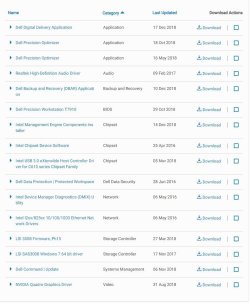
I entered the service tag and got the following list:
 

Attachments

  • Drivers_With_Service_Tag.JPG
    Drivers_With_Service_Tag.JPG
    83.6 KB · Views: 1

My Computer My Computer

At a glance

Microsoft Windows 7 Professional 64-bitDual Xeon(R) CPU E5-2687W v3 @ 3.10GHz32.00 GBNVIDIA Quadro K4200
Computer type
PC/Desktop
Computer Manufacturer/Model Number
Dell Precision Tower 7910 Workstation
OS
Microsoft Windows 7 Professional 64-bit
CPU
Dual Xeon(R) CPU E5-2687W v3 @ 3.10GHz
Motherboard
Dell Inc. 0215PR
Memory
32.00 GB
Graphics Card(s)
NVIDIA Quadro K4200
Sound Card
(1) NVIDIA High Definition Audio (2) High Definition Audio
Hard Drives
(1) SK hynix SC210 2.5 7MM 256GB ATA Device
(2) ATA WDC WD4003FZEX-0 SCSI Disk Device
Antivirus
Avast Free and Malwarebytes Free
Browser
Chrome
Other Info
BIOS: BIOS Date: 04/14/15 18:58:26 Ver: A07.00
Back
Top