Hi
RedLad,
Just before you read the below, please bear in mind I did not install any drivers, except for the one to get online, which was on a TP-Link disc I have.
I have answered this below.
1. I disconnected the 4TB hard drive beforehand, leaving just the new SSD. - I am only remembering that I did have my secondary screen connected to the back of the PC, along with the mouse and keyboard. Would the screen being connected have caused any issues?
I doubt it very much but I always disconnect anything not relevant before I do a clean install. I just leave the keyboard and mouse attached.
2. There are lots actually:
About 130 'Base System Device' ones.
2 'Ethernet Controlers' ones.
'PCI Device, Serial Port and Simple Communications Controller' (x3)
16 'Performance Connters'
'SAS Controller'
'SM Bus Controller'
'System Interrupt Controller' (x2)
'USB Controller'
(During checking this, the PC froze again. Something is definitely up! I just hope it is fixable, as I had some work to do over the holidays.)
This is where all your issues are.
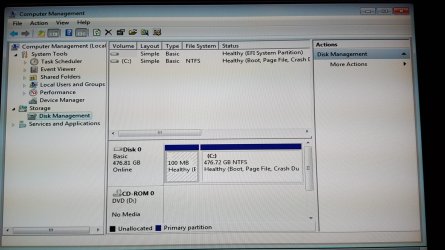
3. The New option. This was during setup - on the screen that lists the partitions/drives. It showed the SSD with just under 500GB. But I clicked on 'New' then clicked OK with the number it said to specify (I left that at default) Was this a bad idea? This then showed the 3 partions I mentioned earlier and after looking up online about it, I am nearly sure it said MSR in one of them as you can see in the attached screen example (this is not from mine)
The MSR partition [Microsoft Reserved Partition] reserves space on each disk drive for subsequent use by OS software. It's a placeholder invented by M$. It doesn't contain any meaningful data and it's there just in case you will ever need to create some additional partition for special uses. You don't really need it.
4. I am not sure to be honest, I did not see or notice anything to do with dual-boot.
That's good!
[1] Right, have a very close look at the
installation disk, are there any
scratches on it?
[2] What does the
label on the disk actually say?
When I do a clean install, I usually delete
ALL the partitions leaving a single
Unallocated space partition which Windows than gets installed on.
From what you have stated, it appears that the disk you got from Dell is
missing most of the Windows 7
drivers!
What you could do, is download a
Windows 7 SP1 ISO x64, burn it to a DVD or USB, and use that for a clean install. This might be the better option depending on whether we can get the OS working correctly!
Alternatively, go onto the Dell website and download the relevant drivers, put them onto a USB and install them on the
LIVE OS. You will need drivers for the MOBO, Graphics/Video Card, Ethernet, Chipset, WLAN etc =>
Support for Precision Tower 7910.
Can you post a screenshot on the
Device Manager!
I hope this helps!