Solved Windows 7 - Connected but no internet access - help needed.

Beagle

New member
Local time
2:41 PM
Messages
22
Hi,
I've recently changed ISP and now have a new router. Everything else connects to the network perfectly (a Macbook, PS4, TV, 2 phones) apart from my Windows 7 PC. I've disabled IPv6, tried flush dns, reset winsock etc. I'm not even able to log into the routers setup on this PC.
Sometimes, I have the yellow warning triangle over the wireless connection icon with the message "no internet access". Other times I will not have the yellow triangle, it will say I have internet access, but I'm unable to load any webpage (including router). Any help very much appreciated!


1. Is this a wired or wireless connection issue?
Wireless


2. Who is your Internet Service Provider (ISP)?
Zen

3. What type of Broadband connection are you using?
Cable/Fibre optic

4. What is the exact Make and Model of your Modem, Router or Modem/Router Combo
Modem is BT OpenReach. Router is Asus NT-56U

5. What is the Name of the Anti-Virus, Security or Firewall Software installed from the problematic computer - McAfee, Norton, Eset, Webroot, Zone Alarm, etc.

Windows Security essentials only

IPCONFIG:


Windows IP Configuration

Host Name . . . . . . . . . . . . : Beagle-PC
Primary Dns Suffix . . . . . . . :
Node Type . . . . . . . . . . . . : Mixed
IP Routing Enabled. . . . . . . . : No
WINS Proxy Enabled. . . . . . . . : No

Wireless LAN adapter Wireless Network Connection 2:

Connection-specific DNS Suffix . :
Description . . . . . . . . . . . : ASUS PCE-N15 11n Wireless LAN PCI-E Card
Physical Address. . . . . . . . . : C8-60-00-D3-E3-92
DHCP Enabled. . . . . . . . . . . : Yes
Autoconfiguration Enabled . . . . : Yes
IPv4 Address. . . . . . . . . . . : 192.168.1.30(Preferred)
Subnet Mask . . . . . . . . . . . : 255.255.255.0
Lease Obtained. . . . . . . . . . : 11 August 2014 19:46:33
Lease Expires . . . . . . . . . . : 12 August 2014 19:46:33
Default Gateway . . . . . . . . . : 192.168.1.1
DHCP Server . . . . . . . . . . . : 192.168.1.1
DNS Servers . . . . . . . . . . . : 212.23.3.100
212.23.6.100
NetBIOS over Tcpip. . . . . . . . : Enabled


Capture.png
 

My Computer My Computer

OS
Windows 7 Home Premium 64bit
Is that ipconfig output form faulty win7 machine? So it has ip address 192.168.1.30?
You can't browse to 192.168.1.1?
Can you do in command prompt:
Code:
ping  192.168.1.1
post output
Can other machines ping the router?
 

My Computer My Computer

Computer type
Laptop
Computer Manufacturer/Model Number
ACER ASPIRE 5742G
OS
Microsoft Windows 7 Home Premium 64-bits 7601 Multiprocessor Free Service Pack 1
CPU
Intel(R) Core(TM) i3 CPU M 370 @ 2.40GHz
Motherboard
Acer Aspire 5742G
Memory
4,00 GB
Graphics Card(s)
ATI Mobility Radeon HD 5400 Series
Sound Card
(1) AMD High Definition Audio Device (2) Realtek High Defi
Screen Resolution
1366 x 768 x 32 bits (4294967296 colors) @ 60 Hz
Hard Drives
WDC WD5000BEVT-22ZAT0
Hi,

Yes that is from the faulty machine. I can access the router perfectly fine on my Macbook.

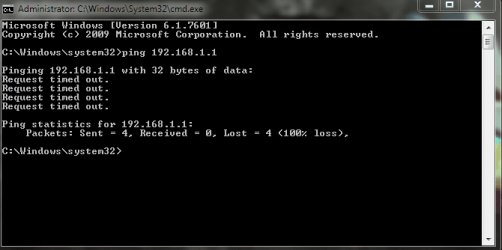
Here's the ping response:
 

Attachments

  • Capture ping.PNG
    Capture ping.PNG
    11.2 KB · Views: 29

My Computer My Computer

OS
Windows 7 Home Premium 64bit
Post output of
Code:
route  -4  print
 

My Computer My Computer

Computer type
Laptop
Computer Manufacturer/Model Number
ACER ASPIRE 5742G
OS
Microsoft Windows 7 Home Premium 64-bits 7601 Multiprocessor Free Service Pack 1
CPU
Intel(R) Core(TM) i3 CPU M 370 @ 2.40GHz
Motherboard
Acer Aspire 5742G
Memory
4,00 GB
Graphics Card(s)
ATI Mobility Radeon HD 5400 Series
Sound Card
(1) AMD High Definition Audio Device (2) Realtek High Defi
Screen Resolution
1366 x 768 x 32 bits (4294967296 colors) @ 60 Hz
Hard Drives
WDC WD5000BEVT-22ZAT0
Code:
tracert  198.211.122.92
post output
 

My Computer My Computer

Computer type
Laptop
Computer Manufacturer/Model Number
ACER ASPIRE 5742G
OS
Microsoft Windows 7 Home Premium 64-bits 7601 Multiprocessor Free Service Pack 1
CPU
Intel(R) Core(TM) i3 CPU M 370 @ 2.40GHz
Motherboard
Acer Aspire 5742G
Memory
4,00 GB
Graphics Card(s)
ATI Mobility Radeon HD 5400 Series
Sound Card
(1) AMD High Definition Audio Device (2) Realtek High Defi
Screen Resolution
1366 x 768 x 32 bits (4294967296 colors) @ 60 Hz
Hard Drives
WDC WD5000BEVT-22ZAT0
What happens if you boot into safe mode with networking? Can you then ping the router?
 

My Computer My Computer

Computer type
PC/Desktop
Computer Manufacturer/Model Number
PC Specialist Custom
OS
Windows 7 Pro 64 bit
CPU
Intel i5
Motherboard
ASUS® H81M-PLUS
Memory
8GB KINGSTON DUAL-DDR3 1600MHz
Graphics Card(s)
2GB AMD RADEON™ R7 250
Hard Drives
120GB KINGSTON V300 SSD
1TB WD CAVIAR BLACK WD1003FZEX
What happens if you boot into safe mode with networking? Can you then ping the router?

Hi BJB, I shall try that tonight.
 

My Computer My Computer

OS
Windows 7 Home Premium 64bit

My Computer My Computer

Computer type
Laptop
Computer Manufacturer/Model Number
ACER ASPIRE 5742G
OS
Microsoft Windows 7 Home Premium 64-bits 7601 Multiprocessor Free Service Pack 1
CPU
Intel(R) Core(TM) i3 CPU M 370 @ 2.40GHz
Motherboard
Acer Aspire 5742G
Memory
4,00 GB
Graphics Card(s)
ATI Mobility Radeon HD 5400 Series
Sound Card
(1) AMD High Definition Audio Device (2) Realtek High Defi
Screen Resolution
1366 x 768 x 32 bits (4294967296 colors) @ 60 Hz
Hard Drives
WDC WD5000BEVT-22ZAT0
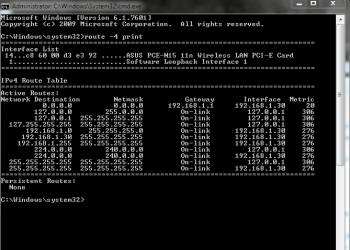
Hi Kaktussoft. Here're those screen grabs.
 

Attachments

  • Capture3.PNG
    Capture3.PNG
    8.3 KB · Views: 13
  • Capture4.PNG
    Capture4.PNG
    1.5 KB · Views: 13

My Computer My Computer

OS
Windows 7 Home Premium 64bit
tracert 198.211.122.92 still gives same output? see post #8
ping 198.211.122.92 still fails?
 

My Computer My Computer

Computer type
Laptop
Computer Manufacturer/Model Number
ACER ASPIRE 5742G
OS
Microsoft Windows 7 Home Premium 64-bits 7601 Multiprocessor Free Service Pack 1
CPU
Intel(R) Core(TM) i3 CPU M 370 @ 2.40GHz
Motherboard
Acer Aspire 5742G
Memory
4,00 GB
Graphics Card(s)
ATI Mobility Radeon HD 5400 Series
Sound Card
(1) AMD High Definition Audio Device (2) Realtek High Defi
Screen Resolution
1366 x 768 x 32 bits (4294967296 colors) @ 60 Hz
Hard Drives
WDC WD5000BEVT-22ZAT0
What happens if you boot into safe mode with networking? Can you then ping the router?

Just tried safe mode. It says I have internet access, I can ping the router. All seems to work - I can even log into the router!
 

My Computer My Computer

OS
Windows 7 Home Premium 64bit

My Computer My Computer

Computer type
Laptop
Computer Manufacturer/Model Number
ACER ASPIRE 5742G
OS
Microsoft Windows 7 Home Premium 64-bits 7601 Multiprocessor Free Service Pack 1
CPU
Intel(R) Core(TM) i3 CPU M 370 @ 2.40GHz
Motherboard
Acer Aspire 5742G
Memory
4,00 GB
Graphics Card(s)
ATI Mobility Radeon HD 5400 Series
Sound Card
(1) AMD High Definition Audio Device (2) Realtek High Defi
Screen Resolution
1366 x 768 x 32 bits (4294967296 colors) @ 60 Hz
Hard Drives
WDC WD5000BEVT-22ZAT0
tracert 198.211.122.92 still gives same output? see post #8
ping 198.211.122.92 still fails?

Yeah, similar results for the tracert (some time-outs) and pinging 198.211.122.92 gave 'request timed out'.

Odd... I was able to load a couple of webpages about 10 minutes ago and ran a speedtest.com test, which gave me good results (ping 12, expected download and upload). But now it can't even complete the test - it's stuck on Ping 29ms...

I'm going to try a clean boot next.
 

My Computer My Computer

OS
Windows 7 Home Premium 64bit
Just did a clean boot and the problem remains. Connected to internet, no pages load, unable to ping 192.168.1.1
 

My Computer My Computer

OS
Windows 7 Home Premium 64bit
What happens if you boot into safe mode with networking? Can you then ping the router?

Just tried safe mode. It says I have internet access, I can ping the router. All seems to work - I can even log into the router!
In safe mode with networking you can ping router and logon to router? You can browse the web? It is not pure luck.... it works all the time?
 

My Computer My Computer

Computer type
Laptop
Computer Manufacturer/Model Number
ACER ASPIRE 5742G
OS
Microsoft Windows 7 Home Premium 64-bits 7601 Multiprocessor Free Service Pack 1
CPU
Intel(R) Core(TM) i3 CPU M 370 @ 2.40GHz
Motherboard
Acer Aspire 5742G
Memory
4,00 GB
Graphics Card(s)
ATI Mobility Radeon HD 5400 Series
Sound Card
(1) AMD High Definition Audio Device (2) Realtek High Defi
Screen Resolution
1366 x 768 x 32 bits (4294967296 colors) @ 60 Hz
Hard Drives
WDC WD5000BEVT-22ZAT0
Just did a clean boot and the problem remains. Connected to internet, no pages load, unable to ping 192.168.1.1
revert the boot to "normal boot".
 

My Computer My Computer

Computer type
Laptop
Computer Manufacturer/Model Number
ACER ASPIRE 5742G
OS
Microsoft Windows 7 Home Premium 64-bits 7601 Multiprocessor Free Service Pack 1
CPU
Intel(R) Core(TM) i3 CPU M 370 @ 2.40GHz
Motherboard
Acer Aspire 5742G
Memory
4,00 GB
Graphics Card(s)
ATI Mobility Radeon HD 5400 Series
Sound Card
(1) AMD High Definition Audio Device (2) Realtek High Defi
Screen Resolution
1366 x 768 x 32 bits (4294967296 colors) @ 60 Hz
Hard Drives
WDC WD5000BEVT-22ZAT0
In safe mode with networking you can ping router and logon to router? You can browse the web? It is not pure luck.... it works all the time?

argh...must have been luck! Just rebooted into safe mode and I can't ping router or log on. Well...the browser asks me for the admin password but after that Chrome just hangs and nothing happens.
 

My Computer My Computer

OS
Windows 7 Home Premium 64bit
I would connect it by cable and try to update the wireless adapter driver.
 

My Computer My Computer

Computer type
PC/Desktop
Computer Manufacturer/Model Number
PC Specialist Custom
OS
Windows 7 Pro 64 bit
CPU
Intel i5
Motherboard
ASUS® H81M-PLUS
Memory
8GB KINGSTON DUAL-DDR3 1600MHz
Graphics Card(s)
2GB AMD RADEON™ R7 250
Hard Drives
120GB KINGSTON V300 SSD
1TB WD CAVIAR BLACK WD1003FZEX
Back
Top