Windows 7 connects to TWO NETWORKS

curveball323

New member
Local time
1:57 AM
Messages
9
I believe this is a driver problem but couldn't find a solution to this problem.

First of all I had some problems installing windows 7 because it didn't recognize my harddrive being a drive to put win 7 on. but i fixed that by installing xp and then intalling win 7 over the top. and then again reformatting and putting windows 7 on after it started recognizing my harddrive.

BUT NOW THE PROBLEM ABOUT THE TWO NETWORKS

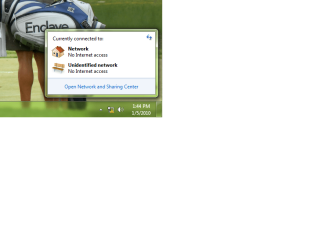
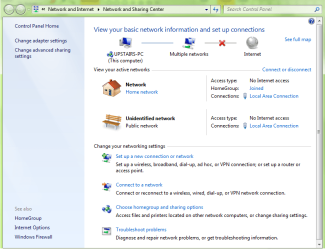
whenever I boot now win 7 always comes up with the problem that it is connected to two different networks. in the network and shared menu it says its connected to the HOME network and to a PUBLIC network both at the same time. I only have one cat5e cable connected to the wireless linksys router. my computer has no other network connections. not wireless nor modem dial up. it only has the one. so to fix this everytime i have to go into device manager and disable then reinable the driver for the network connection. and then all the sudden it works until i shut off the computer and then when it reboots the problem comes up again. I believe its a driver problem. but don't know how to fix it.

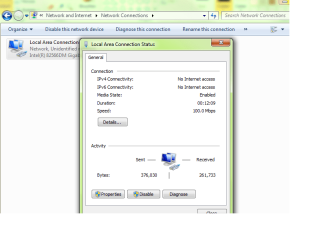
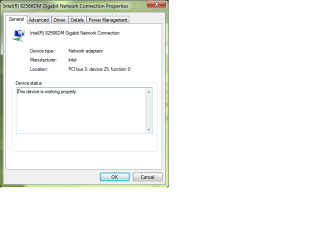
the driver that is enabled on my intel board dq965gf is intel 82566DM Gigabit Network Connection.

Windows 7 found it for me automatically. also i'm just running my cat5e out of the motherboard integrated network connection. NO PCI cards inserted. any help on figuring this one out would be apreciated greatly
 

My Computer My Computer

Computer Manufacturer/Model Number
Intel / custom built
OS
windows 7 ultimate
CPU
intel dual core 2.0 ghz
Motherboard
dq965gf
Monitor(s) Displays
dual monitor
Upgrade installations are proving far more troublesome than clean installs... :zip:
 

My Computer My Computer

Computer Manufacturer/Model Number
Custom built machine
OS
W7 x64
CPU
Intel Q9300 2.5Ghz Quad LGA775 (Would like Q9650)
Motherboard
Gigabyte GA-EP45T-UD3R (F6 Bios)
Memory
4Gb OCZ Gold 1,333Mhz
Graphics Card(s)
Palit HD4850 O/C Sonic 512Mb DDR3, Dual DViD's
Sound Card
Azalia to twin Samson 50w Studio Monitors
Monitor(s) Displays
Twin Dell (E-IPS) U2311H 23.6" Screens
Screen Resolution
1920 x 1080 @ 60Hz
Hard Drives
Crucial M4 SSD, archives on twin Western Digital Caviar Black WD2002FAEX, 2TB, 7200rpm HDD's, Samsung Ritemaster CD/DVD Burner...
PSU
OCZ 600w
Case
Lian-Li PC8 acoustifoamed' aluminium tower
Cooling
Scythe 140mm Zipang
Keyboard
Cherry PS/2 custom model
Mouse
Lenovo USB laser "Thinkpad" Mouse
Internet Speed
ADSL2+ @14Mbps downstream & Cat6 Gigabit Ethernet
Antivirus
NOD32
Browser
Opera
Other Info
Silicon Dust HD Homerun Dual FTA (Ethernet) TV Tuners, Dray Tek Vigor 2850Vn router and 8x HP Gigabit Switch. Lian-Li CR26 Card Reader, Canon MF4430 iSensys laser printer/scanner.
No i got a clean install after doing the upgrade. i reformatted and everything.
 

My Computer My Computer

Computer Manufacturer/Model Number
Intel / custom built
OS
windows 7 ultimate
CPU
intel dual core 2.0 ghz
Motherboard
dq965gf
Monitor(s) Displays
dual monitor
You can delete any unwanted or redundant network connections in Control Panel, Network & Sharing Centre... :)
 

My Computer My Computer

Computer Manufacturer/Model Number
Custom built machine
OS
W7 x64
CPU
Intel Q9300 2.5Ghz Quad LGA775 (Would like Q9650)
Motherboard
Gigabyte GA-EP45T-UD3R (F6 Bios)
Memory
4Gb OCZ Gold 1,333Mhz
Graphics Card(s)
Palit HD4850 O/C Sonic 512Mb DDR3, Dual DViD's
Sound Card
Azalia to twin Samson 50w Studio Monitors
Monitor(s) Displays
Twin Dell (E-IPS) U2311H 23.6" Screens
Screen Resolution
1920 x 1080 @ 60Hz
Hard Drives
Crucial M4 SSD, archives on twin Western Digital Caviar Black WD2002FAEX, 2TB, 7200rpm HDD's, Samsung Ritemaster CD/DVD Burner...
PSU
OCZ 600w
Case
Lian-Li PC8 acoustifoamed' aluminium tower
Cooling
Scythe 140mm Zipang
Keyboard
Cherry PS/2 custom model
Mouse
Lenovo USB laser "Thinkpad" Mouse
Internet Speed
ADSL2+ @14Mbps downstream & Cat6 Gigabit Ethernet
Antivirus
NOD32
Browser
Opera
Other Info
Silicon Dust HD Homerun Dual FTA (Ethernet) TV Tuners, Dray Tek Vigor 2850Vn router and 8x HP Gigabit Switch. Lian-Li CR26 Card Reader, Canon MF4430 iSensys laser printer/scanner.
I already did that. Windows 7 automatically assigns the "Public" network connection everytime. I created the HOME connection. when i disable and reinable the driver in Device manager it says i'm connected to the HOME connection and it works flawlessly. but everytime i reboot it comes up with two network connections
 

My Computer My Computer

Computer Manufacturer/Model Number
Intel / custom built
OS
windows 7 ultimate
CPU
intel dual core 2.0 ghz
Motherboard
dq965gf
Monitor(s) Displays
dual monitor
ok i just did what you said to do and to delete one of the connections. well because it is the same connection it disables both of my connections at the same time. then when i troubleshoot and fix it it reinables the driver and it only comes up with the HOME connection over LAN. and everything works. but i get the same problem everytime i reboot. it comes up with HOME network and Unidentified PUBLIC network and the internet wont work with both connected. its just a pain to go and enable and reinable the driver every single time
 

My Computer My Computer

Computer Manufacturer/Model Number
Intel / custom built
OS
windows 7 ultimate
CPU
intel dual core 2.0 ghz
Motherboard
dq965gf
Monitor(s) Displays
dual monitor
I'm sure if you fiddle around where I've indicated in Control Panel you will discover a setting which isn't correct.

You can also uninstall the network adapter in Device Manager, chose to lose any and all drivers associated with it... then also uninstall the network driver software manually through Control Panel, Programs & Features, and finally reboot and let W7 install a generic driver... rebuild your connection if it doesn't automatically get found, and see if the problem persists or not...
 

My Computer My Computer

Computer Manufacturer/Model Number
Custom built machine
OS
W7 x64
CPU
Intel Q9300 2.5Ghz Quad LGA775 (Would like Q9650)
Motherboard
Gigabyte GA-EP45T-UD3R (F6 Bios)
Memory
4Gb OCZ Gold 1,333Mhz
Graphics Card(s)
Palit HD4850 O/C Sonic 512Mb DDR3, Dual DViD's
Sound Card
Azalia to twin Samson 50w Studio Monitors
Monitor(s) Displays
Twin Dell (E-IPS) U2311H 23.6" Screens
Screen Resolution
1920 x 1080 @ 60Hz
Hard Drives
Crucial M4 SSD, archives on twin Western Digital Caviar Black WD2002FAEX, 2TB, 7200rpm HDD's, Samsung Ritemaster CD/DVD Burner...
PSU
OCZ 600w
Case
Lian-Li PC8 acoustifoamed' aluminium tower
Cooling
Scythe 140mm Zipang
Keyboard
Cherry PS/2 custom model
Mouse
Lenovo USB laser "Thinkpad" Mouse
Internet Speed
ADSL2+ @14Mbps downstream & Cat6 Gigabit Ethernet
Antivirus
NOD32
Browser
Opera
Other Info
Silicon Dust HD Homerun Dual FTA (Ethernet) TV Tuners, Dray Tek Vigor 2850Vn router and 8x HP Gigabit Switch. Lian-Li CR26 Card Reader, Canon MF4430 iSensys laser printer/scanner.
ok i just did what you said to do and to delete one of the connections. well because it is the same connection it disables both of my connections at the same time. then when i troubleshoot and fix it it reinables the driver and it only comes up with the HOME connection over LAN. and everything works. but i get the same problem everytime i reboot. it comes up with HOME network and Unidentified PUBLIC network and the internet wont work with both connected. its just a pain to go and enable and reinable the driver every single time

Can you provide a screenshot of your Network Sharing, also ipconfig /all details pls.
 

My Computer My Computer

Computer Manufacturer/Model Number
Lenovo ThinkPad T60
OS
Windows 7 Ultimate 64Bit
CPU
GenuineIntel Intel(R) Core(TM) DuoCore T2400 @ 1.83GHz
Motherboard
Intel(R) 82801G (ICH7 Family)
Memory
2.00 GB
Graphics Card(s)
Mobile Intel(R) 945 Express Chipset
Sound Card
SoundMAX Integrated Digital HD Audio
Monitor(s) Displays
ThinkPad Display
Screen Resolution
1400x1050
Hard Drives
100Gb SATA
Keyboard
Standard Keyboard
Mouse
HID-compliant Mouse
Internet Speed
Cable Broadband - 54Mbps
Other Info
Intel(R) PRO/1000 PL Network Connection
11a/b/g Wireless LAN Mini PCI Express Adapter
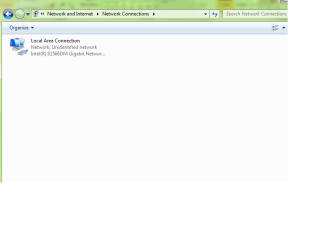
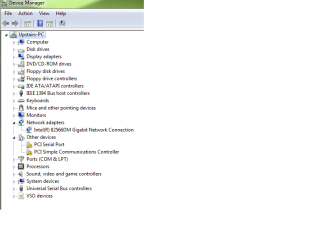
Here take a look.. I know its a driver problem Just can't fix it. and these are the drivers that window 7 assigned. they are the generic ones. so its not my intallation of a bad driver
 

Attachments

  • 1.png
    1.png
    37.6 KB · Views: 69
  • 2.png
    2.png
    40.8 KB · Views: 137
  • 3.png
    3.png
    15.2 KB · Views: 64
  • 4.png
    4.png
    29.9 KB · Views: 75
  • 5.png
    5.png
    15.2 KB · Views: 77
  • 6.png
    6.png
    13.1 KB · Views: 58
  • 7.png
    7.png
    45.5 KB · Views: 85
  • 8.png
    8.png
    15.4 KB · Views: 77

My Computer My Computer

Computer Manufacturer/Model Number
Intel / custom built
OS
windows 7 ultimate
CPU
intel dual core 2.0 ghz
Motherboard
dq965gf
Monitor(s) Displays
dual monitor
If somone could just point out the right driver for my DQ965GF board running Windows 7 Ultimate then i would probably fix the problem in 2 seconds. I think its just the wrong driver. but its funny because it happens on my other laptop running windows ultimate 6.1 7600 also. I wonder if it could be a WINDOWS 7 problem
 

My Computer My Computer

Computer Manufacturer/Model Number
Intel / custom built
OS
windows 7 ultimate
CPU
intel dual core 2.0 ghz
Motherboard
dq965gf
Monitor(s) Displays
dual monitor

My Computer My Computer

Computer Manufacturer/Model Number
Lenovo ThinkPad T60
OS
Windows 7 Ultimate 64Bit
CPU
GenuineIntel Intel(R) Core(TM) DuoCore T2400 @ 1.83GHz
Motherboard
Intel(R) 82801G (ICH7 Family)
Memory
2.00 GB
Graphics Card(s)
Mobile Intel(R) 945 Express Chipset
Sound Card
SoundMAX Integrated Digital HD Audio
Monitor(s) Displays
ThinkPad Display
Screen Resolution
1400x1050
Hard Drives
100Gb SATA
Keyboard
Standard Keyboard
Mouse
HID-compliant Mouse
Internet Speed
Cable Broadband - 54Mbps
Other Info
Intel(R) PRO/1000 PL Network Connection
11a/b/g Wireless LAN Mini PCI Express Adapter
Use the guide in my sig to update your drivers - especially the chipset.
 

My Computer My Computer

Computer Manufacturer/Model Number
Sony Vaio Z46GDU
OS
Windows 7 Ultimate x86-64
CPU
[email protected] 1066MHz FSB
Motherboard
Sony branded
Memory
6GB DDR3 1066MHz
Graphics Card(s)
9300M GS 256MB Dedicated (Speed) + Intel4500MHD (Stamina)
Sound Card
Realtek HD Audio
Monitor(s) Displays
13.1' WXGA
Screen Resolution
1600x900
Hard Drives
320GB 7200RPM w/ 16MB cache
Internet Speed
1MB/s
I asked my Uncle whos a Computer Tech and Network Manager for big Lawfirms here what those two things were and he said they were just ports that connect to other equiptment that we don't have. so nothing is really in those two ports that say they don't have drivers. therefore there is not a number on anything..
 

My Computer My Computer

Computer Manufacturer/Model Number
Intel / custom built
OS
windows 7 ultimate
CPU
intel dual core 2.0 ghz
Motherboard
dq965gf
Monitor(s) Displays
dual monitor
I allready updated the chipset and everything.. scouring the intel sight for a driver to run it.. but still it won't connect on start up .. i allways have to disable the driver and then reinable it.. then it starts working and stays working. it never goes out unless we turn off the computer again
 

My Computer My Computer

Computer Manufacturer/Model Number
Intel / custom built
OS
windows 7 ultimate
CPU
intel dual core 2.0 ghz
Motherboard
dq965gf
Monitor(s) Displays
dual monitor
I have seen a few people have these issues. Each time it has been related to a connectivity issue with the network.
When the system starts to disconnect it seems to recognize the local adapter and the network itself as 2 seperate entities.
The was I have resolved this for them is a complete network rebuild. Trash the network and remove the adapter from the machine completely.
Rebuild the network and then re-install the adapter and point it at the network also if you have not already done so look for any interfering devices (Wireless phones, microwaves)

Sorry if you have tried all of this and I am just repeating your own steps I am just providing my own experiences.

Also if it works fine after restarting the adapter.. Check it is not running on a service and if it is try setting the service to delayed start to give the system time to aquire a connection before launching the wireless service.
 

My Computer My Computer

Computer Manufacturer/Model Number
Me
OS
Windows 7 Ultimate x64
CPU
AMD Phenom II x940 (lapped)
Motherboard
Asus M3A79-T Deluxe
Memory
4GB (2x2GB) Corsiar Dominator 1066
Graphics Card(s)
XFX Radeon HD5870 XXX Edition
Sound Card
SoundBlaster Audigy 2 Platinum EX
Monitor(s) Displays
Samsung 22" Widescreen
Screen Resolution
1680x1050
Hard Drives
150GB WD Raptor (10,000RPM)
1TB Samsung Spinpoint F3
PSU
Zalman 750W Dual Heatpipe (Modular)
Case
Lian Li v2010 (Modded)
Cooling
Custom Water Loop
Keyboard
Saitek Eclipse II
Mouse
Logitech G5
Internet Speed
Wireless 5.5MB (802.11b Network)
Chipset

Use the guide in my sig to update your drivers - especially the chipset.

When I went to my MB site, all they had was the onboard sound and RAID drivers.
Intel has the .inf file for the chipset, but this is not a driver as they point out. So it seems the only available driver is thru Win 7[?]

Richard
 

Attachments

  • MB Capture.JPG
    MB Capture.JPG
    35.1 KB · Views: 4

My Computer My Computer

Computer type
PC/Desktop
Computer Manufacturer/Model Number
Me, as in myself
OS
Win 7 32bit HP
CPU
Intel Core 2 Duo 6600
Motherboard
Gigabyte 965P-DQ6
Memory
2 GB DDR2
Graphics Card(s)
Zotac GeForce GTX 550 Ti
Sound Card
Realtek on board
Monitor(s) Displays
Philips 32" LED-LCD 1080p
Screen Resolution
1920 x 1080
Internet Speed
cable 15mbs
May I ask you what is the make and model of your desktop/laptop please?


is this computer in a home? so your gathering the network from a home router correct?
 

My Computer My Computer

Computer Manufacturer/Model Number
HP Pavilion Elite HPE-410f
OS
Windows 7 Ultimate x64
CPU
AMD Phenom x6 1045t
Motherboard
N/A
Memory
8 GB
Graphics Card(s)
ATI Radeon HD 5570
Sound Card
Realtek Highdefinition Audio / 5.1 Dolby Setup
Monitor(s) Displays
HP w2207h Widescreen
Screen Resolution
1680*1050
Hard Drives
1 TB (fixed), 320 Portable maxtor, Server Hard drives
PSU
350 Watt
Case
HP CASE
Cooling
Bass
Keyboard
Logitech MX 5500
Mouse
Logitech MX 5500
Internet Speed
ROAD RUNNER 16MB D/512 U
I mentioned my board and specs in the first post. go to the first page. I wonder if i go into windows 7 and click on the public network that automatically blocks most things in the firewall. if i go to that and say combine that network with the one that shows my home network. i wonder if i do that if the problem will go away. i think i will try it and let you guys know how it goes.
 

My Computer My Computer

Computer Manufacturer/Model Number
Intel / custom built
OS
windows 7 ultimate
CPU
intel dual core 2.0 ghz
Motherboard
dq965gf
Monitor(s) Displays
dual monitor
We need the Hardware ID of those devices with yellow exclamation marks.
 

My Computer My Computer

Computer Manufacturer/Model Number
Lenovo ThinkPad T60
OS
Windows 7 Ultimate 64Bit
CPU
GenuineIntel Intel(R) Core(TM) DuoCore T2400 @ 1.83GHz
Motherboard
Intel(R) 82801G (ICH7 Family)
Memory
2.00 GB
Graphics Card(s)
Mobile Intel(R) 945 Express Chipset
Sound Card
SoundMAX Integrated Digital HD Audio
Monitor(s) Displays
ThinkPad Display
Screen Resolution
1400x1050
Hard Drives
100Gb SATA
Keyboard
Standard Keyboard
Mouse
HID-compliant Mouse
Internet Speed
Cable Broadband - 54Mbps
Other Info
Intel(R) PRO/1000 PL Network Connection
11a/b/g Wireless LAN Mini PCI Express Adapter
There's a windows service, "##Id_String1.6844f930_1628_4223_b5cc_5bb94b879762##" from Apple Computer, INC.
I have no idea how it got on my machine, but it's part of the mdns bonjour package from apple.
*something* I use regularly bundles it, because I have no quicktime, no safari, no itunes, no apple crap at all.
(Well, maybe klite's got the quicktime codec files, but I looked and klite doesn't bundle bonjour.)

Anyway, long story short: the fix.

Click the start button, type in services.msc and hit enter.
Find that service name, right click on it and say properties.
Click the Stop button, then use the pulldown to switch to "Disabled" startup.
This will disable the mdnsresponder.exe which sets a gateway address of 0.0.0.0 resulting in that second spurious "Unidentified Network" that f--ks everything up.

Restart your network adapter once more to kickstart it, and it should be golden from then on, hopefully. (Worked for me, YMMV)
 

My Computer My Computer

OS
Windows 7 X64 Home Premium VHD / Ubuntu 9.10
Back
Top