Solved Windows 7 fails to remember WiFi Networks

lamboom

New member
Local time
1:31 PM
Messages
14
If I create a list of wifi networks, or log on to a new network, my Dell 6410 will add that Network to the list, This makes it possible to select, and connect to any networks on the list, without having to re-enter the password or key.

I have a newly refurbished Dell 6430, running Windows 7, which allows me manually to create a Network list. The first time I connect to one of the networks on that new list, the connection is made. Unfortunately, all of the other networks on the list go away, and only the selected network remains. WHAT! The entire "list" is not remembered. Only One network is remembered, the one presently connected. As the list no longer has past networks, every attempt to connect to a different local network from the "networks available" window requires the key being reentered ... This gives the "illusion" of WiFi Keys not being remembered. When in fact, the network itself is not remembered. This subject is often discussed in Forums: "Win 7 won't remember wireless network key". Their solutions didn't work for me... sniff.. :-)
 

My Computer My Computer

At a glance

Windows 7 64 bit
Computer Manufacturer/Model Number
Dell,
OS
Windows 7 64 bit
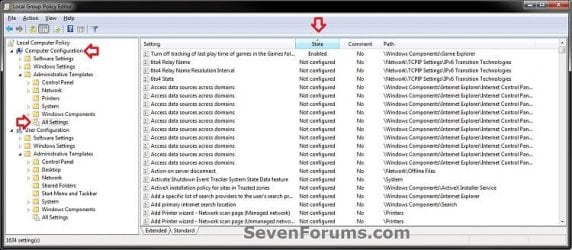
since its refurbished the previous user may have some modified Group Policy settings. To check, do start > run > gpedit.msc > enter, then click on All Settings under BOTH computer configuration and user configuration, then click the State column. Anything other than Not Configured may be your issue. Most Group Policy settings are self-explanatory. There are several Policies commonly modified by employers to limit employee access to unknown networks, etc.
 

Attachments

  • Computer.jpg
    Computer.jpg
    56.5 KB · Views: 49

My Computer My Computer

At a glance

Win7 pro x64stock i7 7700kCorsair Vengeance LPX 16GB (2x8GB) DDR4 @ 320...integrated Intel HD 630
Computer type
PC/Desktop
Computer Manufacturer/Model Number
diy
OS
Win7 pro x64
CPU
stock i7 7700k
Motherboard
Gigabyte Z270N-WIFI mini-ITX
Memory
Corsair Vengeance LPX 16GB (2x8GB) DDR4 @ 3200MHz
Graphics Card(s)
integrated Intel HD 630
Sound Card
onboard Realtek ALC1220
Monitor(s) Displays
two vertically mounted samsung 55" 4k un55mu8000
Screen Resolution
1920x1280
Hard Drives
256GB Samsung EVO 960 M.2 pci-e NVMe SSD
PSU
SilverStone Nightjar ST45NF 450Watt Fanless
Case
No case. Motherboard is mounted directly onto power supply
Cooling
Evercool low profile 815EP with Panaflow 12L fan at 7v
Keyboard
Ortek MCK-86 mini
Mouse
Belkin 5-button USB
Internet Speed
spectrum 400mbps
Thanks for the quick reply johnhoh-


All was "Not Configured" in both Computer & User Settings. This computer had it's SSD cloned from the company's master, There may be a conflict with the wireless adapter. Referring to a "solution" about this relatively common problem, from another forum where the problem was defined as "Win 7 won't remember wireless network key"


A solution written by Smoove910 wrote the following


"open search, type "services.msc" open services.
Scroll down to "wlan auto config" right click, stop the service.

Navigate to
"C: \ProgramData\Microsoft\Wlansvc\ delete everything in this folder leaving only a folder called "profiles" delete everything in the "profiles" folder except for a folder called "interfaces" delete everything in the "interfaces" folder)

Restart "wlan auto config" connect to your wireless network, enter
your passkey, (ensure the connect automaticly box is checked)

Restart your computer job done, your computer will now connect to your wireless network automaticly on boot."


Now this worked for some .. but not me. Aparently, a person (same forum, same problem) did this:

"Went though Smoove910's instructions again, AND uninstalled the wireless adapter's software. Rebooted and this time only installed the adapters driver, not the other software junk. I think there was a software conflict because now the system remembers the password." Problem solved


If there is a software problem here ... I don't really know how to implement what the second person is saying. Does this make any sence to you?
 

My Computer My Computer

At a glance

Windows 7 64 bit
Computer Manufacturer/Model Number
Dell,
OS
Windows 7 64 bit
"Went though Smoove910's instructions again, AND uninstalled the wireless adapter's software. Rebooted and this time only installed the adapters driver, not the other software junk. I think there was a software conflict because now the system remembers the password." Problem solved
Smoove910 is basically saying lets erase everything that might be a problem so the system starts over. I agree with that.

Then the next guy is saying yeah but there is also wireless software that needs to be removed. By that he means go into start > run > appwiz.cpl > and look for anything that looks like a wireless software package, then uninstall it. That also sounds like a good idea.

Be sure to download a fresh driver for your adapter and put it on your desktop. Devicehunt is good for this and usually they have a copy of your driver, or just use devicehunt to identify exactly what your device is and then download the driver elsewhere, like your motherboard manufacturer support page. If you are given the option of just installing the driver or installing the driver plus extra utility software, install just the driver. This can also be done manually if needed but I won't go into it now. Don't install it until the end of the steps in this post though.

https://devicehunt.com/

Then to erase even more potential troublemakers, use Uwe's Device Cleanup Tool to detect and erase ALL drivers of non-present hardware. This tool will ONLY erase drivers of devices your system does not have installed, so your current, needed drivers will remain intact.

https://www.uwe-sieber.de/misc_tools_e.html

After that, do start > run > devmgmt.msc, find your adapter, right click on it and uninstall it, AND say YES when it asks you "do you want to also delete the software for this device?"

At this point you will have deleted everything I can think of that might be the culprit here, so you can then click on the wireless driver package you downloaded from devicehunt or your motherboard site to install a fresh driver.
 
Last edited:

My Computer My Computer

At a glance

Win7 pro x64stock i7 7700kCorsair Vengeance LPX 16GB (2x8GB) DDR4 @ 320...integrated Intel HD 630
Computer type
PC/Desktop
Computer Manufacturer/Model Number
diy
OS
Win7 pro x64
CPU
stock i7 7700k
Motherboard
Gigabyte Z270N-WIFI mini-ITX
Memory
Corsair Vengeance LPX 16GB (2x8GB) DDR4 @ 3200MHz
Graphics Card(s)
integrated Intel HD 630
Sound Card
onboard Realtek ALC1220
Monitor(s) Displays
two vertically mounted samsung 55" 4k un55mu8000
Screen Resolution
1920x1280
Hard Drives
256GB Samsung EVO 960 M.2 pci-e NVMe SSD
PSU
SilverStone Nightjar ST45NF 450Watt Fanless
Case
No case. Motherboard is mounted directly onto power supply
Cooling
Evercool low profile 815EP with Panaflow 12L fan at 7v
Keyboard
Ortek MCK-86 mini
Mouse
Belkin 5-button USB
Internet Speed
spectrum 400mbps
Johnhoh That's a fine list of things to undertake. I understand. You have a gift for detail so necessary in this work. Often When I read "solutions" I find myself staring into space. With yours, I feel enlightened.


Will let you know how this works out. Have just obtained a series of new problems not related to the computer .. might take a few days.. :-)


Best Regards, Michael
 

My Computer My Computer

At a glance

Windows 7 64 bit
Computer Manufacturer/Model Number
Dell,
OS
Windows 7 64 bit
Hi johnhoh

There are two devices that manage WiFi on his Dell PC. One is Windows, the other is something called: WiFi Connection Utility: Intel PROSet/Wireless. There is a way to let Windows manage WiFi by selecting that option from The Intel PROSet window. This deselects PROSet, and allows Windows to run network connections. I did that and the problem went away .. All Fixed! Windows remembers my networks, and I don't have to re-enter the login key every time I change networks.

Going back to "Enable WiFi Control" in the Intel PROSet window .. the problem returns ... It looks like Windows is still active in it's control. They are both "on" ?

In fact when I deactivat PROSet, all the networks return to the Windows list of networks.. And WiFi is working fine.

Am I missing some "off switch" for Windows WiFi controll... like there is for PROSet ..should I want to have PROSet on, and managing WiFi Connections?
 

My Computer My Computer

At a glance

Windows 7 64 bit
Computer Manufacturer/Model Number
Dell,
OS
Windows 7 64 bit
Am I missing some "off switch" for Windows WiFi controll... like there is for PROSet ..should I want to have PROSet on, and managing WiFi Connections?
That seems reasonable. Sounds like you prefer to use intel proset instead of windows. I would first download the current intel proset software, as a fresh install may fix the issue all by itself. You could also go into start >run > msconfig > services and uncheck WLAN Autoconfig and then reboot. That service is what windows uses to discover and connect to wifi networks so unchecking might be the way to turn it off.
 

My Computer My Computer

At a glance

Win7 pro x64stock i7 7700kCorsair Vengeance LPX 16GB (2x8GB) DDR4 @ 320...integrated Intel HD 630
Computer type
PC/Desktop
Computer Manufacturer/Model Number
diy
OS
Win7 pro x64
CPU
stock i7 7700k
Motherboard
Gigabyte Z270N-WIFI mini-ITX
Memory
Corsair Vengeance LPX 16GB (2x8GB) DDR4 @ 3200MHz
Graphics Card(s)
integrated Intel HD 630
Sound Card
onboard Realtek ALC1220
Monitor(s) Displays
two vertically mounted samsung 55" 4k un55mu8000
Screen Resolution
1920x1280
Hard Drives
256GB Samsung EVO 960 M.2 pci-e NVMe SSD
PSU
SilverStone Nightjar ST45NF 450Watt Fanless
Case
No case. Motherboard is mounted directly onto power supply
Cooling
Evercool low profile 815EP with Panaflow 12L fan at 7v
Keyboard
Ortek MCK-86 mini
Mouse
Belkin 5-button USB
Internet Speed
spectrum 400mbps
Thanks for the info... tried it... (Uncheck WLAN Autoconfig) Didn't work, after reboot there was no wifi networks. Looks like the only thing that works so far is to disable Iintel PROSet/Wireless .. One wonders why anyone would want to us it when windows does just fine.
 

My Computer My Computer

At a glance

Windows 7 64 bit
Computer Manufacturer/Model Number
Dell,
OS
Windows 7 64 bit
found a few more ideas:

1) Disable the Intel PROset/Wireless software (set it to let Windows manage the wireless connection).
2) Go to the C:\Documents and Settings\<user name> folder and delete the profile.enc and profile.enc.bak files.
3) Enable the Intel PROset/Wireless software.

bunch more here for win10, may work for win7 too.

Windows 10 Won't Remember Saved WiFi Password [SOLVED] - Troubleshooter
 

My Computer My Computer

At a glance

Win7 pro x64stock i7 7700kCorsair Vengeance LPX 16GB (2x8GB) DDR4 @ 320...integrated Intel HD 630
Computer type
PC/Desktop
Computer Manufacturer/Model Number
diy
OS
Win7 pro x64
CPU
stock i7 7700k
Motherboard
Gigabyte Z270N-WIFI mini-ITX
Memory
Corsair Vengeance LPX 16GB (2x8GB) DDR4 @ 3200MHz
Graphics Card(s)
integrated Intel HD 630
Sound Card
onboard Realtek ALC1220
Monitor(s) Displays
two vertically mounted samsung 55" 4k un55mu8000
Screen Resolution
1920x1280
Hard Drives
256GB Samsung EVO 960 M.2 pci-e NVMe SSD
PSU
SilverStone Nightjar ST45NF 450Watt Fanless
Case
No case. Motherboard is mounted directly onto power supply
Cooling
Evercool low profile 815EP with Panaflow 12L fan at 7v
Keyboard
Ortek MCK-86 mini
Mouse
Belkin 5-button USB
Internet Speed
spectrum 400mbps
Wow, That https://troubleshooter.xyz/wiki/fix-windows-10-wont-remember-saved-wifi-password/

Is amazing... This is starting to scare me a bit...

I tried uninstalling Intel PROSet/Wireless ..and reinstalling it .. Even made sure it would match my adapter ... it's an older one ... Centrino Advanced-N-6205, The reinstall was OK.. Wizard said success. But then ..where is it? I couldn't finnd the software anywhere on the machine! ... so, I went back to the restore point. All's back to where it was. Have disabled PROSet, windows management is working fine.

Now to concider your next suggestion :-) I'm not sure how to follow that path below. There is no "user name" yet,("user-PC"), and I'm not sure where "Documents and Settings" is located ....are you talking about Control Panel?

"Go to the C:\Documents and Settings\<user name> folder and delete the profile.enc and profile.enc.bak files."

Please explain that path a little more ... Regards, Michael
 

My Computer My Computer

At a glance

Windows 7 64 bit
Computer Manufacturer/Model Number
Dell,
OS
Windows 7 64 bit
Easiest way to figure out where the profile.enc files are is to download Everything. Its a great tool I use a dozen times a day
Downloads - voidtools
run the 64-bit installer and say yes to all the defaults. Once its installed run it and type profile.enc on the search line and it will find your files. Then just right click on them and select "open path" and then you will be in the folder they are located and can proceed
 

My Computer My Computer

At a glance

Win7 pro x64stock i7 7700kCorsair Vengeance LPX 16GB (2x8GB) DDR4 @ 320...integrated Intel HD 630
Computer type
PC/Desktop
Computer Manufacturer/Model Number
diy
OS
Win7 pro x64
CPU
stock i7 7700k
Motherboard
Gigabyte Z270N-WIFI mini-ITX
Memory
Corsair Vengeance LPX 16GB (2x8GB) DDR4 @ 3200MHz
Graphics Card(s)
integrated Intel HD 630
Sound Card
onboard Realtek ALC1220
Monitor(s) Displays
two vertically mounted samsung 55" 4k un55mu8000
Screen Resolution
1920x1280
Hard Drives
256GB Samsung EVO 960 M.2 pci-e NVMe SSD
PSU
SilverStone Nightjar ST45NF 450Watt Fanless
Case
No case. Motherboard is mounted directly onto power supply
Cooling
Evercool low profile 815EP with Panaflow 12L fan at 7v
Keyboard
Ortek MCK-86 mini
Mouse
Belkin 5-button USB
Internet Speed
spectrum 400mbps
Very Cool johnhoh! Thanks.
Ya know, PROSet just came with this "refurbished" PC. I'm thinking the best fix is to uninstall it. :-)

But First....I'll take a look at your suggestions.. Thanks for 'Everything"

To be continued
 

My Computer My Computer

At a glance

Windows 7 64 bit
Computer Manufacturer/Model Number
Dell,
OS
Windows 7 64 bit
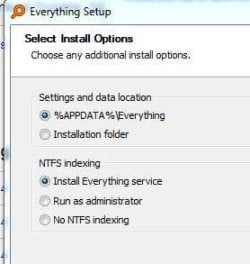
Question... about Everything


not sure what to check here... see pics:
 

Attachments

  • Everything.jpg
    Everything.jpg
    10.6 KB · Views: 25
  • Everything_002.jpg
    Everything_002.jpg
    17.8 KB · Views: 24

My Computer My Computer

At a glance

Windows 7 64 bit
Computer Manufacturer/Model Number
Dell,
OS
Windows 7 64 bit
Just say yes to all the defaults. You can always uninstall it later
 

My Computer My Computer

At a glance

Win7 pro x64stock i7 7700kCorsair Vengeance LPX 16GB (2x8GB) DDR4 @ 320...integrated Intel HD 630
Computer type
PC/Desktop
Computer Manufacturer/Model Number
diy
OS
Win7 pro x64
CPU
stock i7 7700k
Motherboard
Gigabyte Z270N-WIFI mini-ITX
Memory
Corsair Vengeance LPX 16GB (2x8GB) DDR4 @ 3200MHz
Graphics Card(s)
integrated Intel HD 630
Sound Card
onboard Realtek ALC1220
Monitor(s) Displays
two vertically mounted samsung 55" 4k un55mu8000
Screen Resolution
1920x1280
Hard Drives
256GB Samsung EVO 960 M.2 pci-e NVMe SSD
PSU
SilverStone Nightjar ST45NF 450Watt Fanless
Case
No case. Motherboard is mounted directly onto power supply
Cooling
Evercool low profile 815EP with Panaflow 12L fan at 7v
Keyboard
Ortek MCK-86 mini
Mouse
Belkin 5-button USB
Internet Speed
spectrum 400mbps
Just loaded Voidtools Everything ..wonderful... but it didn't find "Profile.enc" ...

Only thing asked for was the two pictures..checked as shown.
 

My Computer My Computer

At a glance

Windows 7 64 bit
Computer Manufacturer/Model Number
Dell,
OS
Windows 7 64 bit
My bet is there is no profile for proset because you have not saved anything yet. Don't really see a reason to pursue getting proset to work if you have no compelling reason to do so. I have always just used windows built-in wireless manager because I've run into problems using vendor-specific connection utilities, and have uninstalled proset on my own machine. Which by the way, is the number 1 tip for your problem at this link, lol.
Windows 10 Won't Remember Saved WiFi Password [SOLVED] - Troubleshooter
 

My Computer My Computer

At a glance

Win7 pro x64stock i7 7700kCorsair Vengeance LPX 16GB (2x8GB) DDR4 @ 320...integrated Intel HD 630
Computer type
PC/Desktop
Computer Manufacturer/Model Number
diy
OS
Win7 pro x64
CPU
stock i7 7700k
Motherboard
Gigabyte Z270N-WIFI mini-ITX
Memory
Corsair Vengeance LPX 16GB (2x8GB) DDR4 @ 3200MHz
Graphics Card(s)
integrated Intel HD 630
Sound Card
onboard Realtek ALC1220
Monitor(s) Displays
two vertically mounted samsung 55" 4k un55mu8000
Screen Resolution
1920x1280
Hard Drives
256GB Samsung EVO 960 M.2 pci-e NVMe SSD
PSU
SilverStone Nightjar ST45NF 450Watt Fanless
Case
No case. Motherboard is mounted directly onto power supply
Cooling
Evercool low profile 815EP with Panaflow 12L fan at 7v
Keyboard
Ortek MCK-86 mini
Mouse
Belkin 5-button USB
Internet Speed
spectrum 400mbps
Hee Hee you are soooooright.... It's been fun...Thanks :-)
 

My Computer My Computer

At a glance

Windows 7 64 bit
Computer Manufacturer/Model Number
Dell,
OS
Windows 7 64 bit
Final solution

Back with best results... the only viable solution was to disable ProSet Wireless... Windows manages wiFi comumunications just fine... All works well now that i got rid of ProSet
 

My Computer My Computer

At a glance

Windows 7 64 bit
Computer Manufacturer/Model Number
Dell,
OS
Windows 7 64 bit
Back
Top