Windows 7 Corrupted Windows Update File Where to delete

Myke

New member
Local time
12:57 PM
Messages
22
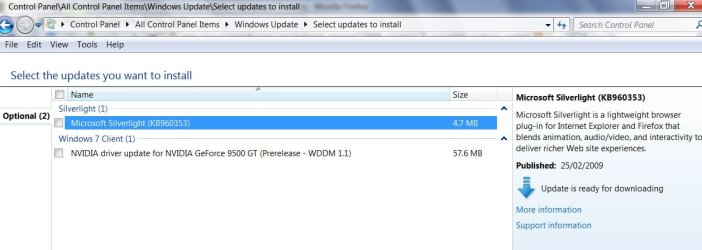
Hi I've had a problem that my windows 7 corrupts downloaded files since installing it, and it's corrupted one of my windows updates so I can't install it. Is there a way of deleting the update so I can redownload it and install it? need to know what folder its in
I just

Thanks
 

My Computer My Computer

Computer Manufacturer/Model Number
Dell Inspiron 1520
OS
Windows 7
CPU
Mobile Intel Celeron 540, 1866 MHz (14 x 133)
Memory
Dual DDR2 SDRAM 2x 2GB
Graphics Card(s)
Integrated
Hard Drives
Drive #1 - Hitachi HTS541616J9SA00 (149 GB)
Internet Speed
8meg
\Windows\SoftwareDistribution\Download

Hope it helps
 

My Computers My Computers

System One System Two

  • Computer type
    PC/Desktop
    OS
    7 X64
    CPU
    i5 8400
    Motherboard
    gigabyte b365m ds3h
    Memory
    2x8gb 3200mhz
    Hard Drives
    various
    PSU
    pure power 11 400w cm
    Case
    Coolermaster
    Cooling
    cryorig m9i
  • Computer type
    PC/Desktop
    OS
    7x64
    CPU
    g5400
    Motherboard
    ga b365m ds3h
    Memory
    8gb ddr4 2400
    PSU
    xfx pro 450w
There's more than one file, is it safe to delete them?
 

My Computer My Computer

Computer Manufacturer/Model Number
Dell Inspiron 1520
OS
Windows 7
CPU
Mobile Intel Celeron 540, 1866 MHz (14 x 133)
Memory
Dual DDR2 SDRAM 2x 2GB
Graphics Card(s)
Integrated
Hard Drives
Drive #1 - Hitachi HTS541616J9SA00 (149 GB)
Internet Speed
8meg
Yes, you don't need them - just delete the contents of the Downloads folder - not the Downloads folder itself.
 

My Computers My Computers

System One System Two

  • Computer type
    PC/Desktop
    OS
    7 X64
    CPU
    i5 8400
    Motherboard
    gigabyte b365m ds3h
    Memory
    2x8gb 3200mhz
    Hard Drives
    various
    PSU
    pure power 11 400w cm
    Case
    Coolermaster
    Cooling
    cryorig m9i
  • Computer type
    PC/Desktop
    OS
    7x64
    CPU
    g5400
    Motherboard
    ga b365m ds3h
    Memory
    8gb ddr4 2400
    PSU
    xfx pro 450w
Thanks very much for your reply. Still won't let me install it though, just get error 800736B3. Thanks anyway
 

My Computer My Computer

Computer Manufacturer/Model Number
Dell Inspiron 1520
OS
Windows 7
CPU
Mobile Intel Celeron 540, 1866 MHz (14 x 133)
Memory
Dual DDR2 SDRAM 2x 2GB
Graphics Card(s)
Integrated
Hard Drives
Drive #1 - Hitachi HTS541616J9SA00 (149 GB)
Internet Speed
8meg
Which one is it - is it listed here?

UPDATES-2-2009-05-22_150006.jpg

or here:

UPDATES-2009-05-22_145828.jpg
 

My Computers My Computers

System One System Two

  • Computer type
    PC/Desktop
    OS
    7 X64
    CPU
    i5 8400
    Motherboard
    gigabyte b365m ds3h
    Memory
    2x8gb 3200mhz
    Hard Drives
    various
    PSU
    pure power 11 400w cm
    Case
    Coolermaster
    Cooling
    cryorig m9i
  • Computer type
    PC/Desktop
    OS
    7x64
    CPU
    g5400
    Motherboard
    ga b365m ds3h
    Memory
    8gb ddr4 2400
    PSU
    xfx pro 450w
Nope it is Windows Test Update, there is one in Important and one in Optional. Both fail to install. I assume it's not the data corruption like I thought but something else
 

My Computer My Computer

Computer Manufacturer/Model Number
Dell Inspiron 1520
OS
Windows 7
CPU
Mobile Intel Celeron 540, 1866 MHz (14 x 133)
Memory
Dual DDR2 SDRAM 2x 2GB
Graphics Card(s)
Integrated
Hard Drives
Drive #1 - Hitachi HTS541616J9SA00 (149 GB)
Internet Speed
8meg
Error during windows update installation

Hi SIW2,

I have problem on installing KB979683. It says Code8007065E. I also downloaded the msu file but still it won't get installed.

I tried what u explain by deleting all the files on C:/windows/SoftwareDistribution/Download. It works for 5% installation only and then Code80073712 appears as another error.

Please advise what to do?

Thank you
 

My Computer My Computer

OS
Windows 7 x64
Ok I been searching around and even tried whats in this thread twice (with a reboot after each time) and my updates still fail, the code I get is the following, 80070002, no matter what I do (including the microsoft update fixit tool) nothing seems to help, im getting to wits end with it, and I really don't want to contact MS or reinstall windows its self to fix this error....so anyone have any further ideas?


if it helps I also tried whats at http://windows.microsoft.com/en-US/windows-vista/Windows-Update-error-80070002 as well as removing the files from the downloads folder to no avail :(, I am starting to wonder if this is becoming a hopeless battle!!!


Im in the process of doing whats listed http://support.microsoft.com/kb/947821 and downloading some updater utility thing of some sort! so here goes!!
 
Last edited:

My Computer My Computer

Computer type
PC/Desktop
Computer Manufacturer/Model Number
Custom Build
OS
Windows 10 64bit Ultimate
CPU
Intel Core i7-4770K @3.50GHz
Motherboard
GA-MA785GT-UD3H
Memory
8192 Mo, Type: DDR3, @669.7MHz
Graphics Card(s)
Sapphire 7990 6GB DDR3 PCIe 3.0
Sound Card
On board
Monitor(s) Displays
Monitor: 22'' Samsung, 2x 15" Touch screen (stored)
Screen Resolution
1600x1900 (Samsung)
Hard Drives
Kingston SSD, 120GB "SSD Now 300"
ADATA SP550
Samsung HM321HI
PSU
1000 Watt
Case
Antec Sonata III
Cooling
200MM side fan, 1 intake front
Keyboard
Naga Chroma Mechanical
Mouse
Razer Naga
Internet Speed
10 megs
Antivirus
Windows Defender
Browser
Chrome
Other Info
Optical drive (main): SONY DVD RW AW-G170S 1.72

My Computer My Computer

Computer type
Laptop
Computer Manufacturer/Model Number
Asus K52F or Lenovo B51-80
OS
Win 7 x64 Home Premium (and x86 VirtualBox VM)/Win10
CPU
i3 370M/i7 6500U
Motherboard
Asus/Lenovo
Memory
8GB - finally :)/8GB
Graphics Card(s)
it's an i3, dude!/dual Intel&nVidia
Sound Card
onboard
Monitor(s) Displays
15.6" built-in
Screen Resolution
1366x768/1920x1080
Hard Drives
750GB Seagate internal
Sundry external drives attached to other computers on the local network
1TB SSD on the Lenovo
PSU
n/a
Internet Speed
as much as I can get - usually on a dongle/phone, so <1MB/s
Antivirus
MSE/Defender
Browser
IE11/12/Edge/Chrome/FF(if I must)
Ok will do, was just trying to keep new posts to a minimum and keep things from getting clutered, but if that will be better I shale do so :)
 

My Computer My Computer

Computer type
PC/Desktop
Computer Manufacturer/Model Number
Custom Build
OS
Windows 10 64bit Ultimate
CPU
Intel Core i7-4770K @3.50GHz
Motherboard
GA-MA785GT-UD3H
Memory
8192 Mo, Type: DDR3, @669.7MHz
Graphics Card(s)
Sapphire 7990 6GB DDR3 PCIe 3.0
Sound Card
On board
Monitor(s) Displays
Monitor: 22'' Samsung, 2x 15" Touch screen (stored)
Screen Resolution
1600x1900 (Samsung)
Hard Drives
Kingston SSD, 120GB "SSD Now 300"
ADATA SP550
Samsung HM321HI
PSU
1000 Watt
Case
Antec Sonata III
Cooling
200MM side fan, 1 intake front
Keyboard
Naga Chroma Mechanical
Mouse
Razer Naga
Internet Speed
10 megs
Antivirus
Windows Defender
Browser
Chrome
Other Info
Optical drive (main): SONY DVD RW AW-G170S 1.72
Back
Top