Windows 7 customize the Start Menu

@koolkat77
i know this tutorial, but this goes into the HKEY_CURRENT_USER branch, but i don't want to remove the computer-icon for my administrator. i want to remove it for a special user or for the users group.

go to run and type regedit and
go to Path: [HKEY_CURRENT_USER\Software\Microsoft\Windows\CurrentVersion\Explorer\Advanced\]
click on advance and create a new DWORD value as "Start_ShowMyComputer" and press enter then right click and modify and set the Value data to 0

Location: Current User
Value Name: Start_ShowMyComputer
Data Type: DWORD (DWORD Value)
Enabled Value: 0
Disabled Value: 1
Action Type: Add an Entry


and restart/log off, i did it myself and the My computer was gone :) post back once you're done
 

My Computer

Computer type
PC/Desktop
Computer Manufacturer/Model Number
Self assembled
OS
Windows 10 Home 64Bit
CPU
Intel Core i5 10400 @ 2.90GHz
Motherboard
Intel Corporation DG41WV (PROCESSOR)
Memory
8.00GB Single-Channel Unknown @ 1329MHz (16-20-20-38)
Sound Card
Realtek High Definition Audio
Monitor(s) Displays
DELL E170S
Screen Resolution
1280x1024 pixels
Hard Drives
931GB TOSHIBA DT01ACA100 (SATA)
238GB TEAM TM8PS7256G (SATA SSD)
Case
Nothing Fancy
Cooling
Fans
Keyboard
A4 Tech Co LTD
Mouse
A4 Tech Co Ltd/Logitech
Internet Speed
25 Mbps
@koolkat77
i know this tutorial, but this goes into the HKEY_CURRENT_USER branch, but i don't want to remove the computer-icon for my administrator. i want to remove it for a special user or for the users group.
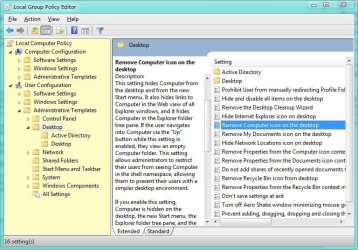
Have you tried here?

Untitled.jpg
 

My Computer

Computer Manufacturer/Model Number
Averatec 6130HS-20
OS
Windows 7 Professional 32-bit (6.1, Build 7600)
CPU
Intel(R) Pentium(R) 4 3.00 GHz HT
Memory
2.0 GB
Graphics Card(s)
ATI Mobility Radeon 9600 64MB
Sound Card
Realtek AC'97 Audio
Screen Resolution
1280 x 800
Hard Drives
Seagate 96023A 60GB 7200RPM -
Seagate FreeAgentDesktop 250GB
Cooling
20 Inch Box Fan
Mouse
Targus PAWM10 Wireless Optical Laptop Mouse

My Computer

Computer type
PC/Desktop
Computer Manufacturer/Model Number
Self assembled
OS
Windows 10 Home 64Bit
CPU
Intel Core i5 10400 @ 2.90GHz
Motherboard
Intel Corporation DG41WV (PROCESSOR)
Memory
8.00GB Single-Channel Unknown @ 1329MHz (16-20-20-38)
Sound Card
Realtek High Definition Audio
Monitor(s) Displays
DELL E170S
Screen Resolution
1280x1024 pixels
Hard Drives
931GB TOSHIBA DT01ACA100 (SATA)
238GB TEAM TM8PS7256G (SATA SSD)
Case
Nothing Fancy
Cooling
Fans
Keyboard
A4 Tech Co LTD
Mouse
A4 Tech Co Ltd/Logitech
Internet Speed
25 Mbps
@Greg S
thx for this is worked.
i've seen the option, but i didn't read it properly. i thought it would only remove the computer icon from the desktop and not from the start menu.
BUT it worked perfectly!!!! :-)

@koolkat77
i tried the tutorial, but i only removes the computer icon from the current user and this is an administrator.
in my case it was useless.

@rustburger
i tried it, and i failed. Because u have the option as an administrator to change the start menu and taskbar but not as a user.

but finally i got it!!!
thx to all for ur help!!!!


cu
 

My Computer

OS
wind 7 32bit
@Greg S
thx for this is worked.
i've seen the option, but i didn't read it properly. i thought it would only remove the computer icon from the desktop and not from the start menu.
BUT it worked perfectly!!!! :-)


cu
You're welcome and Yes, it is a double edged sword. You lose it in both places
 

My Computer

Computer Manufacturer/Model Number
Averatec 6130HS-20
OS
Windows 7 Professional 32-bit (6.1, Build 7600)
CPU
Intel(R) Pentium(R) 4 3.00 GHz HT
Memory
2.0 GB
Graphics Card(s)
ATI Mobility Radeon 9600 64MB
Sound Card
Realtek AC'97 Audio
Screen Resolution
1280 x 800
Hard Drives
Seagate 96023A 60GB 7200RPM -
Seagate FreeAgentDesktop 250GB
Cooling
20 Inch Box Fan
Mouse
Targus PAWM10 Wireless Optical Laptop Mouse
i thought we could close this post, but....
...i found one more security whole.

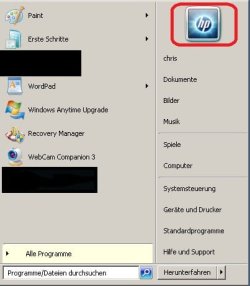
how can i remove or deactivate the user picutre??? have a look in the "red circle".
if u click on the user picture u have access to the control panel.

where can i deactivate this??? or how can i remove the user picture from the start-menu???
 

Attachments

  • start-menu2.jpg
    start-menu2.jpg
    43.6 KB · Views: 0
Last edited:

My Computer

OS
wind 7 32bit

My Computer

Computer type
PC/Desktop
Computer Manufacturer/Model Number
Self assembled
OS
Windows 10 Home 64Bit
CPU
Intel Core i5 10400 @ 2.90GHz
Motherboard
Intel Corporation DG41WV (PROCESSOR)
Memory
8.00GB Single-Channel Unknown @ 1329MHz (16-20-20-38)
Sound Card
Realtek High Definition Audio
Monitor(s) Displays
DELL E170S
Screen Resolution
1280x1024 pixels
Hard Drives
931GB TOSHIBA DT01ACA100 (SATA)
238GB TEAM TM8PS7256G (SATA SSD)
Case
Nothing Fancy
Cooling
Fans
Keyboard
A4 Tech Co LTD
Mouse
A4 Tech Co Ltd/Logitech
Internet Speed
25 Mbps
thx koolkat77 for ur fast answer.
i think i'm going to try the second option.

i would prefer (like all the time) the way via group policies, but if there is no way i have to do it with a tool.
 

My Computer

OS
wind 7 32bit
i thought we could close this post, but....
...i found one more security whole.

how can i remove or deactivate the user picutre??? have a look in the "red circle".
if u click on the user picture u have access to the control panel.

where can i deactivate this??? or how can i remove the user picture from the start-menu???

I would think that if you have a password for your Admin account and the user/s do not know the password, you should be fine.
 

My Computer

Computer Manufacturer/Model Number
Averatec 6130HS-20
OS
Windows 7 Professional 32-bit (6.1, Build 7600)
CPU
Intel(R) Pentium(R) 4 3.00 GHz HT
Memory
2.0 GB
Graphics Card(s)
ATI Mobility Radeon 9600 64MB
Sound Card
Realtek AC'97 Audio
Screen Resolution
1280 x 800
Hard Drives
Seagate 96023A 60GB 7200RPM -
Seagate FreeAgentDesktop 250GB
Cooling
20 Inch Box Fan
Mouse
Targus PAWM10 Wireless Optical Laptop Mouse
glad :)
 

My Computer

Computer type
PC/Desktop
Computer Manufacturer/Model Number
Self assembled
OS
Windows 10 Home 64Bit
CPU
Intel Core i5 10400 @ 2.90GHz
Motherboard
Intel Corporation DG41WV (PROCESSOR)
Memory
8.00GB Single-Channel Unknown @ 1329MHz (16-20-20-38)
Sound Card
Realtek High Definition Audio
Monitor(s) Displays
DELL E170S
Screen Resolution
1280x1024 pixels
Hard Drives
931GB TOSHIBA DT01ACA100 (SATA)
238GB TEAM TM8PS7256G (SATA SSD)
Case
Nothing Fancy
Cooling
Fans
Keyboard
A4 Tech Co LTD
Mouse
A4 Tech Co Ltd/Logitech
Internet Speed
25 Mbps
Back
Top