
Solved Windows 7 Desktop Icons altered with White Sub-icon

IanMc

New member
Local time
3:38 AM
Messages
2
Location
Melbourne, Australia
Hello,

All of sudden, most of the shortcut icons on my desktop have a white rectangle added to them with a small system icon in the middle of this white rectangle. Making a new shortcut still creates this "sub-icon". However, if I simply create a text document on the desktop it's ok. The weird thing is that some icons have this problem and some don't (e.g. folder shortcuts) - see screenshot below.

I have tried deleting the iconcache.db file and running a tweak called LnkFix, both to no avail. I also booted in Safe Mode and they are there too.

In desperation I did an 18 hour Acronis system restore to a few days ago when I don't recall having the problem. Still there!

Any help would be most welcome.

Kind regards
 

Attachments
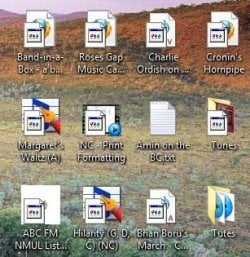
  • Desktop Icon Sample.jpg
    Desktop Icon Sample.jpg
    30.3 KB · Views: 25

My Computer My Computer

At a glance

Windows 7 Pro x64Intel Core 2 Duo T5670 1.8MHz4GBMobile Intel(R) 965 Express
Computer type
Laptop
Computer Manufacturer/Model Number
Dell Vostro 1510
OS
Windows 7 Pro x64
CPU
Intel Core 2 Duo T5670 1.8MHz
Motherboard
Unknown
Memory
4GB
Graphics Card(s)
Mobile Intel(R) 965 Express
Hard Drives
750GB - ST9750420AS ATA
Antivirus
Malwarebytes Antimalware, SpyBot S&D, MS Security Essentials
Browser
Firefox

My Computer My Computer

At a glance

64-bit Windows 11 Pro for WorkstationsIntel i7-8700K OC'd to 5 GHz64 GB (4x16GB) G.SKILL TridentZ RGB DDR4 3600...ASUS ROG-STRIX-GTX1080TI-O11G-GAMING
Computer type
PC/Desktop
Computer Manufacturer/Model Number
Self built custom
OS
64-bit Windows 11 Pro for Workstations
CPU
Intel i7-8700K OC'd to 5 GHz
Motherboard
ASUS ROG Maximus XI Formula Z390
Memory
64 GB (4x16GB) G.SKILL TridentZ RGB DDR4 3600 MHz
Graphics Card(s)
ASUS ROG-STRIX-GTX1080TI-O11G-GAMING
Sound Card
Integrated
Monitor(s) Displays
2 x Samsung Odyssey G7 27"
Screen Resolution
2560x1440
Hard Drives
1TB Samsung 990 PRO M.2,
4TB Samsung 990 PRO PRO M.2,
TerraMaster F8 SSD Plus NAS
PSU
Seasonic Prime Titanium 850W
Case
Thermaltake Core P3
Cooling
Corsair Hydro H115i
Keyboard
Logitech wireless K800
Mouse
Logitech MX Master 4
Internet Speed
2 Gb/s Download and 100 Mb/s Upload
Antivirus
Malwarebyte Anti-Malware Premium
Browser
Google Chrome
Other Info
Logitech Z625 speaker system,
Logitech BRIO 4K Pro webcam,
HP Color LaserJet Pro MFP M477fdn,
APC SMART-UPS RT 1000 XL - SURT1000XLI,
Galaxy S23 Plus phone
Shawn, you're a genius!

When I was thinking about the problem, the old program TweakUI came to mind which, as you probably know has a component like the overlay fix you suggested. So I guess I was on the right track.

Thanks heaps for the fast response - fantastic.

Ian
 

My Computer My Computer

At a glance

Windows 7 Pro x64Intel Core 2 Duo T5670 1.8MHz4GBMobile Intel(R) 965 Express
Computer type
Laptop
Computer Manufacturer/Model Number
Dell Vostro 1510
OS
Windows 7 Pro x64
CPU
Intel Core 2 Duo T5670 1.8MHz
Motherboard
Unknown
Memory
4GB
Graphics Card(s)
Mobile Intel(R) 965 Express
Hard Drives
750GB - ST9750420AS ATA
Antivirus
Malwarebytes Antimalware, SpyBot S&D, MS Security Essentials
Browser
Firefox
You're most welcome Ian. Glad it could help. :)
 

My Computer My Computer

At a glance

64-bit Windows 11 Pro for WorkstationsIntel i7-8700K OC'd to 5 GHz64 GB (4x16GB) G.SKILL TridentZ RGB DDR4 3600...ASUS ROG-STRIX-GTX1080TI-O11G-GAMING
Computer type
PC/Desktop
Computer Manufacturer/Model Number
Self built custom
OS
64-bit Windows 11 Pro for Workstations
CPU
Intel i7-8700K OC'd to 5 GHz
Motherboard
ASUS ROG Maximus XI Formula Z390
Memory
64 GB (4x16GB) G.SKILL TridentZ RGB DDR4 3600 MHz
Graphics Card(s)
ASUS ROG-STRIX-GTX1080TI-O11G-GAMING
Sound Card
Integrated
Monitor(s) Displays
2 x Samsung Odyssey G7 27"
Screen Resolution
2560x1440
Hard Drives
1TB Samsung 990 PRO M.2,
4TB Samsung 990 PRO PRO M.2,
TerraMaster F8 SSD Plus NAS
PSU
Seasonic Prime Titanium 850W
Case
Thermaltake Core P3
Cooling
Corsair Hydro H115i
Keyboard
Logitech wireless K800
Mouse
Logitech MX Master 4
Internet Speed
2 Gb/s Download and 100 Mb/s Upload
Antivirus
Malwarebyte Anti-Malware Premium
Browser
Google Chrome
Other Info
Logitech Z625 speaker system,
Logitech BRIO 4K Pro webcam,
HP Color LaserJet Pro MFP M477fdn,
APC SMART-UPS RT 1000 XL - SURT1000XLI,
Galaxy S23 Plus phone
Hello Ian, and welcome to Seven Forums.

This is an issue with your shortcut arrow overlay on the icon. Restoring the default overlay should sort this for you.

Shortcut Arrow - Change, Remove, or Restore

Hope this helps, :)
Shawn

A big THANKS to Brink for the link and IanMc for posting the question.
I have no idea as to why, but all of my desktop shortcut icons got their arrows replaced with white rectangles with some sort of symbol within the rectangles.
I used the remedy supplied by Nosmo.
When I navigated the registry path, I found that I already had a 29; I right-clicked it > Modify > and replaced whatever was there with the text supplied, restarted, and now I have the neat little XP arrows instead of the huge ugly Win 7 arrows.
I have one stubborn task-bar icon that has been completely replaced with a similar white rectangle.
This particular icon had went to white several days prior to all of the desktop icons losing their arrows.

By the way, this is not the first, nor even the second time that this has happened to one of our machines.
Thanks again.
 

My Computer My Computer

At a glance

Windows 7 Pro x64Intel Core Two Duo E8600 3.33 ghz8GBGigabyte Radeon R7 240
Computer type
PC/Desktop
Computer Manufacturer/Model Number
Dell Optiplex 780m "mini-tower"
OS
Windows 7 Pro x64
CPU
Intel Core Two Duo E8600 3.33 ghz
Motherboard
Whatever DELL put in it
Memory
8GB
Graphics Card(s)
Gigabyte Radeon R7 240
Monitor(s) Displays
HP 2159m
PSU
750 Watt Corsair CX750
Keyboard
Logitech Wireless
Mouse
Logitech Wireless
Browser
Chrome, Firefox, IE
:thumbsup:
 

My Computer My Computer

At a glance

64-bit Windows 11 Pro for WorkstationsIntel i7-8700K OC'd to 5 GHz64 GB (4x16GB) G.SKILL TridentZ RGB DDR4 3600...ASUS ROG-STRIX-GTX1080TI-O11G-GAMING
Computer type
PC/Desktop
Computer Manufacturer/Model Number
Self built custom
OS
64-bit Windows 11 Pro for Workstations
CPU
Intel i7-8700K OC'd to 5 GHz
Motherboard
ASUS ROG Maximus XI Formula Z390
Memory
64 GB (4x16GB) G.SKILL TridentZ RGB DDR4 3600 MHz
Graphics Card(s)
ASUS ROG-STRIX-GTX1080TI-O11G-GAMING
Sound Card
Integrated
Monitor(s) Displays
2 x Samsung Odyssey G7 27"
Screen Resolution
2560x1440
Hard Drives
1TB Samsung 990 PRO M.2,
4TB Samsung 990 PRO PRO M.2,
TerraMaster F8 SSD Plus NAS
PSU
Seasonic Prime Titanium 850W
Case
Thermaltake Core P3
Cooling
Corsair Hydro H115i
Keyboard
Logitech wireless K800
Mouse
Logitech MX Master 4
Internet Speed
2 Gb/s Download and 100 Mb/s Upload
Antivirus
Malwarebyte Anti-Malware Premium
Browser
Google Chrome
Other Info
Logitech Z625 speaker system,
Logitech BRIO 4K Pro webcam,
HP Color LaserJet Pro MFP M477fdn,
APC SMART-UPS RT 1000 XL - SURT1000XLI,
Galaxy S23 Plus phone
Back
Top