windows 7 desktop icons.

Pain69

New member
Local time
10:13 PM
Messages
4
I have a dual boot laptop. It has windows 7 home, and also ubuntu 10.4 on it. I had all the icons on windows before installing ubuntu on the laptop. Now they are all gone and the system wont let me get them back. I dont know how to get them back onto the windows desktop.
 

My Computer

Computer Manufacturer/Model Number
Acer Aspire 5515
OS
windows 7
Hard Drives
160 gig sata
Are you sure, you log into the same account on Windows, you were in when creating those icon?

-DG
 

My Computer

Computer Manufacturer/Model Number
HP m8000n
OS
Windows 7 Ultimate x86
CPU
DualCore AMD Athlon 64 X2, 2600 MHz 5200+
Motherboard
Asus M2N68-LA (Narra)
Memory
Samsung 2GB DDR2
Graphics Card(s)
Onboard NVIDIA GeForce 6150SE nForce 430
Sound Card
Onboard nVIDIA nForce 6100-430 (MCP61P)
Monitor(s) Displays
Westinghouse 19" LED
Screen Resolution
1280x1024
Hard Drives
SATA II Seagate Barracuda 500GB
USB II WD Elements 500GB
USB II WD My Book 1TB
USB II WD My Book 2TB
PSU
Stock (HP)
Case
Stock (HP)
Cooling
Stock
Keyboard
Logitech Classic KB 200
Mouse
Standard HP opticle USB mouse
I have had windows seven on the laptop for awhile now. the icon went away after i installed ubuntu linux. I use the windows os everyday. It worked great till after installing ubuntu onto the laptop
 

My Computer

Computer Manufacturer/Model Number
Acer Aspire 5515
OS
windows 7
Hard Drives
160 gig sata
I didn't want to imply anything. I just fail to see how installation of a second OS should affect any Windows desktop (which is sole part of a user account)
It's not like a proper set up dual boot would affect anything more than the MBR/Boot menu
-DG
 

My Computer

Computer Manufacturer/Model Number
HP m8000n
OS
Windows 7 Ultimate x86
CPU
DualCore AMD Athlon 64 X2, 2600 MHz 5200+
Motherboard
Asus M2N68-LA (Narra)
Memory
Samsung 2GB DDR2
Graphics Card(s)
Onboard NVIDIA GeForce 6150SE nForce 430
Sound Card
Onboard nVIDIA nForce 6100-430 (MCP61P)
Monitor(s) Displays
Westinghouse 19" LED
Screen Resolution
1280x1024
Hard Drives
SATA II Seagate Barracuda 500GB
USB II WD Elements 500GB
USB II WD My Book 1TB
USB II WD My Book 2TB
PSU
Stock (HP)
Case
Stock (HP)
Cooling
Stock
Keyboard
Logitech Classic KB 200
Mouse
Standard HP opticle USB mouse
I'm Not sure either. I have never run into this problem. the system wont even let me right click and send to desktop. all the files r there just the icons arnt showing.They were all there till i restarted the other morning. Now they wont show no more.
 

My Computer

Computer Manufacturer/Model Number
Acer Aspire 5515
OS
windows 7
Hard Drives
160 gig sata

My Computer

Computer type
PC/Desktop
Computer Manufacturer/Model Number
self build
OS
win 7 ultimate32bit, Win8.1pro wmc 32bit
CPU
amd phenom x4 9600
Motherboard
asus m2n32-sli deluxe
Memory
corsair twinxs 2x2gb
Graphics Card(s)
2x nvidia 1gb 8500gt
Sound Card
onboard
Monitor(s) Displays
23" PB Viseo 233d
Screen Resolution
1920x1080
Hard Drives
maxtor sata 500gb
maxtor sata 320gb
fujitsu sata200gb
PSU
oryxx tornado 750w
Case
thermaltake xaser lll
Cooling
artic freezer64 pro + 7 case fans
No, but i am doing it now. I will let you know if it works. Ty
 

My Computer

Computer Manufacturer/Model Number
Acer Aspire 5515
OS
windows 7
Hard Drives
160 gig sata
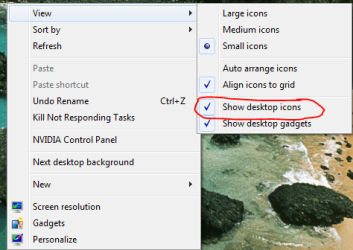
Try this:

Right click on the desktop and make sure the box is checked

Capture.PNG

-DG
 

My Computer

Computer Manufacturer/Model Number
HP m8000n
OS
Windows 7 Ultimate x86
CPU
DualCore AMD Athlon 64 X2, 2600 MHz 5200+
Motherboard
Asus M2N68-LA (Narra)
Memory
Samsung 2GB DDR2
Graphics Card(s)
Onboard NVIDIA GeForce 6150SE nForce 430
Sound Card
Onboard nVIDIA nForce 6100-430 (MCP61P)
Monitor(s) Displays
Westinghouse 19" LED
Screen Resolution
1280x1024
Hard Drives
SATA II Seagate Barracuda 500GB
USB II WD Elements 500GB
USB II WD My Book 1TB
USB II WD My Book 2TB
PSU
Stock (HP)
Case
Stock (HP)
Cooling
Stock
Keyboard
Logitech Classic KB 200
Mouse
Standard HP opticle USB mouse
Back
Top