
Windows 7 downgrade next step

bbqbrisket

New member
Local time
11:17 AM
Messages
26
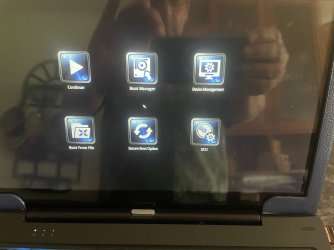
So I'm moving along on my downgrade from 10 and in order to get to the boot mode from the stick that has the iso for Windows 7, I had to press Esc, F1.
The attached is the screen I got.
Which of these icons do I select and what will be next after that?
Thanks
 

Attachments
  • from usb boot.jpg
    from usb boot.jpg
    1.3 MB · Views: 1

My Computer

Computer type
PC/Desktop
Computer Manufacturer/Model Number
lenovo
OS
windows 7 64 Pro
All depends what the situation is is 10 on the hard drive and bootable? If it has 10 its possible it has uefi, secure boot and other options set for 10 and the 7 wont boot from those setting.

Before doing anything have you made a disk image of 10 so if it goes wrong you can recover? Second do you know if there are win7 drivers for everything or it may not downgrade and work
 

My Computer

Computer type
PC/Desktop
OS
win 8 32 bit
Unless my eyes deceive me, that appears to be a pretty old laptop.

What is its brand name and model name and model number and serial number?
 

My Computer

Computer type
PC/Desktop
Computer Manufacturer/Model Number
Dell OptiPlex 9020
OS
Windows 7 Professional SP1 64-bit
CPU
Intel Core i7-4790 3.60 GHz
Memory
32 GB DDR3-1600 MHz
Graphics Card(s)
Integrated Intel HD Graphics 4600
Monitor(s) Displays
Viewsonic 32" LCD
Hard Drives
Kingston SATA 3 240 GB SSD
Internet Speed
Spectrum Internet 1000 Mbps
Back
Top