Windows 7 Dual Boot Setup Issues

matthewjumps

New member
Local time
12:10 PM
Messages
6
Im trying to get a dual boot setup going on my laptop, but Im having a lot of trouble with the installation. I want to have 2 installs of Windows 7 64bit, running on 2 partitions on the same SSD. One partition/install of Windows for audio production, the other completely separate for my own personal use. The audio partition/install will have no networking devices enabled, no antivirus or any other clutter, just my audio software and thats it.

I have tried making the partitions in the Windows 7 installer, installing into the first partition, then once thats done installing into the second. I have tried installing the first time across the whole HD, and then once Windows is running, in the Disk Manager utility running a shrink on the HD, then rebooting and installing the second install into the newly created partition. For some reason I keep getting all manner of weird behaviour though. My SSD isnt getting recognised on boot, its hanging during the Starting Windows splash animation, a couple of times I think the SSD wasnt even seen by the BIOS.

Heres my specs to start:
MSI GT680 Laptop with
- Intel i7 2630QM 2.0GHz,
- 16GB DD3 RAM,
- NVIDIA GeForce GTX 460M 1.5GB,
- Micro-Star International Co MS-16F2 Motherboard

I got a Samsung EVO 840 SSD, with 500GB of storage, for my primary drive, and a HGST 7200RPM 1TB for my secondary. I have tested the Samsung SSD and the HGST with SeaTools, using Short and Long tests, no problems. I have an old Intel SSD and an old WD HD in the laptop, that i was using for years before I purchased the Samsung and the HGST, and they both work fine if I plug them back in, no hangs on startup, no BIOS failure to see the HDs...

Could it be the more recent HDs are not very compatible with my somewhat old motherboard? Or could my attempts to install Windows 7 twice have severely corrupted the boot records or something like that? Another thing to note is my laptops CD drive doesnt work, I was installing off a USB (I tried 2 different USBs, and I validated the ISO I downloaded from digital river), or a proper install disk running on an external USB CD drive.

Has anyone done anything similar with 2 boots of Win 7 on 2 partitions? Any tips would be appreciated
 

My Computer My Computer

At a glance

Windows 7 Professional SP1 64 bitIntel i7 2630QM 2.0GHz16.0GB Dual-Channel DDR3 @ 665MHzNVIDIA GeForce GTX 460M 1.5GB
Computer type
Laptop
Computer Manufacturer/Model Number
MSI
OS
Windows 7 Professional SP1 64 bit
CPU
Intel i7 2630QM 2.0GHz
Motherboard
Micro-Star International MS-16F2
Memory
16.0GB Dual-Channel DDR3 @ 665MHz
Graphics Card(s)
NVIDIA GeForce GTX 460M 1.5GB
I basically followed that install process verbatim, including the diskpart clean from shift-f10, before I saw your post, and now its working, mostly.

The first thing that seems to have helped is I switched my HD and SSD around, so they were in the opposite bays in my laptop than I was initially using. Not sure if this should have any effect, but things have gone a lot smoother since I did that.

Because Im installing 2 instances of Win 7, I followed the process twice. One thing that stood out to me is the fact that I cant seem to stop the USB from booting first. In my BIOS boot order I have my SSD set first, but then when I restart and plug in my USB for the next step, it auto-selects the USB. When I installed the first instance of Win, thankfully the USB offered me the 'press any key to boot from USB' prompt, so when the Windows install process did the 2 usual reboots, it actually progressed through the install when I didnt press any key.

This was actually a surprise, because several tries earlier it never showed this option, I ended up trying different USB drives and different USB ports, until this particular drive in this particular port showed the correct prompt. It may be to do with some of my USB drives being USB3?

However, the second time, installing Windows into the second partition, using the same USB, plugged into the same USB port, the "press any key to boot from usb" prompt was only shown for the INITIAL boot of the USB, and yet during the 2 subsequent reboots, it attempted to boot directly into the USB without asking. I shut down each time as soon as I saw the Windows installer loading again, and restarted and manually selected the SSD with F11, and the install continued on with the next step.

Now I have the 2 installs of Win 7, on 2 separate partitions, and for the most part, it seems to work. I have restarted, shut down, renamed each boot "Audio" and "Matt", set one as default, and installed a bunch of programs on both.

However, 2 or 3 times in the last day, I have restarted and received some kind of boot error, and 1 hang while the Windows startup spash animation is playing. It always seems to be when I make some kind of deep system change.

For example, when I got into msconfig and changed the default boot OS, then restarted, it threw some kind of boot error, but then when I restarted again, immediately, it was fine. Weird.

To answer your questions, I have updated the SSD firmware, and checked for BIOS updates but my MSI update util says the BIOS is up to date, unless you recommend I look elsewhere for BIOS updates than the MSI tool? And Im pretty sure my BIOS is just a standard BIOS, not UEFI.
 

My Computer My Computer

At a glance

Windows 7 Professional SP1 64 bitIntel i7 2630QM 2.0GHz16.0GB Dual-Channel DDR3 @ 665MHzNVIDIA GeForce GTX 460M 1.5GB
Computer type
Laptop
Computer Manufacturer/Model Number
MSI
OS
Windows 7 Professional SP1 64 bit
CPU
Intel i7 2630QM 2.0GHz
Motherboard
Micro-Star International MS-16F2
Memory
16.0GB Dual-Channel DDR3 @ 665MHz
Graphics Card(s)
NVIDIA GeForce GTX 460M 1.5GB
You should have unplugged all other HD's if you followed those steps.

USB3 drivers are not in the Win7 installation media (due to no SP2) so you'll need to use a USB2 port (not colored blue inside), or DVD.

Use the BIOS Boot menu key with HDD set first to boot in BIOS so media does not autostart installation again.

Post back a screenshot of http://www.sevenforums.com/tutorial...nt-post-screen-capture-image.html#post2261610 with all drives plugged in and labeled.
 
yes, when i installed the 2 Win 7s, i only had my SSD plugged in. once the installs were complete i added the Data drive later.

as for using the BIOS boot menu key, thats what i ended up doing for the second install, i pressed F11 every time it restarted and selected the HD instead of the USB.

another thing to note. the partition/OS that fails to start most is the Audio partition. i believe thats the one i created second. last time it hung during the Starting Windows splash animation, then when i restarted and selected the Audio OS from the boot loader, it offered to run startup repair.

a few weird things happened. i ran the cmd utility, and first tried a bootrec scan, rebuildbcd etc. it reported ZERO Windows installs? i then ran diskpart, and found that the SSD was recognized, along with its partitions. so no idea why bootrec wasnt seeing the Windows installs?

also, i ran the startup repair and it said it couldnt fix the problems, and gave this output:
Code:
Problem Event Name: StartupRepairOffline
  Problem Signature 01: 6.1.7600.16385
  Problem Signature 02: 6.1.7600.16385
  Problem Signature 03: unknown
  Problem Signature 04: 1
  Problem Signature 05: AutoFailover
  Problem Signature 06: 1
  Problem Signature 07: NoRootCause
but when i restarted and reselected the Audio OS from the OS boot selection, it ran fine.

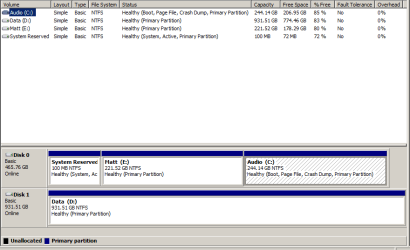
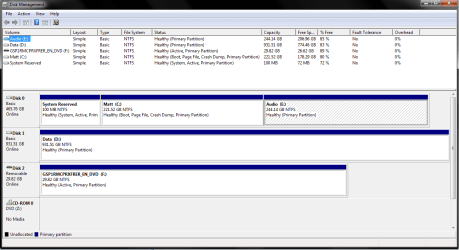
here are screenshots of the disk management utility from both the Audio install and the Matt install. The Audio install is the one with the XP style GUI, and the Matt install is the one with normal Windows Aero GUI. Note that in the Audio install of the OS i have disabled the CD drive. I also have remapped the other OS's partition to E:\ instead of D:\, so the D:\ drive (my Data drive) is always in D:\ regardless of which OS i boot into. not sure if thats a problem, but i have had issues before i did that anyway. i also happened to have my Windows install USB plugged in while taking the screenshot in the Matt OS, hope thats not an issue.

and thank you for all the help so far :)
 

Attachments

  • disk management - Audio.png
    disk management - Audio.png
    11.3 KB · Views: 1
  • disk management - Matt.png
    disk management - Matt.png
    25.5 KB · Views: 2

My Computer My Computer

At a glance

Windows 7 Professional SP1 64 bitIntel i7 2630QM 2.0GHz16.0GB Dual-Channel DDR3 @ 665MHzNVIDIA GeForce GTX 460M 1.5GB
Computer type
Laptop
Computer Manufacturer/Model Number
MSI
OS
Windows 7 Professional SP1 64 bit
CPU
Intel i7 2630QM 2.0GHz
Motherboard
Micro-Star International MS-16F2
Memory
16.0GB Dual-Channel DDR3 @ 665MHz
Graphics Card(s)
NVIDIA GeForce GTX 460M 1.5GB
just wanted to add,

i have only had one or two of the "Disk Read Error, press Ctrl-Alt-Del" issues, which occurs straight after the BIOS splash, and before the Boot selection menu.

i have had a few more of the hangs while the Windows 7 splash animation is playing, usually very early on in the animation, before the 4 colored dots that turn into the Windows logo have even appeared. this also only seems to happen when booting into the Audio OS after selecting it from the boot selection menu.
 

My Computer My Computer

At a glance

Windows 7 Professional SP1 64 bitIntel i7 2630QM 2.0GHz16.0GB Dual-Channel DDR3 @ 665MHzNVIDIA GeForce GTX 460M 1.5GB
Computer type
Laptop
Computer Manufacturer/Model Number
MSI
OS
Windows 7 Professional SP1 64 bit
CPU
Intel i7 2630QM 2.0GHz
Motherboard
Micro-Star International MS-16F2
Memory
16.0GB Dual-Channel DDR3 @ 665MHz
Graphics Card(s)
NVIDIA GeForce GTX 460M 1.5GB
also here is a readout from EasyBCD, run on the Matt OS install:
Code:
Windows Boot Manager
--------------------
identifier              {9dea862c-5cdd-4e70-acc1-f32b344d4795}
device                  partition=\Device\HarddiskVolume2
description             Windows Boot Manager
locale                  en-US
inherit                 {7ea2e1ac-2e61-4728-aaa3-896d9d0a9f0e}
default                 {0d10afc3-5897-11e4-b686-8e031161a699}
resumeobject            {0d10afc6-5897-11e4-b686-8e031161a699}
displayorder            {0d10afc7-5897-11e4-b686-8e031161a699}
                        {0d10afc3-5897-11e4-b686-8e031161a699}
toolsdisplayorder       {b2721d73-1db4-4c62-bf78-c548a880142d}
timeout                 30

Windows Boot Loader
-------------------
identifier              {0d10afc7-5897-11e4-b686-8e031161a699}
device                  partition=E:
path                    \Windows\system32\winload.exe
description             Audio
locale                  en-US
inherit                 {6efb52bf-1766-41db-a6b3-0ee5eff72bd7}
recoverysequence        {0d10afc8-5897-11e4-b686-8e031161a699}
recoveryenabled         Yes
osdevice                partition=E:
systemroot              \Windows
resumeobject            {0d10afc6-5897-11e4-b686-8e031161a699}
nx                      OptIn

Windows Boot Loader
-------------------
identifier              {0d10afc3-5897-11e4-b686-8e031161a699}
device                  partition=C:
path                    \Windows\system32\winload.exe
description             Matt
locale                  en-US
inherit                 {6efb52bf-1766-41db-a6b3-0ee5eff72bd7}
recoverysequence        {0d10afc4-5897-11e4-b686-8e031161a699}
recoveryenabled         Yes
osdevice                partition=C:
systemroot              \Windows
resumeobject            {0d10afc2-5897-11e4-b686-8e031161a699}
nx                      OptIn

and here is the EasyBCD readout run from the Audio install
Code:
Windows Boot Manager
--------------------
identifier              {9dea862c-5cdd-4e70-acc1-f32b344d4795}
device                  partition=\Device\HarddiskVolume2
description             Windows Boot Manager
locale                  en-US
inherit                 {7ea2e1ac-2e61-4728-aaa3-896d9d0a9f0e}
default                 {0d10afc3-5897-11e4-b686-8e031161a699}
resumeobject            {0d10afc6-5897-11e4-b686-8e031161a699}
displayorder            {0d10afc7-5897-11e4-b686-8e031161a699}
                        {0d10afc3-5897-11e4-b686-8e031161a699}
toolsdisplayorder       {b2721d73-1db4-4c62-bf78-c548a880142d}
timeout                 30

Windows Boot Loader
-------------------
identifier              {0d10afc7-5897-11e4-b686-8e031161a699}
device                  partition=C:
path                    \Windows\system32\winload.exe
description             Audio
locale                  en-US
inherit                 {6efb52bf-1766-41db-a6b3-0ee5eff72bd7}
recoverysequence        {0d10afc8-5897-11e4-b686-8e031161a699}
recoveryenabled         Yes
osdevice                partition=C:
systemroot              \Windows
resumeobject            {0d10afc6-5897-11e4-b686-8e031161a699}
nx                      OptIn

Windows Boot Loader
-------------------
identifier              {0d10afc3-5897-11e4-b686-8e031161a699}
device                  partition=E:
path                    \Windows\system32\winload.exe
description             Matt
locale                  en-US
inherit                 {6efb52bf-1766-41db-a6b3-0ee5eff72bd7}
recoverysequence        {0d10afc4-5897-11e4-b686-8e031161a699}
recoveryenabled         Yes
osdevice                partition=E:
systemroot              \Windows
resumeobject            {0d10afc2-5897-11e4-b686-8e031161a699}
nx                      OptIn
 

My Computer My Computer

At a glance

Windows 7 Professional SP1 64 bitIntel i7 2630QM 2.0GHz16.0GB Dual-Channel DDR3 @ 665MHzNVIDIA GeForce GTX 460M 1.5GB
Computer type
Laptop
Computer Manufacturer/Model Number
MSI
OS
Windows 7 Professional SP1 64 bit
CPU
Intel i7 2630QM 2.0GHz
Motherboard
Micro-Star International MS-16F2
Memory
16.0GB Dual-Channel DDR3 @ 665MHz
Graphics Card(s)
NVIDIA GeForce GTX 460M 1.5GB
It looks correct.

Does the Dual Boot work if data drive is unplugged?

If the issue is that you cant boot one Win7 then to force it You can mark its partition Active then run three startup repairs to move the boot files to it and start it. Then if necessary add the second OS using EasyBCD, deleting any previous entry for it.
 
the dual boot works almost all the time, wether the data drive is in or not.

its only occasionally that once i have selected which OS i want to boot into, while the "Starting Windows" animation is playing, that it hangs and i have to power down.

i think i said earlier that it only happens when booting into the Audio OS install, but it just happened while booting into the Matt OS install too. so ye, its happened when starting Windows for both of the OS's.

it mainly seems to happen if i do a few restarts in a row, say im doing some updates, or switching back and forth between OS's a few times... pretty much every time i cold start it works.
 

My Computer My Computer

At a glance

Windows 7 Professional SP1 64 bitIntel i7 2630QM 2.0GHz16.0GB Dual-Channel DDR3 @ 665MHzNVIDIA GeForce GTX 460M 1.5GB
Computer type
Laptop
Computer Manufacturer/Model Number
MSI
OS
Windows 7 Professional SP1 64 bit
CPU
Intel i7 2630QM 2.0GHz
Motherboard
Micro-Star International MS-16F2
Memory
16.0GB Dual-Channel DDR3 @ 665MHz
Graphics Card(s)
NVIDIA GeForce GTX 460M 1.5GB
Back
Top