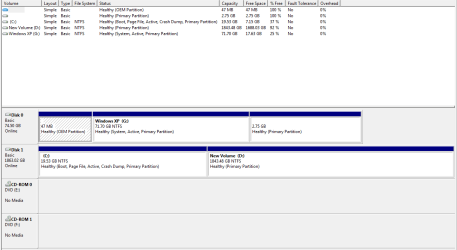
I forgot to post the screen shot so here it is.
Ok!!Lets do it,follow this steps one by one:
1. click on start button
2. click on all programs
3. open acessoires on the list menu
4. right click on command prompt and run as administrator
5. on the DOS black box you gonna type the following command lines one by one hiting enter each time.
COMMAND LINES
1. bcdedit /create {ntldr} /d "Windows XP"
2. bcdedit /set {ntldr} device partition=G:
3. bcdedit /set {ntldr} path \ntldr
4. bcdedit /displayorder {ntldr} /addlast
After entering all those command lines get out of the DOS box
and restart your pc,that's all.
Note: i put already the drive letter of your xp partition i saw on your screenshot you post here,if you want copy is more faster then typing,just hilight the command lines one by one,press CTRL+C just one time,on the border of your DOS box right click the mouse and point to EDIT,then opens other small menu and you just click on PASTE,and the command line will be into the DOS box copied,and so do you with all command lines hiting ENTER each time.
Dont be afraid just do it so and you'll get the dualboot WINDOWS_7_WINDOWS_XP.
Cheers.